
【大数据系列】MapReduce示例一年之内的最高气温
一、项目采用maven构建,如下为pom.xml中引入的jar包
 <project xmlns="http://maven.apache.org/POM/4.0.0" xmlns:xsi="http://www.w3.org/2001/XMLSchema-instance"

   xsi:schemaLocation="http://maven.apache.org/POM/4.0.0 http://maven.apache.org/xsd/maven-4.0.0.xsd">

   <modelVersion>4.0.0</modelVersion>

   <groupId>com.slp</groupId>

   <artifactId>HadoopDevelop</artifactId>

   <version>0.0.1-SNAPSHOT</version>

   <packaging>jar</packaging>

   <name>HadoopDevelop</name>

   <url>http://maven.apache.org</url>

   <properties>

     <project.build.sourceEncoding>UTF-8</project.build.sourceEncoding>

     <hadoopVersion>2.8.0</hadoopVersion>

   </properties>

   <dependencies>

   <!-- Hadoop start -->

 <dependency>

     <groupId>org.apache.hadoop</groupId>

     <artifactId>hadoop-common</artifactId>

     <version>${hadoopVersion}</version>

 </dependency>

 <dependency>

     <groupId>org.apache.hadoop</groupId>

     <artifactId>hadoop-hdfs</artifactId>

     <version>${hadoopVersion}</version>

 </dependency>

 <dependency>

     <groupId>org.apache.hadoop</groupId>

     <artifactId>hadoop-mapreduce-client-core</artifactId>

     <version>${hadoopVersion}</version>

 </dependency>

 <dependency>

     <groupId>org.apache.hadoop</groupId>

     <artifactId>hadoop-client</artifactId>

     <version>${hadoopVersion}</version>

 </dependency>

 <!-- Hadoop -->

 <dependency>

     <groupId>jdk.tools</groupId>

     <artifactId>jdk.tools</artifactId>

     <version>1.8</version>

     <scope>system</scope>

     <systemPath>${JAVA_HOME}/lib/tools.jar</systemPath>

 </dependency>

     <dependency>

       <groupId>junit</groupId>

       <artifactId>junit</artifactId>

       <version>3.8.1</version>

       <scope>test</scope>

     </dependency>

   </dependencies>

 </project>
二、输入文件
2014010114

2014010216

2014010317

2014010410

2014010506

2012010609

2012010732

2012010812

2012010919

2012011023

2001010116

2001010212

2001010310

2001010411

2001010529

2013010619

2013010722

2013010812

2013010929

2013011023

2008010105

2008010216

2008010337

2008010414

2008010516

2007010619

2007010712

2007010812

2007010999

2007011023

2010010114

2010010216

2010010317

2010010410

2010010506

2015010649

2015010722

2015010812

2015010999

2015011023
三、代码实现
 package com.slp.temperature;

 import java.io.IOException;

 import org.apache.hadoop.conf.Configuration;

 import org.apache.hadoop.fs.Path;

 import org.apache.hadoop.io.IntWritable;

 import org.apache.hadoop.io.LongWritable;

 import org.apache.hadoop.io.Text;

 import org.apache.hadoop.mapreduce.Job;

 import org.apache.hadoop.mapreduce.Mapper;

 import org.apache.hadoop.mapreduce.Reducer;

 import org.apache.hadoop.mapreduce.lib.input.FileInputFormat;

 import org.apache.hadoop.mapreduce.lib.output.FileOutputFormat;

 import com.slp.temperature.Temperature.TempMapper.TempReducer;

 public class Temperature {

     static class TempMapper extends Mapper<LongWritable, Text, Text, IntWritable>{

         /**

          * 四个泛型类型分别代表

          * KeyIn  Mapper的输入数据Key ,这里是每行文字的起始位置(0,12,...)

          * ValueIn Mapper的输入数据的Value,这里是每行文字

          * KeyOut  Mapper的输出数据的Key,这里是每行文字中的年份

          * ValueOut Mapper的输出数据的value,这里是每行文字中的气温

          */

         @Override

         protected void map(LongWritable key, Text value, Mapper<LongWritable, Text, Text, IntWritable>.Context context)

                 throws IOException, InterruptedException {

             // TODO Auto-generated method stub

             //super.map(key, value, context);

             //打印样本

             System.out.println("Before Mapper : "+ key+","+value);

             String line = value.toString();

             String year = line.substring(0, 4);

             int temperature = Integer.parseInt(line.substring(8));

             context.write(new Text(year), new IntWritable(temperature));

             //map之后打印样本

             System.out.println("After Mapper:" + new Text(year)+","+new IntWritable(temperature));

         }

         /**

          * 四个泛型类型分别代表

          * KeyIn  Mapper的输入数据Key ,这里是每行文字的年份

          * ValueIn Mapper的输入数据的Value,这里是每行文字中的气温

          * KeyOut  Mapper的输出数据的Key,这里是不重复的年份

          * ValueOut Mapper的输出数据的value,这里是这一年中的最高气温

          */

         static class TempReducer extends Reducer<Text, IntWritable, Text, IntWritable>{

             @Override

             protected void reduce(Text key, Iterable<IntWritable> values,

                     Reducer<Text, IntWritable, Text, IntWritable>.Context context)

                     throws IOException, InterruptedException {

                 // TODO Auto-generated method stub

                 //super.reduce(arg0, arg1, arg2);

                 int maxValue = Integer.MIN_VALUE;

                 StringBuffer sb = new StringBuffer();

                 //取value中的最大值

                 for(IntWritable value : values){

                     maxValue = Math.max(maxValue, value.get());

                     sb.append(value).append(",");

                 }

                 //打印样本

                 System.out.println("Before Reduce:"+key+","+sb.toString());

                 context.write(key, new IntWritable(maxValue));

                 //打印样本

                 System.out.println("After Reduce : "+key+","+maxValue);

             }

         }

     }

     public static void main(String[] args) throws Exception {

         //输入路径

         String dst = "D:\\hadoopnode\\input\\temp.txt";

         //输出路径

         String desout = "D:\\hadoopnode\\outtemp";

         Configuration conf = new Configuration();

         conf.set("fs.hdfs.impl", org.apache.hadoop.hdfs.DistributedFileSystem.class.getName());

         conf.set("fs.file.impl", org.apache.hadoop.fs.LocalFileSystem.class.getName());

           Job job = new Job(conf);

           //如果需要打成jar运行,需要配置如下

           job.setJarByClass(Temperature.class);

           //job执行作业时输入和输出文件的路径

           FileInputFormat.addInputPath(job, new Path(dst));

           FileOutputFormat.setOutputPath(job, new Path(desout));

           //指定自定义的Mapper和Reducer作为两个阶段的任务处理类

           job.setMapperClass(TempMapper.class);

           job.setReducerClass(TempReducer.class);

           //设置最后输出结果的key和value的类型

           job.setOutputKeyClass(Text.class);

           job.setOutputValueClass(IntWritable.class);

           //执行job直到完成

           job.waitForCompletion(true);

           System.out.println("Finished");

     }

 }
四、输出结果
Before Mapper : 0,2014010114

After Mapper:2014,14

Before Mapper : 12,2014010216

After Mapper:2014,16

Before Mapper : 24,2014010317

After Mapper:2014,17

Before Mapper : 36,2014010410

After Mapper:2014,10

Before Mapper : 48,2014010506

After Mapper:2014,6

Before Mapper : 60,2012010609

After Mapper:2012,9

Before Mapper : 72,2012010732

After Mapper:2012,32

Before Mapper : 84,2012010812

After Mapper:2012,12

Before Mapper : 96,2012010919

After Mapper:2012,19

Before Mapper : 108,2012011023

After Mapper:2012,23

Before Mapper : 120,2001010116

After Mapper:2001,16

Before Mapper : 132,2001010212

After Mapper:2001,12

Before Mapper : 144,2001010310

After Mapper:2001,10

Before Mapper : 156,2001010411

After Mapper:2001,11

Before Mapper : 168,2001010529

After Mapper:2001,29

Before Mapper : 180,2013010619

After Mapper:2013,19

Before Mapper : 192,2013010722

After Mapper:2013,22

Before Mapper : 204,2013010812

After Mapper:2013,12

Before Mapper : 216,2013010929

After Mapper:2013,29

Before Mapper : 228,2013011023

After Mapper:2013,23

Before Mapper : 240,2008010105

After Mapper:2008,5

Before Mapper : 252,2008010216

After Mapper:2008,16

Before Mapper : 264,2008010337

After Mapper:2008,37

Before Mapper : 276,2008010414

After Mapper:2008,14

Before Mapper : 288,2008010516

After Mapper:2008,16

Before Mapper : 300,2007010619

After Mapper:2007,19

Before Mapper : 312,2007010712

After Mapper:2007,12

Before Mapper : 324,2007010812

After Mapper:2007,12

Before Mapper : 336,2007010999

After Mapper:2007,99

Before Mapper : 348,2007011023

After Mapper:2007,23

Before Mapper : 360,2010010114

After Mapper:2010,14

Before Mapper : 372,2010010216

After Mapper:2010,16

Before Mapper : 384,2010010317

After Mapper:2010,17

Before Mapper : 396,2010010410

After Mapper:2010,10

Before Mapper : 408,2010010506

After Mapper:2010,6

Before Mapper : 420,2015010649

After Mapper:2015,49

Before Mapper : 432,2015010722

After Mapper:2015,22

Before Mapper : 444,2015010812

After Mapper:2015,12

Before Mapper : 456,2015010999

After Mapper:2015,99

Before Mapper : 468,2015011023

After Mapper:2015,23

Before Reduce:2001,12,10,11,29,16,

After Reduce : 2001,29

Before Reduce:2007,23,19,12,12,99,

After Reduce : 2007,99

Before Reduce:2008,16,14,37,16,5,

After Reduce : 2008,37

Before Reduce:2010,10,6,14,16,17,

After Reduce : 2010,17

Before Reduce:2012,19,12,32,9,23,

After Reduce : 2012,32

Before Reduce:2013,23,29,12,22,19,

After Reduce : 2013,29

Before Reduce:2014,14,6,10,17,16,

After Reduce : 2014,17

Before Reduce:2015,23,49,22,12,99,

After Reduce : 2015,99

Finished
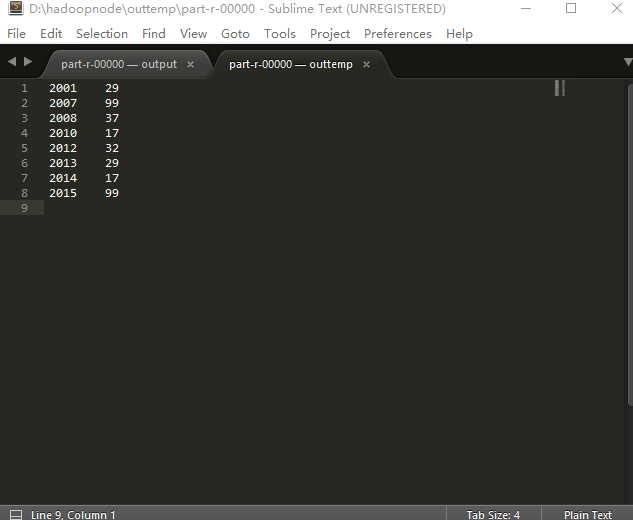
五、reduce输出内容
【大数据系列】MapReduce示例一年之内的最高气温的更多相关文章
- 大数据系列之分布式计算批处理引擎MapReduce实践-排序
清明刚过,该来学习点新的知识点了. 上次说到关于MapReduce对于文本中词频的统计使用WordCount.如果还有同学不熟悉的可以参考博文大数据系列之分布式计算批处理引擎MapReduce实践. ...
- 大数据系列之分布式计算批处理引擎MapReduce实践
关于MR的工作原理不做过多叙述,本文将对MapReduce的实例WordCount(单词计数程序)做实践,从而理解MapReduce的工作机制. WordCount: 1.应用场景,在大量文件中存储了 ...
- 大数据系列4:Yarn以及MapReduce 2
系列文章: 大数据系列:一文初识Hdfs 大数据系列2:Hdfs的读写操作 大数据谢列3:Hdfs的HA实现 通过前文,我们对Hdfs的已经有了一定的了解,本文将继续之前的内容,介绍Yarn与Yarn ...
- 大数据系列之并行计算引擎Spark介绍
相关博文:大数据系列之并行计算引擎Spark部署及应用 Spark: Apache Spark 是专为大规模数据处理而设计的快速通用的计算引擎. Spark是UC Berkeley AMP lab ( ...
- 大数据系列之数据仓库Hive命令使用及JDBC连接
Hive系列博文,持续更新~~~ 大数据系列之数据仓库Hive原理 大数据系列之数据仓库Hive安装 大数据系列之数据仓库Hive中分区Partition如何使用 大数据系列之数据仓库Hive命令使用 ...
- 大数据系列(2)——Hadoop集群坏境CentOS安装
前言 前面我们主要分析了搭建Hadoop集群所需要准备的内容和一些提前规划好的项,本篇我们主要来分析如何安装CentOS操作系统,以及一些基础的设置,闲言少叙,我们进入本篇的正题. 技术准备 VMwa ...
- 大数据系列之数据仓库Hive安装
Hive系列博文,持续更新~~~ 大数据系列之数据仓库Hive原理 大数据系列之数据仓库Hive安装 大数据系列之数据仓库Hive中分区Partition如何使用 大数据系列之数据仓库Hive命令使用 ...
- 大数据系列之数据仓库Hive原理
Hive系列博文,持续更新~~~ 大数据系列之数据仓库Hive原理 大数据系列之数据仓库Hive安装 大数据系列之数据仓库Hive中分区Partition如何使用 大数据系列之数据仓库Hive命令使用 ...
- 玩转大数据系列之Apache Pig高级技能之函数编程(六)
原创不易,转载请务必注明,原创地址,谢谢配合! http://qindongliang.iteye.com/ Pig系列的学习文档,希望对大家有用,感谢关注散仙! Apache Pig的前世今生 Ap ...
随机推荐
- 嵌入式开发之zynq驱动—— zynq ps pl ddr 内存地址空间映射
http://www.wiki.xilinx.com/Zynq-7000+AP+SoC+-+32+Bit+DDR+Access+with+ECC+Tech+Tip http://patchwork.o ...
- (实用)Eclipse中使用命令行(运行外部程序)
备忘 http://www.oschina.net/question/28_46291 另外,在eclipse的console菜单中可以选择“new console view”(新控制台视图),这样就 ...
- opengl deferred shading
原文地址:http://www.verydemo.com/demo_c284_i6147.html 一.Deferred shading技术简介 Deferred shading是这样一种技术:将光照 ...
- 前端图片压缩(纯js)
html代码: <!DOCTYPE html> <html> <head> <meta charset="UTF-8"> <t ...
- 怎样解决Java Web项目更改项目名后报错
作为企业级开发最流行的工具,用Myeclipse开发java web程序无疑是最合适的,有时候,我们需要web工程的项目名,单方面的改动工程的项目名是会报错的,那么该如何改web工程项目名呢? 简 单 ...
- WPF TextBox属性IsReadOnlyCaretVisible
纠结了半天WPF下只读的TextBox怎么显示输入焦点提示,发现wpf 4中已有新属性“IsReadOnlyCaretVisible”,大善^_^
- Pytest 生成Report
1. 生成JunitXML 格式的测试报告 JunitXML报告是一种很常用的测试报告,比如可以和Jenkins进行集成,在Jenkins的GUI上显示Pytest的运行结果,非常便利.运行完case ...
- Android学习笔记——log无法输出的解决方法和命令行查看log日志
本人邮箱:JohnTsai.Work@gmail.com,欢迎交流讨论. 欢迎转载,转载请注明网址:http://www.cnblogs.com/JohnTsai/p/3983936.html. 知识 ...
- [转]Android:Layout_weight的深刻理解
http://mobile.51cto.com/abased-375428.htm 最近写Demo,突然发现了Layout_weight这个属性,发现网上有很多关于这个属性的有意思的讨论,可是找了好多 ...
- CorelDRAW中如何复制对象属性详解
复制对象属性是一种比较特殊.重要的复制方法,它可以方便而快捷地将指定对象中的轮廓笔.轮廓色.填充和文本属性通过复制的方法应用到所选对象中.本教程将详解CorelDRAW中如何复制对象属性. Corel ...