
爬虫--使用scrapy爬取糗事百科并在txt文件中持久化存储
工程目录结构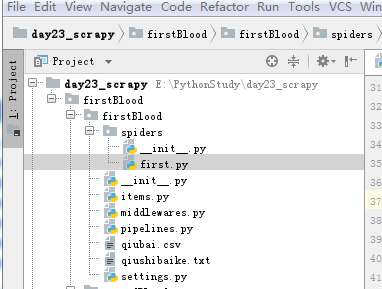
spiders下的first源码
# -*- coding: utf- -*-

import scrapy

from  firstBlood.items  import FirstbloodItem

class FirstSpider(scrapy.Spider):

    #爬虫文件的名称

    #当有多个爬虫文件时,可以通过名称定位到指定的爬虫文件

    name = 'first'

    #allowed_domains 允许的域名 跟start_url互悖

    #allowed_domains = ['www.xxx.com']

    #start_url 请求的url列表,会被自动的请求发送

    start_urls = ['https://www.qiushibaike.com/text/']

    def parse(self, response):

        '''

        解析请求的响应

        可以使用正则,XPATH  ,因为scrapy 集成了XPATH,建议使用XAPTH

        解析得到一个selector

        :param response:

        :return:

        '''

        all_data = []

        div_list=response.xpath('//div[@id="content-left"]/div')

        for div in div_list:

            #author=div.xpath('./div[1]/a[2]/h2/text()')#author 拿到的不是之前理解的源码数据而

            # 是selector对象,我们只需将selector类型对象下的data对象拿到即可

            #author=author[].extract()

            #如果存在匿名用户时,将会报错(匿名用户的数据结构与登录的用户名的数据结构不一样)

            ''' 改进版'''

            author = div.xpath('./div[1]/a[2]/h2/text()| ./div[1]/span[2]/h2/text()')[].extract()

            content=div.xpath('.//div[@class="content"]/span//text()').extract()

            content=''.join(content)

            #print(author+':'+content.strip(' \n \t '))

        #基于终端的存储

        #     dic={

        #         'author':author,

        #         'content':content

        #     }

        #     all_data.append(dic)

        # return all_data

        #持久化存储的两种方式

            # 基于终端指令:parse方法有一个返回值

              #scrapy crawl first -o qiubai.csv --nolog

              #终端指令只能存储json,csv,xml等格式文件

            #2基于管道

            item = FirstbloodItem()#循环里面,每次实例化一个item对象

            item['author']=author

            item['content']=content

            yield item #将item提交给管道
Items文件
# -*- coding: utf- -*-

# Define here the models for your scraped items

#

# See documentation in:

# https://doc.scrapy.org/en/latest/topics/items.html

import scrapy

class FirstbloodItem(scrapy.Item):

    # define the fields for your item here like:

    # name = scrapy.Field()

    #item类型对象 万能对象,可以接受任意类型属性,字符串,json等

    author = scrapy.Field()

    content = scrapy.Field()
pipeline文件
# -*- coding: utf- -*-

# Define your item pipelines here

#

# Don't forget to add your pipeline to the ITEM_PIPELINES setting

# See: https://doc.scrapy.org/en/latest/topics/item-pipeline.html

#只要涉及持久化存储的相关操作代码都需要写在该文件种

class FirstbloodPipeline(object):

    fp=None

    def open_spider(self,spider):

        print('开始爬虫')

        self.fp=open('./qiushibaike.txt','w',encoding='utf-8')

    def process_item(self, item, spider):

        '''

        处理Item

        :param item:

        :param spider:

        :return:

        '''

        self.fp.write(item['author']+':'+item['content'])

        print(item['author'],item['content'])

        return item

    def close_spider(self,spider):

        print('爬虫结束')

        self.fp.close()
Setting文件
# -*- coding: utf- -*-

# Scrapy settings for firstBlood project

#

# For simplicity, this file contains only settings considered important or

# commonly used. You can find more settings consulting the documentation:

#

#     https://doc.scrapy.org/en/latest/topics/settings.html

#     https://doc.scrapy.org/en/latest/topics/downloader-middleware.html

#     https://doc.scrapy.org/en/latest/topics/spider-middleware.html

BOT_NAME = 'firstBlood'

SPIDER_MODULES = ['firstBlood.spiders']

NEWSPIDER_MODULE = 'firstBlood.spiders'

# Crawl responsibly by identifying yourself (and your website) on the user-agent

USER_AGENT = 'Mozilla/5.0 (Windows NT 6.1; Win64; x64) AppleWebKit/537.36 (KHTML, like Gecko) Chrome/70.0.3538.77 Safari/537.36'

# Obey robots.txt rules

#默认为True ,改为False  不遵从ROBOTS协议  反爬

ROBOTSTXT_OBEY = False

# Configure maximum concurrent requests performed by Scrapy (default: )

#CONCURRENT_REQUESTS =

# Configure a delay for requests for the same website (default: )

# See https://doc.scrapy.org/en/latest/topics/settings.html#download-delay

# See also autothrottle settings and docs

#DOWNLOAD_DELAY =

# The download delay setting will honor only one of:

#CONCURRENT_REQUESTS_PER_DOMAIN =

#CONCURRENT_REQUESTS_PER_IP =

# Disable cookies (enabled by default)

#COOKIES_ENABLED = False

# Disable Telnet Console (enabled by default)

#TELNETCONSOLE_ENABLED = False

# Override the default request headers:

#DEFAULT_REQUEST_HEADERS = {

#   'Accept': 'text/html,application/xhtml+xml,application/xml;q=0.9,*/*;q=0.8',

#   'Accept-Language': 'en',

#}

# Enable or disable spider middlewares

# See https://doc.scrapy.org/en/latest/topics/spider-middleware.html

#SPIDER_MIDDLEWARES = {

#    'firstBlood.middlewares.FirstbloodSpiderMiddleware': ,

#}

# Enable or disable downloader middlewares

# See https://doc.scrapy.org/en/latest/topics/downloader-middleware.html

#DOWNLOADER_MIDDLEWARES = {

#    'firstBlood.middlewares.FirstbloodDownloaderMiddleware': ,

#}

# Enable or disable extensions

# See https://doc.scrapy.org/en/latest/topics/extensions.html

#EXTENSIONS = {

#    'scrapy.extensions.telnet.TelnetConsole': None,

#}

# Configure item pipelines

# See https://doc.scrapy.org/en/latest/topics/item-pipeline.html

ITEM_PIPELINES = {

   'firstBlood.pipelines.FirstbloodPipeline': ,# 为优先级

}

# Enable and configure the AutoThrottle extension (disabled by default)

# See https://doc.scrapy.org/en/latest/topics/autothrottle.html

#AUTOTHROTTLE_ENABLED = True

# The initial download delay

#AUTOTHROTTLE_START_DELAY =

# The maximum download delay to be set in case of high latencies

#AUTOTHROTTLE_MAX_DELAY =

# The average number of requests Scrapy should be sending in parallel to

# each remote server

#AUTOTHROTTLE_TARGET_CONCURRENCY = 1.0

# Enable showing throttling stats for every response received:

#AUTOTHROTTLE_DEBUG = False

# Enable and configure HTTP caching (disabled by default)

# See https://doc.scrapy.org/en/latest/topics/downloader-middleware.html#httpcache-middleware-settings

#HTTPCACHE_ENABLED = True

#HTTPCACHE_EXPIRATION_SECS =

#HTTPCACHE_DIR = 'httpcache'

#HTTPCACHE_IGNORE_HTTP_CODES = []

#HTTPCACHE_STORAGE = 'scrapy.extensions.httpcache.FilesystemCacheStorage'
爬虫--使用scrapy爬取糗事百科并在txt文件中持久化存储的更多相关文章
- python_爬虫一之爬取糗事百科上的段子
目标 抓取糗事百科上的段子 实现每按一次回车显示一个段子 输入想要看的页数,按 'Q' 或者 'q' 退出 实现思路 目标网址:糗事百科 使用requests抓取页面 requests官方教程 使用 ...
- python爬虫29 | 使用scrapy爬取糗事百科的例子,告诉你它有多厉害!
是时候给你说说 爬虫框架了 使用框架来爬取数据 会节省我们更多时间 很快就能抓取到我们想要抓取的内容 框架集合了许多操作 比如请求,数据解析,存储等等 都可以由框架完成 有些小伙伴就要问了 你他妈的 ...
- 芝麻HTTP:Python爬虫实战之爬取糗事百科段子
首先,糗事百科大家都听说过吧?糗友们发的搞笑的段子一抓一大把,这次我们尝试一下用爬虫把他们抓取下来. 友情提示 糗事百科在前一段时间进行了改版,导致之前的代码没法用了,会导致无法输出和CPU占用过高的 ...
- python 爬虫实战1 爬取糗事百科段子
首先,糗事百科大家都听说过吧?糗友们发的搞笑的段子一抓一大把,这次我们尝试一下用爬虫把他们抓取下来. 本篇目标 抓取糗事百科热门段子 过滤带有图片的段子 实现每按一次回车显示一个段子的发布时间,发布人 ...
- Python爬虫实战之爬取糗事百科段子
首先,糗事百科大家都听说过吧?糗友们发的搞笑的段子一抓一大把,这次我们尝试一下用爬虫把他们抓取下来. 友情提示 糗事百科在前一段时间进行了改版,导致之前的代码没法用了,会导致无法输出和CPU占用过高的 ...
- Python爬虫实战之爬取糗事百科段子【华为云技术分享】
首先,糗事百科大家都听说过吧?糗友们发的搞笑的段子一抓一大把,这次我们尝试一下用爬虫把他们抓取下来. 友情提示 糗事百科在前一段时间进行了改版,导致之前的代码没法用了,会导致无法输出和CPU占用过高的 ...
- 21天打造分布式爬虫-Spider类爬取糗事百科(七)
7.1.糗事百科 安装 pip install pypiwin32 pip install Twisted-18.7.0-cp36-cp36m-win_amd64.whl pip install sc ...
- 2019基于python的网络爬虫系列,爬取糗事百科
**因为糗事百科的URL改变,正则表达式也发生了改变,导致了网上许多的代码不能使用,所以写下了这一篇博客,希望对大家有所帮助,谢谢!** 废话不多说,直接上代码. 为了方便提取数据,我用的是beaut ...
- scrapy 爬取糗事百科
安装scrapy conda install scrapy 创建scrapy项目 scrapy startproject qiubai 启动pycharm,发现新增加了qiubai这个目录 在spid ...
随机推荐
- C# GDI+ 实现橡皮筋技术
原文 C# GDI+ 实现橡皮筋技术 应该有很多人都在寻找这方面的资料,看看下面我做的,或许对你会有所帮助,但愿如此. 为了实现橡皮筋技术,我用了两种方法: 第一种是利用ControlPain ...
- **Python中的深拷贝和浅拷贝详解
Python中的深拷贝和浅拷贝详解 这篇文章主要介绍了Python中的深拷贝和浅拷贝详解,本文讲解了变量-对象-引用.可变对象-不可变对象.拷贝等内容. 要说清楚Python中的深浅拷贝,需要 ...
- maven surefire plugin介绍
示例 <!-- 测试运行器,生成测试报告 --> <plugin> <groupId>org.apache.maven.plugins</groupId> ...
- WebSocket实践——Java实现WebSocket的两种方式
什么是 WebSocket? 随着互联网的发展,传统的HTTP协议已经很难满足Web应用日益复杂的需求了.近年来,随着HTML5的诞生,WebSocket协议被提出,它实现了浏览器与服务器的全双工通信 ...
- Spring boot + Gradle + Eclipse打war包发布总结
首先感谢两位博主的分享 http://lib.csdn.net/article/git/55444?knId=767 https://my.oschina.net/alexnine/blog/5406 ...
- MFC单文档分割区(CSplitterWnd)
用VS08程序向导,单文档程序,默认设置生成的.工程名为3view; 其中默认生成的视图类CMy3viewView,对应3viewView.h,3viewView.cpp; 在Resourse Vie ...
- java中执行子类的构造方法时,会不会先执行父类的构造方法
会,在创建子类的对象时,jvm会首先执行父类的构造方法,然后再执行子类的构造方法,如果是多级继承,会先执行最顶级父类的构造方法,然后依次执行各级个子类的构造方法.
- 关于springboot中文件上传,properties配置
spring.http.multipart.enabled=true #默认支持文件上传. spring.http.multipart.file-size-threshold=0 #支持文件写入磁盘. ...
- 【LA4043 训练指南】蚂蚁 【二分图最佳完美匹配,费用流】
题意 给出n个白点和n个黑点的坐标,要求用n条不相交的线段把他们连接起来,其中每条线段恰好连接一个白点和一个黑点,每个点恰好连接一条线段. 分析 结点分黑白,很容易想到二分图.其中每个白点对应一个X结 ...
- unity在安卓中横屏闪退
竖屏没问题,横屏闪退 配置文件的AndoridManifest.xml横竖屏设置要和UNITY设置的一致,否则就会强退 UNITY横竖屏设置