
实现一个 WPF 版本的 ConnectedAnimation
Windows 10 的创造者更新为开发者们带来了 Connected Animation 连接动画,这也是 Fluent Design System 的一部分。它的视觉引导性很强,用户能够在它的帮助下迅速定位操作的对象。
不过,这是 UWP,而且还是 Windows 10 Creator’s Update 中才带来的特性,WPF 当然没有。于是,我自己写了一个“简易版本”。
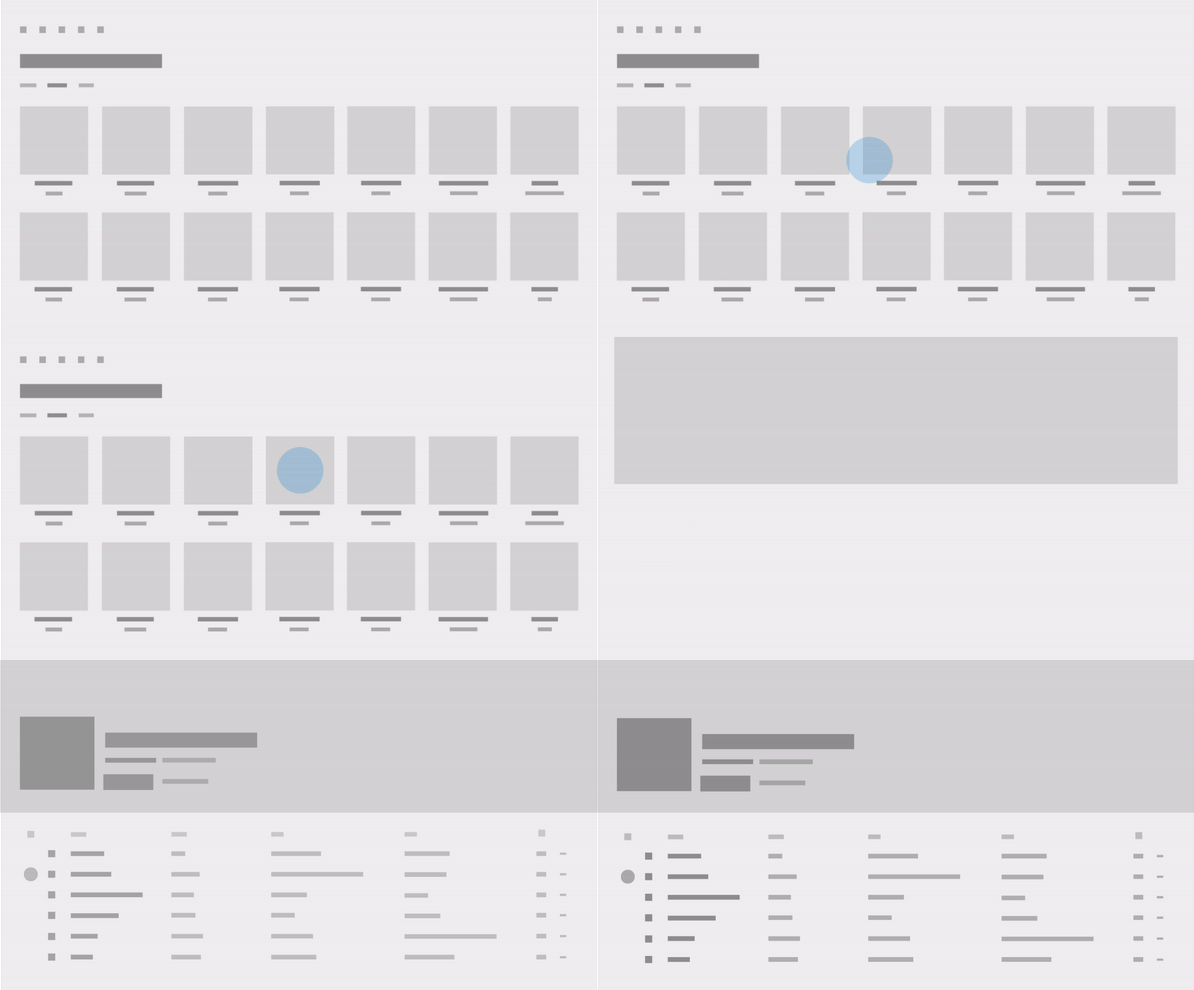
▲ Connected Animation 连接动画
模拟 UWP 中的 API
UWP 中的连接动画能跑起来的最简单代码包含下面两个部分。
准备动画 PrepareToAnimate():
ConnectedAnimationService.GetForCurrentView().PrepareToAnimate(/*string */key, /*UIElement */source);
开始动画 TryStart:
var animation = ConnectedAnimationService.GetForCurrentView().GetAnimation(/*string */key);

animation?.TryStart(/*UIElement */destination);
于是,我们至少需要实现这些 API:
ConnectedAnimationService.GetForCurrentView();ConnectedAnimationService.PrepareToAnimate(string key, UIElement source);ConnectedAnimationService.GetAnimation(string key);ConnectedAnimation.TryStart(UIElement destination);
实现这个 API
现在,我们需要写两个类才能实现上面那些方法:
ConnectedAnimationService- 用来管理一个窗口内的所有连接动画ConnectedAnimation- 用来管理和播放一个指定 Key 的连接动画
ConnectedAnimationService
我选用窗口作为一个 ConnectedAnimationService 的管理单元是因为我可以在一个窗口内实现这样的动画,而跨窗口的动画就非常麻烦了。所以,我试用附加属性为 Window 附加一个 ConnectedAnimationService 属性,用于在任何一个 View 所在的地方获取 ConnectedAnimationService 的实例。
每次 PrepareToAnimate 时我创建一个 ConnectedAnimation 实例来管理此次的连接动画。为了方便此后根据 Key 查找 ConnectedAnimation 的实例,我使用字典存储这些实例。
using System;

using System.Collections.Generic;

using System.Windows;

using System.Windows.Media;

using Walterlv.Annotations;

namespace Walterlv.Demo.Media.Animation

{

    public class ConnectedAnimationService

    {

        private ConnectedAnimationService()

        {

        }

        private readonly Dictionary<string, ConnectedAnimation> _connectingAnimations =

            new Dictionary<string, ConnectedAnimation>();

        public void PrepareToAnimate([NotNull] string key, [NotNull] UIElement source)

        {

            if (key == null)

            {

                throw new ArgumentNullException(nameof(key));

            }

            if (source == null)

            {

                throw new ArgumentNullException(nameof(source));

            }

            if (_connectingAnimations.TryGetValue(key, out var info))

            {

                throw new ArgumentException("指定的 key 已经做好动画准备,不应该重复进行准备。", nameof(key));

            }

            info = new ConnectedAnimation(key, source, OnAnimationCompleted);

            _connectingAnimations.Add(key, info);

        }

        private void OnAnimationCompleted(object sender, EventArgs e)

        {

            var key = ((ConnectedAnimation) sender).Key;

            if (_connectingAnimations.ContainsKey(key))

            {

                _connectingAnimations.Remove(key);

            }

        }

        [CanBeNull]

        public ConnectedAnimation GetAnimation([NotNull] string key)

        {

            if (key == null)

            {

                throw new ArgumentNullException(nameof(key));

            }

            if (_connectingAnimations.TryGetValue(key, out var info))

            {

                return info;

            }

            return null;

        }

        private static readonly DependencyProperty AnimationServiceProperty =

            DependencyProperty.RegisterAttached("AnimationService",

                typeof(ConnectedAnimationService), typeof(ConnectedAnimationService),

                new PropertyMetadata(default(ConnectedAnimationService)));

        public static ConnectedAnimationService GetForCurrentView(Visual visual)

        {

            var window = Window.GetWindow(visual);

            if (window == null)

            {

                throw new ArgumentException("此 Visual 未连接到可见的视觉树中。", nameof(visual));

            }

            var service = (ConnectedAnimationService) window.GetValue(AnimationServiceProperty);

            if (service == null)

            {

                service = new ConnectedAnimationService();

                window.SetValue(AnimationServiceProperty, service);

            }

            return service;

        }

    }

}
ConnectedAnimation
这是连接动画的关键实现。
我创建了一个内部类 ConnectedAnimationAdorner 用于在 AdornerLayer 上承载连接动画。AdornerLayer 是 WPF 中的概念,用于在其他控件上叠加显示一些 UI,UWP 中没有这样的特性。
private class ConnectedAnimationAdorner : Adorner

{

    private ConnectedAnimationAdorner([NotNull] UIElement adornedElement)

        : base(adornedElement)

    {

        Children = new VisualCollection(this);

        IsHitTestVisible = false;

    }

    internal VisualCollection Children { get; }

    protected override int VisualChildrenCount => Children.Count;

    protected override Visual GetVisualChild(int index) => Children[index];

    protected override Size ArrangeOverride(Size finalSize)

    {

        foreach (var child in Children.OfType<UIElement>())

        {

            child.Arrange(new Rect(child.DesiredSize));

        }

        return finalSize;

    }

    internal static ConnectedAnimationAdorner FindFrom([NotNull] Visual visual)

    {

        if (Window.GetWindow(visual)?.Content is UIElement root)

        {

            var layer = AdornerLayer.GetAdornerLayer(root);

            if (layer != null)

            {

                var adorner = layer.GetAdorners(root)?.OfType<ConnectedAnimationAdorner>().FirstOrDefault();

                if (adorner == null)

                {

                    adorner = new ConnectedAnimationAdorner(root);

                    layer.Add(adorner);

                }

                return adorner;

            }

        }

        throw new InvalidOperationException("指定的 Visual 尚未连接到可见的视觉树中,找不到用于承载动画的容器。");

    }

    internal static void ClearFor([NotNull] Visual visual)

    {

        if (Window.GetWindow(visual)?.Content is UIElement root)

        {

            var layer = AdornerLayer.GetAdornerLayer(root);

            var adorner = layer?.GetAdorners(root)?.OfType<ConnectedAnimationAdorner>().FirstOrDefault();

            if (adorner != null)

            {

                layer.Remove(adorner);

            }

        }

    }

}
而 ConnectedAnimationAdorner 的作用是显示一个 ConnectedVisual。ConnectedVisual 包含一个源和一个目标,根据 Progress(进度)属性决定应该分别将源和目标显示到哪个位置,其不透明度分别是多少。
private class ConnectedVisual : DrawingVisual

{

    public static readonly DependencyProperty ProgressProperty = DependencyProperty.Register(

        "Progress", typeof(double), typeof(ConnectedVisual),

        new PropertyMetadata(0.0, OnProgressChanged), ValidateProgress);

    public double Progress

    {

        get => (double) GetValue(ProgressProperty);

        set => SetValue(ProgressProperty, value);

    }

    private static bool ValidateProgress(object value) =>

        value is double progress && progress >= 0 && progress <= 1;

    private static void OnProgressChanged(DependencyObject d, DependencyPropertyChangedEventArgs e)

    {

        ((ConnectedVisual) d).Render((double) e.NewValue);

    }

    public ConnectedVisual([NotNull] Visual source, [NotNull] Visual destination)

    {

        _source = source ?? throw new ArgumentNullException(nameof(source));

        _destination = destination ?? throw new ArgumentNullException(nameof(destination));

        _sourceBrush = new VisualBrush(source) {Stretch = Stretch.Fill};

        _destinationBrush = new VisualBrush(destination) {Stretch = Stretch.Fill};

    }

    private readonly Visual _source;

    private readonly Visual _destination;

    private readonly Brush _sourceBrush;

    private readonly Brush _destinationBrush;

    private Rect _sourceBounds;

    private Rect _destinationBounds;

    protected override void OnVisualParentChanged(DependencyObject oldParent)

    {

        if (VisualTreeHelper.GetParent(this) == null)

        {

            return;

        }

        var sourceBounds = VisualTreeHelper.GetContentBounds(_source);

        if (sourceBounds.IsEmpty)

        {

            sourceBounds = VisualTreeHelper.GetDescendantBounds(_source);

        }

        _sourceBounds = new Rect(

            _source.PointToScreen(sourceBounds.TopLeft),

            _source.PointToScreen(sourceBounds.BottomRight));

        _sourceBounds = new Rect(

            PointFromScreen(_sourceBounds.TopLeft),

            PointFromScreen(_sourceBounds.BottomRight));

        var destinationBounds = VisualTreeHelper.GetContentBounds(_destination);

        if (destinationBounds.IsEmpty)

        {

            destinationBounds = VisualTreeHelper.GetDescendantBounds(_destination);

        }

        _destinationBounds = new Rect(

            _destination.PointToScreen(destinationBounds.TopLeft),

            _destination.PointToScreen(destinationBounds.BottomRight));

        _destinationBounds = new Rect(

            PointFromScreen(_destinationBounds.TopLeft),

            PointFromScreen(_destinationBounds.BottomRight));

    }

    private void Render(double progress)

    {

        var bounds = new Rect(

            (_destinationBounds.Left - _sourceBounds.Left) * progress + _sourceBounds.Left,

            (_destinationBounds.Top - _sourceBounds.Top) * progress + _sourceBounds.Top,

            (_destinationBounds.Width - _sourceBounds.Width) * progress + _sourceBounds.Width,

            (_destinationBounds.Height - _sourceBounds.Height) * progress + _sourceBounds.Height);

        using (var dc = RenderOpen())

        {

            dc.DrawRectangle(_sourceBrush, null, bounds);

            dc.PushOpacity(progress);

            dc.DrawRectangle(_destinationBrush, null, bounds);

            dc.Pop();

        }

    }

}
最后,用一个 DoubleAnimation 控制 Progress 属性,来实现连接动画。
完整的包含内部类的代码如下:
using System;

using System.Collections.Generic;

using System.Linq;

using System.Windows;

using System.Windows.Documents;

using System.Windows.Media;

using System.Windows.Media.Animation;

using Walterlv.Annotations;

namespace Walterlv.Demo.Media.Animation

{

    public class ConnectedAnimation

    {

        internal ConnectedAnimation([NotNull] string key, [NotNull] UIElement source, [NotNull] EventHandler completed)

        {

            Key = key ?? throw new ArgumentNullException(nameof(key));

            _source = source ?? throw new ArgumentNullException(nameof(source));

            _reportCompleted = completed ?? throw new ArgumentNullException(nameof(completed));

        }

        public string Key { get; }

        private readonly UIElement _source;

        private readonly EventHandler _reportCompleted;

        public bool TryStart([NotNull] UIElement destination)

        {

            return TryStart(destination, Enumerable.Empty<UIElement>());

        }

        public bool TryStart([NotNull] UIElement destination, [NotNull] IEnumerable<UIElement> coordinatedElements)

        {

            if (destination == null)

            {

                throw new ArgumentNullException(nameof(destination));

            }

            if (coordinatedElements == null)

            {

                throw new ArgumentNullException(nameof(coordinatedElements));

            }

            if (Equals(_source, destination))

            {

                return false;

            }

            // 正在播动画?动画播完废弃了?false

            // 准备播放连接动画。

            var adorner = ConnectedAnimationAdorner.FindFrom(destination);

            var connectionHost = new ConnectedVisual(_source, destination);

            adorner.Children.Add(connectionHost);

            var storyboard = new Storyboard();

            var animation = new DoubleAnimation(0.0, 1.0, new Duration(TimeSpan.FromSeconds(10.6)))

            {

                EasingFunction = new CubicEase {EasingMode = EasingMode.EaseInOut},

            };

            Storyboard.SetTarget(animation, connectionHost);

            Storyboard.SetTargetProperty(animation, new PropertyPath(ConnectedVisual.ProgressProperty.Name));

            storyboard.Children.Add(animation);

            storyboard.Completed += (sender, args) =>

            {

                _reportCompleted(this, EventArgs.Empty);

                //destination.ClearValue(UIElement.VisibilityProperty);

                adorner.Children.Remove(connectionHost);

            };

            //destination.Visibility = Visibility.Hidden;

            storyboard.Begin();

            return true;

        }

        private class ConnectedVisual : DrawingVisual

        {

            public static readonly DependencyProperty ProgressProperty = DependencyProperty.Register(

                "Progress", typeof(double), typeof(ConnectedVisual),

                new PropertyMetadata(0.0, OnProgressChanged), ValidateProgress);

            public double Progress

            {

                get => (double) GetValue(ProgressProperty);

                set => SetValue(ProgressProperty, value);

            }

            private static bool ValidateProgress(object value) =>

                value is double progress && progress >= 0 && progress <= 1;

            private static void OnProgressChanged(DependencyObject d, DependencyPropertyChangedEventArgs e)

            {

                ((ConnectedVisual) d).Render((double) e.NewValue);

            }

            public ConnectedVisual([NotNull] Visual source, [NotNull] Visual destination)

            {

                _source = source ?? throw new ArgumentNullException(nameof(source));

                _destination = destination ?? throw new ArgumentNullException(nameof(destination));

                _sourceBrush = new VisualBrush(source) {Stretch = Stretch.Fill};

                _destinationBrush = new VisualBrush(destination) {Stretch = Stretch.Fill};

            }

            private readonly Visual _source;

            private readonly Visual _destination;

            private readonly Brush _sourceBrush;

            private readonly Brush _destinationBrush;

            private Rect _sourceBounds;

            private Rect _destinationBounds;

            protected override void OnVisualParentChanged(DependencyObject oldParent)

            {

                if (VisualTreeHelper.GetParent(this) == null)

                {

                    return;

                }

                var sourceBounds = VisualTreeHelper.GetContentBounds(_source);

                if (sourceBounds.IsEmpty)

                {

                    sourceBounds = VisualTreeHelper.GetDescendantBounds(_source);

                }

                _sourceBounds = new Rect(

                    _source.PointToScreen(sourceBounds.TopLeft),

                    _source.PointToScreen(sourceBounds.BottomRight));

                _sourceBounds = new Rect(

                    PointFromScreen(_sourceBounds.TopLeft),

                    PointFromScreen(_sourceBounds.BottomRight));

                var destinationBounds = VisualTreeHelper.GetContentBounds(_destination);

                if (destinationBounds.IsEmpty)

                {

                    destinationBounds = VisualTreeHelper.GetDescendantBounds(_destination);

                }

                _destinationBounds = new Rect(

                    _destination.PointToScreen(destinationBounds.TopLeft),

                    _destination.PointToScreen(destinationBounds.BottomRight));

                _destinationBounds = new Rect(

                    PointFromScreen(_destinationBounds.TopLeft),

                    PointFromScreen(_destinationBounds.BottomRight));

            }

            private void Render(double progress)

            {

                var bounds = new Rect(

                    (_destinationBounds.Left - _sourceBounds.Left) * progress + _sourceBounds.Left,

                    (_destinationBounds.Top - _sourceBounds.Top) * progress + _sourceBounds.Top,

                    (_destinationBounds.Width - _sourceBounds.Width) * progress + _sourceBounds.Width,

                    (_destinationBounds.Height - _sourceBounds.Height) * progress + _sourceBounds.Height);

                using (var dc = RenderOpen())

                {

                    dc.DrawRectangle(_sourceBrush, null, bounds);

                    dc.PushOpacity(progress);

                    dc.DrawRectangle(_destinationBrush, null, bounds);

                    dc.Pop();

                }

            }

        }

        private class ConnectedAnimationAdorner : Adorner

        {

            private ConnectedAnimationAdorner([NotNull] UIElement adornedElement)

                : base(adornedElement)

            {

                Children = new VisualCollection(this);

                IsHitTestVisible = false;

            }

            internal VisualCollection Children { get; }

            protected override int VisualChildrenCount => Children.Count;

            protected override Visual GetVisualChild(int index) => Children[index];

            protected override Size ArrangeOverride(Size finalSize)

            {

                foreach (var child in Children.OfType<UIElement>())

                {

                    child.Arrange(new Rect(child.DesiredSize));

                }

                return finalSize;

            }

            internal static ConnectedAnimationAdorner FindFrom([NotNull] Visual visual)

            {

                if (Window.GetWindow(visual)?.Content is UIElement root)

                {

                    var layer = AdornerLayer.GetAdornerLayer(root);

                    if (layer != null)

                    {

                        var adorner = layer.GetAdorners(root)?.OfType<ConnectedAnimationAdorner>().FirstOrDefault();

                        if (adorner == null)

                        {

                            adorner = new ConnectedAnimationAdorner(root);

                            layer.Add(adorner);

                        }

                        return adorner;

                    }

                }

                throw new InvalidOperationException("指定的 Visual 尚未连接到可见的视觉树中,找不到用于承载动画的容器。");

            }

            internal static void ClearFor([NotNull] Visual visual)

            {

                if (Window.GetWindow(visual)?.Content is UIElement root)

                {

                    var layer = AdornerLayer.GetAdornerLayer(root);

                    var adorner = layer?.GetAdorners(root)?.OfType<ConnectedAnimationAdorner>().FirstOrDefault();

                    if (adorner != null)

                    {

                        layer.Remove(adorner);

                    }

                }

            }

        }

    }

}
调用
我在一个按钮的点击事件里面尝试调用上面的代码:
private int index;

private void AnimationButton_Click(object sender, RoutedEventArgs e)

{

    BeginConnectedAnimation((UIElement)sender, ConnectionDestination);

}

private async void BeginConnectedAnimation(UIElement source, UIElement destination)

{

    var service = ConnectedAnimationService.GetForCurrentView(this);

    service.PrepareToAnimate($"Test{index}", source);

    // 这里特意写在了同一个方法中,以示效果。事实上,只要是同一个窗口中的两个对象都可以实现。

    var animation = service.GetAnimation($"Test{index}");

    animation?.TryStart(destination);

    // 每次点击都使用不同的 Key。

    index++;

}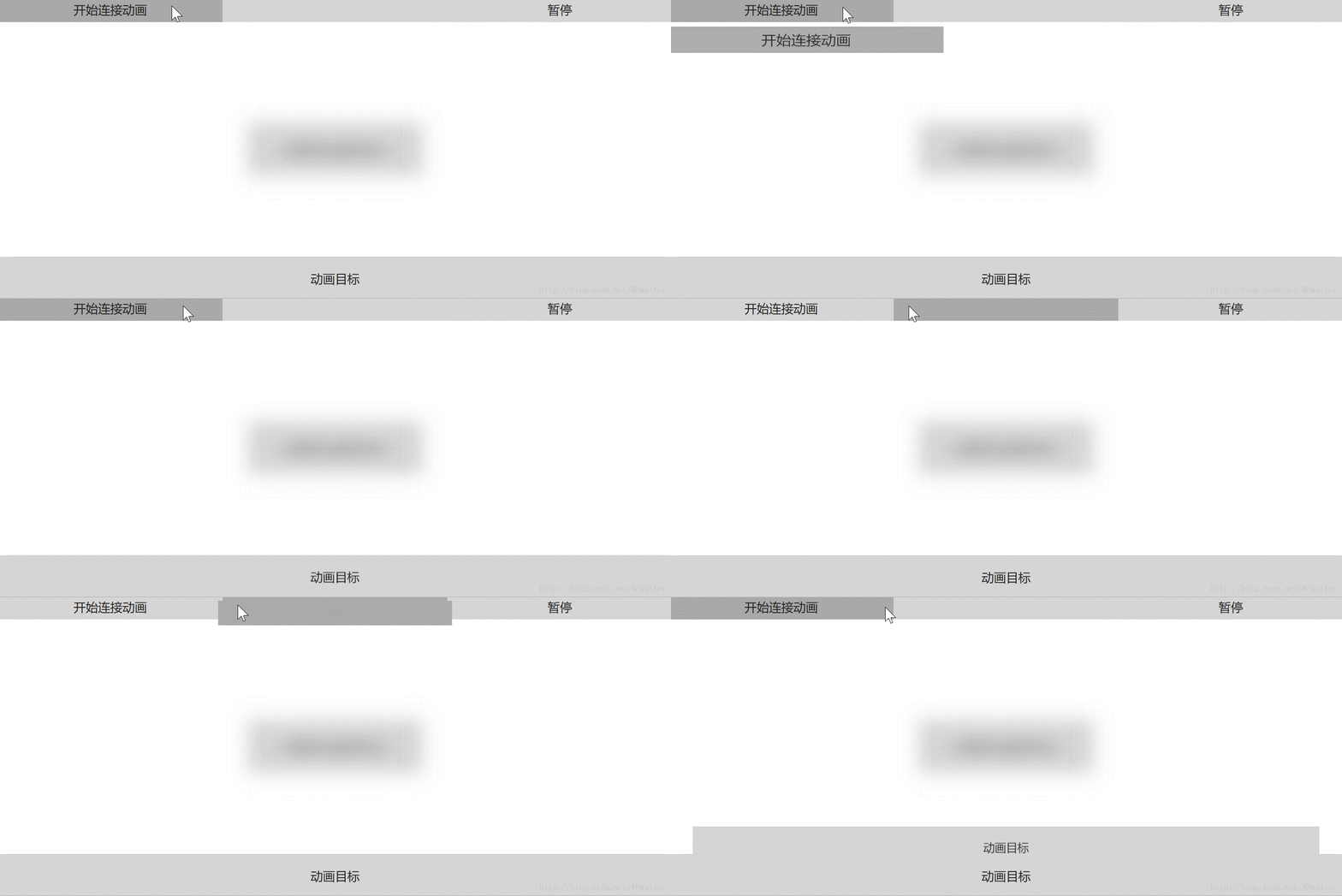
▲ 上面的代码做的连接动画
目前的局限性以及改进计划
然而稍微试试不难发现,这段代码很难将控件本身隐藏起来(设置 Visibility 为 Collapsed),也就是说如果源控件和目标控件一直显示,那么动画期间就不允许隐藏(不同时显示就没有这个问题)。这样也就出不来“连接”的感觉,而是覆盖的感觉。
通过修改调用方的代码,可以规避这个问题。而做法是隐藏控件本身,但对控件内部的可视元素子级进行动画。这样,动画就仅限继承自 Control 的那些元素(例如 Button,UserControl 了)。
private async void BeginConnectedAnimation(UIElement source, UIElement destination)

{

    source.Visibility = Visibility.Hidden;

    ConnectionDestination.Visibility = Visibility.Hidden;

    var animatingSource = (UIElement) VisualTreeHelper.GetChild(source, 0);

    var animatingDestination = (UIElement) VisualTreeHelper.GetChild(destination, 0);

    var service = ConnectedAnimationService.GetForCurrentView(this);

    service.PrepareToAnimate($"Test{index}", animatingSource);

    var animation = service.GetAnimation($"Test{index}");

    animation?.TryStart(animatingDestination);

    index++;

    await Task.Delay(600);

    source.ClearValue(VisibilityProperty);

    ConnectionDestination.ClearValue(VisibilityProperty);

}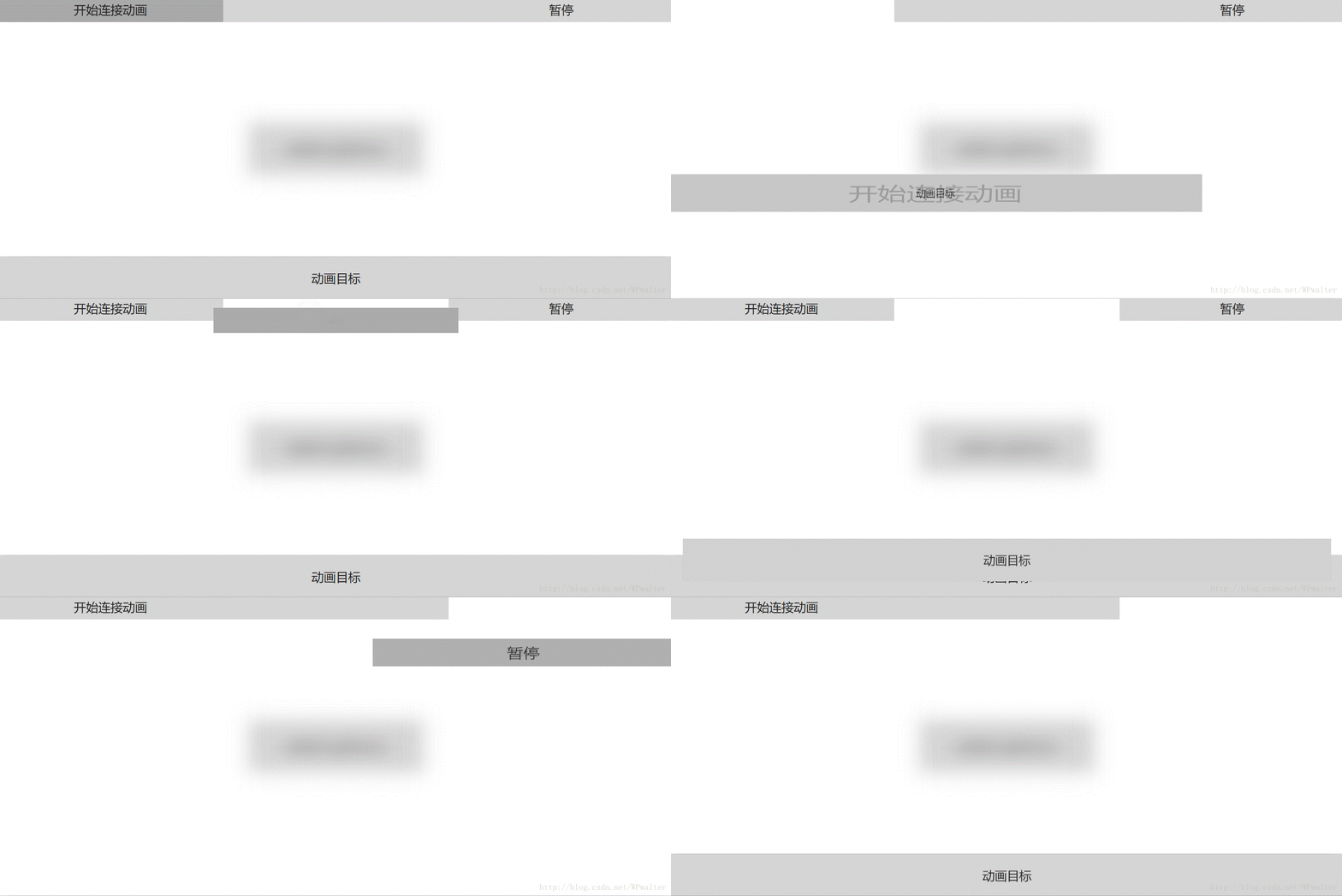
▲ 修改后的代码做的连接动画
现在,我正试图通过截图和像素着色器(Shader Effect)来实现更加通用的 ConnectedAnimation,正在努力编写中……
参考资料
- Connected animation - UWP app developer - Microsoft Docs
- UWP Connected Animations updates with Windows Creators release – Varun Shandilya
- 实现Fluent Design中的Connected Animation - ^ _ ^ .io
实现一个 WPF 版本的 ConnectedAnimation的更多相关文章
- 搭建QQ聊天通信的程序:(1)基于 networkcomms.net 创建一个WPF聊天客户端服务器应用程序 (1)
搭建QQ聊天通信的程序:(1)基于 networkcomms.net 创建一个WPF聊天客户端服务器应用程序 原文地址(英文):http://www.networkcomms.net/creating ...
- WPF入门教程系列(一) 创建你的第一个WPF项目
WPF入门教程系列(一) 创建你的第一个WPF项目 WPF基础知识 快速学习绝不是从零学起的,良好的基础是快速入手的关键,下面先为大家摞列以下自己总结的学习WPF的几点基础知识: 1) C#基础语法知 ...
- [Aaronyang] 写给自己的WPF4.5 笔记15[AyArc诞生-WPF版本绚丽的环状图,Ay制作,AyWindow强势预览]
原文:[Aaronyang] 写给自己的WPF4.5 笔记15[AyArc诞生-WPF版本绚丽的环状图,Ay制作,AyWindow强势预览] 我的文章一定要做到对读者负责,否则就是失败的文章 -- ...
- 演练:我的第一个 WPF 桌面应用程序 https://docs.microsoft.com/zh-cn/dotnet/framework/wpf/getting-started/walkthrough-my-first-wpf-desktop-application
这篇文章演示如何开发简单的 Windows Presentation Foundation (WPF) 应用程序包括元素所共有的大多数 WPF 应用程序: 可扩展应用程序标记语言 (XAML) 标记. ...
- 将 C++/WinRT 中的线程切换体验带到 C# 中来(WPF 版本)
原文:将 C++/WinRT 中的线程切换体验带到 C# 中来(WPF 版本) 如果你要在 WPF 程序中使用线程池完成一个特殊的任务,那么使用 .NET 的 API Task.Run 并传入一个 L ...
- 一个WPF控件 诡异的MouseEvent 。
背景: private System.Windows.Controls.Border _borderTouch; private bool _mouseDown = false; private S ...
- 无法启动调试--未安装 Silverlight Developer 运行时。请安装一个匹配版本。
引自:http://www.cnblogs.com/chillsrc/archive/2010/06/28/1766816.html 安装完VS2010中文版之后,又安装了Silverlight4_T ...
- 意外地解决了一个WPF布局问题
原文:意外地解决了一个WPF布局问题 今天做了一个小测试,意外地将之前的一个困扰解决了,原问题见<WPF疑难杂症会诊>中的“怎么才能禁止内容撑大容器?” 以前我是在外侧嵌套Canvas容器 ...
- 51ak带你看MYSQL5.7源码3:修改代码实现你的第一个Mysql版本
从事DBA工作多年 MYSQL源码也是头一次接触 尝试记录下自己看MYSQL5.7源码的历程 目录: 51ak带你看MYSQL5.7源码1:main入口函数 51ak带你看MYSQL5.7源码2:编译 ...
随机推荐
- 洛谷P3601 签到题
本文版权归ljh2000和博客园共有,欢迎转载,但须保留此声明,并给出原文链接,谢谢合作. 本文作者:ljh2000 作者博客:http://www.cnblogs.com/ljh2000-jump/ ...
- hiho 1318 非法二进制数 dp
#1318 : 非法二进制数 时间限制:10000ms 单点时限:1000ms 内存限制:256MB 描述 如果一个二进制数包含连续的两个1,我们就称这个二进制数是非法的. 小Hi想知道在所有 n 位 ...
- Windows command line monitor
一个可以查看当然系统中进程参数的小工具 下载地址
- poj2007极角排序
裸的极角排序,但是要把0,0放在第一个(话说这题题目真是巨长,废话也多...) #include<map> #include<set> #include<cmath> ...
- Java提高篇之常量池
一.相关概念 1. 什么是常量 用final修饰的成员变量表示常量,值一旦给定就无法改变! final修饰的变量有三种:静态变量.实例变量和局部变量,分别表示三种类型的常量. 2. Class文件中的 ...
- linux下如何安装lua
1.下载lua包并解压 wget -c http://www.lua.org/ftp/lua-5.3.0.tar.gz tar zxvf lua-5.3.0.tar.gz 2.下载libreadli ...
- 原生javascript-分享自己常用的函数
[一]添加监听事件 addHandler:function(node,type,fn){if(node.addEventListener){ node.addEventListener(type,fn ...
- Git 从了解到放弃
1. 简单介绍 1.1. git起源 在1991年linus创建了Linux从此linux成为服务器领域的佼佼者,大部分web服务器.邮件.数据库各种服务器端程序都安装在了linux上面运行,主要是因 ...
- 012——数组(十二) 数组range array_count_values array_pad array_product
<?php /*range () 生成包含指定范围的数组,第三个参数是步长值 */ /*$arr=range(1,10,2); print_r($arr);//输出:Array ( [0] =& ...
- 基于IDEA和Maven的SSM分层项目搭建
前言 虽然现在SpringBoot开始流行,但是SSM作为一个经典框架,还是有必要去了解一下. 项目建立 1.新建一个空白的Maven项目,如下图.然后把IDEA自动生成的多余src目录删掉. 2.右 ...