
tensorFlow(一)相关重要函数理解
1、函数及参数:tf.nn.conv2d
conv2d(
input,
filter,
strides,
padding,
use_cudnn_on_gpu=True,
data_format='NHWC',
name=None
)
卷积的原理可参考 A guide to convolution arithmetic for deep learning
参数列表:
| 参数名 | 必选 | 类型 | 说明 |
|---|---|---|---|
| input | 是 | tensor | 是一个 4 维的 tensor,即 [ batch, in_height, in_width, in_channels ](若 input 是图像,[ 训练时一个 batch 的图片数量, 图片高度, 图片宽度, 图像通道数 ]) |
| filter | 是 | tensor | 是一个 4 维的 tensor,即 [ filter_height, filter_width, in_channels, out_channels ](若 input 是图像,[ 卷积核的高度,卷积核的宽度,图像通道数,卷积核个数 ]),filter 的 in_channels 必须和 input 的 in_channels 相等 |
| strides | 是 | 列表 | 长度为 4 的 list,卷积时候在 input 上每一维的步长,一般 strides[0] = strides[3] = 1 |
| padding | 是 | string | 只能为 " VALID "," SAME " 中之一,这个值决定了不同的卷积方式。VALID 丢弃方式;SAME:补全方式 |
| use_cudnn_on_gpu | 否 | bool | 是否使用 cudnn 加速,默认为 true |
| data_format | 否 | string | 只能是 " NHWC ", " NCHW ",默认 " NHWC " |
| name | 否 | string | 运算名称 |
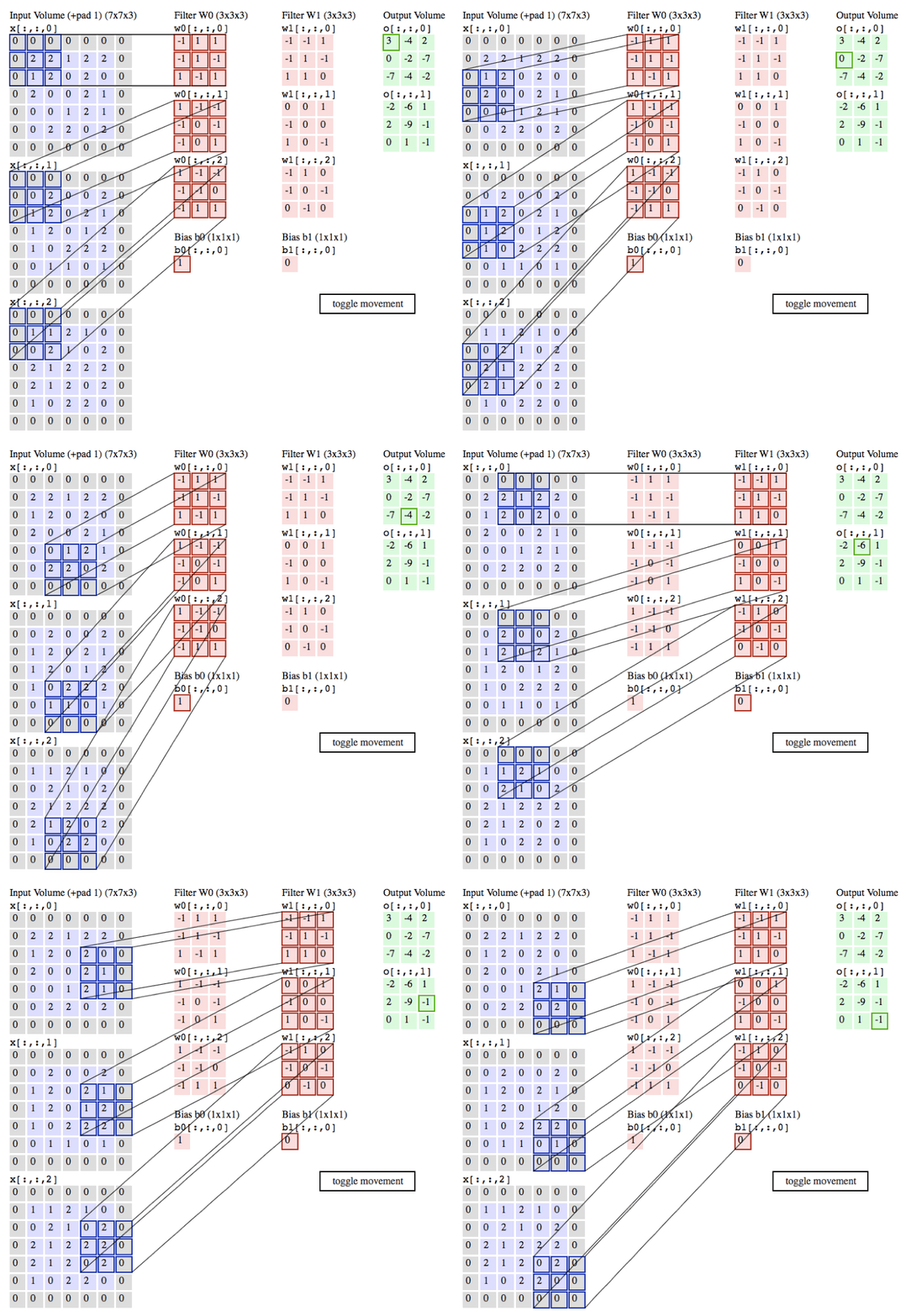
import tensorflow as tf

a = tf.constant([1,1,1,0,0,0,1,1,1,0,0,0,1,1,1,0,0,1,1,0,0,1,1,0,0],dtype=tf.float32,shape=[1,5,5,1])

b = tf.constant([1,0,1,0,1,0,1,0,1],dtype=tf.float32,shape=[3,3,1,1])

c = tf.nn.conv2d(a,b,strides=[1, 2, 2, 1],padding='VALID')

d = tf.nn.conv2d(a,b,strides=[1, 2, 2, 1],padding='SAME')

with tf.Session() as sess:

    print ("c shape:")

    print (c.shape)

    print ("c value:")

    print (sess.run(c))

    print ("d shape:")

    print (d.shape)

    print ("d value:")

    print (sess.run(d))
结果:
c shape:

(1, 3, 3, 1)

c value:

[[[[ 4.]

   [ 3.]

   [ 4.]]

  [[ 2.]

   [ 4.]

   [ 3.]]

  [[ 2.]

   [ 3.]

   [ 4.]]]]

d shape:

(1, 5, 5, 1)

d value:

[[[[ 2.]

   [ 2.]

   [ 3.]

   [ 1.]

   [ 1.]]

  [[ 1.]

   [ 4.]

   [ 3.]

   [ 4.]

   [ 1.]]

  [[ 1.]

   [ 2.]

   [ 4.]

   [ 3.]

   [ 3.]]

  [[ 1.]

   [ 2.]

   [ 3.]

   [ 4.]

   [ 1.]]

  [[ 0.]

   [ 2.]

   [ 2.]

   [ 1.]

   [ 1.]]]]
参考:https://blog.csdn.net/zuolixiangfisher/article/details/80528989
1.1、tf.layers.conv1d
一维卷积一般用于处理文本,所以输入一般是一段长文本,就是词的列表
函数定义如下:
tf.layers.conv1d(

inputs,

filters,

kernel_size,

strides=1,

padding='valid',

data_format='channels_last',

dilation_rate=1,

activation=None,

use_bias=True,

kernel_initializer=None,

bias_initializer=tf.zeros_initializer(),

kernel_regularizer=None,

bias_regularizer=None,

activity_regularizer=None,

kernel_constraint=None,

bias_constraint=None,

trainable=True,

name=None,

reuse=None

)
比较重要的几个参数是inputs, filters, kernel_size,下面分别说明
inputs : 输入tensor, 维度(None, a, b) 是一个三维的tensor
None : 一般是填充样本的个数,batch_size
a : 句子中的词数或者字数
b : 字或者词的向量维度
filters : 过滤器的个数
kernel_size : 卷积核的大小,卷积核其实应该是一个二维的,这里只需要指定一维,是因为卷积核的第二维与输入的词向量维度是一致的,因为对于句子而言,卷积的移动方向只能是沿着词的方向,即只能在列维度移动
一个例子:
inputs = tf.placeholder('float', shape=[None, 6, 8])
out = tf.layers.conv1d(inputs, 5, 3)
说明: 对于一个样本而言,句子长度为6个字,字向量的维度为8
filters=5, kernel_size=3, 所以卷积核的维度为3*8
那么输入6*8经过3*8的卷积核卷积后得到的是4*1的一个向量(4=6-3+1)
又因为有5个过滤器,所以是得到5个4*1的向量
参考:https://blog.csdn.net/u011734144/article/details/84066928
2、函数及参数:tf.nn.relu
relu(
features,
name=None
)
功能说明:
参数列表:
| 参数名 | 必选 | 类型 | 说明 |
|---|---|---|---|
| features | 是 | tensor | 是以下类型float32, float64, int32, int64, uint8, int16, int8, uint16, half |
| name | 否 | string | 运算名称 |
实例:
import tensorflow as tf

a = tf.constant([1,-2,0,4,-5,6])

b = tf.nn.relu(a)

with tf.Session() as sess:

    print (sess.run(b))
执行结果:
[1 0 0 4 0 6]
3、函数及参数:tf.nn.max_pool
max_pool(
value,
ksize,
strides,
padding,
data_format='NHWC',
name=None
)
功能说明:
参数列表:
| 参数名 | 必选 | 类型 | 说明 |
|---|---|---|---|
| value | 是 | tensor | 4 维的张量,即 [ batch, height, width, channels ],数据类型为 tf.float32 |
| ksize | 是 | 列表 | 池化窗口的大小,长度为 4 的 list,一般是 [1, height, width, 1],因为不在 batch 和 channels 上做池化,所以第一个和最后一个维度为 1 |
| strides | 是 | 列表 | 池化窗口在每一个维度上的步长,一般 strides[0] = strides[3] = 1 |
| padding | 是 | string | 只能为 " VALID "," SAME " 中之一,这个值决定了不同的池化方式。VALID 丢弃方式;SAME:补全方式 |
| data_format | 否 | string | 只能是 " NHWC ", " NCHW ",默认" NHWC " |
| name | 否 | string | 运算名称 |
实例:
import tensorflow as tf

a = tf.constant([1,3,2,1,2,9,1,1,1,3,2,3,5,6,1,2],dtype=tf.float32,shape=[1,4,4,1])

b = tf.nn.max_pool(a,ksize=[1, 2, 2, 1],strides=[1, 2, 2, 1],padding='VALID')

c = tf.nn.max_pool(a,ksize=[1, 2, 2, 1],strides=[1, 2, 2, 1],padding='SAME')

with tf.Session() as sess:

    print ("b shape:")

    print (b.shape)

    print ("b value:")

    print (sess.run(b))

    print ("c shape:")

    print (c.shape)

    print ("c value:")

    print (sess.run(c))
执行结果:
b shape:

(1, 2, 2, 1)

b value:

[[[[ 9.]

   [ 2.]]

  [[ 6.]

   [ 3.]]]]

c shape:

(1, 2, 2, 1)

c value:

[[[[ 9.]

   [ 2.]]

  [[ 6.]

   [ 3.]]]]
4、函数及参数:tf.nn.dropout
dropout(
x,
keep_prob,
noise_shape=None,
seed=None,
name=None
)
功能说明:
参数列表:
| 参数名 | 必选 | 类型 | 说明 |
|---|---|---|---|
| x | 是 | tensor | 输出元素是 x 中的元素以 keep_prob 概率除以 keep_prob,否则为 0 |
| keep_prob | 是 | scalar Tensor | dropout 的概率,一般是占位符 |
| noise_shape | 否 | tensor | 默认情况下,每个元素是否 dropout 是相互独立。如果指定 noise_shape,若 noise_shape[i] == shape(x)[i],该维度的元素是否 dropout 是相互独立,若 noise_shape[i] != shape(x)[i] 该维度元素是否 dropout 不相互独立,要么一起 dropout 要么一起保留 |
| seed | 否 | 数值 | 如果指定该值,每次 dropout 结果相同 |
| name | 否 | string | 运算名称 |
实例:
import tensorflow as tf

a = tf.constant([1,2,3,4,5,6],shape=[2,3],dtype=tf.float32)

b = tf.placeholder(tf.float32)

c = tf.nn.dropout(a,b,[2,1],1)

with tf.Session() as sess:

    sess.run(tf.global_variables_initializer())

    print (sess.run(c,feed_dict={b:0.75}))
执行结果:
[[ 0.          0.          0.        ]

 [ 5.33333349  6.66666651  8.        ]]
5、函数及参数:tf.nn.sigmoid_cross_entropy_with_logits
sigmoid_cross_entropy_with_logits(
_sentinel=None,
labels=None,
logits=None,
name=None
)
功能说明:
参数列表:
| 参数名 | 必选 | 类型 | 说明 |
|---|---|---|---|
| _sentinel | 否 | None | 没有使用的参数 |
| labels | 否 | Tensor | type, shape 与 logits相同 |
| logits | 否 | Tensor | type 是 float32 或者 float64 |
| name | 否 | string | 运算名称 |
实例:
import tensorflow as tf

x = tf.constant([1,2,3,4,5,6,7],dtype=tf.float64)

y = tf.constant([1,1,1,0,0,1,0],dtype=tf.float64)

loss = tf.nn.sigmoid_cross_entropy_with_logits(labels = y,logits = x)

with tf.Session() as sess:

    print (sess.run(loss))
执行结果:
[  3.13261688e-01   1.26928011e-01   4.85873516e-02   4.01814993e+00

   5.00671535e+00   2.47568514e-03   7.00091147e+00]
6、函数及参数:tf.truncated_normal
truncated_normal(
shape,
mean=0.0,
stddev=1.0,
dtype=tf.float32,
seed=None,
name=None
)
功能说明:
[ mean - 2 * stddev, mean + 2 * stddev ]。参数列表:
| 参数名 | 必选 | 类型 | 说明 |
|---|---|---|---|
| shape | 是 | 1 维整形张量或 array | 输出张量的维度 |
| mean | 否 | 0 维张量或数值 | 均值 |
| stddev | 否 | 0 维张量或数值 | 标准差 |
| dtype | 否 | dtype | 输出类型 |
| seed | 否 | 数值 | 随机种子,若 seed 赋值,每次产生相同随机数 |
| name | 否 | string | 运算名称 |
实例:
import tensorflow as tf

initial = tf.truncated_normal(shape=[3,3], mean=0, stddev=1)

print(tf.Session().run(initial))
7、函数及参数:tf.constant
constant(
value,
dtype=None,
shape=None,
name='Const',
verify_shape=False
)
功能说明:
参数列表:
| 参数名 | 必选 | 类型 | 说明 |
|---|---|---|---|
| value | 是 | 常量数值或者 list | 输出张量的值 |
| dtype | 否 | dtype | 输出张量元素类型 |
| shape | 否 | 1 维整形张量或 array | 输出张量的维度 |
| name | 否 | string | 张量名称 |
| verify_shape | 否 | Boolean | 检测 shape 是否和 value 的 shape 一致,若为 Fasle,不一致时,会用最后一个元素将 shape 补全 |
8、函数及参数:tf.placeholder
placeholder(
dtype,
shape=None,
name=None
)
功能说明:
参数列表:
| 参数名 | 必选 | 类型 | 说明 |
|---|---|---|---|
| dtype | 是 | dtype | 占位符数据类型 |
| shape | 否 | 1 维整形张量或 array | 占位符维度 |
| name | 否 | string | 占位符名称 |
实例:
#!/usr/bin/python

import tensorflow as tf

import numpy as np

x = tf.placeholder(tf.float32,[None,3])

y = tf.matmul(x,x)

with tf.Session() as sess:

    rand_array = np.random.rand(3,3)

    print(sess.run(y,feed_dict={x:rand_array}))
执行结果:
输出一个 3x3 的张量
constant、placeholder、variable介绍
9、函数及参数:tf.Variable
__init__(
initial_value=None,
trainable=True,
collections=None,
validate_shape=True,
caching_device=None,
name=None,
variable_def=None,
dtype=None,
expected_shape=None,
import_scope=None
)
功能说明:
参数列表:
| 参数名 | 类型 | 说明 |
|---|---|---|
| initial_value | 张量 | Variable 类的初始值,这个变量必须指定 shape 信息,否则后面 validate_shape 需设为 False |
| trainable | Boolean | 是否把变量添加到 collection GraphKeys.TRAINABLE_VARIABLES 中(collection 是一种全局存储,不受变量名生存空间影响,一处保存,到处可取) |
| collections | Graph collections | 全局存储,默认是 GraphKeys.GLOBAL_VARIABLES |
| validate_shape | Boolean | 是否允许被未知维度的 initial_value 初始化 |
| caching_device | string | 指明哪个 device 用来缓存变量 |
| name | string | 变量名 |
| dtype | dtype | 如果被设置,初始化的值就会按照这个类型初始化 |
| expected_shape | TensorShape | 要是设置了,那么初始的值会是这种维度 |
实例:
#!/usr/bin/python

import tensorflow as tf

initial = tf.truncated_normal(shape=[10,10],mean=0,stddev=1)

W=tf.Variable(initial)

list = [[1.,1.],[2.,2.]]

X = tf.Variable(list,dtype=tf.float32)

init_op = tf.global_variables_initializer()

with tf.Session() as sess:

    sess.run(init_op)

    print ("##################(1)################")

    print (sess.run(W))

    print ("##################(2)################")

    print (sess.run(W[:2,:2]))

    op = W[:2,:2].assign(22.*tf.ones((2,2)))

    print ("###################(3)###############")

    print (sess.run(op))

    print ("###################(4)###############")

    print (W.eval(sess)) #computes and returns the value of this variable

    print ("####################(5)##############")

    print (W.eval())  #Usage with the default session

    print ("#####################(6)#############")

    print (W.dtype)

    print (sess.run(W.initial_value))

    print (sess.run(W.op))

    print (W.shape)

    print ("###################(7)###############")

    print (sess.run(X))
执行结果:
##################(1)################

[[ 0.9146753   0.6688656  -1.160011    0.47780406 -0.75987047  0.12145027

   1.9253138   0.47339278  0.35785297 -1.3425105 ]

 [ 0.5472313  -1.1619761   0.5283075  -0.18622003  1.2028183   0.11885296

  -0.7281785  -0.7120525   1.2409171  -0.6293891 ]

 [-0.749       0.6319412   1.2232305   0.84037226  1.3894111   1.6266172

  -0.19630633 -0.60519034 -0.04114273 -0.26215535]

 [ 1.6056366  -0.34816736  1.8081874   0.616779    0.11021009 -1.8835621

  -0.7651011  -1.9168056   0.4641662  -0.49475962]

 [-0.19028567  0.5131004   0.6460657  -1.9266285  -0.8439824   0.9123347

  -0.06474591 -1.1662508  -0.26887077 -1.0815035 ]

 [-0.4873036  -1.286625    0.6506081  -0.6631708   0.14755192  0.6262951

   0.26856226 -0.73765683 -0.92605734 -0.06623057]

 [-0.63469845  0.53975016 -0.30874643 -0.38573733  0.7492554  -1.0891181

  -0.31184393 -0.9791635  -1.5904634   0.42422688]

 [-0.25923353  0.3640418  -0.13705702  1.3891985  -0.04305851  0.7362603

  -0.04637048  1.5171311  -0.41555843 -1.7395841 ]

 [-0.45628768  0.26341474 -0.6413827  -0.03408551 -0.6371565  -0.2707571

  -1.0807754  -0.545007   -0.9005748  -0.44123358]

 [-0.03599161 -0.93177044  0.12982644  0.7088804   0.35801464  0.11168886

   1.227298    0.4929586   1.5796568   0.39961207]]

##################(2)################

[[ 0.9146753  0.6688656]

 [ 0.5472313 -1.1619761]]

###################(3)###############

[[22.         22.         -1.160011    0.47780406 -0.75987047  0.12145027

   1.9253138   0.47339278  0.35785297 -1.3425105 ]

 [22.         22.          0.5283075  -0.18622003  1.2028183   0.11885296

  -0.7281785  -0.7120525   1.2409171  -0.6293891 ]

 [-0.749       0.6319412   1.2232305   0.84037226  1.3894111   1.6266172

  -0.19630633 -0.60519034 -0.04114273 -0.26215535]

 [ 1.6056366  -0.34816736  1.8081874   0.616779    0.11021009 -1.8835621

  -0.7651011  -1.9168056   0.4641662  -0.49475962]

 [-0.19028567  0.5131004   0.6460657  -1.9266285  -0.8439824   0.9123347

  -0.06474591 -1.1662508  -0.26887077 -1.0815035 ]

 [-0.4873036  -1.286625    0.6506081  -0.6631708   0.14755192  0.6262951

   0.26856226 -0.73765683 -0.92605734 -0.06623057]

 [-0.63469845  0.53975016 -0.30874643 -0.38573733  0.7492554  -1.0891181

  -0.31184393 -0.9791635  -1.5904634   0.42422688]

 [-0.25923353  0.3640418  -0.13705702  1.3891985  -0.04305851  0.7362603

  -0.04637048  1.5171311  -0.41555843 -1.7395841 ]

 [-0.45628768  0.26341474 -0.6413827  -0.03408551 -0.6371565  -0.2707571

  -1.0807754  -0.545007   -0.9005748  -0.44123358]

 [-0.03599161 -0.93177044  0.12982644  0.7088804   0.35801464  0.11168886

   1.227298    0.4929586   1.5796568   0.39961207]]

###################(4)###############

[[22.         22.         -1.160011    0.47780406 -0.75987047  0.12145027

   1.9253138   0.47339278  0.35785297 -1.3425105 ]

 [22.         22.          0.5283075  -0.18622003  1.2028183   0.11885296

  -0.7281785  -0.7120525   1.2409171  -0.6293891 ]

 [-0.749       0.6319412   1.2232305   0.84037226  1.3894111   1.6266172

  -0.19630633 -0.60519034 -0.04114273 -0.26215535]

 [ 1.6056366  -0.34816736  1.8081874   0.616779    0.11021009 -1.8835621

  -0.7651011  -1.9168056   0.4641662  -0.49475962]

 [-0.19028567  0.5131004   0.6460657  -1.9266285  -0.8439824   0.9123347

  -0.06474591 -1.1662508  -0.26887077 -1.0815035 ]

 [-0.4873036  -1.286625    0.6506081  -0.6631708   0.14755192  0.6262951

   0.26856226 -0.73765683 -0.92605734 -0.06623057]

 [-0.63469845  0.53975016 -0.30874643 -0.38573733  0.7492554  -1.0891181

  -0.31184393 -0.9791635  -1.5904634   0.42422688]

 [-0.25923353  0.3640418  -0.13705702  1.3891985  -0.04305851  0.7362603

  -0.04637048  1.5171311  -0.41555843 -1.7395841 ]

 [-0.45628768  0.26341474 -0.6413827  -0.03408551 -0.6371565  -0.2707571

  -1.0807754  -0.545007   -0.9005748  -0.44123358]

 [-0.03599161 -0.93177044  0.12982644  0.7088804   0.35801464  0.11168886

   1.227298    0.4929586   1.5796568   0.39961207]]

####################(5)##############

[[22.         22.         -1.160011    0.47780406 -0.75987047  0.12145027

   1.9253138   0.47339278  0.35785297 -1.3425105 ]

 [22.         22.          0.5283075  -0.18622003  1.2028183   0.11885296

  -0.7281785  -0.7120525   1.2409171  -0.6293891 ]

 [-0.749       0.6319412   1.2232305   0.84037226  1.3894111   1.6266172

  -0.19630633 -0.60519034 -0.04114273 -0.26215535]

 [ 1.6056366  -0.34816736  1.8081874   0.616779    0.11021009 -1.8835621

  -0.7651011  -1.9168056   0.4641662  -0.49475962]

 [-0.19028567  0.5131004   0.6460657  -1.9266285  -0.8439824   0.9123347

  -0.06474591 -1.1662508  -0.26887077 -1.0815035 ]

 [-0.4873036  -1.286625    0.6506081  -0.6631708   0.14755192  0.6262951

   0.26856226 -0.73765683 -0.92605734 -0.06623057]

 [-0.63469845  0.53975016 -0.30874643 -0.38573733  0.7492554  -1.0891181

  -0.31184393 -0.9791635  -1.5904634   0.42422688]

 [-0.25923353  0.3640418  -0.13705702  1.3891985  -0.04305851  0.7362603

  -0.04637048  1.5171311  -0.41555843 -1.7395841 ]

 [-0.45628768  0.26341474 -0.6413827  -0.03408551 -0.6371565  -0.2707571

  -1.0807754  -0.545007   -0.9005748  -0.44123358]

 [-0.03599161 -0.93177044  0.12982644  0.7088804   0.35801464  0.11168886

   1.227298    0.4929586   1.5796568   0.39961207]]

#####################(6)#############

<dtype: 'float32_ref'>

[[-8.67323399e-01  4.41813141e-01 -3.52488965e-01 -1.76614091e-01

   1.00177491e+00  2.64105648e-01 -5.67676127e-01 -5.66444278e-01

  -1.11713566e-01 -1.62478304e+00]

 [-4.01060373e-01 -1.53238133e-01  1.42307401e+00  1.83093756e-01

  -3.86358112e-01 -3.38347167e-01 -7.37435699e-01  4.85668957e-01

  -2.23827705e-01 -6.16371274e-01]

 [-1.74246800e+00 -1.50056124e+00  4.86318618e-01  2.23255545e-01

  -1.32530510e-01  4.32058543e-01  1.63234258e+00  4.27152753e-01

  -8.93448740e-02 -1.63452363e+00]

 [-5.66304445e-01  1.96294522e+00 -1.79052025e-01 -4.16035742e-01

  -1.98147106e+00  9.22261253e-02  1.61968184e+00 -8.48334093e-05

  -1.10359132e+00 -9.37306821e-01]

 [-1.29361153e+00 -2.19077677e-01  9.65968966e-01 -1.00457764e+00

   1.03525579e+00  7.68449605e-01 -2.83788472e-01 -9.96825278e-01

   9.89943027e-01 -8.15696597e-01]

 [ 1.05699182e+00  4.94321942e-01  5.56545183e-02 -6.78756416e-01

  -7.09120393e-01  9.43395719e-02  8.03394914e-02 -3.90621006e-01

   1.11901140e+00  1.81483221e+00]

 [ 1.01025134e-01  7.93871880e-01 -9.95540798e-01 -1.59315515e+00

   6.70278594e-02 -1.59100366e+00  5.90698659e-01 -1.91533327e-01

  -1.50902605e+00  1.18755126e+00]

 [-1.12480015e-01 -3.39124560e-01 -2.30515420e-01 -5.54720983e-02

   1.67964801e-01 -6.07038677e-01  7.68552572e-02 -3.74692559e-01

   2.46963039e-01 -3.22560370e-01]

 [-8.20123136e-01 -1.29625332e-02  1.89566636e+00  8.59677613e-01

   7.04243034e-02  2.64431804e-01 -5.70574045e-01  1.15279579e+00

  -2.09608763e-01  1.06412935e+00]

 [-6.38129354e-01 -7.22046494e-01 -9.16518748e-01  1.95674682e+00

   1.76543847e-01 -1.04135227e+00 -1.37964451e+00  5.35133541e-01

  -1.39267373e+00 -1.18439484e+00]]

None

(10, 10)

###################(7)###############

[[1. 1.]

 [2. 2.]]
10、函数及参数:tf.nn.bias_add
bias_add(
value,
bias,
data_format=None,
name=None
)
功能说明:
参数列表:
| 参数名 | 必选 | 类型 | 说明 |
|---|---|---|---|
| value | 是 | 张量 | 数据类型为 float, double, int64, int32, uint8, int16, int8, complex64, or complex128 |
| bias | 是 | 1 维张量 | 维度必须和 value 最后一维维度相等 |
| data_format | 否 | string | 数据格式,支持 ' NHWC ' 和 ' NCHW ' |
| name | 否 | string | 运算名称 |
实例:
#!/usr/bin/python

import tensorflow as tf

import numpy as np

a = tf.constant([[1.0, 2.0],[1.0, 2.0],[1.0, 2.0]])

b = tf.constant([2.0,1.0])

c = tf.constant([1.0])

sess = tf.Session()

print (sess.run(tf.nn.bias_add(a, b)))

#print (sess.run(tf.nn.bias_add(a,c))) error

print ("##################################")

print (sess.run(tf.add(a, b)))

print ("##################################")

print (sess.run(tf.add(a, c)))
执行结果:
3 个 3x2 维张量
11、函数及参数:tf.reduce_mean
reduce_mean(
input_tensor,
axis=None,
keep_dims=False,
name=None,
reduction_indices=None
)
功能说明:
参数列表:
| 参数名 | 必选 | 类型 | 说明 |
|---|---|---|---|
| input_tensor | 是 | 张量 | 输入待求平均值的张量 |
| axis | 否 | None、0、1 | None:全局求平均值;0:求每一列平均值;1:求每一行平均值 |
| keep_dims | 否 | Boolean | 保留原来的维度(例如不会从二维矩阵降为一维向量) |
| name | 否 | string | 运算名称 |
| reduction_indices | 否 | None | 和 axis 等价,被弃用 |
实例:
#!/usr/bin/python

import tensorflow as tf

import numpy as np

initial = [[1.,1.],[2.,2.]]

x = tf.Variable(initial,dtype=tf.float32)

init_op = tf.global_variables_initializer()

with tf.Session() as sess:

    sess.run(init_op)

    print(sess.run(tf.reduce_mean(x)))

    print(sess.run(tf.reduce_mean(x,0))) #Column

    print(sess.run(tf.reduce_mean(x,1))) #row
执行结果:
1.5

[ 1.5  1.5]

[ 1.  2.]
12、函数及参数:tf.squared_difference
squared_difference(
x,
y,
name=None
)
功能说明:
参数列表:
| 参数名 | 必选 | 类型 | 说明 |
|---|---|---|---|
| x | 是 | 张量 | 是 half, float32, float64, int32, int64, complex64, complex128 其中一种类型 |
| y | 是 | 张量 | 是 half, float32, float64, int32, int64, complex64, complex128 其中一种类型 |
| name | 否 | string | 运算名称 |
实例:
#!/usr/bin/python

import tensorflow as tf

import numpy as np

initial_x = [[1.,1.],[2.,2.]]

x = tf.Variable(initial_x,dtype=tf.float32)

initial_y = [[3.,3.],[4.,4.]]

y = tf.Variable(initial_y,dtype=tf.float32)

diff = tf.squared_difference(x,y)

init_op = tf.global_variables_initializer()

with tf.Session() as sess:

    sess.run(init_op)

    print(sess.run(diff))
执行结果:
[[ 4.  4.]

 [ 4.  4.]]
13、函数及参数:tf.square
square(
x,
name=None
)
功能说明:
参数列表:
| 参数名 | 必选 | 类型 | 说明 |
|---|---|---|---|
| x | 是 | 张量 | 是 half, float32, float64, int32, int64, complex64, complex128 其中一种类型 |
| name | 否 | string | 运算名称 |
实例:
#!/usr/bin/python

import tensorflow as tf

import numpy as np

initial_x = [[1.,1.],[2.,2.]]

x = tf.Variable(initial_x,dtype=tf.float32)

x2 = tf.square(x)

init_op = tf.global_variables_initializer()

with tf.Session() as sess:

    sess.run(init_op)

    print(sess.run(x2))
执行结果:
[[ 1.  1.]

 [ 4.  4.]]
14、tf.layers.dense()
全连接层,和tf.fully connected layers功能相同,但推荐tf.layers.dense()
tf.layers.dense(

    inputs,

    units,

    activation=None,

    use_bias=True,

    kernel_initializer=None,

    bias_initializer=tf.zeros_initializer(),

    kernel_regularizer=None,

    bias_regularizer=None,

    activity_regularizer=None,

    kernel_constraint=None,

    bias_constraint=None,

    trainable=True,

    name=None,

    reuse=None

)
- inputs:该层的输入。
- units: 输出的大小(维数),整数或long。
- activation: 使用什么激活函数(神经网络的非线性层),默认为None,不使用激活函数。
- use_bias: 使用bias为True(默认使用),不用bias改成False即可。
- kernel_initializer:权重矩阵的初始化函数。 如果为None(默认值),则使用tf.get_variable使用的默认初始化程序初始化权重。
- bias_initializer:bias的初始化函数。
- kernel_regularizer:权重矩阵的正则函数。
- bias_regularizer:bias的的正则函数。
- activity_regularizer:输出的的正则函数。
- kernel_constraint:由优化器更新后应用于内核的可选投影函数(例如,用于实现层权重的范数约束或值约束)。 该函数必须将未投影的变量作为输入,并且必须返回投影变量(必须具有相同的形状)。 在进行异步分布式培训时,使用约束是不安全的。
- bias_constraint:由优化器更新后应用于偏差的可选投影函数。
- trainable:Boolean,如果为True,还将变量添加到图集collectionGraphKeys.TRAINABLE_VARIABLES(参见tf.Variable)。
- name:名字
- reuse:Boolean,是否以同一名称重用前一层的权重。
tensorFlow(一)相关重要函数理解的更多相关文章
- linux新定时器:timefd及相关操作函数
timerfd是Linux为用户程序提供的一个定时器接口.这个接口基于文件描述符,通过文件描述符的可读事件进行超时通知,所以能够被用于select/poll的应用场景. 一,相关操作函数 #inclu ...
- (四) tensorflow笔记:常用函数说明
tensorflow笔记系列: (一) tensorflow笔记:流程,概念和简单代码注释 (二) tensorflow笔记:多层CNN代码分析 (三) tensorflow笔记:多层LSTM代码分析 ...
- (二十四)linux新定时器:timefd及相关操作函数
timerfd是Linux为用户程序提供的一个定时器接口.这个接口基于文件描述符,通过文件描述符的可读事件进行超时通知,所以能够被用于select/poll的应用场景. 一,相关操作函数 #inclu ...
- tensorflow dataloader 相关内容
Tensorflow dataloader 相关调研:数据读取是训练的开始,是非常关键的一步:下面是调研时搜集到的一些相关链接: 十图详解tensorflow数据读取机制 https://zhuanl ...
- 一些PHP选项参数相关的函数
关于 PHP 的配置,我们大多数情况下都是去查看 php.ini 文件或者通过命令行来查询某些信息,其实,PHP 的一些内置函数也可以帮助我们去查看或操作这些配置参数.比如之前我们学习过的 关于php ...
- Scala中Zip相关的函数
在Scala中存在好几个Zip相关的函数,比如zip,zipAll,zipped 以及zipWithIndex等等.我们在代码中也经常看到这样的函数,这篇文章主要介绍一下这些函数的区别以及使用. 1. ...
- OpenGl的glMatrixMode()函数理解
glMatrixMode()函数的参数,这个函数其实就是对接下来要做什么进行一下声明,也就是在要做下一步之前告诉计算机我要对“什么”进行操作了,这个“什么”在glMatrixMode的“()”里的选项 ...
- python字符串 列表 元组 字典相关操作函数总结
1.字符串操作函数 find 在字符串中查找子串,找到首次出现的位置,返回下标,找不到返回-1 rfind 从右边查找 join 连接字符串数组 replace 用指定内容替换指定内容,可以指定次数 ...
- c/c++ 图相关的函数(二维数组法)
c/c++ 图相关的函数(二维数组法) 遍历图 插入顶点 添加顶点间的线 删除顶点 删除顶点间的线 摧毁图 取得与v顶点有连线的第一个顶点 取得与v1顶点,v1顶点之后的v2顶点的之后的有连线的第一个 ...
随机推荐
- ch01 PHP开篇
ch01 PHP开篇 1.1启蒙知识 思考:WAMP是什么?:集成开发环境 [Windows+Apache服务器+MySQL数据库+PHP编程] 1.1.1 站点 将网站所有相关素材都放到一个文件夹中 ...
- Python实现链表
1.1实现单向链表 #链表结构分成2部分 head,tail #('a',('b',('c',none))) #迭代时候 Head is a ;;;; tail is ('b',('c',none)) ...
- Painter's Problem (高斯消元)
There is a square wall which is made of n*n small square bricks. Some bricks are white while some br ...
- Class_fifth
1,统计文件夹的文件总数 代码: package Class_fifth; import java.io.File; public class Statistics { public static v ...
- IP通信基础学习第一周
在IP方向上,IP通信基础是学习其他诸如:数字程教控交换技术与应用.IPV6技术与应用.SDH传输技术与应用等课程的基础. 学习IP通信基础,对学生而言至少可以拿学分,不仅有利于以后的学习,还有机会从 ...
- spring mvc 的上传图片是怎么实现的?
spring mvc 的上传图片是怎么实现的? 导入jar包,commons-io.jar 及 commons-fileupload.jar 在springmvc的配置文件中配置Mutipart解析器 ...
- makefile中的patsubst函数有何作用?
答:这是个模式替换函数,格式为: $(patsubst <pattern>,<replacement>,<text>) 查找text中的单词,如果匹配pattern ...
- UVA1400 "Ray, Pass me the dishes!"
思路 线段树维护最大子段和,只不过这题还要维护左右端点 还是维护pre,suf,sum,ans,只不过每个再多出一个维护端点的变量即可 注意多解讨论的大于号和大于等于号 代码 #include < ...
- (转载)基于Unity~UGUI的简单UI框架(附UIFramework源码)
此博客跟随siki老师的课程笔记生成,感谢siki老师的辛勤付出! 此框架功能较简单,适用于学习,可以很好的锻炼我们的设计思想 框架源码地址: UIFramework litjson.dll下载地址: ...
- java笔记 -- 数学函数与常量
Math类中, 包含了各种数学函数 不用在数学方法名和常量名前添加前缀Math., 只要在源文件的顶部加上这行代码: import static java.lang.Math.*; (静态导入) 例: ...