
5.prometheus监控--监控nginx
1.监控程序环境准备
mkdir /data/docker-compose -p

cd /data/docker-compose

cat > docker-compose.yaml <<"EOF"

version: '3'

services:

  redis:

    image: redis:5

    container_name: redis

    command: redis-server --requirepass 123456 --maxmemory 512mb

    restart: always

    volumes:

      - /data/redis/data:/data

    ports:

      - 6379:6379

  nginx:

    image: nginx:1.21.6

    container_name: nginx

    restart: always

    volumes:

      - /data/nginx/conf.d:/etc/nginx/conf.d

      - /data/nginx/html:/usr/share/nginx/html

      - /data/nginx/log:/var/log/nginx

    ports:

      - 80:80

  rabbitmq:

    image: rabbitmq:3.7.15-management

    container_name: rabbitmq

    restart: always

    volumes:

      - /data/rabbitmq/data:/var/lib/rabbitmq

      - /data/rabbitmq/log:/var/log/rabbitmq

    ports:

      - 5672:5672

      - 15672:15672

  mongo:

    image: mongo:4.2.5

    container_name: mongo

    restart: always

    volumes:

      - /data/mongo/db:/data/db

    ports:

      - 27017:27017

    command: [--auth]

    environment:

      MONGO_INITDB_ROOT_USERNAME: root

      MONGO_INITDB_ROOT_PASSWORD: 123456

EOF
2.nginx监控
2.1 nginx配置conf文件
# 1.创建nginx目录

mkdir /data/nginx/conf.d -p

cd /data/nginx/conf.d

# 2.创建nginx.conf配置文件

cat >>server.conf<< "EOF"

server {

    listen       80;

    server_name  localhost;

    location / {

        root   /usr/share/nginx/html;

        index  index.html index.htm;

    }

    error_page   500 502 503 504  /50x.html;

    location = /50x.html {

        root   /usr/share/nginx/html;

    }

}

EOF
nginx开启tub_status
- 注 监控nginx需要with-http_stub_status_module
检查是否安装有with-http_stub_status_module模块
[root@test docker-compose]#  docker exec -it nginx nginx -V 2>&1 | grep -o with-http_stub_status_module

with-http_stub_status_module
nginx开启stub_status配置:
vim server.conf

    server_name  localhost;

# 新增以下配置

    location /stub_status {

        stub_status on;

        access_log off;

        #allow nginx_export的ip;

        allow 0.0.0.0/0;

        deny all;

    }

# 重新加载配置

docker exec -it nginx nginx -s reload

# 检查

[root@test nginx]# curl http://192.168.10.100/stub_status

Active connections: 1

server accepts handled requests

 1 1 1

Reading: 0 Writing: 1 Waiting: 0

参数解释:

● Active connections -- 活动连接数

accepts -- 接收请求数

handled -- 成功处理请求数

requests -- 总请求数

reding -- 正在进行读操作的请求数

writing -- 正在进行写操作的请求数

waiting -- 正在等待的请求数
2.2 nginx_exporter二进制监控安装
# 下载并解压

mkdir -p /opt/prometheus/nginx-prometheus

cd /opt/prometheus/nginx-prometheus

wget https://github.com/nginxinc/nginx-prometheus-exporter/releases/download/v1.1.0/nginx-prometheus-exporter_1.1.0_linux_amd64.tar.gz

tar -xzvf nginx-prometheus-exporter_1.1.0_linux_amd64.tar.gz

# 创建用户

useradd -M -s /usr/sbin/nologin prometheus

# 更改exporter文件夹权限

chown prometheus:prometheus -R /opt/prometheus

# 创建服务

cat > /etc/systemd/system/nginx_exporter.service <<"EOF"

[Unit]

Description=nginx-prometheus-exporter

After=network.target

[Service]

Type=simple

User=prometheus

Group=prometheus

Restart=always

ExecStart=/opt/prometheus/nginx_exporter/nginx-prometheus-exporter -nginx.scrape-uri=http://192.168.11.62/stub_status

[Install]

WantedBy=multi-user.target

EOF

# 启动服务

systemctl daemon-reload

systemctl start nginx_exporter.service

systemctl enable nginx_exporter.service
2.2.1 docker-compose方式安装nginx_exporter
cd /data/nginx

cat >docker-compose.yaml <<EOF

version: '3.3'

services:

  nginx_exporter:

    image: nginx/nginx-prometheus-exporter:0.11

    container_name: nginx_exporter

    hostname: nginx_exporter

    command:

     - '-nginx.scrape-uri=http://192.168.10.100/stub_status'

    restart: always

    ports:

    - "9113:9113"

EOF

# 启动

docker-compose up -d

# 参数解释

-nginx.scrape-uri    nginx stub_status 复制
2.3 Prometheus配置
配置prometheus去采集(拉取)nginx_exporter的监控样本数据
cd /data/docker-prometheus

#在scrape_configs(搜刮配置):下面增加如下配置:

cat >> prometheus/prometheus.yml << "EOF"

  - job_name: 'nginx_exporter'

    static_configs:

    - targets: ['192.168.11.62:9113']

      labels:

        instance: test服务器

EOF

# 重载配置
curl -X POST http://localhost:9090/-/reload
检查:
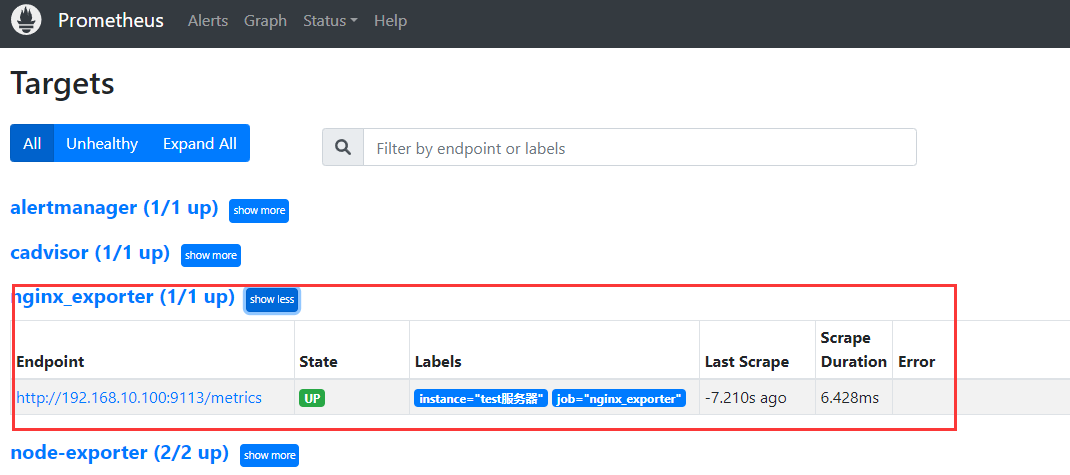
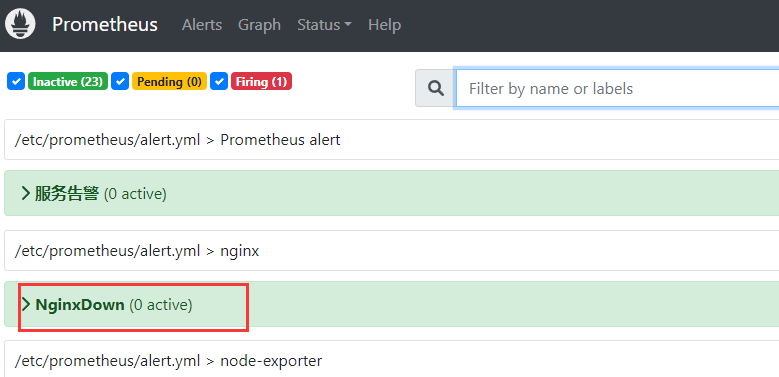
2.4 常用的监控指标
nginx_connections_accepted  接收请求数

nginx_connections_active    活动连接数

nginx_connections_handled   成功处理请求数

nginx_connections_reding    正在进行读操作的请求数

nginx_connections_waiting   正在等待的请求数

nginx_connections_writing   正在进行写操作的请求数

nginx_connections_requests  总请求数
2.5 添加触发器
# 添加触发器

cd /data/docker-prometheus

cat >>prometheus/alert.yml <<"EOF"

- name: nginx

  rules:

  # 对任何实例超过30秒无法联系的情况发出警报

  - alert: NginxDown

    expr: nginx_up == 0

    for: 30s

    labels:

      severity: critical

    annotations:

      summary: "nginx异常,实例:{{ $labels.instance }}"

      description: "{{ $labels.job }} nginx已关闭"

EOF

# 检查配置:

docker exec -it prometheus promtool check config /etc/prometheus/prometheus.yml

# 重载配置

curl -X POST http://localhost:9090/-/reload
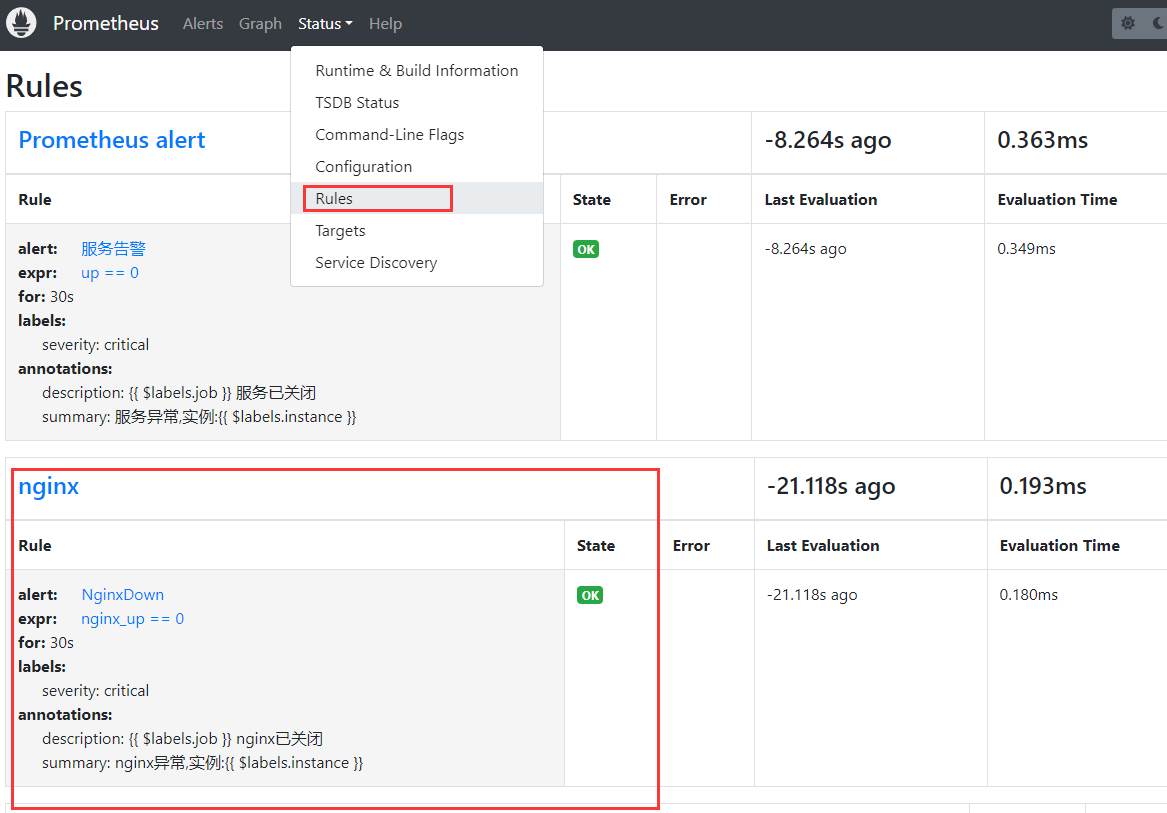
2.6 展示数据
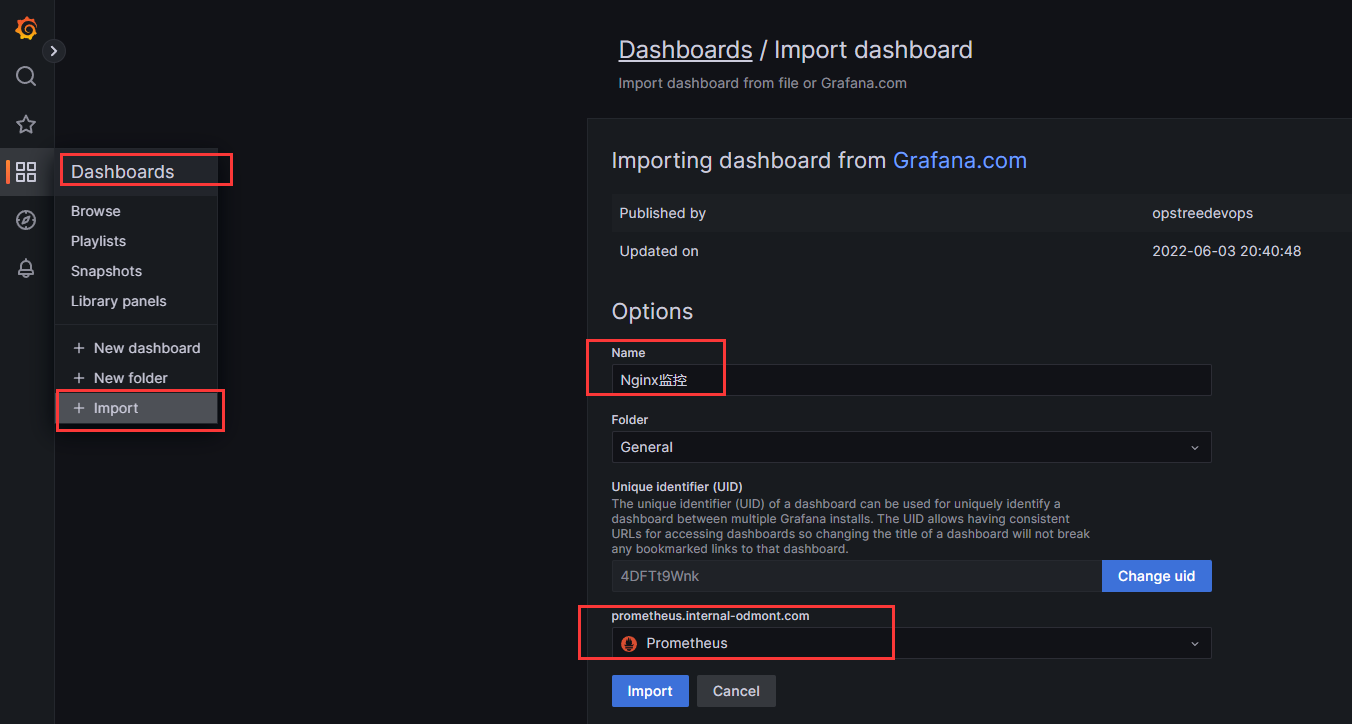
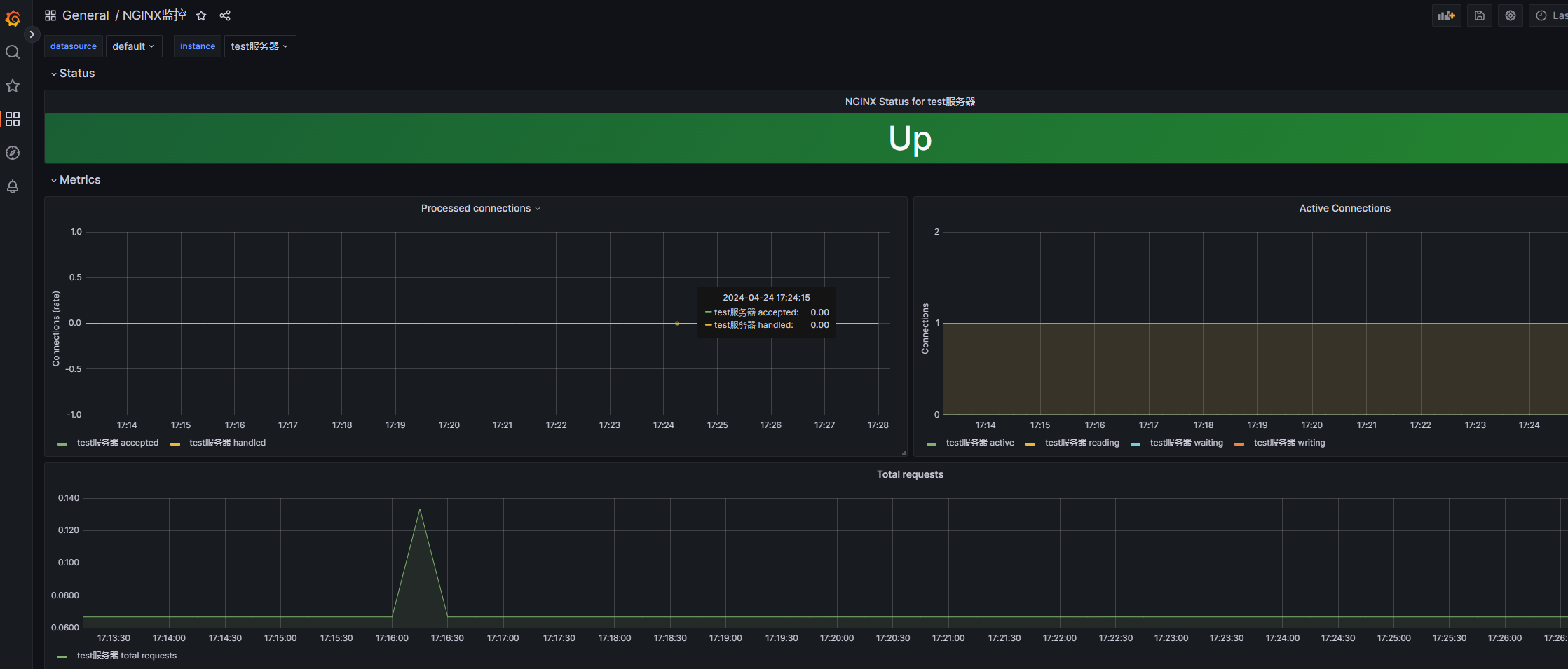
grafana展示prometheus从nginx_exporter收集到的数据
https://grafana.com/grafana/dashboards/12708
或者 https://grafana.com/grafana/dashboards/14900-nginx/
5.prometheus监控--监控nginx的更多相关文章
- 基于k8s集群部署prometheus监控ingress nginx
目录 基于k8s集群部署prometheus监控ingress nginx 1.背景和环境概述 2.修改prometheus配置 3.检查是否生效 4.配置grafana图形 基于k8s集群部署pro ...
- Prometheus 系统监控方案 一
最近一直在折腾时序类型的数据库,经过一段时间项目应用,觉得十分不错.而Prometheus又是刚刚推出不久的开源方案,中文资料较少,所以打算写一系列应用的实践过程分享一下. Prometheus 是什 ...
- 使用Prometheus+Grafana监控MySQL实践
一.介绍Prometheus Prometheus(普罗米修斯)是一套开源的监控&报警&时间序列数据库的组合,起始是由SoundCloud公司开发的.随着发展,越来越多公司和组织接受采 ...
- Prometheus Operator 监控Kubernetes
Prometheus Operator 监控Kubernetes 1. Prometheus的基本架构 Prometheus是一个开源的完整监控解决方案,涵盖数据采集.查询.告警.展示整个监控流程 ...
- kubernetes(k8s) Prometheus+grafana监控告警安装部署
主机数据收集 主机数据的采集是集群监控的基础:外部模块收集各个主机采集到的数据分析就能对整个集群完成监控和告警等功能.一般主机数据采集和对外提供数据使用cAdvisor 和node-exporter等 ...
- Prometheus+Grafana监控
什么是Prometheus? Prometheus是由SoundCloud开发的开源监控报警系统和时序列数据库(TSDB).Prometheus使用Go语言开发,是Google BorgMon监控系统 ...
- 实战 Prometheus 搭建监控系统
实战 Prometheus 搭建监控系统 Prometheus 是一款基于时序数据库的开源监控告警系统,说起 Prometheus 则不得不提 SoundCloud,这是一个在线音乐分享的平台,类似于 ...
- 050.集群管理-Prometheus+Grafana监控方案
一 Prometheus概述 1.1 Prometheus简介 Prometheus是由SoundCloud公司开发的开源监控系统,是继Kubernetes之后CNCF第2个毕业的项目,在容器和微服务 ...
- 部署Prometheus+Grafana监控
Prometheus 1.不是很友好,各种配置都手写 2.对docker和k8s监控有成熟解决方案 Prometheus(普罗米修斯) 是一个最初在SoudCloud上构建的监控系统,开源项目,拥有非 ...
- Docker搭建Prometheus+grafana监控系统
一.Prometheus简介 1.简介 Prometheus是由SoundCloud开发的开源监控报警系统和时序列数据库(TSDB). Prometheus使用Go语言开发,是Google BorgM ...
随机推荐
- druid开启sql监控平台
1.maven导入依赖 <dependency> <groupId>com.alibaba</groupId> <artifactId>druid< ...
- 第十三届蓝桥杯大赛软件赛省赛【Java 大学B 组】试题A: 星期计算
1 public class Test { 2 public static void main(String args[]) { 3 double res=20.0; 4 for(int i=0 ;i ...
- Android开发 活动activity
一.关于Activity 关于Activity必须要了解的内容有:Activity的生命周期.android任务栈.Activity启动模式.scheme跳转协议. 1.1 什么是Activity ...
- System.gc 之后到底发生了什么 ?
本文基于 OpenJDK17 进行讨论 在 JDK NIO 针对堆外内存的分配场景中,我们经常会看到 System.gc 的身影,比如当我们通过 FileChannel#map 对文件进行内存映射的时 ...
- 巴延兴:从主导多个SIG组到OpenHarmony“代码贡献之星”,我是如何做到的?
编者按:在 OpenHarmony 生态发展过程中,涌现了大批优秀的代码贡献者,本专题旨在表彰贡献.分享经验,文中内容来自嘉宾访谈,不代表 OpenHarmony 工作委员会观点. 巴延兴 深圳开鸿数 ...
- 空间音频技术与生态发展高峰论坛成功举办,业界首个Audio Vivid创作工具花瓣三维声亮相
11月26日至27日,UWA世界超高清视频产业联盟(以下简称"UWA联盟").上海交通大学-南加州大学文化创意产业学院.华为联合举办了"互联智慧,共赢未来" 超 ...
- 使用 bat 注册 ocx 控件
注册 新建 reg.bat cd /d %~dp0 regsvr32 ./xxx.ocx 反注册 新建 unreg.bat cd /d %~dp0 regsvr32 /u ./xxx.ocx
- selenium 关闭浏览--- close 与 quit 的区别
selenium 关闭浏览器,有两种方式 close quit 既然都是关闭浏览器,为什么要写两种方式? 区别 close: close只是关闭浏览器,但是不会退出 webdriver quit: q ...
- OOM异常类型总结
OOM是什么?英文全称为 OutOfMemoryError(内存溢出错误).当程序发生OOM时,如何去定位导致异常的代码还是挺麻烦的. 要检查OOM发生的原因,首先需要了解各种OOM情况下会报的异常信 ...
- B端架构升级之路
一.背景 随着B端业务快速发展,系统愈趋复杂.我们发起了B端架构升级专项,基于B端业务的特点,从研发规范建设.B端架构基建.系统架构升级和落地保障等多方面提升了B端的架构水平. 二.升级思路 架构是一 ...