
<Spring Cloud>入门三 Ribbon
1.Ribbon
客户端软负载均衡组件
1.1配置
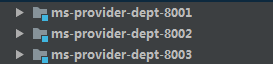
搭建了三个消费者供客户端调用:
1.修改yml
eureka:

  client:

    service-url:

      defaultZone: http://eureka-server01:8761/eureka/,http://eureka-server02:8762/eureka/

    register-with-eureka: false
2.修改配置类
@LoadBalanced ,默认采用RoundRobin
@Configuration

public class ConfigBean {

    @Bean

    @LoadBalanced //开启负载均衡 Ribbon

    public RestTemplate getRestTemplate(){

        return new RestTemplate();

    }

}
3.启动类上标注 eurekaclient
@SpringBootApplication

@EnableEurekaClient

public class App_Consumer_Dept_80 {

    public static void main(String[] args) {

        SpringApplication.run(App_Consumer_Dept_80.class, args);

    }

}
1.2 修改负载均衡算法
在配置类中注入需要算法的Bean
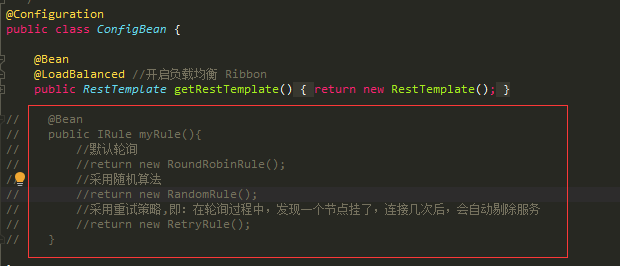
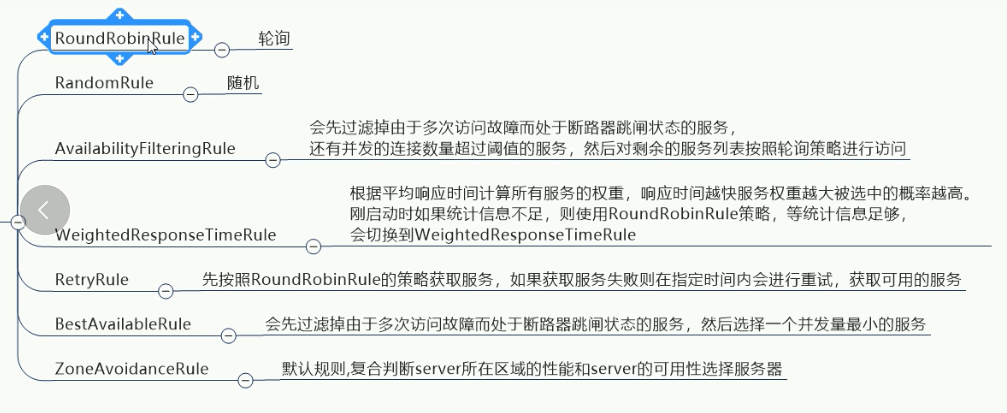
可选算法
1.3 自定义负载均衡算法
@RibbonClient
name:服务提供方的application.name
configuration = 自定义配置类的名字

注意自定义配置类不能在spring boot 启动类的同包或子包下,或者使@ComponentScan不扫描该类
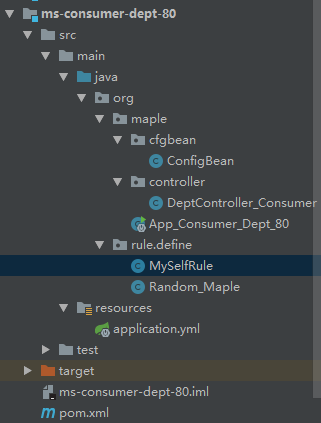
package org.rule.define;

import com.netflix.loadbalancer.IRule;

import org.springframework.context.annotation.Bean;

import org.springframework.context.annotation.Configuration;

/**

 * @author mapleins

 * @Date 2019-01-12 21:45

 * @Desc 自定义ribbon 的rule不能再@ComponentScan的包或子包下

 **/

@Configuration

public class MySelfRule {

    /**

     * 需求:轮询访问,每个服务访问3次

     */

    @Bean

    public IRule myRule(){

        return new RoundRobin_Maple();

    }

}
编写自己的算法,轮询访问,每台服务器访问3次
复制了随机算法的源代码,进行修改
package org.rule.define;

import com.netflix.client.config.IClientConfig;

import com.netflix.loadbalancer.AbstractLoadBalancerRule;

import com.netflix.loadbalancer.ILoadBalancer;

import com.netflix.loadbalancer.Server;

import java.util.List;

import java.util.Random;

/**

 * @author mapleins

 * @Date 2019-01-12 22:05

 * @Desc 需求:轮询访问,每个服务访问3次

 **/

public class RoundRobin_Maple extends AbstractLoadBalancerRule {

    /**

     * 当前该服务器被访问的次数

     */

    private int total = 0 ;

    /**

     * 当前是哪台服务器

     */

    private int currentIndex = 0 ;

    public RoundRobin_Maple() {

    }

    public Server choose(ILoadBalancer lb, Object key) {

        if (lb == null) {

            return null;

        } else {

            Server server = null;

            while(server == null) {

                if (Thread.interrupted()) {

                    return null;

                }

                List<Server> upList = lb.getReachableServers();

                List<Server> allList = lb.getAllServers();

                int serverCount = allList.size();

                if (serverCount == 0) {

                    return null;

                }

                if(currentIndex < upList.size()){ //当前服务器的index<节点数

                    if(total < 3){

                        total++;

                    }else {

                        currentIndex++;

                        total = 0;

                        continue;

                    }

                }else {

                    currentIndex = 0;

                    total = 0;

                    continue;

                }

                server = (Server)upList.get(currentIndex);

                if (server == null) {

                    Thread.yield();

                } else {

                    if (server.isAlive()) {

                        return server;

                    }

                    server = null;

                    Thread.yield();

                }

            }

            return server;

        }

    }

    public Server choose(Object key) {

        return this.choose(this.getLoadBalancer(), key);

    }

    public void initWithNiwsConfig(IClientConfig clientConfig) {

    }

}
<Spring Cloud>入门三 Ribbon的更多相关文章
- Spring Cloud 入门 之 Ribbon 篇(二)
原文地址:Spring Cloud 入门 之 Ribbon 篇(二) 博客地址:http://www.extlight.com 一.前言 上一篇<Spring Cloud 入门 之 Eureka ...
- Spring Cloud入门教程-Ribbon实现客户端负载均衡
简介 我们继续以之前博客的代码为基础,增加Ribbon组件来提供客户端负载均衡.负载均衡是实现高并发.高性能.可伸缩服务的重要组成部分,它可以把请求分散到一个集群中不同的服务器中,以减轻每个服务器的负 ...
- spring cloud: zuul(三): ribbon负载均衡配置
zuul的routes配置下path/url组合不支持负载均衡 下面介绍zuul的routes配置下的path/serviceId负载均衡配置 spring-boot-user微服务开启了:7901, ...
- Spring Cloud 入门 之 Feign 篇(三)
原文地址:Spring Cloud 入门 之 Feign 篇(三) 博客地址:http://www.extlight.com 一.前言 在上一篇文章<Spring Cloud 入门 之 Ribb ...
- Spring Cloud 入门教程(五): Ribbon实现客户端的负载均衡
接上节,假如我们的Hello world服务的访问量剧增,用一个服务已经无法承载, 我们可以把Hello World服务做成一个集群. 很简单,我们只需要复制Hello world服务,同时将原来的端 ...
- Spring Cloud入门教程(二):客户端负载均衡(Ribbon)
对于大型应用系统负载均衡(LB:Load Balancing)是首要被解决一个问题.在微服务之前LB方案主要是集中式负载均衡方案,在服务消费者和服务提供者之间又一个独立的LB,LB通常是专门的硬件,如 ...
- Spring Cloud 入门教程(三): 配置自动刷新
之前讲的配置管理, 只有在应用启动时会读取到GIT的内容, 之后只要应用不重启,GIT中文件的修改,应用无法感知, 即使重启Config Server也不行. 比如上一单元(Spring Cloud ...
- spring cloud 入门系列四:使用Hystrix 实现断路器进行服务容错保护
在微服务中,我们将系统拆分为很多个服务单元,各单元之间通过服务注册和订阅消费的方式进行相互依赖.但是如果有一些服务出现问题了会怎么样? 比如说有三个服务(ABC),A调用B,B调用C.由于网络延迟或C ...
- Spring Cloud 入门教程(六): 用声明式REST客户端Feign调用远端HTTP服务
首先简单解释一下什么是声明式实现? 要做一件事, 需要知道三个要素,where, what, how.即在哪里( where)用什么办法(how)做什么(what).什么时候做(when)我们纳入ho ...
随机推荐
- bzoj 2460: [BeiJing2011]元素【线性基+贪心】
先按魔力值从大到小排序,然后从大到小插入线性基中,如果插入成功就加上这个魔力值 因为线性基里是没有异或和为0的集合的,所以正确性显然,然后最优性,考虑放进去一个原来没选的,这样为了可行性就要删掉一个, ...
- MAC下如何配置Android手机调试(将测试手机加入到Mac系统的调试列表中)
第一步: 查看usb设备信息 在 终端输入:system_profiler SPUSBDataType 可以查看连接的usb设备的信息 比如我的usb信息如下(部分内容): 查看到我的Andr ...
- 浅谈欧拉函数 By cellur925
1.某神犇Blog 学了三遍的 欧拉函数φ--DEADFISH7 2.我要做一些补充o(* ̄▽ ̄*)o $φ(1)=1$: 公式有两种形式,一种有太多除法,实际可能会慢些.通用 对于任意$n$> ...
- plsqldeveloper永久注册码
注册码:Product Code:4t46t6vydkvsxekkvf3fjnpzy5wbuhphqzserial Number:601769 password:xs374ca
- Linux系统配置文件
ubuntu系统: ~/.bashrc:该文件保存终端的文本,颜色等各类设置 ~/.bash_history:保存用户运行过的命令 ~:表示home目录 /etc/matb:该文件保存所有挂载分区的文 ...
- hdu1856 More is better 基础并查集
#include <cstdio> #include <cstring> #include <algorithm> #include <cstdlib> ...
- 1-2JDK的安装和环境变量设置
JDK的下载和安装 可以去oracle官网里面下载JDK:http://www.oracle.com 英文不好的同学可以通过下面这个百度网盘的链接进行下载:http://pan.baidu.com/s ...
- MySQL执行带out的存储过程
CALL `sp_sys_get_code`(3,'sys_customer',@code); SELECT @code
- ios 根据颜色生成图片,十六进制颜色。
//颜色生成图片方法 - (UIImage *)imageWithColor:(UIColor *)color size:(CGSize)size { CGRect rect = CGRectMake ...
- iOS 使用UIBezierPath和CAShapeLayer画各种图形
CAShapeLayer 是 CALayer 的子类,但是比 CALayer 更灵活,可以画出各种图形,当然,你也可以使用其他方式来画,随你. 杂谈 在 CAShapeLayer 中,也可以像 CAL ...