
建立Heapster Influxdb Grafana集群性能监控平台
依赖于kubenets dns服务
图形化展示度量指标的实现需要集成k8s的另外一个Addons组件: Heapster 。
Heapster原生支持K8s(v1.0.6及以后版本)和 CoreOS ,并且支持多种存储后端,比如: InfluxDB 、 ElasticSearch 、 Kafka 。
镜像地址:
index.tenxcloud.com/jimmy/heapster-amd64:v1.3.0-beta.1
index.tenxcloud.com/jimmy/heapster-influxdb-amd64:v1.1.1
index.tenxcloud.com/jimmy/heapster-grafana-amd64:v4.0.2
安装Heapster
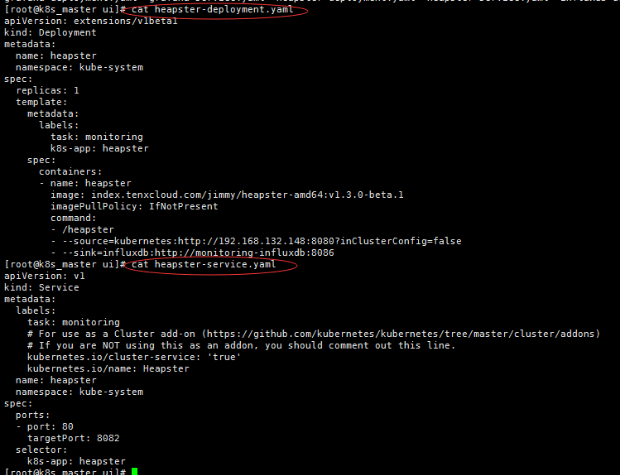
heapster-deployment.yaml
[root@k8s_master ui]# cat heapster-deployment.yaml
apiVersion: extensions/v1beta1
kind: Deployment
metadata:
  name: heapster
  namespace: kube-system
spec:
  replicas: 1
  template:
    metadata:
      labels:
        task: monitoring
        k8s-app: heapster
    spec:
      containers:
      - name: heapster
        image: index.tenxcloud.com/jimmy/heapster-amd64:v1.3.0-beta.1
        imagePullPolicy: IfNotPresent
        command:
        - /heapster
        - --source=kubernetes:http://192.168.132.148:8080?inClusterConfig=false
        - --sink=influxdb:http://monitoring-influxdb:8086
注意:修改- --source为自己的master apiserver访问地址 ,修改image地址(上面已经提供)
heapster-service.yaml
[root@k8s_master ui]# cat heapster-service.yaml
apiVersion: v1
kind: Service
metadata:
  labels:
    task: monitoring
    # For use as a Cluster add-on (https://github.com/kubernetes/kubernetes/tree/master/cluster/addons)
    # If you are NOT using this as an addon, you should comment out this line.
    kubernetes.io/cluster-service: 'true'
    kubernetes.io/name: Heapster
  name: heapster
  namespace: kube-system
spec:
  ports:
  - port: 80
    targetPort: 8082
  selector:
    k8s-app: heapster
创建deployment和service
#kubectl create -f heapster-deployment.yaml
#kubectl create -f heapster-service.yaml
配置Influxdb
influxdb 官方建议使用命令行或 HTTP API 接口来查询数据库,从 v1.1.0 版本开始默认关闭 admin UI,将在后续版本中移除 admin UI 插件。
开启镜像中 admin UI的办法如下:先导出镜像中的 influxdb 配置文件,开启插件后,再将配置文件内容写入 ConfigMap,最后挂载到镜像中,达到覆盖原始配置的目的。
$ #在镜像所在的宿主机上,导出镜像中的influxdb配置文件
$ docker run --rm --entrypoint 'cat' -ti heapster-influxdb-amd64:v1.1.1 /etc/config.toml >config.toml.orig
$ cp config.toml.orig config.toml
$ # 修改:启用 admin 接口
$ vim config.toml
修改第35行
< enabled = false
---
> enabled = true
$ #将修改后的config.toml拷贝到Master上,再将修改后的配置写入到ConfigMap对象中
$ kubectl create configmap influxdb-config --from-file=config.toml -n kube-system
$ # 将ConfigMap中的配置文件挂载到Pod中,达到覆盖原始配置的目的
influxdb-deployment.yaml文件
[root@k8s_master ui]# cat influxdb-deployment.yaml
apiVersion: extensions/v1beta1
kind: Deployment
metadata:
  name: monitoring-influxdb
  namespace: kube-system
spec:
  replicas: 1
  template:
    metadata:
      labels:
        task: monitoring
        k8s-app: influxdb
    spec:
      containers:
      - name: influxdb
        image: index.tenxcloud.com/jimmy/heapster-influxdb-amd64:v1.1.1
        volumeMounts:
        - mountPath: /data
          name: influxdb-storage
        - mountPath: /etc/
          name: influxdb-config
      volumes:
      - name: influxdb-config
        configMap:
          name: influxdb-config
      - name: influxdb-storage
        emptyDir: {}
influxdb-service.yaml
[root@k8s_master ui]# cat influxdb-service.yaml
apiVersion: v1
kind: Service
metadata:
  labels:
    task: monitoring
    # For use as a Cluster add-on (https://github.com/kubernetes/kubernetes/tree/master/cluster/addons)
    # If you are NOT using this as an addon, you should comment out this line.
    kubernetes.io/cluster-service: 'true'
    kubernetes.io/name: monitoring-influxdb
  name: monitoring-influxdb
  namespace: kube-system
spec:
  type: NodePort
  ports:
  - port: 8086
    targetPort: 8086
    name: http
  - port: 8083
    targetPort: 8083
    name: api
  selector:
    k8s-app: influxdb
创建deployment和service
#kubectl create -f influxdb-deployment.yaml
#kubectl create -f influxdb-service.yaml
安装grafana
grafana-deployment.yaml
[root@k8s_master ui]# cat grafana-deployment.yaml
apiVersion: extensions/v1beta1
kind: Deployment
metadata:
  name: monitoring-grafana
  namespace: kube-system
spec:
  replicas: 1
  template:
    metadata:
      labels:
        task: monitoring
        k8s-app: grafana
    spec:
      containers:
      - name: grafana
        image: index.tenxcloud.com/jimmy/heapster-grafana-amd64:v4.0.2
        ports:
          - containerPort: 3000
            protocol: TCP
        volumeMounts:
        - mountPath: /var
          name: grafana-storage
        env:
        - name: INFLUXDB_HOST
          value: monitoring-influxdb
        - name: GRAFANA_PORT
          value: "
          # The following env variables are required to make Grafana accessible via
          # the kubernetes api-server proxy. On production clusters, we recommend
          # removing these env variables, setup auth for grafana, and expose the grafana
          # service using a LoadBalancer or a public IP.
        - name: GF_AUTH_BASIC_ENABLED
          value: "false"
        - name: GF_AUTH_ANONYMOUS_ENABLED
          value: "true"
        - name: GF_AUTH_ANONYMOUS_ORG_ROLE
          value: Admin
        - name: GF_SERVER_ROOT_URL
          # If you're only using the API Server proxy, set this value instead:
          value: /api/v1/proxy/namespaces/kube-system/services/monitoring-grafana/
          #value: /
      volumes:
      - name: grafana-storage
        emptyDir: {}
grafana-service.yaml
[root@k8s_master ui]# cat grafana-service.yaml
apiVersion: v1
kind: Service
metadata:
  labels:
    # For use as a Cluster add-on (https://github.com/kubernetes/kubernetes/tree/master/cluster/addons)
    # If you are NOT using this as an addon, you should comment out this line.
    kubernetes.io/cluster-service: 'true'
    kubernetes.io/name: monitoring-grafana
  name: monitoring-grafana
  namespace: kube-system
spec:
  # In a production setup, we recommend accessing Grafana through an external Loadbalancer
  # or through a public IP.
  # type: LoadBalancer
  # You could also use NodePort to expose the service at a randomly-generated port
  # type: NodePort
  ports:
  - port: 80
    targetPort: 3000
  selector:
    k8s-app: grafana
创建deployment和service
#kubectl create -f grafana-deployment.yaml
#kubectl create -f grafana-service.yaml
获取所有pod
[root@k8s_master ui]#  kubectl get pod -n kube-system
NAME                                           READY     STATUS    RESTARTS   AGE
heapster-3275159538-fdvhf                      1/1       Running   0          5s
kubernetes-dashboard-latest-1381663337-0wwml   1/1       Running   1          19h
monitoring-grafana-2812960871-gbsdf            1/1       Running   1          16h
monitoring-influxdb-1975863524-nmbpk           1/1       Running   1          16h
打印日志
[root@k8s_master ui]# kubectl logs -f pods/heapster-3275159538-fdvhf -n kube-system

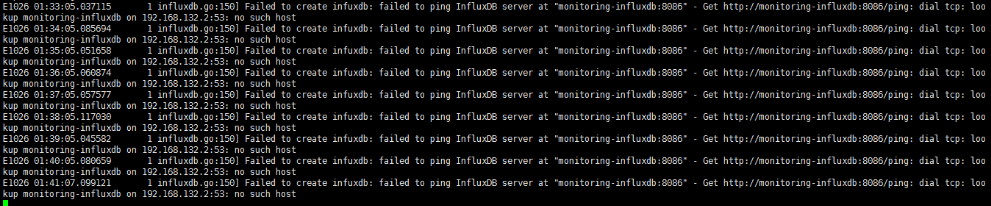
如果没有配置dns,Influxdb会报如下错误
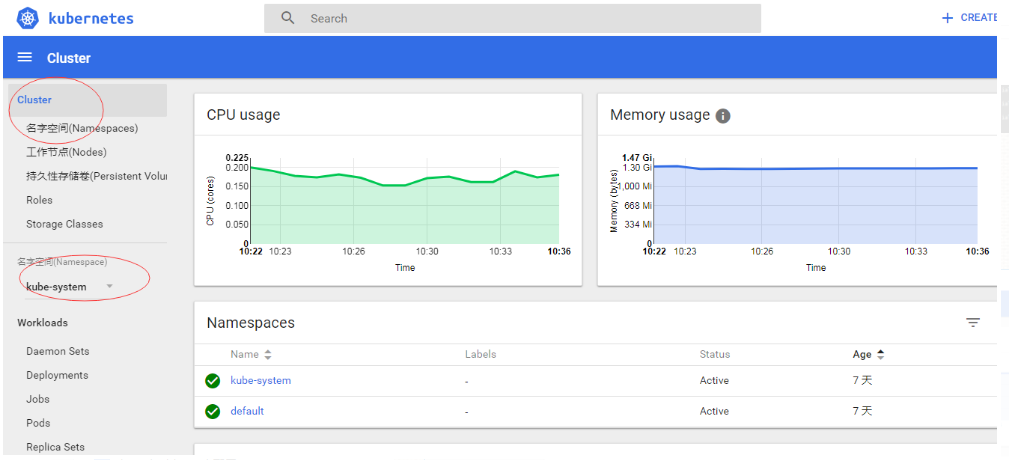
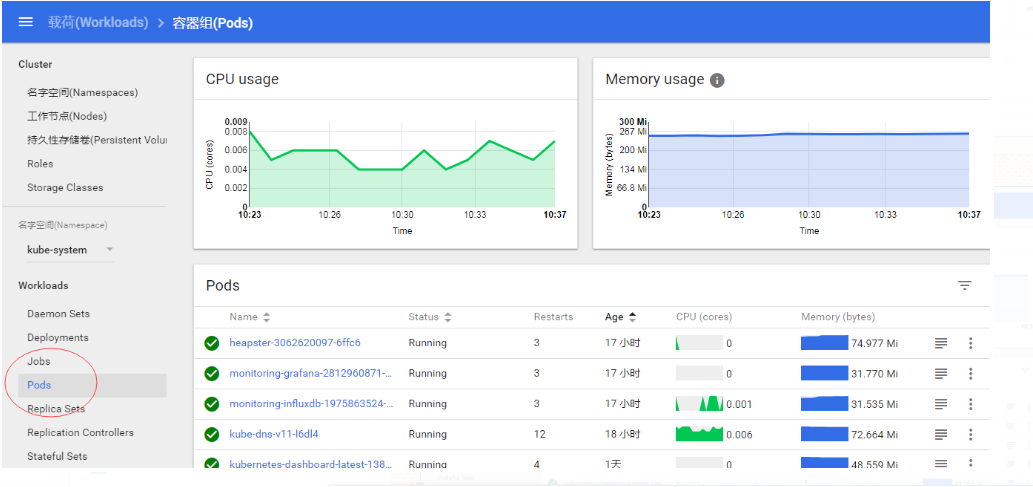
访问验证:
http://192.168.132.148:8080/ui
验证Influxdb
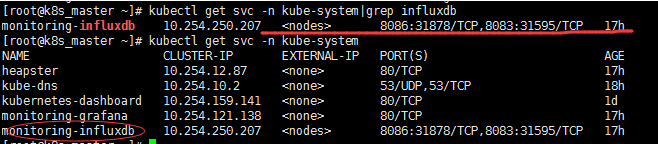
8086端口对应31878
访问:
http://192.168.132.148:8080/api/v1/proxy/namespaces/kube-system/services/monitoring-influxdb:8083/

这里的ip为部署influxdb的主机
查看状态
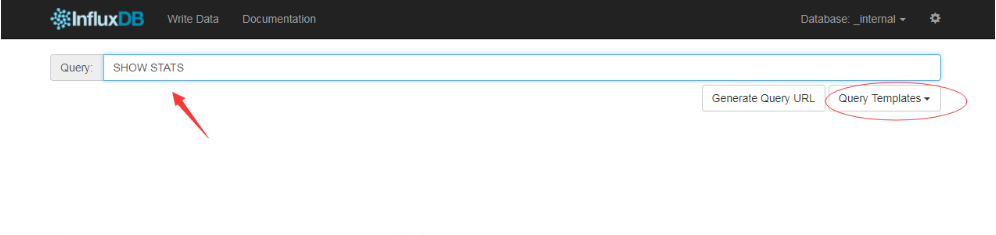
直接回车

通过 kube-apiserver 的非安全端口访问 influxdb 的 admin UI 界面:
[root@k8s_master ~]# kubectl cluster-info

注:这些地址均可在以上的deployment.yaml 里设置
grafan地址:
http://192.168.132.148:8080/api/v1/proxy/namespaces/kube-system/services/monitoring-grafana/dashboard/db/cluster
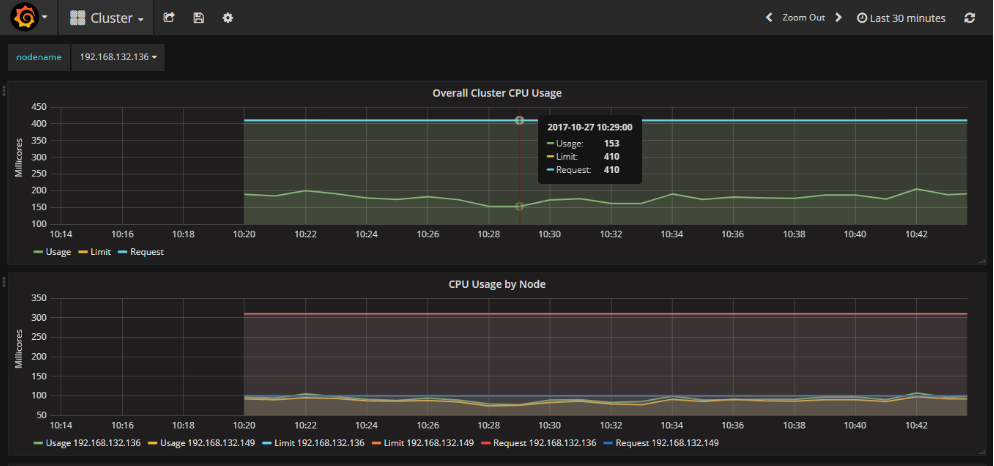

配置信息

建立Heapster Influxdb Grafana集群性能监控平台的更多相关文章
- cAdvisor0.24.1+InfluxDB0.13+Grafana4.0.2搭建Docker1.12.3 Swarm集群性能监控平台
目录 [TOC] 1.基本概念 既然是对Docker的容器进行监控,我们就不自己单独搭建cAdvisor.InfluxDB.Grarana了,本文中这三个实例,主要以Docker容器方式运行. 本 ...
- 高可用Kubernetes集群-14. 部署Kubernetes集群性能监控平台
参考文档: Github介绍:https://github.com/kubernetes/heapster Github yaml文件: https://github.com/kubernetes/h ...
- 搭建jmeter+influxdb+grafana压测实时监控平台(超详细,小白适用)
1.前言 在使用jmeter做性能测试的时候,监控系统性能的时候,无论是使用插件还是报告生成,都没法实现实时监控.使用JMeter+Influxdb+Grafana可以实现实时监控. 本次环境搭建各软 ...
- .NET Core微服务之基于App.Metrics+InfluxDB+Grafana实现统一性能监控
Tip: 此篇已加入.NET Core微服务基础系列文章索引 一.关于App.Metrics+InfluxDB+Grafana 1.1 App.Metrics App.Metrics是一款开源的支持. ...
- Linux服务器集群性能监控之Performance Co-Pilot(PCP)部署
转载自:https://blog.csdn.net/w84268426/article/details/78431778 在部署PCP时,我用到了两台cent os 7虚拟机. 1.官方安装文档htt ...
- 详解k8s原生的集群监控方案(Heapster+InfluxDB+Grafana) - kubernetes
1.浅析监控方案 heapster是一个监控计算.存储.网络等集群资源的工具,以k8s内置的cAdvisor作为数据源收集集群信息,并汇总出有价值的性能数据(Metrics):cpu.内存.netwo ...
- kubernetes 监控方案之:heapster+influxdb+grafana(十八)
目录 一.Heapster 介绍 二.部署 三.使用 heapster 已经 deprecated 了:https://github.com/kubernetes/heapster,所以下面的演示主要 ...
- Docker系列——InfluxDB+Grafana+Jmeter性能监控平台搭建(一)
在做性能测试的时候,重点关注点是各项性能指标,用Jmeter工具,查看指标数据,就是借助于聚合报告,但查看时也并不方便.那如何能更直观的查看各项数据呢?可以通过InfluxDB+Grafana+Jme ...
- Docker系列——InfluxDB+Grafana+Jmeter性能监控平台搭建(二)
在上一篇博文中,主要是讲了InfluxDB的配置,博文链接:https://www.cnblogs.com/hong-fithing/p/14453695.html,今天来分享下Jmeter的配置. ...
随机推荐
- jsp大学课程hi实验:分页在线测评(session的使用)
project_1_updata_1_1.jsp <%@ page contentType="text/html;charset=utf-8" language=" ...
- bzoj 2957 楼房重建 (线段树+思路)
链接: https://www.lydsy.com/JudgeOnline/problem.php?id=2957 思路: 用分块可以很简单的过掉,但是这道题也可以用线段树写. 分类讨论左区间最大值对 ...
- HNOI2017 抛硬币 (FakeBeng)
除了队长快跑外最难的题吧. 除了需要写\(exLucas\)之外,还教会了我大量的卡常技巧. 首先\(70\)分就是个直接按题意模拟,易得\(ans=\sum_{j=0}^{b} C_{b}^{j}\ ...
- SCOI 2015 Day2 简要题解
「SCOI2015」小凸玩密室 题意 小凸和小方相约玩密室逃脱,这个密室是一棵有 $ n $ 个节点的完全二叉树,每个节点有一个灯泡.点亮所有灯泡即可逃出密室.每个灯泡有个权值 $ A_i $,每条边 ...
- python3 特性
切片: 就是可以取到对象中任意位置的元素,[start:end:interval]:字符串.列表.元组可切片,字典.set()不可: L[:] #复制原L L[:10] #前十个 L[-10:] #后 ...
- [SPOJ375]QTREE - Query on a tree【树链剖分】
题目描述 给你一棵树,两种操作. 修改边权,查找边权的最大值. 分析 我们都知道,树链剖分能够维护点权. 而且每一条边只有一个,且唯一对应一个儿子节点,那么就把信息放到这个儿子节点上. 注意,lca的 ...
- <Android基础>(二) Activity Part 1
1.活动的基本用法: 1) 手动创建活动.创建加载布局 2) 在AndroidManifest文件中注册 3) 在活动中添加Button.Toast.Menu 4) 销毁活动 2.Intent 1) ...
- 654. Maximum Binary Tree
654. Maximum Binary Tree 题目大意: 意思就是给你一组数,先选一个最大的作为根,这个数左边的数组作为左子树,右边的数组作为右子树,重复上一步. 读完就知道是递归了. 这个题真尼 ...
- cobbler无人值守自动安装
无人值守安装(自动按定制的需求来批量安装linux系统) kickstart cobbler linux安装系统的方法: 1,光盘 把iso镜像刻录(windows下有类似nero这类软件)到光盘 ...
- react案例->新闻移动客户端--(react+redux+es6+webpack+es6的spa应用)
今天分享一个react应用,应在第一篇作品中说要做一个react+redux+xxx的应用.已经做完一部分,拿出来分享.github地址为:点我就可以咯~ 这里实现了一个新闻移动站的spa.本来想写p ...