
Android应用主界面底部菜单实现
介绍
现在绝大多数主流的应用主界面,都会包含一个底部菜单,就拿腾讯的QQ与微信来说,看起来是这样的
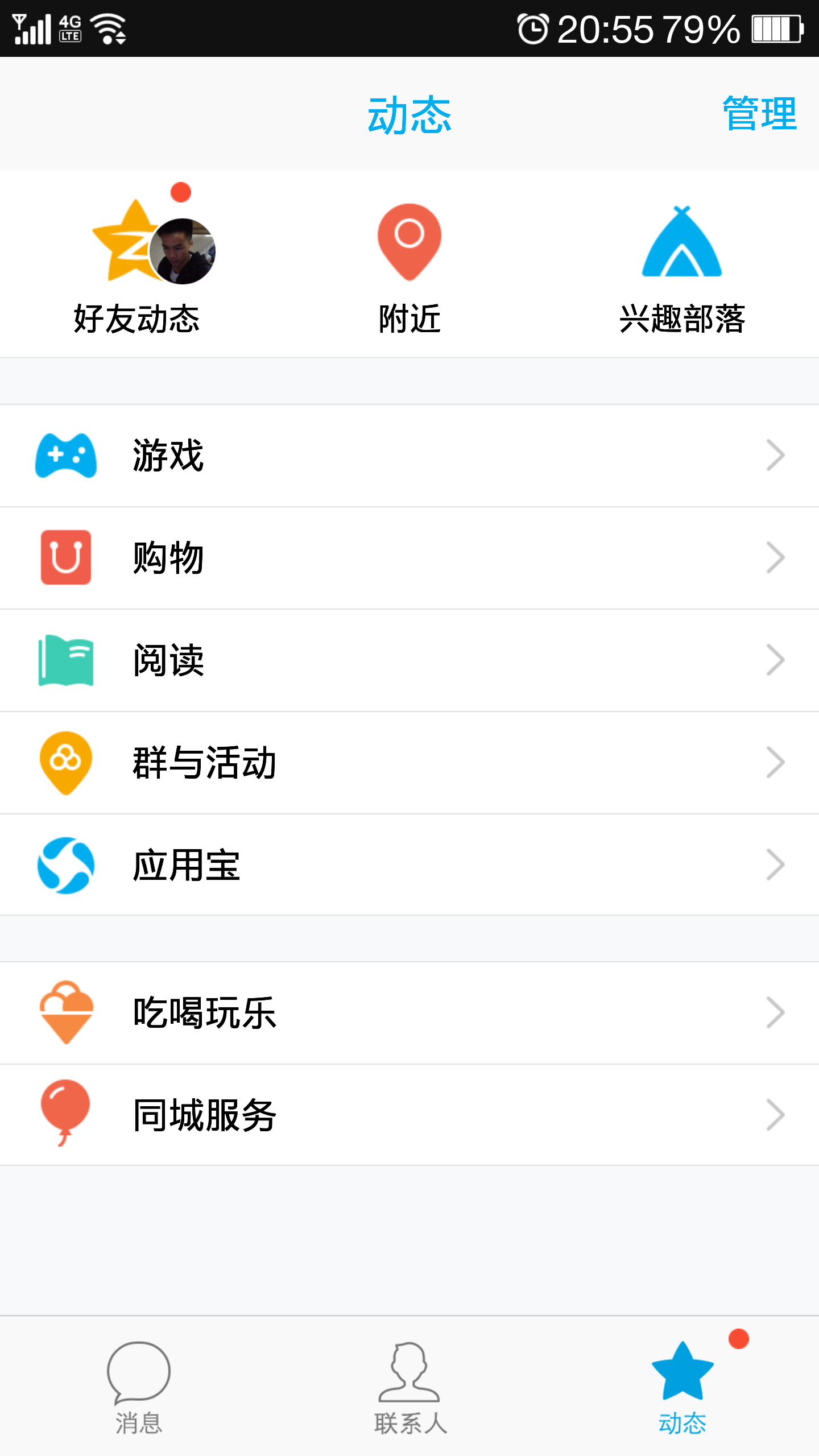
 《---我是底部菜单
原理
在很久以前,可以通过TabActivity实现相关功能,自从Fragment出来后,就被抛弃了。
原理也很简单
1、底部菜单通过自定义RadioGroup实现,通过setOnCheckedChangeListener监听切换内容。
2、内容切换,可以使用ViewPager(可以实现直接滑动切换),TabHost,FragmentManager来实现。、
PS:类似的,这样也可以通过HorizontalScrollView+ViewPager+RadioGroup实现类似网易新闻的顶部栏目效果(或者ViewPageIndicator),通过ScrollView.scrollTo((int)RadioButton.getLeft())来自动滑动到当前选择项,有空再写篇文章。
实现
在几种组合搭配来看,我比较喜欢使用Fragment+Tabhost+RadioGroup搭配实现。
首先上首页布局代码activity_main.xml,注意加粗id
<?xml version="1.0" encoding="utf-8"?>

<TabHost xmlns:android="http://schemas.android.com/apk/res/android"

    android:id="@android:id/tabhost"

    android:layout_width="fill_parent"

    android:layout_height="fill_parent" >

    <LinearLayout

        android:layout_width="fill_parent"

        android:layout_height="fill_parent"

        android:background="#FFFFFFFF"

        android:orientation="vertical" >

        <FrameLayout

            android:layout_width="fill_parent"

            android:layout_height="fill_parent"

            android:layout_weight="1" >

            <FrameLayout

                android:id="@android:id/tabcontent"

                android:layout_width="match_parent"

                android:layout_height="fill_parent" >

                <fragment

                    android:id="@+id/fragment_main"

                    android:name="com.example.tabmenu.MainFragment"

                    android:layout_width="fill_parent"

                    android:layout_height="fill_parent" />

                <fragment

                    android:id="@+id/fragment_mycenter"

                    android:name="com.example.tabmenu.MyCenterFragment"

                    android:layout_width="fill_parent"

                    android:layout_height="fill_parent" />

                <fragment

                    android:id="@+id/fragment_search"

                    android:name="com.example.tabmenu.SearchFragment"

                    android:layout_width="fill_parent"

                    android:layout_height="fill_parent" />

            </FrameLayout>

        </FrameLayout>

        <TabWidget

            android:id="@android:id/tabs"

            android:layout_width="fill_parent"

            android:layout_height="wrap_content"

            android:layout_weight="0.0"

            android:visibility="gone" />


     <!-- 我只是一条线 -->

        <LinearLayout

            android:layout_width="fill_parent"

            android:layout_height="3dp"

            android:background="@drawable/fbutton_color_emerald" >

        </LinearLayout>

        <RadioGroup

            android:id="@+id/radiogroup"

            android:layout_width="fill_parent"

            android:layout_height="wrap_content"

            android:layout_gravity="bottom"

            android:background="@drawable/fbutton_color_turquoise"

            android:gravity="center_vertical"

            android:orientation="horizontal" >

            <!-- android:background="@drawable/bk_footer" -->

            <RadioButton

                android:id="@+id/radio_search"

                style="@style/main_tab_bottom"

                android:layout_weight="1"

                android:background="@drawable/footer_itembg_selector"

                android:drawableTop="@drawable/footer_search_selector"

                android:text="搜索" />

            <RadioButton

                android:id="@+id/radio_main"

                style="@style/main_tab_bottom"

                android:layout_weight="1"

                android:background="@drawable/footer_itembg_selector"

                android:button="@null"

                android:checked="true"

                android:drawableTop="@drawable/footer_main_selector"

                android:text="首 页" />

            <RadioButton

                android:id="@+id/radio_mycenter"

                style="@style/main_tab_bottom"

                android:layout_weight="1"

                android:background="@drawable/footer_itembg_selector"

                android:drawableTop="@drawable/footer_mycenter_selector"

                android:text="个人中心" />

        </RadioGroup>

    </LinearLayout>

</TabHost>
其中RadioButton的样式按照需要自己定义
    <style name="main_tab_bottom">

        <item name="android:textSize">10sp</item>

        <item name="android:textColor">#ffffffff</item>

        <item name="android:ellipsize">marquee</item>

        <item name="android:gravity">center_horizontal</item>

        <item name="android:background">#00000000</item>

        <item name="android:paddingTop">2dp</item>

        <item name="android:layout_width">fill_parent</item>

        <item name="android:layout_height">wrap_content</item>

        <item name="android:button">@null</item>

        <item name="android:singleLine">true</item>

        <item name="android:drawablePadding">2dp</item>

        <item name="android:layout_weight">1.0</item>

    </style>
MainActivity代码
package com.example.tabmenu;

import android.support.v7.app.ActionBarActivity;

import android.os.Bundle;

import android.view.Menu;

import android.view.MenuItem;

import android.view.Window;

import android.view.animation.AnimationUtils;

import android.widget.RadioGroup;

import android.widget.RadioGroup.OnCheckedChangeListener;

import android.widget.TabHost;

public class MainActivity extends ActionBarActivity {

    // tab用参数

    private TabHost tabHost;

    private RadioGroup radiogroup;

    private int menuid;

    @Override

    protected void onCreate(Bundle savedInstanceState) {

        super.onCreate(savedInstanceState);

        setContentView(R.layout.activity_main);

        radiogroup = (RadioGroup) findViewById(R.id.radiogroup);

        tabHost = (TabHost) findViewById(android.R.id.tabhost);

        tabHost.setup();

        tabHost.addTab(tabHost.newTabSpec("main").setIndicator("main")

                .setContent(R.id.fragment_main));

        tabHost.addTab(tabHost.newTabSpec("mycenter").setIndicator("mycenter")

                .setContent(R.id.fragment_mycenter));

        tabHost.addTab(tabHost.newTabSpec("search").setIndicator("search")

                .setContent(R.id.fragment_search));

        radiogroup.setOnCheckedChangeListener(new OnCheckedChangeListener() {

            @Override

            public void onCheckedChanged(RadioGroup group, int checkedId) {

                menuid = checkedId;

                int currentTab = tabHost.getCurrentTab();

                switch (checkedId) {

                case R.id.radio_main:

                    tabHost.setCurrentTabByTag("main");

                    //如果需要动画效果就使用

                    //setCurrentTabWithAnim(currentTab, 0, "main");

                    getSupportActionBar().setTitle("首页");

                    break;

                case R.id.radio_mycenter:

                    //tabHost.setCurrentTabByTag("mycenter");

                    setCurrentTabWithAnim(currentTab, 1, "mycenter");

                    getSupportActionBar().setTitle("个人中心");

                    break;

                case R.id.radio_search:

                    tabHost.setCurrentTabByTag("search");

                    getSupportActionBar().setTitle("搜索");

                }

                // 刷新actionbar的menu

                getWindow().invalidatePanelMenu(Window.FEATURE_OPTIONS_PANEL);

            }

        });

    }

    @Override

    public boolean onCreateOptionsMenu(Menu menu) {

        // Inflate the menu; this adds items to the action bar if it is present.

        switch (menuid) {

        case R.id.radio_main:

            getMenuInflater().inflate(R.menu.main, menu);

            break;

        case R.id.radio_mycenter:

            menu.clear();

            break;

        case R.id.radio_search:

            menu.clear();

            break;

        }

        return true;

    }

    @Override

    public boolean onOptionsItemSelected(MenuItem item) {

        // Handle action bar item clicks here. The action bar will

        // automatically handle clicks on the Home/Up button, so long

        // as you specify a parent activity in AndroidManifest.xml.

        int id = item.getItemId();

        if (id == R.id.action_settings) {

            return true;

        }

        return super.onOptionsItemSelected(item);

    }

    // 这个方法是关键,用来判断动画滑动的方向

    private void setCurrentTabWithAnim(int now, int next, String tag) {

        if (now > next) {

            tabHost.getCurrentView().startAnimation(AnimationUtils.loadAnimation(this, R.anim.push_right_out));

            tabHost.setCurrentTabByTag(tag);

            tabHost.getCurrentView().startAnimation(AnimationUtils.loadAnimation(this, R.anim.push_right_in));

        } else {

            tabHost.getCurrentView().startAnimation(AnimationUtils.loadAnimation(this, R.anim.push_left_out));

            tabHost.setCurrentTabByTag(tag);

            tabHost.getCurrentView().startAnimation(AnimationUtils.loadAnimation(this, R.anim.push_left_in));

        }

    }

}
最后demo截图,其他文件件demo

demo下载地址:
链接:http://pan.baidu.com/s/1dbuKA 密码:84iw
参考:
http://blog.csdn.net/loongggdroid/article/details/9469935
http://blog.csdn.net/eyebrows_cs/article/details/8145913
http://www.cnblogs.com/over140/archive/2011/03/02/1968042.html
Android应用主界面底部菜单实现的更多相关文章
- Xamarin.Android 利用Fragment实现底部菜单
效果图: 第一步:添加引用 引用 Crosslight.Xamarin.Android.Support.v7.AppCompat 这个包. 第二步:绘制Main和Fragment界面 fg_home. ...
- Android自定义控件系列(四)—底部菜单(下)
转载请注明出处:http://www.cnblogs.com/landptf/p/6290862.html 在app中经常会用到底部菜单的控件,每次都需要写好多代码,今天我们用到了前几篇博客里的控件来 ...
- [模拟Android微信]主界面
首先看很像模仿: 走出来: 实现过程: 依赖类库:actionbarsherlock 用actionbarsherlock来实现顶部的搜索的效果. tab用的是Viewpaper实现的. 详细细节: ...
- ViewPager + Fragment 实现主界面底部导航栏
1. 四个类似的Frament布局 tab_main_fragment.xml <LinearLayout xmlns:android="http://schemas.android. ...
- android笔记---主界面(二)自定义actionbar环境的配置
第一步,添加java文件 第二步,添加actionbar的item文件 是个选择器,点中状态和选中状态 <?xml version="1.0" encoding=" ...
- android笔记---主界面(一)
<?xml version="1.0" encoding="utf-8"?> <TabHost xmlns:android="htt ...
- 【Android】5.0 第5章 常用基本控件--本章示例主界面
分类:C#.Android.VS2015: 创建日期:2016-02-06 这一章主要介绍Android简单控件的基本用法.本章源程序共有9个示例,这些示例都在同一个项目中. 项目名:ch05demo ...
- Android学习系列(22)--App主界面比较
本文算是一篇漫谈,谈一谈当前几个流行应用的主界面布局,找个经典的布局我们自己也来实现一个.不是为了追求到底有多难,而是为了明白我们确实需要这么做. 走个题,android的UI差异化市场依然很大,依然 ...
- Android ActionBar应用实战,高仿微信主界面的设计
转载请注明出处:http://blog.csdn.net/guolin_blog/article/details/26365683 经过前面两篇文章的学习,我想大家对ActionBar都已经有一个相对 ...
随机推荐
- [REFERENCE] Real-Time-Normal-Map-Dxt-Compression
DXT5N & 3Dc(aka BC5) compression in common code & SIMD: http://mrelusive.com/publications/pa ...
- 户外物理渗透:终端机,客户端的web测试思路
现在的客户端界面越做越好看了,很多用到了web技术,轻便.界面炫.更新快,但是这样web的缺点也就出来了,就是不稳定,容易受用户等因素影响. 因为很多客户端web是内嵌的,内部通信,所以很多对安全的考 ...
- PC和移动端浏览器同步测试工具Browsersync使用介绍
在移动端网页开发中,总是因为不方便调试,导致各种问题不容易被发现.但是现在有了Browsersync,一切都解决了. 不熟悉的同学可以看看Browsersync的官方网站Browsersync中文网. ...
- SOA之(1)——SOA架构基础概念
在深入探讨什么是面向服务的架构(SOA)之前,先建立一些基本的概念和术语的基本描述而非严格定义,所以也许有些定义在业内还存留争议,此处暂且忽略. 架构基础 技术架构(Technology Archit ...
- 采用Asp.Net的Forms身份验证时,持久Cookie的过期时间会自动扩展
原文:http://www.cnblogs.com/sanshi/archive/2012/06/22/2558476.html 若是持久Cookie,Cookie的有效期Expiration属性有当 ...
- 03server平台delphi程序不支持直接调用webservice
经过多次测试和查证,发现03server平台用delphi7.0开发的应用程序就是不支持直接调用webservice,无论这个webservice是delphi开发的还是C#开发,抑或是java开发的 ...
- hdu 2094 产生冠军(STL,set)
题目 //把所有的出现的名字开始默认都为冠军(1),然后输了的置为0,表示不为冠军,最后统计不为0的, //当有且只有一个不为0的,这个就为冠军,否则,不能产生冠军. //以上思路来自别人的博客.. ...
- POJ 1936
#include<iostream> #include<string> using namespace std; int main() { //freopen("ac ...
- 我是如何学习 Linux 的
为何要学习 Linux? 这个问题可能困扰着很多 Linux 初学者和爱好者,其实我也说不上来为何要学习 Linux,可能最实在的理由就是—-Linux 相关工作岗位很多.在“见到” Linux 的第 ...
- HDU 5151 Sit sit sit 区间DP + 排列组合
Sit sit sit 问题描述 在一个XX大学中有NN张椅子排成一排,椅子上都没有人,每张椅子都有颜色,分别为蓝色或者红色. 接下来依次来了NN个学生,标号依次为1,2,3,...,N. 对于每个学 ...