
四、Spring中使用@Conditional按照条件注册Bean
以前其实是写过@Condtional注解的笔记的,这里附上链接:
Spring中的@conditional注解
但已经忘记的差不多了,所以今天再重新学习下,可以互补着学习
@Contional:按照一定的条件进行判断,满足条件给容器中注册bean
首先准备一个person实体类,具体代码不列了,前几篇博文中都有。
要使用@Condtional注解,必须实现Conditon接口,并实现其抽象方法mathes,也即用来判断条件的。
然后是准备配置类:
@Configuration

public class MainConfig2 {

    //如果系统是windows,给容器中注册("bill")

	//如果是linux系统,给容器中注册("linus")

	@Conditional({WindowsCondition.class})

	@Bean("bill")

	public Person person01(){

		return new Person("Bill Gates",62);

	}

	@Conditional(LinuxCondition.class)

	@Bean("linus")

	public Person person02(){

		return new Person("linus", 48);

	}

}
//判断是否windows系统

public class WindowsCondition implements Condition {

	@Override

	public boolean matches(ConditionContext context, AnnotatedTypeMetadata metadata) {

		Environment environment = context.getEnvironment();

		String property = environment.getProperty("os.name");

		if(property.contains("Windows")){

			return true;

		}

		return false;

	}

}
//判断是否linux系统

public class LinuxCondition implements Condition {

	/**

	 * ConditionContext:判断条件能使用的上下文(环境)

	 * AnnotatedTypeMetadata:注释信息

	 */

	@Override

	public boolean matches(ConditionContext context, AnnotatedTypeMetadata metadata) {

		// TODO是否linux系统

		//1、能获取到ioc使用的beanfactory

		ConfigurableListableBeanFactory beanFactory = context.getBeanFactory();

		//2、获取类加载器

		ClassLoader classLoader = context.getClassLoader();

		//3、获取当前环境信息

		Environment environment = context.getEnvironment();

		//4、获取到bean定义的注册类

		BeanDefinitionRegistry registry = context.getRegistry();

		String property = environment.getProperty("os.name");

		//可以判断容器中的bean注册情况,也可以给容器中注册bean

		boolean definition = registry.containsBeanDefinition("person");

		if(property.contains("linux")){

			return true;

		}

		return false;

	}
写一个测试类,当前我们的环境是Windows10的环境,所以配置类中第二个显然是不满足的。
package com.atguigu.test;

import java.util.Map;

import org.junit.Test;

import org.springframework.context.annotation.AnnotationConfigApplicationContext;

import org.springframework.core.env.ConfigurableEnvironment;

import com.atguigu.bean.Blue;

import com.atguigu.bean.Person;

import com.atguigu.config.MainConfig;

import com.atguigu.config.MainConfig2;

public class IOCTest {

	AnnotationConfigApplicationContext applicationContext = new AnnotationConfigApplicationContext(MainConfig2.class);

	@Test

	public void test03(){

		String[] namesForType = applicationContext.getBeanNamesForType(Person.class);

		ConfigurableEnvironment environment = applicationContext.getEnvironment();

		//动态获取环境变量的值;Windows 10

		String property = environment.getProperty("os.name");

		System.out.println(property);

		for (String name : namesForType) {

			System.out.println(name);

		}

		Map<String, Person> persons = applicationContext.getBeansOfType(Person.class);

		System.out.println(persons);

	}

}
打印出结果:
Windows 10 // 系统环境

bill // 第二个@Bean("linus")没有被注册进来
现在我们再改变一下系统环境
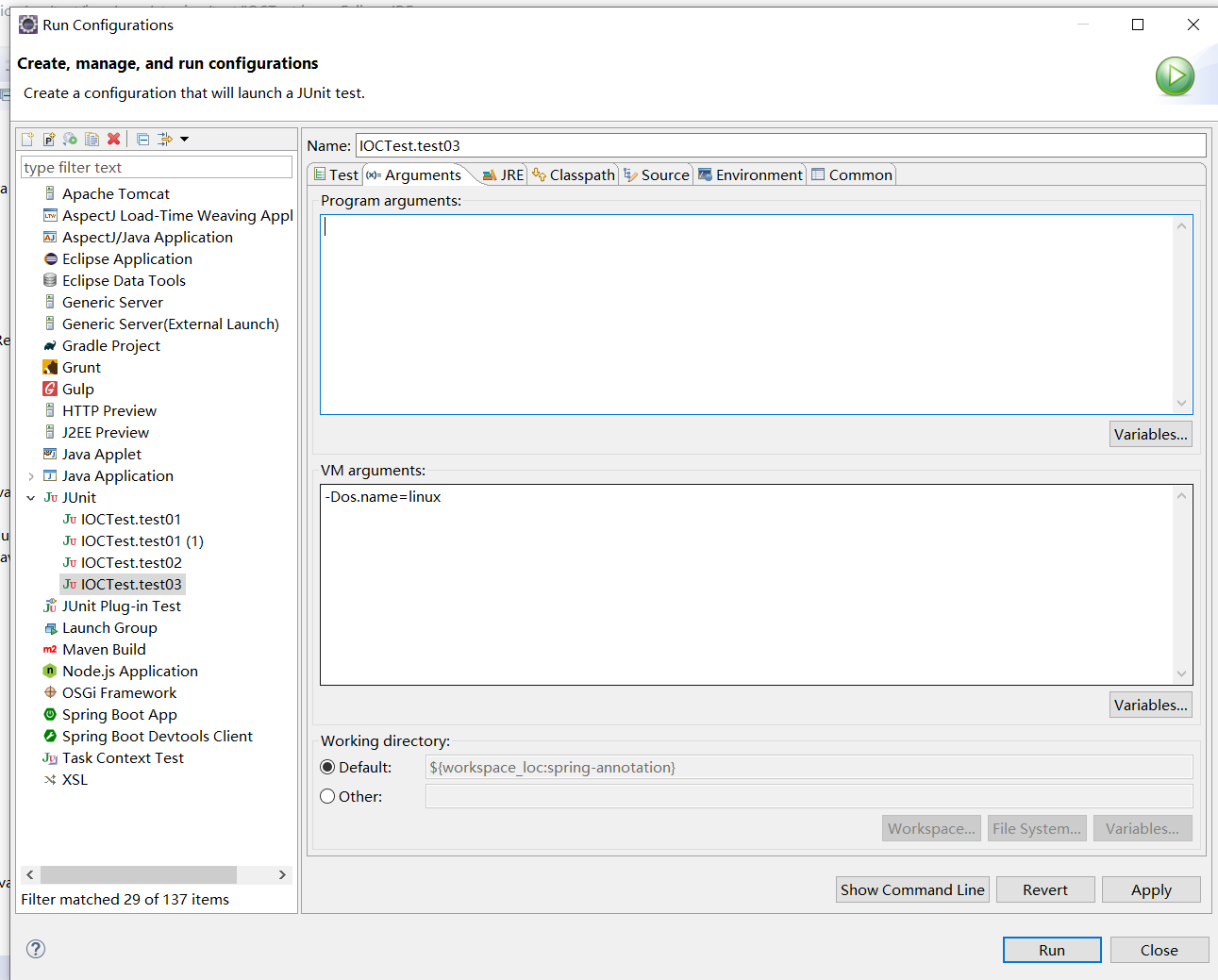
注意看虚拟机参数,这样我们的系统环境就会被识别为linux
点击Run运行,
linux // 系统环境

linus // linus被注册进来
需要注意的是:这个@Conditonal注解,也可以注解在类上,表示:类中组件统一设置。满足当前条件,这个类中配置的所有bean注册才能生效;
至于LinuxCondition和WindowsConditon这两个用来判断条件是否成立的类,可以参看文章开头给的链接。
四、Spring中使用@Conditional按照条件注册Bean的更多相关文章
- Spring注解驱动开发03(按照条件注册bean)
按照条件注册bean 使用@Conditional注解来控制bean的注册 使用步骤 先实现Condition接口,条件写在matches方法里 注意事项:Condition接口是org.spring ...
- 7、组件注册-@Conditional-按照条件注册bean
7.组件注册-@Conditional-按照条件注册bean @Conditional 按照一定的条件进行判断,满足条件给容器注入bean 按照条件进行动态装配. Spring 4 开始提供的一个注解 ...
- 使用spring配置类代替xml配置文件注册bean类
spring配置类,即在类上加@Configuration注解,使用这种配置类来注册bean,效果与xml文件是完全一样的,只是创建springIOC容器的方式不同: //通过xml文件创建sprin ...
- Spring系列11:@ComponentScan批量注册bean
回顾 在前面的章节,我们介绍了@Comfiguration和@Bean结合AnnotationConfigApplicationContext零xml配置文件使用Spring容器的方式,也介绍了通过& ...
- Spring 5:以函数式方式注册 Bean
http://www.baeldung.com/spring-5-functional-beans 作者:Loredana Crusoveanu 译者:http://oopsguy.com 1.概述 ...
- 【归纳】springboot中的IOC注解:注册bean和使用bean
目前了解的springboot中IOC注解主要分为两类: 1. 注册bean:@Component和@Repository.@Service.@Controller .@Configuration 共 ...
- Spring(五)核心容器 - 注册 Bean、BeanDefinitionRegistry 简介
目录 前言 正文 1.BeanDefinitionRegistry 简介 2.registerBeanDefinition 方法注册 Bean 最后 前言 上篇文章我们对 BeanDefinition ...
- 【学习笔记】Spring中的BeanFactory和ApplicationContext 以及 Bean的生命周期(Y2-3-2)
BeanFactory和ApplicationContext Spring的IoC容器就是一个实现了BeanFactory接口的可实例化类. Spring提供了两种不同的容器: 一种是最基本的Bean ...
- Spring IOC(2)----如何注册bean定义
前面说到IOC容器在刷新之前的一些初始化工作,现在来看看在refresh()方法中,是怎样来加载注册我们自己的bean定义的. refresh()方法中有很多功能,从注释中就可以看出来 我们本次重点关 ...
随机推荐
- centos7部署inotify与rsync实现实时数据同步
实验环境:CentOS Linux release 7.6.1810 node1:192.168.216.130 客户端(向服务端发起数据同步) node2:192.168.216.132 服务端(接 ...
- Json在序列化getter导致的问题
Java中的Json序列化,不容忽视的getter 问题重现 public class AjaxJson { private boolean success; private String msg; ...
- Keil MDK5生成 .bin文件的简单教程(图文)
以下参考https://blog.csdn.net/u014563989/article/details/51127519,同时自己实测. 1.按如图步骤做,主要是要找到fromelf.exe的路径: ...
- 关于吲哚美辛(NSAIDS)对袢利尿药的影响。
吲哚美辛 一方面是解热镇痛抗炎药,是最强的PG合成酶抑制药之一,另一方面,吲哚美辛可于袢利尿药如呋塞米.依他尼酸竞争近曲小管有机酸分泌途径,可以影响后者的排泄和作用. 吲哚美辛可以抑制前列腺素的合成, ...
- LOJ P10015 扩散 题解
每日一题 day49 打卡 Analysis 用dis数组记录每两个点之间的时间,再用一个传递闭包来维护最小的时间就好了 #include<iostream> #include<cs ...
- .NET Core入门程序及命令行练习
用命令行一步一步新建项目.添加Package.Restore.Build.Run 执行的实现方式,更让容易让我们了解.NET Core的运行机制. 准备工作 安装.NET Core 运行环境,下载地址 ...
- dbt 0.14.0 发布
以下内容来自官方博客,新的功能还是很不错的,后边尝试使用下. 参考资料:https://blog.fishtownanalytics.com/dbt-v0-14-0-better-serving-ou ...
- apache-tomcat安装
1.下载apache-tomcat 网址:http://tomcat.apache.org 下载 tomcat 9.0.29 2.解压后设置控制台显示中文不乱码 在 apache-tomcat-9.0 ...
- C++之Lambda研究
目录 目录 1 1. 前言 1 2. 示例1 1 3. 示例2 2 4. 示例3 3 5. 示例4 3 6. 示例5 6 7. 匿名类规则 6 8. 参考资料 7 1. 前言 本文代码测试环境为“GC ...
- vuex如何实现数据持久化,刷新页面存储的值还存在
1.安装: npm install vuex-persistedstate --save 2.找到store/index.js import Vue from 'vue' import Vuex fr ...