
springboot外置的Servlet容器
嵌入式Servlet容器:应用打成可执行的jar
优点:简单、便携;
缺点:默认不支持JSP、优化定制比较复杂(使用定制器【ServerProperties、自定义EmbeddedServletContainerCustomizer】,自己编写嵌入式Servlet容器的创建工厂【EmbeddedServletContainerFactory】);
外置的Servlet容器:外面安装Tomcat---应用war包的方式打包;
步骤:
1)、必须创建一个war项目;(利用idea创建好目录结构)
2)、将嵌入式的Tomcat指定为provided;
<dependency>

<groupId>org.springframework.boot</groupId>

<artifactId>spring-boot-starter-tomcat</artifactId>

<scope>provided</scope>

</dependency>
3)、必须编写一个SpringBootServletInitializer的子类,并调用configure方法
public class ServletInitializer extends SpringBootServletInitializer {

 @Override

protected SpringApplicationBuilder configure(SpringApplicationBuilder application) {

//传入SpringBoot应用的主程序

return application.sources(SpringBoot04WebJspApplication.class);

 }

}
4)、启动服务器就可以使用;
原理
jar包:执行SpringBoot主类的main方法,启动ioc容器,创建嵌入式的Servlet容器;
war包:启动服务器,服务器启动SpringBoot应用【SpringBootServletInitializer】,启动ioc容器;
servlet3.0(Spring注解版):
8.2.4 Shared libraries / runtimes pluggability:
规则:
1)、服务器启动(web应用启动)会创建当前web应用里面每一个jar包里面ServletContainerInitializer实例:
2)、ServletContainerInitializer的实现放在jar包的META-INF/services文件夹下,有一个名为javax.servlet.ServletContainerInitializer的文件,内容就是ServletContainerInitializer的实现类的全类名
3)、还可以使用@ , 在应用启动的时候加载我们感兴趣的类;
流程:
1)、启动Tomcat
2)、org\springframework\spring-web\4.3.14.RELEASE\spring-web-4.3.14.RELEASE.jar!\META-INF\services\javax.servlet.ServletContainerInitializer:
Spring的web模块里面有这个文件:org.springframework.web.SpringServletContainerInitializer
3)、SpringServletContainerInitializer将@HandlesTypes(WebApplicationInitializer.class)标注的所有这个类型的类都传入到onStartup方法的Set<Class<?>>;为这些WebApplicationInitializer类型的类创建实例;
4)、每一个WebApplicationInitializer都调用自己的onStartup;
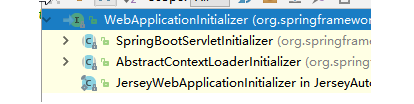
5)、相当于我们的SpringBootServletInitializer的类会被创建对象,并执行onStartup方法
6)、SpringBootServletInitializer实例执行onStartup的时候会createRootApplicationContext;创建容器
protected WebApplicationContext createRootApplicationContext(

      ServletContext servletContext) {

    //1、创建SpringApplicationBuilder

   SpringApplicationBuilder builder = createSpringApplicationBuilder();

   StandardServletEnvironment environment = new StandardServletEnvironment();

   environment.initPropertySources(servletContext, null);

   builder.environment(environment);

   builder.main(getClass());

   ApplicationContext parent = getExistingRootWebApplicationContext(servletContext);

   if (parent != null) {

      this.logger.info("Root context already created (using as parent).");

      servletContext.setAttribute(

            WebApplicationContext.ROOT_WEB_APPLICATION_CONTEXT_ATTRIBUTE, null);

      builder.initializers(new ParentContextApplicationContextInitializer(parent));

   }

   builder.initializers(

         new ServletContextApplicationContextInitializer(servletContext));

   builder.contextClass(AnnotationConfigEmbeddedWebApplicationContext.class);

    //调用configure方法,子类重写了这个方法,将SpringBoot的主程序类传入了进来

   builder = configure(builder);

    //使用builder创建一个Spring应用

   SpringApplication application = builder.build();

   if (application.getSources().isEmpty() && AnnotationUtils

         .findAnnotation(getClass(), Configuration.class) != null) {

      application.getSources().add(getClass());

   }

   Assert.state(!application.getSources().isEmpty(),

         "No SpringApplication sources have been defined. Either override the "

               + "configure method or add an @Configuration annotation");

   // Ensure error pages are registered

   if (this.registerErrorPageFilter) {

      application.getSources().add(ErrorPageFilterConfiguration.class);

   }

    //启动Spring应用

   return run(application);

}
7)、Spring的应用就启动并且创建IOC容器
public ConfigurableApplicationContext run(String... args) {

StopWatch stopWatch = new StopWatch();

stopWatch.start();

ConfigurableApplicationContext context = null;

FailureAnalyzers analyzers = null;

configureHeadlessProperty();

SpringApplicationRunListeners listeners = getRunListeners(args);

listeners.starting();

try {

ApplicationArguments applicationArguments = new DefaultApplicationArguments(

args);

ConfigurableEnvironment environment = prepareEnvironment(listeners,

applicationArguments);

Banner printedBanner = printBanner(environment);

context = createApplicationContext();

analyzers = new FailureAnalyzers(context);

prepareContext(context, environment, listeners, applicationArguments,

printedBanner);

//刷新IOC容器

refreshContext(context);

afterRefresh(context, applicationArguments);

listeners.finished(context, null);

stopWatch.stop();

if (this.logStartupInfo) {

new StartupInfoLogger(this.mainApplicationClass)

.logStarted(getApplicationLog(), stopWatch);

}

return context;

}

catch (Throwable ex) {

handleRunFailure(context, listeners, analyzers, ex);

throw new IllegalStateException(ex);

}

}
==启动Servlet容器,再启动SpringBoot应用==
springboot外置的Servlet容器的更多相关文章
- SpringBoot使用外置的Servlet容器
SpringBoot默认使用嵌入式的Servlet容器,应用打包成可执行的jar包 优点:简单.便携 缺点:默认不支持jsp,优化定制比较复杂(使用定制器serverProperties.自定义Emb ...
- 使用外置的Servlet容器
嵌入式Servlet容器: 优点:简单.便捷 缺点:默认不支持JSP.优化定制比较复杂(使用定制器[ServerProperties.自定义EmbeddedServletContainerCustom ...
- 【串线篇】spring boot使用外置的Servlet容器
嵌入式Servlet容器:应用打成可执行的jar 优点:简单.便携: 缺点:默认不支持JSP.优化定制比较复杂 (使用定制器[ServerProperties/自定义EmbeddedServletCo ...
- SpringBoot(七) -- 嵌入式Servlet容器
一.嵌入式Servlet容器 在传统的开发中,我们在完成开发后需要将项目打成war包,在外部配置好TomCat容器,而这个TomCat就是Servlet容器.在使用SpringBoot开发时,我们无需 ...
- SpringBoot配置嵌入式Servlet容器
1).如何定制和修改Servlet容器的相关配置: 1.修改和server有关的配置(ServerProperties[也是EmbeddedServletContainerCustomizer]): ...
- java框架之SpringBoot(8)-嵌入式Servlet容器
前言 SpringBoot 默认使用的嵌入式 Servlet 容器为 Tomcat,通过依赖关系就可以看到: 问题: 如何定制和修改 Servlet 容器相关配置? SpringBoot 能否支持其它 ...
- springboot(八) 嵌入式Servlet容器自动配置原理和容器启动原理
1.嵌入式Servlet容器自动配置原理 1.1 在spring-boot-autoconfigure-1.5.9.RELEASE.jar => springboot自动配置依赖 jar包下,E ...
- SpringBoot定制修改Servlet容器
1.如何修改Servlet容器的相关配置: 第一种:在application.properties中修改和server有关的配置(ServerProperties提供): server.port=80 ...
- 尚硅谷springboot学习27-使用外置servlet容器
嵌入式Servlet容器:应用打成可执行的jar 优点:简单.便携: 缺点:默认不支持JSP.优化定制比较复杂(使用定制器[ServerProperties.自定义EmbeddedServle ...
随机推荐
- Java多线程编程作业总结
一.多线程知识总结 1.线程同步 有关创建线程的知识就不过多的叙述了.就从主要的开始讲吧,讲一下线程的同步.与操作系统中的进程同步一样,线程同样面临着资源共享的问题,怎样处理线程的资源共享是运用多线程 ...
- java常用类-String类
* 字符串:就是由多个字符组成的一串数据.也可以看成是一个字符数组. * 通过查看API,我们可以知道 * A:字符串字面值"abc"也可以看成是一个字符串对象. * B:字符串是 ...
- poj 3744 Scout (Another) YYF I - 概率与期望 - 动态规划 - 矩阵快速幂
(Another) YYF is a couragous scout. Now he is on a dangerous mission which is to penetrate into th ...
- xlrd与xlwt的下载
读excel表格: xlrd 地址:https://pypi.org/project/xlrd/ 下载语句:pip install xlrd 写excel表格: xlwt https://pypi.o ...
- Git 收集别名
.gitconfig文件夹一般是在C:\Users\Administrator路径下,用于全局的git的配置 下面是git别名的设置: [alias] last = log -1 --stat a = ...
- python学习 day02打卡
今天主要学习的内容: 1.while 循环 : 语法: while 条件 : 循环体 #判断条件是否成立.如果成立执行循环体.然后再次判断条件...直到条件不成立石跳出循环 else : 当条件不成 ...
- C# linq 最大、最小对象的扩展
public static class LinqExtension { public static T MaxBy<T, TR>(this IEnumerable<T> en, ...
- [从零开始搭网站五]http网站Tomcat配置web.xml和server.xml
点击下面连接查看从零开始搭网站全系列 从零开始搭网站 上一章我们在CentOS下搭建了Tomcat,但是还是没有跑起来...那么这一章就把最后的配置给大家放上去. 有两种方式:一种是用 rm -f 给 ...
- centos6.6 安装MariaDB
参考文章:yum安装MariaDB(使用国内镜像快速安装,三分钟安装完毕) 安装环境: virtualbox下CentOS6.6(32位) 遇到的问题: 通过Maria官方提供的安装方式,源是国外的源 ...
- vs2013 报错error C1083: 无法打开包括文件:“gl\glew.h”: No such file or directory\
vs报错诸如如无法打开“gl\xxx.h”时, 解决方法: 1.去http://glew.sourceforge.net/下载相关文件,2.在下载下来的文件里找到xxx.h,将其复制到vs的相关目录下 ...