
eclipse构建maven+scala+spark工程
前提条件
下载安装Scala IDE build of Eclipse SDK
构建工程
1、新建maven工程
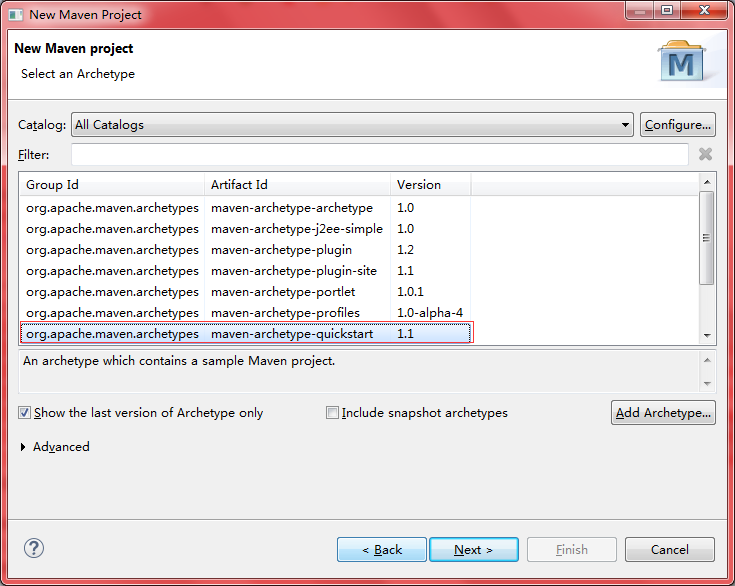
2、配置项目信息
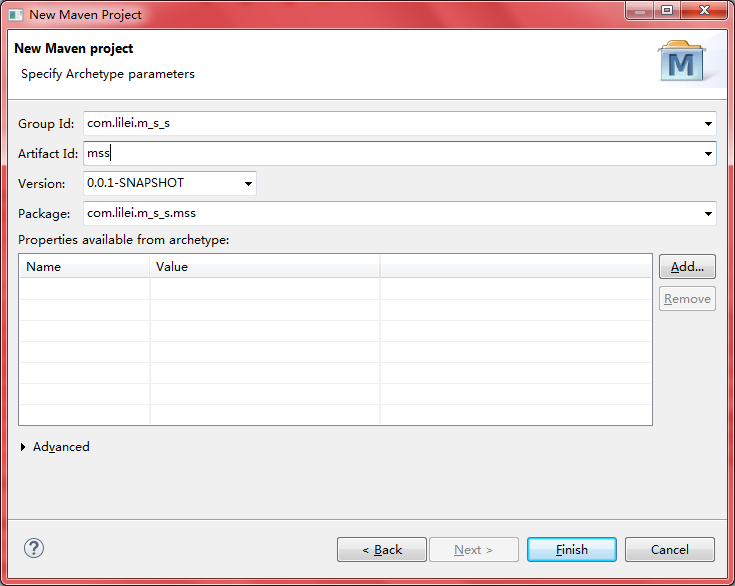
3、新建scala对应的Source Folder
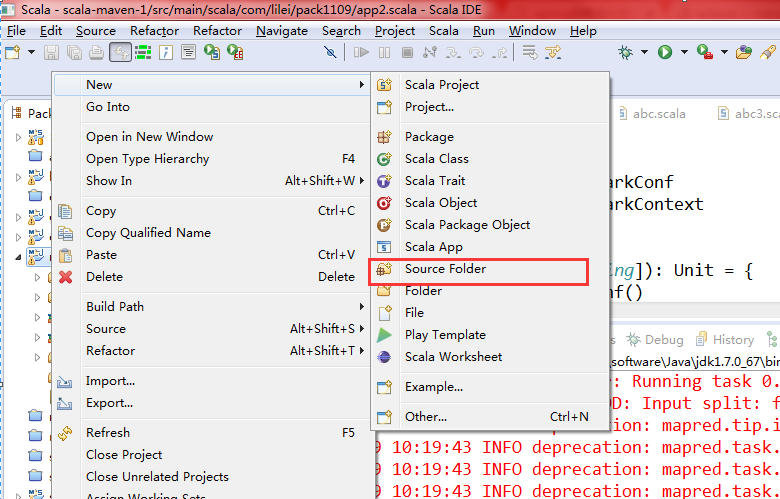
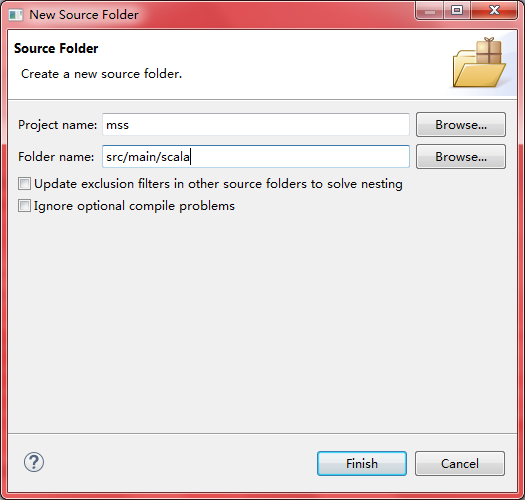
4、添加scala对应Archetype

5、配置pom.xml添加依赖包
<dependency>

			<groupId>org.apache.spark</groupId>

			<artifactId>spark-core_2.10</artifactId>

			<version>1.6.0</version>

		</dependency>

		<dependency>

			<groupId>org.apache.spark</groupId>

			<artifactId>spark-sql_2.10</artifactId>

			<version>1.6.0</version>

		</dependency>

		<dependency>

			<groupId>redis.clients</groupId>

			<artifactId>jedis</artifactId>

			<version>2.8.0</version>

		</dependency>

		<dependency>

			<groupId>postgresql</groupId>

			<artifactId>postgresql</artifactId>

			<version>9.1-901-1.jdbc4</version>

		</dependency>

		<!-- https://mvnrepository.com/artifact/com.databricks/spark-csv_2.11 -->

		<dependency>

			<groupId>com.databricks</groupId>

			<artifactId>spark-csv_2.10</artifactId>

			<version>1.3.2</version>

		</dependency>

		<!-- https://mvnrepository.com/artifact/org.apache.camel/camel-ftp -->

		<dependency>

			<groupId>org.apache.camel</groupId>

			<artifactId>camel-ftp</artifactId>

			<version>2.13.2</version>

		</dependency>

		<!-- https://mvnrepository.com/artifact/org.apache.hbase/hbase-client -->

		<!-- <dependency> <groupId>org.apache.hbase</groupId> <artifactId>hbase-client</artifactId>

			<version>1.2.0</version> </dependency> -->

		<dependency>

			<groupId>org.apache.hbase</groupId>

			<artifactId>hbase-client</artifactId>

			<version>1.2.0</version>

		</dependency>

		<dependency>

			<groupId>jdk.tools</groupId>

			<artifactId>jdk.tools</artifactId>

			<version>1.7</version>

			<scope>system</scope>

			<systemPath>${JAVA_HOME}/lib/tools.jar</systemPath>

		</dependency>

		<!-- https://mvnrepository.com/artifact/com.vividsolutions/jts -->

		<dependency>

			<groupId>com.vividsolutions</groupId>

			<artifactId>jts</artifactId>

			<version>1.13</version>

		</dependency>

		<!-- https://mvnrepository.com/artifact/com.opencsv/opencsv -->

		<dependency>

			<groupId>com.opencsv</groupId>

			<artifactId>opencsv</artifactId>

			<version>3.8</version>

		</dependency>

		<dependency>

			<groupId>org.apache.commons</groupId>

			<artifactId>commons-csv</artifactId>

			<version>1.2</version>

		</dependency>
到此项目部署配置完成。
运行scala程序
编写scala程序
package com.lilei

object test {

  def main(args: Array[String]): Unit = {

    println("hello scala world !")

  }

}
运行本地spark程序
编写spark程序
package com.lilei

import org.apache.spark.SparkConf

import org.apache.spark.SparkContext

object hello_spark {

  def main(args: Array[String]): Unit = {

    val conf = new SparkConf()

      .setAppName("dsfsdf").setMaster("local")

    val sc = new SparkContext(conf)

    val path = "C:\\test\\es\\elasticsearch-5.6.3\\config\\jvm.options"

    sc.textFile(path).foreach(println)

  }

}
输出信息:
Using Spark's default log4j profile: org/apache/spark/log4j-defaults.properties

17/11/09 10:36:40 INFO SparkContext: Running Spark version 1.6.0

17/11/09 10:36:40 WARN NativeCodeLoader: Unable to load native-hadoop library for your platform... using builtin-java classes where applicable

17/11/09 10:36:41 INFO SecurityManager: Changing view acls to: lilei3774

17/11/09 10:36:41 INFO SecurityManager: Changing modify acls to: lilei3774

17/11/09 10:36:41 INFO SecurityManager: SecurityManager: authentication disabled; ui acls disabled; users with view permissions: Set(lilei3774); users with modify permissions: Set(lilei3774)

17/11/09 10:36:41 INFO Utils: Successfully started service 'sparkDriver' on port 8351.

17/11/09 10:36:41 INFO Slf4jLogger: Slf4jLogger started

17/11/09 10:36:41 INFO Remoting: Starting remoting

17/11/09 10:36:42 INFO Remoting: Remoting started; listening on addresses :[akka.tcp://sparkDriverActorSystem@172.22.34.186:8388]

17/11/09 10:36:42 INFO Utils: Successfully started service 'sparkDriverActorSystem' on port 8388.

17/11/09 10:36:42 INFO SparkEnv: Registering MapOutputTracker

17/11/09 10:36:42 INFO SparkEnv: Registering BlockManagerMaster

17/11/09 10:36:42 INFO DiskBlockManager: Created local directory at C:\Users\lilei3774\AppData\Local\Temp\blockmgr-ddd1f997-a689-43d3-878e-73f2a76bd3da

17/11/09 10:36:42 INFO MemoryStore: MemoryStore started with capacity 146.2 MB

17/11/09 10:36:42 INFO SparkEnv: Registering OutputCommitCoordinator

17/11/09 10:36:42 INFO Utils: Successfully started service 'SparkUI' on port 4040.

17/11/09 10:36:42 INFO SparkUI: Started SparkUI at http://172.22.34.186:4040

17/11/09 10:36:42 INFO Executor: Starting executor ID driver on host localhost

17/11/09 10:36:42 INFO Utils: Successfully started service 'org.apache.spark.network.netty.NettyBlockTransferService' on port 8440.

17/11/09 10:36:42 INFO NettyBlockTransferService: Server created on 8440

17/11/09 10:36:42 INFO BlockManagerMaster: Trying to register BlockManager

17/11/09 10:36:42 INFO BlockManagerMasterEndpoint: Registering block manager localhost:8440 with 146.2 MB RAM, BlockManagerId(driver, localhost, 8440)

17/11/09 10:36:42 INFO BlockManagerMaster: Registered BlockManager

17/11/09 10:36:43 WARN SizeEstimator: Failed to check whether UseCompressedOops is set; assuming yes

17/11/09 10:36:43 INFO MemoryStore: Block broadcast_0 stored as values in memory (estimated size 135.5 KB, free 135.5 KB)

17/11/09 10:36:43 INFO MemoryStore: Block broadcast_0_piece0 stored as bytes in memory (estimated size 12.7 KB, free 148.2 KB)

17/11/09 10:36:43 INFO BlockManagerInfo: Added broadcast_0_piece0 in memory on localhost:8440 (size: 12.7 KB, free: 146.2 MB)

17/11/09 10:36:43 INFO SparkContext: Created broadcast 0 from textFile at hello_spark.scala:16

17/11/09 10:36:43 WARN : Your hostname, lilei03774 resolves to a loopback/non-reachable address: fe80:0:0:0:147a:9144:154:bd1f%26, but we couldn't find any external IP address!

17/11/09 10:36:44 INFO FileInputFormat: Total input paths to process : 1

17/11/09 10:36:44 INFO SparkContext: Starting job: foreach at hello_spark.scala:16

17/11/09 10:36:44 INFO DAGScheduler: Got job 0 (foreach at hello_spark.scala:16) with 1 output partitions

17/11/09 10:36:44 INFO DAGScheduler: Final stage: ResultStage 0 (foreach at hello_spark.scala:16)

17/11/09 10:36:44 INFO DAGScheduler: Parents of final stage: List()

17/11/09 10:36:44 INFO DAGScheduler: Missing parents: List()

17/11/09 10:36:44 INFO DAGScheduler: Submitting ResultStage 0 (MapPartitionsRDD[1] at textFile at hello_spark.scala:16), which has no missing parents

17/11/09 10:36:44 INFO MemoryStore: Block broadcast_1 stored as values in memory (estimated size 3.0 KB, free 151.2 KB)

17/11/09 10:36:44 INFO MemoryStore: Block broadcast_1_piece0 stored as bytes in memory (estimated size 1838.0 B, free 153.0 KB)

17/11/09 10:36:44 INFO BlockManagerInfo: Added broadcast_1_piece0 in memory on localhost:8440 (size: 1838.0 B, free: 146.2 MB)

17/11/09 10:36:44 INFO SparkContext: Created broadcast 1 from broadcast at DAGScheduler.scala:1006

17/11/09 10:36:44 INFO DAGScheduler: Submitting 1 missing tasks from ResultStage 0 (MapPartitionsRDD[1] at textFile at hello_spark.scala:16)

17/11/09 10:36:44 INFO TaskSchedulerImpl: Adding task set 0.0 with 1 tasks

17/11/09 10:36:44 INFO TaskSetManager: Starting task 0.0 in stage 0.0 (TID 0, localhost, partition 0,PROCESS_LOCAL, 2157 bytes)

17/11/09 10:36:44 INFO Executor: Running task 0.0 in stage 0.0 (TID 0)

17/11/09 10:36:44 INFO HadoopRDD: Input split: file:/C:/test/es/elasticsearch-5.6.3/config/jvm.options:0+3068

17/11/09 10:36:44 INFO deprecation: mapred.tip.id is deprecated. Instead, use mapreduce.task.id

17/11/09 10:36:44 INFO deprecation: mapred.task.id is deprecated. Instead, use mapreduce.task.attempt.id

17/11/09 10:36:44 INFO deprecation: mapred.task.is.map is deprecated. Instead, use mapreduce.task.ismap

17/11/09 10:36:44 INFO deprecation: mapred.task.partition is deprecated. Instead, use mapreduce.task.partition

17/11/09 10:36:44 INFO deprecation: mapred.job.id is deprecated. Instead, use mapreduce.job.id

## JVM configuration

################################################################

## IMPORTANT: JVM heap size

################################################################

##

## You should always set the min and max JVM heap

## size to the same value. For example, to set

## the heap to 4 GB, set:

##

## -Xms4g

## -Xmx4g

##

## See https://www.elastic.co/guide/en/elasticsearch/reference/current/heap-size.html

## for more information

##

################################################################

# Xms represents the initial size of total heap space

# Xmx represents the maximum size of total heap space

-Xms512m

-Xmx512m

################################################################

## Expert settings

################################################################

##

## All settings below this section are considered

## expert settings. Don't tamper with them unless

## you understand what you are doing

##

################################################################

## GC configuration

-XX:+UseConcMarkSweepGC

-XX:CMSInitiatingOccupancyFraction=75

-XX:+UseCMSInitiatingOccupancyOnly

## optimizations

# pre-touch memory pages used by the JVM during initialization

-XX:+AlwaysPreTouch

## basic

# force the server VM (remove on 32-bit client JVMs)

-server

# explicitly set the stack size (reduce to 320k on 32-bit client JVMs)

-Xss1m

# set to headless, just in case

-Djava.awt.headless=true

# ensure UTF-8 encoding by default (e.g. filenames)

-Dfile.encoding=UTF-8

# use our provided JNA always versus the system one

-Djna.nosys=true

# use old-style file permissions on JDK9

-Djdk.io.permissionsUseCanonicalPath=true

# flags to configure Netty

-Dio.netty.noUnsafe=true

-Dio.netty.noKeySetOptimization=true

-Dio.netty.recycler.maxCapacityPerThread=0

# log4j 2

-Dlog4j.shutdownHookEnabled=false

-Dlog4j2.disable.jmx=true

-Dlog4j.skipJansi=true

## heap dumps

# generate a heap dump when an allocation from the Java heap fails

# heap dumps are created in the working directory of the JVM

-XX:+HeapDumpOnOutOfMemoryError

# specify an alternative path for heap dumps

# ensure the directory exists and has sufficient space

#-XX:HeapDumpPath=${heap.dump.path}

## GC logging

#-XX:+PrintGCDetails

#-XX:+PrintGCTimeStamps

#-XX:+PrintGCDateStamps

#-XX:+PrintClassHistogram

#-XX:+PrintTenuringDistribution

#-XX:+PrintGCApplicationStoppedTime

# log GC status to a file with time stamps

# ensure the directory exists

#-Xloggc:${loggc}

# By default, the GC log file will not rotate.

# By uncommenting the lines below, the GC log file

# will be rotated every 128MB at most 32 times.

#-XX:+UseGCLogFileRotation

#-XX:NumberOfGCLogFiles=32

#-XX:GCLogFileSize=128M

# Elasticsearch 5.0.0 will throw an exception on unquoted field names in JSON.

# If documents were already indexed with unquoted fields in a previous version

# of Elasticsearch, some operations may throw errors.

#

# WARNING: This option will be removed in Elasticsearch 6.0.0 and is provided

# only for migration purposes.

#-Delasticsearch.json.allow_unquoted_field_names=true

17/11/09 10:36:44 INFO Executor: Finished task 0.0 in stage 0.0 (TID 0). 2044 bytes result sent to driver

17/11/09 10:36:44 INFO TaskSetManager: Finished task 0.0 in stage 0.0 (TID 0) in 95 ms on localhost (1/1)

17/11/09 10:36:44 INFO TaskSchedulerImpl: Removed TaskSet 0.0, whose tasks have all completed, from pool

17/11/09 10:36:44 INFO DAGScheduler: ResultStage 0 (foreach at hello_spark.scala:16) finished in 0.107 s

17/11/09 10:36:44 INFO DAGScheduler: Job 0 finished: foreach at hello_spark.scala:16, took 0.183296 s

17/11/09 10:36:44 INFO SparkContext: Invoking stop() from shutdown hook

17/11/09 10:36:44 INFO SparkUI: Stopped Spark web UI at http://172.22.34.186:4040

17/11/09 10:36:44 INFO MapOutputTrackerMasterEndpoint: MapOutputTrackerMasterEndpoint stopped!

17/11/09 10:36:44 INFO MemoryStore: MemoryStore cleared

17/11/09 10:36:44 INFO BlockManager: BlockManager stopped

17/11/09 10:36:44 INFO BlockManagerMaster: BlockManagerMaster stopped

17/11/09 10:36:44 INFO OutputCommitCoordinator$OutputCommitCoordinatorEndpoint: OutputCommitCoordinator stopped!

17/11/09 10:36:44 INFO SparkContext: Successfully stopped SparkContext

17/11/09 10:36:44 INFO ShutdownHookManager: Shutdown hook called

17/11/09 10:36:44 INFO ShutdownHookManager: Deleting directory C:\Users\lilei3774\AppData\Local\Temp\spark-2264631f-e639-4cca-8c51-7c98994dc6b1
eclipse构建maven+scala+spark工程的更多相关文章
- eclipse构建maven+scala+spark工程 转载
转载地址:http://jingpin.jikexueyuan.com/article/47043.html 本文先叙述如何配置eclipse中maven+scala的开发环境,之后,叙述如何实现sp ...
- Eclipse + Idea + Maven + Scala + Spark +sbt
http://jingpin.jikexueyuan.com/article/47043.html 新的scala 编译器idea使用 https://www.jetbrains.com/idea/h ...
- Eclipse+maven+scala+spark环境搭建
准备条件 我用的Eclipse版本 Eclipse Java EE IDE for Web Developers. Version: Luna Release (4.4.0) 我用的是Eclipse ...
- Eclipse构建Maven项目
1. 安装m2eclipse插件 要用Eclipse构建Maven项目,我们需要先安装meeclipse插件 点击eclipse菜单栏Help->Eclipse Marketpl ...
- Maven实战(三)Eclipse构建Maven项目
1. 安装m2eclipse插件 要用Eclipse构建Maven项目,我们需要先安装meeclipse插件 点击eclipse菜单栏Help->Eclipse Marketplac ...
- (转)Maven实战(三)Eclipse构建Maven项目
1. 安装m2eclipse插件 要用Eclipse构建Maven项目,我们需要先安装meeclipse插件 点击eclipse菜单栏Help->Eclipse Marketplac ...
- maven入门(1-4)使用eclipse构建maven项目
1. 安装m2eclipse插件 要用Eclipse构建Maven项目,我们需要先安装meeclipse插件 点击eclipse菜单栏Help->Eclipse Marketplac ...
- eclipse构建maven的web项目(转载)
eclipse构建maven的web项目 分类: java opensource2013-12-25 16:22 43人阅读 评论(0) 收藏 举报 maven框架webappwebeclipse 使 ...
- 使用eclipse构建Maven项目及发布一个Maven项目
开发环境: Eclipse Jee Mars(截止2015年12月1日目前的最新版eclipse4.5),下载地址:http://www.eclipse.org/downloads/ 因为此版本已经集 ...
随机推荐
- PyCharm基本操作
1.1 PyCharm基本使用 视频学习连接地址:http://edu.51cto.com/course/9043.html 1.1.1 在Pycharm下为你的Python项目配置Python解释器 ...
- Python自学笔记-面向对象相关(Mr seven)
---恢复内容开始--- http://www.cnblogs.com/wupeiqi/articles/5433893.html 类的成员可以分为三大类:字段.方法和属性. 一.字段 字段包括:普通 ...
- python中ConfigParse模块的用法
ConfigParser 是Python自带的模块, 用来读写配置文件, 用法及其简单. 配置文件的格式是: [...]包含的叫section section 下有option=value这样的键值 ...
- SAP 参照sto订单创建外向交货BAPI
DATA: SHIP_POINT TYPE TVST-VSTEL, "装运点/接收点 NUM_DELIVERIES TYPE VBNUM, STOCK_TRANS_ITEMS WITH HE ...
- Linux-问题集锦(1)
一. 某用户只读特定文件夹 只读目录 : /home/www/yqz/logs 1. 创建用户 useradd ReadOnly passwd ReadOnly 2. ...
- Cygwin - windows系统下运行linux操作 --代替linux虚拟机安装、双系统的繁琐
我把Cygwin视为Windows用户熟练linxu系统操作的良好途径.它不需要虚拟机.双系统等安装对电脑知识.硬件的要求,只需要基本的软件安装操作即可.以下是安装步骤供小白同胞参考. Cygwin安 ...
- win10 UWP 剪贴板 Clipboard
win10 UWP 剪贴板 Clipboard使用Windows.ApplicationModel.DataTransfer.Clipboard 设置文本 DataPackage dataPackag ...
- win10 uwp 俄罗斯方块
俄罗斯方块是一个很经典的游戏,做一个UWP俄罗斯方块没有什么用,我想说的是移植,把经典游戏移植到UWP. 我的所有博客都是抄别人的,这个才是我自己写的.后台很多代码还是抄别人的,我想说的是我们之前有很 ...
- 关于限制DHCP服务器广播的另类方法
0. 引言 如图,家里有两台计算机,分别处于不同房间.其中一台PC1能够与光猫直连:另外一台PC2较远,考虑到光猫有WLAN功能,便使用了一个路由器无线桥接到光猫,然后有线连接到PC2(均与光猫处于同 ...
- 使用getCurrentPosition方法实时获取当前Geolocation信息(赋源码文件)--html5、JavaScript
使用getCurrentPosition方法实时获取当前Geolocation信息: 1.typeof 运算符返回一个用来表示表达式的数据类型的字符串 <script> alert(typ ...