
tensorflow下识别手写数字基于MLP网络
 # coding: utf-8

 # In[1]:

 import tensorflow as tf

 import tensorflow.examples.tutorials.mnist.input_data as input_data

 # In[2]:

 mnist = input_data.read_data_sets("MNIST_data/", one_hot=True)

 # In[3]:

 print('train',mnist.train.num_examples,

       ',validation',mnist.validation.num_examples,

       ',test',mnist.test.num_examples)

 # In[4]:

 print('train images     :', mnist.train.images.shape,

       'labels:'           , mnist.train.labels.shape)

 # In[5]:

 import matplotlib.pyplot as plt

 def plot_image(image):

     plt.imshow(image.reshape(28,28),cmap='binary')

     plt.gcf().set_size_inches(2, 4)

     plt.show()

 # In[6]:

 plot_image(mnist.train.images[0])

 # In[7]:

 import numpy as np

 np.argmax(mnist.train.labels[0])

 # In[8]:

 import matplotlib.pyplot as plt

 def plot_images_labels_prediction(images,labels,

                                   prediction,idx,num=10):

     fig = plt.gcf()

     fig.set_size_inches(12, 14)

     if num>25: num=25

     for i in range(0, num):

         ax=plt.subplot(5,5, 1+i)

         ax.imshow(np.reshape(images[idx],(28, 28)),

                   cmap='binary')

         title= "label=" +str(np.argmax(labels[idx]))

         if len(prediction)>0:

             title+=",predict="+str(prediction[idx])

         ax.set_title(title,fontsize=10)

         ax.set_xticks([]);ax.set_yticks([])

         idx+=1

     plt.show()

 # In[9]:

 plot_images_labels_prediction(mnist.train.images,

                               mnist.train.labels,[],0)

 # In[10]:

 def layer(output_dim,input_dim,inputs, activation=None):

     W = tf.Variable(tf.random_normal([input_dim, output_dim]))

     b = tf.Variable(tf.random_normal([1, output_dim]))

     XWb = tf.matmul(inputs, W) + b

     if activation is None:

         outputs = XWb

     else:

         outputs = activation(XWb)

     return outputs

 # In[11]:

 x = tf.placeholder("float", [None, 784])

 h1=layer(output_dim=256,input_dim=784,

          inputs=x ,activation=tf.nn.relu)

 y_predict=layer(output_dim=10,input_dim=256,

                     inputs=h1,activation=None)

 y_label = tf.placeholder("float", [None, 10])

 # In[12]:

 loss_function = tf.reduce_mean(

                   tf.nn.softmax_cross_entropy_with_logits

                          (logits=y_predict ,

                           labels=y_label))

 optimizer = tf.train.AdamOptimizer(learning_rate=0.001).minimize(loss_function)

 # In[13]:

 correct_prediction = tf.equal(tf.argmax(y_label  , 1),

                               tf.argmax(y_predict, 1))

 accuracy = tf.reduce_mean(tf.cast(correct_prediction, "float"))

 # In[14]:

 trainEpochs = 20

 batchSize = 100

 totalBatchs = int(mnist.train.num_examples/batchSize)

 epoch_list=[];loss_list=[];accuracy_list=[]

 from time import time

 startTime=time()

 sess = tf.Session()

 sess.run(tf.global_variables_initializer())

 # In[15]:

 for epoch in range(trainEpochs):

     for i in range(totalBatchs):

         batch_x, batch_y = mnist.train.next_batch(batchSize)

         sess.run(optimizer,feed_dict={x: batch_x,y_label: batch_y})

     loss,acc = sess.run([loss_function,accuracy],

                         feed_dict={x: mnist.validation.images,

                                    y_label: mnist.validation.labels})

     epoch_list.append(epoch);

     loss_list.append(loss)

     accuracy_list.append(acc)

     print("Train Epoch:", '%02d' % (epoch+1), "Loss=",                 "{:.9f}".format(loss)," Accuracy=",acc)

 duration =time()-startTime

 print("Train Finished takes:",duration)

 # In[16]:

 get_ipython().magic('matplotlib inline')

 import matplotlib.pyplot as plt

 fig = plt.gcf()

 fig.set_size_inches(4,2)

 plt.plot(epoch_list, loss_list, label = 'loss')

 plt.ylabel('loss')

 plt.xlabel('epoch')

 plt.legend(['loss'], loc='upper left')

 # In[17]:

 plt.plot(epoch_list, accuracy_list,label="accuracy" )

 fig = plt.gcf()

 fig.set_size_inches(4,2)

 plt.ylim(0.8,1)

 plt.ylabel('accuracy')

 plt.xlabel('epoch')

 plt.legend()

 plt.show()

 # In[18]:

 print("Accuracy:", sess.run(accuracy,

                            feed_dict={x: mnist.test.images,

                                       y_label: mnist.test.labels}))

 # In[19]:

 prediction_result=sess.run(tf.argmax(y_predict,1),

                            feed_dict={x: mnist.test.images })

 prediction_result[:10]

 # In[20]:

 plot_images_labels_prediction(mnist.test.images,

                               mnist.test.labels,

                               prediction_result,0)

 # In[21]:

 y_predict_Onehot=sess.run(y_predict,

                           feed_dict={x: mnist.test.images })

 y_predict_Onehot[8]

 # In[22]:

 for i in range(400):

     if prediction_result[i]!=np.argmax(mnist.test.labels[i]):

         print("i="+str(i)+

               "   label=",np.argmax(mnist.test.labels[i]),

               "predict=",prediction_result[i])

 # In[ ]:
代码如上。
手动建立好输入层,隐层,输出层。
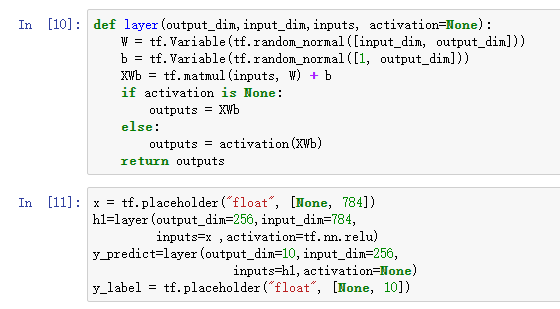
设置损失函数,优化器:

评估方式与准确率:

开始分批次训练:
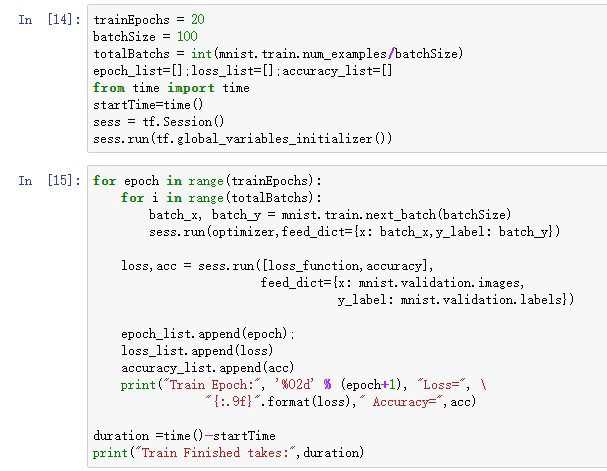
训练完成后的准确率:

查看某项中的预测概率:

筛选出预测失败的数据:
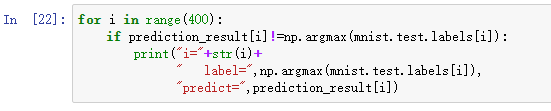
可以通过:
tf.summary.merge_all()
train_writer = tf.summary.FileWriter('log/area',sess.graph)
保存图。
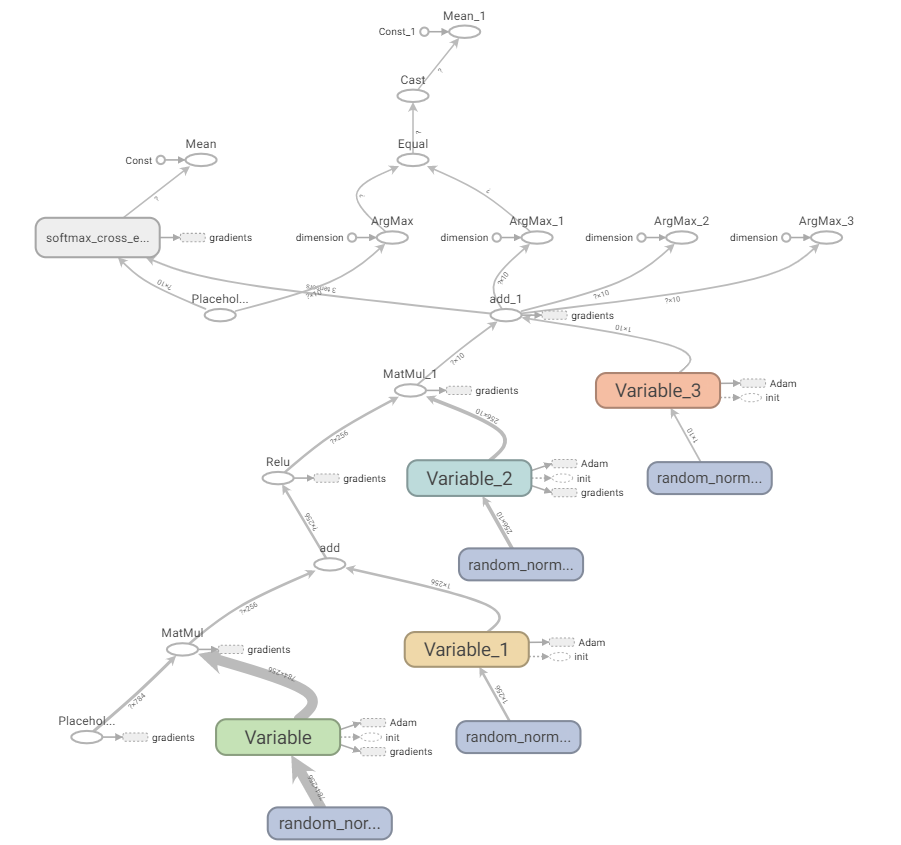
通过tensorboard --logdir="路径",打开服务,通过输入localhost:6006之类打开网站。
查看生成的图:
tensorflow下识别手写数字基于MLP网络的更多相关文章
- 基于tensorflow的MNIST手写数字识别(二)--入门篇
http://www.jianshu.com/p/4195577585e6 基于tensorflow的MNIST手写字识别(一)--白话卷积神经网络模型 基于tensorflow的MNIST手写数字识 ...
- 基于TensorFlow的MNIST手写数字识别-初级
一:MNIST数据集 下载地址 MNIST是一个包含很多手写数字图片的数据集,一共4个二进制压缩文件 分别是test set images,test set labels,training se ...
- 3 TensorFlow入门之识别手写数字
------------------------------------ 写在开头:此文参照莫烦python教程(墙裂推荐!!!) ---------------------------------- ...
- Android+TensorFlow+CNN+MNIST 手写数字识别实现
Android+TensorFlow+CNN+MNIST 手写数字识别实现 SkySeraph 2018 Email:skyseraph00#163.com 更多精彩请直接访问SkySeraph个人站 ...
- TensorFlow实现Softmax Regression识别手写数字中"TimeoutError: [WinError 10060] 由于连接方在一段时间后没有正确答复或连接的主机没有反应,连接尝试失败”问题
出现问题: 在使用TensorFlow实现MNIST手写数字识别时,出现"TimeoutError: [WinError 10060] 由于连接方在一段时间后没有正确答复或连接的主机没有反应 ...
- 一文全解:利用谷歌深度学习框架Tensorflow识别手写数字图片(初学者篇)
笔记整理者:王小草 笔记整理时间2017年2月24日 原文地址 http://blog.csdn.net/sinat_33761963/article/details/56837466?fps=1&a ...
- 6 TensorFlow实现cnn识别手写数字
------------------------------------ 写在开头:此文参照莫烦python教程(墙裂推荐!!!) ---------------------------------- ...
- 学习笔记TF024:TensorFlow实现Softmax Regression(回归)识别手写数字
TensorFlow实现Softmax Regression(回归)识别手写数字.MNIST(Mixed National Institute of Standards and Technology ...
- TensorFlow实战之Softmax Regression识别手写数字
关于本文说明,本人原博客地址位于http://blog.csdn.net/qq_37608890,本文来自笔者于2018年02月21日 23:10:04所撰写内容(http://blog.c ...
随机推荐
- 简单的jQ代码
简单的jQ代码 /* * Lazy Load - jQuery plugin for lazy loading images * * Copyright (c) 2007-2012 Mika Tuup ...
- poj1984(带权并查集)
题目链接:http://poj.org/problem?id=1984 题意:给定n个farm,m条边连接farm,k组询问,询问根据前t3条边求t1到t2的曼哈顿距离,若不可求则输出-1. 思路:类 ...
- leecode 937 Reorder Log Files (模拟)
传送门:点我 You have an array of logs. Each log is a space delimited string of words. For each log, the ...
- 在linux 中启动anaconda
anaconda-navigator $ source ~/anaconda3/bin/activate root ###在bin 目录下打开终端 敲 ./activate root $ a ...
- 成对使用new和delete,传值传引用
首先: delete []p;是用来删除对象数组的,特别是你声明的是对象数组!!! 如果new中用了[],delete一定要用[]:在new中没有使用,在delete中一定不要使用. 其次: 当你使用 ...
- 利用dom4j读写XML
public static HashMap<String, String> ReadConfig() { HashMap<String, String> map=new Has ...
- js关于去重的写法
break和continue的区别和作用 break和continue都是用来控制循环结构的,主要是停止循环. 1.break 有时候我们想在某种条件出现的时候终止循环而不是等到循环条件为false才 ...
- 关于map::erase的使用说明
C++ 中经常使用的容器类有vector,list,map.其中vector和list的erase都是返回迭代器,但是map就比较不一样. 当在循环体中使用map::erase语句时,为了能够在任何机 ...
- 在Struts2框架中使用Servlet的API
1. 在Action类中也可以获取到Servlet一些常用的API * 需求:提供JSP的表单页面的数据,在Action中使用Servlet的API接收到,然后保存到三个域对象中,最后再显示到JSP的 ...
- python 网络下载的三种风格 未完成
import osimport timeimport sys import requests#依序下载POP20_CC = ('CN IN US ID BR PK NG BD RU JP' 'MX P ...