
Hadoop基础-MapReduce的常用文件格式介绍
Hadoop基础-MapReduce的常用文件格式介绍
作者:尹正杰
版权声明:原创作品,谢绝转载!否则将追究法律责任。
一.MR文件格式-SequenceFile
1>.生成SequenceFile文件(SequenceFileOutputFormat)
The Apache Hadoop software library is a framework that allows for the distributed processing of large data sets across clusters of computers using simple programming models. It is designed to scale up from single servers to thousands of machines, each offering local computation and storage. Rather than rely on hardware to deliver high-availability, the library itself is designed to detect and handle failures at the application layer, so delivering a highly-available service on top of a cluster of computers, each of which may be prone to failures.
word.txt 文件内容
 /*

 @author :yinzhengjie

 Blog:http://www.cnblogs.com/yinzhengjie/tag/Hadoop%E8%BF%9B%E9%98%B6%E4%B9%8B%E8%B7%AF/

 EMAIL:y1053419035@qq.com

 */

 package cn.org.yinzhengjie.sequencefile.output;

 import org.apache.hadoop.io.LongWritable;

 import org.apache.hadoop.io.Text;

 import org.apache.hadoop.mapreduce.Mapper;

 import java.io.IOException;

 public class SeqMapper extends Mapper<LongWritable, Text , LongWritable, Text> {

     @Override

     protected void map(LongWritable key, Text value, Context context) throws IOException, InterruptedException {

         context.write(key,value);

     }

 }
SeqMapper.java 文件内容
 /*

 @author :yinzhengjie

 Blog:http://www.cnblogs.com/yinzhengjie/tag/Hadoop%E8%BF%9B%E9%98%B6%E4%B9%8B%E8%B7%AF/

 EMAIL:y1053419035@qq.com

 */

 package cn.org.yinzhengjie.sequencefile.output;

 import org.apache.hadoop.conf.Configuration;

 import org.apache.hadoop.fs.FileSystem;

 import org.apache.hadoop.fs.Path;

 import org.apache.hadoop.io.LongWritable;

 import org.apache.hadoop.io.SequenceFile;

 import org.apache.hadoop.io.Text;

 import org.apache.hadoop.mapreduce.Job;

 import org.apache.hadoop.mapreduce.lib.input.FileInputFormat;

 import org.apache.hadoop.mapreduce.lib.output.FileOutputFormat;

 import org.apache.hadoop.mapreduce.lib.output.SequenceFileOutputFormat;

 /**

  * 把wc.txt变为SequenceFile

  * k-偏移量-LongWritable

  * v-一行文本-Text

  */

 public class SeqApp {

     public static void main(String[] args) throws Exception {

         Configuration conf = new Configuration();

         conf.set("fs.defaultFS","file:///");

         FileSystem fs = FileSystem.get(conf);

         Job job = Job.getInstance(conf);

         job.setJobName("Seq-Out");

         job.setJarByClass(SeqApp.class);

         //设置输出格式,这里的输出格式要和咱们Mapper程序的格式要一致哟!

         job.setOutputKeyClass(LongWritable.class);

         job.setOutputValueClass(Text.class);

         job.setMapperClass(SeqMapper.class);

         FileInputFormat.addInputPath(job, new Path("D:\\10.Java\\IDE\\yhinzhengjieData\\MyHadoop\\word.txt"));

         Path outPath = new Path("D:\\10.Java\\IDE\\yhinzhengjieData\\MyHadoop\\seqout");

         if (fs.exists(outPath)){

             fs.delete(outPath);

         }

         FileOutputFormat.setOutputPath(job,outPath);

         //设置文件输出格式为SequenceFile

         job.setOutputFormatClass(SequenceFileOutputFormat.class);

         //设置SeqFile的压缩类型为块压缩

         SequenceFileOutputFormat.setOutputCompressionType(job,SequenceFile.CompressionType.BLOCK);

         //以上设置参数完毕后,我们通过下面这行代码就开始运行job

         job.waitForCompletion(true);

     }

 }
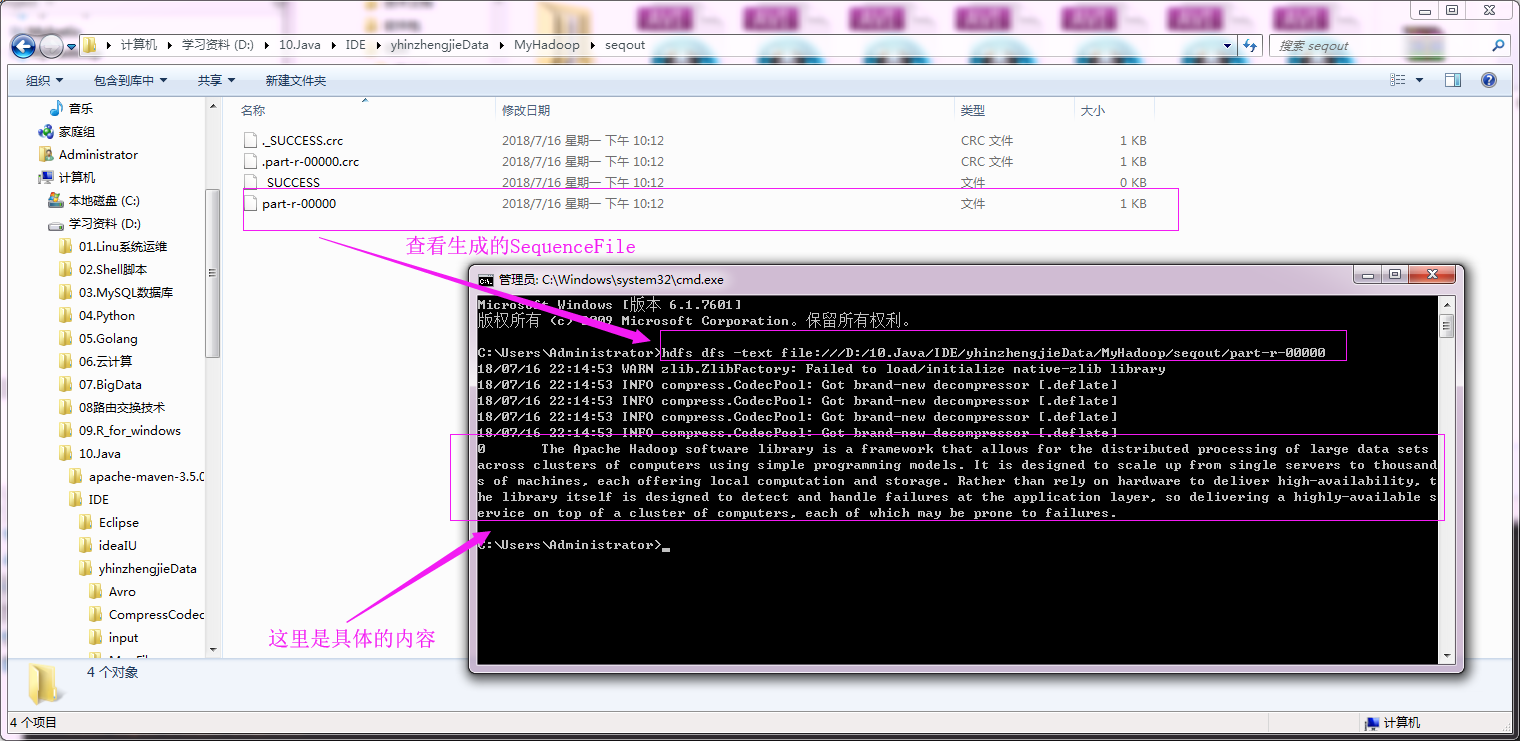
运行以上代码之后,我们可以去输出目录通过hdfs命令查看生成的SequenceFile文件内容,具体操作如下:
2>.对SequenceFile文件进行单词统计测试(SequenceFileInputFormat)
我们就不用去可以找具体的SequenceFile啦,我们直接用上面生成的Sequence进行测试,具体代码如下:
 /*

 @author :yinzhengjie

 Blog:http://www.cnblogs.com/yinzhengjie/tag/Hadoop%E8%BF%9B%E9%98%B6%E4%B9%8B%E8%B7%AF/

 EMAIL:y1053419035@qq.com

 */

 package cn.org.yinzhengjie.sequencefile.input;

 import org.apache.hadoop.io.IntWritable;

 import org.apache.hadoop.io.LongWritable;

 import org.apache.hadoop.io.Text;

 import org.apache.hadoop.mapreduce.Mapper;

 import java.io.IOException;

 public class SeqMapper extends Mapper<LongWritable, Text, Text, IntWritable> {

     @Override

     protected void map(LongWritable key, Text value, Context context) throws IOException, InterruptedException {

         String line = value.toString();

         String[] arr = line.split(" ");

         for(String word: arr){

             context.write(new Text(word),new IntWritable(1));

         }

     }

 }
SeqMapper.java 文件内容
 /*

 @author :yinzhengjie

 Blog:http://www.cnblogs.com/yinzhengjie/tag/Hadoop%E8%BF%9B%E9%98%B6%E4%B9%8B%E8%B7%AF/

 EMAIL:y1053419035@qq.com

 */

 package cn.org.yinzhengjie.sequencefile.input;

 import org.apache.hadoop.io.IntWritable;

 import org.apache.hadoop.io.Text;

 import org.apache.hadoop.mapreduce.Reducer;

 import java.io.IOException;

 public class SeqReducer extends Reducer<Text, IntWritable, Text, IntWritable> {

     protected void reduce(Text key, Iterable<IntWritable> values, Context context) throws IOException, InterruptedException {

         Integer sum = 0;

         for (IntWritable value : values) {

             sum += value.get();

         }

         context.write(key, new IntWritable(sum));

     }

 }
SeqReducer.java 文件内容
 /*

 @author :yinzhengjie

 Blog:http://www.cnblogs.com/yinzhengjie/tag/Hadoop%E8%BF%9B%E9%98%B6%E4%B9%8B%E8%B7%AF/

 EMAIL:y1053419035@qq.com

 */

 package cn.org.yinzhengjie.sequencefile.input;

 import org.apache.hadoop.conf.Configuration;

 import org.apache.hadoop.fs.FileSystem;

 import org.apache.hadoop.fs.Path;

 import org.apache.hadoop.io.IntWritable;

 import org.apache.hadoop.io.Text;

 import org.apache.hadoop.mapreduce.Job;

 import org.apache.hadoop.mapreduce.lib.input.FileInputFormat;

 import org.apache.hadoop.mapreduce.lib.input.SequenceFileInputFormat;

 import org.apache.hadoop.mapreduce.lib.output.FileOutputFormat;

 public class SeqApp  {

     public static void main(String[] args) throws Exception {

         Configuration conf = new Configuration();

         conf.set("fs.defaultFS","file:///");

         FileSystem fs = FileSystem.get(conf);

         Job job = Job.getInstance(conf);

         job.setJobName("Seq-in");

         job.setJarByClass(SeqApp.class);

         job.setOutputKeyClass(Text.class);

         job.setOutputValueClass(IntWritable.class);

         job.setMapperClass(SeqMapper.class);

         job.setReducerClass(SeqReducer.class);

         //将我们生成的SequenceFile文件作为输入

         FileInputFormat.addInputPath(job, new Path("D:\\10.Java\\IDE\\yhinzhengjieData\\MyHadoop\\seqout"));

         Path outPath = new Path("D:\\10.Java\\IDE\\yhinzhengjieData\\MyHadoop\\out");

         if (fs.exists(outPath)){

             fs.delete(outPath);

         }

         FileOutputFormat.setOutputPath(job, outPath);

         //设置输入格式

         job.setInputFormatClass(SequenceFileInputFormat.class);

         //以上设置参数完毕后,我们通过下面这行代码就开始运行job

         job.waitForCompletion(true);

     }

 }
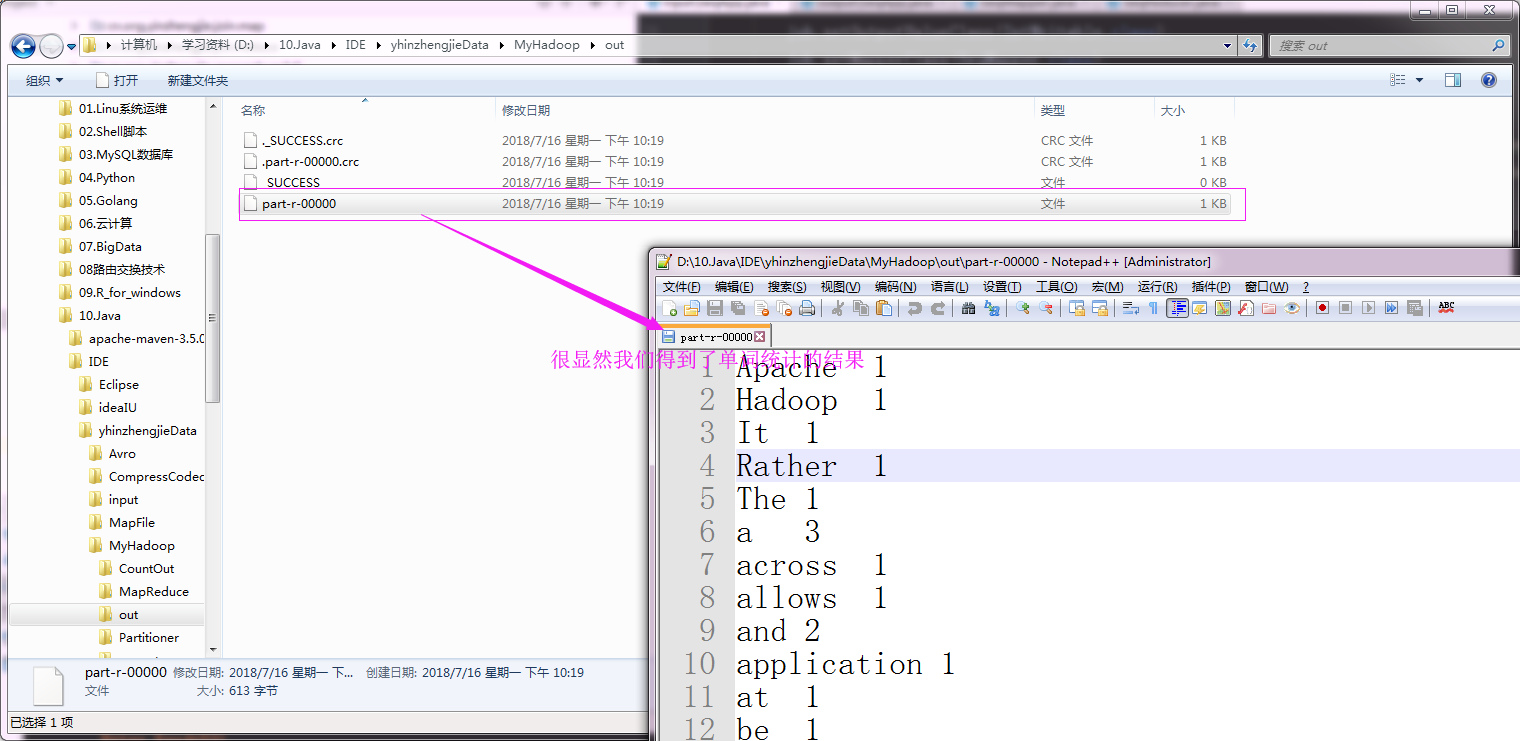
运行以上代码之后,我们可以查看输出的单词统计情况,具体操作如下:
二.MR文件格式-DB
1>.创建数据库表信息
create database yinzhengjie;

use yinzhengjie;

create table wordcount(id int,line varchar(100));

insert into wordcount values(1,'hello my name is yinzhengjie');

insert into wordcount values(2,'I am a good boy');

create table wordcount2(word varchar(100),count int);

2>.编写代码
 /*

 @author :yinzhengjie

 Blog:http://www.cnblogs.com/yinzhengjie/tag/Hadoop%E8%BF%9B%E9%98%B6%E4%B9%8B%E8%B7%AF/

 EMAIL:y1053419035@qq.com

 */

 package cn.org.yinzhengjie.dbformat;

 import org.apache.hadoop.io.Writable;

 import org.apache.hadoop.mapreduce.lib.db.DBWritable;

 import java.io.DataInput;

 import java.io.DataOutput;

 import java.io.IOException;

 import java.sql.PreparedStatement;

 import java.sql.ResultSet;

 import java.sql.SQLException;

 /**

  *  设置数据对应的格式,需要实现两个接口,即Writable, DBWritable。

  */

 public class MyDBWritable implements Writable, DBWritable {

     //注意 : 这里我们定义了2个私有属性,这两个属性分别对应的数据库中的字段,id和line

     private int id;

     private String line;

     //wrutable串行化

     public void write(DataOutput out) throws IOException {

         out.writeInt(id);

         out.writeUTF(line);

     }

     //writable反串行化,注意反串行化的顺序要和串行化的顺序保持一致

     public void readFields(DataInput in) throws IOException {

         id = in.readInt();

         line = in.readUTF();

     }

     //DB串行化,设置值的操作

     public void write(PreparedStatement st) throws SQLException {

         //指定表中的第一列为id列

         st.setInt(1, id);

         //指定表中的第二列为line列

         st.setString(2,line);

     }

     //DB反串行,赋值操作

     public void readFields(ResultSet rs) throws SQLException {

         //读取数据库的第一列,我们赋值给id

         id = rs.getInt(1);

         //读取数据库的第二列,我们赋值给line

         line = rs.getString(2);

     }

     public int getId() {

         return id;

     }

     public void setId(int id) {

         this.id = id;

     }

     public String getLine() {

         return line;

     }

     public void setLine(String line) {

         this.line = line;

     }

 }
MyDBWritable.java 文件内容
 /*

 @author :yinzhengjie

 Blog:http://www.cnblogs.com/yinzhengjie/tag/Hadoop%E8%BF%9B%E9%98%B6%E4%B9%8B%E8%B7%AF/

 EMAIL:y1053419035@qq.com

 */

 package cn.org.yinzhengjie.dbformat;

 import org.apache.hadoop.io.Writable;

 import org.apache.hadoop.mapreduce.lib.db.DBWritable;

 import java.io.DataInput;

 import java.io.DataOutput;

 import java.io.IOException;

 import java.sql.PreparedStatement;

 import java.sql.ResultSet;

 import java.sql.SQLException;

 public class MyDBWritable2 implements Writable, DBWritable {

     //这两个属性分别对应的数据库中的字段,word和count分别对应的是输出表中的字段哟。

     private String word;

     private int count;

     //wrutable串行化

     public void write(DataOutput out) throws IOException {

         out.writeUTF(word);

         out.writeInt(count);

     }

     //writable反串行化

     public void readFields(DataInput in) throws IOException {

         word = in.readUTF();

         count = in.readInt();

     }

     //DB串行化

     public void write(PreparedStatement st) throws SQLException {

         st.setString(1,word);

         st.setInt(2,count);

     }

     //DB反串行

     public void readFields(ResultSet rs) throws SQLException {

         word = rs.getString(1);

         count = rs.getInt(2);

     }

     public String getWord() {

         return word;

     }

     public void setWord(String word) {

         this.word = word;

     }

     public int getCount() {

         return count;

     }

     public void setCount(int count) {

         this.count = count;

     }

 }
MyDBWritable2.java 文件内容
 /*

 @author :yinzhengjie

 Blog:http://www.cnblogs.com/yinzhengjie/tag/Hadoop%E8%BF%9B%E9%98%B6%E4%B9%8B%E8%B7%AF/

 EMAIL:y1053419035@qq.com

 */

 package cn.org.yinzhengjie.dbformat;

 import org.apache.hadoop.io.IntWritable;

 import org.apache.hadoop.io.LongWritable;

 import org.apache.hadoop.io.Text;

 import org.apache.hadoop.mapreduce.Mapper;

 import java.io.IOException;

 /**

  * 注意MyDBWritable为数据库输入格式哟

  */

 public class DBMapper extends Mapper<LongWritable, MyDBWritable, Text, IntWritable> {

     @Override

     protected void map(LongWritable key, MyDBWritable value, Context context) throws IOException, InterruptedException {

         String line = value.getLine();

         String[] arr = line.split(" ");

         for(String word : arr){

             context.write(new Text(word), new IntWritable(1));

         }

     }

 }
DBMapper.java 文件内容
 /*

 @author :yinzhengjie

 Blog:http://www.cnblogs.com/yinzhengjie/tag/Hadoop%E8%BF%9B%E9%98%B6%E4%B9%8B%E8%B7%AF/

 EMAIL:y1053419035@qq.com

 */

 package cn.org.yinzhengjie.dbformat;

 import org.apache.hadoop.io.IntWritable;

 import org.apache.hadoop.io.NullWritable;

 import org.apache.hadoop.io.Text;

 import org.apache.hadoop.mapreduce.Reducer;

 import java.io.IOException;

 public class DBReducer extends Reducer<Text, IntWritable, MyDBWritable2, NullWritable> {

     protected void reduce(Text key, Iterable<IntWritable> values, Context context) throws IOException, InterruptedException {

         Integer sum = 0;

         for (IntWritable value : values) {

             sum += value.get();

         }

         MyDBWritable2 db = new MyDBWritable2();

         //设置需要往数据表中写入数据的值

         db.setWord(key.toString());

         db.setCount(sum);

         //将数据写到到数据库中

         context.write(db,NullWritable.get());

     }

 }
DBReducer.java 文件内容
 /*

 @author :yinzhengjie

 Blog:http://www.cnblogs.com/yinzhengjie/tag/Hadoop%E8%BF%9B%E9%98%B6%E4%B9%8B%E8%B7%AF/

 EMAIL:y1053419035@qq.com

 */

 package cn.org.yinzhengjie.dbformat;

 import org.apache.hadoop.conf.Configuration;

 import org.apache.hadoop.io.IntWritable;

 import org.apache.hadoop.io.Text;

 import org.apache.hadoop.mapreduce.Job;

 import org.apache.hadoop.mapreduce.lib.db.DBConfiguration;

 import org.apache.hadoop.mapreduce.lib.db.DBInputFormat;

 import org.apache.hadoop.mapreduce.lib.db.DBOutputFormat;

 public class DBApp {

     public static void main(String[] args) throws Exception {

         Configuration conf = new Configuration();

         conf.set("fs.defaultFS","file:///");

         Job job = Job.getInstance(conf);

         job.setJobName("DB");

         job.setJarByClass(DBApp.class);

         job.setOutputKeyClass(Text.class);

         job.setOutputValueClass(IntWritable.class);

         job.setMapperClass(DBMapper.class);

         job.setReducerClass(DBReducer.class);

         String driver = "com.mysql.jdbc.Driver";

         String url = "jdbc:mysql://192.168.0.254:5200/yinzhengjie";

         String name = "root";

         String pass = "yinzhengjie";

         DBConfiguration.configureDB(job.getConfiguration(), driver, url, name, pass);

         DBInputFormat.setInput(job, MyDBWritable.class,"select * from wordcount", "select count(*) from wordcount");

         //指定表名为“wordcount2”并指定字段为2

         DBOutputFormat.setOutput(job,"wordcount2",2);

         //指定输入输出格式

         job.setInputFormatClass(DBInputFormat.class);

         job.setOutputFormatClass(DBOutputFormat.class);

         job.waitForCompletion(true);

     }

 }
运行以上代码之后,我们可以查看数据库wordcount2表中的数据是否有新的数据生成,具体操作如下:

Hadoop基础-MapReduce的常用文件格式介绍的更多相关文章
- Hadoop基础-MapReduce入门篇之编写简单的Wordcount测试代码
Hadoop基础-MapReduce入门篇之编写简单的Wordcount测试代码 作者:尹正杰 版权声明:原创作品,谢绝转载!否则将追究法律责任. 本文主要是记录一写我在学习MapReduce时的一些 ...
- Hadoop基础-MapReduce的工作原理第二弹
Hadoop基础-MapReduce的工作原理第二弹 作者:尹正杰 版权声明:原创作品,谢绝转载!否则将追究法律责任. 一.Split(切片) 1>.MapReduce处理的单位(切片) 想必 ...
- Hadoop基础-MapReduce的Join操作
Hadoop基础-MapReduce的Join操作 作者:尹正杰 版权声明:原创作品,谢绝转载!否则将追究法律责任. 一.连接操作Map端Join(适合处理小表+大表的情况) no001 no002 ...
- Hadoop基础-MapReduce的排序
Hadoop基础-MapReduce的排序 作者:尹正杰 版权声明:原创作品,谢绝转载!否则将追究法律责任. 一.MapReduce的排序分类 1>.部分排序 部分排序是对单个分区进行排序,举个 ...
- Hadoop基础-MapReduce的数据倾斜解决方案
Hadoop基础-MapReduce的数据倾斜解决方案 作者:尹正杰 版权声明:原创作品,谢绝转载!否则将追究法律责任. 一.数据倾斜简介 1>.什么是数据倾斜 答:大量数据涌入到某一节点,导致 ...
- Hadoop基础-MapReduce的Partitioner用法案例
Hadoop基础-MapReduce的Partitioner用法案例 作者:尹正杰 版权声明:原创作品,谢绝转载!否则将追究法律责任. 一.Partitioner关键代码剖析 1>.返回的分区号 ...
- Hadoop基础-MapReduce的Combiner用法案例
Hadoop基础-MapReduce的Combiner用法案例 作者:尹正杰 版权声明:原创作品,谢绝转载!否则将追究法律责任. 一.编写年度最高气温统计 如上图说所示:有一个temp的文件,里面存放 ...
- Hadoop基础-MapReduce的工作原理第一弹
Hadoop基础-MapReduce的工作原理第一弹 作者:尹正杰 版权声明:原创作品,谢绝转载!否则将追究法律责任. 在本篇博客中,我们将深入学习Hadoop中的MapReduce工作机制,这些知识 ...
- openresty开发系列13--lua基础语法2常用数据类型介绍
openresty开发系列13--lua基础语法2常用数据类型介绍 一)boolean(布尔)布尔类型,可选值 true/false: Lua 中 nil 和 false 为"假" ...
随机推荐
- ssh无法登录,提示Connection closing...Socket close.
一.问题无法ssh直接连接到服务器 [C:\~]$ ssh 192.168.7.77 Connecting to ... Connection established. To escape to lo ...
- ScreenToGif 代码分析
ScreenToGif项目由四个文件夹组成: Files 存放协议文件 GifRecorder 存放gif编码器代码 ScreenToGif 存放主代码 Other 存放Hooktest和Transl ...
- [UOJ#268]. 【清华集训2016】数据交互[动态dp+可删堆维护最长链]
题意 给出 \(n\) 个点的树,每个时刻可能出现一条路径 \(A_i\) 或者之前出现的某条路径 \(A_i\) 消失,每条路径有一个权值,求出在每个时刻过后能够找到的权值最大的路径(指所有和该路径 ...
- 11、Dockerfile实战-Tomcat
一.编写Dockerfile 具体步骤这里不再细说,直接看Dockerfile文件: FROM centos:7 MAINTAINER QUNXUE ENV VERSION=8.0.46 RUN yu ...
- onSaveInstanceState和onRestoreInstanceState触发的时机
先看Application Fundamentals上的一段话: Android calls onSaveInstanceState() before the activity becomes vul ...
- LintCode——筛子求和
描述:扔n个骰子,向上面的数字之和为 S .给定 Given n,请列出所有可能的 S 值及其相应的概率. 样例:给定n=1,返回 [ [1, 0.17], [2, 0.17], [3, 0.17], ...
- 《Linux内核分析》第三周笔记 构造一个简单的Linux系统MenuOS
构造一个简单的Linux系统MenuOS 一.linux内核源代码简介 三大法宝(存储程序计算机.函数调用堆栈.中断)和两把宝剑(中断上下文的切换:保存现场和恢复现场.进程上下文的切换) 1.在lin ...
- 【Leetcode】222. Count Complete Tree Nodes
Question: Given a complete binary tree, count the number of nodes. Definition of a complete binary t ...
- 用javaScript将页面滚动条到底部
((JavascriptExecutor) driver).executeScript("document.body.scrollTop=500000"); 通过该方法可以将有滚动 ...
- PHP随机函数rand()、mt_rand()、srand()、mt_srand() 的区别
1.生成随机数发生器种子的函数 srand(). mt_srand() 区别:mt_srand() 比 srand() 更好的生成随机数发生器种子 定义: void srand([int $seed ...