
Hadoop基础-MapReduce的数据倾斜解决方案
Hadoop基础-MapReduce的数据倾斜解决方案
作者:尹正杰
版权声明:原创作品,谢绝转载!否则将追究法律责任。
一.数据倾斜简介
1>.什么是数据倾斜
答:大量数据涌入到某一节点,导致此节点负载过重,此时就产生了数据倾斜。
2>.处理数据倾斜的两种方案
第一:重新设计key;
第二:设计随机分区;
二.模拟数据倾斜
screw.txt 文件内容
1>.App端代码
 /*

 @author :yinzhengjie

 Blog:http://www.cnblogs.com/yinzhengjie/tag/Hadoop%E8%BF%9B%E9%98%B6%E4%B9%8B%E8%B7%AF/

 EMAIL:y1053419035@qq.com

 */

 package cn.org.yinzhengjie.srew;

 import org.apache.hadoop.conf.Configuration;

 import org.apache.hadoop.fs.FileSystem;

 import org.apache.hadoop.fs.Path;

 import org.apache.hadoop.io.IntWritable;

 import org.apache.hadoop.io.Text;

 import org.apache.hadoop.mapreduce.Job;

 import org.apache.hadoop.mapreduce.lib.input.FileInputFormat;

 import org.apache.hadoop.mapreduce.lib.output.FileOutputFormat;

 public class ScrewApp {

     public static void main(String[] args) throws Exception {

         //实例化一个Configuration,它会自动去加载本地的core-site.xml配置文件的fs.defaultFS属性。(该文件放在项目的resources目录即可。)

         Configuration conf = new Configuration();

         //将hdfs写入的路径定义在本地,需要修改默认为文件系统,这样就可以覆盖到之前在core-site.xml配置文件读取到的数据。

         conf.set("fs.defaultFS","file:///");

         //代码的入口点,初始化HDFS文件系统,此时我们需要把读取到的fs.defaultFS属性传给fs对象。

         FileSystem fs = FileSystem.get(conf);

         //创建一个任务对象job,别忘记把conf穿进去哟!

         Job job = Job.getInstance(conf);

         //给任务起个名字

         job.setJobName("WordCount");

         //指定main函数所在的类,也就是当前所在的类名

         job.setJarByClass(ScrewApp.class);

         //指定map的类名,这里指定咱们自定义的map程序即可

         job.setMapperClass(ScrewMapper.class);

         //指定reduce的类名,这里指定咱们自定义的reduce程序即可

         job.setReducerClass(ScrewReduce.class);

         //设置输出key的数据类型

         job.setOutputKeyClass(Text.class);

         //设置输出value的数据类型

         job.setOutputValueClass(IntWritable.class);

         Path localPath = new Path("D:\\10.Java\\IDE\\yhinzhengjieData\\MyHadoop\\MapReduce\\out");

         if (fs.exists(localPath)){

             fs.delete(localPath,true);

         }

         //设置输入路径,需要传递两个参数,即任务对象(job)以及输入路径

         FileInputFormat.addInputPath(job,new Path("D:\\10.Java\\IDE\\yhinzhengjieData\\MyHadoop\\MapReduce\\screw.txt"));

         //设置输出路径,需要传递两个参数,即任务对象(job)以及输出路径

         FileOutputFormat.setOutputPath(job,localPath);

         //设置Reduce的个数为2.

         job.setNumReduceTasks();

         //等待任务执行结束,将里面的值设置为true。

         job.waitForCompletion(true);

     }

 }
ScrewApp.java 文件内容
2>.Reduce端代码
 /*

 @author :yinzhengjie

 Blog:http://www.cnblogs.com/yinzhengjie/tag/Hadoop%E8%BF%9B%E9%98%B6%E4%B9%8B%E8%B7%AF/

 EMAIL:y1053419035@qq.com

 */

 package cn.org.yinzhengjie.srew;

 import org.apache.hadoop.io.IntWritable;

 import org.apache.hadoop.io.Text;

 import org.apache.hadoop.mapreduce.Reducer;

 import java.io.IOException;

 public class ScrewReduce extends Reducer<Text,IntWritable,Text,IntWritable> {

     @Override

     protected void reduce(Text key, Iterable<IntWritable> values, Context context) throws IOException, InterruptedException {

         int count = ;

         for (IntWritable value : values) {

             count += value.get();

         }

         context.write(key,new IntWritable(count));

     }

 }
ScrewReduce.java 文件内容
3>.Mapper端代码
 /*

 @author :yinzhengjie

 Blog:http://www.cnblogs.com/yinzhengjie/tag/Hadoop%E8%BF%9B%E9%98%B6%E4%B9%8B%E8%B7%AF/

 EMAIL:y1053419035@qq.com

 */

 package cn.org.yinzhengjie.srew;

 import org.apache.hadoop.io.IntWritable;

 import org.apache.hadoop.io.LongWritable;

 import org.apache.hadoop.io.Text;

 import org.apache.hadoop.mapreduce.Mapper;

 import java.io.IOException;

 public class ScrewMapper extends Mapper<LongWritable,Text,Text,IntWritable> {

     @Override

     protected void map(LongWritable key, Text value, Context context) throws IOException, InterruptedException {

         String line = value.toString();

         String[] arr = line.split(" ");

         for (String word : arr) {

             context.write(new Text(word),new IntWritable());

         }

     }

 }
ScrewMapper.java 文件内容
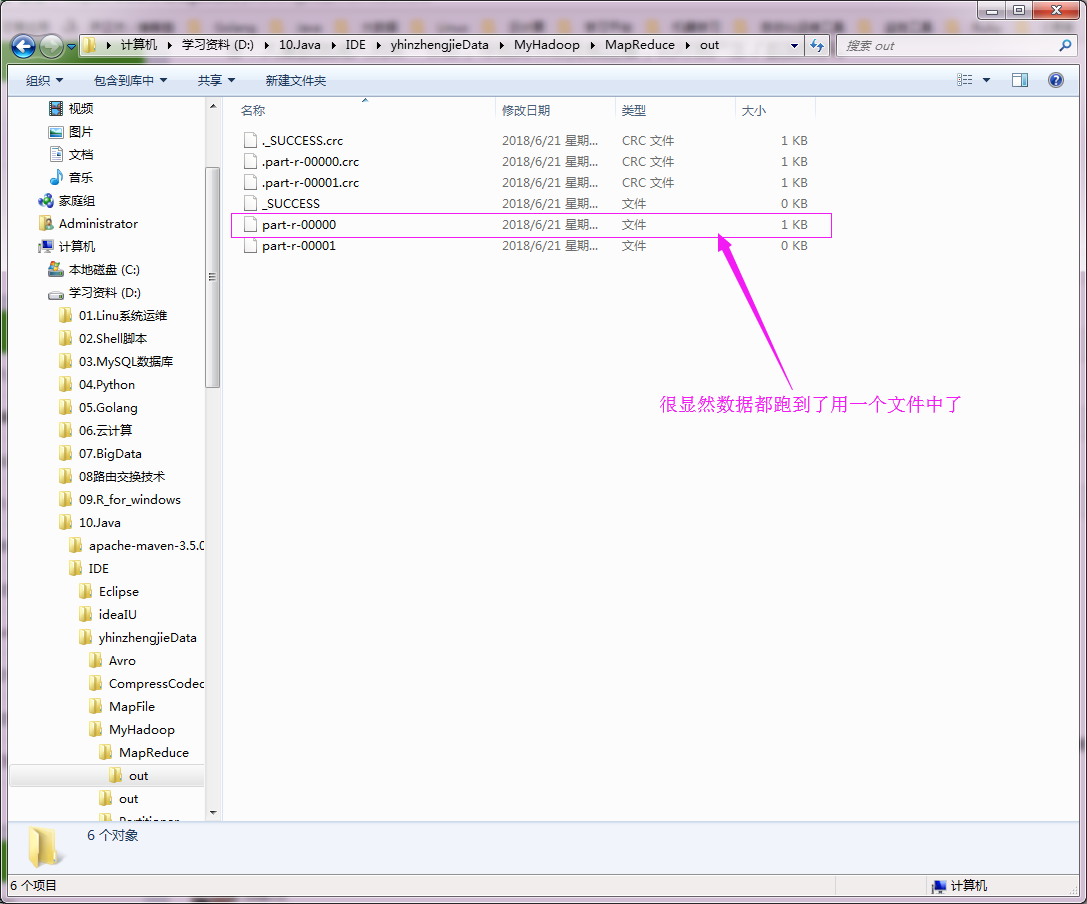
执行以上代码,查看数据如下:
三.解决数据倾斜方案之重新设计key
1>.具体代码如下
/*

@author :yinzhengjie

Blog:http://www.cnblogs.com/yinzhengjie/tag/Hadoop%E8%BF%9B%E9%98%B6%E4%B9%8B%E8%B7%AF/

EMAIL:y1053419035@qq.com

*/

package cn.org.yinzhengjie.srew;

import org.apache.hadoop.io.IntWritable;

import org.apache.hadoop.io.LongWritable;

import org.apache.hadoop.io.Text;

import org.apache.hadoop.mapreduce.Mapper;

import java.io.IOException;

import java.util.Random;

public class ScrewMapper extends Mapper<LongWritable, Text, Text, IntWritable> {

    //定义一个reduce变量

    int reduces;

    //定义一个随机数生成器变量

    Random r;

    /**

     * setup方法是用于初始化值

     */

    @Override

    protected void setup(Context context) throws IOException, InterruptedException {

        //通过context.getNumReduceTasks()方法获取到用户配置的reduce个数。

        reduces = context.getNumReduceTasks();

        //生成一个随机数生成器

        r = new Random();

    }

    @Override

    protected void map(LongWritable key, Text value, Context context) throws IOException, InterruptedException {

        String line = value.toString();

        String[] arr = line.split(" ");

        for (String word : arr) {

            //从reducs的范围中获取一个int类型的随机数赋值给randVal

            int randVal = r.nextInt(reduces);

            //重新定义key

            String newWord = word+"_"+ randVal;

            //将自定义的key赋初始值为1发给reduce端

            context.write(new Text(newWord), new IntWritable(1));

        }

    }

}
ScrewMapper.java 文件内容
 package cn.org.yinzhengjie.srew;

 import org.apache.hadoop.io.IntWritable;

 import org.apache.hadoop.io.LongWritable;

 import org.apache.hadoop.io.Text;

 import org.apache.hadoop.mapreduce.Mapper;

 import java.io.IOException;

 public class ScrewMapper2 extends Mapper<LongWritable,Text,Text,IntWritable> {

     //处理的数据类似于“1_1    677”

     @Override

     protected void map(LongWritable key, Text value, Context context) throws IOException, InterruptedException {

         String line = value.toString();

         //

         String[] arr = line.split("\t");

         //newKey

         String newKey = arr[0].split("_")[0];

         //newVAl

         int newVal = Integer.parseInt(arr[1]);

         context.write(new Text(newKey), new IntWritable(newVal));

     }

 }
ScrewMapper2.java 文件内容
 /*

 @author :yinzhengjie

 Blog:http://www.cnblogs.com/yinzhengjie/tag/Hadoop%E8%BF%9B%E9%98%B6%E4%B9%8B%E8%B7%AF/

 EMAIL:y1053419035@qq.com

 */

 package cn.org.yinzhengjie.srew;

 import org.apache.hadoop.io.IntWritable;

 import org.apache.hadoop.io.Text;

 import org.apache.hadoop.mapreduce.Reducer;

 import java.io.IOException;

 public class ScrewReducer extends Reducer<Text,IntWritable,Text,IntWritable> {

     @Override

     protected void reduce(Text key, Iterable<IntWritable> values, Context context) throws IOException, InterruptedException {

         int count = 0;

         for (IntWritable value : values) {

             count += value.get();

         }

         context.write(key,new IntWritable(count));

     }

 }
ScrewReducer.java 文件内容
 /*

 @author :yinzhengjie

 Blog:http://www.cnblogs.com/yinzhengjie/tag/Hadoop%E8%BF%9B%E9%98%B6%E4%B9%8B%E8%B7%AF/

 EMAIL:y1053419035@qq.com

 */

 package cn.org.yinzhengjie.srew;

 import org.apache.hadoop.conf.Configuration;

 import org.apache.hadoop.fs.FileSystem;

 import org.apache.hadoop.fs.Path;

 import org.apache.hadoop.io.IntWritable;

 import org.apache.hadoop.io.Text;

 import org.apache.hadoop.mapreduce.Job;

 import org.apache.hadoop.mapreduce.lib.input.FileInputFormat;

 import org.apache.hadoop.mapreduce.lib.output.FileOutputFormat;

 public class ScrewApp {

     public static void main(String[] args) throws Exception {

         //实例化一个Configuration,它会自动去加载本地的core-site.xml配置文件的fs.defaultFS属性。(该文件放在项目的resources目录即可。)

         Configuration conf = new Configuration();

         //将hdfs写入的路径定义在本地,需要修改默认为文件系统,这样就可以覆盖到之前在core-site.xml配置文件读取到的数据。

         conf.set("fs.defaultFS","file:///");

         //代码的入口点,初始化HDFS文件系统,此时我们需要把读取到的fs.defaultFS属性传给fs对象。

         FileSystem fs = FileSystem.get(conf);

         //创建一个任务对象job,别忘记把conf穿进去哟!

         Job job = Job.getInstance(conf);

         //给任务起个名字

         job.setJobName("WordCount");

         //指定main函数所在的类,也就是当前所在的类名

         job.setJarByClass(ScrewApp.class);

         //指定map的类名,这里指定咱们自定义的map程序即可

         job.setMapperClass(ScrewMapper.class);

         //指定reduce的类名,这里指定咱们自定义的reduce程序即可

         job.setReducerClass(ScrewReducer.class);

         //设置输出key的数据类型

         job.setOutputKeyClass(Text.class);

         //设置输出value的数据类型

         job.setOutputValueClass(IntWritable.class);

         Path localPath = new Path("D:\\10.Java\\IDE\\yhinzhengjieData\\MyHadoop\\MapReduce\\out");

         if (fs.exists(localPath)){

             fs.delete(localPath,true);

         }

         //设置输入路径,需要传递两个参数,即任务对象(job)以及输入路径

         FileInputFormat.addInputPath(job,new Path("D:\\10.Java\\IDE\\yhinzhengjieData\\MyHadoop\\MapReduce\\screw.txt"));

         //设置输出路径,需要传递两个参数,即任务对象(job)以及输出路径

         FileOutputFormat.setOutputPath(job,localPath);

         //设置Reduce的个数为2.

         job.setNumReduceTasks(2);

         //等待任务执行结束,将里面的值设置为true。

         if (job.waitForCompletion(true)) {

             //当第一个MapReduce结束之后,我们这里又启动了一个新的MapReduce,逻辑和上面类似。

             Job job2 = Job.getInstance(conf);

             job2.setJobName("Wordcount2");

             job2.setJarByClass(ScrewApp.class);

             job2.setMapperClass(ScrewMapper2.class);

             job2.setReducerClass(ScrewReducer.class);

             job2.setOutputKeyClass(Text.class);

             job2.setOutputValueClass(IntWritable.class);

             Path p2 = new Path("D:\\10.Java\\IDE\\yhinzhengjieData\\MyHadoop\\MapReduce\\out2");

             if (fs.exists(p2)) {

                 fs.delete(p2, true);

             }

             FileInputFormat.addInputPath(job2, localPath);

             FileOutputFormat.setOutputPath(job2, p2);

             //我们将第一个MapReduce的2个reducer的处理结果放在新的一个MapReduce中只启用一个MapReduce。

             job2.setNumReduceTasks(1);

             job2.waitForCompletion(true);

         }

     }

 }
ScrewApp.java 文件内容
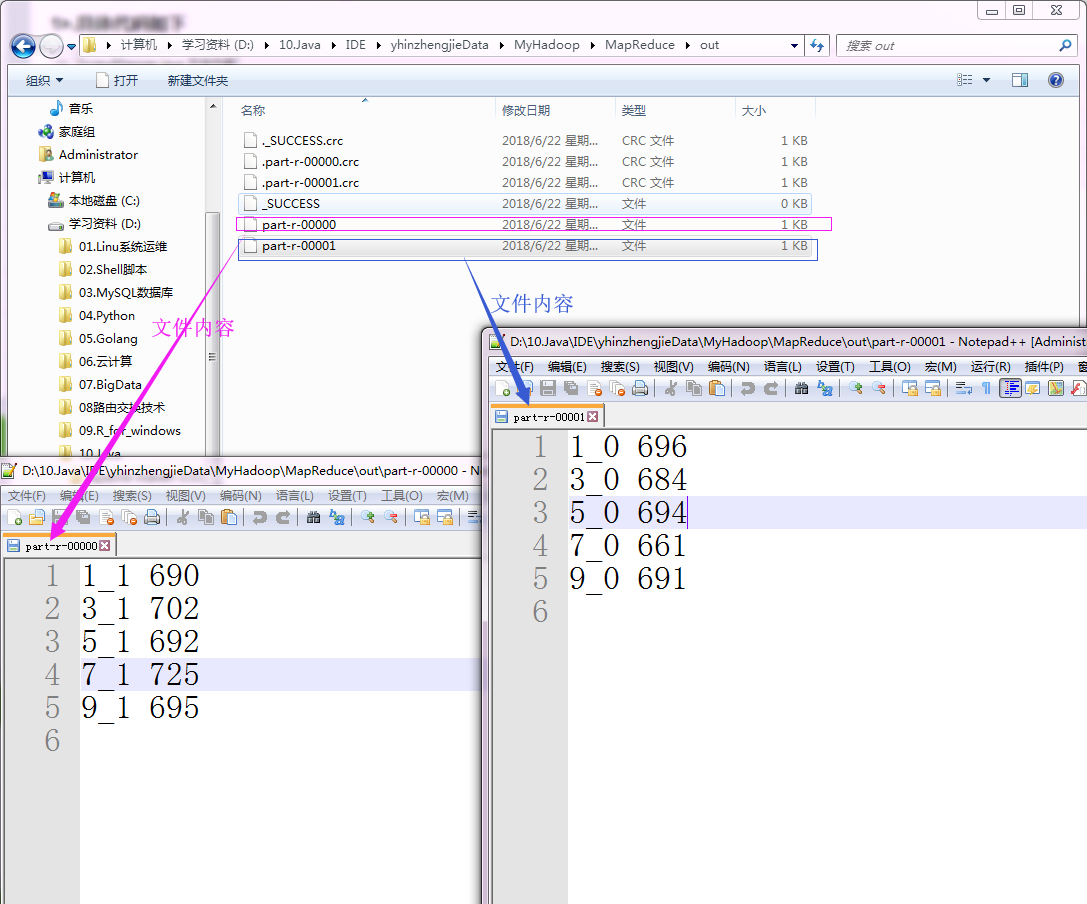
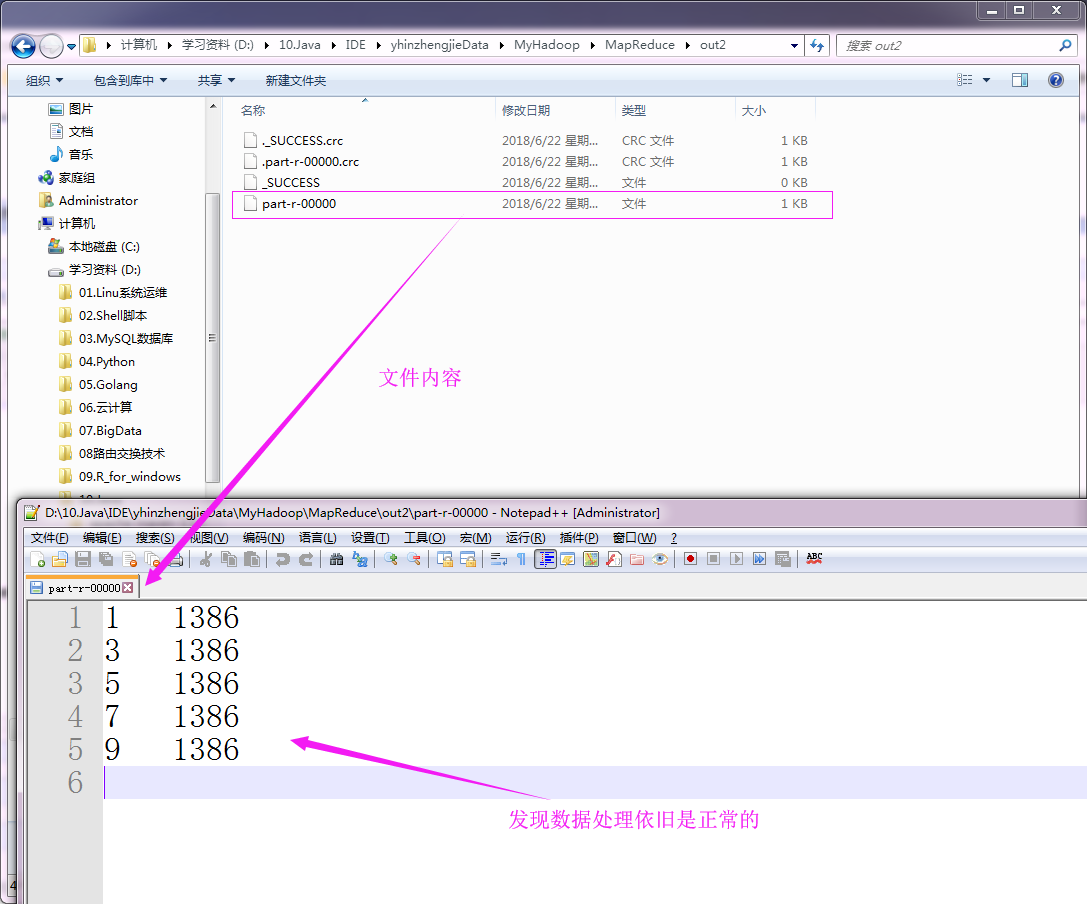
2>.检测实验结果
“D:\\10.Java\\IDE\\yhinzhengjieData\\MyHadoop\\MapReduce\\out” 目录内容如下:
“D:\\10.Java\\IDE\\yhinzhengjieData\\MyHadoop\\MapReduce\\out2” 目录内容如下:
四.解决数据倾斜方案之使用随机分区
1>.具体代码如下
 /*

 @author :yinzhengjie

 Blog:http://www.cnblogs.com/yinzhengjie/tag/Hadoop%E8%BF%9B%E9%98%B6%E4%B9%8B%E8%B7%AF/

 EMAIL:y1053419035@qq.com

 */

 package cn.org.yinzhengjie.screwpartition;

 import org.apache.hadoop.io.IntWritable;

 import org.apache.hadoop.io.LongWritable;

 import org.apache.hadoop.io.Text;

 import org.apache.hadoop.mapreduce.Mapper;

 import java.io.IOException;

 public class Screw2Mapper extends Mapper<LongWritable,Text,Text,IntWritable> {

     @Override

     protected void map(LongWritable key, Text value, Context context) throws IOException, InterruptedException {

         String line = value.toString();

         String[] arr = line.split(" ");

         for(String word : arr){

             context.write(new Text(word), new IntWritable(1));

         }

     }

 }
Screw2Mapper.java 文件内容
 /*

 @author :yinzhengjie

 Blog:http://www.cnblogs.com/yinzhengjie/tag/Hadoop%E8%BF%9B%E9%98%B6%E4%B9%8B%E8%B7%AF/

 EMAIL:y1053419035@qq.com

 */

 package cn.org.yinzhengjie.screwpartition;

 import org.apache.hadoop.io.IntWritable;

 import org.apache.hadoop.io.Text;

 import org.apache.hadoop.mapreduce.Partitioner;

 import java.util.Random;

 public class Screw2Partition extends Partitioner<Text, IntWritable> {

     @Override

     public int getPartition(Text text, IntWritable intWritable, int numPartitions) {

         Random r = new Random();

         //返回的是分区的随机的一个ID

         return r.nextInt(numPartitions);

     }

 }
Screw2Partition.java 文件内容
 /*

 @author :yinzhengjie

 Blog:http://www.cnblogs.com/yinzhengjie/tag/Hadoop%E8%BF%9B%E9%98%B6%E4%B9%8B%E8%B7%AF/

 EMAIL:y1053419035@qq.com

 */

 package cn.org.yinzhengjie.screwpartition;

 import org.apache.hadoop.io.IntWritable;

 import org.apache.hadoop.io.Text;

 import org.apache.hadoop.mapreduce.Reducer;

 import java.io.IOException;

 public class Screw2Reducer extends Reducer<Text,IntWritable,Text,IntWritable> {

     @Override

     protected void reduce(Text key, Iterable<IntWritable> values, Context context) throws IOException, InterruptedException {

         int sum = 0;

         for(IntWritable value : values){

             sum += value.get();

         }

         context.write(key,new IntWritable(sum));

     }

 }
Screw2Reducer.java 文件内容
 /*

 @author :yinzhengjie

 Blog:http://www.cnblogs.com/yinzhengjie/tag/Hadoop%E8%BF%9B%E9%98%B6%E4%B9%8B%E8%B7%AF/

 EMAIL:y1053419035@qq.com

 */

 package cn.org.yinzhengjie.screwpartition;

 import org.apache.hadoop.conf.Configuration;

 import org.apache.hadoop.fs.FileSystem;

 import org.apache.hadoop.fs.Path;

 import org.apache.hadoop.io.IntWritable;

 import org.apache.hadoop.io.Text;

 import org.apache.hadoop.mapreduce.Job;

 import org.apache.hadoop.mapreduce.lib.input.FileInputFormat;

 import org.apache.hadoop.mapreduce.lib.output.FileOutputFormat;

 public class Screw2App {

     public static void main(String[] args) throws Exception {

         Configuration conf = new Configuration();

         conf.set("fs.defaultFS", "file:///");

         FileSystem fs = FileSystem.get(conf);

         Job job = Job.getInstance(conf);

         job.setJobName("Wordcount");

         job.setJarByClass(Screw2App.class);

         job.setMapperClass(Screw2Mapper.class);

         job.setReducerClass(Screw2Reducer.class);

         job.setPartitionerClass(Screw2Partition.class);

         job.setOutputKeyClass(Text.class);

         job.setOutputValueClass(IntWritable.class);

         Path p = new Path("D:\\10.Java\\IDE\\yhinzhengjieData\\MyHadoop\\MapReduce\\out");

         if (fs.exists(p)) {

             fs.delete(p, true);

         }

         FileInputFormat.addInputPath(job, new Path("D:\\10.Java\\IDE\\yhinzhengjieData\\MyHadoop\\MapReduce\\screw.txt"));

         FileOutputFormat.setOutputPath(job, p);

         job.setNumReduceTasks(2);

         job.waitForCompletion(true);

     }

 }
Screw2App.java 文件内容
2>.检测实验结果
“D:\\10.Java\\IDE\\yhinzhengjieData\\MyHadoop\\MapReduce\\out” 目录内容如下:

“D:\\10.Java\\IDE\\yhinzhengjieData\\MyHadoop\\MapReduce\\out2” 目录内容如下:
Hadoop基础-MapReduce的数据倾斜解决方案的更多相关文章
- Hadoop基础-MapReduce的排序
Hadoop基础-MapReduce的排序 作者:尹正杰 版权声明:原创作品,谢绝转载!否则将追究法律责任. 一.MapReduce的排序分类 1>.部分排序 部分排序是对单个分区进行排序,举个 ...
- Hadoop基础-MapReduce入门篇之编写简单的Wordcount测试代码
Hadoop基础-MapReduce入门篇之编写简单的Wordcount测试代码 作者:尹正杰 版权声明:原创作品,谢绝转载!否则将追究法律责任. 本文主要是记录一写我在学习MapReduce时的一些 ...
- Hadoop基础-MapReduce的常用文件格式介绍
Hadoop基础-MapReduce的常用文件格式介绍 作者:尹正杰 版权声明:原创作品,谢绝转载!否则将追究法律责任. 一.MR文件格式-SequenceFile 1>.生成SequenceF ...
- Hadoop基础-MapReduce的Join操作
Hadoop基础-MapReduce的Join操作 作者:尹正杰 版权声明:原创作品,谢绝转载!否则将追究法律责任. 一.连接操作Map端Join(适合处理小表+大表的情况) no001 no002 ...
- Hadoop基础-MapReduce的Partitioner用法案例
Hadoop基础-MapReduce的Partitioner用法案例 作者:尹正杰 版权声明:原创作品,谢绝转载!否则将追究法律责任. 一.Partitioner关键代码剖析 1>.返回的分区号 ...
- Hadoop基础-MapReduce的Combiner用法案例
Hadoop基础-MapReduce的Combiner用法案例 作者:尹正杰 版权声明:原创作品,谢绝转载!否则将追究法律责任. 一.编写年度最高气温统计 如上图说所示:有一个temp的文件,里面存放 ...
- Hadoop基础-MapReduce的工作原理第二弹
Hadoop基础-MapReduce的工作原理第二弹 作者:尹正杰 版权声明:原创作品,谢绝转载!否则将追究法律责任. 一.Split(切片) 1>.MapReduce处理的单位(切片) 想必 ...
- Hadoop基础-MapReduce的工作原理第一弹
Hadoop基础-MapReduce的工作原理第一弹 作者:尹正杰 版权声明:原创作品,谢绝转载!否则将追究法律责任. 在本篇博客中,我们将深入学习Hadoop中的MapReduce工作机制,这些知识 ...
- spak数据倾斜解决方案
数据倾斜解决方案 数据倾斜的解决,跟之前讲解的性能调优,有一点异曲同工之妙. 性能调优中最有效最直接最简单的方式就是加资源加并行度,并注意RDD架构(复用同一个RDD,加上cache缓存).相对于前面 ...
随机推荐
- P问题,NP问题,NPC问题,NP-hard问题
1.P问题:一个问题能找到一个在多项式时间里解决他的算法 多项式时间(o(1),o(lgn),o(n的a次方)) 非多项式时间 o(a的n次方) o(n!) 2.NP问题:在多项式时间找不到问题的解 ...
- linux中wget的使用方法介绍
wget是在Linux下开发的开放源代码的软件,作者是Hrvoje Niksic,后来被移植到包括Windows在内的各个平台上.它有以下功能和特点:(1)支持断点下传功能:这一点,也是网络蚂蚁和Fl ...
- Jq_select的操作
jQuery获取Select选择的Text和Value: 语法解释: $("#select_id").change(function(){//code...}); //为Selec ...
- 软件测试_测试工具_APP测试工具_对比
以下是我自己整理的APP测试工具对比,各个工具相关并不全面.尤其关于收费一项,我只是针对自己公司的实际情况进行对比的,每个工具还有其他收费套餐可以选择,详情可进入相关官网进行查看 以下是部分官网链接: ...
- kafka的简单理解
经典组合: Flume+Kafka+Storm+HDFS/HBase Flume:分布式采集 Kafka:分布式缓存 Kafka简介: 一种分布式的.基于发布/订阅的消息系统(Scala编写的) Ka ...
- libimobiledevice --Mingw32交叉编译
本文只描述 windows环境下的使用情况,linux平台基本雷同. 一.配置编译环境. (1)操作系统 :Windows10 (64bit). (2)类unix环境:Cygwin(64bit) 下载 ...
- mui框架(一)
1.界面初始化 初始化就是把一切程序设为默认状态,把没准备的准备好. mui框架将很多功能配置都集中在mui.init方法中,要使用某项功能,只需要在mui.init方法中完成对应参数配置即可,目前支 ...
- PHP学习 函数 function
参数默认值function drink($kind ='tea'){echo 'would you please a cup'.$kind.'<br>';} drink();drink(' ...
- "Gun N' Rose" Team学习心得
如果我比别人看得更远,只因为我站在巨人的肩膀上. ——牛顿 高级软件工程课程终于开课了!第 ...
- MySQL中EXPLAIN解释命令 查看索引是否生效
explain显示了mysql如何使用索引来处理select语句以及连接表.可以帮助选择更好的索引和写出更优化的查询语句. 使用方法,在select语句前加上explain就可以了: 如: expla ...