
Android模拟微信主页面的Demo
效果图如下:

项目结构图如下:
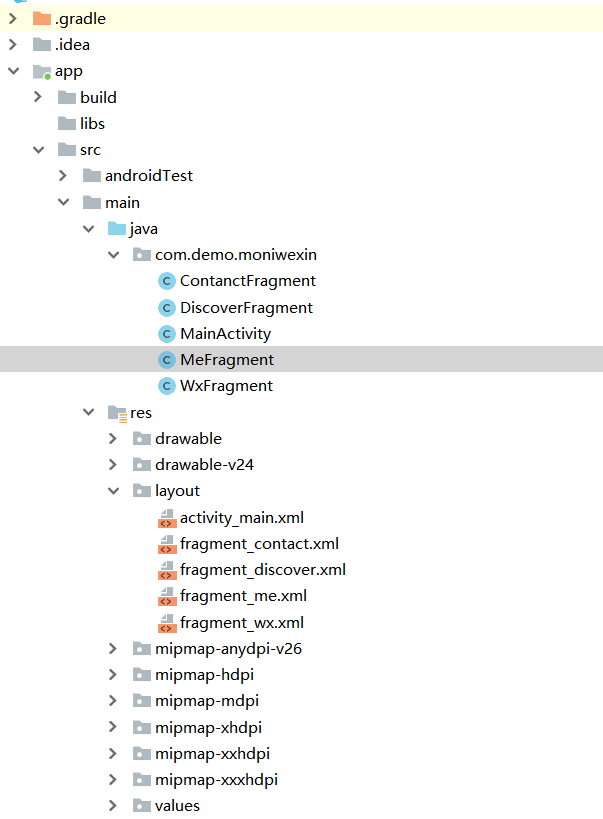
ContanctFragment:
package com.demo.moniwexin;

import android.app.Fragment;

import android.os.Bundle;

import android.view.LayoutInflater;

import android.view.View;

import android.view.ViewGroup;

import android.widget.Button;

public class ContanctFragment extends Fragment {

    @Override

    public View onCreateView(LayoutInflater inflater,ViewGroup container, Bundle savedInstanceState) {

        View view = inflater.inflate(R.layout.fragment_contact, null);

        //测试按钮如何点击

        Button wxBtn = view.findViewById(R.id.btn_test);

        wxBtn.setOnClickListener(new View.OnClickListener() {

            @Override

            public void onClick(View v) {

                System.out.println("点击了通讯录模块");

            }

        });

        return view;

    }

}
DiscoverFragment:
package com.demo.moniwexin;

import android.app.Fragment;

import android.os.Bundle;

import android.view.LayoutInflater;

import android.view.View;

import android.view.ViewGroup;

import android.widget.Button;

public class DiscoverFragment extends Fragment {

    @Override

    public View onCreateView(LayoutInflater inflater,ViewGroup container, Bundle savedInstanceState) {

        View view = inflater.inflate(R.layout.fragment_discover, null);

        //测试按钮如何点击

        Button wxBtn = view.findViewById(R.id.btn_test);

        wxBtn.setOnClickListener(new View.OnClickListener() {

            @Override

            public void onClick(View v) {

                System.out.println("点击了发现模块");

            }

        });

        return view;

    }

}
MainActivity:
package com.demo.moniwexin;

import android.app.FragmentManager;

import android.app.FragmentTransaction;

import android.support.v7.app.AppCompatActivity;

import android.os.Bundle;

import android.view.View;

public class MainActivity extends AppCompatActivity implements View.OnClickListener {

    @Override

    protected void onCreate(Bundle savedInstanceState) {

        super.onCreate(savedInstanceState);

        setContentView(R.layout.activity_main);

        findViewById(R.id.btn_wx).setOnClickListener(this);

        findViewById(R.id.btn_contact).setOnClickListener(this);

        findViewById(R.id.btn_discover).setOnClickListener(this);

        findViewById(R.id.btn_me).setOnClickListener(this);

    }

    @Override

    public void onClick(View v) {

        //获取管理者

        FragmentManager fragmentManager =getFragmentManager();

        FragmentTransaction beginTransaction = fragmentManager.beginTransaction();

        switch (v.getId()){

            case R.id.btn_wx :

                beginTransaction.replace(R.id.ll_l,new WxFragment());

                break;

            case R.id.btn_contact:

                beginTransaction.replace(R.id.ll_l,new ContanctFragment());

                break;

            case R.id.btn_discover:

                beginTransaction.replace(R.id.ll_l,new DiscoverFragment());

                break;

            case R.id.btn_me:

                beginTransaction.replace(R.id.ll_l,new MeFragment());

                break;

                default:

                    break;

        }

        beginTransaction.commit();

    }

}
MeFragment:
package com.demo.moniwexin;

import android.app.Fragment;

import android.os.Bundle;

import android.view.LayoutInflater;

import android.view.View;

import android.view.ViewGroup;

import android.widget.Button;

public class MeFragment extends Fragment {

    @Override

    public View onCreateView(LayoutInflater inflater,ViewGroup container, Bundle savedInstanceState) {

        View view = inflater.inflate(R.layout.fragment_me, null);

        //测试按钮如何点击

        Button wxBtn = view.findViewById(R.id.btn_test);

        wxBtn.setOnClickListener(new View.OnClickListener() {

            @Override

            public void onClick(View v) {

                System.out.println("点击了我模块");

            }

        });

        return view;

    }

}
WxFragment:
package com.demo.moniwexin;

import android.app.Fragment;

import android.os.Bundle;

import android.text.Layout;

import android.view.LayoutInflater;

import android.view.View;

import android.view.ViewGroup;

import android.widget.Button;

public class WxFragment extends Fragment {

    @Override

    public View onCreateView(LayoutInflater inflater,ViewGroup container, Bundle savedInstanceState) {

        View view = inflater.inflate(R.layout.fragment_wx, null);

        //测试按钮如何点击

        Button wxBtn = view.findViewById(R.id.btn_test);

        wxBtn.setOnClickListener(new View.OnClickListener() {

            @Override

            public void onClick(View v) {

                System.out.println("点击了微信模块");

            }

        });

        return view;

    }

}
activity_main.xml:
<?xml version="1.0" encoding="utf-8"?>

<RelativeLayout xmlns:android="http://schemas.android.com/apk/res/android"

    xmlns:app="http://schemas.android.com/apk/res-auto"

    xmlns:tools="http://schemas.android.com/tools"

    android:layout_width="match_parent"

    android:layout_height="match_parent"

    tools:context=".MainActivity">

    <LinearLayout

        android:id="@+id/ll_l"

        android:layout_width="match_parent"

        android:layout_height="match_parent"

        android:orientation="vertical">

    </LinearLayout>

    <LinearLayout

        android:layout_width="match_parent"

        android:layout_height="wrap_content"

        android:layout_alignParentBottom="true"

        android:orientation="horizontal">

        <Button

            android:id="@+id/btn_wx"

            android:layout_width="0dp"

            android:layout_height="wrap_content"

            android:layout_weight="1"

            android:text="微信" />

        <Button

            android:id="@+id/btn_contact"

            android:layout_width="0dp"

            android:layout_height="wrap_content"

            android:layout_weight="1"

            android:text="通讯录" />

        <Button

            android:id="@+id/btn_discover"

            android:layout_width="0dp"

            android:layout_height="wrap_content"

            android:layout_weight="1"

            android:text="发现" />

        <Button

            android:id="@+id/btn_me"

            android:layout_width="0dp"

            android:layout_height="wrap_content"

            android:layout_weight="1"

            android:text="我" />

    </LinearLayout>

</RelativeLayout>
fragment_contact.xml:
<?xml version="1.0" encoding="utf-8"?>

<LinearLayout

    xmlns:android="http://schemas.android.com/apk/res/android" android:layout_width="match_parent"

    android:layout_height="match_parent">

    <TextView

        android:text="我是通讯录模块的内容"

        android:textSize="20dp"

        android:layout_width="wrap_content"

        android:layout_height="wrap_content" />

    <Button

        android:id="@+id/btn_test"

        android:layout_width="wrap_content"

        android:layout_height="wrap_content"

        android:text="测试"

        />

</LinearLayout>
fragment_discover.xml:
<?xml version="1.0" encoding="utf-8"?>

<LinearLayout

    xmlns:android="http://schemas.android.com/apk/res/android" android:layout_width="match_parent"

    android:layout_height="match_parent">

    <TextView

        android:text="我是发现模块的内容"

        android:textSize="20dp"

        android:layout_width="wrap_content"

        android:layout_height="wrap_content" />

    <Button

        android:id="@+id/btn_test"

        android:layout_width="wrap_content"

        android:layout_height="wrap_content"

        android:text="测试"

        />

</LinearLayout>
fragment_me.xml:
<?xml version="1.0" encoding="utf-8"?>

<LinearLayout

    xmlns:android="http://schemas.android.com/apk/res/android" android:layout_width="match_parent"

    android:layout_height="match_parent">

    <TextView

        android:text="我是我的模块内容"

        android:textSize="20dp"

        android:layout_width="wrap_content"

        android:layout_height="wrap_content" />

    <Button

        android:id="@+id/btn_test"

        android:layout_width="wrap_content"

        android:layout_height="wrap_content"

        android:text="测试"

        />

</LinearLayout>
fragment_wx.xml:
<?xml version="1.0" encoding="utf-8"?>

<LinearLayout

    xmlns:android="http://schemas.android.com/apk/res/android" android:layout_width="match_parent"

    android:layout_height="match_parent">

    <TextView

        android:text="我是微信模块的内容"

        android:textSize="20dp"

        android:layout_width="wrap_content"

        android:layout_height="wrap_content" />

    <Button

        android:id="@+id/btn_test"

        android:layout_width="wrap_content"

        android:layout_height="wrap_content"

        android:text="测试"

        />

</LinearLayout>
Android模拟微信主页面的Demo的更多相关文章
- android 模拟微信消息框 BaseAdapter()方法 [2]
在昨天的微信布局的基础上加内容 http://www.cnblogs.com/Seven-cjy/p/6098024.html 项目下/res/layout下创建一个 listview_layout. ...
- android 模拟微信消息 OnItemClickListener()方法 [3]
在 http://www.cnblogs.com/Seven-cjy/p/6101555.html 是基础上修改 MainActivity.java /winxinmff/src/com/exampl ...
- 解决Android微信支付官方demo运行失败
Android微信支付官方demo运行失败,在此简单记录一下解决步骤 1.httpclient错误 官方给的demo是eclipse的,打开之后提示httpclient的错误,我知道在as下解决htt ...
- 记写 android 微信登录的demo历程
前言 首先看一条链接: https://github.com/Tencent/WeDemo 腾讯给了一个wedemo,微信第三方登录的例子.里面是php和ios,ios是object写的,php还是原 ...
- Android仿微信QQ等实现锁屏消息提醒
demo代码如下: import android.content.Intent; import android.os.Bundle; import android.support.v7.app.App ...
- Android模拟位置信息
Android模拟位置程序,俗称GPS欺骗,只能修改采用GPS定位的软件. 手机定位方式目前有4种:基站定位,WIFI定位,GPS定位,AGPS定位 常见的修改手法: 1. 抓包欺骗法,抓包改包欺骗服 ...
- chorme模拟微信浏览器
chorme模拟微信浏览器 1.代码填入到图中2出 Mozilla/5.0 (Linux; Android 4.4.4; HM NOTE 1LTEW Build/KTU84P) AppleWebKit ...
- Android开发 --微信支付开发(转载!)(开发工具:Eclipse)
Android_APP 微信支付接口开发 日期:2015-10-06 12:47:33 作者: 来源: 人气:3549 1.首先说一下我们在开发微信支付接口的时候遇到最多和最疑惑的问题,那就是明明 a ...
- Android 模仿微信启动动画(转)
本文内容 环境 项目结构 演示微信启动动画 本文演示微信启动动画.请点击此处下载,自行调试. 顺便抱怨一下,实践性(与研究性质的相对)技术博的“七宗罪”: 第一宗罪,错字连篇,逻辑不清: 第二宗罪,文 ...
随机推荐
- 转)nodejs后台启动方式PM2
如果直接通过node app来启动,如果报错了可能直接停在整个运行,supervisor感觉只是拿来用作开发环境的.再网上找到pm2.目前似乎最常见的线上部署nodejs项目的有forever,pm2 ...
- 2018 ICPC青岛网络赛 B. Red Black Tree(倍增lca好题)
BaoBao has just found a rooted tree with n vertices and (n-1) weighted edges in his backyard. Among ...
- [leetcode]59. Spiral Matrix II螺旋遍历矩阵2
Given a positive integer n, generate a square matrix filled with elements from 1 to n^2 in spiral or ...
- P1495 曹冲养猪(拓展欧几里得)
题目描述 自从曹冲搞定了大象以后,曹操就开始捉摸让儿子干些事业,于是派他到中原养猪场养猪,可是曹冲满不高兴,于是在工作中马马虎虎,有一次曹操想知道母猪的数量,于是曹冲想狠狠耍曹操一把.举个例子,假如有 ...
- POJ 1655.Balancing Act 树形dp 树的重心
Balancing Act Time Limit: 1000MS Memory Limit: 65536K Total Submissions: 14550 Accepted: 6173 De ...
- ArcGIS for JS 离线部署
本文以arcgis_js_v36_api为例,且安装的是IIS Web服务器 1.下载最新的ArcGIS for JS api 包,可在Esri中国社区或者Esri官网下载 2.下载后解压 3.将解压 ...
- AutoCAD开发2--添加带属性的点
Private Sub CommandButton11_Click() Dim pPoint As AcadPoint Dim DataType(0 To 1) As Integer Dim Data ...
- Java生成静态HTML文件
private static final String FILEPATH = "/opt/nginx/html/banner/"; private static final Str ...
- RS232、RS485和RS422
一.232电平.TTL电平和CMOS电平 1.232电平:逻辑1:-3V--15V: 逻辑0:+3-+15V. 2.TTL电平:逻辑1:5V: 逻辑0:0V.具体是,输出高电平:VOH≥ ...
- CCNA笔记
*****************交换机********************一:交换机:具有多个交换端口,专用集成电路技术使得交换器以线路速率在所有的端口并行转发数据,有很高的总体吞吐率;虚拟网V ...