
android 模拟微信消息框 BaseAdapter()方法 [2]
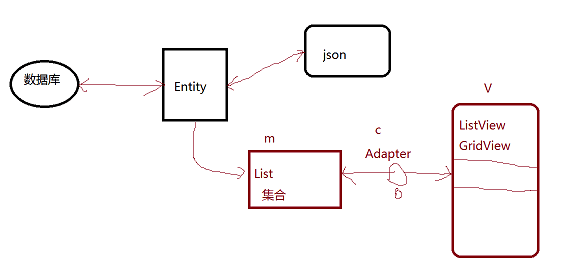
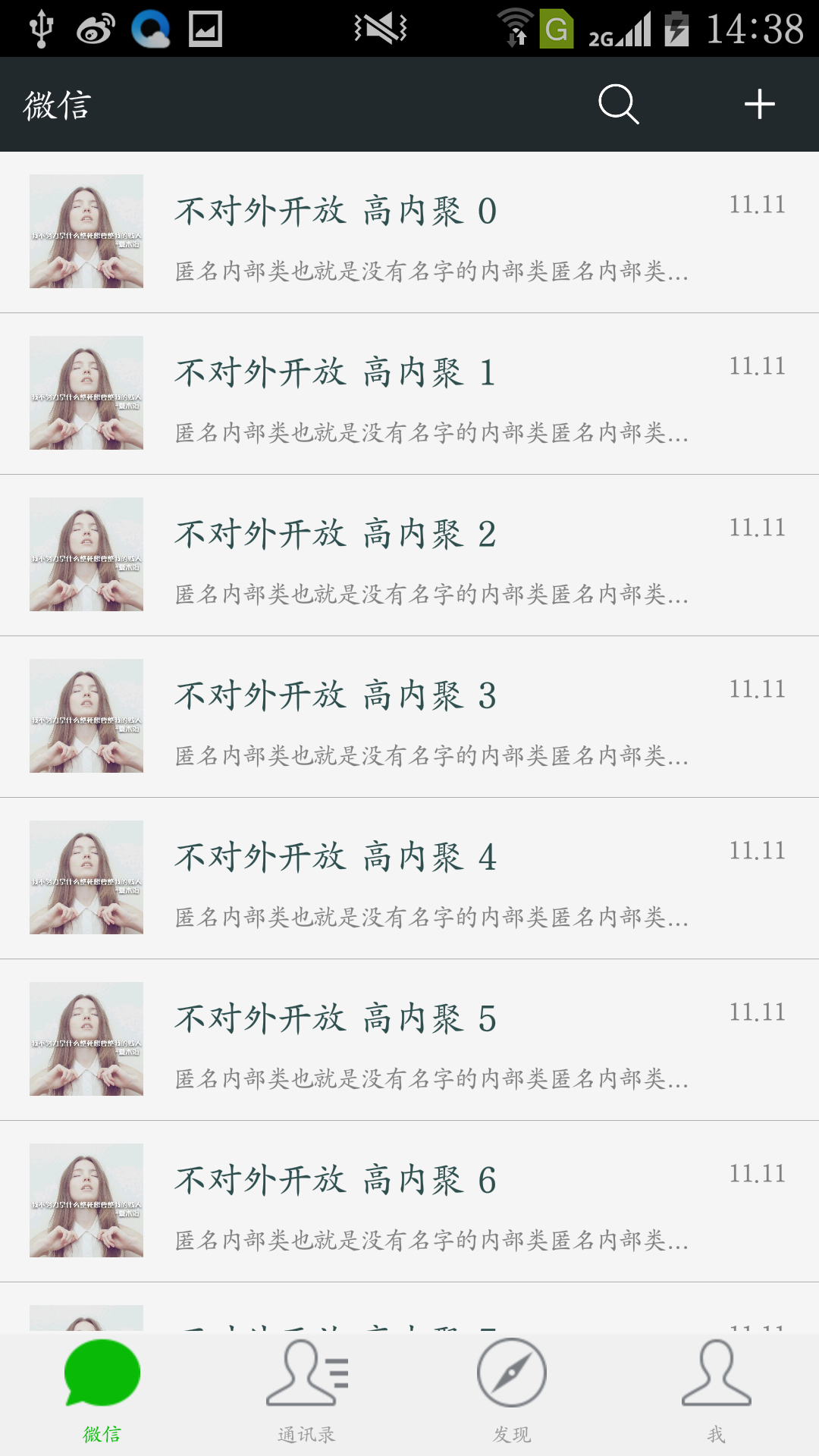
在昨天的微信布局的基础上加内容 http://www.cnblogs.com/Seven-cjy/p/6098024.html
项目下/res/layout下创建一个 listview_layout.xml 的 xml 文件
<?xml version="1.0" encoding="utf-8"?>

<LinearLayout xmlns:android="http://schemas.android.com/apk/res/android"

    android:layout_width="match_parent"

    android:layout_height="match_parent"

    android:orientation="vertical" >

    <ListView

        android:id="@+id/listView1"

        android:layout_width="match_parent"

        android:layout_height="match_parent" >

    </ListView>

</LinearLayout>
listview_layout.xml
项目下/res/layout下创建一个 listview_item_layout.xml 的 xml 文件
<?xml version="1.0" encoding="utf-8"?>

<LinearLayout xmlns:android="http://schemas.android.com/apk/res/android"

    android:layout_width="match_parent"

    android:layout_height="70dp"

    android:orientation="horizontal" >

    <ImageView

        android:id="@+id/imageView1"

        android:layout_width="50dp"

        android:layout_height="50dp"

        android:layout_marginBottom="10dp"

        android:layout_marginLeft="13dp"

        android:layout_marginRight="13dp"

        android:layout_marginTop="10dp"

        android:src="@drawable/a" />

    <LinearLayout

        android:layout_width="wrap_content"

        android:layout_height="70dp"

        android:layout_weight="1"

        android:orientation="vertical" >

        <TextView

            android:id="@+id/tv_userName"

            android:layout_width="match_parent"

            android:layout_height="wrap_content"

            android:layout_marginTop="15dp"

            android:ellipsize="end"

            android:singleLine="true"

            android:textColor="@color/darkslategray"

            android:textSize="16sp" />

        <TextView

            android:id="@+id/tv_lasMessage"

            android:layout_width="match_parent"

            android:layout_height="15dp"

            android:layout_marginBottom="15dp"

            android:layout_marginTop="8dp"

            android:ellipsize="end"

            android:gravity="bottom"

            android:singleLine="true"

            android:textColor="@color/gray"

            android:textSize="11sp" />

    </LinearLayout>

    <LinearLayout

        android:layout_width="40dp"

        android:layout_height="60dp"

        android:layout_marginLeft="10dp"

        android:orientation="vertical" >

        <TextView

            android:id="@+id/tv_datetime"

            android:layout_width="wrap_content"

            android:layout_height="wrap_content"

            android:layout_marginTop="15dp"

            android:layout_weight="1"

            android:gravity="top"

            android:textColor="@color/gray"

            android:textSize="11sp" />

    </LinearLayout>

</LinearLayout>
listview_item_layout.xml
项目下 src 下 创建一个package的包 创建Message.java文件 (如:/项目/src/com/example/entity/Message.java)
package com.example.entity;

public class Message {

    private String tou1;

    private String userName;

    private String lastMessage;

    private String datetime;

    public String getTou1() {

        return tou1;

    }

    public void setTou1(String tou1) {

        this.tou1 = tou1;

    }

    public String getUserName() {

        return userName;

    }

    public void setUserName(String userName) {

        this.userName = userName;

    }

    public String getLastMessage() {

        return lastMessage;

    }

    public void setLastMessage(String lastMessage) {

        this.lastMessage = lastMessage;

    }

    public String getDatetime() {

        return datetime;

    }

    public void setDatetime(String datetime) {

        this.datetime = datetime;

    }

}
Message.java
项目下 /src/com/example/winxinmff/MainActivity.java 文件
package com.example.winxinmff;

import java.util.ArrayList;

import java.util.List;

import com.example.entity.Message;

import android.app.Activity;

import android.os.Bundle;

import android.util.Log;

import android.view.LayoutInflater;

import android.view.View;

import android.view.ViewGroup;

import android.widget.BaseAdapter;

import android.widget.ListView;

import android.widget.TextView;

public class MainActivity extends Activity {

    private ListView lv;

    private List<Message> messageList = new ArrayList<Message>();

    protected void onCreate(Bundle savedInstanceState) {

        super.onCreate(savedInstanceState);

        setContentView(R.layout.weixin);

        // 模拟读取数据库或者互联网

        for (int i = 0; i < 20; i++) {   // 模拟20条数据

            Message p = new Message();

            p.setTou1("xxx");

            p.setUserName("不对外开放 高内聚 ");

            p.setLastMessage("匿名内部类也就是没有名字的内部类匿名内部类也就是没有名字的内部类");

            p.setDatetime("11.11");

            messageList.add(p);

        }

        lv = (ListView) findViewById(R.id.listView1);

        // 简单理解为VC绑在一起

        lv.setAdapter(new BaseAdapter() {

            private View view;

            public int getCount() {                // 返回多少条记录

                return messageList.size();

            }

            // 每一个item项, 返回一次界面

            public View getView(int position, View convertView, ViewGroup parent) {

                // 布局不变,数据变

                // 如果缓存为空 ,我们生成新的布局作为1个 item

                if (convertView == null) {

                    Log.i("info: ", "没有缓存,重新生成" + position);

                    LayoutInflater inflater = MainActivity.this.getLayoutInflater();

                    // 因为 getView() 返回的对象, adapter 会自动赋给 List

                    view = inflater.inflate(R.layout.listview_item_layout, null);

                } else {

                    Log.i("info: ", "有缓存,不需要重新生成" + position);

                    view = convertView;

                }

                Message m = messageList.get(position);

                TextView tv_userName = (TextView) view.findViewById(R.id.tv_userName);

                tv_userName.setText(m.getUserName() + position);

                TextView tv_lasMessage = (TextView) view.findViewById(R.id.tv_lasMessage);

                tv_lasMessage.setText(m.getLastMessage());

                TextView tv_datetime = (TextView) view.findViewById(R.id.tv_datetime);

                tv_datetime.setText(m.getDatetime());

                return view;

            }

            public long getItemId(int position) {

                return 0;

            }

            public Object getItem(int position) {

                return null;

            }

        });

    }

}
MainActivity.java
android 模拟微信消息框 BaseAdapter()方法 [2]的更多相关文章
- android 模拟微信消息 OnItemClickListener()方法 [3]
在 http://www.cnblogs.com/Seven-cjy/p/6101555.html 是基础上修改 MainActivity.java /winxinmff/src/com/exampl ...
- WP&Win10仿微信消息框代码分享
上次分享了幸运转盘的源码,感觉小伙伴们很喜欢:这次和大家分享下通信相关部分需要用到的类似微信的消息框代码,有需要的童鞋可以拿去用哟.自己尝试写的,可能有点low,勿喷呀! 希望以后有好的东西大家都分享 ...
- Android模拟微信主页面的Demo
Android模拟微信主页面的Demo 效果图如下: 项目结构图如下: ContanctFragment: package com.demo.moniwexin; import android.app ...
- Android实例-消息框(XE8+小米2)
方法一支持. 方法二与方法三都是三方单元,功能相同. 方法4与方法5报错,提示平台不支持. 第三方单元一: unit Android.JNI.Toast; // Java bridge class i ...
- 元素定位:selenium消息框处理 (alert、confirm、prompt)
基础普及 alert对话框 .细分三种,Alert,prompt,confirm 1. alert() 弹出个提示框 (确定) 警告消息框 alert 方法有一个参数,即希望对用户显示的文本字符串.该 ...
- selenium 消息框元素定位处理
以下内容来自于“风少”的博客 <元素定位:selenium消息框处理 (alert.confirm.prompt)> 基础普及 alert对话框 .细分三种,Alert,prompt,co ...
- 2.7.1 元素定位:selenium消息框处理 (alert、confirm、prompt)
来源:http://blog.csdn.net/cui_angel/article/details/7784211 http://www.cnblogs.com/tobecrazy/p/ ...
- Android仿微信QQ等实现锁屏消息提醒
demo代码如下: import android.content.Intent; import android.os.Bundle; import android.support.v7.app.App ...
- C#代码像QQ的右下角消息框一样,无论现在用户的焦点在哪个窗口,消息框弹出后都不影响焦点的变化,那么有两种方法
你QQ的右下角消息框一样,无论现在用户的焦点在哪个窗口,消息框弹出后都不影响焦点的变化,那么有两种方法: 要么重写需要弹出的窗体的事件: protected override CreateParams ...
随机推荐
- cf590A Median Smoothing
A. Median Smoothing time limit per test 2 seconds memory limit per test 256 megabytes input standard ...
- [TCO 2012 Round 3A Level3] CowsMooing (数论,中国剩余定理,同余方程)
题目:http://community.topcoder.com/stat?c=problem_statement&pm=12083 这道题还是挺耐想的(至少对我来说是这样).开始时我只会60 ...
- iOS speex
1. http://www.cocoachina.com/bbs/read.php?tid=114755 2, http://blog.csdn.net/jiangyiaxiu/article/det ...
- php开启错误提示
1.在php.ini文件里加上下面两句 display_errors = Onerror_reporting = E_ALL | E_STRICT 2.在Apache的 httpd.conf文件里加上 ...
- save与 merge与 saveOrUpdate的区别
save()方法很显然是执行保存操作的,如果是对一个新的刚new出来的对象进行保存,自然要使用这个方法了,数据库中没有这个对象. update()如果是对一个已经存在的托管对象进行更新那么肯定是要使用 ...
- ASP.NET MVC 3 Model【通过一简单实例一步一步的介绍】
今天主要讲Model的两个方面: 1. ASP.Net MVC 3 Model 简介 通过一简单的事例一步一步的介绍 2. ASP.Net MVC 3 Model 的一些验证 MVC 中 Model ...
- HDU -1284钱币兑换
这个是完全背包的基础题, 模拟换钱, 刚开始状态方程写错了,我直接写dp[i] = dp[i - 1] + dp[i - 2] + dp[i - 3], 然后想了想感觉太大了,不太对,后来看网上的代码 ...
- 一览css布局标准
回顾历史,CSS1于1996.12.17发正式版,它是为辅助HTML的展现效果而生的.1998.5.12,CSS2发正式版.随后发修订版CSS2.1,纠正了CSS2中的一些错误.注意从CSS2起,CS ...
- Dev GridControl 按条件合并相同单元格
Dev 默认的合并方式,只要(垂直方向)相邻两个单元格的值相同都会进行合并,这种方式并不是最优的,所以需要在进行合并的过程中进行判断. 方式如下: 1:先设置需要合并的列为允许合并 OptionsVi ...
- javascript基础之javascript的存在形式和js代码块在页面中的存放位置
1.存在形式 文件 如: <script src='js/jc.js'></script> 前页面 <script type='text/javascript'>a ...