
android toolbar效果2
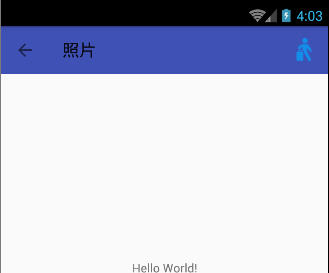
只有一个按钮的情况
<resources>
    <string name="app_name">照片</string>
</resources>
styles.xml
<resources>

    <!-- Base application theme. -->
    <style name="AppTheme" parent="Theme.AppCompat.Light.NoActionBar">
        <!-- Customize your theme here. -->
        <item name="colorPrimary">@color/colorPrimary</item>
        <item name="colorPrimaryDark">@color/colorPrimaryDark</item>
        <item name="colorAccent">@color/colorAccent</item>

        <!-- Toolbar styles -->
        <item name="toolbarStyle">@style/Widget.AppCompat.Toolbar</item>
    </style>

</resources>
mainActivity.java
Toolbar myToolbar = (Toolbar) findViewById(R.id.my_toolbar);
setSupportActionBar(myToolbar);
getSupportActionBar().setDisplayHomeAsUpEnabled(true);
activity_main.xml
<?xml version="1.0" encoding="utf-8"?>

<android.support.constraint.ConstraintLayout xmlns:android="http://schemas.android.com/apk/res/android"

    xmlns:app="http://schemas.android.com/apk/res-auto"

    xmlns:tools="http://schemas.android.com/tools"

    android:layout_width="match_parent"

    android:layout_height="match_parent"

    tools:context="com.homelink.testtoolbar7.MainActivity">

    <android.support.v7.widget.Toolbar

        style="style/toolbarStyle"

        android:id="@+id/my_toolbar"

        xmlns:android="http://schemas.android.com/apk/res/android"

        android:layout_width="match_parent"

        android:layout_height="wrap_content"

        android:background="?attr/colorPrimary"

        android:minHeight="?attr/actionBarSize">

        <ImageView

            android:id="@+id/bluetoothState"

            android:layout_width="wrap_content"

            android:layout_height="wrap_content"

            android:src="@drawable/fm_detailitem_walk"

            android:contentDescription="content_description_bluetooth_status"

            android:padding="8dp"

            android:layout_marginRight="10dp"

            android:layout_gravity="right"/>

    </android.support.v7.widget.Toolbar>

    <TextView

        android:layout_width="wrap_content"

        android:layout_height="wrap_content"

        android:text="Hello World!"

        app:layout_constraintBottom_toBottomOf="parent"

        app:layout_constraintLeft_toLeftOf="parent"

        app:layout_constraintRight_toRightOf="parent"

        app:layout_constraintTop_toTopOf="parent" />

</android.support.constraint.ConstraintLayout>
android toolbar效果2的更多相关文章
- android toolbar效果4
两个标题的,右边一个按钮 activity_main.xml: <android.support.v7.widget.Toolbar style="style/toolbarStyle ...
- android toolbar效果3
Title居中,只有一个右边按钮 activity_main.xml: <?xml version="1.0" encoding="utf-8"?> ...
- android toolbar效果
layout下的layout_main.xml: <?xml version="1.0" encoding="utf-8"?> <Relati ...
- [置顶]
xamarin android toolbar(踩坑完全入门详解)
网上关于toolbar的教程有很多,很多新手,在使用toolbar的时候踩坑实在太多了,不好好总结一下,实在浪费.如果你想学习toolbar,你肯定会去去搜索androd toolbar,既然你能看到 ...
- Android Toolbar中的title居中问题
版权声明:本文为xing_star原创文章,转载请注明出处! 本文同步自http://javaexception.com/archives/167 Android Toolbar中的title居中问题 ...
- Android动画效果之自定义ViewGroup添加布局动画
前言: 前面几篇文章介绍了补间动画.逐帧动画.属性动画,大部分都是针对View来实现的动画,那么该如何为了一个ViewGroup添加动画呢?今天结合自定义ViewGroup来学习一下布局动画.本文将通 ...
- Android动画效果之Property Animation进阶(属性动画)
前言: 前面初步认识了Android的Property Animation(属性动画)Android动画效果之初识Property Animation(属性动画)(三),并且利用属性动画简单了补间动画 ...
- Android动画效果之初识Property Animation(属性动画)
前言: 前面两篇介绍了Android的Tween Animation(补间动画) Android动画效果之Tween Animation(补间动画).Frame Animation(逐帧动画)Andr ...
- Android动画效果之Frame Animation(逐帧动画)
前言: 上一篇介绍了Android的Tween Animation(补间动画) Android动画效果之Tween Animation(补间动画),今天来总结下Android的另外一种动画Frame ...
随机推荐
- Spring 源码学习(4)—— bean的加载part 1
前面随笔中,结束了对配置文件的解析工作,以及将配置文件转换成对应的BeanDefinition存储在容器中.接下来就该进行bean的加载了. public Object getBean(String ...
- gitlab 同步小脚本
gitlab 是公司中的代码仓库,如何保证两台机器同步呢 公司中使用的是docker那么久使用docker进行演示了也方便以后的工作查找资料 附:脚本 #!/bin/bash docker stop ...
- iOS 添加第三方字体
有时候根据UI的设计,我们需要添加第三方字体到工程中,实现特殊的效果. 一,把第三方字体包导入工程 二,在info.plist文件中添加Fonts provided by application 类型 ...
- VSCode 常用的快捷键
R键:点击后热加载,直接查看预览结果 P键: 在虚拟机中显示网格,常用 O 键:切换iOS 和Android Q键 :退出调试 ctr +~ 打开 终端
- css颜色属性及设置颜色的地方
css颜色属性 在css中用color属性规定文本的颜色. 默认值是not specified 有继承性,在javascript中语法是object.style.color="#FF0000 ...
- cordova获取app版本信息插件的使用:cordova-plugin-app-version
1. 添加插件: cordova plugin add cordova-plugin-app-version 2. 调用方法: //获取当前文件的版本号: document.addEventListe ...
- 面試題之web
1. django和flask框架的区别? django:大而全的全的框架,重武器:内置很多组件:ORM.admin.Form.ModelForm.中间件.信号.缓存.csrf等 flask: 微型框 ...
- C# 数据库
连接: using System; using System.Collections.Generic; using System.Linq; using System.Text; using Syst ...
- mysql 启动失败,数据恢复
mysql 启动失败,数据恢复 2017年02月13日 16:46:36 阅读数:621 Forcing InnoDB Recovery提供了6个等级的修复模式,需要注意的是值大于3的时候,会对数据文 ...
- opencv::将两幅图像合并后,在同一个窗口显示;并将合并的图像流保存成视频文件
/** * @file main-opencv.cpp * @date July 2014 * @brief An exemplative main file for the use of ViBe ...