
android toolbar效果3
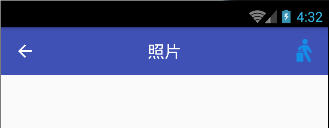
Title居中,只有一个右边按钮
activity_main.xml:
<?xml version="1.0" encoding="utf-8"?>

<android.support.constraint.ConstraintLayout xmlns:android="http://schemas.android.com/apk/res/android"

    xmlns:app="http://schemas.android.com/apk/res-auto"

    xmlns:tools="http://schemas.android.com/tools"

    android:layout_width="match_parent"

    android:layout_height="match_parent"

    tools:context="com.homelink.testtoolbar7.MainActivity">

    <android.support.v7.widget.Toolbar

        style="style/toolbarStyle"

        android:id="@+id/my_toolbar"

        xmlns:android="http://schemas.android.com/apk/res/android"

        android:layout_width="match_parent"

        android:layout_height="wrap_content"

        android:gravity="center"

        android:background="?attr/colorPrimary"

        android:minHeight="?attr/actionBarSize"

        app:theme="@style/ThemeOverlay.AppCompat.Dark.ActionBar"

        app:popupTheme="@style/ThemeOverlay.AppCompat.Light">

        <TextView

            android:layout_width="wrap_content"

            android:layout_height="wrap_content"

            android:text="Toolbar Title"

            android:layout_gravity="center"

            style="@style/TextAppearance.AppCompat.Widget.ActionBar.Title"

            android:id="@+id/toolbar_title" />

        <ImageView

            android:id="@+id/bluetoothState"

            android:layout_width="wrap_content"

            android:layout_height="wrap_content"

            android:src="@drawable/fm_detailitem_walk"

            android:contentDescription="content_description_bluetooth_status"

            android:padding="8dp"

            android:layout_marginRight="10dp"

            android:layout_gravity="right"/>

    </android.support.v7.widget.Toolbar>

    <TextView

        android:layout_width="wrap_content"

        android:layout_height="wrap_content"

        android:text="Hello World!"

        app:layout_constraintBottom_toBottomOf="parent"

        app:layout_constraintLeft_toLeftOf="parent"

        app:layout_constraintRight_toRightOf="parent"

        app:layout_constraintTop_toTopOf="parent" />

</android.support.constraint.ConstraintLayout>
MainActivity.java
     @Override

     protected void onCreate(Bundle savedInstanceState) {

         super.onCreate(savedInstanceState);

         setContentView(R.layout.activity_main);

         Toolbar myToolbar = (Toolbar) findViewById(R.id.my_toolbar);

         TextView mTitle = (TextView) myToolbar.findViewById(R.id.toolbar_title);

         setSupportActionBar(myToolbar);

         mTitle.setText(myToolbar.getTitle());

         getSupportActionBar().setDisplayShowTitleEnabled(false);

         getSupportActionBar().setDisplayHomeAsUpEnabled(true);

     }
styles.xml:
<resources>

    <!-- Base application theme. -->
    <style name="AppTheme" parent="Theme.AppCompat.Light.NoActionBar">
        <!-- Customize your theme here. -->
        <item name="colorPrimary">@color/colorPrimary</item>
        <item name="colorPrimaryDark">@color/colorPrimaryDark</item>
        <item name="colorAccent">@color/colorAccent</item>

        <!-- Toolbar styles -->
        <item name="toolbarStyle">@style/Widget.AppCompat.Toolbar</item>
    </style>

</resources>
android toolbar效果3的更多相关文章
- android toolbar效果4
两个标题的,右边一个按钮 activity_main.xml: <android.support.v7.widget.Toolbar style="style/toolbarStyle ...
- android toolbar效果2
只有一个按钮的情况 <resources> <string name="app_name">照片</string></resources& ...
- android toolbar效果
layout下的layout_main.xml: <?xml version="1.0" encoding="utf-8"?> <Relati ...
- [置顶]
xamarin android toolbar(踩坑完全入门详解)
网上关于toolbar的教程有很多,很多新手,在使用toolbar的时候踩坑实在太多了,不好好总结一下,实在浪费.如果你想学习toolbar,你肯定会去去搜索androd toolbar,既然你能看到 ...
- Android Toolbar中的title居中问题
版权声明:本文为xing_star原创文章,转载请注明出处! 本文同步自http://javaexception.com/archives/167 Android Toolbar中的title居中问题 ...
- Android动画效果之自定义ViewGroup添加布局动画
前言: 前面几篇文章介绍了补间动画.逐帧动画.属性动画,大部分都是针对View来实现的动画,那么该如何为了一个ViewGroup添加动画呢?今天结合自定义ViewGroup来学习一下布局动画.本文将通 ...
- Android动画效果之Property Animation进阶(属性动画)
前言: 前面初步认识了Android的Property Animation(属性动画)Android动画效果之初识Property Animation(属性动画)(三),并且利用属性动画简单了补间动画 ...
- Android动画效果之初识Property Animation(属性动画)
前言: 前面两篇介绍了Android的Tween Animation(补间动画) Android动画效果之Tween Animation(补间动画).Frame Animation(逐帧动画)Andr ...
- Android动画效果之Frame Animation(逐帧动画)
前言: 上一篇介绍了Android的Tween Animation(补间动画) Android动画效果之Tween Animation(补间动画),今天来总结下Android的另外一种动画Frame ...
随机推荐
- jmeter操作练习
1.登录: 2.用户定义变量 3.http请求默认值 这是登录里面的服务器名称或IP可以不用填(以上情况是当多个共用一个IP的时候,可以这样做) 4.配置文件下--CSV Data Set Confi ...
- ARTS(一)
ARTS第一周,2019年3月17日,星期日,天气晴. A:算法学习(Algorithm) 将一个给定字符串根据给定的行数,以从上往下.从左到右进行 Z 字形排列. 比如输入字符串为 "LE ...
- ceph集群性能测试结果
对ceph存储集群(8台万兆服务器)从以下几个方面进行测试的结果 1.读写稳定性 无故障下的ceph集群性能完全满足业务对磁盘性能的需求. 测试数据结果如下表1-1,1-2 2.业务稳定性 ceph集 ...
- Java学习笔记43(Spring的jdbc模板)
在之前的学习中,我们执行sql语句,需要频繁的开流,关流比较麻烦,为了更加的简化代码,我们使用Spring 的jdbc模板jdbcTemplate来简化我们的代码量:需要导入的包有: 我们在之前的dr ...
- 蓝牙协议分析(5)_BLE广播通信相关的技术分析
1. 前言 大家都知道,相比传统蓝牙,蓝牙低功耗(BLE)最大的突破就是加大了对广播通信(Advertising)的支持和利用.关于广播通信,通过“玩转BLE(1)_Eddystone beacon” ...
- 自用IP查询网址 - 地址 - 归属地 - 地理位置 - 2017.5
下面速度较快排行 http://city.ip138.com/ip2city.asp http://1212.ip138.com/ic.asp http://www.taobao.com/help/g ...
- Oracle(二)在 Mysql 的基础上学习 Oracle
毕竟我是先学的mysql,对数据库的一切认知都会有一个先入为主的思想在里面,如果不搞清楚其中的异同,我感觉Oracle我是学不会 了,甚至会把它们混淆.那么,不会mysql的没必要往下看了. 下边第一 ...
- 牛客网PAT乙级(Basic Level)真题-数素数 (20)
题目描述 令Pi表示第i个素数.现任给两个正整数M <= N <= 10000,请输出PM到PN的所有素数. 输入描述: 输入在一行中给出M和N,其间以空格分隔. 输出描述: 输出从PM到 ...
- SQL注入之Sqli-labs系列第三十四关(基于宽字符逃逸POST注入)和三十五关
开始挑战第三十四关和第三十五关(Bypass add addslashes) 0x1查看源码 本关是post型的注入漏洞,同样的也是将post过来的内容进行了 ' \ 的处理. if(isset($_ ...
- Address localhost:1099 is already in use
在 ItelliJ idea中创建了Servlet,启动tomcat时系统报错: Error running Tomcat 7.0.47: Address localhost:1099 is alre ...