
CQL操作
http://docs.datastax.com/en/cql/3.1/pdf/cql31.pdf
CQL是Cassandra Query Language的缩写,目前作为Cassandra默认并且主要的交互接口。CQL和SQL比较类似,主要的区别是Cassandra不支持join或子查询,除了支持通过Hive进行批处理分析。要说这个Cassandra以前的接口主要是Thrift API,这个没有用过,不做评价。
Cassandra在CQL语言层面支持多种数据类型[12]。
| CQL类型 | 对应Java类型 | 描述 |
|---|---|---|
| ascii | String | ascii字符串 |
| bigint | long | 64位整数 |
| blob | ByteBuffer/byte[] | 二进制数组 |
| boolean | boolean | 布尔 |
| counter | long | 计数器,支持原子性的增减,不支持直接赋值 |
| decimal | BigDecimal | 高精度小数 |
| double | double | 64位浮点数 |
| float | float | 32位浮点数 |
| inet | InetAddress | ipv4或ipv6协议的ip地址 |
| int | int | 32位整数 |
| list | List | 有序的列表 |
| map | Map | 键值对 |
| set | Set | 集合 |
| text | String | utf-8编码的字符串 |
| timestamp | Date | 日期 |
| uuid | UUID | UUID类型 |
| timeuuid | UUID | 时间相关的UUID |
| varchar | string | text的别名 |
| varint | BigInteger | 高精度整型 |
cqlsh语法
cqlsh [options] [host [port]]
python cqlsh [options] [host [port]]
Options
- -C, --color
- Always use color output.
- --debug
- Show additional debugging information.
- --cqlshrc path
- Use an alternative cqlshrc file location, path. (Cassandra 2.1.1)
- -e cql_statement, --execute cql_statement
- Accept and execute a CQL command in Cassandra 2.1 and later. Useful for saving CQL output to a file.
- -f file_name, --file=file_name
- Execute commands from file_name, then exit.
- -h, --help
- Show the online help about these options and exit.
- -k keyspace_name
- Use the given keyspace. Equivalent to issuing a USE keyspace command immediately after starting cqlsh.
- --no-color
- Never use color output.
- -p password
- Authenticate using password. Default = cassandra.
- -t transport_factory_name, --transport=transport_factory_name
- Use the provided Thrift transport factory function.
- -u user_name
- Authenticate as user. Default = cassandra.
- --version
- Show the cqlsh version.
启动CQL命令是cqlsh,我下面的例子是window上的,cassandra版本是2.1.14
示例:
#debug

D:\soft\cassandra\apache-cassandra-2.1.-bin\bin>cqlsh.bat --debug

Using CQL driver: <module 'cassandra' from 'D:\soft\cassandra\apache-cassandra-2.1.14-bin\bin\..\lib\cassandra-driver-in

ternal-only-2.7..zip\cassandra-driver-2.7.\cassandra\__init__.py'>

Using connect timeout:  seconds

Connected to Test Cluster at 127.0.0.1:.

[cqlsh 5.0. | Cassandra 2.1. | CQL spec 3.2. | Native protocol v3]

Use HELP for help.

WARNING: pyreadline dependency missing.  Install to enable tab completion.

#version

D:\soft\cassandra\apache-cassandra-2.1.-bin\bin>cqlsh.bat --version

cqlsh 5.0.

#Saving CQL output in a file导出

D:\soft\cassandra\apache-cassandra-2.1.-bin\bin>cqlsh.bat -e "select * from duansf.users">myoutput.txt
导出的文件如下:
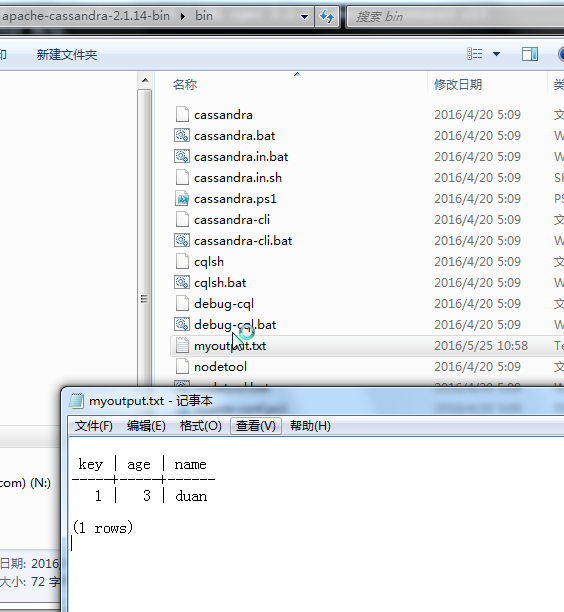
D:\soft\cassandra\apache-cassandra-2.1.14-bin\bin>cqlsh.bat
结果:cqlsh Can't detect Python version!
安装python,我安装的是64位的2.7版本,并配置下环境变量path中增加python的安装根路径。安装好后再执行cqlsh.bat
D:\soft\cassandra\apache-cassandra-2.1.14-bin\bin>cqlsh.bat
D:\soft\cassandra\apache-cassandra-2.1.-bin\bin>cqlsh.bat

Connected to Test Cluster at 127.0.0.1:.

[cqlsh 5.0. | Cassandra 2.1. | CQL spec 3.2. | Native protocol v3]

Use HELP for help.

WARNING: pyreadline dependency missing.  Install to enable tab completion.
一、创建keyspace
作为对照,你可以把keyspace理解成一个SQL数据库实例,当然它们毕竟是不同的:Cassandra的keyspace是用来定义数据是如何在节点间复制的。通常情况下,应该为一个应用程序建立一个keyspace。
CREATE KEYSPACE IF NOT EXISTS pimin_net

WITH REPLICATION = {'class': 'SimpleStrategy','replication_factor':};
上面语句的意思是判断是否存在keyspace,如果不存在则建立keyspace;使用的副本策略是简单策略,复制因子是1。暂时先不管里面深层次的东西,我们先按照简单原则实现。
二、创建表
虽然说Cassandra是面向列的分布式数据库,但是它也有表的概念。创建之前先use pimin_net。
USE pimin_net;

CREATE TABLE users (

id int,

user_name varchar,

PRIMARY KEY (id) );
这样就建立了一张用户表,为了简单起见,就只有两个字段,看起来和oracle、mysql这些是不是很像?
三、对表的CRUD
已经有了一张用户表,我们就向里面插入一些数据,对它进行查询、更新和删除操作。
INSERT INTO users (id,user_name) VALUES (,'china');

INSERT INTO users (id,user_name) VALUES (,'taiwan');

SELECT * FROM users;
cqlsh:pimin_net> SELECT * FROM users;

 id | user_name

----+-----------

( rows)

cqlsh:pimin_net> INSERT INTO users (id,user_name) VALUES (,'china');

cqlsh:pimin_net> INSERT INTO users (id,user_name) VALUES (,'taiwan');

cqlsh:pimin_net> SELECT * FROM users;

 id | user_name

----+-----------

   |     china

   |    taiwan

( rows)

cqlsh:pimin_net>
UPDATE users SET user_name = 'china2014' WHERE id = ;

SELECT * FROM users;

DELETE FROM users WHERE id = ;

SELECT * FROM users;
结果:
cqlsh:pimin_net> UPDATE users SET user_name = 'china2014' WHERE id = ;

cqlsh:pimin_net> SELECT * FROM users;

 id | user_name

----+-----------

   | china2014

   |    taiwan

( rows)

cqlsh:pimin_net> DELETE FROM users WHERE id = ;

cqlsh:pimin_net> SELECT * FROM users;

 id | user_name

----+-----------

   |    taiwan

( rows)

cqlsh:pimin_net>
重要:不同于传统的RDBMS,Cassandra不能使用DELETE FROM users;这样的表达式,必须有WHERE条件!
重要:不同于传统的RDBMS,Cassandra不能使用DELETE FROM users;这样的表达式,必须有WHERE条件!
示例2:
cqlsh:usermanager> use duansf
1.创建keyspace
cqlsh:usermanager> create keyspace duansf WITH REPLICATION = {'class': 'SimpleStrategy','replication_factor':};
创建一个名为duansf的keyspace,副本策略SimpleStrategy,复制因子为1.
2.创建Column family
cqlsh>use duansf;

cqlsh:duansf> create columnfamily users(

           key varchar primary key,

           password varchar,

           gender varchar,

           session_token varchar,

           state varchar,

           birth_year bigint);
创建一个名为users的column family
... KEY varchar PRIMARY KEY,该columnfamily下有一个Key
和5列
... password varchar,
... gende rvarchar,
... session_token varchar,
... state varchar,
... birth_year bigint);
3.插入和检索Columns
cqlsh:duansf> insert into users(key,password) values('jsmith','chadsfl') using ttl 86400;
向passwod这一列插入数据
cqlsh:duansf> select * from users where key='jsmith';

 key    | birth_year | gender | password | session_token | state

--------+------------+--------+----------+---------------+-------

 jsmith |       null |   null |  chadsfl |          null |  null

( rows)

cqlsh:duansf>
向session_token这一列插入数据
cqlsh:duansf> insert into users(key,session_token) values('jsmith','test') using ttl ;

cqlsh:duansf> select * from users where key='jsmith';

 key    | birth_year | gender | password | session_token | state

--------+------------+--------+----------+---------------+-------

 jsmith |       null |   null |  chadsfl |          test |  null
3.向Column family中增加Column
cqlsh:duansf> alter table user add coupon_code varchar;
注意:其他已经存在的列不会进行更新。
4. 更改Column的元数据
cqlsh:duansf> alter table users alter coupon_code type int;

ConfigurationException: <ErrorMessage code= [Query invalid because of configuration issue] message="Cannot change co

upon_code from type text to type int: types are incompatible.">
注意:已经存在的数据不会转成此类型,新插入的数据才是该类型的。
5.使用TTL属性设置列的到期时间
cqlsh:duansf> update users using ttl set password='asldkjsfsdf' where key = 'jsmith';
更新密码列的到期时间为5天。
6.删除列元数据
cqlsh:duansf> alter table users drop coupon_code;
7.索引Column
cqlsh:duansf> create index state_key on users(state);

cqlsh:duansf> create index birth_year_key on users(birth_year);
8.删除列或者行
cqlsh:duansf> delete session_token from users where key='jsmith';  //删除session_token列

cqlsh:duansf> select * from users;

 key    | birth_year | gender | password    | session_token | state

--------+------------+--------+-------------+---------------+-------

 jsmith |       null |   null | asldkjsfsdf |          null |  null

( rows)

cqlsh:duansf> delete from users where key='jsmith';  //删除key=jsmith的行

cqlsh:duansf> select * from users;

 key | birth_year | gender | password | session_token | state

-----+------------+--------+----------+---------------+-------

( rows)

cqlsh:duansf>
9. 删除columnfamily和keyspace
cqlsh:duansf> drop columnfamily users;

cqlsh:duansf> insert into users(key,password) values('jsmith','chadsfl') using ttl ;

InvalidRequest: code= [Invalid query] message="unconfigured columnfamily users"

cqlsh:duansf>
删除keyspace
cqlsh:duansf> drop keyspace duansf;

cqlsh:duansf> use duansf;

InvalidRequest: code= [Invalid query] message="Keyspace 'duansf' does not exist"

cqlsh:duansf>
10.查看结构信息
cqlsh:usermanager> desc users;

CREATE TABLE usermanager.users (

    key blob PRIMARY KEY,

    age text,

    name text

) WITH bloom_filter_fp_chance = 0.01

    AND caching = '{"keys":"ALL", "rows_per_partition":"NONE"}'

    AND comment = ''

    AND compaction = {'class': 'org.apache.cassandra.db.compaction.SizeTieredCompactionStrategy'}

    AND compression = {'sstable_compression': 'org.apache.cassandra.io.compress.LZ4Compressor'}

    AND dclocal_read_repair_chance = 0.1

    AND default_time_to_live =

    AND gc_grace_seconds =

    AND max_index_interval =

    AND memtable_flush_period_in_ms =

    AND min_index_interval =

    AND read_repair_chance = 0.0

    AND speculative_retry = '99.0PERCENTILE';
CQL操作的更多相关文章
- Cassandra 之 入门
1.到官网下载压缩包. http://cassandra.apache.org/download/ 我下载的是最新的 apache-cassandra-2.1.2-bin.tar.gz 另外:语言支持 ...
- cassandra 在window上的demo
Cassandra window使用 1. 下载:http://cassandra.apache.org/download/. 2. 解压后,bin目录下,cassan ...
- Cassandra 数据库, python cqlsh命令
★ cql操作数据库(cqlsh.bat: python cqlsh命令操作<优缺点:https://blog.csdn.net/vbirdbest/article/details/77662 ...
- Atitit.nosql api 标准化 以及nosql数据库的实现模型分类差异
Atitit.nosql api 标准化 以及nosql数据库的实现模型分类差异 1. 常用的nosql数据库MongoDB Cassandra1 1.1. 查询> db.blogposts. ...
- cassandra CQL 常用操作
1. CQL客户端链接 bin/cqlsh ip username password 2. (1)建立keyspace语句,keyspace类似于 mysql 中的数据库,一个数据库中可以有很多表: ...
- CQL和SQL的CRUD操作比较
数据进行CRUD操作时,CQL语句和SQL语句的异同之处. 1.建表 2.CRUD语句比较 3.总结 1.建表 在此之前先分别创建两张表,插入数据,用来测试然后进行比较 在SQL数据库里面创建表 在C ...
- cassandra CQL 3.0 怎样实现 dynamic column;
1. cassandra有一个好的特点是列之间可以按照column key进行排序:这样当rowkey确定以后,对于同一个“行”的范围(range query)查找是很方便的:官方说法,每一个“行”( ...
- PLSQL_闪回操作4_Flashback Drop
2014-06-25 Created By BaoXinjian
- Cassandra 数据模型 (基于CQL,解决胖列数量限制及灵活性问题)(1.1及以上版本)
文中主要交代Cassandra的编程模型及数据结构. 由于Cassandra版本数次更新,网上中文的资料已经有点过时,比较有代表性的比如ebuy那篇文章都已经过时了,于是自己找资料,结合官方博客写一篇 ...
随机推荐
- 论文阅读之 A Convex Optimization Framework for Active Learning
A Convex Optimization Framework for Active Learning Active learning is the problem of progressively ...
- GDB动态库搜索路径
当GDB无法显示so动态库的信息或者显示信息有误时,通常是由于库搜索路径错误导致的,可使用set sysroot.set solib-absolute-prefix.set solib-search- ...
- rsyslog日志服务的配置文件分析
基于rsyslog日志服务的日志 在不同的LINUX系统,实现的软件略有不同. syslog,rsyslog,syslog-ng,用于实现系统日志的管理. [root@asianux4 ~]# rpm ...
- APACHE 多站点配置方法
例如你的主机IP:192.168.1.8 而你有三个站点,域名为:www.111.com,www.222.com,www.333.com 相应的网站文件放在主机的:\website\111;D:\we ...
- 下载word文档
来源:http://www.cnblogs.com/damonlan/archive/2012/04/28/2473525.html 作者:浪迹天涯 protected void GridView1_ ...
- Nginx 499错误的原因及解决方法
今天进行系统维护,发现了大量的499错误, 499错误 ngx_string(ngx_http_error_495_page), /* 495, https certificate error */n ...
- 【转】.NET 安装和部署(Installer) 如何卸载上一个版本
前言 当使用.NET“安装项目”打包的安装文件,再次安装的时候会弹出如下提示,这个时候会让我们很郁闷,怎样才能自动卸载上一个安装的版本呢?方法很简单,只需简单的两个操作步骤即可解决. 操作步骤 主要由 ...
- Amazon后台模拟登陆
本文基于python3.4的selenium库打开浏览器,并将浏览器中的登陆cookie保存到本地,那么下次登陆就可以直接利用cookie了: # !/usr/bin/python3.4 # -*- ...
- android电视安装爱奇艺等不能看视频问题
下载地址: http://pan.baidu.com/s/1dDoxA29
- WEB/HTTP 调试利器 Fiddler 的一些技巧分享
1.原理简介: Fiddler 是目前最强大最好用的 Web 调试工具之一,它能记录所有客户端和服务器的http和https请求, 允许你监视,设置 CGI 请求的断点,甚至修改输入输出数据.同类的工 ...