
限制RICHTEXTBOX的输入的范围
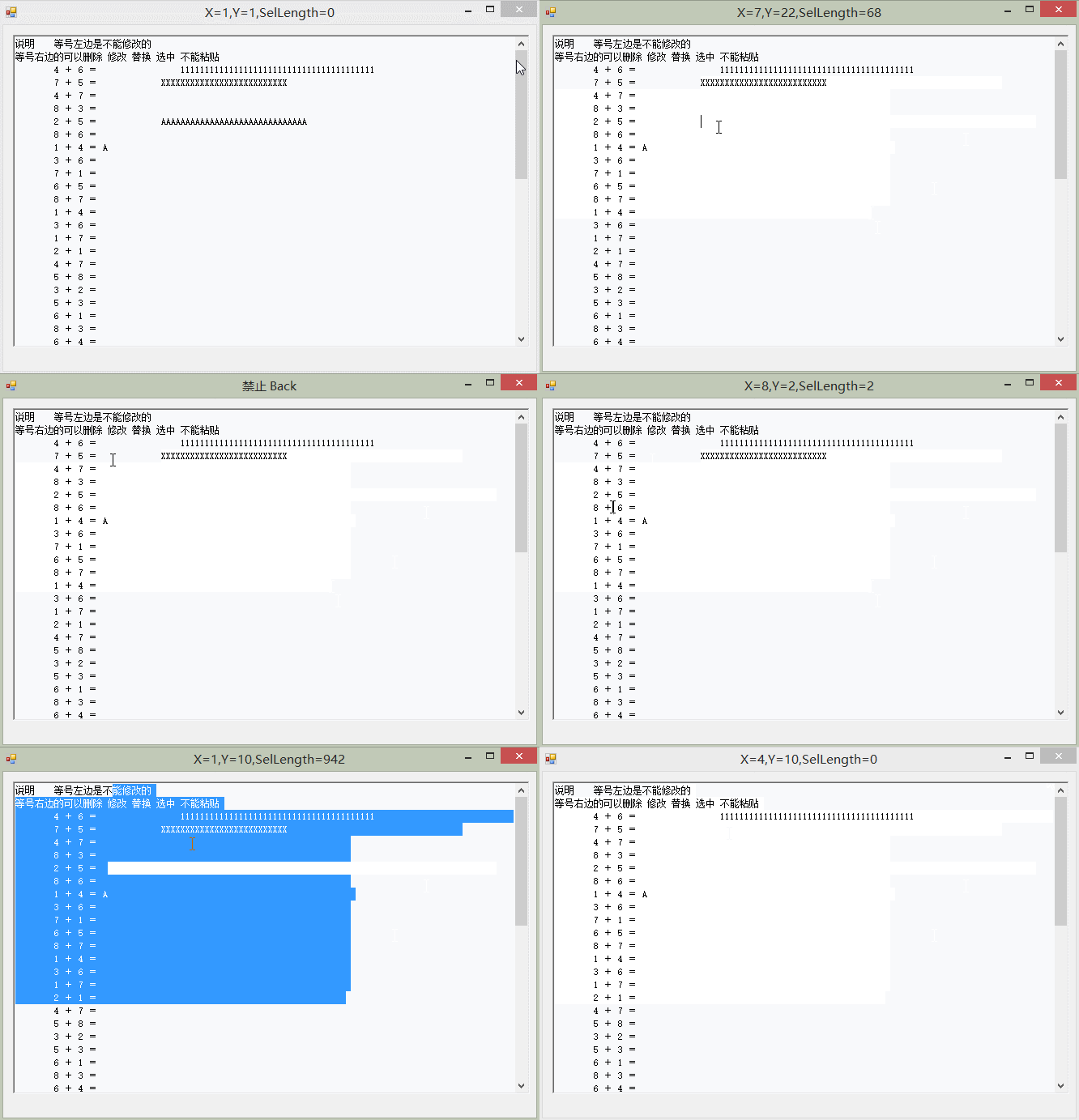
 #region 设置 和 获得光标所在的行号

        ///要在本类中初始化 richTextBox1 = this;

        private int EM_LINEINDEX = 0x00BB;

        private int EM_LINEFROMCHAR = 0x00C9;

        [System.Runtime.InteropServices.DllImport("user32.dll", EntryPoint = "SendMessage")]

        public static extern int SendMessage(IntPtr hwnd, int wMsg, int wParam, int lParam);

        /// <summary>

        /// 获得光标所在的行号和列号

        /// </summary>

        /// <param name="editControl"></param>

        /// <returns>p.X =列号  p.Y =行号</returns>

        public Point GetCaretPosition()

        {

            int charIndex = (int)SendMessage(richTextBox1.Handle, EM_LINEINDEX, -, );

            int lineIndex = (int)SendMessage(richTextBox1.Handle, EM_LINEFROMCHAR, charIndex, );

            Point pt = new Point();

            pt.X = richTextBox1.SelectionStart - charIndex + ;//Line

            pt.Y = lineIndex + ;//Column

            return pt;

        }

        /// <summary>

        /// 转到行

        /// </summary>

        /// <param name="Line">行号</param>

        public void jumpLine(int Line)

        {

            richTextBox1.SelectionStart = SendMessage(richTextBox1.Handle, EM_LINEINDEX, Line - , );

            richTextBox1.SelectionLength = ;

            richTextBox1.ScrollToCaret();

        }

        #endregion
设置 和 获得光标所在的行号
附件列表
限制RICHTEXTBOX的输入的范围的更多相关文章
- WPF自定义控件与样式(3)-TextBox & RichTextBox & PasswordBox样式、水印、Label标签、功能扩展
一.前言.预览 申明:WPF自定义控件与样式是一个系列文章,前后是有些关联的,但大多是按照由简到繁的顺序逐步发布的等,若有不明白的地方可以参考本系列前面的文章,文末附有部分文章链接. 本文主要是对文本 ...
- 将richTextBox中的内容写入txt文件发现不换行(解决方法),在richTextBox指定位置插入文字
string pathname = dt.ToString().Replace(":", ""); string str = richTextBoxResult ...
- 初学c# -- 学习笔记(七) RichTextBox支持GIF
园子里许明吉博客写的一篇,刚好用到这个,写的非常好.转过来了 不过在应用中也有一些问题,win10下不能中文输入,凑合着进行了修改, 下面是原来的代码: private void button2_Cl ...
- RichTextBox文字处理控件属性介绍
RichTextBox控件是一种既能够输入文本. 又能够修改文本的文字处理控件, 与TextBox控件比较, RichTextBox控件的文字处理功用更加丰厚, 不只能够设定文字的色彩. 字体, 还具 ...
- WPF RichTextBox,关键字搜索,样式改变,超链接替换,图文混排
RichTextBox 只是一个控件,表示对 FlowDocument 对象执行操作的丰富编辑控件.它所承载的内容由其 Document 属性来呈现. Document 是一个 FlowDocumen ...
- (C#)RichTextBox控件
RichTextBox(有格式文本)控件可实现TextBox控件的所有功能. ❶在RichTextBox控件中显示滚动条 RichTextBox可设置Multiline属性来控制是否显示滚动套,tru ...
- C# winform 加载网页 模拟键盘输入自动接入访问网络
声明: 本文原创,首发于博客园 http://www.cnblogs.com/EasyInvoice/p/6070563.html 转载请注明出处. 背景: 由于所在办公室网络限制,笔者每天都使用网络 ...
- 《Programming WPF》翻译 第3章 2.处理输入
原文:<Programming WPF>翻译 第3章 2.处理输入 在Windows应用程序中,又3种基本的用户输入形式:鼠标.键盘和手写板.同时,还有一种更高级输入方式,其可能来自快捷键 ...
- C# RichTextBox 制作文本编辑器
本文利用一个简单的小例子[文本编辑器],讲解RichTextBox的用法,仅供学习分享使用,如有不足之处,还请指正. Windows窗体中的RichTextBox控件用于显示,输入和操作格式化的文本, ...
随机推荐
- 【BZOJ-3110】K大数查询 整体二分 + 线段树
3110: [Zjoi2013]K大数查询 Time Limit: 20 Sec Memory Limit: 512 MBSubmit: 6265 Solved: 2060[Submit][Sta ...
- BZOJ 4448: [Scoi2015]情报传递 树链剖分 主席树
4448: [Scoi2015]情报传递 题目连接: http://www.lydsy.com/JudgeOnline/problem.php?id=4448 Description 奈特公司是一个巨 ...
- C#高级编程9-第2章 核心C#
C#基础 使用C#命名编译器csc.exe,编译C#程序 变量 变量一般初始化后才能使用 类型判断弱类型var,根据初始值判断类型, 变量作用域,可以访问该代码的区域 类中定义的成员变量和属性,作用在 ...
- mysql另类分页方法
mysql> limit ,;select found_rows(); +----+-----------------+---------+--------+ | id | rankName | ...
- Git_远程仓库
到目前为止,我们已经掌握了如何在Git仓库里对一个文件进行时光穿梭,你再也不用担心文件备份或者丢失的问题了. 可是有用过集中式版本控制系统SVN的童鞋会站出来说,这些功能在SVN里早就有了,没看出Gi ...
- .NET泛型02,泛型的使用
在" .NET泛型01,为什么需要泛型,泛型基本语法"中,了解了泛型的基本概念,本篇偏重于泛型的使用.主要包括: ■ 泛型方法重载需要注意的问题■ 泛型的类型推断■ 泛型方法也可以 ...
- codeforces 444 C. DZY Loves Colors(线段树)
题目大意: 1 l r x操作 讲 [l,r]上的节点涂成x颜色,而且每一个节点的值都加上 |y-x| y为涂之前的颜色 2 l r 操作,求出[l,r]上的和. 思路分析: 假设一个区间为同样的颜 ...
- Kafka broker配置介绍 (四)
这部分内容对了解系统和提高软件性能都有很大的帮助,kafka官网上也给出了比较详细的配置详单,但是我们还是直接从代码来看broker到底有哪些配置需要我们去了解的,配置都有英文注释,所以每一部分是干什 ...
- Unity3d-Particle System系统的学习(三)
这节课我们来实战下上几节讲的几乎所有Particle System用到的参数. 我们今天制作下图所示的粒子: 类似于带有光晕的魔法球.用到的材质也就是上节课用到的材质贴图. http://pan.ba ...
- 《Windows核心编程》第1章——错误处理
GetLastError: GetLastError返回错误编码,即便出错函数后边跟随一个正确执行了的函数,也不会覆盖原先的错误代码: 考虑多线程的情况.子线程中的错误代码不会被主线程捕获: 但是子函 ...