
【Android】3.5 示例5--多地图展示
分类:C#、Android、VS2015、百度地图应用; 创建日期:2016-02-04
3.5 示例5--多地图展示
一、简介
地图控件自v2.3.5版本起,支持多实例,即开发者可以在一个页面中建立多个地图对象,并且针对这些对象分别操作且不会产生相互干扰。
文件名:Demo04MultiMapView.cs
简介:介绍多MapView的使用
详述:在一个界面内,同时建立四个TextureMapView控件;
二、示例
1、运行截图
在x86模拟器中的运行效果如下:
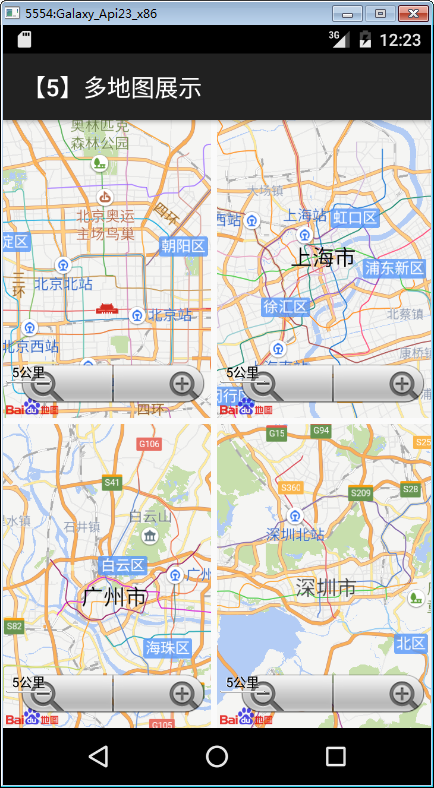
在上一节例子的基础上,只需要再增加下面的步骤即可。
2、添加demo05_multimap.axml文件
在layout文件夹下添加该文件,将其改为下面的代码:
<?xml version="1.0" encoding="utf-8"?>

<LinearLayout xmlns:android="http://schemas.android.com/apk/res/android"

    xmlns:map="http://schemas.android.com/apk/res-auto"

    android:layout_width="match_parent"

    android:layout_height="match_parent"

    android:orientation="vertical" >

    <LinearLayout

        android:layout_width="match_parent"

        android:layout_height="match_parent"

        android:layout_marginBottom="5dp"

        android:layout_weight=""

        android:orientation="horizontal" >

        <fragment

            android:id="@+id/map1"

            android:layout_width="match_parent"

            android:layout_height="match_parent"

            android:layout_marginRight="5dp"

            android:layout_weight=""

            class="com.baidu.mapapi.map.TextureMapFragment" />

        <fragment

            android:id="@+id/map2"

            android:layout_width="match_parent"

            android:layout_height="match_parent"

            android:layout_weight=""

            class="com.baidu.mapapi.map.TextureMapFragment" />

    </LinearLayout>

    <LinearLayout

        android:layout_width="match_parent"

        android:layout_height="match_parent"

        android:layout_weight=""

        android:orientation="horizontal" >

        <fragment

            android:id="@+id/map3"

            android:layout_width="match_parent"

            android:layout_height="match_parent"

            android:layout_marginRight="5dp"

            android:layout_weight=""

            class="com.baidu.mapapi.map.TextureMapFragment" />

        <fragment

            android:id="@+id/map4"

            android:layout_width="match_parent"

            android:layout_height="match_parent"

            android:layout_weight=""

            class="com.baidu.mapapi.map.TextureMapFragment" />

    </LinearLayout>

</LinearLayout>
3、添加Demo05MultiMapView.cs文件
在SdkDemos文件夹下添加该文件,然后将其内容改为下面的代码:
using Android.App;

using Android.Content.PM;

using Android.OS;

using Com.Baidu.Mapapi.Map;

using Com.Baidu.Mapapi.Model;

namespace BdMapV371Demos.SrcSdkDemos

{

    /// <summary>

    /// 在一个Activity中展示多个地图

    /// </summary>

    [Activity(Label = "@string/demo_name_multimap",

        ConfigurationChanges = ConfigChanges.Orientation | ConfigChanges.KeyboardHidden,

        ScreenOrientation = ScreenOrientation.Sensor)]

    public class Demo05MutiMapView : Activity

    {

        private readonly LatLng Geo_BeiJing = new LatLng(39.945, 116.404);

        private readonly LatLng Geo_ShangHai = new LatLng(31.227, 121.481);

        private readonly LatLng Geo_GuangZhou = new LatLng(23.155, 113.264);

        private readonly LatLng Geo_ShenZhen = new LatLng(22.560, 114.064);

        protected override void OnCreate(Bundle savedInstanceState)

        {

            base.OnCreate(savedInstanceState);

            SetContentView(Resource.Layout.demo05_multimap);

            InitMap();

        }

        /// <summary>

        /// 初始化Map

        /// </summary>

        private void InitMap()

        {

            MapStatusUpdate u1 = MapStatusUpdateFactory.NewLatLng(Geo_BeiJing);

            TextureMapFragment map1 = FragmentManager.FindFragmentById<TextureMapFragment>(Resource.Id.map1);

            map1.BaiduMap.SetMapStatus(u1);

            MapStatusUpdate u2 = MapStatusUpdateFactory.NewLatLng(Geo_ShangHai);

            TextureMapFragment map2 = FragmentManager.FindFragmentById<TextureMapFragment>(Resource.Id.map2);

            map2.BaiduMap.SetMapStatus(u2);

            MapStatusUpdate u3 = MapStatusUpdateFactory.NewLatLng(Geo_GuangZhou);

            TextureMapFragment map3 = FragmentManager.FindFragmentById<TextureMapFragment>(Resource.Id.map3);

            map3.BaiduMap.SetMapStatus(u3);

            MapStatusUpdate u4 = MapStatusUpdateFactory.NewLatLng(Geo_ShenZhen);

            TextureMapFragment map4 = FragmentManager.FindFragmentById<TextureMapFragment>(Resource.Id.map4);

            map4.BaiduMap.SetMapStatus(u4);

        }

    }

}
4、修改MainActivity.cs文件
在MainActivity.cs文件的demos字段定义中添加下面的代码。
          //示例5--多地图展示

            new DemoInfo<Activity>(Resource.String.demo_title_multimap,

                Resource.String.demo_desc_multimap,

                new Demo05MutiMapView()),
运行观察结果。
【Android】3.5 示例5--多地图展示的更多相关文章
- Android 开发之集成百度地图的定位与地图展示
app 应用中,大多数应用都具有定位功能,百度定位就成了开发人员的集成定位功能的首选,近期也在做定位功能,可是发现百度真是个大坑啊, sdk 命名更新了,相关代码却不更新,害得我花费了非常长时间来研究 ...
- LBS数据分析:使用地图展示统计数据——麻点图与麻数图
作为一个LBS的APP,都获得了用户经纬度,也都使用了友盟统计.google ana等等统计分析系统,不过没有地图展示功能,不能进行直观的展示. 友盟统计.google ana等系统是总体数据统计,无 ...
- 【iOS】7.4 定位服务->3.1 地图框架MapKit 功能1:地图展示
> 本文并非最终版本,如果想要关注更新或更正的内容请关注文集,联系方式详见文末,如有疏忽和遗漏,欢迎指正. --- > 本文相关目录: ================== 所属文集:[[ ...
- Android 组件化/模块化之路——在展示层搭建MVP结构
Android 组件化/模块化之路——在展示层搭建MVP结构 什么是MVP Model–View–Presenter (MVP) 源于 Model–View–Controller (MVC) 的结构设 ...
- 基于MySQL + Node.js + Leaflet的离线地图展示,支持百度、谷歌、高德、腾讯地图
1. 基本说明 本项目实现了离线展示百度.谷歌.高德.腾讯地图.主要功能如下: 实现了地图瓦片图下载.存储.目前支持存储至MySQL Node.js服务调用MySQL中的瓦片图 Leaflet展示地图 ...
- openlayers4 入门开发系列之地图展示篇(附源码下载)
前言 openlayers4 官网的 api 文档介绍地址 openlayers4 api,里面详细的介绍 openlayers4 各个类的介绍,还有就是在线例子:openlayers4 官网在线例子 ...
- Echarts地图展示及属性分析
Echarts,一个效果非常棒的可视化库,可以生产各种图表,动态展示,附上官方网址:http://www.echartsjs.com/index.html 之前带本科实习时有同学用过,狗哥的博客也用这 ...
- SkylineGlobe Android 开发 面积计算示例代码
SkylineGlobe Android 开发 面积计算示例代码: 如果之前熟悉SkylineGlobe桌面端的二次开发,看这些代码应该不难理解. package com.skyline.terrae ...
- Android vcard使用示例,生成vcf文件
Android vcard使用示例,生成vcf文件 我们备份手机联系人时,导出到SD卡时,会在SD卡中生成一个vcf文件,用于保存联系人姓名,手机号码. vCard 规范容许公开交换个人数据交换 ( ...
随机推荐
- iOS后台播放音乐
iOS实现在后台播放音乐 iOS4之后就支持后台播放音频了.只需下面两步就可以实现后台播放音频操作了. 1. 在Info.plist中,添加"Required background mode ...
- Java从零开始学三十六(JAVA IO- 字符流)
一.字符流 BufferedReader:BufferedReader是从缓冲区之中读取内容,所有的输入的字节数据都将放在缓冲区之中 BufferedWriter:把一批数据写入到缓冲区,当缓冲区区的 ...
- ssh2的application.xml配置文件配置详解
ssh2的application.xml配置文件配置详解 1.导入其他的配置文件.在ssh项目中可以导入其他的配置文件,导入的格式为: <import resource="clas ...
- 从官方的BZR源安装avant-window-navigator
资料来自: http://blog.163.com/azhai@126/blog/static/111056312008315842433/http://www.ibentu.org/2007/09/ ...
- LoadRunner如何监控Linux系统资源
LoadRunner如何监控Linux系统资源 一 简述:LoadRunner监控Linux资源时弹出如下错误: Monitor name :UNIX Resources. Cannot initia ...
- 迅雷极速版|xunlei下载
迅雷很不错的下载软件,曾经出现了,迷你版.极速版... 迅雷极速版 迅雷精简版 迅雷极速版-下载: http://pan.baidu.com/s/1dF3XYTj 密码: 5tj3 迅雷精简版-下载: ...
- 富文本处理NSMutableAttributedString
概述 富文本处理在项目中使用率越来越高.比如像颜色改变突出, 大字号突出处理, 下划线处理, 中划线(删除线)处理等等 详细 代码下载:http://www.demodashi.com/demo/10 ...
- 微信小程序的POST和GET请求方式的header区别
1.post请求: wx.request({ url: 'https://m.***.com/index.php/Home/Xiaoxxf/make_order', header: { "C ...
- 原创+转发:微信小程序navigator、redirectTo、switchTab几种页面跳转方式
什么是事件? 事件是视图层到逻辑层的通讯方式. 事件可以将用户的行为反馈到逻辑层进行处理. 详解(以常见的tap点击事情为例) 模板.wxml代码: <view id="tapTest ...
- HDUOJ----1165Eddy's research II
Eddy's research II Time Limit: 4000/2000 MS (Java/Others) Memory Limit: 65536/32768 K (Java/Other ...