
Android-上下文菜单Menu
上一篇博客介绍了,Android-普通菜单Menu,而这篇博客介绍Android-上下文菜单Menu
AndroidManifest.xml 中加入权限:
   <!-- 读取联系人数据的权限 -->

    <uses-permission android:name="android.permission.READ_CONTACTS"/>

    <!-- 读取通话记录的全身 -->

    <uses-permission android:name="android.permission.READ_CALL_LOG" />

    <!-- 修改通话记录的权限 -->

    <uses-permission android:name="android.permission.WRITE_CALL_LOG" />
Activity
package liudeli.activity;

import android.app.Activity;

import android.content.ClipboardManager;

import android.content.ContentResolver;

import android.content.Context;

import android.content.Intent;

import android.database.Cursor;

import android.net.Uri;

import android.os.Bundle;

import android.provider.CallLog;

import android.view.ContextMenu;

import android.view.LayoutInflater;

import android.view.Menu;

import android.view.MenuItem;

import android.view.View;

import android.view.ViewGroup;

import android.widget.AdapterView;

import android.widget.CursorAdapter;

import android.widget.ListView;

import android.widget.TextView;

public class ContentMenuActivity extends Activity {

    private static final int MENU_ITEM_COPY_TO_DIALER = Menu.FIRST;

    private static final int MENU_ITEM_SEND_SMS = Menu.FIRST + 1;

    private static final int MENU_ITEM_COPY_TO_CLIPBOARD = Menu.FIRST + 2;

    private CursorAdapter adapter;

    @Override

    public void onCreate(Bundle savedInstanceState) {

        super.onCreate(savedInstanceState);

        setContentView(R.layout.activity_content_menu);

        // 初始化控件

        ListView lv = findViewById(R.id.lv);

        // 获取通话记录的数据

        ContentResolver cr = getContentResolver();

        Uri uri = CallLog.Calls.CONTENT_URI;

        String[] projection = new String[]{CallLog.Calls._ID,

                                           CallLog.Calls.CACHED_NAME,

                                           CallLog.Calls.NUMBER,

                                           CallLog.Calls.TYPE};

        Cursor cursor = cr.query(uri, projection, null, null, null);

        adapter = new MyAdapter(this, cursor);

        lv.setAdapter(adapter);

        /**

         * 1 给listview注册上下文菜单

         */

        registerForContextMenu(lv);

    }

    /**

     * 2 创建上下文菜单

     * @param menu

     * @param v

     * @param menuInfo

     */

    @Override

    public void onCreateContextMenu(ContextMenu menu, View v,

                                    ContextMenu.ContextMenuInfo menuInfo) {

        menu.add(0, MENU_ITEM_COPY_TO_DIALER, 0, "复制号码到拨号盘");

        menu.add(0, MENU_ITEM_SEND_SMS, 0, "发送短信");

        menu.add(0, MENU_ITEM_COPY_TO_CLIPBOARD, 0, "复制号码到粘贴板");

        super.onCreateContextMenu(menu, v, menuInfo);

    }

    /**

     * 3 处理上下文菜单的点击事件

     * @param item

     * @return

     */

    @Override

    public boolean onContextItemSelected(MenuItem item) {

        AdapterView.AdapterContextMenuInfo acmi = (AdapterView.AdapterContextMenuInfo) item.getMenuInfo();

        int position = acmi.position;

        Cursor cursor = (Cursor) adapter.getItem(position);

        String number = cursor.getString(cursor.getColumnIndex(CallLog.Calls.NUMBER));

        Intent intent;

        int id = item.getItemId();

        switch (id) {

            case MENU_ITEM_COPY_TO_DIALER:

                //激活拨号盘的组件,并且把号码传递过去

                intent = new Intent();

                intent.setAction(Intent.ACTION_DIAL);

                intent.setData(Uri.parse("tel:"+number));

                startActivity(intent);

                break;

            case MENU_ITEM_SEND_SMS:

                intent = new Intent();

                intent.setAction(Intent.ACTION_SENDTO);

                intent.setData(Uri.parse("smsto:"+number));

                startActivity(intent);

                break;

            case MENU_ITEM_COPY_TO_CLIPBOARD:

                //剪贴板是一个系统服务

                ClipboardManager clipboardManager = (ClipboardManager) getSystemService(Context.CLIPBOARD_SERVICE);

                //复制数据

                clipboardManager.setText(number);

                break;

            default:

                break;

        }

        return super.onContextItemSelected(item);

    }

    private class MyAdapter extends CursorAdapter {

        private LayoutInflater mInflater;

        public MyAdapter(Context context, Cursor c) {

            super(context, c);

            mInflater = (LayoutInflater) context.getSystemService(Context.LAYOUT_INFLATER_SERVICE);

        }

        @Override

        public View newView(Context context, Cursor cursor, ViewGroup parent) {

            View view = mInflater.inflate(R.layout.lv_item, null);

            return view;

        }

        @Override

        public void bindView(View view, Context context, Cursor cursor) {

            // 得到控件

            TextView tv_name = view.findViewById(R.id.tv_name);

            TextView tv_number = view.findViewById(R.id.tv_number);

            TextView tv_type = view.findViewById(R.id.tv_type);

            // 得到数据

            String name = cursor.getString(1);

            String number = cursor.getString(2);

            int type = cursor.getInt(3);

            // 绑定数据

            if(name == null){

                tv_name.setText("未知");

            }else{

                tv_name.setText(name);

            }

            tv_number.setText(number);

            switch (type) {

                case CallLog.Calls.INCOMING_TYPE:

                    tv_type.setText("来电");

                    break;

                case CallLog.Calls.OUTGOING_TYPE:

                    tv_type.setText("拨号");

                    break;

                case CallLog.Calls.MISSED_TYPE:

                    tv_type.setText("未接");

                    break;

                default:

                    break;

            }

        }

    }

}
Activity的布局文件:
<?xml version="1.0" encoding="utf-8"?>

<LinearLayout

    xmlns:android="http://schemas.android.com/apk/res/android"

    android:layout_width="match_parent"

    android:layout_height="match_parent">

    <ListView

        android:id="@+id/lv"

        android:layout_width="fill_parent"

        android:layout_height="wrap_content"

        />

</LinearLayout>
适配器要使用的 item 布局:
<?xml version="1.0" encoding="utf-8"?>

<LinearLayout xmlns:android="http://schemas.android.com/apk/res/android"

    android:layout_width="match_parent"

    android:layout_height="match_parent"

    android:orientation="horizontal" >

    <TextView

        android:id="@+id/tv_name"

        android:layout_width="0dip"

        android:layout_weight="1"

        android:layout_height="wrap_content"

        />

    <TextView

        android:id="@+id/tv_number"

        android:layout_width="0dip"

        android:layout_weight="1"

        android:layout_height="wrap_content"

        />

    <TextView

        android:id="@+id/tv_type"

        android:layout_width="0dip"

        android:layout_weight="1"

        android:layout_height="wrap_content"

        />

</LinearLayout>
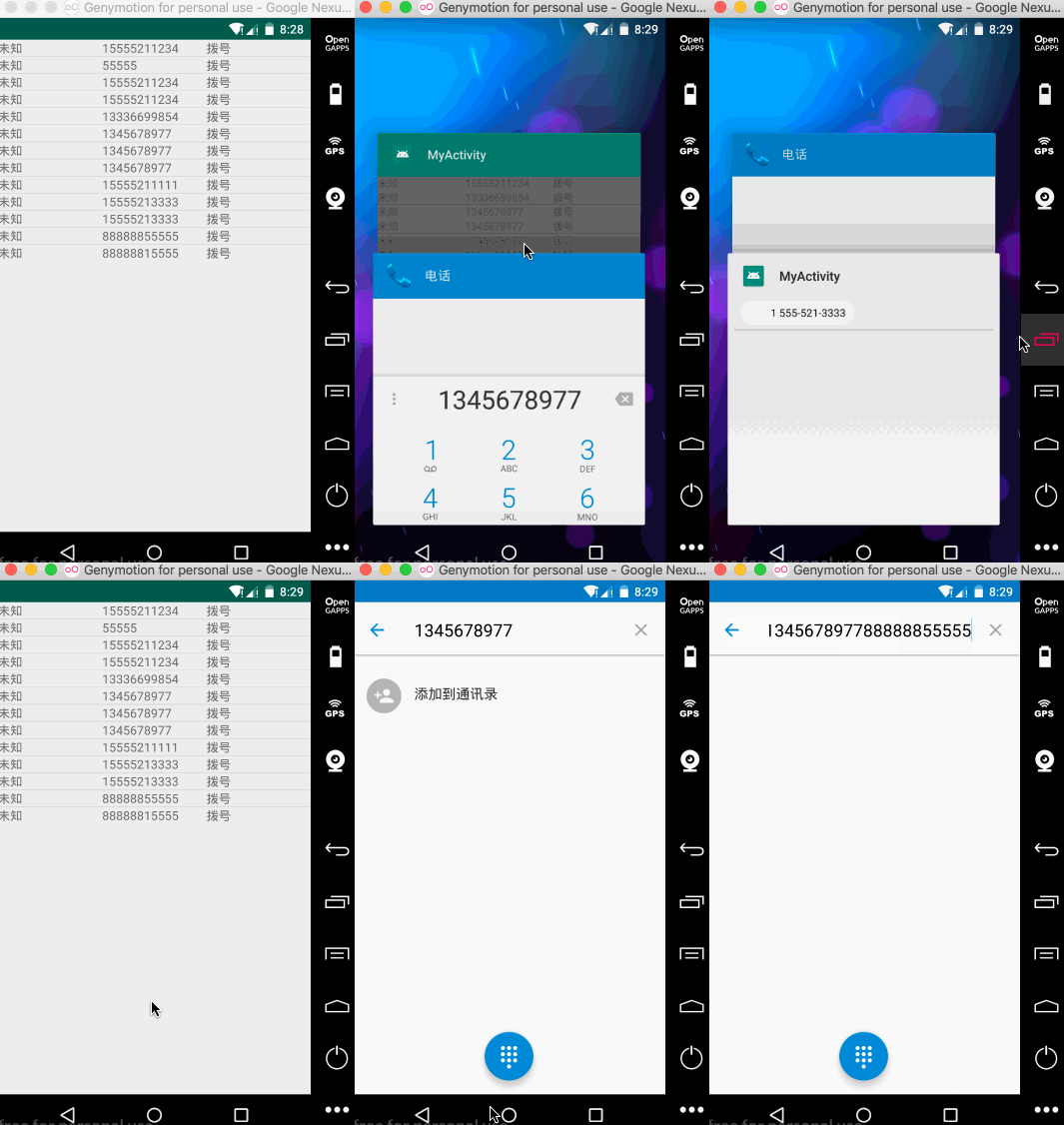
效果:
Android-上下文菜单Menu的更多相关文章
- android上下文菜单
XML: <RelativeLayout xmlns:android="http://schemas.android.com/apk/res/android" xmln ...
- Android 上下文菜单实现
1.覆盖Activity的onCreateContenxtMenu()方法,调用Menu的add方法添加菜单项(MenuItem). 2.覆盖Activity的onContextItemSelecte ...
- android 上下文菜单详解
本文使用xml来创建上下文菜单 <?xml version="1.0" encoding="utf-8"?> <menu xmlns:andr ...
- Android上下文菜单ContentView详解
ContentView介绍 上下文菜单继承了android.view.Menu,因此我们可以像操作Options Menu那样给上下文菜单增加菜单项.上下文菜单与Options Menu最大的不同在于 ...
- Android 上下文菜单 ContextMenu
public class MainActivity extends Activity { private ListView listView; @Override protected void onC ...
- Android 上下文菜单 ActionMode
public class MainActivity extends Activity { private Button button; private ActionMode actionMode; @ ...
- Android 上下文菜单 PopupMenu
@Override protected void onCreate(Bundle savedInstanceState) { super.onCreate(savedInstanceState); s ...
- 安卓开发_浅谈ContextMenu(上下文菜单)
长下文菜单,即长按view显示一个菜单栏 与OptionMenu的区别OptionMenu对应的是activity,一个activity只能拥有一个选项菜单ContextMenu对应的是View,每个 ...
- Android开发之Menu组件
菜单Menu大致分为三种类型:选项菜单(OptionsMenu),上下文菜单(ContextMenu),子菜单(SubMenu). 1.选项菜单 在一个Activity界面中点击手机Menu键,在屏幕 ...
- Android 的上下文菜单: Context Menu,registerForContextMenu(getListView())
概述: Android 的上下文菜单类似于 PC 上的右键菜单.当为一个视图注册了上下文菜单之后,长按(2 秒左右)这个视图对象就会弹出一个浮动菜单,即上下文菜单.任何视图都可以注册上下文菜单,不过, ...
随机推荐
- Gradle with Android
[Gradle with Android] The Android Studio build system is based on Gradle, and the Android plugin for ...
- 使用JSON.parse()转化成json对象需要注意的地方
http://blog.csdn.net/u011277123/article/details/53055479 有三种方法: var str = '{"name":"小 ...
- Python float() 函数
Python float() 函数 Python 内置函数 描述 float() 函数用于将整数和字符串转换成浮点数. 语法 float()方法语法: class float([x]) 参数 x - ...
- np.random.randn()、np.random.rand()、np.random.randint()
(1)np.random.randn()函数 语法: np.random.randn(d0,d1,d2……dn) 1)当函数括号内没有参数时,则返回一个浮点数: 2)当函数括号内有一个参数时,则返回秩 ...
- php反射机制学习
PHP 5 具有完整的反射 API,可以通过反射机制来获取类,接口,函数的详细信息.例如可以通过反射api的成员属性,成员方法,命名空间的名称,检测某个类是否为抽象类等操作.(欢迎指点) 一般用途是在 ...
- C#中获取串口与并口列表
//获取系统中的串口并加入到下拉框中 cbCashBoxPort.Items.Clear(); string[] ports = System.IO.Ports.SerialPort.GetPortN ...
- 解决安装Apache中出现checking for APR... no configure: error: APR not found. Please read the documentation的问题
Linux中安装Apache 编译出现问题: 解决办法: 1.下载所需要的软件包 wget http://archive.apache.org/dist/apr/apr-1.4.5.tar.gz wg ...
- 在ecplise中创建一个maven工程
1.我们首先需要在Ecplise中配置maven环境,详情见我的博客:https://www.cnblogs.com/wyhluckdog/p/10277278.html 2.maven projec ...
- c++ tricks
1 关于virtual关键字的实验 1.1 在派生类中改变virtual函数访问权限 定义两个类A,B,其中B公有派生于A.A中定义一个private成员虚函数func,B中覆写此函数,但是将其访问权 ...
- Speeding up Homestead on Windows Using NFS
Speeding up Homestead on Windows Using NFS Sep 07 2015 Homestead Laravel EDIT: I have another articl ...