
Simple example
This is a simple example showing a small window. Yet we can do a lot with this window. We can resize it, maximise it, or minimise it. This requires a lot of coding. Someone already coded this functionality. Because it repeats in most applications, there is no need to code it over again. PyQt4 is a high level toolkit. If we would code in a lower level toolkit, the following code example could easily have hundreds of lines.
#!/usr/bin/python

# -*- coding: utf-8 -*-

"""

ZetCode PyQt4 tutorial

In this example, we create a simple

window in PyQt4.

author: Jan Bodnar

website: zetcode.com

last edited: October 2011

"""

import sys

from PyQt4 import QtGui

def main():

    app = QtGui.QApplication(sys.argv)

    w = QtGui.QWidget()

    w.resize(250, 150)

    w.move(300, 300)

    w.setWindowTitle('Simple')

    w.show()

    sys.exit(app.exec_())

if __name__ == '__main__':

    main()
The above code shows a small window on the screen.
import sys

from PyQt4 import QtGui
Here we provide the necessary imports. The basic GUI widgets are located in the QtGui module.
app = QtGui.QApplication(sys.argv)
Every PyQt4 application must create an application object. The application object is located in theQtGui module. The sys.argv parameter is a list of arguments from the command line. Python scripts can be run from the shell. It is a way how we can control the startup of our scripts.
w = QtGui.QWidget()
The QtGui.QWidget widget is the base class of all user interface objects in PyQt4. We provide the default constructor for QtGui.QWidget. The default constructor has no parent. A widget with no parent is called a window.
w.resize(250, 150)
The resize() method resizes the widget. It is 250px wide and 150px high.
w.move(300, 300)
The move() method moves the widget to a position on the screen at x=300 and y=300 coordinates.
w.setWindowTitle('Simple')
Here we set the title for our window. The title is shown in the titlebar.
w.show()
The show() method displays the widget on the screen. A widget is first created in memory and later shown on the screen.
sys.exit(app.exec_())
Finally, we enter the mainloop of the application. The event handling starts from this point. The mainloop receives events from the window system and dispatches them to the application widgets. The mainloop ends if we call the exit() method or the main widget is destroyed. The sys.exit()method ensures a clean exit. The environment will be informed how the application ended.
The exec_() method has an underscore. It is because the exec is a Python keyword. And thus, exec_()was used instead.
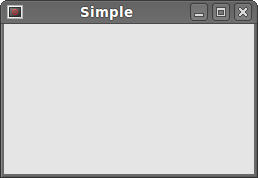 Figure: Simple
Simple example的更多相关文章
- PHP设计模式(一)简单工厂模式 (Simple Factory For PHP)
最近天气变化无常,身为程序猿的寡人!~终究难耐天气的挑战,病倒了,果然,程序猿还需多保养自己的身体,有句话这么说:一生只有两件事能报复你:不够努力的辜负和过度消耗身体的后患.话不多说,开始吧. 一.什 ...
- Design Patterns Simplified - Part 3 (Simple Factory)【设计模式简述--第三部分(简单工厂)】
原文链接:http://www.c-sharpcorner.com/UploadFile/19b1bd/design-patterns-simplified-part3-factory/ Design ...
- WATERHAMMER: A COMPLEX PHENOMENON WITH A SIMPLE SOLUTION
开启阅读模式 WATERHAMMER A COMPLEX PHENOMENON WITH A SIMPLE SOLUTION Waterhammer is an impact load that is ...
- BZOJ 3489: A simple rmq problem
3489: A simple rmq problem Time Limit: 40 Sec Memory Limit: 600 MBSubmit: 1594 Solved: 520[Submit] ...
- Le lié à la légèreté semblait être et donc plus simple
Il est toutefois vraiment à partir www.runmasterfr.com/free-40-flyknit-2015-hommes-c-1_58_59.html de ...
- ZOJ 3686 A Simple Tree Problem
A Simple Tree Problem Time Limit: 3 Seconds Memory Limit: 65536 KB Given a rooted tree, each no ...
- 设计模式之简单工厂模式Simple Factory(四创建型)
工厂模式简介. 工厂模式专门负责将大量有共同接口的类实例化 工厂模式可以动态决定将哪一个类实例化,不必事先知道每次要实例化哪一个类. 工厂模式有三种形态: 1.简单工厂模式Simple Factory ...
- HDU 5795 A Simple Nim 打表求SG函数的规律
A Simple Nim Problem Description Two players take turns picking candies from n heaps,the player wh ...
- 关于The C compiler "arm-none-eabi-gcc" is not able to compile a simple test program. 的错误自省...
在 GCC ARM Embedded https://launchpad.net/gcc-arm-embedded/ 上面下载了个arm-none-eabi-gcc 用cmake 编译时 #指定C交叉 ...
- A Simple OpenGL Shader Example II
A Simple OpenGL Shader Example II eryar@163.com Abstract. The OpenGL Shading Language syntax comes f ...
随机推荐
- 如何使用git工具向github提交代码
大致分为以下几个步骤 安装git环境,工具使用msysgit github上的账号 首先在github上点击头像旁边的加号 add new ,选择new Repository,自己创建一个名字,假设取 ...
- java_线程的几种状态
java thread的运行周期中, 有几种状态, 在 java.lang.Thread.State 中有详细定义和说明: NEW 状态是指线程刚创建, 尚未启动 RUNNABLE 状态是线程正在正常 ...
- 用户空间程序的函数跟踪器 (Function Tracer)
http://blog.csdn.net/robertsong2004/article/details/38499995
- 达芬奇TI DVSDK之视频数据流过程分析
作者:openwince@gmail.com 博客:http://www.cnblogs.com/tinz 本文的copyright归openwince@gmail.com所有,使用GPL发布, ...
- 线程系列08,实现线程锁的各种方式,使用lock,Montor,Mutex,Semaphore以及线程死锁
当涉及到多线程共享数据,需要数据同步的时候,就可以考虑使用线程锁了.本篇体验线程锁的各种用法以及线程死锁.主要包括: ※ 使用lock处理数据同步※ 使用Monitor.Enter和Monitor.E ...
- 使用Dictionary泛型集合封装业务逻辑判断 z
C#2.0 提供了Dictionary 泛型类,它提供了从一组键到一组值的映射.字典中的每个添加项都由一个值及其相关联的键组成.通过键来检索值的速度是非常快的,接近于 O(1),这是因为 Dictio ...
- Oracle 学习(scott方案)
Oracle学习中,重点是sql语句的学习,而所有的sql语句都要在scott用户下完成. 熟悉这个用户下的四张表,是必要的. 查看所有表名: SELECT * FROM tab; 查看每张表的结 ...
- Oracle用imp和exp实现数据的导入和导出
使用方法如下: Imp username/password@connect_string param=value - exp username/password@connect_string para ...
- 在JTextField中监听回车键,并执行相应按钮
在jbInit() 中加入jTextField1的按键监听,代码如下: jTextField1.addKeyListener(new KeyAdapter(){ public voi ...
- [ IOS ] 视图控制对象ViewController的生命周期
init-初始化程序 viewDidLoad-加载视图 viewWillAppear-UIViewController对象的视图即将加入窗口时调用: viewDidApper-UIViewContro ...