
A Simple OpenGL Shader Example II
A Simple OpenGL Shader Example II
Abstract. The OpenGL Shading Language syntax comes from the C family of programming languages. Tokes, identifiers, semicolons, nesting with curly braces, control-flow, and many key words look like C. GLSL provides three qualifiers which form the interfaces of the shaders to their outside world.
Key Words. OpenGL, GLSL, Qualifiers,
1. Introduction
GLSL的特性与C/C++非常类似,包括它的数据类型。GLSL有三种基本数据类型:float, int和bool,及由这些数据类型组成的数组和结构体。需要注意的是GLSL并不支持指针。
GLSL 中有4个限定符(Qualifier)可供使用,它们限定了被标记的变量不能被更改的“范围”。及通过这几个限定符可以与OpenGL的程序来通信,即为 OpenGL程序提供了一个将数据传递给Shader的界面(Interface to a Shader)。
OpenCASCADE中使用GLSL实现了Ray Tracing效果,刚开始使用第三方库OpenCL来使用GPU加速,最新版本统一使用GLSL。
Figure 1.1 OpenGL Training
在《OpenGL高级编程技术培训教材》中,GLSL也是一个重要内容。虽然当时听得云里雾里,还是要感谢公司提供这样的培训机会。
2.GLSL Data Types
GLSL内置了许多数据类型,使图形操作的表达式计算更方便。布尔类型、整型、矩阵、向量及结构、数组等都包括在内。
|
Scalars |
|
|
float |
Declares a single floating-point number. |
|
int |
Declares a single integer number. |
|
bool |
Declares a single Boolean number. |
这三种是GLSL的基本类型。
|
Vectors |
|
|
vec2 |
Vector of two floating-point numbers |
|
vec3 |
Vector of three floating-point numbers |
|
vec4 |
Vector of four floating-point numbers |
|
ivec2 |
Vector of two integers |
|
ivec3 |
Vector of three integers |
|
ivec4 |
Vector of four integers |
|
bvec2 |
Vector of two booleans |
|
bvc3 |
Vector of three booleans |
|
bvc4 |
Vector of four booleans |
向量非常有用,可以用来存储和操作颜色、位置、纹理坐标等等。GLSL内置的很多变量及函数中就大量使用了向量。
|
Matrices |
|
|
mat2 |
2x2 matrix of floating-point numbers |
|
mat3 |
3x3 matrix of floating-point numbers |
|
mat4 |
4x4 matrix of floating-point numbers |
矩阵主要用来实现线性变换。
|
Samplers |
|
|
sampler1D |
Accesses a one-dimensional texture |
|
sampler2D |
Accesses a two-dimensional texture |
|
sampler3D |
Accesses a three-dimensional texture |
|
samplerCube |
Accesses a cube-map texture |
|
sampler1DShadow |
Accesses a one-dimensional depth texture with comparison |
|
sampler2DShadow |
Accesses a two-dimensional depth texture with comparison |
3.Qualifiers
GLSL有4个限定符可供使用,它们限定了被标记的变量不能被更改的范围:
|
Qualifiers |
|
|
attribute |
For frequently changing information, from the application to a vertex shader |
|
uniform |
For infrequently changing information, from the application to either a vertex shader or a fragment shader |
|
varying |
For interpolated information passed from a vertex shader to a fragment shader |
|
const |
For declaring nonwritable, compile-time constant variables as in C |
const限定符和C/C++里的相同,表示限定的变量在编译时不可被修改,即它标记了一个常量。const限定符是4个限定符中被标记变量不可被更改的范围最大的。其余3个限定符是GLSL特有的,所以它们都用在着色器内部声明变量。
attribute限定符标记的是一种全局变量,该变量被用作从OpenGL应用程序向顶点着色器中传递参数,因此该限定符仅用于顶点着色器。
uniform限定符也标也一种全局变量,该变量对于一个图元来说是不可改变的。同attribute限定符一样,uniform可以从OpenGL应用程序中接收传递过来的数据。uniform限定符可以用于顶点着色器和像素着色器。
最后GLSL还提供了从顶点着色器向片段着色器传递数据的方法,即使用varying限定符。
4.Code Example
在《A Simple OpenGL Shader Example》
中已经成功实现了一个带Shader的OpenGL程序。事实上这是两个相对独立的Shader,它们只能使用OpenGL内置的变量从外部OpenGL
程序中获取一些数据。比如当前顶点坐标、当前像素颜色等。这些Shader还没有自定义的变量,以便从OpenGL程序中传递数据。通常程序的设计者需要
在OpenGL程序中更好地控制shader的行为,这就需要从OpenGL程序向shader传递数据。
如上述的4个限定符,可以用来声明变量帮助shader从外部获取数据。其中uniform变量可以用来从OpenGL程序中给vertex shader或fragment shader传递数据,最很常用的一个限定符变量。将《A Simple OpenGL Shader Example》中的程序稍做修改,使得片段shader可以收到一个来自OpenGL程序里面的数据。
实现的主要代码在这两个函数中:
void ShaderWidget::paintGL()

{

    glClear(GL_COLOR_BUFFER_BIT | GL_DEPTH_BUFFER_BIT);

    mAngle += 0.1;

    glRotatef(mAngle, 0.0, 1.0, 1.0);

    // update uniform variable value

    mShaderProgram->setUniformValue(mTimeId, mAngle);

    glutSolidTeapot(1.0);

    //glutWireTeapot(1.0);

}

void ShaderWidget::setShader()

{

    if (!isValid())

    {

        return;

    }

    const QGLContext* aGlContext = context();

    mShaderProgram = new QGLShaderProgram(aGlContext);

    //mShaderProgram->addShaderFromSourceFile(QGLShader::Vertex, "vertex.vs");

    mShaderProgram->addShaderFromSourceFile(QGLShader::Fragment, "uniform.fs");

    mShaderProgram->link();

    mShaderProgram->bind();

    QString aLog = mShaderProgram->log();

    // save the location of the uniform variable name within the shader program.

    mTimeId = mShaderProgram->uniformLocation("v_time");

}
首 先通过QShaderProgram的函数uniformLocation()给GLSL中的变量用一个整数标记,对应在OpenGL中的函数是 GLint glGetUniformLocation(GLuint program, const char* name);再通过函数setUniformValue()来更新GLSL中变量的值,对应OpenGL中的函数为:glUniform{1234} (if,ui}。最后只用了一个片段着色器,代码如下所示:
// time(passed in from the application)

uniform float v_time;

void main()

{

    float fr = 0.9 * sin(0.0 + v_time*0.05) + 1.0;

    float fg = 0.9 * cos(0.33 + v_time*0.05) + 1.0;

    float fb = 0.9 * sin(0.67 + v_time*0.05) + 1.0;

    gl_FragColor = vec4(fr/2.0, fg/2.0, fb/2.0, 1.0);

}
运行程序,当程序视图重绘时就会改变茶壶的颜色,如下图所示:
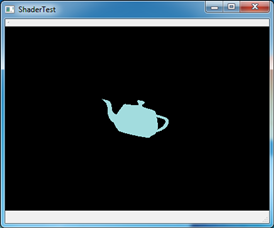
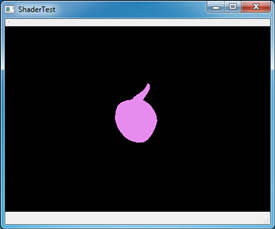
Figure 4.1 Test uniform variable in GLSL
当将uniform.fs中的v_time改名后,就会发现视图一片漆黑,说明shader已经起作用了。
5.Conclusion
综上所述,GLSL中通过限定符Qualifiers来实现OpenGL程序与GLSL的数据传递。其中uniform变量可以用来从OpenGL程序向片段着色器和顶点传递数据,是很常用的一种方式。
本文在Qt中测试了uniform变量效果,可以发现Qt对OpenGL的面向对象封装还是很方便使用,也很容易找到与之对应的OpenGL函数。通过学习使用Qt中的OpenGL来方便学习理解OpenGL相关知识点。
6. References
1. san. Shader support in OCCT6.7.0. http://dev.opencascade.org/index.php?q=node/902
2. Qt Assistant.
PDF version and Source code: A Simple OpenGL Shader Example II
A Simple OpenGL Shader Example II的更多相关文章
- A Simple OpenGL Shader Example
A Simple OpenGL Shader Example eryar@163.com Abstract. OpenGL Shading Language, the high-level progr ...
- OpenGL Shader in OpenCASCADE
OpenGL Shader in OpenCASCADE eryar@163.com Abstract. As implementation of one of the strategic steps ...
- OpenGL Shader源码分享
Opengl shader程序,旗帜混合纹理加载,通过N张图片,能够组合出数百个:http://www.eyesourcecode.com/thread-39015-1-1.html 用GLSL做了一 ...
- OpenGL复习要点II
[OpenGL复习要点II] 1.视图变换必须出现在模型变换之前. 2.glMatrixMode()参数有三个,GL_MODELVIEW,GL_PROJECTION,GL_TEXTURE. 3.变换顺 ...
- 【玩转cocos2d-x之四十】怎样在Cocos2d-x 3.0中使用opengl shader?
有小伙伴提出了这个问题.事实上GLProgramCocos2d-x引擎自带了.全然能够直接拿来用. 先上图吧. 使用opengl前后的对照: watermark/2/text/aHR0cDovL2Js ...
- 「游戏引擎 浅入浅出」4.1 Unity Shader和OpenGL Shader
「游戏引擎 浅入浅出」从零编写游戏引擎教程,是一本开源电子书,PDF/随书代码/资源下载: https://github.com/ThisisGame/cpp-game-engine-book 4.1 ...
- OpenGL shader 中关于顶点坐标值的思考
今天工作中需要做一个事情: 在shader内部做一些空间距离上的计算,而且需要对所有的点进行计算,符合条件的显示,不符合条件的点不显示. 思路很简单,在vertex shader内知道顶点坐标,进行计 ...
- 【OpenGL】用OpenGL shader实现将YUV(YUV420,YV12)转RGB-(直接调用GPU实现,纯硬件方式,效率高)
这段时间一直在搞视频格式的转换问题,终于最近将一个图片的YUV格式转RGB格式转换成功了.下面就来介绍一下: 由于我的工程是在vs2008中的,其中包含一些相关头文件和库,所以下面只是列出部分核心代码 ...
- OpenGL shader渲染贴图
simple.vert #version core layout (location = ) in vec3 position; layout (location = ) in vec3 color; ...
随机推荐
- [BZOJ1562][NOI2009] 变换序列
Description Input Output Sample Input 5 1 1 2 2 1 Sample Output 1 2 4 0 3 HINT 30%的数据中N≤50:60%的数据中N≤ ...
- printf的特殊用法
printf的特殊用法:对于m.n的格式可以用如下方法表示 前边的 * 定义的是总的宽度,后边的 * 定义的是输出的个数.分别对应外面的参数m和n .这种方法的好处是可以在语句之外对参数m和n赋值 ...
- 基于java平台的常用资源整理
这里整理了基于java平台的常用资源 翻译 from :akullpp | awesome-java 大家一起学习,共同进步. 如果大家觉得有用,就mark一下,赞一下,或评论一下,让更多的人知道.t ...
- mvc 返回值
mvc返回值为Model类型 public ActionResult Index(T result) { return View(result); } view中的对象即为页面中的Model数据,之后 ...
- wex5中的星星评分
新建一个空白的.w文件,然后在页面上放5个img星星图片 重要的是图片路径不能是绝对路径,要用相对路径,不然js操作的时候会出bug 添加两个label标签(标签随你挑,在这我就用label) 你到时 ...
- winfrom自定义滚动条
panel或图片什么的跟着鼠标走,这里panel自己可以加背景图或直接搞个图就行了.为了演示清楚,有个滚动条控件做对比,与自定义的同步. using System; using System.Coll ...
- 解决IE6/IE7/IE8不支持before,after问题
对从事web开发的朋友来讲,低版本的IE永远是一个痛点,不支持最新技术(如css3,html5). 在现在web开发中使用图标字体已经很广泛,如Font Awesome,Bootstrap等,字体图片 ...
- 取消TableViewCell选中状态的外观变化
tabelViewcell 使用Xib创建自定义外观的时候,在tableview选中的时候,cell的外观会发生变化,在定义Xib中如下图将选中的外观状态取消掉 也有其他选项,可以选择控制选中的时候的 ...
- nginx-(/usr/local/nginx)配置编译
./configure \ --prefix=/usr/local/nginx \ --sbin-path=/usr/local/nginx/sbin/nginx \ --conf-path=/usr ...
- 搭建spark环境
1.wget http://www.apache.org/dyn/closer.cgi/spark/spark-1.2.0/spark-1.2.0-bin-hadoop2.4.tgz