
Simple example
This is a simple example showing a small window. Yet we can do a lot with this window. We can resize it, maximise it, or minimise it. This requires a lot of coding. Someone already coded this functionality. Because it repeats in most applications, there is no need to code it over again. PyQt4 is a high level toolkit. If we would code in a lower level toolkit, the following code example could easily have hundreds of lines.
#!/usr/bin/python

# -*- coding: utf-8 -*-

"""

ZetCode PyQt4 tutorial

In this example, we create a simple

window in PyQt4.

author: Jan Bodnar

website: zetcode.com

last edited: October 2011

"""

import sys

from PyQt4 import QtGui

def main():

    app = QtGui.QApplication(sys.argv)

    w = QtGui.QWidget()

    w.resize(250, 150)

    w.move(300, 300)

    w.setWindowTitle('Simple')

    w.show()

    sys.exit(app.exec_())

if __name__ == '__main__':

    main()
The above code shows a small window on the screen.
import sys

from PyQt4 import QtGui
Here we provide the necessary imports. The basic GUI widgets are located in the QtGui module.
app = QtGui.QApplication(sys.argv)
Every PyQt4 application must create an application object. The application object is located in theQtGui module. The sys.argv parameter is a list of arguments from the command line. Python scripts can be run from the shell. It is a way how we can control the startup of our scripts.
w = QtGui.QWidget()
The QtGui.QWidget widget is the base class of all user interface objects in PyQt4. We provide the default constructor for QtGui.QWidget. The default constructor has no parent. A widget with no parent is called a window.
w.resize(250, 150)
The resize() method resizes the widget. It is 250px wide and 150px high.
w.move(300, 300)
The move() method moves the widget to a position on the screen at x=300 and y=300 coordinates.
w.setWindowTitle('Simple')
Here we set the title for our window. The title is shown in the titlebar.
w.show()
The show() method displays the widget on the screen. A widget is first created in memory and later shown on the screen.
sys.exit(app.exec_())
Finally, we enter the mainloop of the application. The event handling starts from this point. The mainloop receives events from the window system and dispatches them to the application widgets. The mainloop ends if we call the exit() method or the main widget is destroyed. The sys.exit()method ensures a clean exit. The environment will be informed how the application ended.
The exec_() method has an underscore. It is because the exec is a Python keyword. And thus, exec_()was used instead.
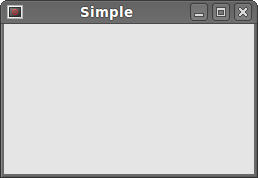 Figure: Simple
Simple example的更多相关文章
- PHP设计模式(一)简单工厂模式 (Simple Factory For PHP)
最近天气变化无常,身为程序猿的寡人!~终究难耐天气的挑战,病倒了,果然,程序猿还需多保养自己的身体,有句话这么说:一生只有两件事能报复你:不够努力的辜负和过度消耗身体的后患.话不多说,开始吧. 一.什 ...
- Design Patterns Simplified - Part 3 (Simple Factory)【设计模式简述--第三部分(简单工厂)】
原文链接:http://www.c-sharpcorner.com/UploadFile/19b1bd/design-patterns-simplified-part3-factory/ Design ...
- WATERHAMMER: A COMPLEX PHENOMENON WITH A SIMPLE SOLUTION
开启阅读模式 WATERHAMMER A COMPLEX PHENOMENON WITH A SIMPLE SOLUTION Waterhammer is an impact load that is ...
- BZOJ 3489: A simple rmq problem
3489: A simple rmq problem Time Limit: 40 Sec Memory Limit: 600 MBSubmit: 1594 Solved: 520[Submit] ...
- Le lié à la légèreté semblait être et donc plus simple
Il est toutefois vraiment à partir www.runmasterfr.com/free-40-flyknit-2015-hommes-c-1_58_59.html de ...
- ZOJ 3686 A Simple Tree Problem
A Simple Tree Problem Time Limit: 3 Seconds Memory Limit: 65536 KB Given a rooted tree, each no ...
- 设计模式之简单工厂模式Simple Factory(四创建型)
工厂模式简介. 工厂模式专门负责将大量有共同接口的类实例化 工厂模式可以动态决定将哪一个类实例化,不必事先知道每次要实例化哪一个类. 工厂模式有三种形态: 1.简单工厂模式Simple Factory ...
- HDU 5795 A Simple Nim 打表求SG函数的规律
A Simple Nim Problem Description Two players take turns picking candies from n heaps,the player wh ...
- 关于The C compiler "arm-none-eabi-gcc" is not able to compile a simple test program. 的错误自省...
在 GCC ARM Embedded https://launchpad.net/gcc-arm-embedded/ 上面下载了个arm-none-eabi-gcc 用cmake 编译时 #指定C交叉 ...
- A Simple OpenGL Shader Example II
A Simple OpenGL Shader Example II eryar@163.com Abstract. The OpenGL Shading Language syntax comes f ...
随机推荐
- Oracle 12c on Solaris 10 安装文档
http://www.orasql.com/blog/archives/2013/08/20/12c_solaris.htm
- Selenium2+python自动化55-unittest之装饰器(@classmethod)
前言 前面讲到unittest里面setUp可以在每次执行用例前执行,这样有效的减少了代码量,但是有个弊端,比如打开浏览器操作,每次执行用例时候都会重新打开,这样就会浪费很多时间. 于是就想是不是可以 ...
- [翻译] The Amazing Audio Engine
The Amazing Audio Engine https://github.com/TheAmazingAudioEngine/TheAmazingAudioEngine The Amazing ...
- struts2 iterator 迭代标签只显示前五条记录
<s:iterator value="#session.produceLists" var="produce" begin="0" e ...
- synchronized与lock,哪个效率更高
Java在一开始就提供了synchronized关键字,用于多线程之间的同步.它使用简便,不会出现拿锁之后不归还的情况,可以避免一些编程错误. 而jdk5时提供的concurrent包里,有一个Loc ...
- [Android Pro] Swift 3.0多线程
本文只介绍Grand Central Dispath(GCD) 中央调度 个人认为一个GCD就够用了,可能是改版或是其他的在找之前写的多线程方法时发现不能用了,看文档之后发现改了,现在看上去更加简单易 ...
- 利用c#+jquery+echarts生成统计报表(附源代码)
背景: 因为最近项目要生成报表,经过几轮挑选,最终选择了百度的echarts作为报表基础类库.百度echarts简介请参考 http://echarts.baidu.com/ 虽然echarts功能强 ...
- 【BZOJ】【1415】【NOI2005】聪聪和可可
数学期望+记忆化搜索 论文:<浅析竞赛中一类数学期望问题的解决方法>——汤可因 中的第一题…… Orz 黄学长 我实在是太弱,这么简单都yy不出来…… 宽搜预处理有点spfa的感觉= = ...
- Objective-C:随机的读取文件中的内容
可以通过改变当前文件的偏移量来实现文件的读取 -offsetInFile获取文件当前的位移量 -seekToFileOffset:(NSUInteger)length设置文件当前的位移量 -readD ...
- Objective-C:MRC手动释放对象内存举例(引用计数器)
手机内存下的类的设计练习: 设计Book类, 1.三个成员变量: title(书名)author(作者).price(价格) 2.不使用@property,自己完成存取方法(set方法,get方 ...