
Spring和MyBatis整合
前言:在前面一篇文章中,介绍了单独使用MyBatis连接orace的例子,在这里分享学习下Spring和MyBatis是如何整合的,以具体工程为例子
阅读目录:
- 1.环境准备
- 2.搭建工程
- 2.1.applicationContext.xml
- 2.2.userMapper.xml
- 2.3.测试类
MyBatis和Spring整合的官方地址,http://www.mybatis.org/spring/zh/index.html
1.环境准备
所需环境 Eclipse+maven
所需jar包 mybatis-3.4.5.jar
spring-context-4.3.1.RELEASE.jar spring相关jar包
mybatis-spring-1.3.1.jar
2.搭建工程
工程结构如下图所示
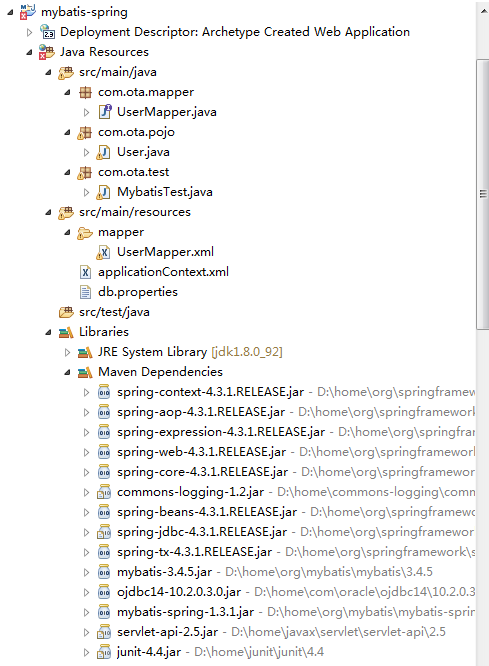
2.1 spring框架的配置文件applicationContext.xml
<?xml version="1.0" encoding="UTF-8"?>

<beans xmlns="http://www.springframework.org/schema/beans"

    xmlns:xsi="http://www.w3.org/2001/XMLSchema-instance" xmlns:context="http://www.springframework.org/schema/context"

    xsi:schemaLocation="

       http://www.springframework.org/schema/beans

       http://www.springframework.org/schema/beans/spring-beans.xsd

       http://www.springframework.org/schema/context

       http://www.springframework.org/schema/context/spring-context.xsd">

    <!--1 引入属性文件,在配置中占位使用 -->

    <context:property-placeholder location="classpath:db.properties" />

    <bean id="dataSource"

        class="org.springframework.jdbc.datasource.DriverManagerDataSource">

        <property name="driverClassName" value="${driver}" />

        <property name="url" value="${url}" />

        <property name="username" value="otatransuser" />

        <property name="password" value="${password}" />

    </bean>

    <bean id="sqlSessionFactory" class="org.mybatis.spring.SqlSessionFactoryBean">

        <property name="dataSource" ref="dataSource" />

        <!-- sql映射文件路径 -->

          <property name="mapperLocations" value="classpath:mapper/*.xml"></property>

    </bean>

    <bean id="userMapper" class="org.mybatis.spring.mapper.MapperFactoryBean">

        <property name="mapperInterface" value="com.ota.mapper.UserMapper" />

        <property name="sqlSessionFactory" ref="sqlSessionFactory" />

    </bean>

    <!--5 声明式事务管理 -->

    <!--定义事物管理器,由spring管理事务 -->

    <bean id="transactionManager"

        class="org.springframework.jdbc.datasource.DataSourceTransactionManager">

        <property name="dataSource" ref="dataSource"></property>

    </bean>

</beans>
db.properties文件放在类路径下,内容为:
driver=oracle.jdbc.driver.OracleDriver

url=jdbc\:oracle\:thin\:@(DESCRIPTION\=(ADDRESS\=(PROTOCOL\=TCP)(HOST\=10.221.129.208)(PORT\=1523))(CONNECT_DATA\=(SERVICE_NAME\=otatransuser)))

username=otatransuser

password=otatransuser123
要注意:(1)sqlSessionFactory的属性dataSource是必输项,用来指定数据源
sqlSessionFactory的属性configLocation,是用来指定 MyBatis 的 XML 配置文件路径的。这个属性是可选项
sqlSessionFactory的属性mapperLocations 属性使用一个资源位置的 list。 这个属性可以用来指定 MyBatis 的 XML 映射器文件的位置。比如:
<property name="mapperLocations" value="classpath*:sample/config/mappers/**/*.xml" />表示这会从类路径下加载在 sample.config.mappers 包和它的子包中所有的 MyBatis 映射器 XML 文件。
(2)使用MapperFactoryBean把映射器接口userMapper加入到spring中,如果你有多个映射器接口,需要一一的注入到spring。
其实没有必要在spring的xml文件中注册所有的映射器,可以采用这样一种方法,
你可以使用一个 MapperScannerConfigurer , 它 将 会 查 找 类 路 径 下 的 映 射 器 并 自 动 将 它 们 创 建 成 MapperFactoryBean。
要创建 MapperScannerConfigurer,可以在 Spring 的配置中添加如下代码:
<!-- 指定要自动扫描接口的基础包,实现接口 -->

    <bean class="org.mybatis.spring.mapper.MapperScannerConfigurer">

        <property name="basePackage" value="com.ota.mapper" />

    </bean>
注 意 , 没 有 必 要 去 指 定 SqlSessionFactory 或 SqlSessionTemplate , 因 为 MapperScannerConfigurer 将会创建 MapperFactoryBean,之后自动装配
2.2 userMapper.xml文件
userMapper.xml映射器内容如下,user还有userMapper这里也不再一一详细介绍,在前面一篇mybatis入门中有提到
<mapper namespace="com.ota.mapper.UserMapper">

  <select id="findUserByName" parameterType="java.lang.String" resultType="com.ota.pojo.User">

   select * from ota_user where username=#{username}

  </select>

</mapper>
2.3测试类
public class MybatisTest {

    public static void main(String[] args) throws Exception {

        ApplicationContext ctx = null;

        ctx = new ClassPathXmlApplicationContext("applicationContext.xml");

        UserMapper userMapper = (UserMapper) ctx.getBean("userMapper");

        User user = userMapper.findUserByName("wanghaixia");

        System.out.println(user);

    }
运行OK
Spring和MyBatis整合的更多相关文章
- Spring+springmvc+Mybatis整合案例 annotation版(myeclipse)详细版
Spring+springmvc+Mybatis整合案例 Version:annotation版 文档结构图: 从底层开始做起: 01.配置web.xml文件 <?xml version=&qu ...
- Spring+springmvc+Mybatis整合案例 xml配置版(myeclipse)详细版
Spring+springmvc+Mybatis整合案例 Version:xml版(myeclipse) 文档结构图: 从底层开始做起: 01.配置web.xml文件 <?xml version ...
- Spring与Mybatis整合的MapperScannerConfigurer处理过程源码分析
前言 本文将分析mybatis与spring整合的MapperScannerConfigurer的底层原理,之前已经分析过java中实现动态,可以使用jdk自带api和cglib第三方库生成动态代理. ...
- Mybatis学习--spring和Mybatis整合
简介 在前面写测试代码的时候,不管是基于原始dao还是Mapper接口开发都有许多的重复代码,将spring和mybatis整合可以减少这个重复代码,通过spring的模板方法模式,将这些重复的代码进 ...
- 九 spring和mybatis整合
1 spring和mybatis整合 1.1 整合思路 需要spring通过单例方式管理SqlSessionFactory. spring和mybatis整合生成代理对象,使用Sq ...
- Mybatis学习(7)spring和mybatis整合
整合思路: 需要spring通过单例方式管理SqlSessionFactory. spring和mybatis整合生成代理对象,使用SqlSessionFactory创建SqlSession.(spr ...
- 框架篇:Spring+SpringMVC+Mybatis整合开发
前言: 前面我已搭建过ssh框架(http://www.cnblogs.com/xrog/p/6359706.html),然而mybatis表示不服啊. Mybatis:"我抗议!" ...
- SpringMVC, Spring和Mybatis整合案例一
一 准备工作 包括:spring(包括springmvc).mybatis.mybatis-spring整合包.数据库驱动.第三方连接池. 二 整合思路 Dao层: 1.SqlMapConfig. ...
- MyBatis学习七:spring和MyBatis整合
<\mybatis\day02\16mybatis和spring整合-sqlSessionFactory配置.avi;> MyBatis学习七:spring和MyBatis整合.逆向工程 ...
- Spring boot Mybatis 整合(完整版)
个人开源项目 springboot+mybatis+thymeleaf+docker构建的个人站点开源项目(集成了个人主页.个人作品.个人博客) 朋友自制的springboot接口文档组件swagge ...
随机推荐
- ubuntu 安装pip
apt-get install python3-pip
- C++中的内存区[译文]
C++ 中的内存区 Const Data: The const data area stores string literals and other data whose values are kno ...
- Linux下使用USB模拟ACM串口设备【转】
本文转载自:https://www.cnblogs.com/pied/p/4549614.html 这个想法之前就在脑袋里有过,最近公司产品要用到,所以多做了些了解. 1. USB 简介 USB 是 ...
- mysql全库搜索指定字符串
mysql全库搜索指定字符串 DELIMITER // DROP PROCEDURE IF EXISTS `proc_FindStrInAllDataBase`; # CALL `proc_FindS ...
- 【北京集训D2T3】tvt
[北京集训D2T3]tvt \(n,q \le 1e9\) 题目分析: 首先需要对两条路径求交,对给出的四个点的6个lca进行分类讨论.易于发现路径的交就是这六个lca里面最深的两个所形成的链. 然后 ...
- 金中半日baoling游-----stoi
蒟蒻又来水博客了,写个游记啦啦啦啦,好像是第一篇游记咯. 温馨提示:愚人节写的博客看了后会变棒棒哦!(麻麻再也不用担心我被骗) 进入正题 3月31日早6:30左右起床了,然后就是....(此处可省略) ...
- LeetCode——Find All Numbers Disappeared in an Array
LeetCode--Find All Numbers Disappeared in an Array Question Given an array of integers where 1 ≤ a[i ...
- web前端调优
web前端性能调优(二) http://www.cnblogs.com/liaoweipeng/p/6306606.html
- sklearn学习笔记之岭回归
岭回归 岭回归是一种专用于共线性数据分析的有偏估计回归方法,实质上是一种改良的最小二乘估计法,通过放弃最小二乘法的无偏性,以损失部分信息.降低精度为代价获得回归系数更为符合实际.更可靠的回归方法,对病 ...
- CentOS下安装mysql及配置使用
最近一直使用的是CentOS,平时用的最多的数据库是Sql Server,对于mysql还停留在上学的时候,早已忘得一干二净,写这篇内容目的是,重新学习如何安装使用mysql. 一.安装mysql 操 ...