
SpringMvc集成开源流量监控、限流、熔断降级、负载保护组件Sentinel
前言:作者查阅了Sentinel官网、51CTO、CSDN、码农家园、博客园等很多技术文章都没有很准确的springmvc集成Sentinel的示例,因此整理了本文,主要介绍SpringMvc集成Sentinel
SpringMvc集成Sentinel
一、Sentinel 介绍
随着微服务的流行,服务和服务之间的稳定性变得越来越重要。Sentinel 是面向分布式、多语言异构化服务架构的流量治理组件,主要以流量为切入点,从流量路由、流量控制、流量整形、熔断降级、系统自适应过载保护、热点流量防护等多个维度来帮助开发者保障微服务的稳定性。
GitHub主页:https://github.com/alibaba/Sentinel
中文文档:https://sentinelguard.io/zh-cn/docs/introduction.html
控制台文档:https://sentinelguard.io/zh-cn/docs/dashboard.html
核心类解析:https://github.com/alibaba/Sentinel/wiki/Sentinel-核心类解析
Sentinel示例项目:https://github.com/alibaba/Sentinel/tree/master/sentinel-demo
二、Sentinel 基本概念
资源
资源是 Sentinel 的关键概念。它可以是 Java 应用程序中的任何内容,例如,由应用程序提供的服务,或由应用程序调用的其它应用提供的服务,甚至可以是一段代码。在接下来的文档中,我们都会用资源来描述代码块。
只要通过 Sentinel API 定义的代码,就是资源,能够被 Sentinel 保护起来。大部分情况下,可以使用方法签名,URL,甚至服务名称作为资源名来标示资源。
规则
围绕资源的实时状态设定的规则,可以包括流量控制规则、熔断降级规则以及系统保护规则。所有规则可以动态实时调整。
三、springMVC集成Sentinel
这里用的是spring
<spring.version>5.3.18</spring.version>
<servlet.api.version>2.5</servlet.api.version> <sentinel.version>1.8.6</sentinel.version>
1、springmvc项目引入依赖pom
        <!-- 这是sentinel的核心依赖 -->

        <dependency>

            <groupId>com.alibaba.csp</groupId>

            <artifactId>sentinel-core</artifactId>

            <version>${sentinel.version}</version>

        </dependency>

        <!-- 这是将自己项目和sentinel-dashboard打通的依赖 -->

        <dependency>

            <groupId>com.alibaba.csp</groupId>

            <artifactId>sentinel-transport-simple-http</artifactId>

            <version>${sentinel.version}</version>

        </dependency>

        <!-- 这是使用sentinel对限流资源进行AOP -->

        <dependency>

            <groupId>com.alibaba.csp</groupId>

            <artifactId>sentinel-annotation-aspectj</artifactId>

            <version>${sentinel.version}</version>

        </dependency>

        <!--这是使用sentinel适配Web Servlet的依赖-->

        <dependency>

            <groupId>com.alibaba.csp</groupId>

            <artifactId>sentinel-web-servlet</artifactId>

            <version>${sentinel.version}</version>

        </dependency>

        <!-- 这是使用sentinel热点参数限流功能依赖 -->

        <dependency>

            <groupId>com.alibaba.csp</groupId>

            <artifactId>sentinel-parameter-flow-control</artifactId>

            <version>${sentinel.version}</version>

        </dependency>
2、添加配置文件
在application.properties下创建同级文件sentinel.properties,内容如下
# 集成到sentinel的项目名称

project.name=spring-sentinel-demo

# 对应的sentinel-dashboard地址

csp.sentinel.dashboard.server=localhost:8080
3、添加配置类引入配置文件
创建配置类SentinelAspectConfiguration并引入配置文件sentinel.properties
import com.alibaba.csp.sentinel.annotation.aspectj.SentinelResourceAspect;

import org.springframework.context.annotation.Bean;

import org.springframework.context.annotation.Configuration;

import org.springframework.context.annotation.PropertySource;

import org.springframework.context.annotation.PropertySources;

@Configuration

@PropertySources({@PropertySource("classpath:/sentinel.properties")})

public class SentinelAspectConfiguration {

    @Bean

    public SentinelResourceAspect sentinelResourceAspect() {

        return new SentinelResourceAspect();

    }

}
4、web.xml新增如下过滤器配置
 <filter>

        <filter-name>SentinelCommonFilter</filter-name>

        <filter-class>com.alibaba.csp.sentinel.adapter.servlet.CommonFilter</filter-class>

    </filter>

    <filter-mapping>

        <filter-name>SentinelCommonFilter</filter-name>

        <url-pattern>/*</url-pattern>

    </filter-mapping>
接入 filter 之后,所有访问的 Web URL 就会被自动统计为 Sentinel 的资源---来源于 https://sentinelguard.io/zh-cn/docs/open-source-framework-integrations.html
开源框架适配的Web 适配下的Web Servlet
5、创建Controller接口
@Controller

public class WebMvcTestController {

    @GetMapping("/hello")

    @ResponseBody

    public String apiHello(String id) {

        System.out.println("id = " + id);

        Date date = new Date();

        System.out.println("date = " + date);

        return "Hello!";

    }

    @GetMapping("/doBusiness")

    @ResponseBody

    public String doBusiness(String id) {

        System.out.println("doBusiness = ");

        return "Oops...";

    }

 }
6、下载控制台-即图形化实时监控平台
参考 https://sentinelguard.io/zh-cn/docs/dashboard.html Sentinel 控制台的下载和启动
访问 https://github.com/alibaba/Sentinel/releases/tag/1.8.6
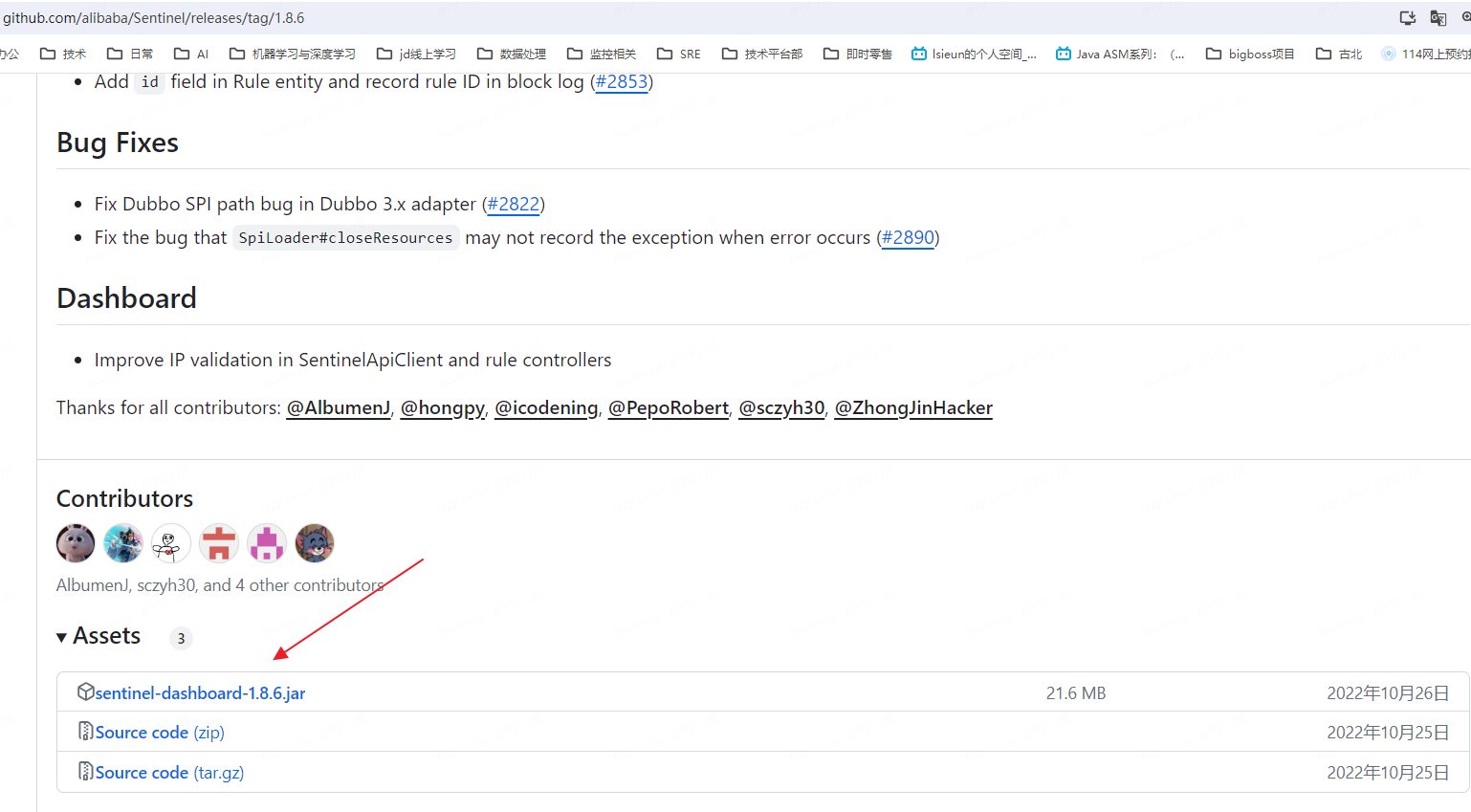
点击下载
7、运行控制台
java -Dserver.port=8080 -Dcsp.sentinel.dashboard.server=localhost:8080 -Dproject.name=sentinel-dashboard -jar sentinel-dashboard.jar

运行控制台后运行springmvc项目,然后访问某一个路径,就可以在控制台看到了,实时监控如果这个路径没有被访问是显示不出来的
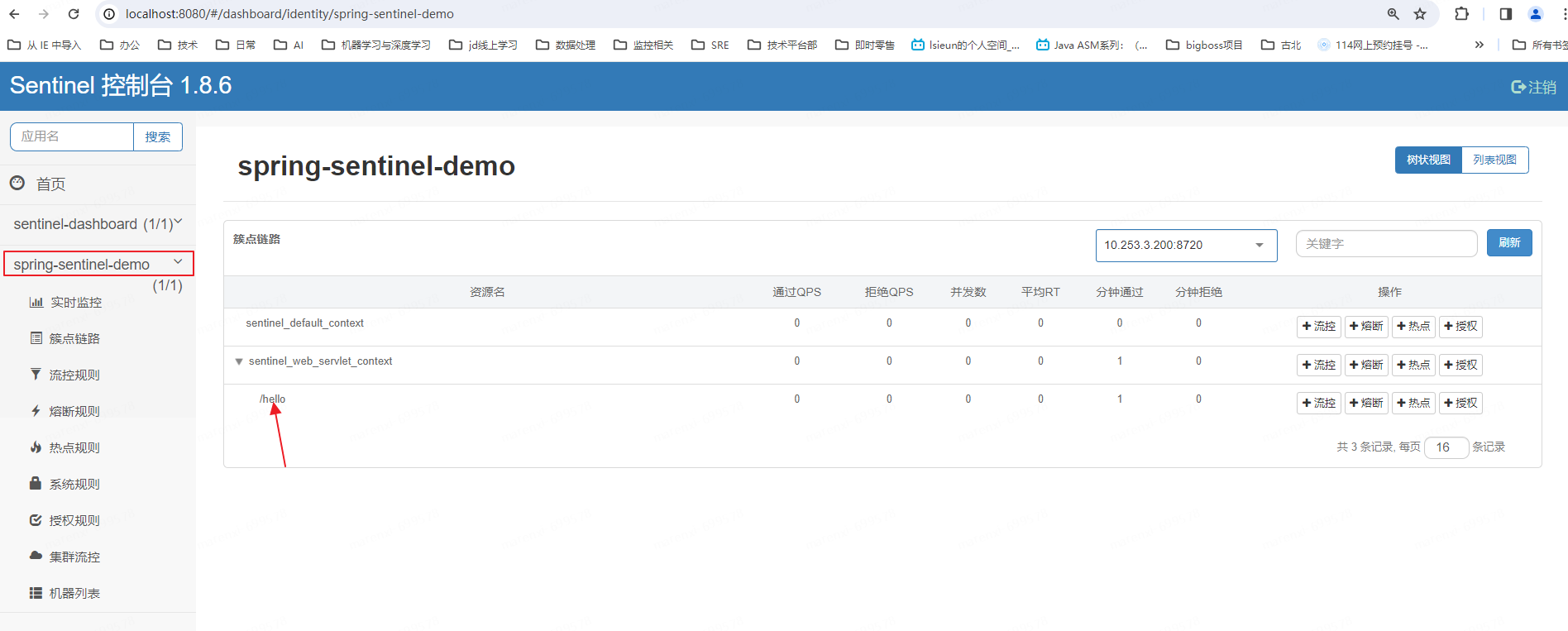
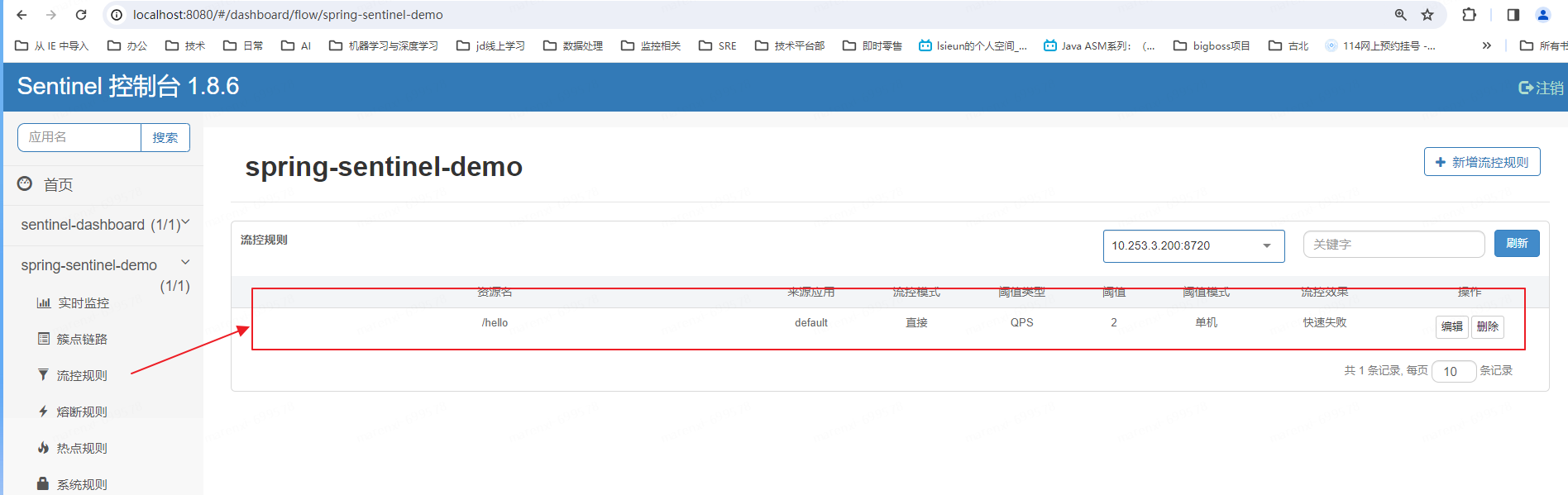
这个时候我们配置限流为即Qps为2
8、测试限流
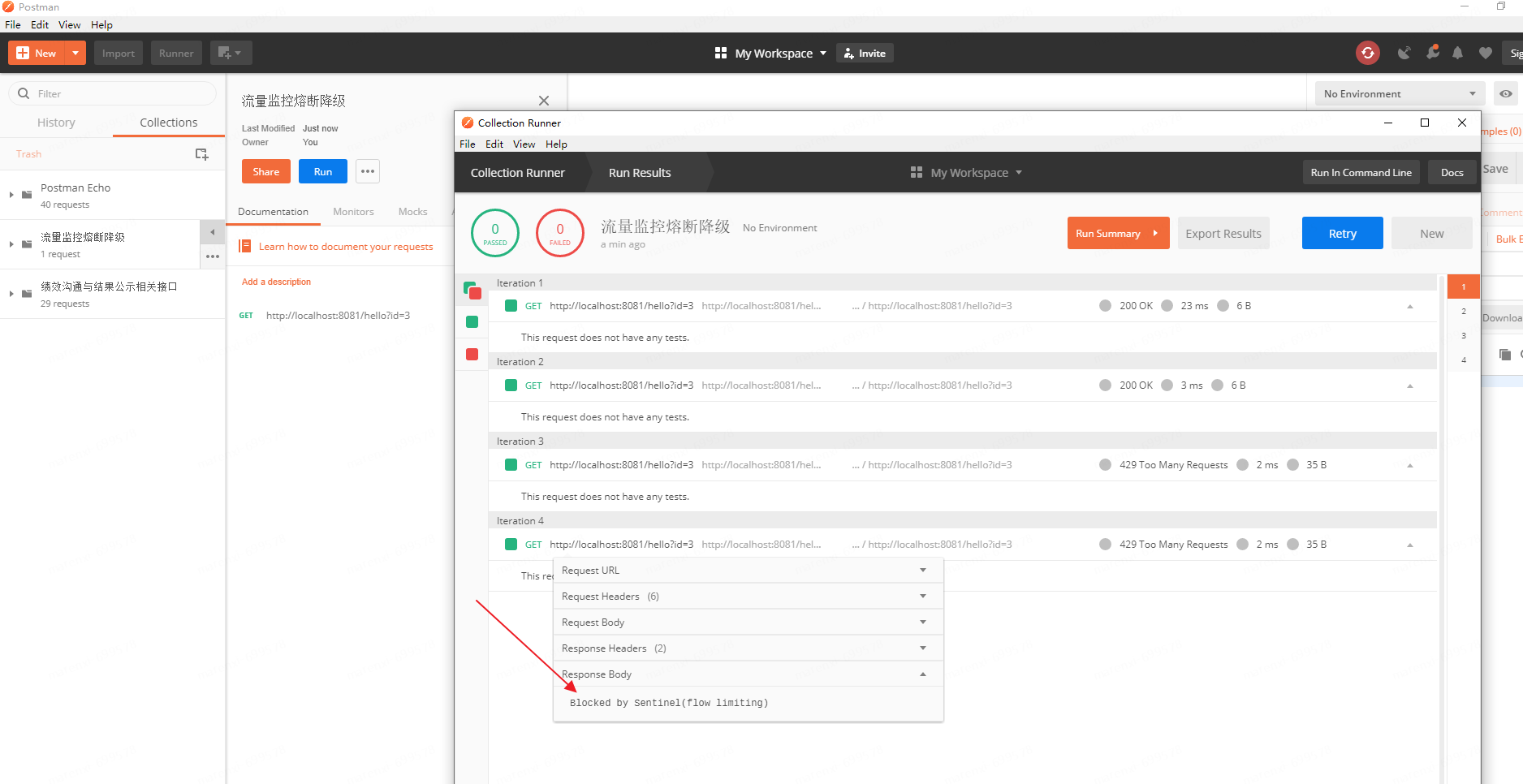
这里我们用postman进行压测,填写请求的路径保存。并点击run调出压测执行器
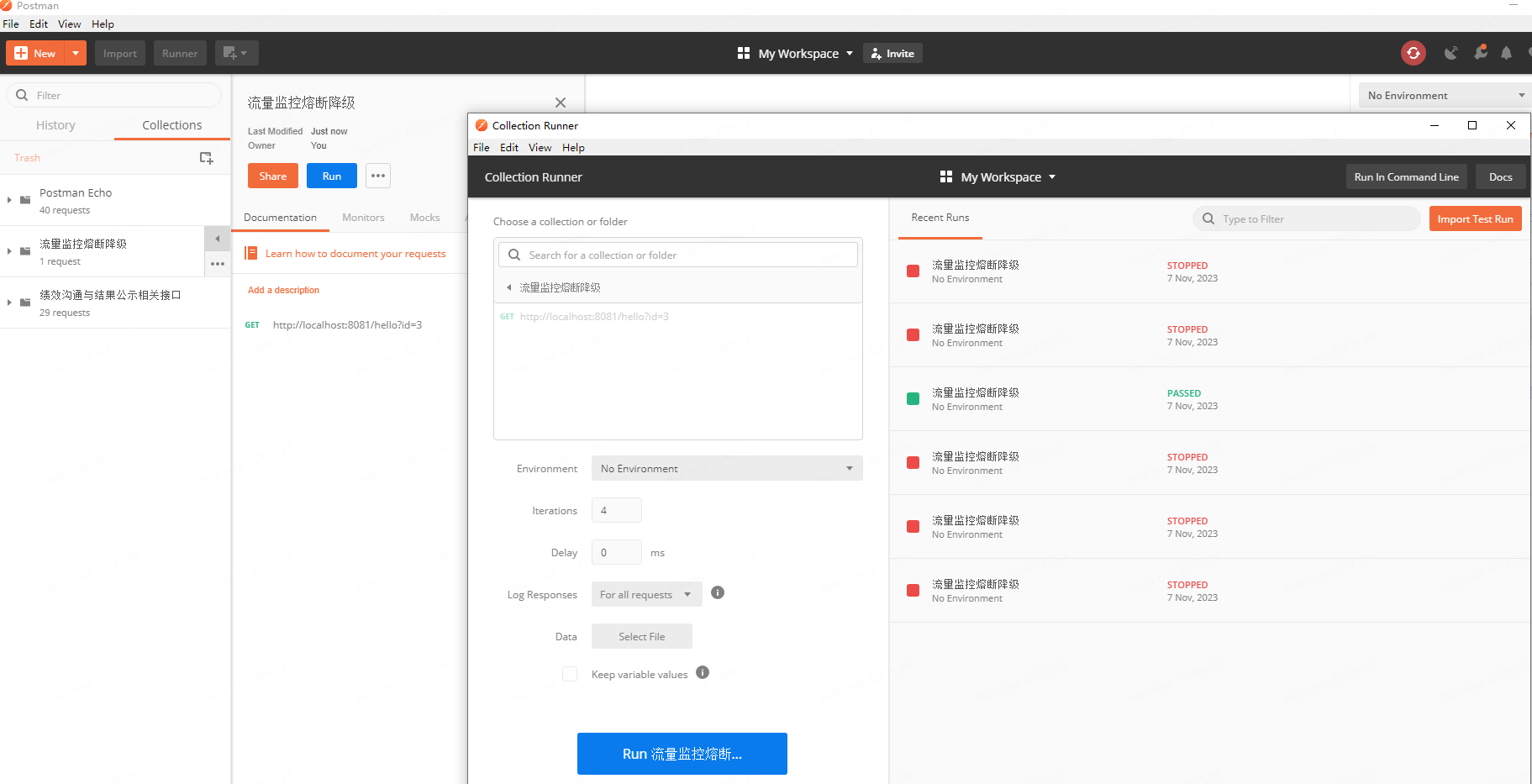
执行后查看结果如下
四、自定义异常返回
1、定义如下接口(这里只进行了常见的url定义方式的定义)
import org.springframework.stereotype.Controller;

import org.springframework.web.bind.annotation.*;

@Controller

@RequestMapping("/test")

public class WebMvcTestController {

    /**

     * 1.未配置流控规则 1000次请求没有间隔发起请求,应该在1秒中完成09:44:33

     * @param id

     * @return

     */

    @RequestMapping("/RequestMapping")

    @ResponseBody

    public String RequestMapping(String id) {

        return "RequestMapping!";

    }

    @GetMapping("/GetMapping")

    @ResponseBody

    public String GetMapping(String id) {

        return "GetMapping...";

    }

    @PostMapping("/PostMapping")

    @ResponseBody

    public String PostMapping(String id) {

        return "PostMapping...";

    }

    /*

    * 路径变量(Path Variables):使用花括号 {} 来标记路径中的变量,并通过 @PathVariable 注解将其绑定到方法参数上

    * */

    @GetMapping("/GetMapping/{id}")

    @ResponseBody

    public String apiFoo(@PathVariable("id") Long id) {

        return "Hello " + id;

    }

    /*

    * Ant风格的路径匹配:

    *   使用 ? 表示任意单个字符,

    *   * 表示任意多个字符(不包含路径分隔符 /),

    *   ** 表示任意多个字符(包含路径分隔符 /)。

    * */

    @GetMapping("/Ant/*/{id}")

    @ResponseBody

    public String Ant(@PathVariable("id") Long id) {

        return "Ant " + id;

    }

    /*

    * 正则表达式路径匹配:使用 @RequestMapping 注解的 value 属性结合正则表达式来定义请求路径。

    * */

    @GetMapping(value = "/users/{id:\\d+}")

    @ResponseBody

    public String pattern(@PathVariable("id") int id) {

        return "Ant " + id;

    }

}
2、自定义限流返回处理Handler
import com.alibaba.csp.sentinel.adapter.servlet.callback.UrlBlockHandler;

import com.alibaba.csp.sentinel.slots.block.BlockException;

import com.alibaba.csp.sentinel.slots.block.authority.AuthorityException;

import com.alibaba.csp.sentinel.slots.block.degrade.DegradeException;

import com.alibaba.csp.sentinel.slots.block.flow.FlowException;

import com.alibaba.csp.sentinel.slots.block.flow.param.ParamFlowException;

import com.alibaba.csp.sentinel.slots.system.SystemBlockException;

import com.alibaba.fastjson.JSON;

import org.springframework.context.ApplicationContext;

import org.springframework.web.method.HandlerMethod;

import org.springframework.web.servlet.mvc.condition.PatternsRequestCondition;

import org.springframework.web.servlet.mvc.method.RequestMappingInfo;

import org.springframework.web.servlet.mvc.method.annotation.RequestMappingHandlerMapping;

import org.springframework.web.util.UrlPathHelper;

import javax.servlet.http.HttpServletRequest;

import javax.servlet.http.HttpServletResponse;

import java.io.IOException;

import java.util.*;

public class SentinelExceptionHandler implements UrlBlockHandler {

    @Override

    public void blocked(HttpServletRequest request, HttpServletResponse httpServletResponse, BlockException e) throws IOException {

        String contextPath = request.getContextPath();

        String servletPath = request.getServletPath();

        String requestURI = request.getRequestURI();

        String url = request.getRequestURL().toString();

        System.out.println("servletPath = " + servletPath);

        System.out.println("requestURI = " + requestURI);

        System.out.println("url = " + url);

        if (contextPath == null) {

            contextPath = "";

        }

        ApplicationContext controllerApplicationContext = LiteFlowApplicationContext.getControllerApplicationContext();

        RequestMappingHandlerMapping handlerMapping = controllerApplicationContext.getBean(RequestMappingHandlerMapping.class);

        // 查找匹配的处理方法

        Class<?> returnType = null;

        Map<RequestMappingInfo, HandlerMethod> handlerMethods = handlerMapping.getHandlerMethods();

        for (Map.Entry<RequestMappingInfo, HandlerMethod> entry : handlerMethods.entrySet()) {

            RequestMappingInfo requestMappingInfo = entry.getKey();

            HandlerMethod handlerMethod = entry.getValue();

            //匹配url

            if (requestMappingInfo.getPatternsCondition().getPatterns().contains(requestURI)) {

                System.out.println("Controller: " + handlerMethod.getBeanType().getName());

                System.out.println("Method: " + handlerMethod.getMethod().getName());

                System.out.println("getReturnType: " + handlerMethod.getMethod().getReturnType());

                returnType = handlerMethod.getMethod().getReturnType();

                break;

            }

            //匹配路径带参数的url

            UrlPathHelper pathHelper = new UrlPathHelper();

            String lookupPath = pathHelper.getPathWithinApplication(request);

            PatternsRequestCondition patternsCondition = requestMappingInfo.getPatternsCondition();

            if (patternsCondition != null && patternsCondition.getMatchingPatterns(lookupPath).size() > 0) {

                System.out.println("Controller1111: " + handlerMethod.getBeanType().getName());

                System.out.println("Method111: " + handlerMethod.getMethod().getName());

                System.out.println("getReturnType: " + handlerMethod.getMethod().getReturnType());

                returnType = handlerMethod.getMethod().getReturnType();

                break;

            }

        }

        httpServletResponse.setContentType("application/json;charset=utf-8");

        ResponseData data = null;

        if (returnType != null) {

            if (returnType == String.class) {

                String str = "返回类型为字符串方法限流";

                httpServletResponse.getWriter().write(str);

                return;

            } else if (returnType == Integer.class) {

                httpServletResponse.getWriter().write(new Integer(1));

                return;

            } else if (returnType == Long.class) {

                httpServletResponse.getWriter().write(2);

                return;

            } else if (returnType == Double.class) {

            } else if (returnType == Boolean.class) {

            } else if (returnType == Float.class) {

            } else if (returnType == Byte.class) {

            }

        }

        //BlockException 异常接口,包含Sentinel的五个异常

        // FlowException 限流异常

        // DegradeException 降级异常

        // ParamFlowException 参数限流异常

        // AuthorityException 授权异常

        // SystemBlockException 系统负载异常

        if (e instanceof FlowException) {

            data = new ResponseData(-1, "流控规则被触发......");

        } else if (e instanceof DegradeException) {

            data = new ResponseData(-2, "降级规则被触发...");

        } else if (e instanceof AuthorityException) {

            data = new ResponseData(-3, "授权规则被触发...");

        } else if (e instanceof ParamFlowException) {

            data = new ResponseData(-4, "热点规则被触发...");

        } else if (e instanceof SystemBlockException) {

            data = new ResponseData(-5, "系统规则被触发...");

        }

        httpServletResponse.getWriter().write(JSON.toJSONString(data));

    }

}
3、使用自定义限流处理类
import com.alibaba.csp.sentinel.adapter.servlet.callback.WebCallbackManager;

import org.springframework.context.annotation.Configuration;

@Configuration

public class SentinelConfig {

    public SentinelConfig() {

        WebCallbackManager.setUrlBlockHandler(new SentinelExceptionHandler());

    }

}
4、配置限流并测试结果
当开启限流后访问触发自定义UrlBlockHandler后结果如下
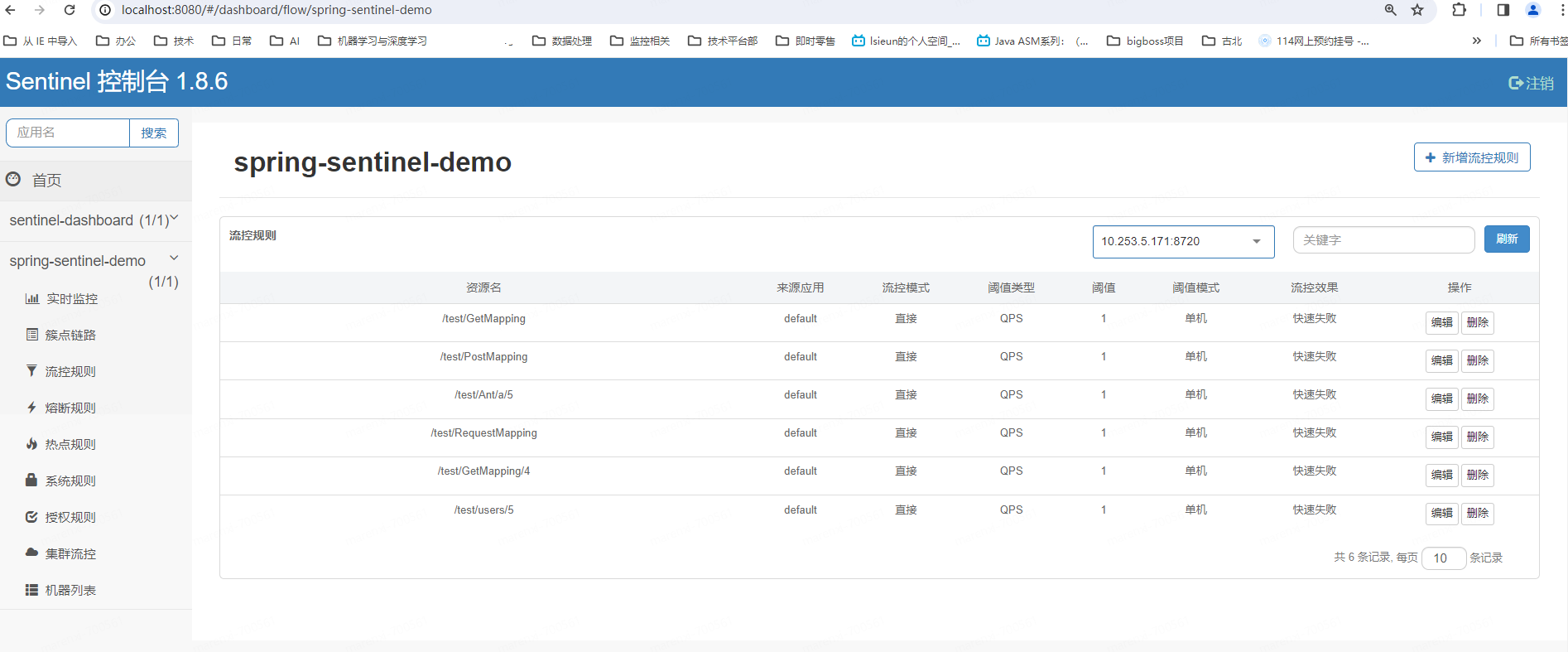
访问对应得url后控制台打印
servletPath = /test/RequestMapping

requestURI = /test/RequestMapping

url = http://localhost:8081/test/RequestMapping

Controller: org.example.WebMvcTestController

Method: RequestMapping

getReturnType: class java.lang.String

servletPath = /test/GetMapping

requestURI = /test/GetMapping

url = http://localhost:8081/test/GetMapping

Controller: org.example.WebMvcTestController

Method: GetMapping

getReturnType: class java.lang.String

servletPath = /test/PostMapping

requestURI = /test/PostMapping

url = http://localhost:8081/test/PostMapping

Controller: org.example.WebMvcTestController

Method: PostMapping

getReturnType: class java.lang.String

servletPath = /test/GetMapping/4

requestURI = /test/GetMapping/4

url = http://localhost:8081/test/GetMapping/4

Controller1111: org.example.WebMvcTestController

Method111: apiFoo

getReturnType: class java.lang.String

servletPath = /test/Ant/a/5

requestURI = /test/Ant/a/5

url = http://localhost:8081/test/Ant/a/5

Controller1111: org.example.WebMvcTestController

Method111: Ant

getReturnType: class java.lang.String

servletPath = /test/users/5

requestURI = /test/users/5

url = http://localhost:8081/test/users/5

Controller1111: org.example.WebMvcTestController

Method111: pattern

getReturnType: class java.lang.String
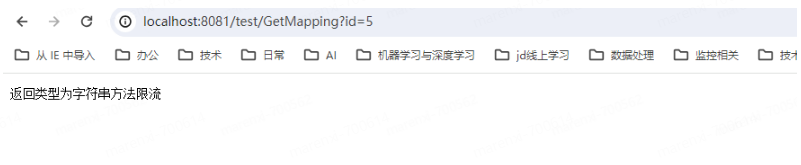
5、页面效果如下
五、springboot集成Sentinel
因为springboot集成文章较多,这里不多做赘述
Sentinel 与 Spring Boot/Spring Cloud 的整合见 Sentinel Spring Cloud Starter。
作者:京东健康 马仁喜
来源:京东云开发者社区 转载请注明来源
SpringMvc集成开源流量监控、限流、熔断降级、负载保护组件Sentinel的更多相关文章
- Sentinel入门到实操 (限流熔断降级)
微服务保护--Sentinel 介绍Sentinel 1.背景 Sentinel是阿里巴巴开源的一款微服务流量控制组件.官网地址:https://sentinelguard.io/zh-cn/inde ...
- springBoot整合Sentinel实现降级限流熔断
由于hystrix的停止更新,以及阿里Sentinel在历年双十一的贡献.项目中使用了Sentinel,今天我们来讲讲Sentinel的入门教程,本文使用1.6.3版本进行讲解 本文通过Sentine ...
- Hystrix介绍以及服务的降级限流熔断
(dubbo熔断,Hystrix问的少) 无论是缓存层还是存储层都会有出错的概率,可以将它们视同为资源.作为并发量较大的系统,假如有一个资源不可用,可能会造成线程全部 hang (挂起)在这个资源上, ...
- DBPack 限流熔断功能发布说明
上周我们发布了 v0.4.0 版本,增加了限流熔断功能,现对这两个功能做如下说明. 限流 DBPack 限流熔断功能通过 filter 实现.要设置限流规则,首先要定义 RateLimitFilter ...
- dubbo 熔断,限流,降级
1 写在前面 1.1 名词解释 consumer表示服务调用方 provider标示服务提供方,dubbo里面一般就这么讲. 下面的A调用B服务,一般是泛指调用B服务里面的一个接口. 1.2 拓扑图 ...
- .net core使用ocelot---第四篇 限流熔断
简介 .net core使用ocelot---第一篇 简单使用 .net core使用ocelot---第二篇 身份验证 .net core使用ocelot---第三篇 日志记录 前几篇文章我们陆续介 ...
- .Net微服务实践(四)[网关]:Ocelot限流熔断、缓存以及负载均衡
目录 限流 熔断 缓存 Header转化 HTTP方法转换 负载均衡 注入/重写中间件 后台管理 最后 在上篇.Net微服务实践(三)[网关]:Ocelot配置路由和请求聚合中我们介绍了Ocelot的 ...
- 高可用服务设计之二:Rate limiting 限流与降级
<高可用服务设计之二:Rate limiting 限流与降级> <nginx限制请求之一:(ngx_http_limit_conn_module)模块> <nginx限制 ...
- 0.9.0.RELEASE版本的spring cloud alibaba sentinel限流、降级处理实例
先看服务提供方的,我们在原来的sentinel实例(参见0.9.0.RELEASE版本的spring cloud alibaba sentinel实例)上加上限流.降级处理,三板斧只需在最后那一斧co ...
- Spring Cloud alibaba网关 sentinel zuul 四 限流熔断
spring cloud alibaba 集成了 他内部开源的 Sentinel 熔断限流框架 Sentinel 介绍 官方网址 随着微服务的流行,服务和服务之间的稳定性变得越来越重要.Sentine ...
随机推荐
- 服务端apk打包教程
本文我将给大家介绍一个 apk 打包工具 VasDolly 的使用介绍.原理以及如何在服务端接入 VasDolly 进行服务端打渠道包操作. 使用介绍 VasDolly 是一个快速多渠道打包工具,同时 ...
- 【解惑】介绍三大数据库的with语句的写法及使用场景
WITH 子句通常被称为 "Common Table Expressions"(CTE),俗称内存临时表,当使用 WITH 语句时,应注意具体的数据库版本和支持情况.以下是对 My ...
- Typora 主题,设置代码块Mac风格三个小圆点
目录 打造Typora主题 1 typoa样式修改步骤 1.1 第一步打开偏好设置 1.2 第二步打开主题文件夹 2 标题添加颜色 3 表格优化 4 代码块Mac风格三个圆点 5 主题总代码如下: 打 ...
- 震惊!CSS 也能实现碰撞检测?
本文,我们将一起学习,使用纯 CSS,实现如下所示的动画效果: 上面的动画效果,非常有意思,核心有两点: 小球随机做 X.Y 方向的直线运动,并且能够实现碰撞到边界的时候,实现反弹效果 小球在碰撞边界 ...
- 《Kali渗透基础》08. 弱点扫描(二)
@ 目录 1:OpenVAS / GVM 1.1:介绍 1.2:安装 1.3:使用 2:Nessus 2.1:介绍 2.2:安装 2.3:使用 3:Nexpose 本系列侧重方法论,各工具只是实现目标 ...
- CodeForces 1388C Uncle Bogdan and Country Happiness
题意 给一棵\(n\)节点的树,每个节点有\(a[i]\)个人住,他们从\(1\)号节点回家,回家路上可能从开心的状态变成不开心的状态(但不可以由不开心变为开心),每个节点有个探测器,会探测经过该节点 ...
- 《Python魔法大冒险》007 被困的精灵:数据类型的解救
小鱼和魔法师深入魔法森林,树木之间流淌着神秘的光芒,每一片叶子都似乎在低语着古老的咒语.不久,他们来到了一个小湖旁,湖中央有一个小岛,岛上困着一个透明的泡泡,里面有一个悲伤的精灵. 小鱼看着那个精灵, ...
- Kali-Linux-配置开发环境
本文主要讲解JDK.SDK.eclipse-adt.android studio.cpu模式TensorFlow 的安装配置.update:2019-08-30 03:31:46 JDK 当前系统jd ...
- 利用别名简化进入docker容器数据库的操作
之前研究docker和数据库的交互,越发对docker这个东西喜爱了.因为平常偶尔会用到各类数据库测试环境验证一些想法,需要进一步简化进入到这些环境的步骤. 比如我现在有三套docker容器数据库测试 ...
- crypto 加解密库简介与测试【GO 常用的库】
〇.前言 GO 语言的标准库 crypto 提供了一组用于加密和解密的包,包括对称加密.哈希函数.数字签名.随机数生成等功能.在日常开发中,通过使用这些库,可以确保数据的安全性和完整性. 对于使用频率 ...