
Android实现简单登录界面
LoginActivity
 1 package com.example.myapplication;

 2

 3 import android.os.Bundle;

 4 import android.view.View;

 5

 6 import androidx.annotation.Nullable;

 7 import androidx.appcompat.app.AppCompatActivity;

 8

 9 public class LoginActivity extends AppCompatActivity implements View.OnClickListener{

10     @Override

11     protected void onCreate(@Nullable Bundle savedInstanceState) {

12         super.onCreate(savedInstanceState);

13         setContentView(R.layout.activity_login);

14

15

16

17     }

18

19     @Override

20     public void onClick(View v) {

21

22     }

23 }
Activity_login
 1 <?xml version="1.0" encoding="utf-8"?>

 2 <RelativeLayout xmlns:android="http://schemas.android.com/apk/res/android"

 3     android:layout_width="match_parent"

 4     android:layout_height="match_parent"

 5     android:layout_centerInParent="true"

 6     >

 7     <LinearLayout

 8         android:id="@+id/ll_input"

 9         android:layout_centerInParent="true"

10         android:layout_width="match_parent"

11         android:layout_height="wrap_content"

12         android:orientation="vertical">

13         <LinearLayout

14             android:layout_width="match_parent"

15             android:layout_height="wrap_content"

16             android:orientation="horizontal"

17             >

18             <TextView

19                 android:layout_width="wrap_content"

20                 android:layout_height="wrap_content"

21                 android:width="50dp"

22                 android:text="账号"

23                 >

24             </TextView>

25             <EditText

26                 android:layout_width="match_parent"

27                 android:layout_height="wrap_content"

28                 android:hint="请输入账号" />

29         </LinearLayout>

30         <LinearLayout

31             android:layout_width="match_parent"

32             android:layout_height="wrap_content"

33             android:orientation="horizontal"

34             >

35             <TextView

36                 android:layout_width="wrap_content"

37                 android:layout_height="wrap_content"

38                 android:width="50dp"

39                 android:text="密码"

40                 >

41             </TextView>

42

43             <EditText

44                 android:layout_width="match_parent"

45                 android:layout_height="wrap_content"

46                 android:hint="请输入密码" />

47         </LinearLayout>

48         <Button

49             android:layout_width="match_parent"

50             android:layout_height="wrap_content"

51             android:text="登录"

52             />

53         <LinearLayout

54             android:layout_width="match_parent"

55             android:layout_height="wrap_content"

56             android:orientation="horizontal"

57             >

58             <Button

59                 android:layout_width="0dp"

60                 android:layout_height="wrap_content"

61                 android:layout_weight="1"

62                 android:text="注册"

63                 />

64             <Button

65                 android:layout_width="0dp"

66                 android:layout_height="wrap_content"

67                 android:layout_weight="1"

68                 android:text="忘记密码"

69                 />

70         </LinearLayout>

71     </LinearLayout>

72     <LinearLayout

73         android:layout_width="match_parent"

74         android:gravity="center"

75         android:orientation="vertical"

76         android:layout_height="match_parent"

77         android:layout_above="@id/ll_input"

78         >

79         <ImageView

80             android:layout_width="wrap_content"

81             android:layout_height="wrap_content"

82             android:src="@android:drawable/btn_star_big_on"

83             ></ImageView>

84     </LinearLayout>

85     <TextView

86         android:layout_width="wrap_content"

87         android:layout_height="wrap_content"

88         android:layout_alignParentBottom="true"

89         android:layout_centerHorizontal="true"

90         android:text="最终解释权归本公司所有"

91         >

92     </TextView>

93 </RelativeLayout>
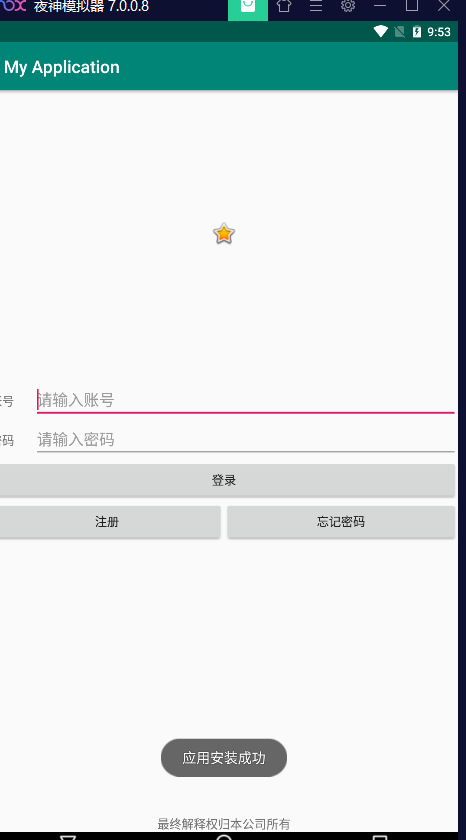
效果图
Android实现简单登录界面的更多相关文章
- android 案例二 登录界面
效果图: 运行图: 总结: 编写这个简单的用户登录界面,主要用到了以下的知识: java基础中的IO流的操作 用以读取.显示用户的信息 Android布局 线性布局和相对布局 数据的存储选在包 ...
- Android之QQ登录界面
首先过程中碰到的几个问题: 1.对 EditText 进行自定义背景 2.运行时自动 EditText 自动获得焦点 3.在获得焦点时即清空 hint ,而不是输入后清空 4.清空按钮的出现时机(在得 ...
- Cookie案例:简单登录界面中的应用
ServletDemo1.java package ztq.servlet.study; import java.io.IOException; import java.io.PrintWriter; ...
- 以java实现的一个简单登录界面(带验证码)
本文参考于:https://blog.csdn.net/wyf2017/article/details/78831744 https://blog.csdn.net/MengKun822/articl ...
- JSP内置对象的cookie和session实现简单登录界面
创建一个index.jsp页面 <%@ page language="java" contentType="text/html; charset=utf-8&quo ...
- JAVA语言实现简单登录界面
程序设计思想: 使用Math.random()方法循环生成6个97~122之间的随机整数(对应ASCII码值‘a’~‘z’),将其转化为char型变量,连接成为一个6位字符串作为验证码输出,提示用户输 ...
- Android studio 简易登录界面
•参考资料 [1]:视频资源 [2]:Android TextView设置图标,调整图标大小 •效果展示图 •前置知识 TextView EditText Button 以及按压效果,点击事件 •出现 ...
- qt 简单登录界面(一)
widget.h #ifndef WIDGET_H #define WIDGET_H #include <QWidget> #include<QLineEdit> class ...
- 设计简单登录界面(Java web)
程序设计思想: 在Input.jsp中创建一个表格里边分别是课程名称,任课老师,教学地点,并分别用三个文本框来接受输入的三个属性, 并传到另外的Jsp页面中,又来接受三个数据,并判断传来的教师,与教室 ...
- Java简单登录图形界面
本文参考与:https://blog.csdn.net/wyf2017/article/details/78831744 https://blog.csdn.net/MengKun822/articl ...
随机推荐
- Oracle 分析函数详解(Analytic Functions)--概念部分
一.概念介绍: Analytic functions compute an aggregate value based on a group of rows. They differ from agg ...
- js根据输入字符长度自动调整textarea高度
1.编写html <!DOCTYPE html> <html lang="en"> <head> <meta charset=" ...
- 小红书 x Hugging Face 邀请你一起晒「创意新春照」
不藏了,近期全网爆火的AI 写真项目 InstantID,正是来自小红书社区技术创作发布团队. 为了迎接龙年春节的到来,我们的InstantID全新推出「Spring Festival」新春风格!并与 ...
- django学习第十四天--Forms和ModelForm
Forms和ModelForm 进行数据校验,先看数据校验的过程 注册页面图解: 前端为了用户体验会做一些校验,不满足校验要求会报错 服务端也会对数据进行一些校验,不满足校验要求会报错 数据库也会对数 ...
- 【转载】重装系统小贴士:ssh、vscode免密登录
ssh安装 apt install openssh-server 然后到cd /etc/ssh下找sshd_config文件,打开把允许远程root登录的选项改为yes 重启ssh服务:/etc/in ...
- 5分钟教你从爬虫到数据处理到图形化一个界面实现山西理科分数查学校-Python
5分钟教你从爬虫到数据处理到图形化一个界面实现山西理科分数查学校-Python 引言 在高考结束后,学生们面临的一大挑战是如何根据自己的分数找到合适的大学.这是一个挑战性的任务,因为它涉及大量的数据和 ...
- 【XInput】手柄模拟鼠标运作之 .NET P/Invoke 和 UWP-API 方案
上一篇中,老周简单肤浅地介绍了 XInput API 的使用,并模拟了鼠标移动,左.右键单击和滚轮.本篇,咱们用 .NET 代码来完成相同的效果. 说起来也是倒霉,博文写了一半,电脑忽然断电了.不知道 ...
- 影刀rpa第一个学习项目开发所得
1.我要在某个位置新增一条指令,但是可能没有选择好的原因,这条指令被添加到指令的最后面了,我的指令行数有几十行,然后我就要把这条指令拖动到上一屏我指定的位置上,但当我拖动指令到了当前屏最上方时,发现编 ...
- 新零售SaaS架构:订单履约系统架构设计(万字图文总结)
什么是订单履约系统? 订单履约系统用来管理从接收客户订单到将商品送达客户手中的全过程. 它连接了上游交易(客户在销售平台下单环)和下游仓储配送(如库存管理.物流配送),确保信息流顺畅.操作协同,提升整 ...
- WireShark学习笔记(一)
1.从WireShark分析网络层协议的传输 下面是网络接口层协议,从图中可以看到两个相邻设备的MAC地址,因此该网络包才能以接力的方式传送到目的地址. 下面是网络层,在这个包中,主要的任务是把TCP ...