
JavaWeb-SpringSecurity图片验证ImageCode
系列博文
项目已上传至guthub 传送门
JavaWeb-SpringSecurity初认识 传送门
JavaWeb-SpringSecurity在数据库中查询登陆用户 传送门
JavaWeb-SpringSecurity自定义登陆页面 传送门
JavaWeb-SpringSecurity实现需求-判断请求是否以html结尾 传送门
JavaWeb-SpringSecurity自定义登陆配置 传送门
JavaWeb-SpringSecurity图片验证ImageCode 传送门
JavaWeb-SpringSecurity记住我功能 传送门
JavaWeb-SpringSecurity使用短信验证码登陆 传送门
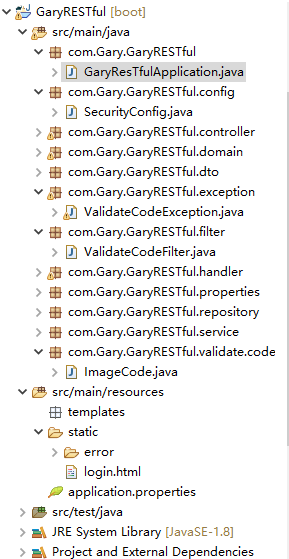
创建一个validate.code存放编写验证码校验代码,创建ImageCode.class图片验证码工具类
package com.Gary.GaryRESTful.validate.code;

import java.awt.image.BufferedImage;

import java.time.LocalDateTime;

//图片验证码

public class ImageCode {

    //给前台展示的图片

    private BufferedImage image;

    //验证码

    private String code;

    //过期时间

    private LocalDateTime expireTime;

    public ImageCode(BufferedImage image,String code,int expreTime)

    {

        this.image = image;

        this.code = code;

        this.expireTime = LocalDateTime.now().plusSeconds(expreTime);

    }

    public ImageCode(BufferedImage image,String code,LocalDateTime expireTime)

    {

        this.image = image;

        this.code = code;

        this.expireTime = expireTime;

    }

    public BufferedImage getImage() {

        return image;

    }

    public void setImage(BufferedImage image) {

        this.image = image;

    }

    public String getCode() {

        return code;

    }

    public void setCode(String code) {

        this.code = code;

    }

    public LocalDateTime getExpireTime() {

        return expireTime;

    }

    public void setExpireTime(LocalDateTime expireTime) {

        this.expireTime = expireTime;

    }

}
ImageCode.class
在controller层中创建ValidateCodeController.class
图片验证三步骤
@GetMapping("/code/image")

    public void createCode(HttpServletRequest request,HttpServletResponse response) throws IOException

    {

        //生成随机数的图片

        ImageCode imageCode = createImageCode();

        //将随机数放入到session中

        sessionStrategy.setAttribute(new ServletWebRequest(request), sessionKey, imageCode);

        //将我们生成的图片写到接口的响应的输出流中

        ImageIO.write(imageCode.getImage(), "JPEG", response.getOutputStream());

    }
package com.Gary.GaryRESTful.controller;

import java.io.IOException;

import javax.imageio.ImageIO;

import javax.servlet.http.HttpServletRequest;

import javax.servlet.http.HttpServletResponse;

import org.springframework.social.connect.web.HttpSessionSessionStrategy;

import org.springframework.social.connect.web.SessionStrategy;

import org.springframework.web.bind.annotation.GetMapping;

import org.springframework.web.bind.annotation.RestController;

import org.springframework.web.context.request.ServletWebRequest;

import com.Gary.GaryRESTful.validate.code.ImageCode;

@RestController

public class ValidateCodeController {

    //操作Session

    private SessionStrategy sessionStrategy = new HttpSessionSessionStrategy();

    private String sessionKey = "session_key_image_code";

    @GetMapping("/code/image")

    public void createCode(HttpServletRequest request,HttpServletResponse response) throws IOException

    {

        //生成随机数的图片

        ImageCode imageCode = createImageCode();

        //将随机数放入到session中

        sessionStrategy.setAttribute(new ServletWebRequest(request), sessionKey, imageCode);

        //将我们生成的图片写到接口的响应的输出流中

        ImageIO.write(imageCode.getImage(), "JPEG", response.getOutputStream());

    }

    //生成图片验证码(验证码,图片,失效的时间)

    private ImageCode createImageCode()

    {

        return null;

    }

}
ValidateCodeController.class
编写验证码的逻辑
1、定义验证码图片长与宽
2、获取画笔工具
3、设置画笔工具的颜色
4、画长方形
5、改变画笔工具的颜色
6、画干扰线
7、改变画笔工具的颜色
8、画数据
9、关闭画笔工具
登陆页面login.html
<form action="/loginPage" method="post">

        用户名:

        <input type="text" name="username">

        <br>

        密码:

        <input type="password" name="password">

        <br>

        图片验证码:

        <input type="text" name="imageCode">

        <img src="/code/image">

        <input type="submit">

</form>
ValidateCodeController.java中实现绘画验证码方法createImageCode()
//生成图片验证码(验证码,图片,失效的时间)

    private ImageCode createImageCode()

    {

        //定义图片的长和宽

        int width = 67;

        int height = 23;

        //生成一张图片

        BufferedImage image = new BufferedImage(width,height,BufferedImage.TYPE_INT_RGB);

        //获得画笔工具

        Graphics g = image.getGraphics();

        //画一个矩形

        g.setColor(new Color(255,255,255));

        g.fillRect(0, 0, width, height);

        //画干扰线

        g.setColor(new Color(0,0,0));

        //设置字体

        g.setFont(new Font("Time New Roman",Font.ITALIC,20));

        Random random = new Random();

        for(int i=0;i<20;i++)

        {

            int x = random.nextInt(width);

            int y = random.nextInt(height);

            int x1 = random.nextInt(12);

            int y1 = random.nextInt(12);

            //(x,y)到(x+x1,y+y1)

            g.drawLine(x, y, x+x1, y+y1);

        }

        //画数据

        String sRand = "";

        for(int i = 0;i<4;i++)

        {

            String rand =String.valueOf(random.nextInt(10));

            sRand += rand;

            //每一个字都改变一下颜色

            g.setColor(new Color(20+random.nextInt(110),20+random.nextInt(110),20+random.nextInt(110)));

            //画每一个数据

            g.drawString(rand, 13*i, 16);

        }

        g.dispose();

        //生成我们自己的验证码数据(图片,验证码,过期时间)

        return new ImageCode(image,sRand,60);

    }
package com.Gary.GaryRESTful.controller;

import java.awt.Color;

import java.awt.Font;

import java.awt.Graphics;

import java.awt.image.BufferedImage;

import java.io.IOException;

import java.util.Random;

import javax.imageio.ImageIO;

import javax.servlet.http.HttpServletRequest;

import javax.servlet.http.HttpServletResponse;

import org.springframework.social.connect.web.HttpSessionSessionStrategy;

import org.springframework.social.connect.web.SessionStrategy;

import org.springframework.web.bind.annotation.GetMapping;

import org.springframework.web.bind.annotation.RestController;

import org.springframework.web.context.request.ServletWebRequest;

import com.Gary.GaryRESTful.validate.code.ImageCode;

@RestController

public class ValidateCodeController {

    //操作Session

    private SessionStrategy sessionStrategy = new HttpSessionSessionStrategy();

    private String sessionKey = "session_key_image_code";

    @GetMapping("/code/image")

    public void createCode(HttpServletRequest request,HttpServletResponse response) throws IOException

    {

        //生成随机数的图片

        ImageCode imageCode = createImageCode();

        //将随机数放入到session中

        sessionStrategy.setAttribute(new ServletWebRequest(request), sessionKey, imageCode);

        //将我们生成的图片写到接口的响应的输出流中

        ImageIO.write(imageCode.getImage(), "JPEG", response.getOutputStream());

    }

    //生成图片验证码(验证码,图片,失效的时间)

    private ImageCode createImageCode()

    {

        //定义图片的长和宽

        int width = 67;

        int height = 23;

        //生成一张图片

        BufferedImage image = new BufferedImage(width,height,BufferedImage.TYPE_INT_RGB);

        //获得画笔工具

        Graphics g = image.getGraphics();

        //画一个矩形

        g.setColor(new Color(255,255,255));

        g.fillRect(0, 0, width, height);

        //画干扰线

        g.setColor(new Color(0,0,0));

        //设置字体

        g.setFont(new Font("Time New Roman",Font.ITALIC,20));

        Random random = new Random();

        for(int i=0;i<20;i++)

        {

            int x = random.nextInt(width);

            int y = random.nextInt(height);

            int x1 = random.nextInt(12);

            int y1 = random.nextInt(12);

            //(x,y)到(x+x1,y+y1)

            g.drawLine(x, y, x+x1, y+y1);

        }

        //画数据

        String sRand = "";

        for(int i = 0;i<4;i++)

        {

            String rand =String.valueOf(random.nextInt(10));

            sRand += rand;

            //每一个字都改变一下颜色

            g.setColor(new Color(20+random.nextInt(110),20+random.nextInt(110),20+random.nextInt(110)));

            //画每一个数据

            g.drawString(rand, 13*i, 16);

        }

        g.dispose();

        //生成我们自己的验证码数据(图片,验证码,过期时间)

        return new ImageCode(image,sRand,60);

    }

}
ValidateCodeController.java
处理验证码拦截器,添加处理图片验证码的Filter
如果验证码登陆成功,则放行,否则进行拦截
配置验证码拦截器ValidateCodeException.java,继承AuthenticationException.java
//AuthenticationException是springsecurity中所有异常的基类

public class ValidateCodeException extends AuthenticationException{

    public ValidateCodeException(String msg) {

        super(msg);

        // TODO Auto-generated constructor stub

    }

}
检验验证码是否正确方法
//校验验证码是否正确

    private void validate(ServletWebRequest request) throws ServletRequestBindingException {

        // 获得session域中正确的验证码

        ImageCode codeInSession =  (ImageCode) sessionStrategy.getAttribute(request, ValidateCodeController.sessionKey);

        // 获得request域中的用户输入的验证码imageCode

        String codeInRequest = ServletRequestUtils.getStringParameter(request.getRequest(), "imageCode");

        // 判断用户输入的验证码是否为空

        if(StringUtils.isEmpty(codeInRequest))

        {

            throw new ValidateCodeException("验证码不能为空");

        }

        // 判断session域中的验证码是否为null

        if(codeInSession == null)

        {

            throw new ValidateCodeException("验证码不存在");

        }

        // 判断验证码是否过期

        if(codeInSession.isExpried())

        {

            throw new ValidateCodeException("验证码已过期");

        }

        // 校验两个验证码是否匹配

        if(!StringUtils.pathEquals(codeInSession.getCode(), codeInRequest))

        {

            //System.out.println("正确的:"+codeInSession.getCode());

            //System.out.println("用户输入的:"+codeInRequest);

            throw new ValidateCodeException("验证码不匹配");

        }

        // 将验证码从session域中移除

        sessionStrategy.removeAttribute(request, ValidateCodeController.sessionKey);

    }
如果用户验证码正确则放行用户登陆步骤,当用户登陆输入正确输入账号密码时,则给与用户下一步操作,否则返回"坏的凭证"
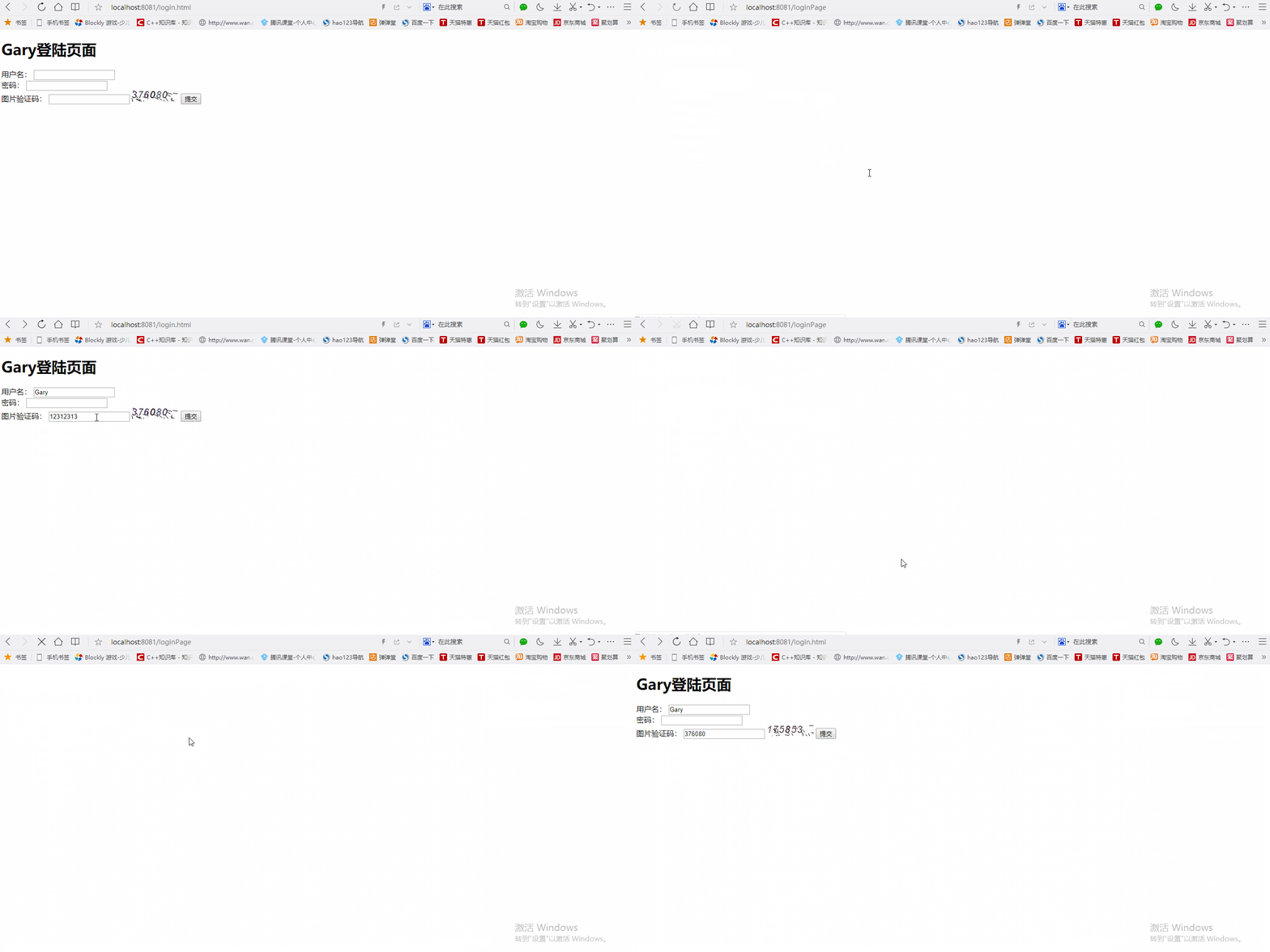
验证码如果没有输入正确,不会放行用户登陆步骤
SecurityConfig.java配置
//Web应用安全适配器

@Configuration

public class SecurityConfig extends WebSecurityConfigurerAdapter{

    //告诉SpringSecurity密码用什么加密的

    @Bean

    public PasswordEncoder passwordEncoder()

    {

        return new BCryptPasswordEncoder();

    }

    @Autowired

    private LoginSuccessHandler loginSuccessHandler;

    @Autowired

    private LoginFailureHandler loginFailureHandler;

    protected void configure(HttpSecurity http) throws Exception{

        //声明我们自己写的过滤器

        ValidateCodeFilter validateCodeFilter = new ValidateCodeFilter();

        //给过滤器赋值

        validateCodeFilter.setAuthenticationFailureHandler(loginFailureHandler);

        //表单验证(身份认证)

        http.addFilterBefore(validateCodeFilter, UsernamePasswordAuthenticationFilter.class)

            .formLogin()

            //自定义登陆页面

            .loginPage("/require")

            //如果URL为loginPage,则用SpringSecurity中自带的过滤器去处理该请求

            .loginProcessingUrl("/loginPage")

            //配置登陆成功调用loginSuccessHandler

            .successHandler(loginSuccessHandler)

            //配置登陆失败调用loginFailureHandler

            .failureHandler(loginFailureHandler)

            .and()

            //请求授权

            .authorizeRequests()

            //在访问我们的URL时,我们是不需要省份认证,可以立即访问

            .antMatchers("/login.html","/require","/code/image").permitAll()

            //所有请求都被拦截,跳转到(/login请求中)

            .anyRequest()

            //都需要我们身份认证

            .authenticated()

            //SpringSecurity保护机制

            .and().csrf().disable();

    }

<!DOCTYPE html>

<html>

<head>

<meta charset="UTF-8">

<title>Insert title here</title>

</head>

<body>

<h1>Gary登陆页面</h1>

    <form action="/loginPage" method="post">

        用户名:

        <input type="text" name="username">

        <br>

        密码:

        <input type="password" name="password">

        <br>

        图片验证码:

        <input type="text" name="imageCode">

        <img src="/code/image">

        <input type="submit">

    </form>

</body>

</html>
login.html
package com.Gary.GaryRESTful.config;

import org.springframework.beans.factory.annotation.Autowired;

import org.springframework.context.annotation.Bean;

import org.springframework.context.annotation.Configuration;

import org.springframework.security.config.annotation.web.builders.HttpSecurity;

import org.springframework.security.config.annotation.web.configuration.WebSecurityConfigurerAdapter;

import org.springframework.security.crypto.bcrypt.BCryptPasswordEncoder;

import org.springframework.security.crypto.password.PasswordEncoder;

import org.springframework.security.web.authentication.UsernamePasswordAuthenticationFilter;

import com.Gary.GaryRESTful.filter.ValidateCodeFilter;

import com.Gary.GaryRESTful.handler.LoginFailureHandler;

import com.Gary.GaryRESTful.handler.LoginSuccessHandler;

//Web应用安全适配器

@Configuration

public class SecurityConfig extends WebSecurityConfigurerAdapter{

    //告诉SpringSecurity密码用什么加密的

    @Bean

    public PasswordEncoder passwordEncoder()

    {

        return new BCryptPasswordEncoder();

    }

    @Autowired

    private LoginSuccessHandler loginSuccessHandler;

    @Autowired

    private LoginFailureHandler loginFailureHandler;

    protected void configure(HttpSecurity http) throws Exception{

        //声明我们自己写的过滤器

        ValidateCodeFilter validateCodeFilter = new ValidateCodeFilter();

        //给过滤器赋值

        validateCodeFilter.setAuthenticationFailureHandler(loginFailureHandler);

        //表单验证(身份认证)

        http.addFilterBefore(validateCodeFilter, UsernamePasswordAuthenticationFilter.class)

            .formLogin()

            //自定义登陆页面

            .loginPage("/require")

            //如果URL为loginPage,则用SpringSecurity中自带的过滤器去处理该请求

            .loginProcessingUrl("/loginPage")

            //配置登陆成功调用loginSuccessHandler

            .successHandler(loginSuccessHandler)

            //配置登陆失败调用loginFailureHandler

            .failureHandler(loginFailureHandler)

            .and()

            //请求授权

            .authorizeRequests()

            //在访问我们的URL时,我们是不需要省份认证,可以立即访问

            .antMatchers("/login.html","/require","/code/image").permitAll()

            //所有请求都被拦截,跳转到(/login请求中)

            .anyRequest()

            //都需要我们身份认证

            .authenticated()

            //SpringSecurity保护机制

            .and().csrf().disable();

    }

}
SecurityConfig.java
package com.Gary.GaryRESTful.validate.code;

import java.awt.image.BufferedImage;

import java.time.LocalDateTime;

//图片验证码

public class ImageCode {

    //给前台展示的图片

    private BufferedImage image;

    //验证码

    private String code;

    //过期时间

    private LocalDateTime expireTime;

    public ImageCode(BufferedImage image,String code,int expreTime)

    {

        this.image = image;

        this.code = code;

        this.expireTime = LocalDateTime.now().plusSeconds(expreTime);

    }

    public ImageCode(BufferedImage image,String code,LocalDateTime expireTime)

    {

        this.image = image;

        this.code = code;

        this.expireTime = expireTime;

    }

    //判断验证码是否过去

    public boolean isExpried()

    {

        //判断当前时间是否在过期时间之后

        return LocalDateTime.now().isAfter(expireTime);

    }

    public BufferedImage getImage() {

        return image;

    }

    public void setImage(BufferedImage image) {

        this.image = image;

    }

    public String getCode() {

        return code;

    }

    public void setCode(String code) {

        this.code = code;

    }

    public LocalDateTime getExpireTime() {

        return expireTime;

    }

    public void setExpireTime(LocalDateTime expireTime) {

        this.expireTime = expireTime;

    }

}
ImageCode.java
package com.Gary.GaryRESTful.controller;

import java.awt.Color;

import java.awt.Font;

import java.awt.Graphics;

import java.awt.image.BufferedImage;

import java.io.IOException;

import java.util.Random;

import javax.imageio.ImageIO;

import javax.servlet.http.HttpServletRequest;

import javax.servlet.http.HttpServletResponse;

import org.springframework.social.connect.web.HttpSessionSessionStrategy;

import org.springframework.social.connect.web.SessionStrategy;

import org.springframework.web.bind.annotation.GetMapping;

import org.springframework.web.bind.annotation.RestController;

import org.springframework.web.context.request.ServletWebRequest;

import com.Gary.GaryRESTful.validate.code.ImageCode;

@RestController

public class ValidateCodeController {

    //操作Session

    private SessionStrategy sessionStrategy = new HttpSessionSessionStrategy();

    public SessionStrategy getSessionStrategy() {

        return sessionStrategy;

    }

    public void setSessionStrategy(SessionStrategy sessionStrategy) {

        this.sessionStrategy = sessionStrategy;

    }

    public static String getSessionKey() {

        return sessionKey;

    }

    public static void setSessionKey(String sessionKey) {

        ValidateCodeController.sessionKey = sessionKey;

    }

    public static String sessionKey = "session_key_image_code";

    @GetMapping("/code/image")

    public void createCode(HttpServletRequest request,HttpServletResponse response) throws IOException

    {

        //生成随机数的图片

        ImageCode imageCode = createImageCode();

        //将随机数放入到session中

        sessionStrategy.setAttribute(new ServletWebRequest(request), sessionKey, imageCode);

        //将我们生成的图片写到接口的响应的输出流中

        ImageIO.write(imageCode.getImage(), "JPEG", response.getOutputStream());

    }

    //生成图片验证码(验证码,图片,失效的时间)

    private ImageCode createImageCode()

    {

        //定义图片的长和宽

        int width = 67;

        int height = 23;

        //生成一张图片

        BufferedImage image = new BufferedImage(width,height,BufferedImage.TYPE_INT_RGB);

        //获得画笔工具

        Graphics g = image.getGraphics();

        //画一个矩形

        g.setColor(new Color(255,255,255));

        g.fillRect(0, 0, width, height);

        //画干扰线

        g.setColor(new Color(0,0,0));

        //设置字体

        g.setFont(new Font("Time New Roman",Font.ITALIC,20));

        Random random = new Random();

        for(int i=0;i<20;i++)

        {

            int x = random.nextInt(width);

            int y = random.nextInt(height);

            int x1 = random.nextInt(12);

            int y1 = random.nextInt(12);

            //(x,y)到(x+x1,y+y1)

            g.drawLine(x, y, x+x1, y+y1);

        }

        //画数据

        String sRand = "";

        for(int i = 0;i<4;i++)

        {

            String rand =String.valueOf(random.nextInt(10));

            //System.out.println(rand);

            sRand += rand;

            //每一个字都改变一下颜色

            g.setColor(new Color(20+random.nextInt(110),20+random.nextInt(110),20+random.nextInt(110)));

            //画每一个数据

            g.drawString(rand, 13*i, 16);

        }

        g.dispose();

        //生成我们自己的验证码数据(图片,验证码,过期时间)

        return new ImageCode(image,sRand,60000);

    }

}
ValidateCodeController.java
package com.Gary.GaryRESTful.exception;

import org.springframework.security.core.AuthenticationException;

//AuthenticationException是springsecurity中所有异常的基类

public class ValidateCodeException extends AuthenticationException{

    public ValidateCodeException(String msg) {

        super(msg);

        // TODO Auto-generated constructor stub

    }

}
ValidateCodeException.java
package com.Gary.GaryRESTful.filter;

import java.io.IOException;

import javax.servlet.FilterChain;

import javax.servlet.ServletException;

import javax.servlet.http.HttpServletRequest;

import javax.servlet.http.HttpServletResponse;

import org.springframework.security.web.authentication.AuthenticationFailureHandler;

import org.springframework.social.connect.web.HttpSessionSessionStrategy;

import org.springframework.social.connect.web.SessionStrategy;

import org.springframework.util.StringUtils;

import org.springframework.web.bind.ServletRequestBindingException;

import org.springframework.web.bind.ServletRequestUtils;

import org.springframework.web.context.request.ServletWebRequest;

import org.springframework.web.filter.OncePerRequestFilter;

import com.Gary.GaryRESTful.controller.ValidateCodeController;

import com.Gary.GaryRESTful.exception.ValidateCodeException;

import com.Gary.GaryRESTful.validate.code.ImageCode;

//继承OncePerRequestFilter,保证这个filter只会执行一次

public class ValidateCodeFilter extends OncePerRequestFilter{

    private AuthenticationFailureHandler authenticationFailureHandler;

    //操作session域的工具

    private SessionStrategy sessionStrategy = new HttpSessionSessionStrategy();

    //Filter执行

    @Override

    protected void doFilterInternal(HttpServletRequest request, HttpServletResponse response, FilterChain filterChain)

            throws ServletException, IOException {

        //loginPage

        if(StringUtils.pathEquals("/loginPage", request.getRequestURI()) && StringUtils.startsWithIgnoreCase(request.getMethod(), "post"))

        {

            //filter才会执行

            try

            {

                validate(new ServletWebRequest(request));

            }

            catch(ValidateCodeException e) {

                //判处验证码的异常

                authenticationFailureHandler.onAuthenticationFailure(request,response,e);

                //一旦出现异常,我们就不就不能继续执行(应该放行),应该return

                return;

            }

        }

        //放行

        filterChain.doFilter(request, response);

    }

    //校验验证码是否正确

    private void validate(ServletWebRequest request) throws ServletRequestBindingException {

        // 获得session域中正确的验证码

        ImageCode codeInSession =  (ImageCode) sessionStrategy.getAttribute(request, ValidateCodeController.sessionKey);

        // 获得request域中的用户输入的验证码imageCode

        String codeInRequest = ServletRequestUtils.getStringParameter(request.getRequest(), "imageCode");

        // 判断用户输入的验证码是否为空

        if(StringUtils.isEmpty(codeInRequest))

        {

            throw new ValidateCodeException("验证码不能为空");

        }

        // 判断session域中的验证码是否为null

        if(codeInSession == null)

        {

            throw new ValidateCodeException("验证码不存在");

        }

        // 判断验证码是否过期

        if(codeInSession.isExpried())

        {

            throw new ValidateCodeException("验证码已过期");

        }

        // 校验两个验证码是否匹配

        if(!StringUtils.pathEquals(codeInSession.getCode(), codeInRequest))

        {

            //System.out.println("正确的:"+codeInSession.getCode());

            //System.out.println("用户输入的:"+codeInRequest);

            throw new ValidateCodeException("验证码不匹配");

        }

        // 将验证码从session域中移除

        sessionStrategy.removeAttribute(request, ValidateCodeController.sessionKey);

    }

    public AuthenticationFailureHandler getAuthenticationFailureHandler() {

        return authenticationFailureHandler;

    }

    public void setAuthenticationFailureHandler(AuthenticationFailureHandler authenticationFailureHandler) {

        this.authenticationFailureHandler = authenticationFailureHandler;

    }

    public SessionStrategy getSessionStrategy() {

        return sessionStrategy;

    }

    public void setSessionStrategy(SessionStrategy sessionStrategy) {

        this.sessionStrategy = sessionStrategy;

    }

}
ValidateCodeFilter.java
优化:增加代码的重用性
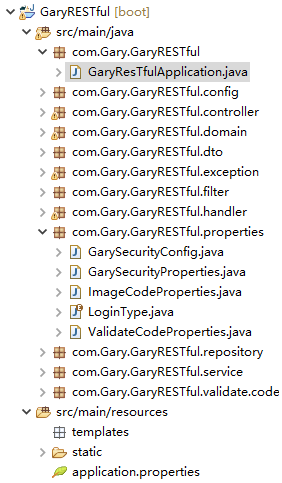
在GaryRESTful.properties包下创建ValidateCodeProperties.class,用于管理配置图片验证码的功能,再创建一个ImageCodeProperties.class,用于管理图片验证码的生成
优化图片验证码的生成
application.properties
#配置登陆方式

gary.security.loginType = JSON

server.port=8081

#验证码长度

gary.security.code.image.length = 6

#验证码图片的长

gary.security.code.image.width = 100

#datasource

spring.datasource.url=jdbc:mysql:///springsecurity?serverTimezone=UTC&characterEncoding=utf-8

spring.datasource.username=root

spring.datasource.password=123456

spring.datasource.dricer-class-name=com.mysql.jdbc.Driver

#jpa

#打印出数据库语句

spring.jpa.show-sql=true

#更新数据库表

spring.jpa.hibernate.ddl-auto=update

#配置登陆方式

gary.security.loginType = JSON

server.port=8081

#验证码长度

gary.security.code.image.length = 6

#验证码图片的长

gary.security.code.image.width = 100
application.properties
package com.Gary.GaryRESTful.controller;

import java.awt.Color;

import java.awt.Font;

import java.awt.Graphics;

import java.awt.image.BufferedImage;

import java.io.IOException;

import java.util.Random;

import javax.imageio.ImageIO;

import javax.servlet.http.HttpServletRequest;

import javax.servlet.http.HttpServletResponse;

import org.springframework.beans.factory.annotation.Autowired;

import org.springframework.social.connect.web.HttpSessionSessionStrategy;

import org.springframework.social.connect.web.SessionStrategy;

import org.springframework.web.bind.ServletRequestUtils;

import org.springframework.web.bind.annotation.GetMapping;

import org.springframework.web.bind.annotation.RestController;

import org.springframework.web.context.request.ServletWebRequest;

import com.Gary.GaryRESTful.properties.GarySecurityProperties;

import com.Gary.GaryRESTful.validate.code.ImageCode;

@RestController

public class ValidateCodeController {

    //操作Session

    private SessionStrategy sessionStrategy = new HttpSessionSessionStrategy();

    public static String sessionKey = "session_key_image_code";

    @Autowired

    private GarySecurityProperties garySecurityProperties;

    public SessionStrategy getSessionStrategy() {

        return sessionStrategy;

    }

    public void setSessionStrategy(SessionStrategy sessionStrategy) {

        this.sessionStrategy = sessionStrategy;

    }

    public static String getSessionKey() {

        return sessionKey;

    }

    public static void setSessionKey(String sessionKey) {

        ValidateCodeController.sessionKey = sessionKey;

    }

    @GetMapping("/code/image")

    public void createCode(HttpServletRequest request,HttpServletResponse response) throws IOException

    {

        //生成随机数的图片

        ImageCode imageCode = createImageCode(request);

        //将随机数放入到session中

        sessionStrategy.setAttribute(new ServletWebRequest(request), sessionKey, imageCode);

        //将我们生成的图片写到接口的响应的输出流中

        ImageIO.write(imageCode.getImage(), "JPEG", response.getOutputStream());

    }

    //生成图片验证码(验证码,图片,失效的时间)

    private ImageCode createImageCode(HttpServletRequest request)

    {

        //定义图片的长和宽

        int width = ServletRequestUtils.getIntParameter(request, "width", garySecurityProperties.getCode().getImage().getWidth());

        int height =  ServletRequestUtils.getIntParameter(request, "height", garySecurityProperties.getCode().getImage().getHeight());;

        //生成一张图片

        BufferedImage image = new BufferedImage(width,height,BufferedImage.TYPE_INT_RGB);

        //获得画笔工具

        Graphics g = image.getGraphics();

        //画一个矩形

        g.setColor(new Color(255,255,255));

        g.fillRect(0, 0, width, height);

        //画干扰线

        g.setColor(new Color(0,0,0));

        //设置字体

        g.setFont(new Font("Time New Roman",Font.ITALIC,20));

        Random random = new Random();

        for(int i=0;i<20;i++)

        {

            int x = random.nextInt(width);

            int y = random.nextInt(height);

            int x1 = random.nextInt(12);

            int y1 = random.nextInt(12);

            //(x,y)到(x+x1,y+y1)

            g.drawLine(x, y, x+x1, y+y1);

        }

        //画数据

        String sRand = "";

        for(int i = 0;i<garySecurityProperties.getCode().getImage().getLength();i++)

        {

            String rand =String.valueOf(random.nextInt(10));

            //System.out.println(rand);

            sRand += rand;

            //每一个字都改变一下颜色

            g.setColor(new Color(20+random.nextInt(110),20+random.nextInt(110),20+random.nextInt(110)));

            //画每一个数据

            g.drawString(rand, 13*i, 16);

        }

        g.dispose();

        //生成我们自己的验证码数据(图片,验证码,过期时间)

        return new ImageCode(image,sRand,garySecurityProperties.getCode().getImage().getExpireIn());

    }

}
ValidateCodeController.java
package com.Gary.GaryRESTful.properties;

import org.springframework.boot.context.properties.ConfigurationProperties;

@ConfigurationProperties(prefix = "gary.security")

public class GarySecurityProperties {

    //LoginType登陆的方式,默认为JSON(restful设计风格)

    private LoginType loginType = LoginType.JSON;

    private ValidateCodeProperties code = new ValidateCodeProperties();

    public ValidateCodeProperties getCode() {

        return code;

    }

    public void setCode(ValidateCodeProperties code) {

        this.code = code;

    }

    public LoginType getLoginType() {

        return loginType;

    }

    public void setLoginType(LoginType loginType) {

        this.loginType = loginType;

    }

}
GarySecurityProperties.java
package com.Gary.GaryRESTful.properties;

public class ImageCodeProperties {

    private int width = 67;

    private int height = 23;

    private int length = 4;

    private int expireIn = 60;

    public int getWidth() {

        return width;

    }

    public void setWidth(int width) {

        this.width = width;

    }

    public int getHeight() {

        return height;

    }

    public void setHeight(int height) {

        this.height = height;

    }

    public int getLength() {

        return length;

    }

    public void setLength(int length) {

        this.length = length;

    }

    public int getExpireIn() {

        return expireIn;

    }

    public void setExpireIn(int expireIn) {

        this.expireIn = expireIn;

    }

}
ImageCodeProperties.java
package com.Gary.GaryRESTful.properties;

public class ValidateCodeProperties {

    //图片验证码

    private ImageCodeProperties image;

    public ImageCodeProperties getImage() {

        return image;

    }

    public void setImage(ImageCodeProperties image) {

        this.image = image;

    }

}
ValidateCodeProperties.java
优化:配置Filter哪些请求需要拦截器执行
ImageCodeProperties.java中添加一个String类型的url
application.properties中添加一个gary.security.code.image.url,用来配置哪些需要我们验证码的Filter
在ValidateCodeFilter.java将用户请求的url进行切割保存到Set集合当中,遍历Set集合看是否有请求与我们request中的url一致
//在garySecurityProperties.code.image.url    /user,/user/*

    //当Bean组装好之后回调用这个函数

    @Override

    public void afterPropertiesSet() throws ServletException {

        super.afterPropertiesSet();

        //切割用户配置的url

        String[] configUrls = StringUtils.split(garySecurityProperties.getCode().getImage().getUrl(), ",");

        //将数组放入urls中

        for(String configURL : configUrls)

        {

            urls.add(configURL);

        }

        //loginPage一定会用到这个Filter,所以我们必须加上

        urls.add("/loginPage");

    }
doFilterInternal()通过循环判断是否有匹配的路径
//Filter执行

    @Override

    protected void doFilterInternal(HttpServletRequest request, HttpServletResponse response, FilterChain filterChain)

            throws ServletException, IOException {

        //loginPage

        //if(StringUtils.pathEquals("/loginPage", request.getRequestURI()) && StringUtils.startsWithIgnoreCase(request.getMethod(), "post"))

        //判断是否有匹配的路径

        boolean action = false;

        //循环判断

        for(String url :urls)

        {

            if(antPathMatcher.match(url, request.getRequestURI()))

            {

                action = true;

            }

        }

        if(action)

        {

            //filter才会执行

            try

            {

                validate(new ServletWebRequest(request));

            }

            catch(ValidateCodeException e) {

                //判处验证码的异常

                authenticationFailureHandler.onAuthenticationFailure(request,response,e);

                //一旦出现异常,我们就不就不能继续执行(应该放行),应该return

                return;

            }

        }

        //放行

        filterChain.doFilter(request, response);

    }
#datasource

spring.datasource.url=jdbc:mysql:///springsecurity?serverTimezone=UTC&characterEncoding=utf-8

spring.datasource.username=root

spring.datasource.password=123456

spring.datasource.dricer-class-name=com.mysql.jdbc.Driver

#jpa

#打印出数据库语句

spring.jpa.show-sql=true

#更新数据库表

spring.jpa.hibernate.ddl-auto=update

#配置登陆方式

gary.security.loginType = JSON

server.port=8081

#验证码长度

gary.security.code.image.length = 6

#验证码图片的长

gary.security.code.image.width = 100

#配置哪些需要我们验证码的Filter

gary.security.code.image.url = /user,/user/*
application.properties
package com.Gary.GaryRESTful.config;

import org.springframework.beans.factory.annotation.Autowired;

import org.springframework.context.annotation.Bean;

import org.springframework.context.annotation.Configuration;

import org.springframework.security.config.annotation.web.builders.HttpSecurity;

import org.springframework.security.config.annotation.web.configuration.WebSecurityConfigurerAdapter;

import org.springframework.security.crypto.bcrypt.BCryptPasswordEncoder;

import org.springframework.security.crypto.password.PasswordEncoder;

import org.springframework.security.web.authentication.UsernamePasswordAuthenticationFilter;

import com.Gary.GaryRESTful.filter.ValidateCodeFilter;

import com.Gary.GaryRESTful.handler.LoginFailureHandler;

import com.Gary.GaryRESTful.handler.LoginSuccessHandler;

import com.Gary.GaryRESTful.properties.GarySecurityProperties;

//Web应用安全适配器

@Configuration

public class SecurityConfig extends WebSecurityConfigurerAdapter{

    //告诉SpringSecurity密码用什么加密的

    @Bean

    public PasswordEncoder passwordEncoder()

    {

        return new BCryptPasswordEncoder();

    }

    @Autowired

    private LoginSuccessHandler loginSuccessHandler;

    @Autowired

    private LoginFailureHandler loginFailureHandler;

    @Autowired

    private GarySecurityProperties garySecurityProperties;

    protected void configure(HttpSecurity http) throws Exception{

        //声明我们自己写的过滤器

        ValidateCodeFilter validateCodeFilter = new ValidateCodeFilter();

        //给过滤器赋值

        validateCodeFilter.setAuthenticationFailureHandler(loginFailureHandler);

        validateCodeFilter.setGarySecurityProperties(garySecurityProperties);

        validateCodeFilter.afterPropertiesSet();

        //表单验证(身份认证)

        http.addFilterBefore(validateCodeFilter, UsernamePasswordAuthenticationFilter.class)

            .formLogin()

            //自定义登陆页面

            .loginPage("/require")

            //如果URL为loginPage,则用SpringSecurity中自带的过滤器去处理该请求

            .loginProcessingUrl("/loginPage")

            //配置登陆成功调用loginSuccessHandler

            .successHandler(loginSuccessHandler)

            //配置登陆失败调用loginFailureHandler

            .failureHandler(loginFailureHandler)

            .and()

            //请求授权

            .authorizeRequests()

            //在访问我们的URL时,我们是不需要省份认证,可以立即访问

            .antMatchers("/login.html","/require","/code/image").permitAll()

            //所有请求都被拦截,跳转到(/login请求中)

            .anyRequest()

            //都需要我们身份认证

            .authenticated()

            //SpringSecurity保护机制

            .and().csrf().disable();

    }

}
SecurityConfig.java
package com.Gary.GaryRESTful.filter;

import java.io.IOException;

import java.util.HashSet;

import java.util.Set;

import javax.servlet.FilterChain;

import javax.servlet.ServletException;

import javax.servlet.http.HttpServletRequest;

import javax.servlet.http.HttpServletResponse;

import org.springframework.beans.factory.InitializingBean;

import org.springframework.security.web.authentication.AuthenticationFailureHandler;

import org.springframework.social.connect.web.HttpSessionSessionStrategy;

import org.springframework.social.connect.web.SessionStrategy;

import org.springframework.util.AntPathMatcher;

import org.springframework.util.StringUtils;

import org.springframework.web.bind.ServletRequestBindingException;

import org.springframework.web.bind.ServletRequestUtils;

import org.springframework.web.context.request.ServletWebRequest;

import org.springframework.web.filter.OncePerRequestFilter;

import com.Gary.GaryRESTful.controller.ValidateCodeController;

import com.Gary.GaryRESTful.exception.ValidateCodeException;

import com.Gary.GaryRESTful.properties.GarySecurityProperties;

import com.Gary.GaryRESTful.validate.code.ImageCode;

//继承OncePerRequestFilter,保证这个filter只会执行一次

public class ValidateCodeFilter extends OncePerRequestFilter implements InitializingBean{

    private AuthenticationFailureHandler authenticationFailureHandler;

    //操作session域的工具

    private SessionStrategy sessionStrategy = new HttpSessionSessionStrategy();

    private GarySecurityProperties garySecurityProperties;

    private Set<String> urls = new HashSet<String>();

    //为了处理/user/*的形式

    private AntPathMatcher antPathMatcher = new AntPathMatcher();

    //在garySecurityProperties.code.image.url    /user,/user/*

    //当Bean组装好之后回调用这个函数

    @Override

    public void afterPropertiesSet() throws ServletException {

        super.afterPropertiesSet();

        //切割用户配置的url

        String[] configUrls = StringUtils.split(garySecurityProperties.getCode().getImage().getUrl(), ",");

        //将数组放入urls中

        for(String configURL : configUrls)

        {

            urls.add(configURL);

        }

        //loginPage一定会用到这个Filter,所以我们必须加上

        urls.add("/loginPage");

    }

    public GarySecurityProperties getGarySecurityProperties() {

        return garySecurityProperties;

    }

    public void setGarySecurityProperties(GarySecurityProperties garySecurityProperties) {

        this.garySecurityProperties = garySecurityProperties;

    }

    //Filter执行

    @Override

    protected void doFilterInternal(HttpServletRequest request, HttpServletResponse response, FilterChain filterChain)

            throws ServletException, IOException {

        //loginPage

        //if(StringUtils.pathEquals("/loginPage", request.getRequestURI()) && StringUtils.startsWithIgnoreCase(request.getMethod(), "post"))

        //判断是否有匹配的路径

        boolean action = false;

        //循环判断

        for(String url :urls)

        {

            if(antPathMatcher.match(url, request.getRequestURI()))

            {

                action = true;

            }

        }

        if(action)

        {

            //filter才会执行

            try

            {

                validate(new ServletWebRequest(request));

            }

            catch(ValidateCodeException e) {

                //判处验证码的异常

                authenticationFailureHandler.onAuthenticationFailure(request,response,e);

                //一旦出现异常,我们就不就不能继续执行(应该放行),应该return

                return;

            }

        }

        //放行

        filterChain.doFilter(request, response);

    }

    //校验验证码是否正确

    private void validate(ServletWebRequest request) throws ServletRequestBindingException {

        // 获得session域中正确的验证码

        ImageCode codeInSession =  (ImageCode) sessionStrategy.getAttribute(request, ValidateCodeController.sessionKey);

        // 获得request域中的用户输入的验证码imageCode

        String codeInRequest = ServletRequestUtils.getStringParameter(request.getRequest(), "imageCode");

        // 判断用户输入的验证码是否为空

        if(StringUtils.isEmpty(codeInRequest))

        {

            throw new ValidateCodeException("验证码不能为空");

        }

        // 判断session域中的验证码是否为null

        if(codeInSession == null)

        {

            throw new ValidateCodeException("验证码不存在");

        }

        // 判断验证码是否过期

        if(codeInSession.isExpried())

        {

            throw new ValidateCodeException("验证码已过期");

        }

        // 校验两个验证码是否匹配

        if(!StringUtils.pathEquals(codeInSession.getCode(), codeInRequest))

        {

            //System.out.println("正确的:"+codeInSession.getCode());

            //System.out.println("用户输入的:"+codeInRequest);

            throw new ValidateCodeException("验证码不匹配");

        }

        // 将验证码从session域中移除

        sessionStrategy.removeAttribute(request, ValidateCodeController.sessionKey);

    }

    public AuthenticationFailureHandler getAuthenticationFailureHandler() {

        return authenticationFailureHandler;

    }

    public void setAuthenticationFailureHandler(AuthenticationFailureHandler authenticationFailureHandler) {

        this.authenticationFailureHandler = authenticationFailureHandler;

    }

    public SessionStrategy getSessionStrategy() {

        return sessionStrategy;

    }

    public void setSessionStrategy(SessionStrategy sessionStrategy) {

        this.sessionStrategy = sessionStrategy;

    }

}
ValidateCodeFilter.java
JavaWeb-SpringSecurity图片验证ImageCode的更多相关文章
- $Django 图片验证刷新 上传头像
1.图片验证刷新 $('img').click(function () { $('img')[0].src+='?' }) 2.上传头像 1.模板 <div class="form-g ...
- $Django 表设计,登陆图片验证
pip3 install pillow #PIL登陆图片验证(未实现局部刷新)详细:https://www.cnblogs.com/qiangyuge/p/8025168.htmldef get_co ...
- 滑动验证 和滑动图片验证JS
滑动验证 先放效果图 <!DOCTYPE html> <html lang="en"> <head> <meta charset=&quo ...
- QTP图片验证/图片比较/二进制流对比法
图片验证主要是文件对比,其中我们可以利用二进制的方法读取图片信息,然后进行对比,达到对比的效果,本例子利用fso对象的文件流的方法实现,代码如下: Public Function CompareFil ...
- thinkphp5.0 实现图片验证效果且能点击图片刷新图片
思路与文件上传相同,只是验证码一个方法: <img src="{:captcha_src()}" /> 后台文件:app\ceshi\yam <?php name ...
- 完整说明使用SpringBoot+js实现滑动图片验证
常见的网站验证方式有手机短信验证,图片字符验证,滑块验证,滑块图片验证.本文主要讲解的是滑块图片验证的实现流程.包括后台和前端的实现. 实现效果 使用的API java.awt.image.Buffe ...
- JAVA实现图片验证
一.什么是图片验证码? 可以参考下面这张图: 我们在一些网站登陆的时候,经常需要填写以上图片的信息. 这种图片验证方式是我们最常见的形式,它可以有效的防范恶意攻击者采用恶意工具,来进行窃取用户的密码 ...
- c# 简单的滑动图片验证
普通的验证码对用户使用体验不友好,出现了滑动图片验证的验证方式,用户只要按住滑块完成图片的拼接即可通过验证(这是最简单的方式,滑动轨迹,数据分析,滑行速度 什么的暂没考虑) 主要的实现思路: 1.先从 ...
- javaWeb——图片验证
publicvoid doGet(HttpServletRequest request, HttpServletResponse response) throws ServletException, ...
随机推荐
- Eclipse 设置新建文件默认编码为 utf-8 的方法
选择编辑器顶部 Windows->Preferences->搜索jsp->选择utf-8编码->保存.
- vue项目性能优化总结
在使用elementUI构建公司管理系统时,发现首屏加载时间长,加载的网络资源比较多,对系统的体验性会差一点,而且用webpack打包的vuejs的vendor包会比较大.所以通过搜集网上所有对于vu ...
- 【异常】553 Mail from must equal authorized user
1 详细异常打印 2019-08-12 14:54:42,178 ERROR org.apache.camel.processor.DefaultErrorHandler: Failed delive ...
- 适配器 1、ArrayAdapter 2.SimpleAdapter
1.ArrayAdapter(数组适配器):用于绑定格式单一的数据.数据源:可以是集合或数组 public class MainActivity extends AppCompatActivity { ...
- 【Swing】图形用户界面基础
前言 简单总结一下图形用户界面(Graphical User Interface)的相关基础,如GUI的基本元素:窗口,以及介绍Java中的图形界面开发设计的技术. 图形用户界面 图形用户界面就是以图 ...
- Summer training #9
A:树形DP 给出一棵树,但是它的边是有向边,选择一个城市,问最少调整多少条边的方向能使一个选中城市可以到达所有的点,输出最小的调整的边数,和对应的点 要改变的边的权值为1,不需要改变的边的权值为0, ...
- 点击startup.bat启动tomcat出现乱码
找到tomcat目录下的/conf/logging.properties添加语句:java.util.logging.ConsoleHandler.encoding = GBK重启tomcat 问题解 ...
- 代理模式-aop
https://www.jianshu.com/p/a82509c4bb0d 在软件业,AOP为Aspect Oriented Programming的缩写,意为:面向切面编程,通过预编译方式和运行期 ...
- Internet层协议下IP协议
Internet层协议特征 运行于 OSI 网络层面向无连接的协议独立处理数据包分层编址尽力而为传输无数据恢复功能 Internet层主要包含IP.ICMP.ARP.RARP几个协议. 这一主要说IP ...
- css 判断是iphone4s iphone5 加载不同样式
@media (device-height:480px) and (-webkit-min-device-pixel-ratio:2){/* 兼容iphone4/4s */ .class{}}@med ...