
prometheus部署
1.prometheus安装
软件下载:
wget https://dl.grafana.com/oss/release/grafana-6.4.2-1.x86_64.rpm
https://github.com/prometheus/prometheus/releases/download/v2.13.0/prometheus-2.13.0.linux-amd64.tar.gz
wget https://golang.org/doc/install?download=go1.13.1.linux-amd64.tar.gz
说明:虚拟机Centos7 环境下进行安装.
1.1环境装备
配置golang的环境

wget https://golang.org/doc/install?download=go1.13.1.linux-amd64.tar.gz

tar -C /usr/local/ -xvf    go1.13.1.linux-amd64.tar.gz

添加到环境变量中

vim /etc/profile

export PATH=$PATH:/usr/local/go/bin

重载环境变量

source /etc/profile

查看版本

go   version
1.2安装Prometheus
tar -C /usr/local/ -xvf   prometheus-2.13.0.linux-amd64.tar.gz

ln -sv /usr/local/prometheus-2.13.0.linux-amd64/   /usr/local/prometheus

启动:

/usr/local/prometheus/prometheus  --storage.tsdb.path=/data/     --config.file=/usr/local/prometheus/prometheus.yml

暂时关闭防火墙

systemctl stop firewalld.service

登录:http://192.168.31.91:9090
1.3安装Grafana
rpm -ivh --nodeps grafana-6.4.2-1.x86_64.rpm

启动:

systemctl daemon-reload

systemctl enable grafana-server.service

systemctl start grafana-server.service

登录:http://192.168.31.91:3000/login  初始密码:admin admin

安装饼图插件:

grafana-cli plugins install grafana-piechart-panel
注意Grafana 密码重置
yum的安装方式,源码安装方式找到grafana.db文件
sqlite3 /var/lib/grafana/grafana.db
update user set password = '59acf18b94d7eb0694c61e60ce44c110c7a683ac6a8f09580d626f90f4a242000746579358d77dd9e570e83fa24faa88a8a6', salt = 'F3FAxVm33R' where login = 'admin';
1.4.配置Grafana
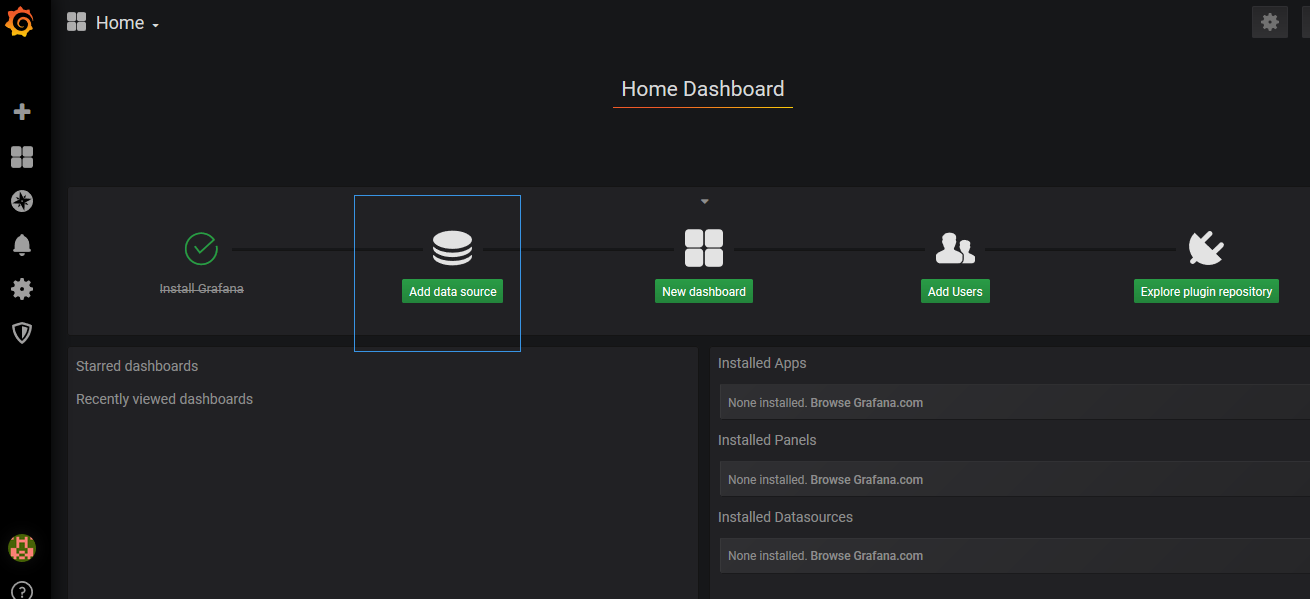
添加prometheus数据源
点击主界面的“Add data source”
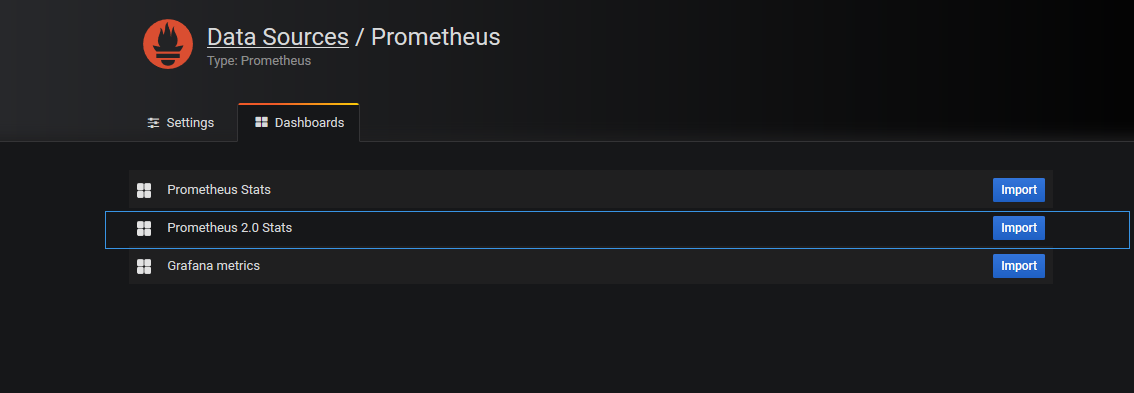
Dashboards页面选择“Prometheus 2.0 Stats”
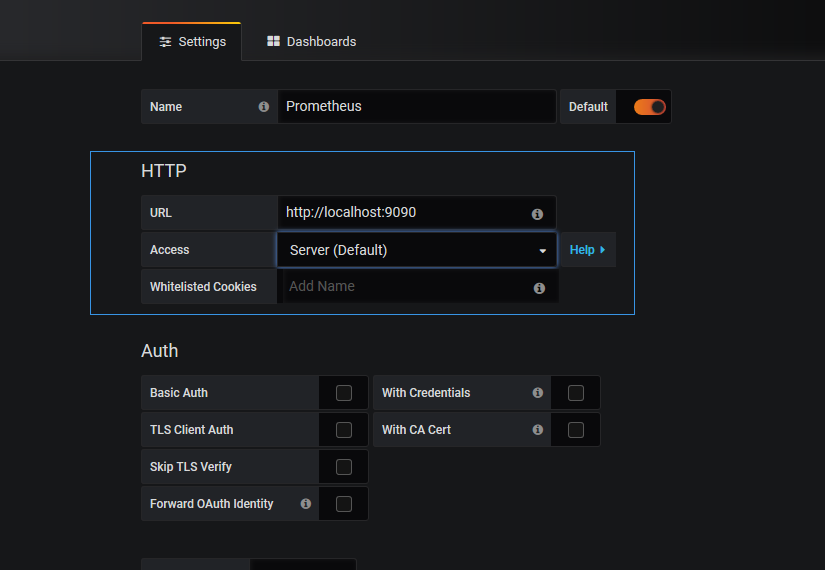
Settings页面填写普罗米修斯地址并保存
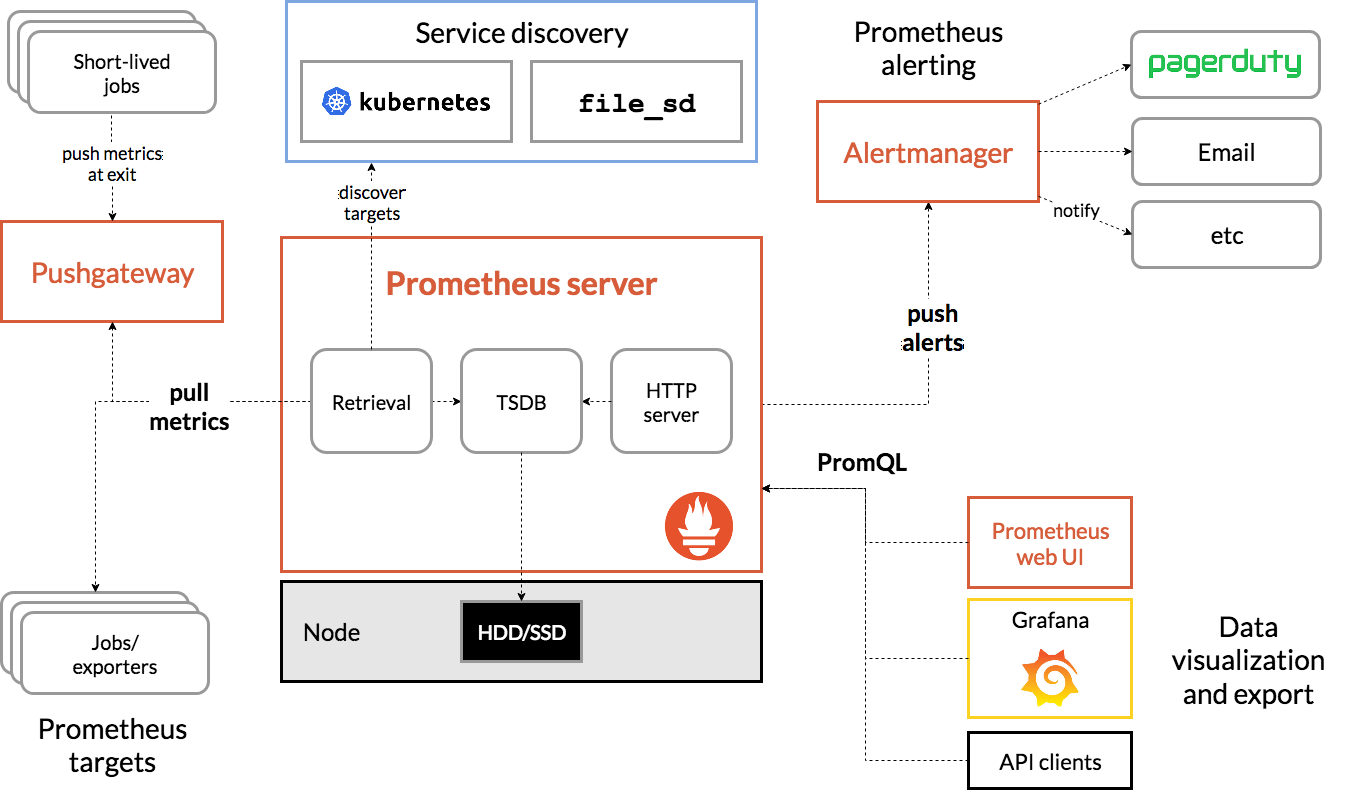
如果需要告警的配置需要下载alertmanager
Prometheus的告警机制是server推送告警到alertmanger,配置告警规则和告警方式
插件下载地址https://github.com/prometheus/alertmanager/releases/download/v0.19.0/alertmanager-0.19.0.linux-amd64.tar.gz
具体架构图如下:
如果在prometheus的http://localhost:9090/管理界面没有数据同时又
No datapoints found报错显示
解决方案:一定要修改服务器的时间
prometheus部署的更多相关文章
- k8s全方位监控-prometheus部署
1.k8s 监控资源对象 2. prometheus简单介绍. https://github.com/prometheus •多维数据模型:由度量名称和键值对标识的时间序列数据•PromSQL:一种灵 ...
- Prometheus部署各服务的Node监控
1.部署监控主机 部署主机监控,需要安装node_exporter 1.1 下载node exporter wget https://github.com/prometheus/node_export ...
- prometheus部署安装
1. 下载&部署 # 下载 [root@prometheus src]# cd /usr/local/src/ [root@prometheus src]# wget https://gith ...
- Kubernetes实战总结 - Prometheus部署
什么是普罗米修斯? Prometheus是最初在SoundCloud上构建的开源系统监视和警报工具包 . 自2012年成立以来,许多公司和组织都采用了Prometheus,该项目拥有非常活跃的开发人员 ...
- Prometheus部署监控容器
Prometheus架构描述 Prometheus 是一个非常优秀的监控工具.准确的说,应该是监控方案.Prometheus 提供了监控数据搜集.存储.处理.可视化和告警一套完整的解决方案 Prome ...
- Prometheus学习笔记(2)Prometheus部署
目录 Prometheus的安装配置启动 Prometheus的安装配置启动 1.Prometheus二进制安装 Prometheus下载链接:https://prometheus.io/downlo ...
- Prometheus 和 Grafana 安装部署
Prometheus 是一套开源的系统监控报警框架.Prometheus 作为生态圈 Cloud Native Computing Foundation(简称:CNCF)中的重要一员,其活跃度仅次于 ...
- prometheus + grafana安装部署(centos6.8)
官方网址:https://prometheus.io/ GitHub网址:https://github.com/prometheus/prometheus 软件下载地址:https://prometh ...
- Prometheus+Grafana监控部署实践
参考文档: Prometheus github:https://github.com/prometheus grafana github:https://github.com/grafana/graf ...
随机推荐
- POJ 3229:The Best Travel Design
Description Dou Nai ), and the end of the travel route hours on traveling every day. Input There are ...
- mui mui-control-item获得选中的标签
function getActiveControl() { var segmentedControl = document.getElementById("top-scroll") ...
- 关于quartz定期,起服务时不新增配置文件中的定期问题
关于quartz定期,起服务时不新增配置文件中的定期问题 问题原因:生产环境中起服务,未加载配置文件信息,且quartz连接超时 查找原因发现 由于别人新建了一个定期文件 并将 quartz工厂类的i ...
- (八)动态 sql
目录 什么是动态 sql sql 片段 foreach 标签 什么是动态 sql 我们之前在映射文件中,配置 sql 的时候,其实都是静态的 : <!--复杂查询--> <selec ...
- 文件锁-fcntl flock lockf
这三个函数的作用都是给文件加锁,那它们有什么区别呢? 首先flock和fcntl是系统调用,而lockf是库函数.lockf实际上是fcntl的封装,所以lockf和fcntl的底层实现是一样的,对文 ...
- 关于container_of函数分析
#include <stdio.h> #define offset_of(type,member) ((int)&(((type *)0)->member)) #define ...
- RSA加密,以及证书加密
简单的加密:https://blog.csdn.net/qq_32523587/article/details/79092364 生成证书:https://blog.csdn.net/u0121916 ...
- 禅道工具的下载和使用(原地址:https://www.cnblogs.com/ydnice/p/5800256.html)
下载地址:http://sourceforge.net/projects/zentao/files/8.2/ZenTaoPMS.8.2.stable.exe/download 1.解压ZenTaoPM ...
- .Net C# 签名字符串排序
#region Get Sign Content /// <summary> /// Get Sign Content /// </summary> /// <param ...
- async/await 的引用
static async void Start() { string s = "ass"; Console.WriteLine(getMemory(s)+"Hello W ...