
C++ 第二天 字符串
字符串
字符串是最常用的一种数据类型了,在python中声明字符串和声明其他类型的数据一样,都非常的简单。但是在c++中,对于字符串的操作,相对来说要稍微复杂一些。
C++ 提供了以下两种类型的字符串表示形式:
C 风格字符串
C++ 引入的 string 类类型
C风格字符串
C 风格的字符串起源于 C 语言,并在 C++ 中继续得到支持。字符串实际上是使用 null 字符 \0 终止的一维字符数组。如下面的声明和初始化创建了一个 "Hello" 字符串。由于在数组的末尾存储了空字符,所以字符数组的大小比单词 "Hello" 的字符数多一个。
int main(){

    char greeting[] = {'H', 'e', 'l', 'l', 'o', '\0'};

    //可以简写成:

    char greeting2[] = "Hello";

    return  ;

}
c风格字符串常见操作
1.遍历字符串
#include<iostream>

int main(){

    //最后总会跟着一个\0的空字符,此时括号中如果写长度,必须大于等于6

    char  name[] = "hello";

    for (int i = ; i < sizeof(name ) / sizeof(char); ++i) {

        std::cout << name[i] << std::endl;

    }

}
2.字符串的其他操作
C语言中提供了针对字符串操作的大量函数,不过在使用之前,需要先引入 #include<cstring>
以下函数的使用,需要引入 #include<ctype.h> 头文件
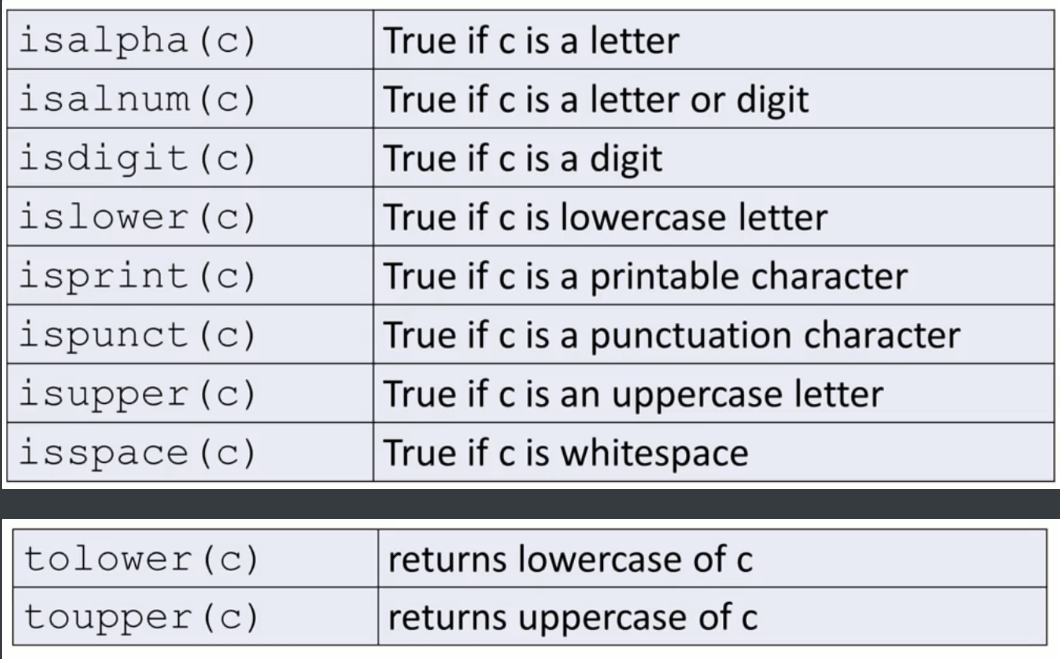
拷贝、拼接字符串
#include <iostream>

int main(){

    //拷贝字符串

    char  name[] = "hello";

    char name2[];

    //参数一: 目标字符串, 参数二:源字符串

    strcpy(name2 , name);

    std::cout << name2 << std::endl;

    //拼接字符串

    strcat(name2 , " , 张三");

    std::cout << name2 << std::endl;

    // 返回字符串长度

    int len = strlen(name2);

    std::cout << "name2的长度:" << len << std::endl;

    return  ;

}
C++风格字符串
C++ 标准库提供了 string 类类型,支持上述所有的操作,另外还增加了其他更多的功能。需要引入 #include<string> ,由于string类声明在命名空间 std ,所以在使用的首要注意 命名空间的联合使用
#include <iostream>
//必须引入string库

#include <string>

using namespace std;

int mian(){

    string s1;

    string s2 {"北京"};

    string s3{s2};

    string s4 = "你好";

    s1 = s3;

    return  ;

}
C++风格字符串常见操作
1.拼接字符串
c++字符串的拼接跟Python一样,直接用+拼接即可。
#include <iostream>

#include<string>

using namespace std;

int main(){

    string part1 {"c++"};

    string part2 {" is a powerful"};

    string sentence ;

    sentence = part1 + part2 ;

    cout << sentence << endl;   // 结果是  c++ is a powerful

    return  ;

}
2.获取指定位置的字符
可以使用[]和 at()操作字符串
#include <iostream>

#include<string>

using namespace std;

int main(){

    string s1 {"i love c++"};

    cout << s1[]<<endl;    // o

    cout << s1.at() << endl;    // i

   return  ;

}
3.遍历字符串
#include <iostream>

#include<string>

using namespace std;

int main(){

    string s1 {"abcdef"};

    for(char s : s1){

        cout << s << " ";  //  打印的结果 :a b c d e f

    }

    cout << endl;

    for(int s : s1){

// 因为s1是字符串类型,指定的s又为int类型,所以这里面打印出来是字符所对应的ascii码

        cout << s << " ";  // 打印的结果:97 98 99 100 101 102

    }

    cout << endl;

    return  ;

}
4.字符串比较
字符串也是可以比较大小的。
#include <iostream>

#include<string>

using namespace std;

int main(){

    string s1{"Apple"};

    string s2{"Banana"};

    string s3 {"kiwi"};

    string s3 {"apple"};

    string s3 {s1};

    s1 == s5 // true

    s1 == s2 // false

    s1 != s2 // true

    s1 < s2 // True

    s1 > s2 // false

    s1 == "Apple" // false

    return  ;

}
5.截取字符串
#include <iostream>

#include<string>

using namespace std;

int main(){

    substr(开始索引, 截取长度);

    string s1 {"This is a test"};

    cout << s1.substr( , ) ; // This

    return  ;

}
6.获取字符(字符串)在字符串中的索引
#include <iostream>

#include<string>

using namespace std;

int main(){

    find(搜索的字符)

    string s1 {"This is a test"};

    cout << s1.find("This") ; // 0

    cout << s1.find("is") ; //

    cout << s1.find("test") ; // 10

   return  ;

}
7.获取字符串长度
length() : 返回字符串长度
size():返回字符串长度
#include <iostream>

#include<string>

using namespace std;

int main(){

    string s1 {"abcd"};

    cout << "s1的字符串长度为" << s1.length() << endl;  // 4
   cout << "s1的字符串长度为" <<  s1.size() << endl;  // 4
return 0 ; }
C++中string类的size和length到底有没有区别?
这是c++标准库中的string中length和size的源码
   _NODISCARD size_type length() const noexcept { // return length of sequence

        return _Get_data()._Mysize;

    }

    _NODISCARD size_type size() const noexcept { // return length of sequence

        return _Get_data()._Mysize;

    }
由此可以看出,length()与size()没有区别,都是返回string对象中元素数量,即返回std::distance(begin(),end()) 。length是因为沿用C语言的习惯而保留下来的,string类最初只有length,引入STL之后,为了兼容又加入了size,它是作为STL容器的属性存在的,便于符合STL的接口规则,以便用于STL的算法。
原文链接:https://blog.csdn.net/qq_43152052/article/details/95861329
每天一个表情包,美滋滋
C++ 第二天 字符串的更多相关文章
- 剑指Offer:从第一个字符串中删除第二个字符串中出现过的所有字符
// 从第一个字符串中删除第二个字符串中出现过的所有字符 #include <stdio.h> char* remove_second_from_first( char *first, c ...
- 面试35-删除字符串重复字符-删除出现在第二个字符串中的字符-第一个只出现一次的字符-hash表计数
#include<iostream>#include<algorithm>#include<functional>using namespace std;char ...
- Python学习-第二天-字符串和常用数据结构
Python学习-第二天-字符串和常用数据结构 字符串的基本操作 def main(): str1 = 'hello, world!' # 通过len函数计算字符串的长度 print(len(str1 ...
- <CPP学习 第二天> 字符串的输入 及 String类
今天简单的学习了字符串的输入以及C++的String类. 1.面向行的输入: getline(); getline()函数读取整行,通过回车键输入的换行符来确定输入结尾.要调用这种方法,可以使用cin ...
- python基础知识第二篇(字符串)
基本数据类型 数字 整形 int ---int 将字符串 ...
- python学习第二天--字符串及格式化输出
# 字符串# 字符串取值:字符串名[索引值] 只能取单个值# 正序访问,从0开始str1 = "hello world"print(str1[3]) # 输出"l&quo ...
- 写一个程序可以对两个字符串进行测试,得知第一个字符串是否包含在第二个字符串中。如字符串”PEN”包含在字符串“INDEPENDENT”中。
package lovo.test; import java.util.Scanner; public class Java { @param args public static void main ...
- Windows核心编程第二章,字符串的表示以及宽窄字符的转换
目录 Windows核心编程,字符串的表示以及宽窄字符的转换 1.字符集 1.1.双字节字符集DBCS 1.2 Unicode字符集 1.3 UTF-8编码 1.4 UTF - 32编码. 1.5 U ...
- 【原创】Python第二章——字符串
字符串是一个字符序列,(提醒:序列是Python的一个重要的关键词),其中存放UNICODE字符.Python中的字符串是不可变的(immutable),即对字符串执行操作时,总是产生一个新的字符串而 ...
- SQL Server(第二章) 字符串函数、日期时间函数、转换函数
--1.CONCAT 函数:字符串连接(支持sql server2012 SQL规则 如果与NULL连接返回NILL) SELECT empid,CONCAT(firstname,lastname) ...
随机推荐
- 轻松搞定安全框架(Shiro)
SpringBoot 是为了简化 Spring 应用的创建.运行.调试.部署等一系列问题而诞生的产物,自动装配的特性让我们可以更好的关注业务本身而不是外部的XML配置,我们只需遵循规范,引入相关的依赖 ...
- Golang协程池(workpool)实现
背景 因与工作相关,所以本文中的数据都进行了更改,但逻辑是一样的. 笔者的服务ServerA会请求服务ServerH获取一些数据,但ServerH的接口有个N秒内只能请求M次的限制,并返回false. ...
- 从CAS讲起,真正高性能解决并发编程的原子操作
今天是猿灯塔“365天原创计划”第1天. 一.原子性操作 原子性操作:原子性在一个操作是不可中断的,要么全部执行成功要么全部执行失败,有着“同生共死”的感觉.及时在多个线程一起执行的时候,一个操作一旦 ...
- requests接口自动化6-Body里json格式数据形式的post请求:json
Body里json格式数据形式的post请求:用json传参 fiddler里请求响应内容: 传递的json数据 [{"stepId":"0","ca ...
- JavaScript图形实例:阿基米德螺线
1.阿基米德螺线 阿基米德螺线亦称“等速螺线”.当一点P沿动射线OP以等速率运动的同时,该射线又以等角速度绕点O旋转,点P的轨迹称为“阿基米德螺线”. 阿基米德螺线的笛卡尔坐标方程式为: r=10*( ...
- Unity3D Demo项目开发记录
前言 经过一段时间的学习与实际开发,unity3D也勉强算是强行入门了,正所谓好记性不如烂笔头,更何况本人并非专业从事unity3D开发,会一点C#但也并不熟悉,为了避免后期遗忘,因此特意整理了一个D ...
- Python Ethical Hacking - MAC Address & How to Change(3)
SIMPLE ALGORITHM Goal -> Check if MAC address was changed. Steps: 1. Execute and read ifconfig. ...
- Ethical Hacking - GAINING ACCESS(4)
SERVER SIDE ATTACKS - METASPLOIT Metasploit is an exploit development and execution tool. It can als ...
- UC 网盘:我又回来了
普通用户不限速下载,免费 10GB 空间,支持离线下载 这个域名非常厉害,某里挑选域名果然是值得称赞的.直接使用手机号即可注册登录,默认赠送 10GB 空间.不过目前好像没看到有电脑客户端,电脑上下载 ...
- 利用华为eNSP模拟器实现vlan之间的通信
eNSP交换机配置VLAN 1. 搭建网络拓扑结构 运行eNSP>新建拓扑>搭建如下图的拓扑结构>启动设备.利用调色板将划分的vlan进行区分. 2. pc机IP地址配置 pc1的I ...