
Pandas_VBA_数据分类比较
Python与VBA的比较2
需求:
input文件中有两列数据,第一列为Name,第二列为Score,Name列里有重复的值,要求按照name的唯一值统计 score,输出到output文件按中。
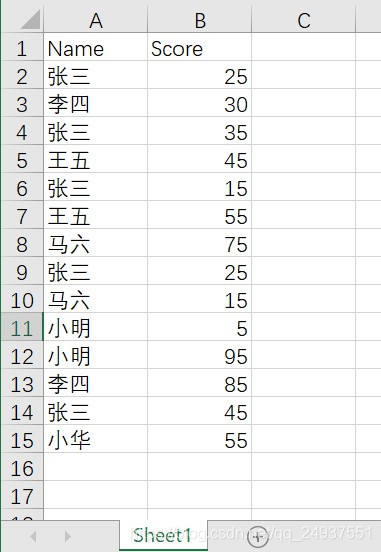
1--用 Pandas解决:
from pandas import DataFrame

import pandas as pd

df=pd.read_excel(r"C:\Users\12078\Desktop\UIPATH_test\20200409\input.xlsx",sheet_name='Sheet1')

df=df.groupby('Name').sum()

df.to_excel(r"C:\Users\12078\Desktop\UIPATH_test\20200409\output.xlsx",sheet_name="Sheet1")
2--用 VBA解决:
Option Explicit

Option Base 1

Sub test_data()

   on error goto errorhandling

    Dim wb_in                      As Workbook

    Dim wb_out                     As Workbook

    Dim sht_in                     As Worksheet

    Dim sht_out                    As Worksheet

    Dim rng                        As Range

    Dim usedrows                   As Integer

    Dim usedrows_out               As Integer

    Dim input_path                 As String

    Dim output_path                As String

	Dim data_dict                  As Object

    Dim data_arr                   As Variant

    Dim data_arr_out               As Variant

   input_path = "C:\Users\12078\Desktop\UIPATH_test\20200409\input.xlsx"

   output_path = "C:\Users\12078\Desktop\UIPATH_test\20200409\output.xlsx"

   Set wb_in = checkAndAttachWorkbook(input_path)

   Set sht_in = wb_in.Worksheets("Sheet1")

   Set wb_out = Workbooks.Add

   wb_out.SaveAs output_path

   Set sht_out = wb_out.Worksheets("Sheet1")

   Set data_dict = CreateObject("Scripting.Dictionary")

   usedrows = WorksheetFunction.Max(getLastValidRow(sht_in, "A"), getLastValidRow(sht_in, "B"))

   data_arr = sht_in.Range("A2", "B" & usedrows)

   Dim i As Integer

    For i = 1 To UBound(data_arr, 1)

        If Not data_dict.Exists(data_arr(i, 1)) Then

            data_dict.Add data_arr(i, 1), data_arr(i, 2)

        Else

            data_dict(data_arr(i, 1)) = data_dict(data_arr(i, 1)) + data_arr(i, 2)

        End If

        Debug.Print data_arr(i, 1) & "--" & data_dict(data_arr(i, 1))

    Next i

    sht_out.Range("A1") = "Name"

    sht_out.Range("B1") = "Score"

    usedrows_out = data_dict.Count

   Dim index_dict As Integer

   ReDim data_arr_out(1 To UBound(data_dict.keys) + 1, 1 To 2)

   For index_dict = 0 To UBound(data_dict.keys)

        data_arr_out(index_dict + 1, 1) = data_dict.keys()(index_dict)

        data_arr_out(index_dict + 1, 2) = data_dict(data_dict.keys()(index_dict))

        Debug.Print index_dict

        Debug.Print data_arr_out(index_dict + 1, 1) & "--" & data_arr_out(index_dict + 1, 2) 'for debug

   Next

   sht_out.Range("A2").Resize(UBound(data_arr_out), 2) = data_arr_out

    Call checkAndCloseWorkbook(wb_in, False)

    Call checkAndCloseWorkbook(wb_out, True)

Exit Sub

errorhandling:

    Call checkAndCloseWorkbook(wb_in, False)

    Call checkAndCloseWorkbook(wb_out, False)

End Sub

' 辅助函数:

'Get last row of Column N in a Worksheet

Function getLastValidRow(in_ws As Worksheet, in_col As String)

    getLastValidRow = in_ws.Cells(in_ws.Rows.Count, in_col).End(xlUp).Row

End Function

Function checkAndAttachWorkbook(in_wb_path As String) As Workbook

    Dim wb As Workbook

    Dim mywb As String

    mywb = in_wb_path

   For Each wb In Workbooks

        If LCase(wb.FullName) = LCase(mywb) Then

            Set checkAndAttachWorkbook = wb

            Exit Function

        End If

    Next

   Set wb = Workbooks.Open(in_wb_path, UpdateLinks:=0)

   Set checkAndAttachWorkbook = wb

End Function

Function checkAndCloseWorkbook(in_wb_path As String, in_saved As Boolean)

    Dim wb As Workbook

    Dim mywb As String

    mywb = in_wb_path

    For Each wb In Workbooks

        If LCase(wb.FullName) = LCase(mywb) Then

            wb.Close Savechanges:=in_saved

            Exit Function

        End If

    Next

End Function
输出结果:
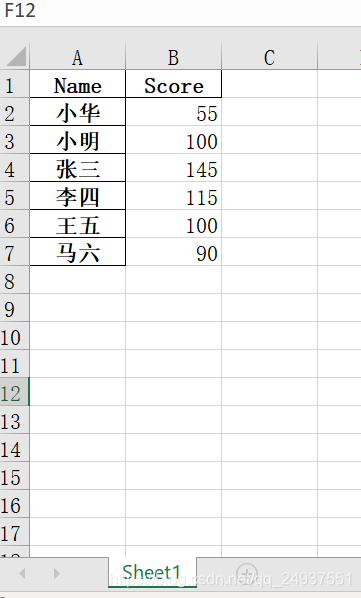
比对结论:
pandas简单得多!
Pandas_VBA_数据分类比较的更多相关文章
- Pandas_VBA_数据筛选比较
Pandas与VBA筛选数据的比较 Author:Collin_PXY 需求: 将B列里值为Completed 和 Pending的A,B,D三列数据筛选出来,新建一个名为 Filited_data的 ...
- Hadoop 中利用 mapreduce 读写 mysql 数据
Hadoop 中利用 mapreduce 读写 mysql 数据 有时候我们在项目中会遇到输入结果集很大,但是输出结果很小,比如一些 pv.uv 数据,然后为了实时查询的需求,或者一些 OLAP ...
- App开发:模拟服务器数据接口 - MockApi
为了方便app开发过程中,不受服务器接口的限制,便于客户端功能的快速测试,可以在客户端实现一个模拟服务器数据接口的MockApi模块.本篇文章就尝试为使用gradle的android项目设计实现Moc ...
- 使用TSQL查询和更新 JSON 数据
JSON是一个非常流行的,用于数据交换的文本数据(textual data)格式,主要用于Web和移动应用程序中.JSON 使用“键/值对”(Key:Value pair)存储数据,能够表示嵌套键值对 ...
- SQL Server 大数据搬迁之文件组备份还原实战
一.本文所涉及的内容(Contents) 本文所涉及的内容(Contents) 背景(Contexts) 解决方案(Solution) 搬迁步骤(Procedure) 搬迁脚本(SQL Codes) ...
- SQLSERVER将一个文件组的数据移动到另一个文件组
SQLSERVER将一个文件组的数据移动到另一个文件组 有经验的大侠可以直接忽视这篇文章~ 这个问题有经验的人都知道怎麽做,因为我们公司的数据量不大没有这个需求,也不知道怎麽做实验 今天求助了QQ群里 ...
- 【.net 深呼吸】设置序列化中的最大数据量
欢迎收看本期的<老周吹牛>节目,由于剧组严重缺钱,故本节目无视频无声音.好,先看下面一个类声明. [DataContract] public class DemoObject { [Dat ...
- Scrapy框架爬虫初探——中关村在线手机参数数据爬取
关于Scrapy如何安装部署的文章已经相当多了,但是网上实战的例子还不是很多,近来正好在学习该爬虫框架,就简单写了个Spider Demo来实践.作为硬件数码控,我选择了经常光顾的中关村在线的手机页面 ...
- 通过AngularJS实现前端与后台的数据对接(二)——服务(service,$http)篇
什么是服务? 服务提供了一种能在应用的整个生命周期内保持数据的方法,它能够在控制器之间进行通信,并且能保证数据的一致性. 服务是一个单例对象,在每个应用中只会被实例化一次(被$injector实例化) ...
随机推荐
- JavaScript高级程序设计(第4版)pdf 电子书
JavaScript高级程序设计(第4版)pdf 电子书 免责声明:JavaScript高级程序设计(第4版)pdf 电子书下载 高清收集于网络,请勿商用,仅供个人学习使用,请尊重版权,购买正版书籍. ...
- 用ip xfrm搭ipsec隧道
拓扑如下 基本的IP配置就不说了,直接写重点,在LS上配置 #配置SA ip xfrm state add src 194.168.10.4 dst 194.168.10.5 proto esp sp ...
- Python数据类型--集合(set)
Python的集合是无序.可迭代的容器对象,所有元素放在一对大括号中{},元素之间使用逗号隔开,同一集合内的元素具有唯一性,不允许重复. 集合中只能包含数字.字符串.元组等不可变类型的数据,不能包含列 ...
- 物联网wifi模块
物联网wifi模块 物联网wifi模块 是上海卓岚推出的MQTT+JSON转Modbus物联网WiFi核心模块.支持以MQTT的方式连接云端服务器,支持可以界面话配置,自主采集Modbus仪表/645 ...
- 【LWJGL3】LWJGL3的内存分配设计,第一篇,栈上分配
简介 LWJGL (Lightweight Java Game Library 3),是一个支持OpenGL,OpenAl,Opengl ES,Vulkan等的Java绑定库.<我的世界> ...
- C语言和单片机C语言为什么会有差异?虽不同但理同!
许多小伙伴在学完C语言后想入门单片机,但学着学着发现明明都是C语言,为什么单片机C语言和我当初学的C语言有差异呢? 今天小编就来梳理我们平时所学的C语言与单片机C语言的有什么样的不同. 单片机c语言比 ...
- openresty上安装waf
一,查看openresty的当前版本 [root@localhost luacache]# /usr/local/openresty/bin/openresty -V nginx version: o ...
- centos8平台:redis6配置启用io多线程(redis6.0.1)
一,linux平台上redis6的安装 请参见这一篇: https://www.cnblogs.com/architectforest/p/12830056.html 说明:刘宏缔的架构森林是一个专注 ...
- 解析SparkStreaming和Kafka集成的两种方式
spark streaming是基于微批处理的流式计算引擎,通常是利用spark core或者spark core与spark sql一起来处理数据.在企业实时处理架构中,通常将spark strea ...
- JS之关于函数
Javascript的函数也是一个对象 function test() { ... } var test = function(){ ... } 函数内部一旦执行return,则函数执行完毕,如果没有 ...