
树莓派raspbian安装matchbox-keyboard虚拟键盘
环境:raspbian-stretch(2018-06-27)
树莓派:3代B型
官网安装地址:http://ozzmaker.com/virtual-keyboard-for-the-raspberry-pi/

回家发现家里的键盘有些按键已经失灵了,没办法,和windows一样,直接安装个虚拟键,也是美滋滋!
matchbox-keyboard是屏幕上的“虚拟”或“软件”的键盘,适用于连接到Raspberry Pi的小型触摸屏TFT。
matchbox-keyboard键盘还使用XML文件来指定键的布局,这使得它可以高度自定义。
1、安装必备开发包
pi@raspberrypi ~ $ sudo apt-get install libfakekey-dev libpng-dev libxft-dev autoconf libtool -y
2、安装并编译matchbox-keyboard
pi@raspberrypi ~ $ git clone https://github.com/mwilliams03/matchbox-keyboard.git

pi@raspberrypi ~ $ cd matchbox-keyboard

pi@raspberrypi ~/matchbox-keyboard $ ./autogen.sh

pi@raspberrypi ~/matchbox-keyboard  $ make

pi@raspberrypi ~/matchbox-keyboard  $ sudo make install
安装matchbox-keyboard后,需要安装共享的 matchbox库。
pi@raspberrypi ~ $ sudo apt-get install libmatchbox1 -y
3、创建切换脚本以启动或停止matchbox-keyboard
我们现在将创建一个脚本来打开和关闭键盘。 然后添加一个菜单项来访问脚本,并在任务栏中添加一个图标以便于访问。
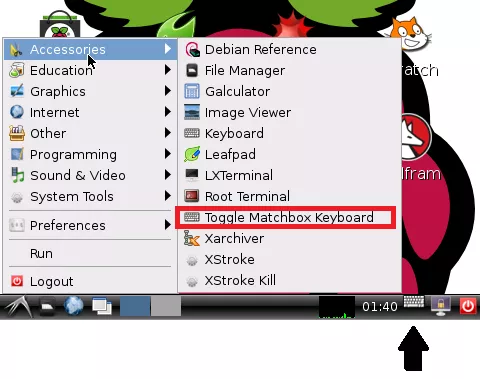
创建一个新文件;
pi@raspberrypi ~ $ sudo nano /usr/bin/toggle-matchbox-keyboard.sh
并且将下面的文本复制进去;
#!/bin/bash

#This script toggle the virtual keyboard

PID=`pidof matchbox-keyboard`

if [ ! -e $PID ]; then

  killall matchbox-keyboard

else

 matchbox-keyboard&

fi
现在让它可执行;
pi@raspberrypi ~ $ sudo chmod +x /usr/bin/toggle-matchbox-keyboard.sh
我们现在将在开始菜单中添加一个项目;
对于较旧的镜像;
pi@raspberrypi ~ $ sudo nano /usr/local/share/applications/toggle-matchbox-keyboard.desktop
对于较新的镜像,包括Jessie;(我这里是新镜像,所以使用此命令)
pi@raspberrypi ~ $ sudo nano /usr/share/applications/toggle-matchbox-keyboard.desktop
将以下内容复制进去;
[Desktop Entry]

Name=Toggle Matchbox Keyboard

Comment=Toggle Matchbox Keyboard

Exec=toggle-matchbox-keyboard.sh

Type=Application

Icon=matchbox-keyboard.png

Categories=Panel;Utility;MB

X-MB-INPUT-MECHANSIM=True
要在任务栏上创建图标,请打开LXDE面板配置;
pi@raspberrypi ~ $ nano ~/.config/lxpanel/LXDE/panels/panel
如果上面的文件是空的,那么很可能你用的是一个较新版本的Raspbian,特别是如果你使用的是Pi 2。
你需要在这个位置编辑面板配置;
如果使用RASPBIAN WHEEZY;
pi@raspberrypi ~ $ nano ~/.config/lxpanel-pi/LXDE/panels/panel
如果使用RASPBIAN JESSIE;(我这里使用的是此命令)
pi@raspberrypi ~ $ nano ~/.config/lxpanel/LXDE-pi/panels/panel
找到这部分配置;
Plugin {

    type = launchbar

    Config {

        Button {

            id=lxde-screenlock.desktop

        }

        Button {

            id=lxde-logout.desktop

        }

    }
增加 id=toggle-matchbox-keyboard.desktop的代码进去;
Plugin {

    type = launchbar

    Config {

        Button {

            id=toggle-matchbox-keyboard.desktop

        }

        Button {

            id=lxde-screenlock.desktop

        }

        Button {

            id=lxde-logout.desktop

        }

    }
4、更多信息
pi@raspberrypi ~ $ matchbox-keyboard
这将加载默认的键盘布局,如图所示;
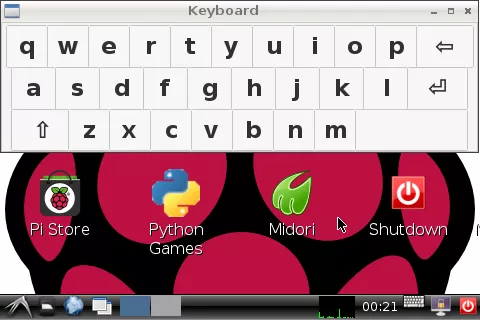
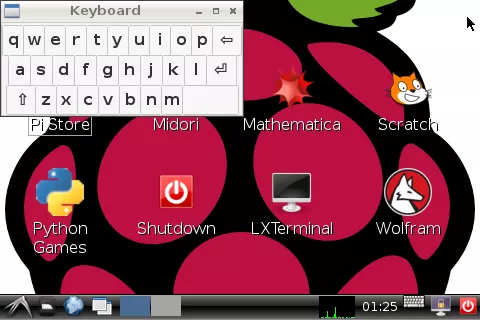
Matchbox-keyboard还可以使用-s整数参数调整窗口大小。 整数是屏幕宽度的30%-100%之间的值。
这是在屏幕宽度的50%处加载的defualt键盘布局;
pi@raspberrypi ~ $ matchbox-keyboard -s
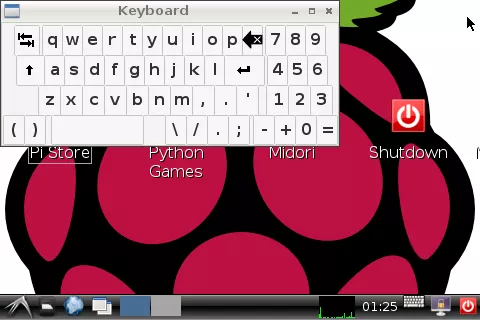
Matchbox-keyboard还支持自定义键盘,并且还有一些已加载到/ usr / local / share / matchbox-keyboard /中。 很容易使用自己的。
pi@raspberrypi ~ $ matchbox-keyboard -s extended
树莓派raspbian安装matchbox-keyboard虚拟键盘的更多相关文章
- 树莓派raspbian安装配置(基本配置+中文配置+远程桌面+lighttpd+php+mysql)
raspbian为树莓派的官方系统,基于Debian裁剪过的Linux系统 其配置过程如下 烧录镜像 首先从树莓派的官方网站上下载镜像和镜像工具 http://www.raspberrypi.org/ ...
- 树莓派3B 安装微雪LCD5inch显示器(包含软键盘)
树莓派单独使用时,往往需要触摸屏和软键盘用以方便操作,微雪LCD显示器就能较好的实现这个功能, 正好实验室又买入了一个3B的板子和一个5inch的显示器,便对着官方的安装手册,亲自安装了一次. 一:材 ...
- 树莓派4B安装Raspbian系统及配置
2019/11/11, 树莓派4B, Raspbian Buster 摘要:给树莓派4B安装系统及基础配置 树莓派实验室参考文档 准备工具 树莓派4B硬件 SD卡格式化工具 SD Formatter ...
- arm树莓派Raspbian 下安装selenium+chrome
arm树莓派Raspbian 下安装selenium+chrome 安装selenium pip3 install selenium 安装chromedriver sudo apt-get insta ...
- 树莓派4B安装docker-compose(64位Linux)
准备工作 树莓派4B已装好64位Linux,并且装好了19.03.1版本的Docker,具体的安装步骤请参考<树莓派4B安装64位Linux(不用显示器键盘鼠标)> 安装docker-co ...
- 039. asp.netWeb用户控件之七实现具有虚拟键盘的功能的用户控件
用户控件ascx代码: <%@ Control Language="C#" AutoEventWireup="true" CodeFile="K ...
- WPF 虚拟键盘
之前做了一款WPF虚拟键盘,调用Win32的API,可以模拟键盘事件. 现将代码分享如下: 按键布局如下: <Button Name="> <StackPanel Orie ...
- 重新想象 Windows 8 Store Apps (49) - 输入: 获取输入设备信息, 虚拟键盘, Tab 导航, Pointer, Tap, Drag, Drop
[源码下载] 重新想象 Windows 8 Store Apps (49) - 输入: 获取输入设备信息, 虚拟键盘, Tab 导航, Pointer, Tap, Drag, Drop 作者:weba ...
- HoloLens开发手记 - Unity之Keyboard input 键盘输入
虽然HoloLens支持很多种输入方式,包括蓝牙键盘在内.但是大部分应用还是不能断定用户有物理键盘可以输入,所以虚拟键盘输入还是必须要提供的. Unity提供了一个TouchScreenKeyboar ...
随机推荐
- 连续张量理解和contiguous()方法使用,view和reshape的区别
连续张量理解和contiguous()方法使用,view和reshape的区别 待办 内存共享: 下边的x内存布局是从0开始的,y内存布局,不是从0开始的张量 For example: when yo ...
- NotePad++中如何改变光标样式(转换横着和竖着)?
在键盘上找 Insert ,按这个Insert就可以把横向闪烁光标( _ )修改成竖向闪烁光标样式( | )
- StreamPipes
MQTT is a machine-to-machine (M2M)/"Internet of Things" connectivity protocol. It was desi ...
- (转)java垃圾回收二
转自:http://shuaijie506.iteye.com/blog/1779651 在网上看到一篇不错的文章,记录下来备忘. 要理解java对象的生命周期,我们需要要明白两个问题, 1.java ...
- python3练习100题——003
今天继续-答案都会通过python3测试- 原题链接:http://www.runoob.com/python/python-exercise-example3.html 题目:一个整数,它加上100 ...
- Vue 任务清单
<style> li{ list-style: none; } #root{ width: 400px; min-height: 400px; box-shadow: 0 0 10px # ...
- Python_递归函数
楔子 在讲今天的内容之前,我们先来讲一个故事,讲的什么呢?从前有座山,山里有座庙,庙里有个老和尚讲故事,讲的什么呢?从前有座山,山里有座庙,庙里有个老和尚讲故事,讲的什么呢?从前有座山,山里有座庙,庙 ...
- SQL Server经典sql语句大全(转)
一.基础1.说明:创建数据库CREATE DATABASE database-name2.说明:删除数据库drop database dbname3.说明:备份sql server--- 创建 备份数 ...
- linux软件下载
可以到linux官网下载:http://vault.centos.org/6.10/os/Source/SPackages/
- JavaScript中的 typeof,null,和undefined
typeof操作符 null 在JavaScript中null表示“什么都没有”. null是一个只有一个值的特殊类型.表示一个空对象引用. typeof null; 返回的是object 可以将nu ...