
springboot2.0 redis EnableCaching的配置和使用

一、前言
关于EnableCaching最简单使用,个人感觉只需提供一个CacheManager的一个实例就好了。springboot为我们提供了cache相关的自动配置。引入cache模块,如下。
二、maven依赖
<dependency>

    <groupId>org.springframework.boot</groupId>

    <artifactId>spring-boot-starter-cache</artifactId>

</dependency>

<dependency>

    <groupId>org.springframework.boot</groupId>

    <artifactId>spring-boot-starter-data-redis</artifactId>

</dependency>

<dependency>

    <groupId>org.springframework.integration</groupId>

    <artifactId>spring-integration-redis</artifactId>

</dependency>

<dependency>

    <groupId>redis.clients</groupId>

    <artifactId>jedis</artifactId>

</dependency>
三、缓存类型
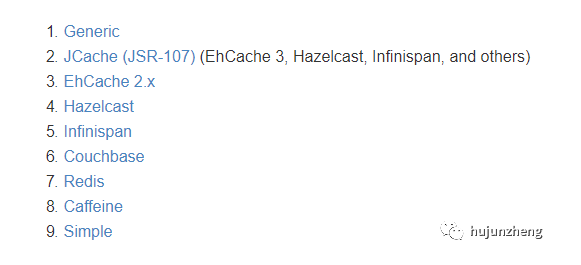
本人也仅仅使用了redis、guava、ehcache。更多详情请参考 spring cache官方文档。
https://docs.spring.io/spring-boot/docs/current/reference/html/boot-features-caching.html
四、常用注解
@Cacheable 触发缓存填充
@CacheEvict 触发缓存驱逐
@CachePut 更新缓存而不会干扰方法执行
@Caching 重新组合要在方法上应用的多个缓存操作
@CacheConfig 在类级别共享一些常见的缓存相关设置
五、Spring Cache提供的SpEL上下文数据
下表直接摘自Spring官方文档:
|
名字
|
位置
|
描述
|
示例
|
|
methodName
|
root对象
|
当前被调用的方法名
|
#root.methodName
|
|
method
|
root对象
|
当前被调用的方法
|
#root.method.name
|
|
target
|
root对象
|
当前被调用的目标对象
|
#root.target
|
|
targetClass
|
root对象
|
当前被调用的目标对象类
|
#root.targetClass
|
|
args
|
root对象
|
当前被调用的方法的参数列表
|
#root.args[0]
|
|
caches
|
root对象
|
当前方法调用使用的缓存列表(如@Cacheable(value={"cache1", "cache2"})),则有两个cache
|
#root.caches[0].name
|
|
argument name
|
执行上下文
|
当前被调用的方法的参数,如findById(Long id),我们可以通过#id拿到参数
|
#user.id
|
|
result
|
执行上下文
|
方法执行后的返回值(仅当方法执行之后的判断有效,如‘unless’,'cache evict'的beforeInvocation=false)
|
#result
|
六、RedisCacheManager配置
基于jedis
@Configuration
@EnableCaching

public class RedisCacheConfig extends CachingConfigurerSupport {

    @Autowired

    private RedisProperties redisProperties;

    @Bean

    public JedisConnectionFactory jedisConnectionFactory() {

        // 获取服务器数组(这里要相信自己的输入,所以没有考虑空指针问题)

        String[] serverArray = redisProperties.getClusterNodes().split(",");

        RedisClusterConfiguration redisClusterConfiguration = new

            RedisClusterConfiguration(Arrays.asList(serverArray));

        JedisPoolConfig jedisPoolConfig = new JedisPoolConfig();

        // 最大空闲连接数, 默认8个

        jedisPoolConfig.setMaxIdle(100);

        // 最大连接数, 默认8个

        jedisPoolConfig.setMaxTotal(500);

        // 最小空闲连接数, 默认0

        jedisPoolConfig.setMinIdle(0);

        // 获取连接时的最大等待毫秒数(如果设置为阻塞时BlockWhenExhausted),如果超时就抛异常, 小于零:阻塞不确定的时间,

        // 默认-1

        jedisPoolConfig.setMaxWaitMillis(2000); // 设置2秒

        // 对拿到的connection进行validateObject校验

        jedisPoolConfig.setTestOnBorrow(true);

        return new JedisConnectionFactory(redisClusterConfiguration

            ,jedisPoolConfig);

    }

    /**     * 注入redis template     *     * @return     */

    @Bean

    @Qualifier("redisTemplate")

    public RedisTemplate redisTemplate(

        JedisConnectionFactoryjedisConnectionFactory

        , Jackson2JsonRedisSerializer jackson2JsonRedisSerializer) {

        RedisTemplate template = new RedisTemplate();

        template.setConnectionFactory(jedisConnectionFactory);

        template.setKeySerializer(new JdkSerializationRedisSerializer());

        template.setValueSerializer(jackson2JsonRedisSerializer);

        template.afterPropertiesSet();

        return template;

    }

    /**     * redis cache manager     *     * @return     */

    @Bean

    @Primary

    public RedisCacheManager redisCacheManager(

        JedisConnectionFactory jedisConnectionFactory

        , ObjectProvider<List<RedisCacheConfigurationProvider>>

            configurationProvider) {

        Map<String, RedisCacheConfiguration> redisCacheConfigurationMap =

            Maps.newHashMap();

        List<RedisCacheConfigurationProvider> configurations

             = configurationProvider.getIfAvailable();

        if (!CollectionUtils.isEmpty(configurations)) {

            for (RedisCacheConfigurationProvider configuration : configurations) {

                redisCacheConfigurationMap.putAll(configuration.resolve());

            }

        }

        RedisCacheManager cacheManager = RedisCacheManager.

            RedisCacheManagerBuilder.fromConnectionFactory(jedisConnectionFactory)

                .cacheDefaults(resovleRedisCacheConfiguration(Duration.

                    ofSeconds(300), JacksonHelper.genJavaType(Object.class)))

                .withInitialCacheConfigurations(redisCacheConfigurationMap)

                .build();

        return cacheManager;

    }

    private static RedisCacheConfiguration resovleRedisCacheConfiguration(Duration duration, JavaType javaType) {

        return RedisCacheConfiguration.defaultCacheConfig()

                .serializeKeysWith(RedisSerializationContext

                    .SerializationPair

                    .fromSerializer(new StringRedisSerializer()))

                .serializeValuesWith(RedisSerializationContext

                    .SerializationPair.fromSerializer(

                        new Jackson2JsonRedisSerializer<>(javaType)))

                .entryTtl(duration);

    }

    /**     * 配置一个序列器, 将对象序列化为字符串存储, 和将对象反序列化为对象     */

    @Bean

    public Jackson2JsonRedisSerializer jackson2JsonRedisSerializer() {

        Jackson2JsonRedisSerializer jackson2JsonRedisSerializer = new Jackson2JsonRedisSerializer(Object.class);

        ObjectMapper om = new ObjectMapper();

        om.setVisibility(PropertyAccessor.ALL, JsonAutoDetect.Visibility.ANY);

        om.enableDefaultTyping(ObjectMapper.DefaultTyping.NON_FINAL);

        jackson2JsonRedisSerializer.setObjectMapper(om);

        return jackson2JsonRedisSerializer;

    }

    public static abstract class RedisCacheConfigurationProvider {

        // key = 缓存名称, value = 缓存时间 和 缓存类型

        protected Map<String, Pair<Duration, JavaType>> configs;

        protected abstract void initConfigs();

        public Map<String, RedisCacheConfiguration> resolve() {

            initConfigs();

            Assert.notEmpty(configs, "RedisCacheConfigurationProvider 配置不能为空...");

            Map<String, RedisCacheConfiguration> result = Maps.newHashMap();

            configs.forEach((cacheName, pair) -> result.put(cacheName,

                resovleRedisCacheConfiguration(pair.getKey(), pair.getValue())));

            return result;

        }

    }

}
基于Lettuce
@Configuration

@EnableCaching

public class RedisCacheConfig extends CachingConfigurerSupport {

  @Autowired

    private RedisProperties redisProperties;

    @Bean

    public LettuceConnectionFactory lettuceConnectionFactory() {

        String[] serverArray = redisProperties.getClusterNodes().split(",");// 获取服务器数组(这里要相信自己的输入,所以没有考虑空指针问题)

        RedisClusterConfiguration redisClusterConfiguration = new RedisClusterConfiguration(Arrays.asList(serverArray));

        GenericObjectPoolConfig poolConfig = new GenericObjectPoolConfig();

        // 最大空闲连接数, 默认8个

        poolConfig.setMaxIdle(100);

        // 最大连接数, 默认8个

        poolConfig.setMaxTotal(500);

        // 最小空闲连接数, 默认0

        poolConfig.setMinIdle(0);

        LettuceClientConfiguration lettuceClientConfiguration = LettucePoolingClientConfiguration.builder()

                .commandTimeout(Duration.ofSeconds(15))

                .poolConfig(poolConfig)

                .shutdownTimeout(Duration.ZERO)

                .build();

        return new LettuceConnectionFactory(redisClusterConfiguration, lettuceClientConfiguration);

    }

    /**     * 注入redis template     *     * @return     */

    @Bean

    @Qualifier("redisTemplate")

    public RedisTemplate redisTemplate(LettuceConnectionFactory lettuceConnectionFactory, Jackson2JsonRedisSerializer jackson2JsonRedisSerializer) {

        RedisTemplate template = new RedisTemplate();

        template.setConnectionFactory(lettuceConnectionFactory);

        template.setKeySerializer(new JdkSerializationRedisSerializer());

        template.setValueSerializer(jackson2JsonRedisSerializer);

        template.afterPropertiesSet();

        return template;

    }

    /**     * redis cache manager     *     * @return     */

    @Bean

    @Primary

    public RedisCacheManager redisCacheManager(LettuceConnectionFactory lettuceConnectionFactory, ObjectProvider<List<RedisCacheConfigurationProvider>> configurationProvider) {

        Map<String, RedisCacheConfiguration> redisCacheConfigurationMap = Maps.newHashMap();

        List<RedisCacheConfigurationProvider> configurations = configurationProvider.getIfAvailable();

        if (!CollectionUtils.isEmpty(configurations)) {

            for (RedisCacheConfigurationProvider configuration : configurations) {

                redisCacheConfigurationMap.putAll(configuration.resolve());

            }

        }

        RedisCacheManager cacheManager = RedisCacheManager.RedisCacheManagerBuilder.fromConnectionFactory(lettuceConnectionFactory)

                .cacheDefaults(resovleRedisCacheConfiguration(Duration.ofSeconds(300), JacksonHelper.genJavaType(Object.class)))

                .withInitialCacheConfigurations(redisCacheConfigurationMap)

                .build();

        return cacheManager;

    }

    private static RedisCacheConfiguration resovleRedisCacheConfiguration(Duration duration, JavaType javaType) {

        return RedisCacheConfiguration.defaultCacheConfig()

                .serializeKeysWith(RedisSerializationContext.SerializationPair.fromSerializer(new StringRedisSerializer()))

                .serializeValuesWith(RedisSerializationContext.SerializationPair.fromSerializer(new Jackson2JsonRedisSerializer<>(javaType)))

                .entryTtl(duration);

    }

    @Bean

    public RedisLockRegistry redisLockRegistry(LettuceConnectionFactory lettuceConnectionFactory) {

        return new RedisLockRegistry(lettuceConnectionFactory, "recharge-plateform", 60000 * 20);

    }

    /**     * 配置一个序列器, 将对象序列化为字符串存储, 和将对象反序列化为对象     */

    @Bean

    public Jackson2JsonRedisSerializer jackson2JsonRedisSerializer() {

        Jackson2JsonRedisSerializer jackson2JsonRedisSerializer = new Jackson2JsonRedisSerializer(Object.class);

        ObjectMapper om = new ObjectMapper();

        om.setVisibility(PropertyAccessor.ALL, JsonAutoDetect.Visibility.ANY);

        om.enableDefaultTyping(ObjectMapper.DefaultTyping.NON_FINAL);

        jackson2JsonRedisSerializer.setObjectMapper(om);

        return jackson2JsonRedisSerializer;

    }

    public static abstract class RedisCacheConfigurationProvider {

        // key = 缓存名称, value = 缓存时间 和 缓存类型

        protected Map<String, Pair<Duration, JavaType>> configs;

        protected abstract void initConfigs();

        public Map<String, RedisCacheConfiguration> resolve() {

            initConfigs();

            Assert.notEmpty(configs, "RedisCacheConfigurationProvider 配置不能为空...");

            Map<String, RedisCacheConfiguration> result = Maps.newHashMap();

            configs.forEach((cacheName, pair) -> result.put(cacheName, resovleRedisCacheConfiguration(pair.getKey(), pair.getValue())));

            return result;

        }

    }

}
Jedis和Lettuce比较
Jedis 是直连模式,在多个线程间共享一个 Jedis 实例时是线程不安全的,如果想要在多线程环境下使用 Jedis,需要使用连接池,
每个线程都去拿自己的 Jedis 实例,当连接数量增多时,物理连接成本就较高了。
Lettuce的连接是基于Netty的,连接实例可以在多个线程间共享,
所以,一个多线程的应用可以使用同一个连接实例,而不用担心并发线程的数量。当然这个也是可伸缩的设计,一个连接实例不够的情况也可以按需增加连接实例。通过异步的方式可以让我们更好的利用系统资源,而不用浪费线程等待网络或磁盘I/O。
只在基于Lettuce的配置中,加入了RedisLockRegistry对应bean的配置,由于在集群的模式下,基于Jedis的配置下,通过RedisLockRegistry 获取分布式锁的时候报错:
EvalSha is not supported in cluster environment
具体的解决方案就是切换至基于Lettuce的配置,请参考
https://stackoverflow.com/questions/47092475/spring-boot-redistemplate-execute-sc
RedisCacheConfigurationProvider 作用为不同的cache提供特定的缓存时间以及key、value序列化和反序列化的方式。具体使用方式如下。
@Component

public class CouponRedisCacheConfigurationProvider extends RedisCacheConfig.RedisCacheConfigurationProvider {

@Override

    protected void initConfigs() {

        this.configs = Maps.newHashMap();

        this.configs.put(CouponConstants.COUPON_ALL_CACHE, new Pair<>(Duration.ofHours(1), JacksonHelper.genMapType(HashMap.class, Integer.class, Coupon.class)));

        this.configs.put(CouponConstants.COUPON_GOOD_CACHE, new Pair<>(Duration.ofHours(1), JacksonHelper.genCollectionType(List.class, String.class)));

        this.configs.put(CouponConstants.COUPON_HANDLE_TELEPHONE_STATUS_CACHE, new Pair<>(Duration.ofMinutes(10), JacksonHelper.genCollectionType(List.class, CouponHandle.class)));

        this.configs.put(CouponConstants.COUPON_HANDLE_TELEPHONE_GOOD_CACHE, new Pair<>(Duration.ofMinutes(10), JacksonHelper.genCollectionType(List.class, CouponHandle.class)));

    }

}
JacksonHelper 作用是根据不同的类型的对象获取对应的JavaType对象,在构造RedisTempalte序列化和反序列化器Jackson2JsonRedisSerializer对象需要。具体代码如下。
public class JacksonHelper {

    private static Logger LOGGER = LoggerFactory.getLogger(JacksonHelper.class);

    private static final SimpleModule module = initModule();

    private static final ObjectMapper objectMapper;

    private static final ObjectMapper prettyMapper;

    public JacksonHelper() {

    }

    private static SimpleModule initModule() {

        return (new SimpleModule()).addSerializer(BigDecimal.class, new BigDecimalSerializer())

                .addSerializer(LocalTime.class, new LocalTimeSerializer())

                .addDeserializer(LocalTime.class, new LocalTimeDeserializer())

                .addSerializer(LocalDate.class, new LocalDateSerializer())

                .addDeserializer(LocalDate.class, new LocalDateDeserializer())

                .addSerializer(LocalDateTime.class, new LocalDateTimeSerializer())

                .addDeserializer(LocalDateTime.class, new LocalDateTimeDeserializer())

                .addSerializer(Date.class, new DateSerializer())

                .addDeserializer(Date.class, new DateDeserializer());

    }

    public static JavaType genJavaType(TypeReference<?> typeReference) {

        return getObjectMapper().getTypeFactory().constructType(typeReference.getType());

    }

    public static JavaType genJavaType(Class<?> clazz) {

        return getObjectMapper().getTypeFactory().constructType(clazz);

    }

    public static JavaType genCollectionType(Class<? extends Collection> collectionClazz, Class<?> javaClazz) {

        return getObjectMapper().getTypeFactory().constructCollectionType(collectionClazz, javaClazz);

    }

    public static JavaType genMapType(Class<? extends Map> mapClazz, Class<?> keyClass, Class<?> valueClazz) {

        return getObjectMapper().getTypeFactory().constructMapType(mapClazz, keyClass, valueClazz);

    }

    public static ObjectMapper getObjectMapper() {

        return objectMapper;

    }

    public static ObjectMapper getPrettyMapper() {

        return prettyMapper;

    }

    static {

        objectMapper = (new ObjectMapper()).registerModule(module).configure(DeserializationFeature.FAIL_ON_UNKNOWN_PROPERTIES, false).configure(DeserializationFeature.READ_UNKNOWN_ENUM_VALUES_AS_NULL, true).configure(SerializationFeature.FAIL_ON_EMPTY_BEANS, false);

        prettyMapper = objectMapper.copy().configure(SerializationFeature.INDENT_OUTPUT, true);

    }

}

class LocalDateDeserializer extends JsonDeserializer<LocalDate> {

    public LocalDateDeserializer() {

    }

    public LocalDate deserialize(JsonParser jp, DeserializationContext ctxt) throws IOException {

        String dateString = ((JsonNode) jp.getCodec().readTree(jp)).asText();

        return LocalDate.parse(dateString, DateTimeFormatter.ISO_LOCAL_DATE);

    }

}

class DateDeserializer extends JsonDeserializer<Date> {

    public DateDeserializer() {

    }

    public Date deserialize(JsonParser jp, DeserializationContext ctxt) throws IOException {

        String dateTimeStr = ((JsonNode) jp.getCodec().readTree(jp)).asText();

        SimpleDateFormat sdf = new SimpleDateFormat(CouponConstants.DATE_TIME_FORMATER);

        ParsePosition pos = new ParsePosition(0);

        return sdf.parse(dateTimeStr, pos);

    }

}

class LocalDateTimeDeserializer extends JsonDeserializer<LocalDateTime> {

    public LocalDateTimeDeserializer() {

    }

    public LocalDateTime deserialize(JsonParser jp, DeserializationContext ctxt) throws IOException {

        String dateTimeStr = ((JsonNode) jp.getCodec().readTree(jp)).asText();

        return LocalDateTime.parse(dateTimeStr, DateTimeFormatter.ISO_LOCAL_DATE_TIME);

    }

}

class LocalTimeDeserializer extends JsonDeserializer<LocalTime> {

    public LocalTimeDeserializer() {

    }

    public LocalTime deserialize(JsonParser jp, DeserializationContext ctxt) throws IOException {

        String dateString = ((JsonNode) jp.getCodec().readTree(jp)).asText();

        return LocalTime.parse(dateString, DateTimeFormatter.ISO_LOCAL_TIME);

    }

}

class BigDecimalSerializer extends JsonSerializer<BigDecimal> {

    public BigDecimalSerializer() {

    }

    public void serialize(BigDecimal value, JsonGenerator jgen, SerializerProvider provider) throws IOException {

        jgen.writeString(value.toString());

    }

}

class LocalDateSerializer extends JsonSerializer<LocalDate> {

    public LocalDateSerializer() {

    }

    public void serialize(LocalDate value, JsonGenerator jgen, SerializerProvider provider) throws IOException {

        jgen.writeString(DateTimeFormatter.ISO_LOCAL_DATE.format(value));

    }

}

class LocalDateTimeSerializer extends JsonSerializer<LocalDateTime> {

    public LocalDateTimeSerializer() {

    }

    public void serialize(LocalDateTime value, JsonGenerator jgen, SerializerProvider provider) throws IOException {

        jgen.writeString(DateTimeFormatter.ISO_LOCAL_DATE_TIME.format(value));

    }

}

class DateSerializer extends JsonSerializer<Date> {

    public DateSerializer() {

    }

    public void serialize(Date value, JsonGenerator jgen, SerializerProvider provider) throws IOException {

        SimpleDateFormat sdf = new SimpleDateFormat(CouponConstants.DATE_TIME_FORMATER);

        jgen.writeString(sdf.format(value));

    }

}

class LocalTimeSerializer extends JsonSerializer<LocalTime> {

    public LocalTimeSerializer() {

    }

    public void serialize(LocalTime value, JsonGenerator jgen, SerializerProvider provider) throws IOException {

        jgen.writeString(DateTimeFormatter.ISO_LOCAL_TIME.format(value));

    }

}
业务代码
@Component

public class ServiceImpl {

   @Override

    @CacheEvict(cacheNames = CouponConstants.COUPON_HANDLE_TELEPHONE_STATUS_CACHE, key = "#telephone+'#'+#status", beforeInvocation = true)

    public void evictCouponHandles(String telephone, Integer status) {

    }

    @Override

    @Cacheable(cacheNames = CouponConstants.COUPON_HANDLE_TELEPHONE_STATUS_CACHE, key = "#telephone+'#'+#status", sync = true)

    public List<CouponHandle> searchCouponHandles(String telephone, Integer status) {

    }

}
不同的缓存对应不同的存储类型,不同的存储类型对应着不同的序列化和反序列化器,这就保证了再调用注有@Cacheable注解的代码时获取到的对象不会发生类型转换错误。关于设置不同的cache下过期时间以及序列化和反序列器,请参考下面更直接明了的例子。
@Configuration

public class RedisCacheConfig {

@Bean

    public KeyGenerator simpleKeyGenerator() {

        return (o, method, objects) -> {

            StringBuilder stringBuilder = new StringBuilder();

            stringBuilder.append(o.getClass().getSimpleName());

            stringBuilder.append(".");

            stringBuilder.append(method.getName());

            stringBuilder.append("[");

            for (Object obj : objects) {

                stringBuilder.append(obj.toString());

            }

            stringBuilder.append("]");

            return stringBuilder.toString();

        };

    }

    @Bean

    public CacheManager cacheManager(RedisConnectionFactory redisConnectionFactory) {

        return new RedisCacheManager(

            RedisCacheWriter.nonLockingRedisCacheWriter(redisConnectionFactory),

            this.getRedisCacheConfigurationWithTtl(600), // 默认策略,未配置的 cache 会使用这个

            this.getRedisCacheConfigurationMap() // 指定 cache 策略

        );

    }

    private Map<String, RedisCacheConfiguration> getRedisCacheConfigurationMap() {

        Map<String, RedisCacheConfiguration> redisCacheConfigurationMap = new HashMap<>();

        redisCacheConfigurationMap.put("UserInfoList", this.getRedisCacheConfigurationWithTtl(3000));

        redisCacheConfigurationMap.put("UserInfoListAnother", this.getRedisCacheConfigurationWithTtl(18000));

        return redisCacheConfigurationMap;

    }

    private RedisCacheConfiguration getRedisCacheConfigurationWithTtl(Integer seconds) {

        Jackson2JsonRedisSerializer<Object> jackson2JsonRedisSerializer = new Jackson2JsonRedisSerializer<>(Object.class);

        ObjectMapper om = new ObjectMapper();

        om.setVisibility(PropertyAccessor.ALL, JsonAutoDetect.Visibility.ANY);

        om.enableDefaultTyping(ObjectMapper.DefaultTyping.NON_FINAL);

        jackson2JsonRedisSerializer.setObjectMapper(om);

        RedisCacheConfiguration redisCacheConfiguration = RedisCacheConfiguration.defaultCacheConfig();

        redisCacheConfiguration = redisCacheConfiguration.serializeValuesWith(

            RedisSerializationContext

                .SerializationPair

                .fromSerializer(jackson2JsonRedisSerializer)

        ).entryTtl(Duration.ofSeconds(seconds));

        return redisCacheConfiguration;

    }

}
@Cacheable(value = "UserInfoList", keyGenerator = "simpleKeyGenerator") // 3000秒

@Cacheable(value = "UserInfoListAnother", keyGenerator = "simpleKeyGenerator") // 18000秒

@Cacheable(value = "DefaultKeyTest", keyGenerator = "simpleKeyGenerator") // 600秒,未指定的cache,使用默认策略
springboot2.0 redis EnableCaching的配置和使用的更多相关文章
- springBoot2.0+redis+fastJson+自定义注解实现方法上添加过期时间
springBoot2.0集成redis实例 一.首先引入项目依赖的maven jar包,主要包括 spring-boot-starter-data-redis包,这个再springBoot2.0之前 ...
- springboot2.0+redis实现消息队列+redis做缓存+mysql
本博客仅供参考,本人实现没有问题. 1.环境 先安装redis.mysql 2.springboot2.0的项目搭建(请自行完成),本人是maven项目,因此只需配置,获取相应的jar包,配置贴出. ...
- SpringBoot2.0之六 多环境配置
开发过程中面对不同的环境,例如数据库.redis服务器等的不同,可能会面临一直需要修改配置的麻烦中,在以前的项目中,曾通过Tomcat的配置来实现,有的项目甚至需要手动修改相关配置,这种方式费时费力, ...
- SpringBoot2.0之八 多数据源配置
在开发的过程中我们可能都会遇到对接公司其他系统等需求,对于外部的系统可以采用接口对接的方式,对于一个公司开发的两个系统,并且知道相关数据库结构的情况下,就可以考虑使用多数据源来解决这个问题.Spri ...
- SpringBoot2.0 redis生成组建和读写配置文件
@Component 生成组建 @ConfigurationProperties(prefix="redis") 读写redis配置文件 application.propertie ...
- springboot2.0和Druid整合配置数据源
1. idea使用spring 初始化工具初始化springboot项目(要选中web) 下一步,下一步 2. 在pom.xml中,引入Druid连接池依赖: <dependency> & ...
- IntelliJ IDEA 2017版 spring-boot2.0.4的yml配置使用
一.必须配置字端两个 server: port: 8080 servlet: context-path: /demo 二.两种mvc转换springboot,一种是注解,一种就是.yml或proper ...
- IntellJ IDEA2017 springboot2.0.2中读取配置
IDEA 路径 src\main\resources\application.properties 配置文件名称为 application.properties 默认的位置在classpath根目录下 ...
- springboot2.0最精简的配置yml
https://blog.csdn.net/yu_hongrun/article/details/81708762
随机推荐
- 兼容性很好的纯css圆角
<!DOCTYPE HTML> <html lang="en-US"> <head> <meta charset="UTF-8& ...
- 高性能JavaScript读后感
这本书让lz对js性能优化有了更深刻的理解,现在因为我们通常用第三方构建工具webpack.gulp等诸如此类,之前总是听说什么dom操作影响性能呢,对这个概念总是有点模糊,但看完这本书之后后,相对而 ...
- ionic3 使用html2canvas将数据导出为图片,并下载本地
1.安装html2canvas npm install --save html2canvas 官方网站 https://html2canvas.hertzen.com/ 2.在需要的组件中引入html ...
- bzoj2200拓扑排序+最短路+联通块
自己写的不知道哪里wa了,明明和网上的代码差不多.,. /* 给定一张图,有的边是无向边,有的是有向边,有向边不会出现在环中,且有可能是负权值 现在给定起点s,求出s到其余所有点的最短路长度 任何存在 ...
- CentOS7+mysql(yum)
1.现在centos上默认是没有yum源的,yum安装的是 MariaDB.所以我们需要自己先配置yum源.配置yum源步骤如下: 下载yum源:wget 'https://dev.mysql.com ...
- vue-cli3.0 使用postcss-plugin-px2rem(推荐)和 postcss-pxtorem(postcss-px2rem)自动转换px为rem 的配置方法;
如何在vue-cli3.0中使用postcss-plugin-px2rem 插件 插件的作用是 自动将vue项目中的px转换为rem . 为什么这三个中要推荐 postcss-plugin-px2r ...
- centos/redhat破解账号密码
说明:1.个人觉得centos系统和redhat系统差不多,界面都差不多一样. 2.下面方法用于开机root密码忘了,其他人篡改root密码等等 下面是破解账号密码(图解) 之后要等久点 效果: 方法 ...
- PV-UV-QPS
QPS:每秒查询率(Query Per Second) ,每秒的响应请求数,也即是最大吞吐能力.QPS = req/sec = 请求数/秒QPS统计方式 [一般使用 http_load 进行统计]QP ...
- pycaffe训练的完整组件示例
pycaffe训练的完整组件示例 为什么写这篇博客 1. 需要用到pycaffe 因为用到的开源代码基于Caffe:要维护的项目基于Caffe.基本上是用Caffe的Python接口. 2. 训练中想 ...
- Task任务的屏障机制
Barrier 是 .Net 提供的一直并发的机制,它允许多个任务同步他们不同阶段的并发工作. 这里的关键点是[多个任务]和[不同阶段]. 假设有4个相同的任务(Task),每个任务都有4个阶段(Ph ...