
SSM框架的搭建和测试(Spring+Spring MVC+MyBatis)
Spring MVC:MVC框架,通过Model-View-Controller模式很好的将数据,业务与展现进行分离。
MyBatis:数据持久层框架
我这里使用的是MyEclipse 2016 CI
下面是具体的搭建流程:
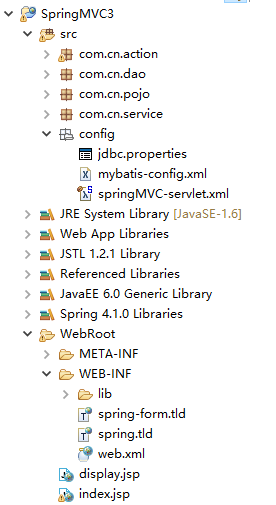
1、项目结构:
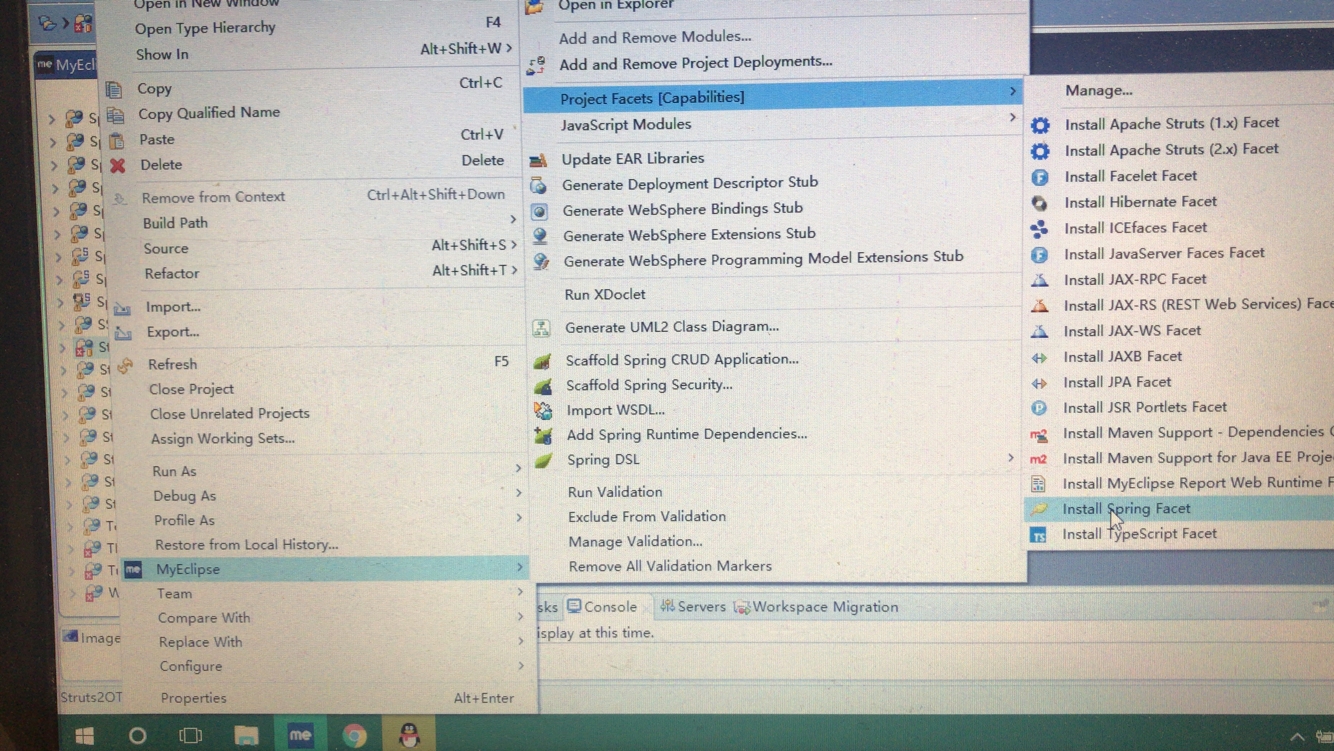
2、安装Spring
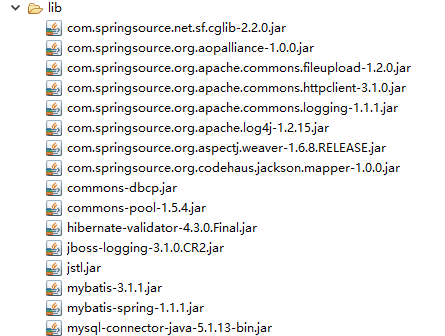
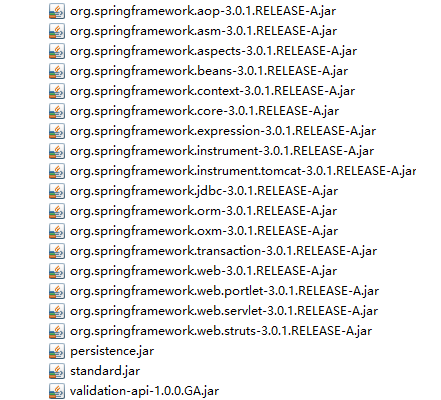
3、依赖包(其中包括Spring MVC,Spring MVC验证包,MyBatis整合SpringMVC所需包)
4、web.xml
<?xml version="1.0" encoding="UTF-8"?>

<web-app xmlns:xsi="http://www.w3.org/2001/XMLSchema-instance" xmlns="http://java.sun.com/xml/ns/javaee" xsi:schemaLocation="http://java.sun.com/xml/ns/javaee http://java.sun.com/xml/ns/javaee/web-app_3_0.xsd" version="3.0">

  <display-name>SpringMVC3</display-name>

   <!-- 监听服务器启动 -->

  <listener>

      <listener-class>org.springframework.web.context.ContextLoaderListener</listener-class>

  </listener>

  <!-- 读取spring配置文件 -->

  <context-param>

      <param-name>contextConfigLocation</param-name>

      <param-value>classpath:config/springMVC-servlet.xml</param-value>

  </context-param>

  <!-- 配置SpringMVC核心 -->

  <servlet>

      <servlet-name>springMVC</servlet-name>

      <servlet-class>org.springframework.web.servlet.DispatcherServlet</servlet-class>

      <!-- 指定springMVC-servlet.xml路径 -->

      <init-param>

          <param-name>contextConfigLocation</param-name>

          <param-value>classpath:config/springMVC-servlet.xml</param-value>

      </init-param>

  </servlet>

  <servlet-mapping>

      <servlet-name>springMVC</servlet-name>

      <url-pattern>*.form</url-pattern>

  </servlet-mapping>

  <!-- 解决中文乱码 -->

  <filter>

        <filter-name>characterEncodingFilter</filter-name>

        <filter-class>org.springframework.web.filter.CharacterEncodingFilter</filter-class>

        <init-param>

            <param-name>encoding</param-name>

            <param-value>UTF-8</param-value>

        </init-param>

        <init-param>

            <param-name>forceEncoding</param-name>

            <param-value>true</param-value>

        </init-param>

    </filter>

    <filter-mapping>

        <filter-name>characterEncodingFilter</filter-name>

        <url-pattern>/*</url-pattern>

    </filter-mapping>

</web-app>
5、jdbc.properties
driver=com.mysql.jdbc.Driver

url=jdbc:mysql://localhost:3306/jsp?characterEncoding=utf-8

username=root

password=************
6、mybatis-config.xml
<?xml version="1.0" encoding="UTF-8" ?>

<!DOCTYPE configuration PUBLIC "-//mybatis.org//DTD Config 3.0//EN"

    "http://mybatis.org/dtd/mybatis-3-config.dtd">

<configuration>

    <settings>

        <!-- 允许JDBC支持生成的键 -->

        <setting name="useGeneratedKeys" value="true"/>

    </settings>

    <typeAliases>

        <!-- 配置数据类型的别名 -->

        <typeAlias type="com.cn.pojo.User"  alias="user"/>

    </typeAliases>

</configuration>
7、springMVC-servlet.xml
<?xml version="1.0" encoding="UTF-8"?>

<beans

    xmlns="http://www.springframework.org/schema/beans"

    xmlns:xsi="http://www.w3.org/2001/XMLSchema-instance"

    xmlns:p="http://www.springframework.org/schema/p"

    xmlns:mvc="http://www.springframework.org/schema/mvc"

    xmlns:context="http://www.springframework.org/schema/context"

    xsi:schemaLocation="http://www.springframework.org/schema/beans

                        http://www.springframework.org/schema/beans/spring-beans-3.0.xsd

                        http://www.springframework.org/schema/mvc

                        http://www.springframework.org/schema/mvc/spring-mvc-3.0.xsd

                        http://www.springframework.org/schema/context

                        http://www.springframework.org/schema/context/spring-context-3.0.xsd">

    <!-- 读取外面文件 -->

    <context:property-placeholder location="classpath:config/jdbc.properties"/>

    <!-- 配置数据源 -->

    <bean id="datasource" class="org.springframework.jdbc.datasource.DriverManagerDataSource">

        <property name="driverClassName" value="${driver}"></property>

        <property name="url" value="${url}"></property>

        <property name="username" value="${username}"></property>

        <property name="password" value="${password}"></property>

    </bean>

    <!-- 将mybatis交给Spring管理 -->

    <bean id="sqlSessionFactory" class="org.mybatis.spring.SqlSessionFactoryBean">

        <property name="dataSource" ref="datasource"></property>

        <property name="configLocation" value="classpath:config/mybatis-config.xml"></property>

    </bean>

    <!-- 扫描 -->

    <context:component-scan base-package="com.cn.action,com.cn.service"></context:component-scan>

    <!-- 启动驱动 -->

    <mvc:annotation-driven/>

    <!-- 注入校验bean -->

    <bean class="org.springframework.validation.beanvalidation.LocalValidatorFactoryBean"></bean>

    <!-- 扫描mapper -->

    <bean class="org.mybatis.spring.mapper.MapperScannerConfigurer">

        <property name="basePackage" value="com.cn.dao"></property>

        <property name="sqlSessionFactoryBeanName" value="sqlSessionFactory"></property>

    </bean>

</beans>
8、pojo封装数据层:User.java
package com.cn.pojo;

import java.io.Serializable;

import javax.validation.constraints.Pattern;

public class User implements Serializable{

    private int id;

    @Pattern(regexp="\\w{2,12}",message="用户名必须在2-12位之间")

    private String username;

    @Pattern(regexp="\\w{6,12}",message="密码必须在6-12位之间")

    private String password;

    private String address;

    public int getId() {

        return id;

    }

    public void setId(int id) {

        this.id = id;

    }

    public String getUsername() {

        return username;

    }

    public void setUsername(String username) {

        this.username = username;

    }

    public String getPassword() {

        return password;

    }

    public void setPassword(String password) {

        this.password = password;

    }

    public String getAddress() {

        return address;

    }

    public void setAddress(String address) {

        this.address = address;

    }

    public User() {

        super();

        // TODO Auto-generated constructor stub

    }

    public User(String username, String password, String address) {

        super();

        this.username = username;

        this.password = password;

        this.address = address;

    }

}
9、dao数据持久层:
UserDAO.java:
package com.cn.dao;

import com.cn.pojo.User;

public interface UserDAO {

    public void saveUser(User user);

}
UserDAO.xml:
<?xml version="1.0" encoding="UTF-8" ?>

<!DOCTYPE mapper PUBLIC "-//mybatis.org//DTD Mapper 3.0//EN"

"http://mybatis.org/dtd/mybatis-3-mapper.dtd">

<mapper namespace="com.cn.dao.UserDAO">

    <insert id="saveUser" parameterType="user">

        insert into t_user(username,password,address) values(#{username},#{password},#{address})

    </insert>

</mapper>
10、servic业务逻辑层:
UserService.java
package com.cn.service;

import org.springframework.beans.factory.annotation.Autowired;

import org.springframework.stereotype.Service;

import com.cn.dao.UserDAO;

import com.cn.pojo.User;

@Service("userService")

public class UserService implements UserServiceInterf{

    @Autowired

    private UserDAO userDAO;

    public void saveUser(User user) {

        userDAO.saveUser(user);

    }

    public UserDAO getUserDAO() {

        return userDAO;

    }

    public void setUserDAO(UserDAO userDAO) {

        this.userDAO = userDAO;

    }

}
UserServiceInterf.java
package com.cn.service;

import com.cn.pojo.User;

public interface UserServiceInterf {

    public void saveUser(User user);

}
11、action控制器层(负责业务逻辑层与表现层的交互):UserAction.java
package com.cn.action;

import javax.annotation.Resource;

import javax.validation.Valid;

import org.springframework.beans.factory.annotation.Autowired;

import org.springframework.stereotype.Controller;

import org.springframework.validation.BindingResult;

import org.springframework.web.bind.annotation.ModelAttribute;

import org.springframework.web.bind.annotation.RequestMapping;

import com.cn.pojo.User;

import com.cn.service.UserServiceInterf;

@Controller

@RequestMapping("/")

public class UserAction {

    @Resource(name="userService")

    private UserServiceInterf userService;

    @RequestMapping("/regist")

    public String saveUser(@Valid @ModelAttribute("user") User user,BindingResult br){

        if(br.hasErrors()){

            return "regist.jsp";

        }else{

            userService.saveUser(user);

            return "welcome.jsp";

        }

    }

    public UserServiceInterf getUserService() {

        return userService;

    }

    public void setUserService(UserServiceInterf userService) {

        this.userService = userService;

    }

}
12、regist.jsp
<%@ page language="java" import="java.util.*" pageEncoding="utf-8"%>

<%@taglib prefix="form" uri="http://www.springframework.org/tags/form"  %>

<%

String path = request.getContextPath();

String basePath = request.getScheme()+"://"+request.getServerName()+":"+request.getServerPort()+path+"/";

%>

<!DOCTYPE HTML PUBLIC "-//W3C//DTD HTML 4.01 Transitional//EN">

<html>

  <head>

    <base href="<%=basePath%>">

    <title>My JSP 'regist.jsp' starting page</title>

    <meta http-equiv="pragma" content="no-cache">

    <meta http-equiv="cache-control" content="no-cache">

    <meta http-equiv="expires" content="0">

    <meta http-equiv="keywords" content="keyword1,keyword2,keyword3">

    <meta http-equiv="description" content="This is my page">

    <!--

    <link rel="stylesheet" type="text/css" href="styles.css">

    -->

    <script type="text/javascript" src="js/jquery-1.12.3.min.js"></script>

    <script type="text/javascript">

        $(function(){

            alert("hello");

        });

    </script>

  </head>

  <body style="background: url(img/bground.jpg)">

    <form:form modelAttribute="user" action="regist.form">

        用户名:<input type="text" value="${user.username }" name="username"/><span style="color:red"><form:errors path="username"></form:errors></span><br/>

        密码:<input type="password" value="${user.password }" name="password"/><span style="color:red"><form:errors path="password"></form:errors></span><br/>

        地址:<input type="text" value="${user.address }" name="address"/><br/>

        <input type="submit" value="注册"/>

    </form:form>

  </body>

</html>
SSM框架的搭建和测试(Spring+Spring MVC+MyBatis)的更多相关文章
- SSM框架的搭建与测试
关于框架的搭建无非就是 框架所依赖的jar包,然后就是关于各个框架的配置文件: 下面我们来看下不同层的依赖的jar包以及各个配置文件: 首先pojo这一层只需要依赖parent聚合工程 mapper层 ...
- SSH框架的搭建和测试(Spring + Struts2 + Hibernate)
SSH框架实现了视图.控制器.和模型的彻底分离,同时还实现了业务逻辑层与持久层的分离. Spring实现了MVC中的 Controller的功能,Struts实现Web视图的功能,Hibernate则 ...
- Spring+SpringMVC+Mybatis(SSM)框架集成搭建
Spring+SpringMVC+Mybatis框架集成搭建教程 一.背景 最近有很多同学由于没有过SSM(Spring+SpringMvc+Mybatis , 以下简称SSM)框架的搭建的经历,所以 ...
- SSM框架手动搭建
SSM框架手动搭建 创建web项目 IDEA创建Maven项目 [File]-->[new]-->[project..] 将项目变为web项目 [File]-->[Project S ...
- ssm框架的搭建实现CRUD的操作
最近在开发公司的一个系统,系统的框架是用ssm的框架搭建的,当然和这次写博客的不一样,它拥有很多的配置文件,企业级的开发所需要的配置文件是非常繁琐的,今天记录一下一个简单的SSM框架的搭建和实现一个C ...
- SSM框架开发web项目系列(二) MyBatis真正的力量
前言 上篇SSM框架环境搭建篇,演示了我们进行web开发必不可少的一些配置和准备工作,如果这方面还有疑问的地方,可以先参考上一篇“SSM框架开发web项目系列(一) 环境搭建篇”.本文主要介绍MyBa ...
- 用IntelliJ IDEA 开发Spring+SpringMVC+Mybatis框架 分步搭建三:配置spring并测试
这一部分的主要目的是 配置spring-service.xml 也就是配置spring 并测试service层 是否配置成功 用IntelliJ IDEA 开发Spring+SpringMVC+M ...
- Spring mybatis 之-ssm框架环境搭建(方案一)
SSM框架- S-Spring S-Spring mvc M-mybatis 就需要以下几个配置文件,放在resources文件夹下面: db.properties 放的是数据库连接池的配置文件, ...
- SSM框架整合(IntelliJ IDEA + maven + Spring + SpringMVC + MyBatis)
本篇文章主要内容是介绍如何使用IntelliJ IDEA创建Spring + SpringMVC + MyBatis项目,下面会给出项目搭建的详细步骤以及相关的配置文件. 1. 创建maven项目 ...
随机推荐
- 洛谷P4907【CYH-01】小奔的国庆练习赛 :$A$换$B$ $problem$(DFS,剪枝)
洛谷题目传送门 顺便提一下题意有一个地方不太清楚,就是如果输出No还要输出最少需要添加多少张牌才能满足要求.蒟蒻考完以后发现四个点Too short on line 2... 比较需要技巧的搜索 既然 ...
- input type=file上传控件老问题
// 1.用INPUT控制上传文件时,点击INPUT控件出现文件选择框. // 2.如果在手机上使用时,一般不会出现这种较丑的 // 3.于是就自然想到将控件隐藏,然后用一个按钮代替,点击按钮时在函数 ...
- css border制作小三角形状及气泡框(兼容IE6)
先看下CSS盒模型 一个盒子包括: margin+border+padding+content 上下左右边框交界处出呈现平滑的斜线. 利用这个特点, 通过设置不同的上下左右边框宽度或者颜色可以得到小三 ...
- 739. Daily Temperatures && 单调栈 && Python collections deque
题目大意 给你接下来每一天的气温,求出对于每一天的气温,下一次出现比它高气温的日期距现在要等多少天 解题思路 利用单调栈,维护一个单调递减的栈 将每一天的下标i入栈,维护一个温度递减的下标 若下一个温 ...
- CodeVS1288埃及分数(IDA*)
在古埃及,人们使用单位分数的和(形如1/a的, a是自然数)表示一切有理数. 如:2/3=1/2+1/6,但不允许2/3=1/3+1/3,因为加数中有相同的. 对于一个分数a/b,表示方法有很多种,但 ...
- 用Python计算幂的两种方法,非递归和递归法
用Python计算幂的两种方法: #coding:utf-8 #计算幂的两种方法.py #1.常规方法利用函数 #不使用递归计算幂的方法 """ def power(x, ...
- Up-to-date cache with EclipseLink and Oracle
Up-to-date cache with EclipseLink and Oracle One of the most useful feature provided by ORM librarie ...
- CF747F Igor and Interesting Numbers
我佛了,这CF居然没有官方题解. 题意:给定k,t,求第k小的16进制数,满足每个数码的出现次数不超过t. 解: 每个数都有个出现次数限制,搞不倒.一开始想到了排序hash数位DP,不过写了写觉得不胜 ...
- (转)每天进步一点点——五分钟理解一致性哈希算法(consistent hashing)
背景:在redis集群中,有关于一致性哈希的使用. 一致性哈希:桶大小0~(2^32)-1 哈希指标:平衡性.单调性.分散性.负载性 为了提高平衡性,引入“虚拟节点” 每天进步一点点——五分钟理解一致 ...
- Mybatis 中获得 connection
转: Mybatis 中获得 connection 2012年07月30日 19:02:21 dqsweet 阅读数:13861 @Autowired private SqlSession sql ...