
CSS3 之高级动画(6)CSS3 clip-path属性实现的几何图形变形动画
clip-path
属性介绍:
clip-path属性可以创建一个只有元素的部分区域可以显示的剪切区域。
区域内的部分显示,区域外的隐藏。
剪切区域是被引用内嵌的URL定义的路径或者外部svg的路径。
使用:
具体还支持SVG路径
maker工具,你画好图形,代码就在下面: http://bennettfeely.com/clippy/
主流浏览器支持情况:
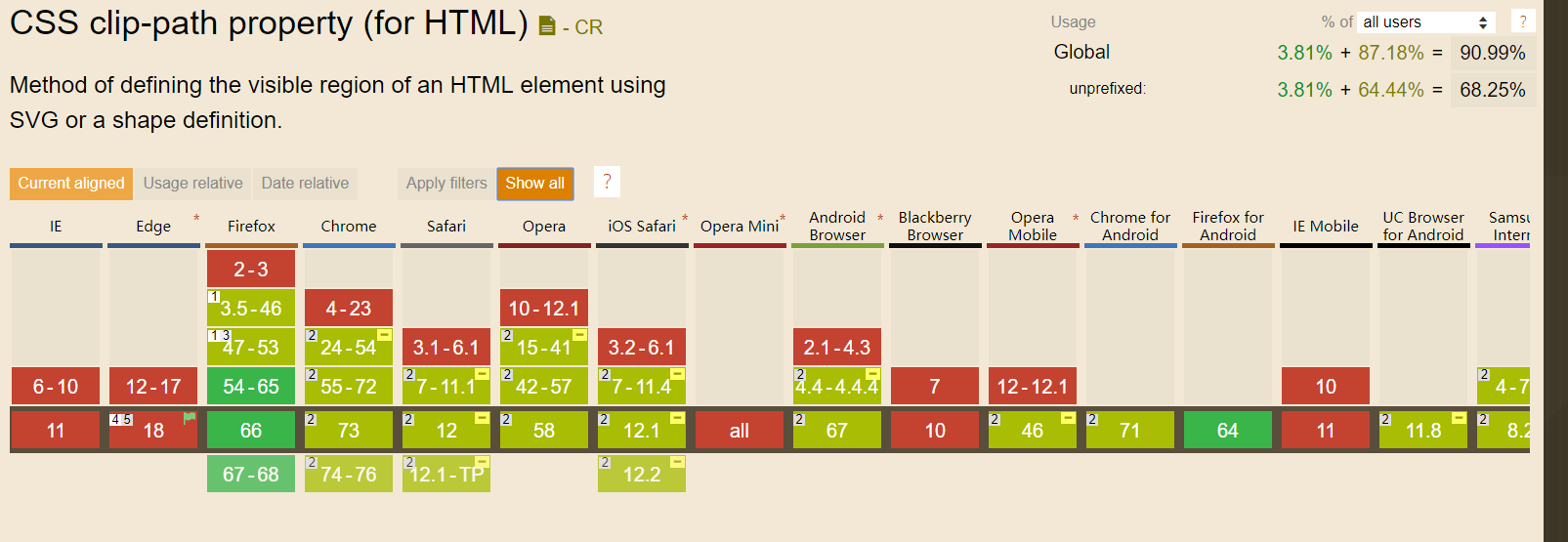
效果实现:
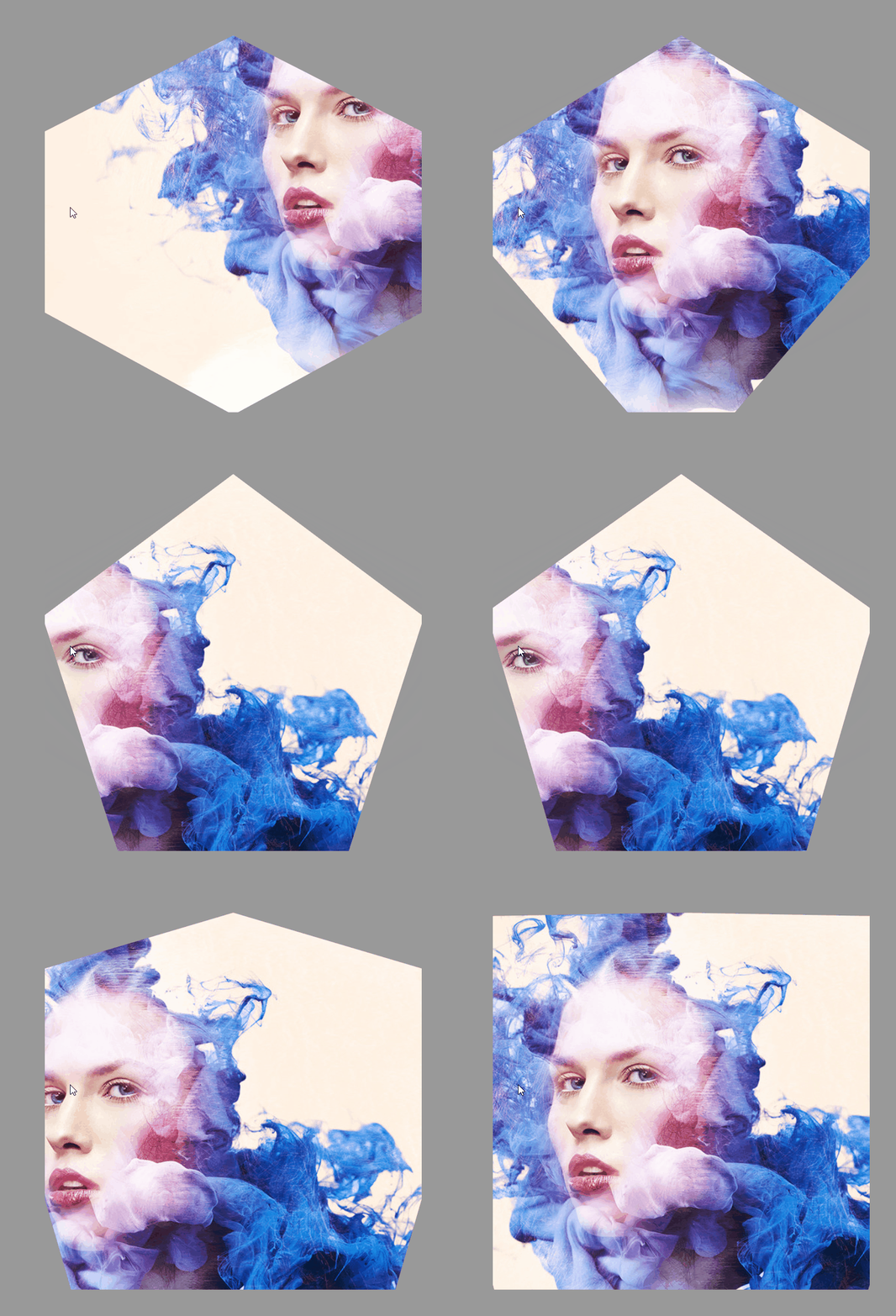
html:
<div></div>
css:
html,
body {
  height: 100%;
}

body {
  display: -webkit-flex;
  display: -ms-flexbox;
  display: flex;
  -webkit-justify-content: center;
  -ms-flex-pack: center;
  justify-content: center;
  -webkit-align-items: center;
  -ms-flex-align: center;
  align-items: center;
  background: #999999;
}

div {
  width: 75vmin;
  height: 75vmin;
  -webkit-animation: shape 10s ease-in-out infinite both;
  animation: shape 10s ease-in-out infinite both;
}

@-webkit-keyframes shape {

  from,
  to {
    -webkit-clip-path: polygon(30% 0%, 70% 0%, 100% 30%, 100% 70%, 70% 100%, 30% 100%, 0% 70%, 0% 30%);
    clip-path: polygon(30% 0%, 70% 0%, 100% 30%, 100% 70%, 70% 100%, 30% 100%, 0% 70%, 0% 30%);
    background: url('./267323.jpg') center;
  }

  14.28571% {
    -webkit-clip-path: polygon(30% 0%, 70% 0%, 100% 30%, 100% 70%, 70% 100%, 30% 100%, 0% 70%, 0% 30%);
    clip-path: polygon(30% 0%, 70% 0%, 100% 30%, 100% 70%, 70% 100%, 30% 100%, 0% 70%, 0% 30%);
    background: url('./267323.jpg') left top;
  }

  28.57143% {
    -webkit-clip-path: polygon(50% 0, 50% 0, 90% 20%, 100% 60%, 75% 100%, 25% 100%, 0 60%, 10% 20%);
    clip-path: polygon(50% 0, 50% 0, 90% 20%, 100% 60%, 75% 100%, 25% 100%, 0 60%, 10% 20%);
    background: url('./267323.jpg') right bottom;
  }

  42.85714% {
    -webkit-clip-path: polygon(50% 0, 50% 0, 100% 25%, 100% 75%, 50% 100%, 50% 100%, 0 75%, 0 25%);
    clip-path: polygon(50% 0, 50% 0, 100% 25%, 100% 75%, 50% 100%, 50% 100%, 0 75%, 0 25%);
    background: url('./267323.jpg') left bottom;
  }

  57.14286% {
    -webkit-clip-path: polygon(50% 0, 50% 0, 100% 38%, 100% 38%, 82% 100%, 18% 100%, 0 38%, 0 38%);
    clip-path: polygon(50% 0, 50% 0, 100% 38%, 100% 38%, 82% 100%, 18% 100%, 0 38%, 0 38%);
    background: url('./267323.jpg') right top;
  }

  71.42857% {
    -webkit-clip-path: polygon(50% 0, 50% 0, 100% 0, 100% 100%, 100% 100%, 0 100%, 0 100%, 0 0);
    clip-path: polygon(50% 0, 50% 0, 100% 0, 100% 100%, 100% 100%, 0 100%, 0 100%, 0 0);
    background: url('./267323.jpg') right right;
  }

  85.71429% {
    -webkit-clip-path: polygon(50% 0, 50% 0, 50% 0, 100% 100%, 100% 100%, 0 100%, 0 100%, 50% 0);
    clip-path: polygon(50% 0, 50% 0, 50% 0, 100% 100%, 100% 100%, 0 100%, 0 100%, 50% 0);
    background: url('./267323.jpg') left center;
  }
}

@keyframes shape {

  from,
  to {
    -webkit-clip-path: polygon(30% 0%, 70% 0%, 100% 30%, 100% 70%, 70% 100%, 30% 100%, 0% 70%, 0% 30%);
    clip-path: polygon(30% 0%, 70% 0%, 100% 30%, 100% 70%, 70% 100%, 30% 100%, 0% 70%, 0% 30%);
    background: url('./267323.jpg') center;
  }

  14.28571% {
    -webkit-clip-path: polygon(30% 0%, 70% 0%, 100% 30%, 100% 70%, 70% 100%, 30% 100%, 0% 70%, 0% 30%);
    clip-path: polygon(30% 0%, 70% 0%, 100% 30%, 100% 70%, 70% 100%, 30% 100%, 0% 70%, 0% 30%);
    background: url('./267323.jpg') left top;
  }

  28.57143% {
    -webkit-clip-path: polygon(50% 0, 50% 0, 90% 20%, 100% 60%, 75% 100%, 25% 100%, 0 60%, 10% 20%);
    clip-path: polygon(50% 0, 50% 0, 90% 20%, 100% 60%, 75% 100%, 25% 100%, 0 60%, 10% 20%);
    background: url('./267323.jpg') right bottom;
  }

  42.85714% {
    -webkit-clip-path: polygon(50% 0, 50% 0, 100% 25%, 100% 75%, 50% 100%, 50% 100%, 0 75%, 0 25%);
    clip-path: polygon(50% 0, 50% 0, 100% 25%, 100% 75%, 50% 100%, 50% 100%, 0 75%, 0 25%);
    background: url('./267323.jpg') left bottom;
  }

  57.14286% {
    -webkit-clip-path: polygon(50% 0, 50% 0, 100% 38%, 100% 38%, 82% 100%, 18% 100%, 0 38%, 0 38%);
    clip-path: polygon(50% 0, 50% 0, 100% 38%, 100% 38%, 82% 100%, 18% 100%, 0 38%, 0 38%);
    background: url('./267323.jpg') right top;
  }

  71.42857% {
    -webkit-clip-path: polygon(50% 0, 50% 0, 100% 0, 100% 100%, 100% 100%, 0 100%, 0 100%, 0 0);
    clip-path: polygon(50% 0, 50% 0, 100% 0, 100% 100%, 100% 100%, 0 100%, 0 100%, 0 0);
    background: url('./267323.jpg') right right;
  }

  85.71429% {
    -webkit-clip-path: polygon(50% 0, 50% 0, 50% 0, 100% 100%, 100% 100%, 0 100%, 0 100%, 50% 0);
    clip-path: polygon(50% 0, 50% 0, 50% 0, 100% 100%, 100% 100%, 0 100%, 0 100%, 50% 0);
    background: url('./267323.jpg') left center;
  }
}
CSS3 之高级动画(6)CSS3 clip-path属性实现的几何图形变形动画的更多相关文章
- Unity插件 - MeshEditor(六) 变形动画状态机
变形动画状态机--MeshAnimator,是针对MeshAnimation的状态管理器,有大量类似Unity animator的功能,但MeshAnimator操作会更加简便,更加直观,居家旅(zh ...
- CSS3实践之路(六):CSS3的过渡效果(transition)与动画(animation)
刚开始W3C CSS Workgroup拒绝将CSS3 transition与animation加入官方标准,一些成员认为过渡效果和动画并非样式属性,而且已经可以用脚本实现.所以请大家明白,特别是We ...
- CSS3展现精彩的动画效果 css3的动画属性
热火朝天的css3无疑吸引了很多前端开发者的眼球,然而在css3中的动画属性则是新功能中的主打招牌,说到css3的动画属性不得不让人想起这三个属性:Transform﹑Transition﹑Anima ...
- css3学习--css3动画详解一(animation属性)
***介绍的属性并不完全,写的都是我认为容易混淆的难点属性,所以属性会在最后综合案例展示~ 一.Keyframes介绍: Keyframes被称为关键帧,其类似于Flash中的关键帧.在CSS3中其主 ...
- (一)CSS3动画应用 - CSS3 实现 侧边栏展开收起
@keyframes 规则用于创建动画. @keyframes 中规定某项 CSS 样式,就能创建由当前样式逐渐改为新样式的动画效果 @keyframes 中创建动画时,请把它捆绑到某个选择器,否则不 ...
- CSS3集锦之新增选择器、圆角、阴影、透明度、transition动画、transform变形、animation动画
---恢复内容开始--- 一.CSS3新增选择器 1.nth-chlid(n)用法 selector:nth-chlid(n)指找到第n个子元素并且该元素为selector标签 <!DOCTYP ...
- 关于JS动画和CSS3动画的性能差异
本文章为综合其它资料所得. 根据Google Developer,Chromium项目里,渲染线程分为main thread和compositor thread. 如果CSS动画只是改变transfo ...
- CSS3 基本属性 浅析(含选择器、背景阴影、3D转换、动画等)
1渐进增强原则 2私有前缀 不同浏览器在发布不同版本(一般测试版)时会加前缀,新增属性加上前缀进行支持测试: Chrome浏览器:-webkit-border-radius: 5px; ...
- 使用jquery封装的动画脚本(无动画、css3动画、js动画)
自己封装好的showhide.js 包含无动画.css3动画.js动画 包括:fade(淡入淡出) slideUpDown(上下滑动) slideLeftRight(左右滑动) fadeSlid ...
随机推荐
- POJ 2718 Smallest Difference dfs枚举两个数差最小
Smallest Difference Time Limit: 1000MS Memory Limit: 65536K Total Submissions: 19528 Accepted: 5 ...
- Plcsim 模拟IO访问故障 OB122组织块
假设在OB1 中用 如下指令 T PQW20 实际在组态的时候就没有QW20 这个地址 所以会显示访问IO 错误 我在OB122 中设置一个变量 进入一次 加1 可以看到每个扫描周期都要调用一次OB1 ...
- SChema 多个属性的设置学习
<?xml version="1.0" encoding="UTF-8"?> <xs:schema xmlns:xs="http:/ ...
- 无法删除oracle用户的问题
http://blog.sina.com.cn/s/blog_684848d60101hj8a.html
- docker 为镜像添加ssh服务-使用Dockerfile 创建
首先,基于要添加内容的镜像ubuntu:18.04运行一个容器, 在宿主机(下面步骤是在容器中创建的,应该在宿主机创建进行以下步骤) 一.创建一个工作目录 二.创建Dockerfile 和脚本run. ...
- vDom和domDiff
虚拟dom和domDiff 1. 构建虚拟DOM var tree = el('div', {'id': 'container'}, [ el('h1', {style: 'color: blue'} ...
- MS SQLSERVER 自增ID列竟然会重复
MS SQLSERVER 2008 R2 datacenter edition 自增的ID列,设为了主键. 从没遇到过的情况.
- 解析underscore中的throttle
什么是throttle(节流) Throttling enforces a maximum number of times a function can be called over time. 简单 ...
- Acwing200 Hankson的趣味题
原题面:https://www.acwing.com/problem/content/202/ 题目大意:gcd(x,a0)=a1,lcm(x,b0)=b1,问你有多少满足条件的正整数x. 输入描述: ...
- 学习进度04(billbill长评数据提取01)
学习了python写入csv文件自己想了一个小实战,爬取billbill<白色相簿>番剧的长评 网页是动态变化的,往下拉他才会更新出长评,找出关键链接https://api.bilibil ...