
Android LinearLayout线性布局详解
为了更好地管理Android应用的用户界面里的各组件,Android提供了布局管理器。通过使用布局管理器,Android应用图形用户界面具有良好的平台无关性。推荐使用布局管理器来管理组件的分布、大小,而不是直接设置组件的位置和大小。可以使用布局管理器嵌套布局管理器,即也可作为一个UI组件来使用。
LinearLayout可以控制组件横向排列或者纵向排列,内容不会换行,超出屏幕部分将不会显示出来。
学习图解

LinearLayout 常用XML属性及方法
【属性一】orientation 设置子组件的排列方式(单选)
XML: android:orientation="horizontal"
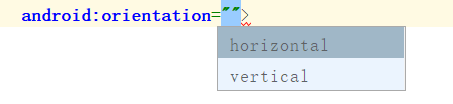
horizontal:横向排列
vertical:纵向排列
JAVA :linearLayout.setOrientation(LinearLayout.VERTICAL);
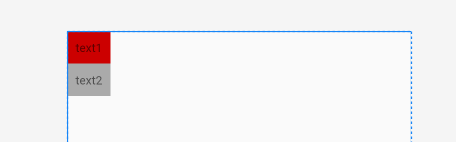
LinearLayout.HORIZONTAL 横向排列
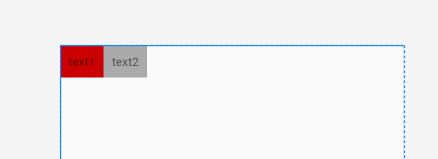
LinearLayout.VERTICAL 纵向排列
【属性二】gravity 设置子组件的对齐方式(多选)
XML: android:gravity="center"
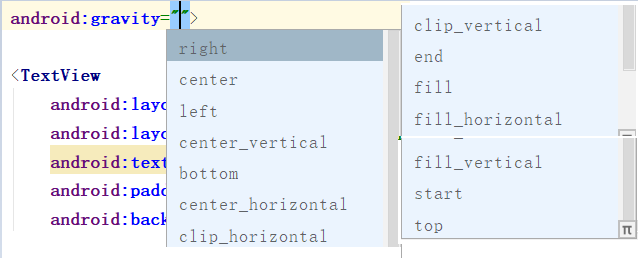
JAVA :linearLayout.setGravity(Gravity.CENTER);
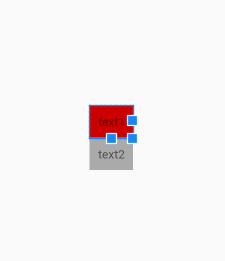
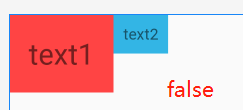
【属性三】baselineAligned 设置子元素基准线对弃,默认为true
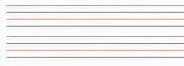
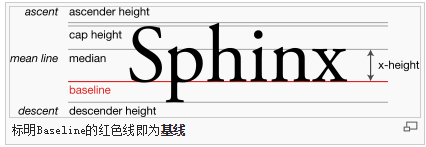
基准线:
打开的英语练习本,那条红线就是基准线
XML: android:baselineAligned="false"

JAVA: linearLayout.setBaselineAligned(true);
代码:true
    <LinearLayout

        android:layout_width="match_parent"

        android:layout_height="wrap_content"

        android:baselineAligned="true"

        android:orientation="horizontal">

        <TextView

            android:layout_width="wrap_content"

            android:layout_height="wrap_content"

            android:background="@android:color/holo_red_light"

            android:padding="20dp"

            android:text="text1"

            android:textSize="30sp">

        </TextView>

        <TextView

            android:layout_width="wrap_content"

            android:layout_height="wrap_content"

            android:background="@android:color/holo_blue_light"

            android:padding="10dp"

            android:text="text2"

            android:textSize="16sp">

        </TextView>

    </LinearLayout>
效果:
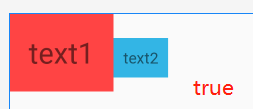
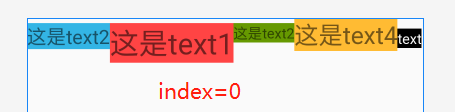
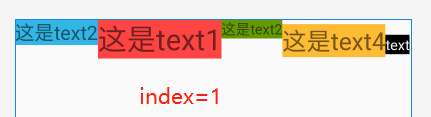
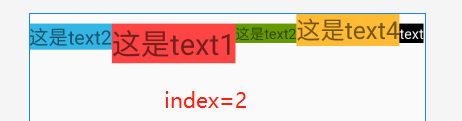
【搭配属性三】baselineAlignedChildIndex LinearLayout的基准线以他的第几个子元素为准,下标从0开始
一个LinearLayout 里面有很多 textview ,每一个 textview 都有自己的基准线,那么LinearLayout可能也是另一个LinearLayout的子元素,作为子元素 baselineAlignedChildIndex 就决定这他的一个基准线
XML:android:baselineAlignedChildIndex="0"
JAVA:linearLayout.setBaselineAlignedChildIndex(0);
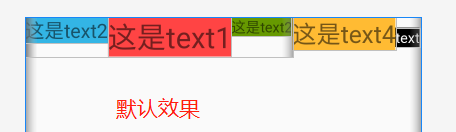
代码:⭐注意内部的LinearLayout,后面将在 第二个LinearLayout上添加 baselineAlignedChildIndex ,搭配 baselineAligned="false" 使用
<LinearLayout

    android:layout_width="match_parent"

    android:layout_height="match_parent"

    android:orientation="horizontal">

    <LinearLayout

        android:layout_width="wrap_content"

        android:layout_height="wrap_content"

        android:baselineAligned="false"

        android:orientation="horizontal">

        <TextView

            android:layout_width="wrap_content"

            android:layout_height="wrap_content"

            android:background="@android:color/holo_blue_light"

            android:text="这是text2"

            android:textSize="20sp">

        </TextView>

        <TextView

            android:layout_width="wrap_content"

            android:layout_height="wrap_content"

            android:background="@android:color/holo_red_light"

            android:text="这是text1"

            android:textSize="30sp">

        </TextView>

        <TextView

            android:layout_width="wrap_content"

            android:layout_height="wrap_content"

            android:background="@android:color/holo_green_dark"

            android:text="这是text2"

            android:textSize="15sp">

        </TextView>

    </LinearLayout>

    <TextView

        android:layout_width="wrap_content"

        android:layout_height="wrap_content"

        android:text="这是text4"

        android:textSize="25sp"

        android:background="@android:color/holo_orange_light"

        >

    </TextView>

    <TextView

        android:layout_width="wrap_content"

        android:layout_height="wrap_content"

        android:background="@android:color/black"

        android:text="text"

        android:textColor="@android:color/white"

        android:textSize="15sp">

   </TextView>

</LinearLayout>
效果:
⭐ 总结
- 默认LinearLayout是没有基准线的,从图一和图三的对比可知。
- 下标从0开始三个子组件,最大index为2,超过2时布局将不显示
- 这个属性是用来决定当前LinearLayout的基准线时以哪个子组件为准的
Android LinearLayout线性布局详解的更多相关文章
- android:TableLayout表格布局详解
http://blog.csdn.net/justoneroad/article/details/6835915 这篇博文包括的内容:1.TableLayout简介2.TableLayout行列数的确 ...
- [置顶] Android系统五大布局详解Layout
我们知道Android系统应用程序一般是由多个Activity组成,而这些Activity以视图的形式展现在我们面前,视图都是由一个一个的组件构成的.组件就是我们常见的Button.TextEdit等 ...
- Android系统五大布局详解Layout
我们知道Android系统应用程序一般是由多个Activity组成,而这些Activity以视图的形式展现在我们面前, 视图都是由一个一个的组件构成的.组件就是我们常见的Button.TextEdit ...
- Android开发之线性布局详解(布局权重)
布局权重 线性布局支持给个别的子视图设定权重,通过android:layout_weight属性.就一个视图在屏幕上占多大的空间而言,这个属性给其设 定了一个重要的值.一个大的权重值,允许它扩大到填充 ...
- Android 之 TableLayout 布局详解
TableLayout简介 •简介 Tablelayout 类以行和列的形式对控件进行管理,每一行为一个 TableRow 对象,或一个 View 控件. 当为 TableRow 对象时,可在 Tab ...
- Android学习之基础知识六—Android四种布局详解
一.Android基本布局 布局是一种可以放置多个控件的容器,它可以按照一定规律调整内部控件的位置,而且布局内部除了可以放置控件外,还可以放置布局,实现多层布局嵌套.布局和控件.布局和布局之间的关系如 ...
- Android LinearLayout线性布局
LinearLayout是线性布局控件:要么横向排布,要么竖向排布 决定性属性:必须有的! android:orientation:vertical (垂直方向) .horizontal(水平方向) ...
- Android布局管理详解(1)—— LinearLayout 线性布局
Android的布局方式共有6种,分别是LinearLayout(线性布局).TableLayout(表格布局).FrameLayout(帧布局).RelativeLayout(相对布局).GridL ...
- Android开发重点难点1:RelativeLayout(相对布局)详解
前言 啦啦啦~博主又推出了一个新的系列啦~ 之前的Android开发系列主要以完成实验的过程为主,经常会综合许多知识来写,所以难免会有知识点的交杂,给人一种混乱的感觉. 所以博主推出“重点难点”系列, ...
随机推荐
- 仿豆瓣首页弹性滑动控件|Axlchen's blog
逛豆瓣的时候看到了这样的控件,觉得挺有趣,遂模仿之 先看看原版的效果 再看看模仿的效果 分析 控件结构分析 由于*ScrollView只能有一个child view,所以整个child view的结构 ...
- Java编程Tips
原文: Java编程中"为了性能"尽量要做到的一些地方 作者: javatgo 最近的机器内存又爆满了,除了新增机器内存外,还应该好好review一下我们的代码,有很多代码编写过于 ...
- 【Git】按照git提交ID导出修改的代码
#!/bin/bash IFS=$'\n' #conf start commid id startCommitId=030cd2bf4e3694fe3a3b6f069556c4ea91a9858d l ...
- TCP 可靠传输与流量控制的实现
TCP 可靠传输与流量控制的实现 一.TCP可靠传输的实现 现在所讲的可靠传输是根据之前所说的可靠传输原理的实现,是现实中应用的技术. 1.1.以字节为单位的滑动窗口 如图A端一份文件分为了多个字节, ...
- win10下LoadRunner12 下载安装图文教程
1.下载安装包: 链接:https://pan.baidu.com/s/1hiGC9FjfKOFRWHVfMAHaeg 提取码:sr8x 如下图所示,咱们直接安装社区版“HP_LoadRunner_1 ...
- go语言指南之映射练习
练习:映射 实现 WordCount.它应当返回一个映射,其中包含字符串 s 中每个“单词”的个数.函数 wc.Test 会对此函数执行一系列测试用例,并输出成功还是失败. 你会发现 strings. ...
- 《前端之路》--- 重温 Egg.js
目录 <前端之路>--- 重温 Egg.js 一.基础功能 > 日志系统包含了 四大层面的 日志对象, 分别是 App Logger.App CoreLogger.Context L ...
- 前端每日实战:20# 视频演示如何用纯 CSS 为母亲节创作一颗像素画风格的爱心
效果预览 按下右侧的"点击预览"按钮可以在当前页面预览,点击链接可以全屏预览. https://codepen.io/comehope/pen/LmrZVX 可交互视频教程 此视频 ...
- LeetCode 162.Find Peak Element(M)(P)
题目: A peak element is an element that is greater than its neighbors. Given an input array where num[ ...
- 关于java性能优化细节方面的建议
在Javva程序中,性能问题的大部分原因并不在于Java语言,而是程序本身,养成一个良好的编码习惯非常重要,能够显著地提升程序性能.下面来聊聊该方面的建议: 1.尽量在合适的场合使用单例: 所谓单例, ...