
Android LinearLayout线性布局详解
为了更好地管理Android应用的用户界面里的各组件,Android提供了布局管理器。通过使用布局管理器,Android应用图形用户界面具有良好的平台无关性。推荐使用布局管理器来管理组件的分布、大小,而不是直接设置组件的位置和大小。可以使用布局管理器嵌套布局管理器,即也可作为一个UI组件来使用。
LinearLayout可以控制组件横向排列或者纵向排列,内容不会换行,超出屏幕部分将不会显示出来。
学习图解

LinearLayout 常用XML属性及方法
【属性一】orientation 设置子组件的排列方式(单选)
XML: android:orientation="horizontal"
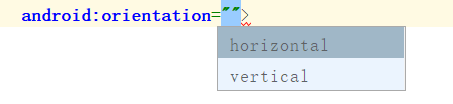
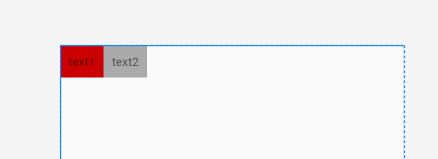
horizontal:横向排列
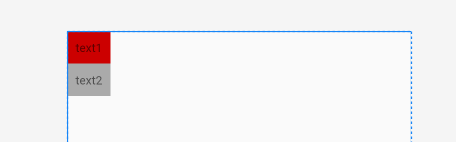
vertical:纵向排列
JAVA :linearLayout.setOrientation(LinearLayout.VERTICAL);
LinearLayout.HORIZONTAL 横向排列
LinearLayout.VERTICAL 纵向排列
【属性二】gravity 设置子组件的对齐方式(多选)
XML: android:gravity="center"
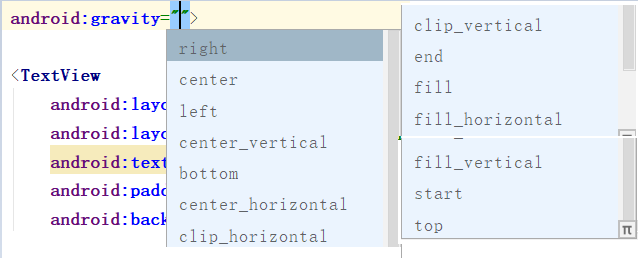
JAVA :linearLayout.setGravity(Gravity.CENTER);
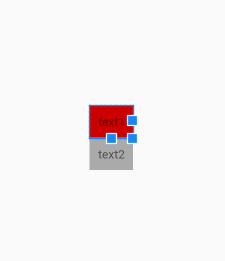
【属性三】baselineAligned 设置子元素基准线对弃,默认为true
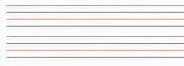
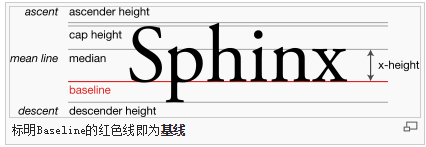
基准线:
打开的英语练习本,那条红线就是基准线
XML: android:baselineAligned="false"

JAVA: linearLayout.setBaselineAligned(true);
代码:true
    <LinearLayout

        android:layout_width="match_parent"

        android:layout_height="wrap_content"

        android:baselineAligned="true"

        android:orientation="horizontal">

        <TextView

            android:layout_width="wrap_content"

            android:layout_height="wrap_content"

            android:background="@android:color/holo_red_light"

            android:padding="20dp"

            android:text="text1"

            android:textSize="30sp">

        </TextView>

        <TextView

            android:layout_width="wrap_content"

            android:layout_height="wrap_content"

            android:background="@android:color/holo_blue_light"

            android:padding="10dp"

            android:text="text2"

            android:textSize="16sp">

        </TextView>

    </LinearLayout>
效果:
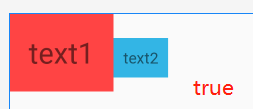
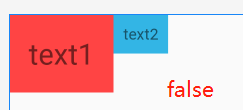
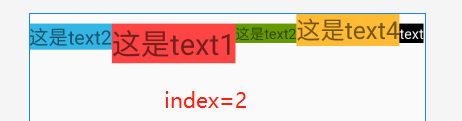
【搭配属性三】baselineAlignedChildIndex LinearLayout的基准线以他的第几个子元素为准,下标从0开始
一个LinearLayout 里面有很多 textview ,每一个 textview 都有自己的基准线,那么LinearLayout可能也是另一个LinearLayout的子元素,作为子元素 baselineAlignedChildIndex 就决定这他的一个基准线
XML:android:baselineAlignedChildIndex="0"
JAVA:linearLayout.setBaselineAlignedChildIndex(0);
代码:⭐注意内部的LinearLayout,后面将在 第二个LinearLayout上添加 baselineAlignedChildIndex ,搭配 baselineAligned="false" 使用
<LinearLayout

    android:layout_width="match_parent"

    android:layout_height="match_parent"

    android:orientation="horizontal">

    <LinearLayout

        android:layout_width="wrap_content"

        android:layout_height="wrap_content"

        android:baselineAligned="false"

        android:orientation="horizontal">

        <TextView

            android:layout_width="wrap_content"

            android:layout_height="wrap_content"

            android:background="@android:color/holo_blue_light"

            android:text="这是text2"

            android:textSize="20sp">

        </TextView>

        <TextView

            android:layout_width="wrap_content"

            android:layout_height="wrap_content"

            android:background="@android:color/holo_red_light"

            android:text="这是text1"

            android:textSize="30sp">

        </TextView>

        <TextView

            android:layout_width="wrap_content"

            android:layout_height="wrap_content"

            android:background="@android:color/holo_green_dark"

            android:text="这是text2"

            android:textSize="15sp">

        </TextView>

    </LinearLayout>

    <TextView

        android:layout_width="wrap_content"

        android:layout_height="wrap_content"

        android:text="这是text4"

        android:textSize="25sp"

        android:background="@android:color/holo_orange_light"

        >

    </TextView>

    <TextView

        android:layout_width="wrap_content"

        android:layout_height="wrap_content"

        android:background="@android:color/black"

        android:text="text"

        android:textColor="@android:color/white"

        android:textSize="15sp">

   </TextView>

</LinearLayout>
效果:
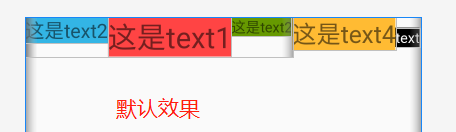
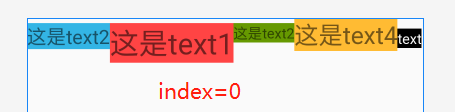
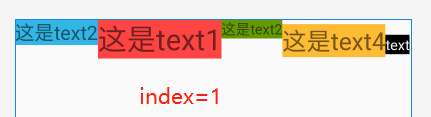
⭐ 总结
- 默认LinearLayout是没有基准线的,从图一和图三的对比可知。
- 下标从0开始三个子组件,最大index为2,超过2时布局将不显示
- 这个属性是用来决定当前LinearLayout的基准线时以哪个子组件为准的
Android LinearLayout线性布局详解的更多相关文章
- android:TableLayout表格布局详解
http://blog.csdn.net/justoneroad/article/details/6835915 这篇博文包括的内容:1.TableLayout简介2.TableLayout行列数的确 ...
- [置顶] Android系统五大布局详解Layout
我们知道Android系统应用程序一般是由多个Activity组成,而这些Activity以视图的形式展现在我们面前,视图都是由一个一个的组件构成的.组件就是我们常见的Button.TextEdit等 ...
- Android系统五大布局详解Layout
我们知道Android系统应用程序一般是由多个Activity组成,而这些Activity以视图的形式展现在我们面前, 视图都是由一个一个的组件构成的.组件就是我们常见的Button.TextEdit ...
- Android开发之线性布局详解(布局权重)
布局权重 线性布局支持给个别的子视图设定权重,通过android:layout_weight属性.就一个视图在屏幕上占多大的空间而言,这个属性给其设 定了一个重要的值.一个大的权重值,允许它扩大到填充 ...
- Android 之 TableLayout 布局详解
TableLayout简介 •简介 Tablelayout 类以行和列的形式对控件进行管理,每一行为一个 TableRow 对象,或一个 View 控件. 当为 TableRow 对象时,可在 Tab ...
- Android学习之基础知识六—Android四种布局详解
一.Android基本布局 布局是一种可以放置多个控件的容器,它可以按照一定规律调整内部控件的位置,而且布局内部除了可以放置控件外,还可以放置布局,实现多层布局嵌套.布局和控件.布局和布局之间的关系如 ...
- Android LinearLayout线性布局
LinearLayout是线性布局控件:要么横向排布,要么竖向排布 决定性属性:必须有的! android:orientation:vertical (垂直方向) .horizontal(水平方向) ...
- Android布局管理详解(1)—— LinearLayout 线性布局
Android的布局方式共有6种,分别是LinearLayout(线性布局).TableLayout(表格布局).FrameLayout(帧布局).RelativeLayout(相对布局).GridL ...
- Android开发重点难点1:RelativeLayout(相对布局)详解
前言 啦啦啦~博主又推出了一个新的系列啦~ 之前的Android开发系列主要以完成实验的过程为主,经常会综合许多知识来写,所以难免会有知识点的交杂,给人一种混乱的感觉. 所以博主推出“重点难点”系列, ...
随机推荐
- 《AndroidStudio导入安卓源码-idegen》---可方便查看安卓源代码
idegen是Android源码中的一个模块,需要编译一下.生成一个jar包.然后再进行构建生成AndroidStudio配置相关文件. > 什么是idegen 要将Android系统源代码工程 ...
- HBase源码系列之HFile
本文讨论0.98版本的hbase里v2版本.其实对于HFile能有一个大体的较深入理解是在我去查看"到底是不是一条记录不能垮block"的时候突然意识到的. 首先说一个对HFile ...
- GoLand2019.03破解与汉化
1.准备工作 (请认真的做好准备工作,否则中途可能会操作失败.) GoLand是JetBrains公司发布的商业版的GO语言编辑器(收费的),本屌目前还没钱购买正版,所以本次教程是以Windows平台 ...
- 动态构造任意复杂的 Linq Where 表达式
前言 Linq 是 C# 中一个非常好用的集合处理库,用好了能帮我们简化大量又臭又长的嵌套循环,使处理逻辑清晰可见.EF 查询主要也是依赖 Linq.但是 Linq 相对 sql 也存在一些缺点,最主 ...
- SAP CRM Transaction处理中的权限控制
当试图打开一个Opportunity时, 系统会进行如下一系列的权限检查: 1. 检查Authorization object CRM_ORD_OP: 此处会检查当前user的partner func ...
- PC端如何下载B站里面的视频?
此随笔只是记录一下: PC端下载B站的视频,在blibli前面加上一个i 然后在视频上鼠标右键,视频另存为+路径即可 PS:网上其他的方法,比如在blibli前面加上kan,后面加上jj等,这些方 ...
- volatile关键字的理解
volatile是java语言提供的一种稍弱的同步机制,它的作用是能够保证被volatile修饰的变量,每个线程在获取它的值时都能获取到最新的值. 要理解这个原理首先要知道java内存模型:每个线程都 ...
- Javascript中的Math.max()和Math.min()
Math.max()是求最大值,Math.min()是求最小值 Math.max(value1,value2,value3....) 但是如果是数组或者对象呢? var numArr = [1,2,4 ...
- 浅谈JS之setTimeout与setInterval
概念 setTimeout与clearTimeout,以及setInterval与clearInterval均属于Window对象方法. 方法 描述 setTimeout 在指定的毫秒数后调用函数或计 ...
- deepin15.11安装N卡驱动,实测!!!(可解决N卡电脑关机卡屏)
前言:deepin(深度)是一款由武汉深之度公司研发的一款适合国人日常学习的linux系统,其UI精美,美过Mac.它对于中国用户的一个亮点就是QQ微信等国软件傻瓜式安装(类似安卓应用商店安装),如果 ...