
学会用bootstrap的modal和carousel
bootstrap框架提供了很多好用的javascript组件,可以很方便的实现常用的js效果,比如点击弹出一个div(modal)、下拉菜单、旋转木马(carousel或slider),非常适合前端不专业的后端程序员使用。下面就来看下modal和carousel如何使用。
modal即点击弹出div的效果,先看下效果图。
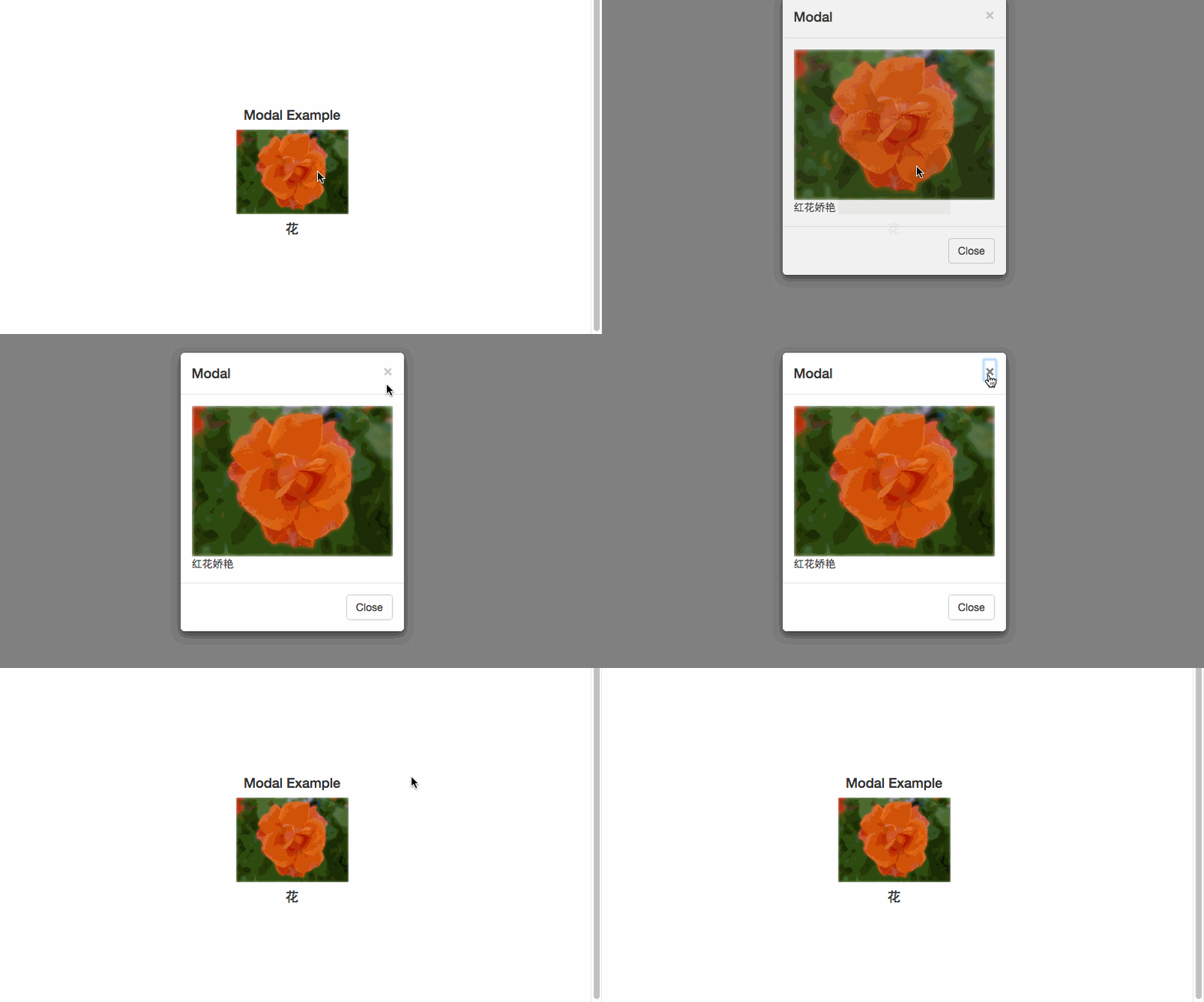
代码如下:
<!DOCTYPE html>
<html lang="zh">
<head>
<title>Bootstrap Example</title>
<meta charset="utf-8">
<meta name="viewport" content="width=device-width, initial-scale=1">
<link rel="stylesheet" href="../../vendor/bootstrap-3.3.7-dist/css/bootstrap.min.css">
<script src="../../vendor/jquery-3.0.0.min.js"></script>
<script src="../../vendor/bootstrap-3.3.7-dist/js/bootstrap.min.js"></script>
</head> <body>
<style>
.prime-img {
width: 100%;
}
.mw {
width: 300px;
}
.box {
margin: 150px auto;
text-align: center;
width: 150px;
}
</style> <div class="container"> <div class="box">
<h4>Modal Example</h2>
<!-- Trigger the modal with a button -->
<img data-toggle="modal" data-target="#myModal" class="prime-img" src="../../asset/images/p1.jpg" alt="">
<h4 class="box-desc">花</h4>
</div>
</div> <!-- Modal -->
<div class="modal fade" id="myModal" role="dialog">
<div class="modal-dialog mw">
<!-- Modal content-->
<div class="modal-content">
<div class="modal-header">
<button type="button" class="close" data-dismiss="modal">×</button>
<h4 class="modal-title">Modal</h4>
</div>
<div class="modal-body">
<img class="prime-img" src="../../asset/images/p1.jpg" alt="">
<div>红花娇艳</div>
</div>
<div class="modal-footer">
<button type="button" class="btn btn-default" data-dismiss="modal">Close</button>
</div>
</div>
<!--End Modal content-->
</div>
</div>
<!-- End Modal -->
</div>
</body>
</html>
代码第7-9行是需要引入的css和js,可以看到bootstrap.min.js依赖于jQuery。
第32行中的 data-target="#myModal" 指定了要弹出div的id,第38行开始的id为myModal的div就是弹出的实现。其中可以看到弹出的div内容被包含在.modal-content中,而它又被分成了三个部分,.modal-header、.modal-body、.modal-header。具体在使用时不用拘泥于上面的写法,可以自己定义布局和样式。
再看carousel(也可以叫slider),即旋转木马,又叫幻灯片或滑块。
看下效果图,箭头可以控制:
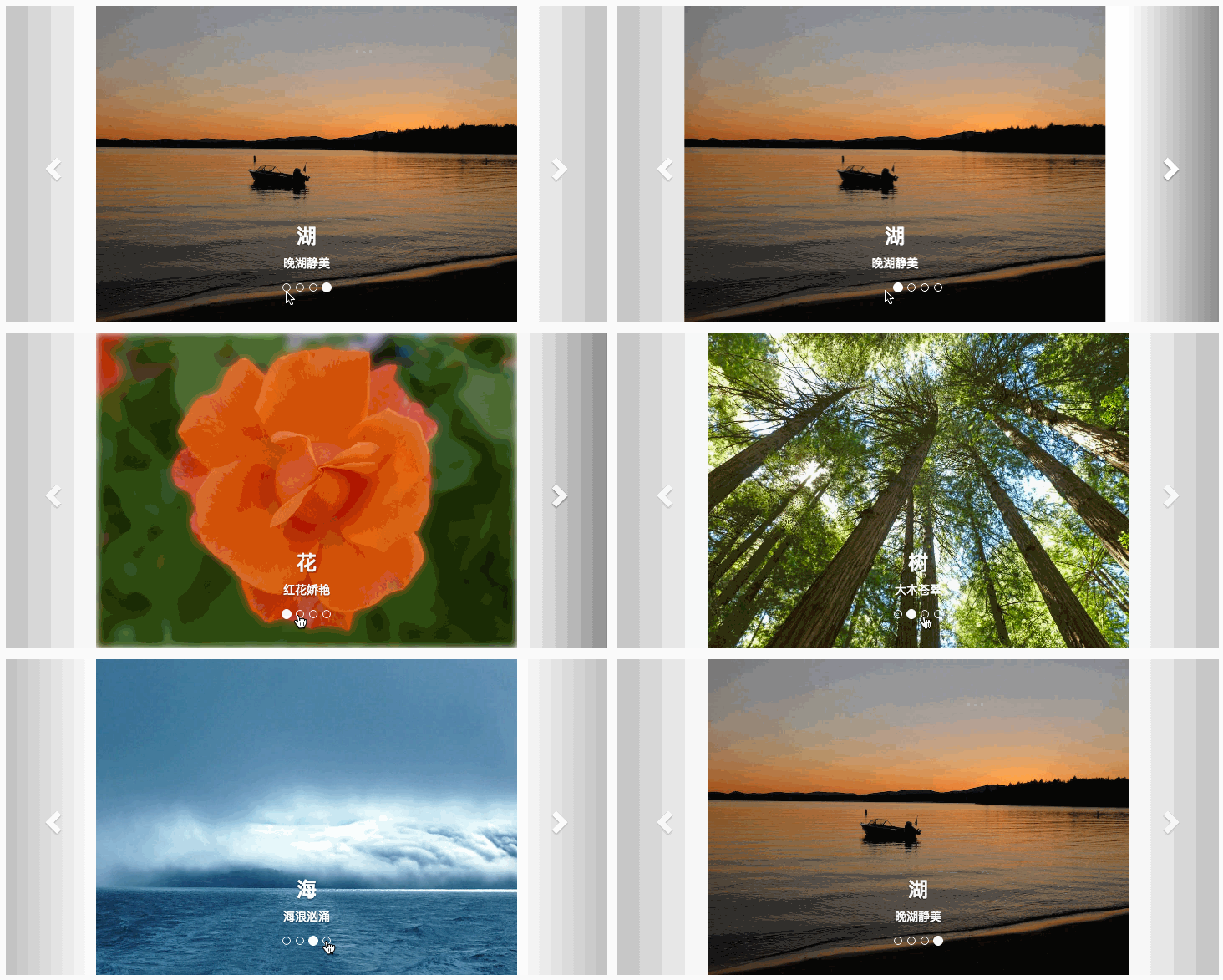
按钮也可以控制

看下代码:
 <!DOCTYPE html>

 <html lang="en">

 <head>

   <title>Bootstrap Example</title>

   <meta charset="utf-8">

   <meta name="viewport" content="width=device-width, initial-scale=1">

   <link rel="stylesheet" href="../../vendor/bootstrap-3.3.7-dist/css/bootstrap.min.css">

   <script src="../../vendor/jquery-3.0.0.min.js"></script>

   <script src="../../vendor/bootstrap-3.3.7-dist/js/bootstrap.min.js"></script>

   <style>

   .carousel-inner > .item > img,

   .carousel-inner > .item > a > img {

       width: 70%;

       margin: auto;

   }

   </style>

 </head>

 <body>

 <div class="container">

   <br>

   <div id="myCarousel" class="carousel slide" data-ride="carousel">

     <!-- Indicators -->

     <ol class="carousel-indicators">

       <li data-target="#myCarousel" data-slide-to="0" class="active"></li>

       <li data-target="#myCarousel" data-slide-to="1"></li>

       <li data-target="#myCarousel" data-slide-to="2"></li>

       <li data-target="#myCarousel" data-slide-to="3"></li>

     </ol>

     <!-- Wrapper for slides -->

     <div class="carousel-inner" role="listbox">

       <div class="item active">

         <img src="../../asset/images/p1.jpg" alt="花" width="460" height="345">

         <div class="carousel-caption">

           <h3>花</h3>

           <p>红花娇艳</p>

         </div>

       </div>

       <div class="item">

         <img src="../../asset/images/p2.jpg" alt="树" width="460" height="345">

         <div class="carousel-caption">

           <h3>树</h3>

           <p>大木苍翠</p>

         </div>

       </div>

       <div class="item">

         <img src="../../asset/images/p3.jpg" alt="海" width="460" height="345">

         <div class="carousel-caption">

           <h3>海</h3>

           <p>海浪汹涌</p>

         </div>

       </div>

       <div class="item">

         <img src="../../asset/images/p4.jpg" alt="湖" width="460" height="345">

         <div class="carousel-caption">

           <h3>湖</h3>

           <p>晚湖静美</p>

         </div>

       </div>

     </div>

     <!-- Left and right controls -->

     <a class="left carousel-control" href="#myCarousel" role="button" data-slide="prev">

       <span class="glyphicon glyphicon-chevron-left" aria-hidden="true"></span>

       <span class="sr-only">Previous</span>

     </a>

     <a class="right carousel-control" href="#myCarousel" role="button" data-slide="next">

       <span class="glyphicon glyphicon-chevron-right" aria-hidden="true"></span>

       <span class="sr-only">Next</span>

     </a>

   </div>

 </div>

 </body>

 </html>
整个滑动内容和控制元素都被#myCarousel的div包起来,它分为三部分:第23行ol包起来的li组成的按钮,第31行开始到第65中是要滑动的3个.item元素,第67行后面是左右控制箭头。
是不是很简单,拿来就用。有时间再研究下如何把modal和carousel结合起来使用。
参考:
http://getbootstrap.com/javascript/
学会用bootstrap的modal和carousel的更多相关文章
- 解决select2在bootstrap的modal中默认不显示的问题
在Bootstrap中的Modal,select2插件会有不显示,因为其z-index小于modal,还有另外一个问题是,修正z-index之后,select2不会自动失去焦点的问题.代码解决如下: ...
- bootstrap 模态 modal 小例子
bootstrap 模态 modal 小例子 <html> <head> <meta charset="utf-8" /> <title ...
- 利用bootstrap的modal组件自定义alert,confirm和modal对话框
由于浏览器提供的alert和confirm框体验不好,而且浏览器没有提供一个标准的以对话框的形式显示自定义HTML的弹框函数,所以很多项目都会自定义对话框组件.本篇文章介绍自己在项目中基于bootst ...
- Bootstrap 轮播(Carousel)插件
Bootstrap 轮播(Carousel)插件是一种灵活的响应式的向站点添加滑块的方式.除此之外,内容也是足够灵活的,可以是图像.内嵌框架.视频或者其他您想要放置的任何类型的内容. 如果您想要单独引 ...
- Bootstrap: 样式CSS:carousel轮换 图片的使用
Bootstrap 轮播(Carousel)插件 Bootstrap轮播(Carousel)插件是一种灵活的响应式的向站点添加滑块的方式.除此之外,内容也是足够灵活的,可以是图像.内嵌框架.视频或者其 ...
- bootstrap 模态 modal 小例子【转】
bootstrap 模态 modal 小例子 <html> <head> <meta charset="utf-8" /> <title ...
- Bootstrap 轮播(Carousel)详解
Bootstrap 轮播(Carousel)插件是一种灵活的响应式的向站点添加滑块的方式.除此之外,内容也是足够灵活的,可以是图像.内嵌框架.视频或者其他您想要放置的任何类型的内容.如果您想要单独引用 ...
- 【bootstrap】modal模态框的几种打开方法+问题集锦
第一部分: 关于bootstrap中modal的使用,下面把几种自己用的打开方法展示出来 首先呢,得有个Bootstrap的页面,这里就不说了. 其次呢,得有个modal放在页面中,不管你这段代码加在 ...
- bootstrap的modal弹窗,在多层窗口关闭时只会关闭自窗口,不再关闭父窗口
bootstrap多层modal弹窗时.当子窗口关闭时,所有父窗口一起关闭. 原因是bootstrap在窗口关闭事件委托时,委托给所有窗口. 如源码: this.$element.on('click. ...
随机推荐
- C#异步编程(二)
async和await结构 序 前篇博客异步编程系列(一) 已经介绍了何谓异步编程,这篇主要介绍怎么实现异步编程,主要通过C#5.0引入的async/await来实现. BeginInvoke和End ...
- 浅谈 LayoutInflater
浅谈 LayoutInflater 版权声明:本文为博主原创文章,未经博主允许不得转载. 微博:厉圣杰 源码:AndroidDemo/View 文中如有纰漏,欢迎大家留言指出. 在 Android 的 ...
- angular 源码分析 1 - angularInit()
angularjs 是个神奇的框架,由于我的好奇,想了解她的内部工作原理,只能一步一步的走进她,靠近她,和她深入的交流. angularjs 的入口是什么样子的呢?一起掀起她的盖头吧. 在这里我只讲方 ...
- 个人网站对xss跨站脚本攻击(重点是富文本编辑器情况)和sql注入攻击的防范
昨天本博客受到了xss跨站脚本注入攻击,3分钟攻陷--其实攻击者进攻的手法很简单,没啥技术含量.只能感叹自己之前竟然完全没防范. 这是数据库里留下的一些记录.最后那人弄了一个无限循环弹出框的脚本,估计 ...
- js学习之函数的参数传递
我们都知道在 ECMAScript 中,数据类型分为原始类型(又称值类型/基本类型)和引用类型(又称对象类型):这里我将按照这两种类型分别对函数进行传参,看一下到底发生了什么. 参数的理解 首先,我们 ...
- CSS 3 学习——渐变
通过CSS渐变创建的是一个没有固定比例和固定尺寸的<image>类型,也就是说是一张图片,这张图片的尺寸由所应用的元素的相关信息决定.凡是支持图片类型的CSS属性都可以设置渐变,而支持颜色 ...
- android 事件分发机制详解(OnTouchListener,OnClick)
昨天做东西做到触摸事件冲突,以前也经常碰到事件冲突,想到要研究一下Android的事件冲突机制,于是从昨天开始到今天整整一天时间都要了解这方面的知识,这才懂了安卓的触摸和点击事件的机制.探究如下: 首 ...
- 安卓自定义组合控件--toolbar
最近在学习安卓APP的开发,用到了toolbar这个控件, 最开始使用时include layout这种方法,不过感觉封装性不好,就又改成了自定义组合控件的方式. 使用的工具为android stud ...
- git快速get
配置:git config --global user.name 'yangshaoxiang' git config --global user.email '254135495@qq.com' s ...
- SQL*Plus生成html文件
最近使用SQL*Plus命令生成html文件,遇到一些有意思的知识点,顺便记录一下,方便以后需要的时候而这些知识点又忘记而捉急.好记性不如烂笔头吗! 为什么要用SQL*Plus生成html文件? ...