
Unity之生成扫描二维码
Unity之生成扫描二维码
Unity之生成扫描二维码
前言
开篇
- 又到了一周一分享啦,今儿小黑为了给小可爱一个好玩的,想来想去不知道弄什么。
- 后来一想,就制作一个生成和扫描二维码的软件吧。
Unity版本及使用插件
Unity 2020.4.4f1
zxing.unity.dll 下载地址
正题
前期准备
- 1、创建项目。
- 2、创建Plugins文件夹并且放入 zxing.unity.dll 。
- 3、编写脚本
首先生成二维码
using UnityEngine;

using UnityEngine.UI;

using ZXing;

/// <summary>

/// 二维码的生成类

/// </summary>

public class QRCodeDraw : MonoBehaviour

{

    public static QRCodeDraw _Instance;

    private void Awake() => _Instance = this;

    /// <summary> 绘制好的二维码 </summary>

    public Image image_QRCode;

    //二维码绘制类

    BarcodeWriter barcodeWriter;

    /// <summary>

    /// 将制定字符串信息转换成二维码图片信息

    /// </summary>

    /// <param name="formatStr">要生产二维码的字符串信息</param>

    /// <param name="width">二维码的宽度</param>

    /// <param name="height">二维码的高度</param>

    /// <returns>返回二维码图片的颜色数组信息</returns>

    Color32[] GeneQRCode(string formatStr, int width, int height)

    {

        //绘制二维码前进行一些设置

        ZXing.QrCode.QrCodeEncodingOptions options = new ZXing.QrCode.QrCodeEncodingOptions();

        //设置字符串转换格式,确保字符串信息保持正确

        options.CharacterSet = "UTF-8";

        //设置绘制区域的宽度和高度的像素值

        options.Width = width;

        options.Height = height;

        //设置二维码边缘留白宽度(值越大留白宽度大,二维码就减小)

        options.Margin = 1;

        //实例化字符串绘制二维码工具

        barcodeWriter = new BarcodeWriter { Format = BarcodeFormat.QR_CODE, Options = options };

        //进行二维码绘制并进行返回图片的颜色数组信息

        return barcodeWriter.Write(formatStr);

    }

    /// <summary>

    /// 根据二维码图片信息绘制指定字符串信息的二维码到指定区域

    /// </summary>

    /// <param name="str">要生产二维码的字符串信息</param>

    /// <param name="width">二维码的宽度</param>

    /// <param name="height">二维码的高度</param>

    /// <returns>返回绘制好的图片</returns>

    Texture2D ShowQRCode(string str, int width, int height)

    {

        //实例化一个图片类

        Texture2D t = new Texture2D(width, height);

        //获取二维码图片颜色数组信息

        Color32[] col32 = GeneQRCode(str, width, height);

        //为图片设置绘制像素颜色信息

        t.SetPixels32(col32);

        //设置信息更新应用下

        t.Apply();

        //将整理好的图片信息显示到指定区域中

        return t;

    }

    /// <summary>

    /// 开始绘制指定信息的二维码

    /// </summary>

    /// <param name="formatStr">要被绘制的信息</param>

    public void DrawQRCode(string formatStr)

    {

        //Debug.Log(formatStr);

        //注意:这个宽高度大小256不要变。不然生成的信息不正确

        //256有可能是这个ZXingNet插件指定大小的绘制像素点数值

        Texture2D t = ShowQRCode(formatStr, 256, 256);

        //转为image

        Sprite image = Sprite.Create(t, new Rect(00, 0, t.width, t.height),new Vector2(0.5f,0.5f));

        //显示到UI界面的图片上

        ///texture_QRCode = t;

        image_QRCode.sprite = image;

        UnityTools.Debuger.Log("想要生成二维码的内容为:" + formatStr);

    }

}
然后需要扫描二维码
using UnityEngine;

using UnityEngine.UI;

using ZXing;

/// <summary>

/// 二维码扫描识别类

/// </summary>

public class QRCodeScanning : MonoBehaviour

{

    public static QRCodeScanning _Instance;

    private void Awake() => _Instance = this;

    [System.NonSerialized]

    public bool bool_Result;

    [System.NonSerialized]

    /// <summary> 扫描信息 </summary>

    public string str_ScanInfo;

    /// <summary> 摄像机映射显示区域 </summary>

    ///public Texture cameraTexture;

    public Image cameraTexture;

    private WebCamTexture webCamTexture;//摄像机映射纹理

    //二维码识别类

    BarcodeReader barcodeReader;//库文件的对象(二维码信息保存的地方)

    /// <summary>

    /// 开启摄像机和准备工作

    /// </summary>

    void DeviceInit()

    {

        //1、获取所有摄像机硬件

        WebCamDevice[] devices = WebCamTexture.devices;

        //2、获取第一个摄像机硬件的名称

        string deviceName = devices[0].name;//手机后置摄像机

        //3、创建实例化一个摄像机显示区域

        webCamTexture = new WebCamTexture(deviceName: deviceName);

        //4、显示的图片信息

        //cameraTexture = webCamTexture;

        //Debuger.Log(webCamTexture.width + "_____"+ webCamTexture.height);

        //Texture2D texture2D = Texture2Texture2D(webCamTexture);

        //Sprite sprite = Sprite.Create(texture2D, new Rect(0, 0, texture2D.width, texture2D.height), new Vector2(0.5f, 0.5f));

        //cameraTexture.sprite = sprite;

        //5、打开摄像机运行识别

        if (webCamTexture.isPlaying) return;

            webCamTexture.Play();

        //6、实例化识别二维码信息存储对象

        barcodeReader = new BarcodeReader();

    }

    Color32[] data;//二维码图片信息以像素点颜色信息数组存放

    /// <summary>

    /// 识别摄像机图片中的二维码信息

    /// 打印二维码识别到的信息

    /// </summary>

    void ScanQRCode()

    {

        if (!webCamTexture.isPlaying) return;

        //7、获取摄像机画面的像素颜色数组信息

        data = webCamTexture.GetPixels32();

        //8、获取图片中的二维码信息

        Result result = barcodeReader.Decode(data, webCamTexture.width, webCamTexture.height);

        //如果获取到二维码信息了,打印出来

        if (result != null)

        {

            //Debuger.Log(result.Text);//===》==》===》 这是从二维码识别出来的信息

            str_ScanInfo = result.Text;//显示扫描信息

            UnityTools.Debuger.Log("扫描结果为:" + str_ScanInfo);

            _Instance.bool_Result = true;

            //扫描成功之后的处理

            IsScanning = false;

            webCamTexture.Stop();

            cameraTexture.sprite = null;

        }

    }

    bool IsScanning = false;

    float interval = 3;//扫描识别时间间隔

    /// <summary>

    /// 扫描

    /// </summary>

    public void Scanning()

    {

        if (webCamTexture != null && webCamTexture.isPlaying) return;

        //Debuger.Log("开始扫描");

        DeviceInit();

        IsScanning = true;

    }

    public void Stop()

    {

        if (!webCamTexture.isPlaying) return;

        //Debuger.Log("停止扫描");

        webCamTexture.Stop();

        IsScanning = false;

    }

    Texture2D texture2D;

    private void Update()

    {

        if (IsScann/ing)

        {

            texture2D = Texture2Texture2D(webCamTexture);

            Sprite sprite = Sprite.Create(texture2D, new Rect(0, 0, texture2D.width, texture2D.height), new Vector2(0.5f, 0.5f));

            cameraTexture.sprite = sprite;

            //每隔一段时间进行一次识别二维码信息

            interval += Time.deltaTime;

            if (interval >= 3)

            {

                interval = 0;

                ScanQRCode();//开始扫描

            }

        }

    }

    //以下参考博客https://blog.csdn.net/a673544319/article/details/82751883

    Texture2D Texture2Texture2D(Texture texture)

    {

        Texture2D texture2D = new Texture2D(texture.width, texture.height, TextureFormat.RGBA32, false);

        RenderTexture currentRT = RenderTexture.active;

        RenderTexture renderTexture = RenderTexture.GetTemporary(texture.width, texture.height, 32);

        Graphics.Blit(texture, renderTexture);

        RenderTexture.active = renderTexture;

        texture2D.ReadPixels(new Rect(0, 0, renderTexture.width, renderTexture.height), 0, 0);

        texture2D.Apply();

        RenderTexture.active = currentRT;

        RenderTexture.ReleaseTemporary(renderTexture);

        return texture2D;

    }

}
该使用了
using System.Collections;

using System.Collections.Generic;

using UnityEngine;

using UnityEngine.UI;

public class QRCodeController : MonoBehaviour

{

    public InputField inputField;

    public void InstanceQRCode()

    {

        QRCodeDraw._Instance.DrawQRCode(inputField.text);

    }

    public void ScaningQRCode()

    {

        QRCodeScanning._Instance.Scanning();

    }

}
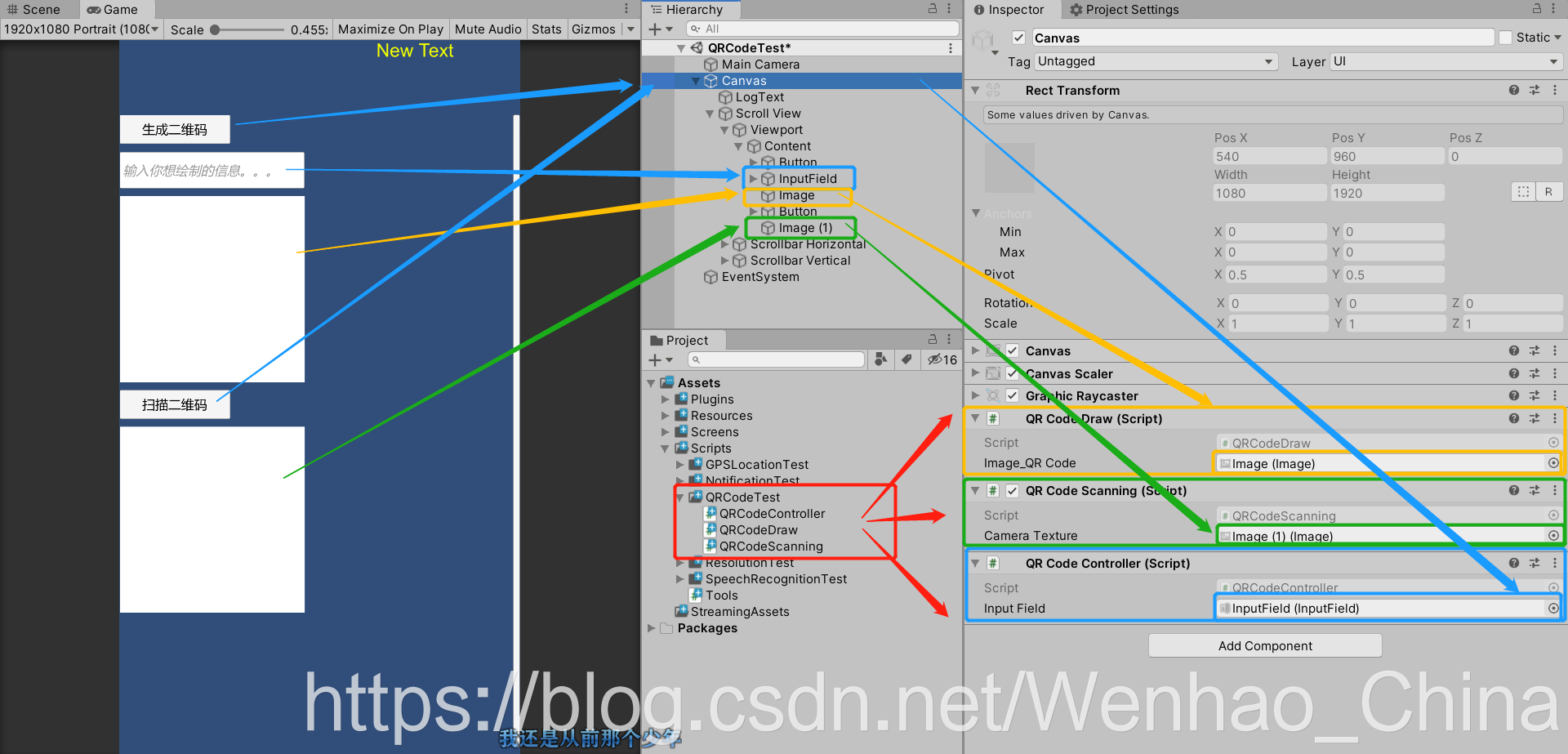
挂载脚本绑定按钮和输入框
运行内容
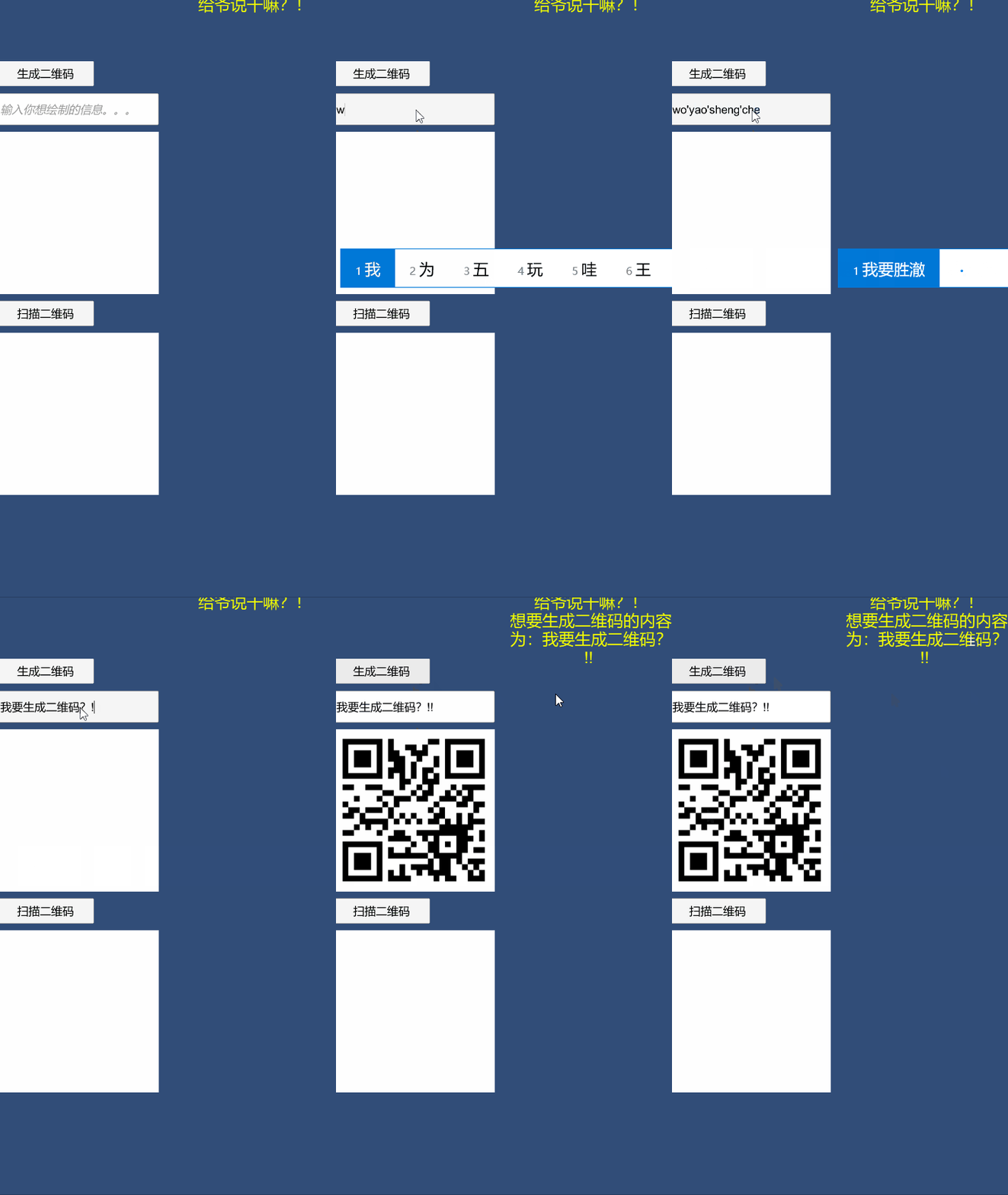
生成二维码
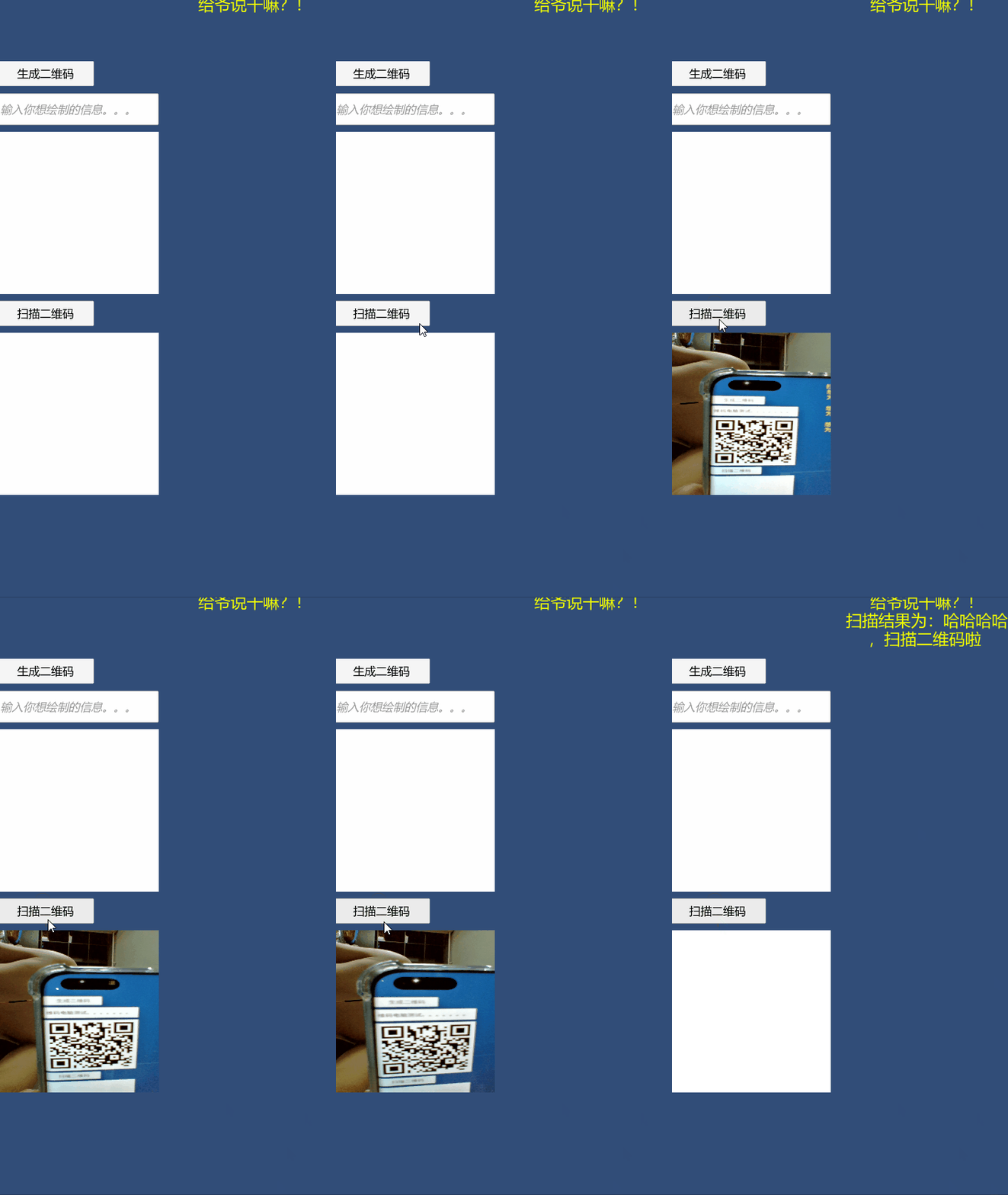
扫描二维码
结尾
唠家常
- 小黑的今日分享结束啦,小伙伴们你们get到了么,你们有没有更好的办法呢,可以评论区留言分享,也可以加小黑的QQ:841298494,大家一起进步。
- 小黑现在好想让小可爱来北京找我呀,哈哈哈哈哈。
今日有推荐
推荐内容:Texture 转为 Texture2D,博客链接:
Unity中Texture转Texture2D博客链接 https://blog.csdn.net/a673544319/article/details/82751883
- 客官,看完get之后记得点赞哟!
- 小伙伴你还想要别的知识?好的呀,分享给你们
- 小黑的杂货铺,想要什么都有,客官来杯茶喝啊
程序的道路上学习永不停止,探索随时进行。
Let’s go. Just do it. We can.
Unity之生成扫描二维码的更多相关文章
- 生成扫描二维码下载app的二维码的方法
进入APP store苹果应用程序商店,根据分类找到你要生成二维码的APP,然后在浏览器连接里找到ID后的一串数字就是APP的应用ID了. 安卓系统的appid 在电脑浏览器中打开应用宝官网,http ...
- 今天网站后台登录页面需要生成一个二维码,然后在手机app上扫描这个二维码,实现网站登录的效果及其解决方案如下
要实现二维码登录,需要解决2个技术,1.需要js websocket 与后台php实现长连接技术 2.实现二维码生成技术 要实现这个功能第二个算是比较简单,只需要下载一个php的二维码生成器即可,但要 ...
- Swift开发小技巧--扫描二维码,二维码的描边与锁定,设置扫描范围,二维码的生成(高清,无码,你懂得!)
二维码的扫描,二维码的锁定与描边,二维码的扫描范围,二维码的生成(高清,无码,你懂得!),识别相册中的二维码 扫描二维码用到的三个重要对象的关系,如图: 1.懒加载各种类 // MARK: - 懒加载 ...
- 实现手机扫描二维码页面登录,类似web微信-第二篇,关于二维码的自动生成
转自:http://www.cnblogs.com/fengyun99/p/3541251.html 接上一章,我们已经基本把业务逻辑分析清楚了 下面我们第一步,实现二维码的web动态生成. 页面的二 ...
- Android实例-实现扫描二维码并生成二维码(XE8+小米5)
相关资料: 第三方资料太大没法写在博文上,请下载CSDN的程序包. 程序包下载: http://download.csdn.net/detail/zhujianqiangqq/9657186 注意事项 ...
- Cordova各个插件使用介绍系列(二)—$cordovaBarcodeScanner扫描二维码与生成二维码
详情链接地址:http://www.ncloud.hk/%E6%8A%80%E6%9C%AF%E5%88%86%E4%BA%AB/cordova-2-cordovabarcodescanner/ 这是 ...
- QRCode 扫描二维码、扫描条形码、相册获取图片后识别、生成带 Logo 二维码、支持微博微信 QQ 二维码扫描样式
目录 功能介绍 常见问题 效果图与示例 apk Gradle 依赖 布局文件 自定义属性说明 接口说明 关于我 功能介绍 根据之前公司的产品需求,参考 barcodescanner 改的,希望能帮助到 ...
- iOS中 扫描二维码/生成二维码详解 韩俊强的博客
最近大家总是问我有没有关于二维码的demo,为了满足大家的需求,特此研究了一番,希望能帮到大家! 每日更新关注:http://weibo.com/hanjunqiang 新浪微博 指示根视图: se ...
- 转【微信小程序 四】二维码生成/扫描二维码
原文:https://blog.csdn.net/xbw12138/article/details/75213274 前端 二维码生成 二维码要求:每分钟刷新一次,模拟了个鸡肋,添加了个按分钟显示的时 ...
随机推荐
- java中类的关系的总结
类和类之间存在多种关系,而这种关系在我们的代码中司空见惯,有时多种类关系很难区分 (由于水平有限,没有画出类的关系图,关系图可以参考参考链接) 继承关系 继承是指一个子类(子接口)继承父类(父接口)然 ...
- 27、求解n阶多项式的值,多项式公式如下
/* 求解n阶多项式的值,多项式公式如下: Pn(x) = 1 n=0; = x n = 1; = (2n - 1)xPn-1(x) - (n - 1)Pn-2(x) n>=2 */ #incl ...
- [排序算法] 树形选择排序 (C++)
树形选择排序解释 树形选择排序 又称为锦标赛排序,其实理解起来很简单. 数组的 n 个元素就好像在进行锦标赛一样,每一轮小比赛每两个一组决出胜负(比较谁更小). 再将每一轮的胜者每两个一组进行小比赛, ...
- Vue使用Element表单校验错误Cannot read property ‘validate’ of undefined
在做注册用户的页面使用表单校验一直提示Cannot read property 'validate' of undefined错误,其实这个错误的提示根据有多种情况,比较常见的就是 ref 的名字不一 ...
- 一张VR图像帧的生命周期
"VR 应用程序每帧渲染两张图像,一张用于左眼,一张用于右眼."人们通常这样来解释 VR 渲染,虽然没有错,但可能过于简单化了.对于 Quest 开发人员来说,了解全貌是有益的,这 ...
- Java实现递归查询树结构
我们在实际开发中,肯定会用到树结构,如部门树.菜单树等等.Java后台利用递归思路进行构建树形结构数据,返回给前端,能以下拉菜单等形式进行展示.今天,咱们就来说说怎么样将List集合转换成TreeLi ...
- Kafka教程(二)API开发-生产者、消费者、topic
一.地址 1.实时更新的思维导图 https://www.mubucm.com/doc/4uqlpedefuj 2.图片 二.具体内容 5.producer生产者 demo 发送pro.s ...
- ATM项目
ATM项目实战 项目需求分析: 1.注册(密码要加密) 2.登陆 3.查看余额 4.提现(可自定手续费) 5.还款 6.转账 7.查看流水 8.添加购物车功能 (商品可配置) 9.查看购物车功能 10 ...
- 使用echarts(可视化图表库)
一:echarts 1.简介 一个基于 JavaScript 的开源可视化图表库 echarts官网使用教程: https://echarts.apache.org/zh/index.html 2.e ...
- psutil模块使用(系统监控,性能分析,进程管理)
psutil模块的介绍 在Python中,我们可以使用psutil这个第三方模块去获取信息的信息. psutil模块可以跨平台使用,支持Linux/UNIX/OSX/Windows等,它主要用来做系统 ...