
10.9 android输入系统_APP跟输入系统建立联系和Dispatcher线程_分发dispatch
12. 输入系统_APP跟输入系统建立联系_InputChannel和Connection
核心: socketpair // 第9课第3节_输入系统_必备Linux编程知识_任意进程双向通信(scoketpair+binder)
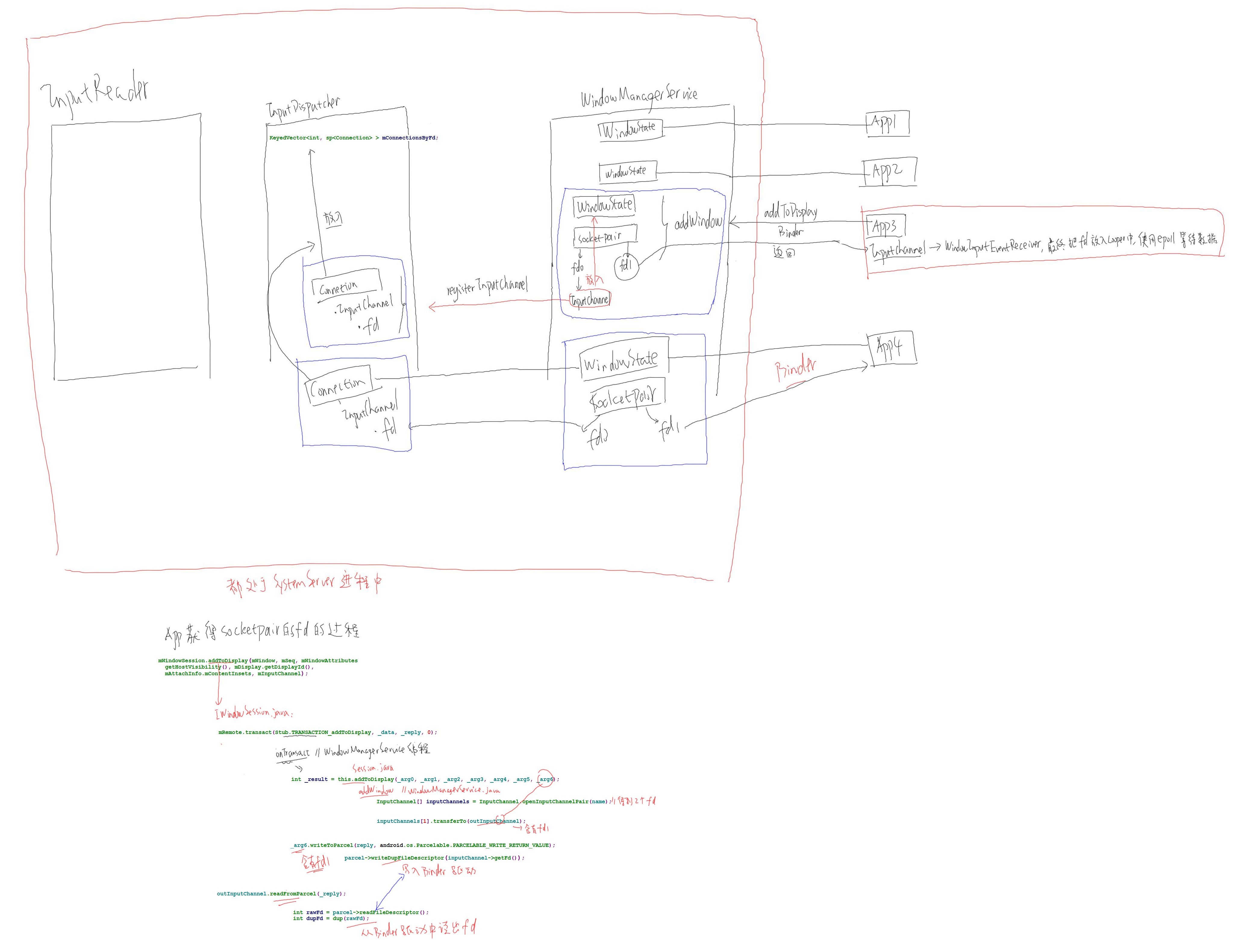
对于每个APP在WindowManagerService中都有个WindowState与之对应,当新建一个APP的时候通过binder系统调用addToDisplay把自己告诉给WindowManagerService,同时会导致addWindow被调用,其会创建WindowState来表示这个应用程序,并创建一个socketpair得到两个文件句柄fd0和fd1,同时把fd1返回给应用程序,把fd0封装成Inputchannel,这个Inputchannel会放入到WindowState中,也会通过registerInputchannel注册给InputDispatcher,在InputDispatcher中会根据Inputchannel来构造一个Connection,把这个创建出来的Connection放入KeyedVector(KeyedVector<int,sp<Connection>> mConnectionsByFd),这个InputDispatcher得到数据后放入某个Connection.Inputchannel.fd0中,APP端从fd1取得数据;APP在收到返回的fd1后,把其封装成Inputchannel,在把其封装成WindowInputEventReceiver,最后把fd1放入Looper中,使用epoll来查询等待。
对于每个能接受输入事件的应用程序,其在InputDispatcher中都有对应的connection,InputDispatcher需要把数据发送给应用程序的时候,需要找出当前在屏幕最前面的是哪个应用程序,然后找到他的connection,把数据输入他的fd就可以
InputReader线程、InputDispatcher线程、WindowManagerService线程都属于SystemServer进程中,线程可以直接通讯,不需要binder
应用程序调用:
handleResumeActivity
ViewManager wm =a.getWindowManager()//这个WindowManager和上面说的WindowManagerService不是一个东西
wm.addView(decor,l);
mGlobal.addView()
root = new ViewRootlmpl()
root.setView()
mWindowSession.addToDisplay(...,mInputChannel)//该函数是分界线,下面的内容是在WindowManagerService线程中执行,前面的都是在应用程序中执行的,mWindowSession是一个远程服务的引用,mInputChannel包含有返回的文件句柄fd1
mRemote.transact(Stub.TRANSACTION_addToDisplay,...)
onTransact
addToDisplay
addWindow
InputChannel[] inputChannels = InputChannel.openInputChannelPair(name)//得到fd0和fd1
nativeOpenInputChannelPair
android_view_InputChannel_nativeOpenInputChannelPair
openInputChannelPair
socketpair
win.setInputChannel(inputChannels[0])
inputChannels[1].transferTo(outInputChannel)
mInputManager.registerInputChannel //把inputChannels[1]告诉InputDispatcher,WindowManagerService与InputDispatcher同属一个进程,所有可以直接调用
nativeRegisterInputChannel
im->registerInputChannel
registerInputChannel
connection = new Connection(inputChannel,inputWindowHandle,monitor)
int fd = inputChannel->getFd()
mConnectionByFd.add(fd,connection);
mLooker->addFd(fd,0,ALOOPER_EVENT_INPUT,....)
_arg6.writeToParcel
parcel->writeDupFileDescriptor(inputChannel->getFd())//把fd1写入binder驱动
outInputChannel.readFromParcel(_reply)
int rawFd = parcel->readFileDescriptor();//binder驱动中读到fd1
int dupFd = dup(rawFd);
InputChannel* inputChannel = new InputChannel(name, dupFd);
NativeInputChannel* nativeInputChannel = new NativeInputChannel(inputChannel);
android_view_InputChannel_setNativeInputChannel(env, obj, nativeInputChannel);
mInputEventReceiver = new WindowInputEventReceiver()
InputEventReceiver
nativeInit
receiver = new NativeInputEventReceiver
receiver->initialize()
setFdEvents
mMessageQueue->getLooper()->addFd(fd,0,events,this,NULL)
13. 输入系统_Dispatcher线程_分发dispatch
dispatch线程中有mConnectionsByFd,其中有一些列的connection,connection中有inputchannel.fd0,通过socketpair与APP的fd1通讯
分发的步骤(具体情景分析见uml图中的dispatch_input_event)
(1)查找目标
向WindowManagerService查询当前Window获得对应的Connection
(2)把输入事件放入Connection的队列outboundQueue
(3)从队列中取出事件构造为InputMessage发送
10.9 android输入系统_APP跟输入系统建立联系和Dispatcher线程_分发dispatch的更多相关文章
- Android系统--输入系统(十七)Dispatcher线程_分发dispatch
Android系统--输入系统(十七)Dispatcher线程_分发dispatch 1. 回顾 InputRead线程从输入设备当中得到输入事件 对于读到输入事件稍作处理,比如紧急事件,来电时候按下 ...
- 10.4 android输入系统_框架、编写一个万能模拟输入驱动程序、reader/dispatcher线程启动过程源码分析
1. 输入系统框架 android输入系统官方文档 // 需FQhttp://source.android.com/devices/input/index.html <深入理解Android 卷 ...
- 10.13 android输入系统_多点触摸驱动理论与框架
1.多点触摸驱动理论 驱动程序仅上报多个触点的位置就可以,是放大还是缩小由应用程序控制 对于多点触摸驱动在linux系统中有个输入子系统,其已经实现了open/read/write等接口 我们只需要实 ...
- 10.7 android输入系统_Dispatcher线程情景分析_Reader线程传递事件和dispatch前处理
android输入系统C++最上层文件是com_android_serve_input_InputManagerService.cpp global key:按下按键,启动某个APP可以自己指定,修改 ...
- 10.6 android输入系统_Dispatcher线程_总体框架
图解Android - Android GUI 系统 (5) - Android的Event Input System - 漫天尘沙 - 博客园.htm // 关注里面的Dispatcher处理流程h ...
- 10.5 android输入系统_Reader线程_使用EventHub读取事件和核心类及配置文件_实验_分析
4. Reader线程_使用EventHub读取事件 使用inotify监测/dev/input下文件的创建和删除 使用epoll监测有无数据上报 细节: a.fd1 = inotify_init(& ...
- Android底层开发之Linux输入子系统要不要推断系统休眠状态上报键值
Android底层开发之Linux输入子系统要不要推断系统休眠状态上报键值 题外话:一个问题研究到最后,那边记录文档的前半部分基本上都是没用的,甚至是错误的. 重点在最后,前边不过一些假想猜測. ht ...
- Android系统--输入系统(八)Reader线程_使用EventHub读取事件
Android系统--输入系统(八)Reader线程_使用EventHub读取事件 1. Reader线程工作流程 获得事件 size_t count = mEventHub->getEvent ...
- Android系统--输入系统(九)Reader线程_核心类及配置文件
Android系统--输入系统(九)Reader线程_核心类及配置文件 1. Reader线程核心类--EventHub 1.1 Reader线程核心结构体 实例化对象:mEventHub--表示多个 ...
随机推荐
- 第一个ASP.NET
1.新建 2.发布 3.访问
- CentOS6.5下的Nagios安装配置详解(图文)
最近因为,科研需要,接触上了Nagios,这里,我将安装笔记做个详解.为自己后续需要和博友们学习! VMware workstation 11 的下载 VMWare Workstation 11的安装 ...
- Spark存储体系
作为分布式应用,Spark的数据存储在不同机器上.这就涉及到数据的传输,元数据的管理等内容.而且由于Spark可以利用内存和磁盘作为存储介质,这还涉及到了内存和磁盘的数据管理. Spark存储体系架构 ...
- python 中文文档地址总结
sqlalchemy: https://www.imooc.com/article/details/id/22343
- WPF通用框架 数据库结构
前言 由於技術轉型, 目前大部分工作都是WPF為主, 但是趨於如今想在網絡上找一套能夠滿意的WPF權限管理框架太難, 因為WinForm那時候是有一套改寫過的權限框架, 所以數據庫設計這塊已經有了一個 ...
- POJ——T 3461 Oulipo
http://poj.org/problem?id=3461 Time Limit: 1000MS Memory Limit: 65536K Total Submissions: 42698 ...
- 平衡树之RB-tree
#include <memory> template<class T> struct rb_node { T key; bool color;//true red | fals ...
- nyist oj 1058 部分和问题 (DFS搜索)
部分和问题 时间限制:1000 ms | 内存限制:65535 KB 难度:2 描写叙述 给定整数a1.a2........an.推断能否够从中选出若干数,使它们的和恰好为K. 输入 首先,n和k ...
- 【Android Studio探索之路系列】之六:Android Studio加入依赖
作者:郭孝星 微博:郭孝星的新浪微博 邮箱:allenwells@163.com 博客:http://blog.csdn.net/allenwells github:https://github.co ...
- 2.2 Consumer API官网剖析(博主推荐)
不多说,直接上干货! 一切来源于官网 http://kafka.apache.org/documentation/ 2.2 Consumer API 2.2.消费者API 随着0..0版本,我们已经增 ...