
crossplaform---Nodejs in Visual Studio Code 04.Swig模版
1.开始
设置Node_Global:npm config set prefix "C:\Program Files\nodejs"
Express组件:npm install express -g(全局安装)
Express-Generator:npm install express-generator -g(全局安装)
如果没有设置global可能导致express命令在cmd里面无法执行
我接触过3个模版jade,ejs,swig,最后选择了swig
jade :是express的默认View模版,jade的功能强大(模版继承、判断、循环、变量等),然而风格我忍不了,放出来感受一下;
|
1
2
3
4
5
|
extends layoutblock content h1= title p Welcome to #{title} |
ejs : 看起来像是html了,风格我喜欢,但是里面把模版要素和js混用看着很纠结,如果写到后面很难维护 ,最重要的是功能没有jade那么多,弃用原因2是不支持模版继承;
|
1
2
3
4
5
6
7
|
<% if (names.length) { %> <ul> <% names.forEach(function(name){ %> <li foo='<%= name + "'" %>'><%= name %></li> <% }) %> </ul> <% } %> |
swig :缺点是搜索结果比ejs、jade少很多,然而支持继承,功能比ejs强大,又是html风格的,没有和js混用的缺点,棒棒哒;
|
1
2
3
4
5
6
7
8
9
10
11
12
13
14
|
<!doctype html><html><head> <meta charset="utf-8"> <title>{% block title %}My Site{% endblock %}</title> {% block head %} <link rel="stylesheet" href="main.css"> {% endblock %}</head><body> {% block content %}{% endblock %}</body></html> |
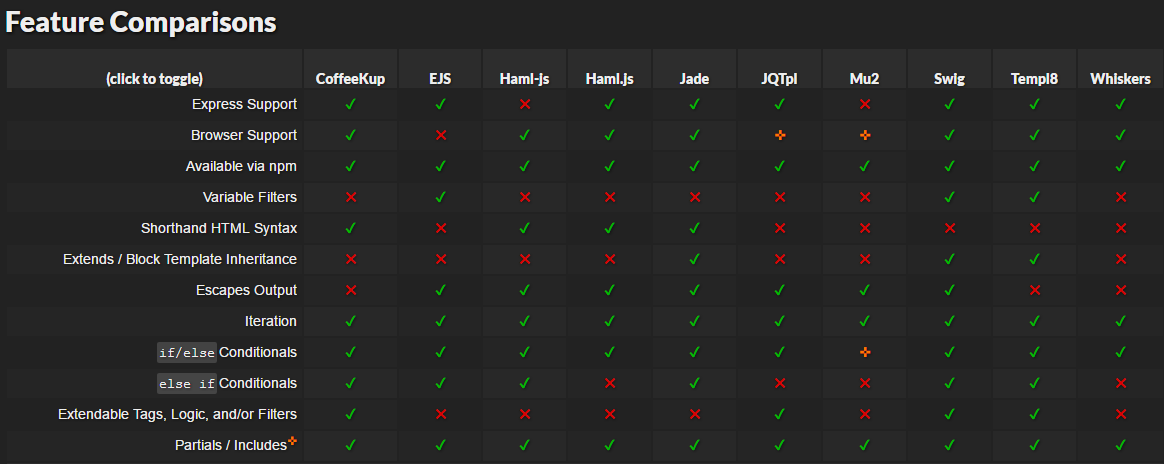
注:上表Swig最强参考 http://paularmstrong.github.io/node-templates/
2.改造Express默认模版使用swig作为ViewEngine
打开CMD使用命令新建一个Express Example
|
1
2
3
4
5
6
7
8
9
10
11
|
$ cd D:\Libraries\Documents\Visual Studio Code$ express myapp create : myappcreate : myapp/package.json...... install dependencies:> cd myapp && npm installrun the app:> SET DEBUG=myapp:* & npm start |
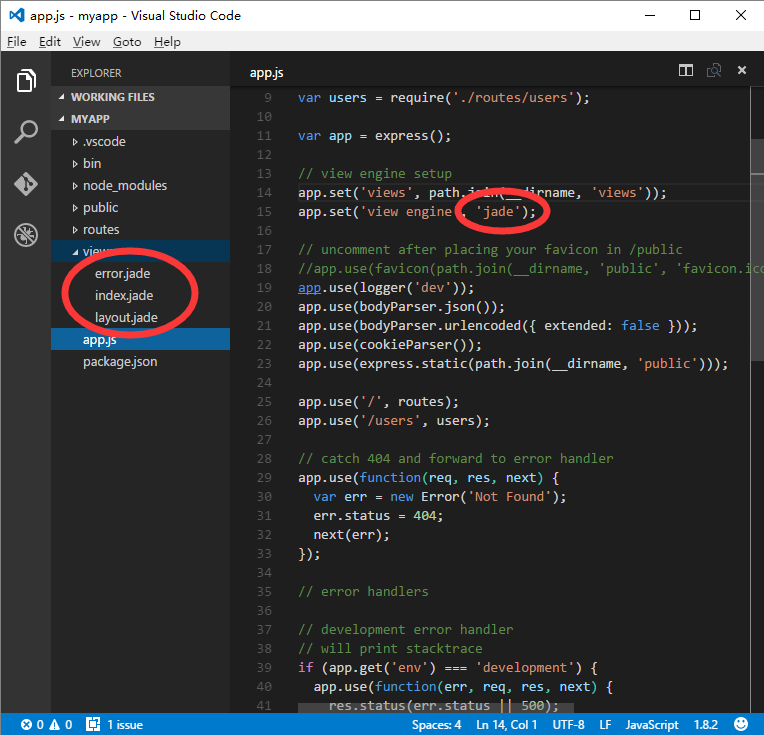
修改package.json文件,将jade替换为swig
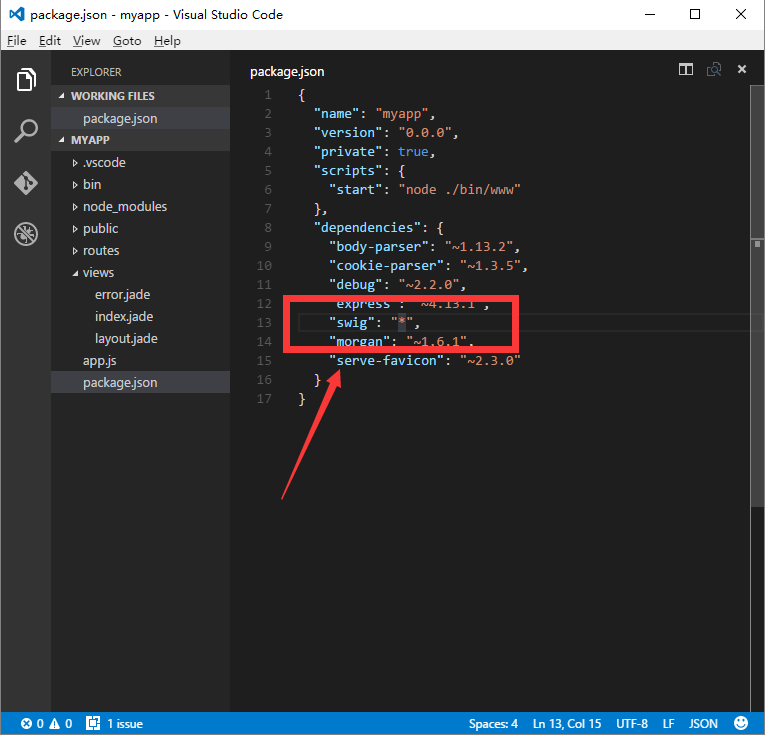
修改app.js将jade viewengine替换为swig viewengine
修改后:swig ViewEngine
|
1
2
3
4
5
6
7
8
9
10
11
12
13
14
15
16
17
18
|
var express = require('express');var path = require('path');var favicon = require('serve-favicon');var logger = require('morgan');var cookieParser = require('cookie-parser');var bodyParser = require('body-parser');//add swig requiredvar swig = require('swig');var routes = require('./routes/index');var users = require('./routes/users');var app = express();// view engine setup -swigapp.set('views', path.join(__dirname, 'views'));app.set('view engine', 'tpl');app.engine('tpl', swig.renderFile); |
修改view/layout.jade ,更名为view/layout.tpl
修改后layout.html
|
1
2
3
4
5
6
7
8
9
10
11
12
13
|
<!DOCTYPE html><html><head> <title>{% block title %} {% endblock %}</title> <link rel="stylesheet" href="/stylesheets/style.css"></head><body> {% block content %} {% endblock %}</body></html> |
修改view/index.jade,更名为view/index.tpl
修改后index.tpl
|
1
2
3
4
5
6
7
8
|
{% extends 'layout.tpl' %}{% block title %}{{ title }}{% endblock %}{% block content %} <h1>{{ title }}</h1> <p>Welcome to {{ title }}</p>{% endblock %} |
修改view/error.jade,更名为view/error.tpl
修改后error.tpl
|
1
2
3
4
5
6
7
8
9
10
11
12
13
14
15
16
|
{% extends 'layout.tpl' %}{% block title %}{% endblock %}{% block content %} <div class="container"> <h1>{{ message }}</h1> <h2>{{ error.status }}</h2> <pre>{{ error.stack }}</pre> </div>{% endblock %} |
修改routes/index.js
|
1
2
3
4
5
6
7
8
9
|
var express = require('express');var router = express.Router();/* GET home page. */router.get('/', function(req, res, next) { res.render('index', { title: 'Swig Express' });});module.exports = router; |
修改完成,打开CMD运行项目
|
1
2
3
4
5
6
7
8
|
$ npm installswig@1.4.2 node_modules\swig├── optimist@0.6.1 (wordwrap@0.0.3, minimist@0.0.10)└── uglify-js@2.4.24 (uglify-to-browserify@1.0.2, async@0.2.10, yargs@3.5.4, source-map@0.1.34)$ npm start> myapp@0.0.0 start d:\Libraries\Documents\Visual Studio Code\myapp> node ./bin/www |
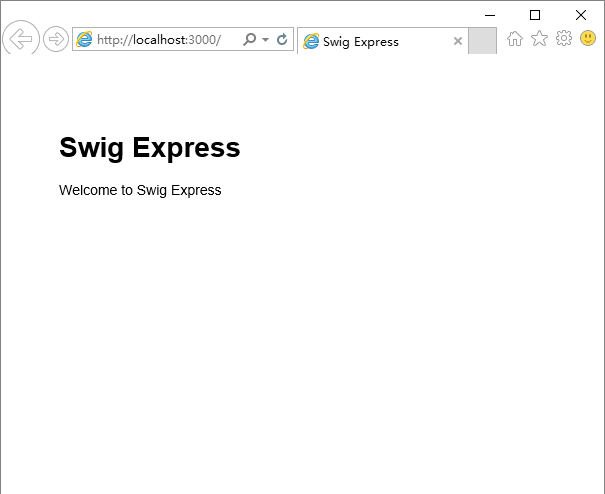
源代码:https://github.com/Mengkzhaoyun/nodepractise
http://www.cnblogs.com/mengkzhaoyun/p/5356138.html
crossplaform---Nodejs in Visual Studio Code 04.Swig模版的更多相关文章
- Nodejs in Visual Studio Code 04.Swig模版
1.开始 设置Node_Global:npm config set prefix "C:\Program Files\nodejs" Express组件:npm install e ...
- Nodejs in Visual Studio Code 05.Swig+Bootstrap
1. 开始 准备好Express+Swig的练习代码:https://github.com/Mengkzhaoyun/nodepractise 准备好AdminLTE后台管理模版:https://ww ...
- Nodejs in Visual Studio Code 11.前端工程优化
1.开始 随着互联网技术的发展,企业应用里到处都是B/S设计,我有幸经历了很多项目有Asp.Net的,有Html/js的,有Silverlight的,有Flex的.很遗憾这些项目很少关注前端优化的问题 ...
- Nodejs in Visual Studio Code 10.IISNode
1.开始 Nodejs in Visual Studio Code 08.IIS : http://www.cnblogs.com/mengkzhaoyun/p/5410185.html 参考此篇内容 ...
- Nodejs in Visual Studio Code 14.IISNode与IIS7.x
1.开始 部署IISNode环境请参考:Nodejs in Visual Studio Code 08.IIS 部署Nodejs程序请参考:Nodejs in Visual Studio Code 1 ...
- Nodejs in Visual Studio Code 01.简单介绍Nodejs
1.开始 作者自己:开发人员,Asp.Net , html / js , restful , memcached , oracle ,windows , iis 目标读者:供自己以后回顾 2.我看No ...
- Nodejs in Visual Studio Code 07.学习Oracle
1.开始 Node.js:https://nodejs.org OracleDB: https://github.com/oracle/node-oracledb/blob/master/INSTAL ...
- crossplatform---Nodejs in Visual Studio Code 05.Swig+Bootstrap
1. 开始 准备好Express+Swig的练习代码:https://github.com/Mengkzhaoyun/nodepractise 准备好AdminLTE后台管理模版:https://ww ...
- Nodejs in Visual Studio Code 06.新建Module
1.开始 Node.js:https://nodejs.org 2.Moudle js编程中,由于大家可以直接在全局作用域中编写代码,使开发人员可以很容易的新建一个全局变量或这全局模块,这些全局变量或 ...
随机推荐
- [Angular2] Build reuseable template with ngTemplateOutlet
We can build a template, use this template and pass in different context to make it reuseable: <t ...
- Qt 使用qDebug() 打印Qlist 容器数据(将QDebug()定义成某个类的友元函数)
当QList<T>容器中的数据用qDebug() 打印时 ,假如 T 是内置类型(int float ...)与 打印一个字符串使用完全一样,假如T 是一个CustomerClass 那 ...
- [Angular2 Router] Guard: CanLoad
'canLoad' guard can decide whether a lazy load module can be loaded or not. @Injectable() export cla ...
- HTTP协议和HTTPS协议初探
概况 HTTP是hypertext transfer protocol(超文本传输协议)的简写.它是TCP/IP协议的一个应用层协议,用于定义WEB浏览器与WEBserver之间交换数据的过程. HT ...
- pandas 学习(五)—— datetime(日期)
date range pd.date_range('2014-11-19', '2014-11-21', freq='D') # 起始时间,终止时间,时间间隔,也即步长,D ⇒ Day,5H:以 5 ...
- [Ramda] Compose lenses
We can compose lenses to get value: const addrs = [{street: '99 Walnut Dr.', zip: '04821'}, {street: ...
- Django之settings.py 的media路径设置
在一个 models 中使用 FileField 或 ImageField 需要以下步骤: 1. 在你的 settings.py文件中, 定义一个完整路径给MEDIA_ROOT 以便让 Django在 ...
- Request对象和Response对象详解
Request 1.获取请求的基本信息 1>获取请求的url和uri 2>获取url后面的请求参数部分的字符串 3>获取请求方式 4>获取主机名,IP地址 5>获取 Co ...
- HDU 5072 Coprime (单色三角形+容斥原理)
题目链接:Coprime pid=5072"> 题面: Coprime Time Limit: 2000/1000 MS (Java/Others) Memory Limit: ...
- STL map 按key值和按value值排序
map是用来存放<key, value>键值对的数据结构,能够非常方便高速的依据key查到对应的value. 假如存储水果和其单位价格.我们用map来进行存储就是个不错的选择. 我们这样定 ...