
crossplaform---Nodejs in Visual Studio Code 04.Swig模版
1.开始
设置Node_Global:npm config set prefix "C:\Program Files\nodejs"
Express组件:npm install express -g(全局安装)
Express-Generator:npm install express-generator -g(全局安装)
如果没有设置global可能导致express命令在cmd里面无法执行
我接触过3个模版jade,ejs,swig,最后选择了swig
jade :是express的默认View模版,jade的功能强大(模版继承、判断、循环、变量等),然而风格我忍不了,放出来感受一下;
|
1
2
3
4
5
|
extends layoutblock content h1= title p Welcome to #{title} |
ejs : 看起来像是html了,风格我喜欢,但是里面把模版要素和js混用看着很纠结,如果写到后面很难维护 ,最重要的是功能没有jade那么多,弃用原因2是不支持模版继承;
|
1
2
3
4
5
6
7
|
<% if (names.length) { %> <ul> <% names.forEach(function(name){ %> <li foo='<%= name + "'" %>'><%= name %></li> <% }) %> </ul> <% } %> |
swig :缺点是搜索结果比ejs、jade少很多,然而支持继承,功能比ejs强大,又是html风格的,没有和js混用的缺点,棒棒哒;
|
1
2
3
4
5
6
7
8
9
10
11
12
13
14
|
<!doctype html><html><head> <meta charset="utf-8"> <title>{% block title %}My Site{% endblock %}</title> {% block head %} <link rel="stylesheet" href="main.css"> {% endblock %}</head><body> {% block content %}{% endblock %}</body></html> |
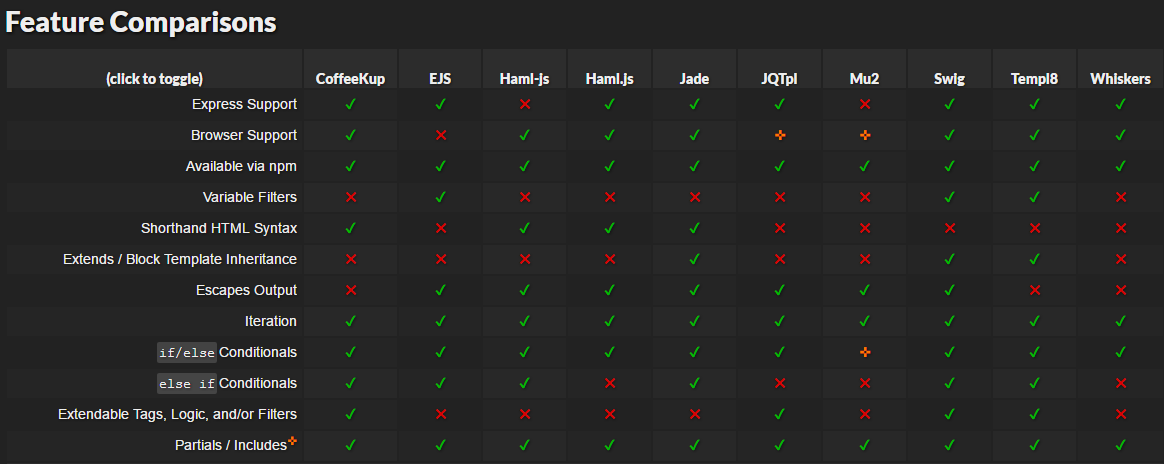
注:上表Swig最强参考 http://paularmstrong.github.io/node-templates/
2.改造Express默认模版使用swig作为ViewEngine
打开CMD使用命令新建一个Express Example
|
1
2
3
4
5
6
7
8
9
10
11
|
$ cd D:\Libraries\Documents\Visual Studio Code$ express myapp create : myappcreate : myapp/package.json...... install dependencies:> cd myapp && npm installrun the app:> SET DEBUG=myapp:* & npm start |
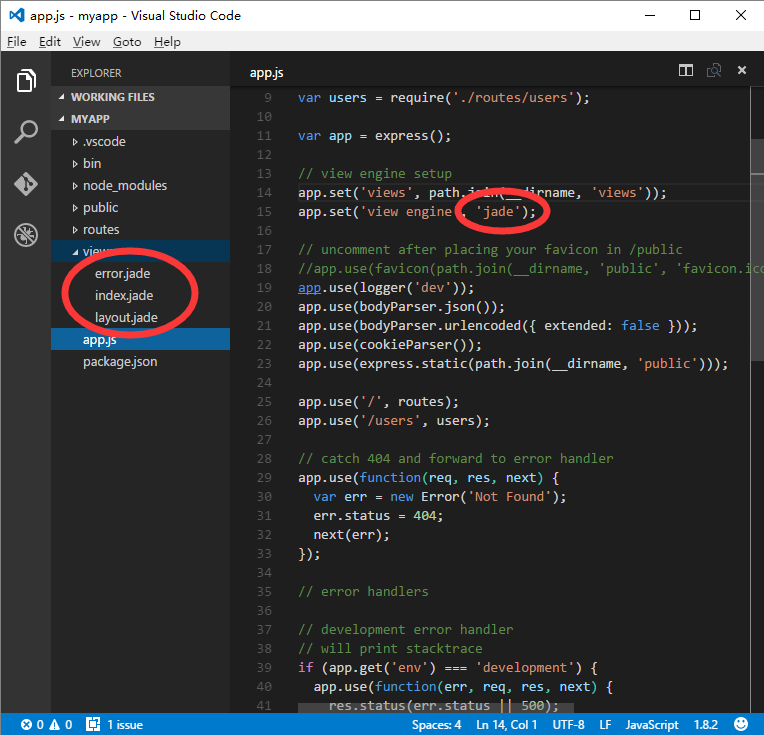
修改package.json文件,将jade替换为swig
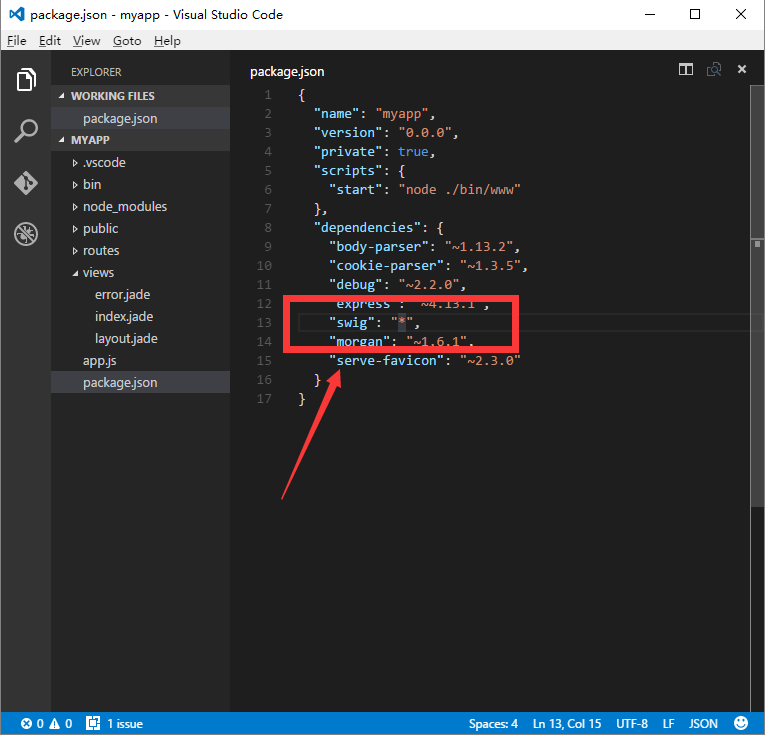
修改app.js将jade viewengine替换为swig viewengine
修改后:swig ViewEngine
|
1
2
3
4
5
6
7
8
9
10
11
12
13
14
15
16
17
18
|
var express = require('express');var path = require('path');var favicon = require('serve-favicon');var logger = require('morgan');var cookieParser = require('cookie-parser');var bodyParser = require('body-parser');//add swig requiredvar swig = require('swig');var routes = require('./routes/index');var users = require('./routes/users');var app = express();// view engine setup -swigapp.set('views', path.join(__dirname, 'views'));app.set('view engine', 'tpl');app.engine('tpl', swig.renderFile); |
修改view/layout.jade ,更名为view/layout.tpl
修改后layout.html
|
1
2
3
4
5
6
7
8
9
10
11
12
13
|
<!DOCTYPE html><html><head> <title>{% block title %} {% endblock %}</title> <link rel="stylesheet" href="/stylesheets/style.css"></head><body> {% block content %} {% endblock %}</body></html> |
修改view/index.jade,更名为view/index.tpl
修改后index.tpl
|
1
2
3
4
5
6
7
8
|
{% extends 'layout.tpl' %}{% block title %}{{ title }}{% endblock %}{% block content %} <h1>{{ title }}</h1> <p>Welcome to {{ title }}</p>{% endblock %} |
修改view/error.jade,更名为view/error.tpl
修改后error.tpl
|
1
2
3
4
5
6
7
8
9
10
11
12
13
14
15
16
|
{% extends 'layout.tpl' %}{% block title %}{% endblock %}{% block content %} <div class="container"> <h1>{{ message }}</h1> <h2>{{ error.status }}</h2> <pre>{{ error.stack }}</pre> </div>{% endblock %} |
修改routes/index.js
|
1
2
3
4
5
6
7
8
9
|
var express = require('express');var router = express.Router();/* GET home page. */router.get('/', function(req, res, next) { res.render('index', { title: 'Swig Express' });});module.exports = router; |
修改完成,打开CMD运行项目
|
1
2
3
4
5
6
7
8
|
$ npm installswig@1.4.2 node_modules\swig├── optimist@0.6.1 (wordwrap@0.0.3, minimist@0.0.10)└── uglify-js@2.4.24 (uglify-to-browserify@1.0.2, async@0.2.10, yargs@3.5.4, source-map@0.1.34)$ npm start> myapp@0.0.0 start d:\Libraries\Documents\Visual Studio Code\myapp> node ./bin/www |
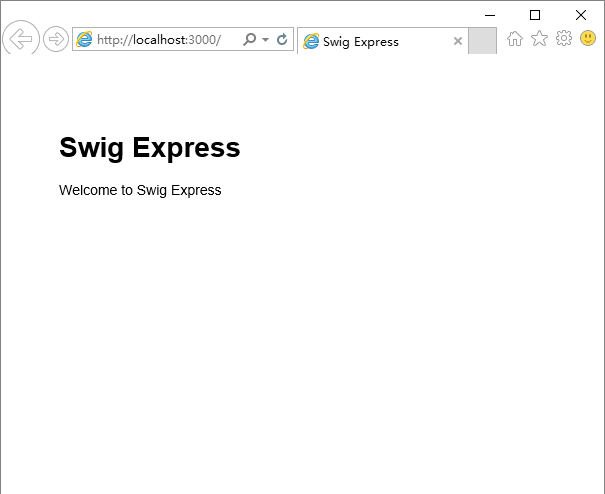
源代码:https://github.com/Mengkzhaoyun/nodepractise
http://www.cnblogs.com/mengkzhaoyun/p/5356138.html
crossplaform---Nodejs in Visual Studio Code 04.Swig模版的更多相关文章
- Nodejs in Visual Studio Code 04.Swig模版
1.开始 设置Node_Global:npm config set prefix "C:\Program Files\nodejs" Express组件:npm install e ...
- Nodejs in Visual Studio Code 05.Swig+Bootstrap
1. 开始 准备好Express+Swig的练习代码:https://github.com/Mengkzhaoyun/nodepractise 准备好AdminLTE后台管理模版:https://ww ...
- Nodejs in Visual Studio Code 11.前端工程优化
1.开始 随着互联网技术的发展,企业应用里到处都是B/S设计,我有幸经历了很多项目有Asp.Net的,有Html/js的,有Silverlight的,有Flex的.很遗憾这些项目很少关注前端优化的问题 ...
- Nodejs in Visual Studio Code 10.IISNode
1.开始 Nodejs in Visual Studio Code 08.IIS : http://www.cnblogs.com/mengkzhaoyun/p/5410185.html 参考此篇内容 ...
- Nodejs in Visual Studio Code 14.IISNode与IIS7.x
1.开始 部署IISNode环境请参考:Nodejs in Visual Studio Code 08.IIS 部署Nodejs程序请参考:Nodejs in Visual Studio Code 1 ...
- Nodejs in Visual Studio Code 01.简单介绍Nodejs
1.开始 作者自己:开发人员,Asp.Net , html / js , restful , memcached , oracle ,windows , iis 目标读者:供自己以后回顾 2.我看No ...
- Nodejs in Visual Studio Code 07.学习Oracle
1.开始 Node.js:https://nodejs.org OracleDB: https://github.com/oracle/node-oracledb/blob/master/INSTAL ...
- crossplatform---Nodejs in Visual Studio Code 05.Swig+Bootstrap
1. 开始 准备好Express+Swig的练习代码:https://github.com/Mengkzhaoyun/nodepractise 准备好AdminLTE后台管理模版:https://ww ...
- Nodejs in Visual Studio Code 06.新建Module
1.开始 Node.js:https://nodejs.org 2.Moudle js编程中,由于大家可以直接在全局作用域中编写代码,使开发人员可以很容易的新建一个全局变量或这全局模块,这些全局变量或 ...
随机推荐
- PatentTips - Modified buddy system memory allocation
BACKGROUND Memory allocation systems assign blocks of memory on request. A memory allocation system ...
- error: { "$err" : "not master and slaveOk=false", "code" : 13435 }
rsguo:SECONDARY> db.users.find();error: { "$err" : "not master and slaveOk=false&q ...
- 【29.27%】【hdu 5908】Abelian Period
Time Limit: 2000/1000 MS (Java/Others) Memory Limit: 262144/131072 K (Java/Others) 问题描述 设SS是一个数字串,定义 ...
- Mariadb配置文件优化参数(仅供参考)
[client]#password= your_passwordport= 3306 socket= /tmp/mysql.sock!includedir /opt/local/mys ...
- GitHub项目协作基本步骤 分类: C_OHTERS 2013-09-23 21:31 690人阅读 评论(0) 收藏
1.查找某个项目,然后Fork 2.打开GitHub For Windows,发现刚才Fork的项目 3.对着项目点击Clone,将之复制至本地 4.使用Eclipse等进行开发,如新增一个文件 5. ...
- C#生成6位随机验证码
private string VerifyCode() { Random random = new Random(); , ).ToString(); }
- springMVC返回json数据乱码问题及@RequestMapping 详解
原文地址:https://blog.csdn.net/u010127245/article/details/51774074 一.@RequestMapping RequestMapping是一个用来 ...
- php课程 6-24 字符串函数有哪些(复习)
php课程 6-24 字符串函数有哪些(复习) 一.总结 一句话总结: 二.php课程 6-24 字符串函数有哪些(复习) 上次复习:--------------------------------- ...
- 【codeforces 750F】New Year and Finding Roots
time limit per test2 seconds memory limit per test256 megabytes inputstandard input outputstandard o ...
- 数字图像处理原理与实践(MATLAB版)勘误表
本文系<数字图像处理原理与实践(MATLAB版)>一书的勘误表. [内容简单介绍]本书全面系统地介绍了数字图像处理技术的理论与方法,内容涉及几何变换.灰度变换.图像增强.图像切割.图像去噪 ...