
vue ssr 项目改造经历
vue ssr 项目改造经历
由于工作项目需求,需要将原有的项目改造,vue ssr 没有用到nuxt,因为vue ssr更利于seo,没办法,一个小白的改造经历,
首先说明一下,小白可以借鉴,高手也可以点评一下,因为,我写的不一定准确,只是针对我的项目。
下面先说一下大致:
原有项目有用到element,在改造ssr过程中,是很坑的。如果可以的话,还是强烈建议你重新改写成nuxt项目。由于我是小白,所以开始时候备份了一下项目,然后开始网上查找相关文章。
1.首先是这位大神的文章https://segmentfault.com/a/1190000012440041,笔名 右三。
2.然后是https://www.cnblogs.com/xiaohuochai/p/9158675.html,一个小火柴项目的改造过程。
3.https://segmentfault.com/a/1190000016637877 ,五步学会基础。
我列举他们三个,是因为,刚开始以为项目直接改改代码就可以,于是按照他们所说改写,发现,处处是坑,总之,他们的说法并不适合我的项目,于是苦思冥想,去看官网,再结合他们文章,开始大刀阔斧改造。
请您备份好:
先上一张原有项目图纸,就是普通的cli2构造出来的,其中theme是element主题,可不用理会。
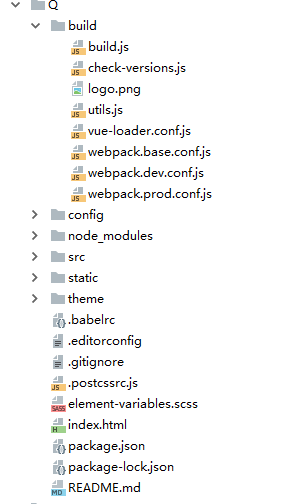
接下来开始改造:
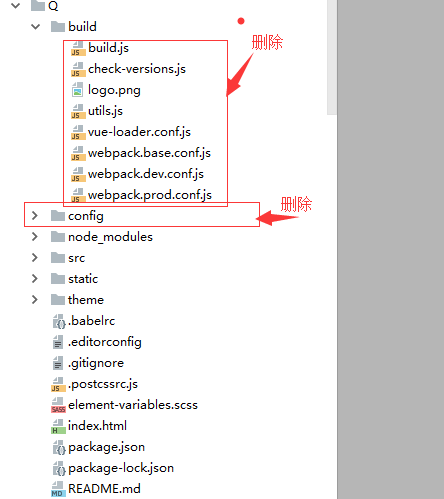
是不是不可思议,不敢整的,可以看文末怎么解决的一些坑。我接着分析
删除完以后,在build里添加四个文件:
1. setup-dev-server.js
const path = require('path')
const webpack = require('webpack')
const MFS = require('memory-fs')
const clientConfig = require('./webpack.client.config')
const serverConfig = require('./webpack.server.config')

module.exports = function setupDevServer (app, cb) {
  let bundle
  let template

  // 修改客户端配置添加 热更新中间件
  clientConfig.entry.app = ['webpack-hot-middleware/client', clientConfig.entry.app]
  clientConfig.output.filename = '[name].js'
  clientConfig.plugins.push(
    new webpack.HotModuleReplacementPlugin(),
    new webpack.NoEmitOnErrorsPlugin()
  )

  const clientCompiler = webpack(clientConfig) // 执行webpack
  const devMiddleware = require('webpack-dev-middleware')(clientCompiler, {
    publicPath: clientConfig.output.publicPath,
    stats: {
      colors: true,
      chunks: false
    }
  })
  app.use(devMiddleware)

  clientCompiler.plugin('done', () => {
    const fs = devMiddleware.fileSystem
    // 模板为打包后的html文件
    const filePath = path.join(clientConfig.output.path, 'index.html')
    if (fs.existsSync(filePath)) {
      template = fs.readFileSync(filePath, 'utf-8')
      console.log("执行4")
      if (bundle) {
        console.log("执行1")
        cb(bundle, template)
      }
    }
  })

  app.use(require('webpack-hot-middleware')(clientCompiler))
  // 监听 server renderer
  const serverCompiler = webpack(serverConfig)
  const mfs = new MFS() // 内存文件系统,在JavaScript对象中保存数据。
  serverCompiler.outputFileSystem = mfs
  serverCompiler.watch({}, (err, stats) => {
    if (err) throw err
    stats = stats.toJson()
    stats.errors.forEach(err => console.error(err))
    stats.warnings.forEach(err => console.warn(err))
    // 读取使用vue-ssr-webpack-plugin生成的bundle(vue-ssr-bundle.json)
    const bundlePath = path.join(serverConfig.output.path, 'vue-ssr-bundle.json')
    bundle = JSON.parse(mfs.readFileSync(bundlePath, 'utf-8'))
    console.log("执行3")
    if (template) {
      console.log("执行2")
      cb(bundle, template)
    }
  })
}
2. webpack.base.config.js
const path = require('path')
const ExtractTextPlugin = require('extract-text-webpack-plugin')
const extractCSS = new ExtractTextPlugin('stylesheets/[name]-one.css');

// 这样我们在开发过程中仍然可以热重载,CSS 提取应该只用于生产环境
const isProduction = process.env.NODE_ENV === 'production'

module.exports = {
  devtool: '#source-map',
  entry: {
    app: './src/entry-client.js',
    //app: ["babel-polyfill", "./src/entry-client.js"],///解决ie关键
    vendor: [
      'vue',
      'vue-router',
      'vuex'
    ]
  },
  output: {
    path: path.resolve(__dirname, '../dist'),
    publicPath: '/dist/',
    filename: '[name].[chunkhash].js'
  },
  resolve: {
    alias: {
      'static': path.resolve(__dirname, '../static'),
      // '@': path.resolve('src'),
    }
  },
  module: {
    noParse: /es6-promise\.js$/, // avoid webpack shimming process
    rules: [
      {
        test: /\.vue$/,
        loader: 'vue-loader',
        options: {
          extractCSS: isProduction,
          preserveWhitespace: false,
          postcss: [
            require('autoprefixer')({
              browsers: ['last 3 versions']
            })
          ]
        }
      },

      {
        test: /\.js$/,
        loader: 'buble-loader',
        exclude: /node_modules/,
        options: {
          objectAssign: 'Object.assign'
        }
      },
      {
        test: /\.(png|jpg|gif|svg)$/,
        loader: 'url-loader',
        options: {
          limit: 10000,
          name: '[name].[ext]?[hash]'
        }
      },
      {
        test: /\.(woff2?|eot|ttf|otf)(\?.*)?$/,
        loader: 'url-loader',
        query: {
          limit: 10000,
          name: 'fonts/[name].[hash:7].[ext]'
        }
      },
      {
        test: /\.css$/,
        use: isProduction
          ? ExtractTextPlugin.extract({
            use: 'css-loader',
            fallback: 'vue-style-loader'
          })
          : ['vue-style-loader', 'css-loader']
      }
    ]
  },
  plugins: isProduction
    // 确保添加了此插件!
    ? [new ExtractTextPlugin({ filename: 'common.[chunkhash].css' })]
    : [],
  performance: {
    hints: process.env.NODE_ENV === 'production' ? 'warning' : false,
    maxAssetSize: 30000000, // 整数类型(以字节为单位)
    maxEntrypointSize: 50000000, // 整数类型(以字节为单位)
    assetFilter: function(assetFilename) {
      // 提供资源文件名的断言函数
      return assetFilename.endsWith('.css') || assetFilename.endsWith('.js');
    }

  }
}
3. webpack.client.config.js
const webpack = require('webpack')
const merge = require('webpack-merge')
const base = require('./webpack.base.config')
const HTMLPlugin = require('html-webpack-plugin')
const SWPrecachePlugin = require('sw-precache-webpack-plugin')

const config = merge(base, {
  plugins: [
    // 全局变量
    new webpack.DefinePlugin({
      'process.env.NODE_ENV': JSON.stringify(process.env.NODE_ENV || 'development'),
      'process.env.VUE_ENV': '"client"'
    }),
    // 将依赖模块提取到 vendor chunk 以获得更好的缓存,是很常见的做法。
    new webpack.optimize.CommonsChunkPlugin({
      name: 'vendor',
      minChunks: function (module) {
        return (
          // 如果它在 node_modules 中
          /node_modules/.test(module.context) &&
          // 如果 request 是一个 CSS 文件,则无需外置化提取
          !/\.css$/.test(module.request)
        )
      }
    }),
    // 提取 webpack 运行时和 manifest
    new webpack.optimize.CommonsChunkPlugin({
      name: 'manifest'
    }),
    // html模板
    new HTMLPlugin({
      template: 'index.html'
    })
  ]
})

if (process.env.NODE_ENV === 'production') {
  config.plugins.push(
    // 生产环境下 - 压缩js
    new webpack.optimize.UglifyJsPlugin({
      compress: {
        warnings: false
      }
    }),
    // 用于使用service worker来缓存外部项目依赖项。
    new SWPrecachePlugin({
      cacheId: 'vue-hn',
      filename: 'service-worker.js',
      dontCacheBustUrlsMatching: /./,
      staticFileGlobsIgnorePatterns: [/index\.html$/, /\.map$/]
    })
  )
}

module.exports = config
4. webpack.server.config.js
const webpack = require('webpack')
const merge = require('webpack-merge')
const base = require('./webpack.base.config')
const VueSSRPlugin = require('vue-ssr-webpack-plugin')
const nodeExternals = require('webpack-node-externals')

module.exports = merge(base, {
  target: 'node',
  entry: './src/entry-server.js',
  devtool: 'source-map',
  output: {
    filename: 'server-bundle.js',
    libraryTarget: 'commonjs2'
  },

  externals: nodeExternals({
    // do not externalize CSS files in case we need to import it from a dep
    whitelist: /\.css$/,
    "jquery": "$",
    'Vue': true,
    'VueLazyload': true,
    '$': true,
    'vue-router': 'VueRouter',
    'vuex':'Vuex',
    'axios': 'axios',
    // 'element-ui':'ELEMENT',
  }),
  plugins: [
    new webpack.DefinePlugin({
      'process.env.NODE_ENV': JSON.stringify(process.env.NODE_ENV || 'development'),
      'process.env.VUE_ENV': '"server"'
    }),
    /*
    使用webpack按需代码分割的特性的时候(require.ensure或动态import)结果就是服务端bundle会包含很多分开的文件。
    'vue-ssr-webpack-plugin'作用是将其打包为一个单独的JSON文件,这个文件可以传入到bundleRenderer中(server.js),可以极大地简化了工作流。
    默认文件名为 `vue-ssr-server-bundle.json`,也可以参数形式传入其他名称
    */
    new VueSSRPlugin()
  ]
})
加完这些,大概是这样子

显然,加如这些不够。
我们还需要在根目录添加
server.js
const fs = require('fs')
const path = require('path')
const express = require('express')
const compression = require('compression') // 开启gzip压缩
const resolve = file => path.resolve(__dirname, file)

const isProd = process.env.NODE_ENV === 'production'
const serverInfo = `express/${require('express/package.json').version} ` +
  `vue-server-renderer/${require('vue-server-renderer/package.json').version}`
const app = express()
function createRenderer (bundle, template) {
  return require('vue-server-renderer').createBundleRenderer(bundle, {
    template, // 缓存
    cache: require('lru-cache')({
      max: 1000,
      maxAge: 1000 * 60 * 15
    })
  })
}
let renderer
if (isProd) {
  const bundle = require('./dist/vue-ssr-bundle.json')
  const template = fs.readFileSync(resolve('./dist/index.html'), 'utf-8')
  renderer = createRenderer(bundle, template)
} else {
  require('./build/setup-dev-server')(app, (bundle, template) => {
    renderer = createRenderer(bundle, template)
  })
}
const serve = (path, cache) => express.static(resolve(path), {
  maxAge: cache && isProd ? 60 * 60 * 24 * 30 : 0 // 静态资源设置缓存
})

app.use(compression({ threshold: 0 })) // gzip压缩
app.use('/dist', serve('./dist', true)) // 静态资源
app.use('/static', serve('./static', true)) // 静态资源 (如:http://localhost:8080/public/logo-120.png)
app.use('/manifest.json', serve('./manifest.json', true))
app.use('/service-worker.js', serve('./dist/service-worker.js'))

app.get('*', (req, res) => {
  if (!renderer) {
    return res.end('未渲染成功||wei cheng gong')
  }
  const s = Date.now()
  res.setHeader("Content-Type", "text/html")
  res.setHeader("Server", serverInfo)
  const errorHandler = err => {
    if (err && err.code === 404) {
      console.log(404)
      res.status(404).end('404 | Page Not Found')
    } else {
      res.status(500).end('500 | Internal Server Error')
      console.error(`error during render : ${req.url}`)
      console.error(err)
    }
  }

  var title = '测试-首页' // 自定义变量(此处用于title)
  var author ='Anne' // 默认author
  var keywords ='我是keywords' // 默认keywords
  var description ='我是description' //默认description
  renderer.renderToStream({title,author,keywords,description, url: req.url})

    .on('error', errorHandler)
    .on('end', () => console.log(`整体请求: ${Date.now() - s}ms`))
    .pipe(res)
})

const port = process.env.PORT || 3026

app.listen(port, () => {
  console.log(`localhost:${port}`)
})
在src目录下还有俩:
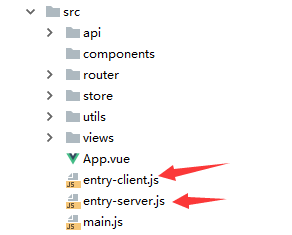
这里注意一下我的入口文件为main.js。
app.js和utils.js文件夹,可不用理会,是项目单分出来的接口文件用axio。我们获取数据接口将在vuex里面写。也就是store文件夹。
entry-client.js:
// entry-client.js 客户端渲染入口文件
import Vue from 'vue'
import { app, store, router } from './main'

/*Vue-SSR 根据访问的路由会调用当前路由组件中的asyncData方法由服务端调用相关接口,根据数据
生成首屏对应的html,并在返回的html中写入 window.__INITIAL_STATE__ = {服务端请求到的数据}
不需要服务端渲染的数据则在 mounted 中请求接口。*/

/*路由切换时组件的asyncData方法并不会被调用,若该组件存在服务端渲染方法asyncData,可通过下面
三种方式客户端调用,并进行客户端渲染*/

//(1)
// 全局mixin,beforeRouteEnter,切换路由时,调用asyncData方法拉取数据进行客户端渲染
// 注意beforeRouteEnter无法直接获取到当前组件this,需使用next((vm)=>{ vm即为this }) 获取

/*Vue.mixin({
  beforeRouteEnter (to, from, next) {
    console.log('beforeRouteEnter1')
    next((vm)=>{
        const {asyncData} = vm.$options
    console.log('beforeRouteEnter1'+ asyncData)
        if (asyncData) {
            asyncData(vm.$store, vm.$route).then(next).catch(next)
        } else {
            next()
        }
    })

  }
})*/

//(2)
// 全局mixin,beforeRouteUpdate,切换路由时,调用asyncData方法拉取数据进行客户端渲染
// beforeRouteUpdate可直接获取到this对象(2.2版本以上)
/*Vue.mixin({
  beforeRouteUpdate (to, from, next) {
    console.log('beforeRouteUpdate2')
    const { asyncData } = this.$options
    if (asyncData) {
        // 传入store与route
        asyncData(this.$store, this.$route).then(next).catch(next)
    } else {
        next()
    }
  }
})*/

// (3)
// 注册全局mixin,所有组件beforeMount时,如果根组件_isMounted为真(即根实例已mounte,该钩子函数是由路由跳转触发的)
// 调用asyncData方法拉取数据进行客户端渲染
Vue.mixin({
  data(){ //全局mixin一个loading
    return {
      //loading:false
    }
  },
  beforeMount () {
    const { asyncData } = this.$options;
    let data=null; //把数据在computed的名称固定为data,防止重复渲染
    try{
      data=this.data; //通过try/catch包裹取值,防止data为空报错
    }catch(e){}
    if(asyncData&&!data){ //如果拥有asyncData和data为空的时候,进行数据加载
      //触发loading加载为true,显示加载器不显示实际内容
      //this.loading=true;
      //为当前组件的dataPromise赋值为这个返回的promise,通过判断这个的运行情况来改变loading状态或者进行数据的处理 (在组件内通过this.dataPromise.then保证数据存在)
      this.dataPromise=asyncData({store,route:router.currentRoute})
      // this.dataPromise.then(()=>{
      //   //this.loading=false;
      // }).catch(e=>{
      //  // this.loading=false;
      // })
    }else if(asyncData){
      //如果存在asyncData但是已经有数据了,也就是首屏情况的话返回一个成功函数,防止组件内因为判断then来做的操作因为没有promise报错
      this.dataPromise=Promise.resolve();
    }
  }
})
// 使用 window.__INITIAL_STATE__ 中的数据替换store中的数据
if (window.__INITIAL_STATE__) {
  store.replaceState(window.__INITIAL_STATE__)
}

router.onReady(() => {
  app.$mount('#app')
})
entry-server.js:
// entry-server.js
import { app, router, store } from './main'

const isDev = process.env.NODE_ENV !== 'production' // 开发模式 || 生产模式
export default context => {
  const s = isDev && Date.now()

  // 因为有可能会是异步路由钩子函数或组件,所以我们将返回一个 Promise,
  // 以便服务器能够等待所有的内容在渲染前,
  // 就已经准备就绪。
  return new Promise((resolve, reject) => {
    console.log(context)
    // push对应访问路径
    router.push(context.url)

    // 等到 router 将可能的异步组件和钩子函数解析完
    router.onReady(() => {
      const matchedComponents = router.getMatchedComponents() // 返回当前路径匹配到的组件

      // 匹配不到的路由,reject(),返回 404
      if (!matchedComponents.length) {
        reject({ code: 404 })
      }
      // Promise.all 组件的 asyncData 方法 拿数据 全部数据返回后 为window.__INITIAL_STATE__赋值并 resolve(app)
      Promise.all(matchedComponents.map(component => {
        if (component.asyncData) {
          return component.asyncData({store, route: router.currentRoute})
        }
      }))
        .then(() => {
          isDev && console.log(`数据预取: ${Date.now() - s}ms`)
          context.state = store.state
          resolve(app)
        }).catch(reject)
    })

  })
}
同时main.js也需要改:
import Vue from 'vue'

import App from './App.vue'

import { createRouter } from './router/index'
import { createStore } from './store/index'
import {sync} from 'vuex-router-sync'

//时间过滤器
import './utils/jsontime.js'
//title
//import titleMixin from './utils/title'
//ie
//import 'babel-polyfill'
require("babel-polyfill");
import axios from 'axios'
import VueAxios from 'vue-axios'
//import Vuex from'vuex'
//import MetaInfo from 'vue-meta-info'

Vue.prototype.filterHtml = function (msg) {
  if (msg) {
    return msg.replace(/<img/g, "<img style='max-width: 800px;max-height: 500px;margin:10px 30px;'")
  }
  return ''
};

if (typeof window !== 'undefined') {
  require('element-ui/lib/theme-chalk/index.css');
  const ElementUI = require('element-ui');
  Vue.use(ElementUI);
}
// if (process.browser) {
//   //console.log('浏览器端渲染');
//   Vue.use(require('element-ui'),require('element-ui/lib/theme-chalk/index.css'))
// } else {
//   //console.log("非浏览器端渲染");
// }

Vue.config.productionTip = false;
//Vue.mixin(titleMixin),
// Vue.use(Vuex);
  Vue.use(VueAxios, axios);
//Vue.use(MetaInfo);

const router = createRouter();
const store = createStore();
sync(store, router);

const app = new Vue({
  router,
  store,
  render: h => h(App)
});

export { app, router, store }
这里主要部分还是这几句:其他的一会简单说明,
import Vue from 'vue'
import App from './App.vue'
import { createRouter } from './router/index'
import { createStore } from './store/index'
import {sync} from 'vuex-router-sync'

Vue.config.productionTip = false;
const router = createRouter();
const store = createStore();
sync(store, router);
const app = new Vue({
  router,
  store,
  render: h => h(App)
});
export { app, router, store }
还有一个文件:差点忘了那个模板index,html
<!DOCTYPE html>
<html>
<head>
  <meta charset="utf-8">
  <meta name="viewport" content="width=device-width,initial-scale=1.0">
  <title>{{title}}</title>
  <meta name="keywords" content='{{keywords}}'>
  <meta name="description" content='{{description}}'>
  <link rel="shortcut icon" type="image/x-icon" href="/static/favicon.ico">

  <style>
    .Tmain{
      margin: 0px;
    }
  </style>
</head>
<body class="Tmain">
 <!--vue-ssr-outlet-->
</body>
</html>
接下来看路由文件:router/index.js
import Vue from 'vue'
import Router from 'vue-router'

Vue.use(Router)

export function createRouter() {
  return new Router({
    mode: 'history',
    routes: [
      {
        path: '/', name: 'index',
        component: () =>import('../views/index.vue')
      },
      {
        path: '/articlex/:id', name: 'articlex',
        component: resolve => require(['../views/main/article/articlex.vue'], resolve)
      },
      {path: "*", redirect: "/"}
    ]
  })
}
这里第一个路由是ssr的异步加载,第二个为懒加载写法,第三个为404,返回到原页面。
还有store/index.js文件,问什么把这个放到最后呢,因为这个文件可以模块化,也可以写到一个里。
在一个里面写:
import Vue from 'vue'
import Vuex from 'vuex'
import axios from 'axios'

Vue.use(Vuex)

// 数据
let state = {
  lists: [], // 文章列表
  detail: {} // 文章详情
}

// 事件
let actions = {
  // 获取文章列表
  fetchLists ({ commit }, data) {
    return axios.get('https://xxxx/api/v1/topics?page=' + data.page)
    .then((res) => {
      if (res.data.success) {
        commit('setLists', res.data.data)
      }
    })
  },
  // 获取文章详情
  fetchDetail ({ commit }, data) {
    return axios.get('https://xxxx/api/v1/topic/' + data.id)
    .then((res) => {
      if (res.data.success) {
        commit('setDetail', res.data.data)
      }
    })
  }
}

// 改变
let mutations = {
  setLists (state, data) {
    state.lists = data
  },
  setDetail (state, data) {
    state.detail = data
  }
}

// 获取
let getters = {
  getLists: state => {
    return state.lists
  },
  getDetail: state => {
    return state.detail
  }
}

export function createStore () {
  return new Vuex.Store({
    state,
    actions,
    mutations,
    getters
  })
}
在模块化的话结构这样:

index.js:
import Vue from 'vue'
import vuex from 'vuex'
import user from './modules/user'
import getters from './getters'

Vue.use(vuex);
export function createStore() {
  return new vuex.Store({
    modules: {
      user,
    },
    getters
  });

}
getters.js
const getters = {
  lists: state => state.user.lists,
  detail: state => state.detail,

};
export default getters
modules/user.js
import axios from 'axios'

const user = {
  state: {
    lists: [],
    detail:{},
  },

  mutations: {
    SET_LISTS: (state, lists) => {
      state.lists = lists;
    },
    SET_DETAIL: (state, detail) => {
      state.detail = detail;
    },

  },

  actions: {

// 获取文章列表
  fetchLists ({ commit }, data) {
    return axios.get('https://XXX/api/v1/topics?page=' + data.page)
    .then((res) => {
      if (res.data.success) {
        commit('SET_LISTS', res.data.data)
      }
    })
  },
  // 获取文章详情
  fetchDetail ({ commit }, data) {
    return axios.get(XXXX/api/v1/topic/' + data.id)
    .then((res) => {
      if (res.data.success) {
        commit('SET_DETAIL', res.data.data)
      }
    })
  }
}

    // 前端 登出
    FedLogOut({commit}) {
      return new Promise(resolve => {
        commit('SET_LISTS', "");
        commit('SET_DETAIL', "");
        resolve();
      });
    },
  }
};

export default user;
写到这也算完成一半多了,继续往下看
一个页面怎么才算是开始渲染,用到了asyncData,
由于项目保密原因我只展示一页内容仅供参考:index.vue
<template>
    <div>
        {{lists.id}}
    </div>
</template>
<script>
    import axios from 'axios'
    export default {
        /**
         * [SSR获取所有组件的asyncData并执行获得初始数据]
         * @param  {[Object]} store [Vuex Store]
         * 此函数会在组件实例化之前调用,所以它无法访问 this。需要将 store 和路由信息作为参数传递进去:
         */
        asyncData (store, route) {
            return store.dispatch('fetchLists' ) // 服务端渲染触发
        },
        name: "home",
        // 数据
        data() {
            return {

            }
        },
        // 计算属性
        computed: {
               lists () {
               return this.$store.getters.lists // 文章列表
              },
        },

        mounted() {

        },
        // 方法
        methods: {

        },
        // 子组件
        components: {
        }
    }
</script>
<!--当前组件的样式 -->
<style scoped>

</style>
最后启动了,改为
package.json
 "scripts": {
    "dev": "node server",
    "start": "cross-env NODE_ENV=production node server",
    "build": "rimraf dist && npm run build:client && npm run build:server",
    "build:client": "cross-env NODE_ENV=production webpack --config build/webpack.client.config.js --progress",
    "build:server": "cross-env NODE_ENV=production webpack --config build/webpack.server.config.js --progress"
  },
// 安装依赖包
npm install
// 开发模式
npm run dev
// 生产模式
npm run build
npm run start
这样,就算是结束一个简单的渲染了,下面我将介绍我在开发中遇到的问题以及解决方法:
1.当我写完这些后发现一个大的问题,路径问题:之前写的项目有的路径用@/api/sre.js等。
由于重新写完发现@不好使了,没太深究直接../../绝对路径。
2.npm install 安装依赖插件。都安什么呢?
如果少个依赖,看报错信息《Can't find xxxx dependence》。
我这里大致总结了写=些,项目直接码上:
npm install -g npm (更新npm)
npm i vue-server-renderer(一定要和vue版本一致,别问为啥,官方大大)
npm install babel-plugin-component --save-dev(element)
npm i axios buble buble-loader compression cross-env es6-promise express http-proxy-middleware lru-cache serve-favicon sw-precache-webpack-plugin vue-ssr-webpack-plugin vue-style-loader vuex vuex-router-sync webpack-hot-middleware webpack-merge webpack-node-externals
(lru-cache4.0.2,这个插件报错,就换这个版本)
npm install --save babel-polyfill (ie兼容)
3。安装element-ui,这个大坑,趟浑水了。
1. npm i element-ui -S
2. main.js里这样引入就可以了。原因自己猜去吧
if (typeof window !== 'undefined') {
  require('element-ui/lib/theme-chalk/index.css');
  const ElementUI = require('element-ui');
  Vue.use(ElementUI);
}
// if (process.browser) {
//   //console.log('浏览器端渲染');
//   Vue.use(require('element-ui'),require('element-ui/lib/theme-chalk/index.css'))
// } else {
//   //console.log("非浏览器端渲染");
// }
3.发现一个问题没有过多探究,好像首页和他的组件不能用懒加载方式。有待研究,因为我用懒加载,报错 error during render : / Error: stream.push() after EOF at readableAddChun
4.ie浏览器不兼容问题。
首页模板index.html 添加
<meta http-equiv="X-UA-Compatible" content="IE=7,IE=9">
<meta http-equiv="X-UA-Compatible" content="IE=7,9">
<meta http-equiv="X-UA-Compatible" content="IE=Edge,chrome=1">
#以上代码IE=edge告诉IE使用最新的引擎渲染网页,chrome=1则可以激活Chrome Frame.
npm install --save babel-polyfill
main.js里加
require("babel-polyfill");//或者import "babel-polyfill";//注意放的位置
webpack.base.config.js里加
module.exports = {

  entry: ["babel-polyfill", "./app/js"]

};
5.假如asyncData 调用多个vuex怎么写,这样就能并发
asyncData ({ store , route }) {
let data1= Promise.all([
  store.dispatch('ghnavList'),
  store.dispatch('gxnavList'),
  store.dispatch('getdonglist',{artdongid:21}),
  store.dispatch('getyoulist',{artyouid:22}),
  store.dispatch('getzhilist',{artzhiid:23})
    ])
 return data1
},
6.第一次完成项目的时候,发现页面渲染了两次,就是一个页面显示两个一样的版块,很是揪心,于是我将index.html里的文件搞成这样:
<body >
<div id="app">
 <!--vue-ssr-outlet-->
</div>
</body>
指标不治本,下次完善。
7.head管理。
新建一个head.js
function getHead (vm) {
  const { head } = vm.$options;

  if (head) {
    return typeof head === 'function' ?
      head.call(vm) :
      head;
  }
}

const serverHeadMixin = {
  created () {
    const head = getHead(this);

    if (head) {
      if (head.title) this.$ssrContext.title = `${head.title}`;
      if (head.author) this.$ssrContext.author = `${head.author}`;
      if (head.keywords) this.$ssrContext.keywords = head.keywords;
      if (head.description) this.$ssrContext.description = head.description;
    }
  }
};

const clientHeadMixin = {
  mounted () {
    const head = getHead(this);

    if (head) {
      if (head.title) document.title = `${head.title}`;
      if (head.author) document.querySelector('meta[name="author"]').setAttribute('content', `${head.author}`);
      if (head.keywords) document.querySelector('meta[name="keywords"]').setAttribute('content', head.keywords);
      if (head.description) document.querySelector('meta[name="description"]').setAttribute('content', head.description);
    }
  }
};

export default process.env.VUE_ENV === 'server' ?
  serverHeadMixin :
  clientHeadMixin;
在main.js引用
import headMixin from './utils/head';
Vue.mixin(headMixin);
当然index.html也做修改
<head>
<title>{{title}}</title>
<meta name="keywords" content='{{keywords}}'>
<meta name="description" content='{{description}}'>

</head>
在页面引用
export default {
  name: 'index',

  head(){
      return {
        'title': '你好',
        'author': '星涑'
      };
    },

}
在server.js里配置默认
var title = '测试-首页' // 自定义变量(此处用于title)
  var author ='Anne' // 默认author
  var keywords ='我是keywords' // 默认keywords
  var description ='我是description' //默认description
  renderer.renderToStream({title,author,keywords,description, url: req.url})
现在时间24:00整,有很多东西还没有想到,来不及整理了,希望有更多的人看到我文章,对其进行评价补充,我将不胜感激。
还是墨迹那句话,希望有更多的人支持我,点个关注。我会努力发表更好的文章
QQ:1763907618------备注:博客园
vue ssr 项目改造经历的更多相关文章
- 基于vue现有项目的服务器端渲染SSR改造
前面的话 不论是官网教程,还是官方DEMO,都是从0开始的服务端渲染配置.对于现有项目的服务器端渲染SSR改造,特别是基于vue cli生成的项目,没有特别提及.本文就小火柴的前端小站这个前台项目进行 ...
- 改造@vue/cli项目为服务端渲染-ServerSideRender
VUE SEO方案二 - SSR服务端渲染 在上一章中,我们分享了预渲染的方案来解决SEO问题,个人还是很中意此方案的,既简单又能解决大部分问题.但是也有着一定的缺陷,所以我们继续来看下一个方案--服 ...
- Vue SSR 配合Java的Javascript引擎j2v8实现服务端渲染2创建Vue2+webpack4项目
前提 安装好nodejs并配置好环境变量,最好是 node10,https://nodejs.org/en/download/ 参考我之前的文章 debian安装nodejs Yarn &&a ...
- vue SSR 部署详解
先用vue cli初始化一个项目吧. 输入命令行开始创建项目: vue create my-vue-ssr 记得不要选PWA,不知为何加了这个玩意儿就报错. 后续选router模式记得选 histor ...
- 一次优化web项目的经历记录(三)
一次优化web项目的经历记录 这段时间以来的总结与反思 前言:最近很长一段时间没有更新博客了,忙于一堆子项目的开发,严重拖慢了学习与思考的进程. 开水倒满了需要提早放下杯子,晚了就会烫手,这段时间以来 ...
- vue SSR : 原理(一)
前言: 由于vue 单页面对seo搜索引擎不支持,vue官网给了一个解决方案是ssr服务端渲染来解决seo这个问题,最近看了很多关于ssr的文章, 决定总结下: 参考博客:从0开始,搭建Vue2.0的 ...
- 转载一篇好理解的vue ssr文章
转载:原文链接https://www.86886.wang/detail/5b8e6081f03d630ba8725892,谢谢作者的分享 前言 大多数Vue项目要支持SSR应该是为了SEO考虑,毕竟 ...
- Vue SSR不可不知的问题
Vue SSR不可不知的问题 本文主要介绍Vue SSR(vue服务端渲染)的应用场景,开发中容易遇到的一些问题,提升ssr性能的方法,以及ssr的安全性问题. ssr的应用场景 1.SEO需求 SE ...
- 建立多页面vue.js项目
介绍 根据需求,我们希望建立一个多页面的vue.js项目,如何改造单页面vue.js项目为多页面项目?跟着我的步伐看下去吧. 1.创建单页面vue.js项目 简单的记录一下创建步骤: --安装cnpm ...
随机推荐
- http://blog.csdn.net/pizi0475/article/details/48286579 -------------(Collada 快速入门)
http://blog.csdn.net/zhouhangjay/article/details/8469085 说明:Collada的文件格式,中文版的很少,在csdn上看到了一个Sleepy的,感 ...
- [API 开发管理] EOLINKER 升级为多产品架构, AMS V4.5 版本常见问题汇总
自AMS4.5开始,eoLinker 全面升级为多产品架构,部分操作方式较以前有较大改变,本文针对改进部分做重点说明. 在说明之前,我们先通过以下的图文看看AMSV4.5更新了哪些内容: Q:我可以创 ...
- pandas.DataFrame.rank
原文:https://www.cnblogs.com/sunbigdata/p/7874581.html pandas.DataFrame.rank DataFrame.rank(axis=0 ...
- lua_note_01_lua介绍
1. lua 1. lua 1.1. lua介绍 1.2. Lua 特性 1.3. 特点 1.4. Lua 应用场景 1.5. 环境搭建 1.6. VS lua 1.1. lua介绍 Lua 是一种轻 ...
- Linux之iptables(二、基本认识和组成)
iptables的基本认识 Netfilter组件 内核空间,集成在linux内核中 扩展各种网络服务的结构化底层框架 内核中选取五个位置放了五个hook(勾子) function(INPUT.OUT ...
- 25.TF&IDF算法以及向量空间模型算法
主要知识点: boolean model IF/IDF vector space model 一.boolean model 在es做各种搜索进行打分排序时,会先用boolean mo ...
- 第十节:pandas之loc()、iloc()与ix()索引
- 倍增/线段树维护树的直径 hdu5993/2016icpc青岛L
题意: 给一棵树,每次询问删掉两条边,问剩下的三棵树的最大直径 点10W,询问10W,询问相互独立 Solution: 考虑线段树/倍增维护树的直径 考虑一个点集的区间 [l, r] 而我们知道了有 ...
- Maven学习总结(27)——Maven自定义打包插件maven-assembly-plugin详解
Assembly插件会生成 "assemblies", 此特性等同于的Maven 1 distribution plug-in..该插件不仅支持创建二进制归档文件,也支持创建源码归 ...
- noip模拟赛 gcd
题目更正:输出的a<b. 分析:这是一道数学题,范围这么大肯定是有规律的,打个表可以发现f(a,b)=k,a+b最小的a,b是斐波那契数列的第k+1项和k+2项.矩阵快速幂搞一搞就好了. #in ...