
利用WPF建立自己的3d gis软件(非axhost方式)(十二)SDK中的导航系统
原文:利用WPF建立自己的3d gis软件(非axhost方式)(十二)SDK中的导航系统
先下载SDK:https://pan.baidu.com/s/1M9kBS6ouUwLfrt0zV0bPew密码:1te1
地图数据包(sqlserver2008R2版本,也可以不下载): https://pan.baidu.com/s/1PjcNamad7OVpCrsVJ7dwFQ 密码:uw9r
下载 核心SDK升级包:https://pan.baidu.com/s/1Q3dlM-Va-RmlEYbnmi8Xuw 并覆盖到SDK目录中。里面有也每一篇的例子代码
完整的视频演示:http://v.youku.com/v_show/id_XMTU4MTI5NTE4NA==.html 再三强调一下,用互联网的服务器使用速度上会卡顿,建议最好的效果一定要下载sql数据库,本地建服务。
下载完成以后,解压出来,将30-1.exe 拖动到 把授权拖到我上面install.bat上完成授权安装。。。
设置system.ini 如下内容
Server=122.112.229.220
user=GisTest
Password=chinamtouch.com
该数据库中只提供 成都市火车南站附近的数据请注意,104.0648,30.61658
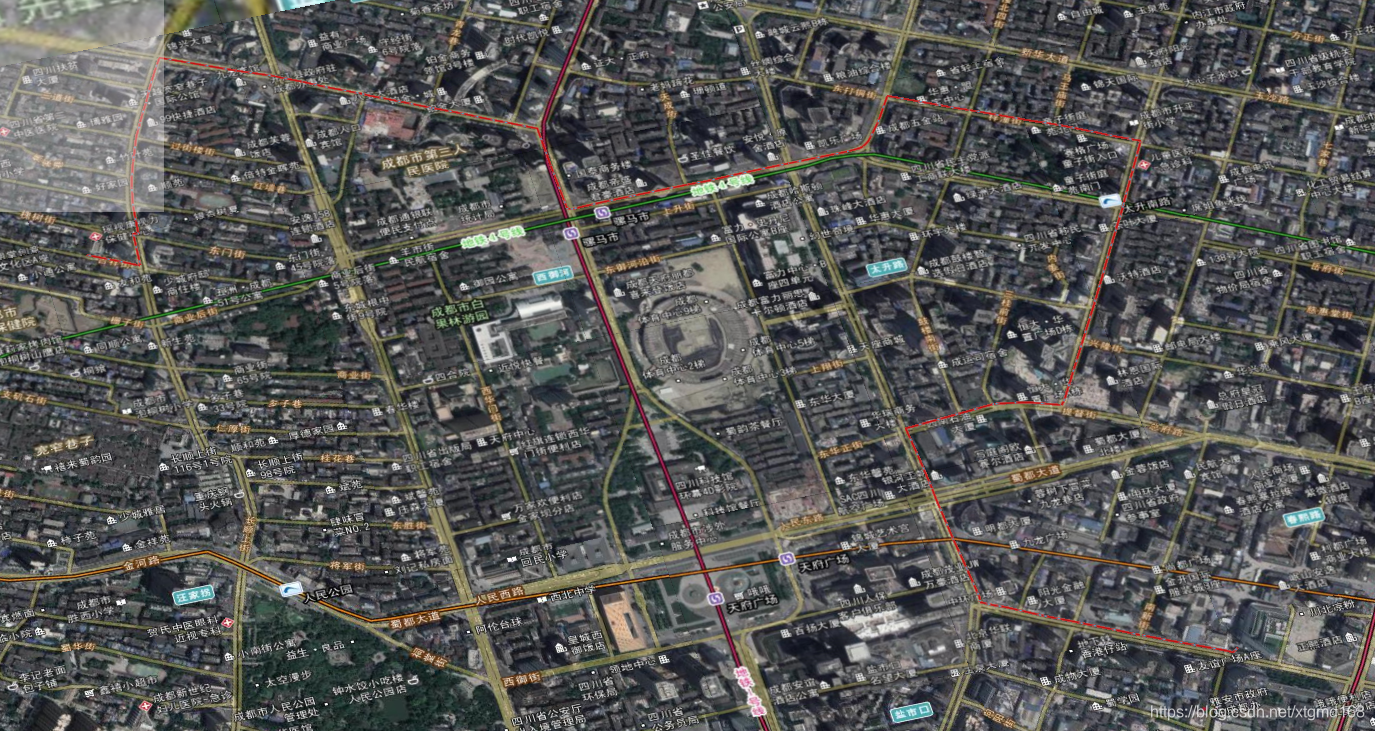
SDK中自带了一套 导航系统,用的是比较详细的导航数据,你们懂的,修正了一下在使用互联网服务器时候的一个BUG,请在使用这部分功能时务必下载上面地址中的核心更新包覆盖。 截图如下:

该导航图为切片导航图。年份嘛,你们懂的,另外导航系统为线程异步工作。因需要数据库支持,所以如果你是用的互联网服务器
导航算法得到路径的时间会有所增长,建议是把数据库下载到本地才可以看到真实的导航算法速度。
导航算法在单独的ShortRoad.dll中(可独立使用,担需要相关数据文件。)导航算法可根据权值进行微调,目前有高速优先和,最短路径两种。
ShortRoad.ShortPath.MyPareant = this.Dispatcher; //因为导航算法为异步委托+多线程方式完成,需要一个异步委托主对象(静态)。
ShortRoad.ShortPath.chuslhi(); //初始化数据(静态)
MyShort = new ShortRoad.ShortPath();
//初始化导航类
MyShort.OnShortPath += new ShortRoad.ShortPath.PathOver(ShortPath_OnShortPath);
//导航数据回调事件
MyShort.OnPro += new ShortRoad.ShortPath.ChuLiPro(ShortPath_OnPro);
//导航算法信息事件。
MyShort.GetShortPath(BeginPoint.X, BeginPoint.Y, EndPoint.X, EndPoint.Y,false);
//获取最短路径:
参数起点经度,纬度,终点经度,纬度,是否启用高速优先。
路径回调事件:
void ShortPath_OnShortPath(System.Collections.Generic.Dictionary<string, System.Collections.Generic.List<System.Drawing.PointF>> value,System.Windows.Point bx,System.Windows.Point ey)
{ double Totolength = 0;
Pareant.PlayPath.Add(new Point3D(BeginPoint.X, BeginPoint.Y, 0));
foreach (string key in value.Keys)
{
Totolength += Convert.ToDouble(key.Split('#')[1].Split(',')[12]);
foreach (System.Drawing.PointF y1 in value[key])
{
Pareant.PlayPath.Add(new Point3D(y1.X, y1.Y, 0));
}
}
}
事件参数1:System.Collections.Generic.Dictionary<string,System.Collections.Generic.List<System.Drawing.PointF>>
存放有所有的路径数据 KEY为路径详细信息内容如下(Value中为经纬度数据):
"清江东路#464400 , 49559714 , 1 , 0302 , 130 , 3 , 2 , 1 , , 47106369 , 5880354 , 3 , 0.012 , 1 , 1 , , 0 , 1 , 0 , 510105 , 510105 , 1 , , , 5 , , 4 , 3 , 11110001110000000000000000000000 , 0 , 0 , , , , 600 , , 1 , 1 , , 清江东路"
该KEY描述了这条路的所有信息。可参看下表:
|
|
序 号 |
字段设置 |
取值范围 |
注释 |
|||
|
含义 |
名称 |
类型 |
|||||
|
1 |
图幅号 |
MapID |
Char(8) |
|
|
|
|
|
2 |
号码 |
ID |
Char(13) |
|
Link 号码 |
|
|
|
3 |
种别代码数 |
Kind_num |
Char(2) |
1—4 |
种别个数 |
|
|
|
4 |
种别代码(M) |
Kind |
Char(23) |
|
道路等级属性,多个之间用"|"分隔 |
(1) |
|
|
5 |
幅宽 |
Width |
Char(3) |
15 |
<=3.0m |
(2) |
|
|
30 |
(3.0m, 5.5m] |
||||||
|
55 |
(5.5m, 13.0m] |
||||||
|
130 |
>13m |
||||||
|
6 |
通行方向 |
Direction |
Char(1) |
0 |
未调查:默认为双方向都可以通行 |
|
|
|
1 |
双向:双方向可以通行 |
|
|||||
|
2 |
顺方向:单向通行,通行方向为起点到终点 方向 |
|
|||||
|
3 |
逆方向:单向通行,通行方向为终点到起点 方向 |
|
|||||
|
7 |
收费设置 |
Toll |
Char(1) |
0 |
未调查 |
(3) |
|
下面上代码,先要引用shortroad.dll
 ShortRoad.ShortPath.MyPareant = this.Dispatcher;  //因为导航算法为异步委托+多线程方式完成,需要一个异步委托主对象(静态)。

            ShortRoad.ShortPath.chuslhi(); //初始化数据(静态)

            MyShort = new ShortRoad.ShortPath();

            //初始化导航类

            MyShort.OnShortPath += this.MyShort_OnShortPath;

            //导航数据回调事件

            MyShort.OnPro += MyShort_OnPro;

            //导航算法信息事件。
  #region 导航系统

        System.Windows.Point FirstJW= new System.Windows.Point();

        System.Windows.Point secJW = new System.Windows.Point();

        private void Button_Click_15(object sender, RoutedEventArgs e)

        {

            gis3d.State = GisLib.WindowsMT.GisState.获取经纬度;

            gis3d.GetJWEvent += Gis3d_GetJWEvent2;

        }

        private void Gis3d_GetJWEvent2(System.Windows.Media.Media3D.Point3D value)

        {

            gis3d.GetJWEvent -= Gis3d_GetJWEvent2;

            FirstJW = new System.Windows.Point(value.X, value.Y);

            gis3d.State = GisLib.WindowsMT.GisState.漫游;

        }

        private void Button_Click_16(object sender, RoutedEventArgs e)

        {

            gis3d.State = GisLib.WindowsMT.GisState.获取经纬度;

            gis3d.GetJWEvent += Gis3d_GetJWEvent3;

        }

        private void Gis3d_GetJWEvent3(System.Windows.Media.Media3D.Point3D value)

        {

            gis3d.GetJWEvent -= Gis3d_GetJWEvent2;

            secJW = new System.Windows.Point(value.X, value.Y);

            MyShort.GetShortPath(FirstJW.X, FirstJW.Y, secJW.X, secJW.Y, true);

            gis3d.State = GisLib.WindowsMT.GisState.漫游;

        }

        private void MyShort_OnPro(string value)

        {

            FirstShort.Content = value;

        }

        private void MyShort_OnShortPath(Dictionary<string, List<PointF>> value, System.Windows.Point mbegin, System.Windows.Point mend)

        {

            if (value == null)

                return;

            if (value.Count == 0)

                return;

            List<Point3D> PlayPath = new List<Point3D>();

            double Totolength = 0;

            // Pareant.PlayPath.Add(new Point3D(BeginPoint.X, BeginPoint.Y, 0));

            foreach (string key in value.Keys)

            {

                if (key.Length > 12)

                {

                    if (key.Split('#').Length >= 2)

                        Totolength += Convert.ToDouble(key.Split('#')[1].Split(',')[12]);

                }

                foreach (System.Drawing.PointF y1 in value[key])

                {

                    PlayPath.Add(new Point3D(y1.X, y1.Y, 0));

                }

            }

            PlayPath.Add(new Point3D(secJW.X, secJW.Y, 0));

            Random t1 = new System.Random();

            System.Windows.Media.Color pp = new System.Windows.Media.Color();

                pp = Colors.Red;

            //调用SDK提供的画路方法把路画出来

            gis3d.RemoveShotPath("导航路径");

            gis3d.DrawShortPath(PlayPath, "导航路径", pp, true);

        }

        #endregion
效果如下:再三强调数据库配合,所以用互联网服务器的时候。在计算时会比较慢,担因为使用的是线程模式,所以不影响主进程做其它事。SDK自带的drashortpath方法支持自动抽稀,可以显示很长的导航路线。
 ,
,
http://www.chinamtouch.com QQ:40140203 微信公众号:m3dgis2001
利用WPF建立自己的3d gis软件(非axhost方式)(十二)SDK中的导航系统的更多相关文章
- 利用WPF建立自己的3d gis软件(非axhost方式)(十三)万能的用户层接口,(强大的WPF)
原文:利用WPF建立自己的3d gis软件(非axhost方式)(十三)万能的用户层接口,(强大的WPF) 先下载SDK:https://pan.baidu.com/s/1M9kBS6ouUwLfrt ...
- 利用WPF建立自己的3d gis软件(非axhost方式)(十一)SDK中的动画系统
原文:利用WPF建立自己的3d gis软件(非axhost方式)(十一)SDK中的动画系统 先下载SDK:https://pan.baidu.com/s/1M9kBS6ouUwLfrt0zV0bPew ...
- 利用WPF建立自己的3d gis软件(非axhost方式)(十)SDK中一些自带的展示面板应用
原文:利用WPF建立自己的3d gis软件(非axhost方式)(十)SDK中一些自带的展示面板应用 先下载SDK:https://pan.baidu.com/s/1M9kBS6ouUwLfrt0zV ...
- 利用WPF建立自己的3d gis软件(非axhost方式)(七)实现简单的粒子效果
原文:利用WPF建立自己的3d gis软件(非axhost方式)(七)实现简单的粒子效果 先下载SDK:https://pan.baidu.com/s/1M9kBS6ouUwLfrt0zV0bPew密 ...
- 利用WPF建立自己的3d gis软件(非axhost方式)(八)拖动一个UI到地球上
原文:利用WPF建立自己的3d gis软件(非axhost方式)(八)拖动一个UI到地球上 先下载SDK:https://pan.baidu.com/s/1M9kBS6ouUwLfrt0zV0bPew ...
- 利用WPF建立自己的3d gis软件(非axhost方式)(九)SDK自带部分面板的调用
原文:利用WPF建立自己的3d gis软件(非axhost方式)(九)SDK自带部分面板的调用 先下载SDK:https://pan.baidu.com/s/1M9kBS6ouUwLfrt0zV0bP ...
- 利用WPF建立自己的3d gis软件(非axhost方式)(六)跳转,增加外部三维模型
原文:利用WPF建立自己的3d gis软件(非axhost方式)(六)跳转,增加外部三维模型 先下载SDK:https://pan.baidu.com/s/1M9kBS6ouUwLfrt0zV0bPe ...
- 利用WPF建立自己的3d gis软件(非axhost方式)(五)在鼠标点击的位置增加UI
原文:利用WPF建立自己的3d gis软件(非axhost方式)(五)在鼠标点击的位置增加UI 先下载SDK:https://pan.baidu.com/s/1M9kBS6ouUwLfrt0zV0bP ...
- 利用WPF建立自己的3d gis软件(非axhost方式)(四)在地图上添加FrameworkElement
原文:利用WPF建立自己的3d gis软件(非axhost方式)(四)在地图上添加FrameworkElement 先下载SDK:https://pan.baidu.com/s/1M9kBS6ouUw ...
随机推荐
- Spring Profiles example--转载
原文地址:http://www.mkyong.com/spring/spring-profiles-example/ Spring @Profile allow developers to regis ...
- Java Callable Future Example(java 关于Callable,Future的例子)
Home » Java » Java Callable Future Example Java Callable Future Example April 3, 2018 by Pankaj 25 C ...
- [D3] SVG Graphics Containers and Text Elements in D3 v4
SVG is a great output format for data visualizations because of its scalability, but it comes with s ...
- UIActionSheet用法
//上拉菜单 1 UIActionSheet* sheet = [[UIActionSheet alloc] initWithTitle:nil delegate:self cancelButtonT ...
- android Fragment与Activity交互,互相发数据(附图具体解释)
笔者最近看官方training.发现了非常多实用又好玩的知识. 当中.fragment与Activity通信就是一个. fragment与Activity通信主要是两点: 1.fragment传递信息 ...
- mongodb查询部分满足条件的列
db.tblorders.createIndex( { orderid : -1 },{background:true, name:"index_orderid"} ); db.o ...
- Codeforces Round #315 (Div. 2) (ABCD题解)
比赛链接:http://codeforces.com/contest/569 A. Music time limit per test:2 seconds memory limit per test: ...
- POJ 1012 Joseph 约瑟夫问题
http://poj.org/problem?id=1012 早上去图书馆复习苦逼的复习....万恶的数逻.T T我还要自我安慰的说复习完了奖励回来刷水题~ 10点多的时候外面校运会大吼撑杆跳的那个. ...
- 修复STS4 server中没有Tomcat的问题(必看,官方推荐,包教包会,国内首发)
版权声明:原创.欢迎转载,转载请注明来源,谢谢. https://blog.csdn.net/qq_41910280/article/details/83279129 修复STS4 server中没有 ...
- Gora官方范例 分类: C_OHTERS 2015-01-29 16:14 632人阅读 评论(0) 收藏
参考官方文档:http://gora.apache.org/current/tutorial.html 项目代码见:https://code.csdn.net/jediael_lu/mygoradem ...