
使用DOT语言和Graphviz绘图(翻译)
使用DOT语言和Graphviz绘图(翻译)
简述
本文翻译自Drawing Graphs using Dot and Graphviz
1. 许可
Copyright (C) 2013, 2014 Tony Ballantyne. Permission is granted to
copy, distribute and/or modify this document under the terms of the GNU
Free Documentation License, Version 1.3 or any later version published
by the Free Software Foundation; with no Invariant Sections, no
Front-Cover Texts, and no Back-Cover Texts.
Code in this document is free software: you can redistribute it
and/or modify it under the terms of the GNU General Public License as
published by the Free Software Foundation, either version 3 of the
License, or (at your option) any later version.
This code is distributed in the hope that it will be useful, but
WITHOUT ANY WARRANTY; without even the implied warranty of
MERCHANTABILITY or FITNESS FOR A PARTICULAR PURPOSE. See the GNU General
Public License for more details.
2. 介绍
2.1 什么是DOT?
DOT是纯文本图像描述语言,对于计算机和人来说,都很容易阅读。
2.2 什么是Graphviz?
Graphviz是一个开源的图像可视化的软件,所谓图像可视化就是使用一种简单的方法,来将结构化的信息表现成用抽象图片和网络构成的示意图。
2.3 谁适合看这篇文章?
这篇文章本来是我写来给自己当速成手册看的。不过现在看起来已经被我弄成给学计算机的学生看的教程了。现在这篇文章可以给任何想通过例子学习DOT的人看。
2.4 相关材料
我博客还有类似的其他文章TonyBallantyne.com/tech
如果你是想了解关于我作为一名SF and Fantasy writer的工作,但不幸点到这篇文章的话,下面的链接可能就对你比较有用:
- TonyBallantyne.com: 这里有我的小说和短故事
- Emacs Tutorial: 给作家的一个关于Emacs的简短介绍
- My Emacs Writing Setup: 关于我如何使用Emacs的Org Mode来写小说和短故事
译注:这儿所谓的相关材料其实是作者自己其他的一些文章,跟DOT关系不大
3. 安装
如果你要顺着这个教程继续下去,那你可能就需要要装Graphviz套件了。Graphviz可以在官网免费下载。
4. 基础例子
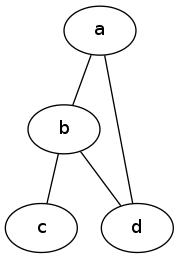
4.1 简单图例
graph graphname {

    a -- b;

    b -- c;

    b -- d;

    d -- a;

}
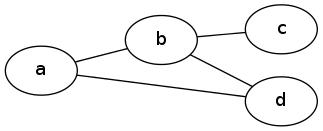
4.2 一样的图,不一样的布局
graph graphname {

    rankdir=LR;  //Rank Direction Left to Right

    a -- b;

    b -- c;

    b -- d;

    d -- a;

}
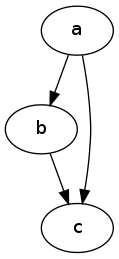
4.3 简单有向图
digraph graphname{

    a -> b;

    b -> c;

    a -> c;

}
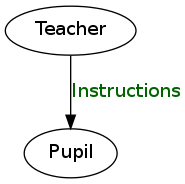
4.4 带标签的简单有向图
digraph graphname{

    T [label="Teacher"]      // node T

    P [label="Pupil"]  // node P

    T->P [label="Instructions", fontcolor=darkgreen] // edge T->P

}
4.5 同样的图,不同的形状和颜色
digraph graphname {

    T [label="Teacher" color=Blue, fontcolor=Red, fontsize=24, shape=box]      // node T

    P [label="Pupil" color=Blue, fontcolor=Red, fontsize=24, shape=box]  // node P

    T->P [label="Instructions", fontcolor=darkgreen] // edge T->P

}
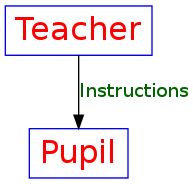
这儿你可以选择的形状有: box, polygon, ellipse, oval, circle, point, egg, triangle, plaintext, diamond, trapezium, parallelogram, house, pentagon, hexagon, septagon, octagon, doublecircle, doubleoctagon, tripleoctagon 更多的形状看这里
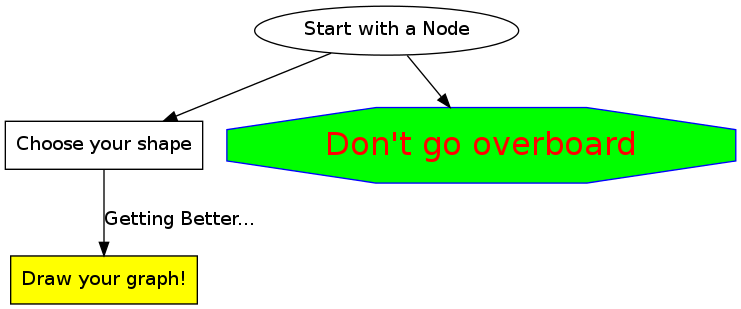
4.6 总结
digraph summary{

    start [label="Start with a Node"]

    next [label="Choose your shape", shape=box]

    warning [label="Don't go overboard", color=Blue, fontcolor=Red,fontsize=24,style=filled, fillcolor=green,shape=octagon]

    end [label="Draw your graph!", shape=box, style=filled, fillcolor=yellow]

    start->next

    start->warning

    next->end [label="Getting Better...", fontcolor=darkblue]

}
5. 高级
5.1 节省时间的技巧
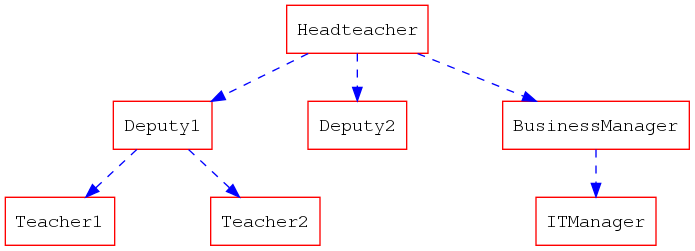
单独地去定义每一个节点其实很浪费时间的,下面这个技巧能够让你快点儿。
digraph hierarchy {

    nodesep=1.0 // increases the separation between nodes

    node [color=Red,fontname=Courier,shape=box] //All nodes will this shape and colour

    edge [color=Blue, style=dashed] //All the lines look like this

    Headteacher->{Deputy1 Deputy2 BusinessManager}

    Deputy1->{Teacher1 Teacher2}

    BusinessManager->ITManager

    {rank=same;ITManager Teacher1 Teacher2}  // Put them on the same level

}
5.2 记录
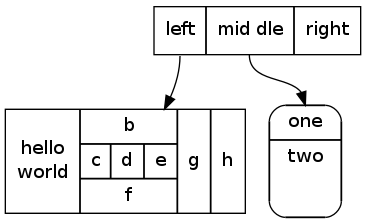
你现在可以用HTML来定义这一类节点了,这里有更多相关信息。
digraph structs {

    node[shape=record]

    struct1 [label="<f0> left|<f1> mid\ dle|<f2> right"];

    struct2 [label="{<f0> one|<f1> two\n\n\n}" shape=Mrecord];

    struct3 [label="hello\nworld |{ b |{c|<here> d|e}| f}| g | h"];

    struct1:f1 -> struct2:f0;

    struct1:f0 -> struct3:f1;

}
6. 例子
6.1 有限状态机
digraph finite_state_machine {

    rankdir=LR;

    size="8,5"

    node [shape = circle];

    S0 -> S1 [ label = "Lift Nozzle" ]

    S1 -> S0 [ label = "Replace Nozzle" ]

    S1 -> S2 [ label = "Authorize Pump" ]

    S2 -> S0 [ label = "Replace Nozzle" ]

    S2 -> S3 [ label = "Pull Trigger" ]

    S3 -> S2 [ label = "Release Trigger" ]

}

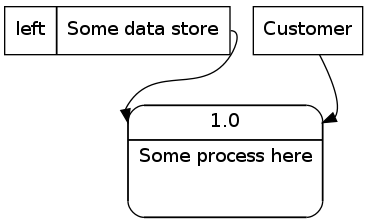
6.2 数据流示意图
digraph dfd{

    node[shape=record]

    store1 [label="<f0> left|<f1> Some data store"];

    proc1 [label="{<f0> 1.0|<f1> Some process here\n\n\n}" shape=Mrecord];

    enti1 [label="Customer" shape=box];

    store1:f1 -> proc1:f0;

    enti1-> proc1:f0;

}
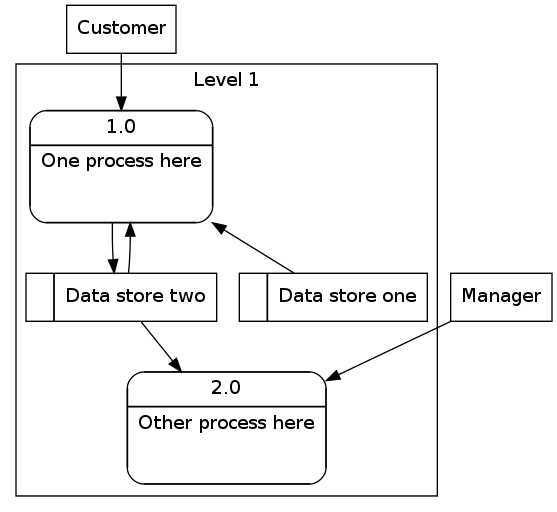
6.3 数据流示意图2
digraph dfd2{

    node[shape=record]

    subgraph level0{

    enti1 [label="Customer" shape=box];

    enti2 [label="Manager" shape=box];

    }

    subgraph cluster_level1{

                    label ="Level 1";

                    proc1 [label="{<f0> 1.0|<f1> One process here\n\n\n}" shape=Mrecord];

                    proc2 [label="{<f0> 2.0|<f1> Other process here\n\n\n}" shape=Mrecord];

                    store1 [label="<f0>    |<f1> Data store one"];

                    store2 [label="<f0>   |<f1> Data store two"];

                    {rank=same; store1, store2}

    }

    enti1 -> proc1

    enti2 -> proc2

    store1 -> proc1

    store2 -> proc2

    proc1 -> store2

    store2 -> proc1

}
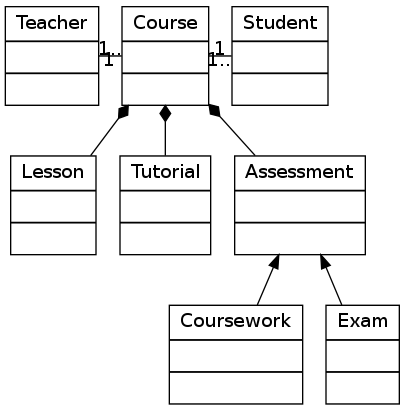
6.4 对象继承
digraph obj{

    node[shape=record];

    rankdir="BT";

    teacher [label = "{<f0> Teacher|<f1> \n  |<f2> \n   }"];

    course [label = "{<f0> Course|<f1> \n  |<f2> \n   }"];

    student [label = "{<f0> Student|<f1> \n  |<f2> \n   }"];

    lesson [label = "{<f0> Lesson |<f1> \n  |<f2> \n   }"];

    tutorial [label = "{<f0> Tutorial|<f1> \n  |<f2> \n   }"];

    assessment[label = "{<f0> Assessment|<f1> \n  |<f2> \n   }"];

    coursework [label = "{<f0> Coursework|<f1> \n  |<f2> \n   }"];

    exam [label = "{<f0> Exam|<f1> \n  |<f2> \n   }"];

    {rank=same; teacher course student}

    teacher->course [dir="forward",arrowhead="none",arrowtail="normal",headlabel="1",taillabel="1.."];

    student->course [dir="forward",arrowhead="none",arrowtail="normal",headlabel="1",taillabel="1.."];

    lesson->course [dir="forward",arrowhead="diamond",arrowtail="normal"];

    tutorial->course [dir="forward",arrowhead="diamond",arrowtail="normal"];

    assessment->course [dir="forward",arrowhead="diamond",arrowtail="normal"];

    coursework->assessment;

    exam->assessment;

}
6.5 关系型实体
digraph ER{

    node[shape=box];

    Book;

    Customer;

    Loan;

    {rank=same;Book,Customer,Loan}

    Book->Loan[dir="forward",arrowhead="crow",arrowtail="normal"];

    Customer->Loan[dir="forward",arrowhead="crow",arrowtail="normal"];

}

7. 参考
以下可能是你在画图时候最有用的一些属性,完整的列表可以在这里看。
7.1 图像属性
    label="My Graph";       # 给图像设置标签

    rankdir=LR;             # 将图片由原来的从上到下布局变成从左到右布局

    {rank=same; a, b, c }   # 将一组元素放到同一个level

    splines="line";         # 让边框变为直线,没有曲线和锐角

    K=0.6;                  # 用来在布局中影响spring属性,spring属性可以用于将节点往外推,这个在twopi和sfdp布局中很有用。
译注:暂时还没明白这个spring属性应该怎么翻,初步猜测是弹性。胡克定律里面的常量名也叫K。
7.2 交点属性
    [label="Some Label"]    # 给交点打标签

    [color="red"]           # 给交点上色

    [fillcolor="blue"]      # 设置交点的填充色
7.3 边的属性
    [label="Some Label"]    # 给边设置标签 (设置路径权重的时候很有用)

    [color="red"]           # 给交点上色 (标示路径的时候很有用)

    [penwidth=2.0]          # 给边适配厚度,标示路径的时候很有用。
7.4 尺寸, 背景颜色
    fixedsize=true;

    size="1,1";

    resolution=72;

    bgcolor="#C6CFD532";

    # 不是我偷懒不翻译哦,原文就没有解释。
8. 附录
8.1 拓展阅读
An Introduction to GraphViz and dot
Graphviz Examples and Tutorial
8.2 使用Emacs的Org Mode
Emacs的Org Mode不管对于写作,还是执行和导出DOT图片都是个很理想的工作环境。
8.2.1 配置
下载并安装Graphviz,然后把相关路径加到exec-path这个变量里去。
你也要把你的.emacs文件更新成能够把DOT作为babel语言加载,下面这个配置可以很容易的设置DOT为babel语言,其他语言也可以类似操作
(org-babel-do-load-languages

    (quote org-babel-load-languages)

    (quote

        (

            (emacs-lisp . t)

            (java . t)

            (dot . t)

            (ditaa . t)

            (R . t)

            (python . t)

            (ruby . t)

            (gnuplot . t)

            (clojure . t)

            (sh . t)

            (ledger . t)

            (org . t)

            (plantuml . t)

            (latex . t)

        )

    )

)
8.2.2 将Dot嵌入Emacs
Org Mode通过使用Library of Babel来解析各种语言。要想这么做的话,就用begin_src和end_src标签把你的dot代码想下面这样包含进去。你也需要在包裹的时候像下面那样添加一些命令行参数。
用<s[TAB]快捷键可以快速生成一个begin_src代码块。
#+begin_src dot :file ./img/example1.png :cmdline -Kdot -Tpng

graph graphname {

                a -- b;

                b -- c;

                b -- d;

                d -- a;

        }

#+end_src
8.2.3 命令行相关
#+begin_ src dot :file ./img/example1.png :cmdline -Kdot -Tpng里的:cmdline -Kdot -Tpng就是命令行参数. 他们告诉dot如何渲染和展示。
-Kdot使用dot布局方式. 你也可以尝试其他的布局方式,比如Kneato,Kcirco,Ktwopi,Kfdp,Ksfdp-Tpng渲染成png格式
完整的命令行参数可以看这里
Date: <2013-10-21 Mon>
Author: Tony Ballantyne
Translator: Casa Taloyum
Created: 2014-04-12 Sat 10:13
Emacs 23.3.1 (Org mode 8.0.2)
评论系统我用的是Disqus,不定期被墙。所以如果你看到文章下面没有加载出评论列表,翻个墙就有了。
本文遵守CC-BY。 请保持转载后文章内容的完整,以及文章出处。本人保留所有版权相关权利。
我的博客拒绝挂任何广告,如果您觉得文章有价值,可以通过支付宝扫描下面的二维码捐助我。

Comments
使用DOT语言和Graphviz绘图(翻译)的更多相关文章
- [译]使用DOT语言和GraphvizOnline来可视化你的ASP.NETCore3.0终结点01
这是系列文章中的第一篇:使用GraphvizOnline可视化ASP.NETCore3.0终结点.. 第1部分-使用DOT语言来可视化你的ASP.NETCore3.0终结点(本文) 第2部分-向ASP ...
- 【翻译】Scriban README 文本模板语言和.NET引擎
scriban Scriban是一种快速.强大.安全和轻量级的文本模板语言和.NET引擎,具有解析liquid模板的兼容模式 Github https://github.com/lunet-io/sc ...
- 使用Graphviz绘图(一)
前言 日常开发或者编写课程论文时,除了代码文档的编写,其中一个很重要的部分就是需要绘制流程图.示意图 绘制流程图有很多工具,一般常见的就有如下几种: Word.PPT等办公软件 Viso以及开源的Di ...
- 聊聊C语言和ABAP
这个公众号之前的文章,分享的都是Jerry和SAP成都研究院的同事在工作中学到的一些知识和感受.而今天这篇文章,写作的由来是因为最近我又参与了SAP成都数字创新空间应聘者的面试,和一些朋友聊了一些关于 ...
- C语言和C++中动态申请内存
在C语言和C++的动态内存的使用方法是不同的,在C语言中要使用动态内存要包含一个头文件即 #include<malloc.h> 或者是#include<stdlib.h> ...
- C语言和C++篇
C语言和C++篇 基本上所有主流的编程语言都有String的标准库,因为字符串操作是我们每个程序员几乎每天都要遇到的.想想我们至今的代码,到底生成和使用了多少String!标题上所罗列的语言,可以看成 ...
- c语言和java的区别
今晚读了一下c程序设计语言,这是一本经典书籍,发现C语言和java有很多是相同的,毕竟java是由c语言进化来的. 我大概从我自己的思考来谈谈不同点 1.c语言是面向过程,主要单位是函数,变量和函数的 ...
- CHENGDU1-Python编程语言和PEP8规范
CHENGDU1-Python编程语言和PEP8规范 PEP8规范6条? 答:PEP8规范说白了就是一种规范,可以遵守,也可以不遵守,遵守PEP8可以让代码的可读性更高. 代码编排:---缩进,4个空 ...
- 从C,C++,JAVA和C#看String库的发展(一)----C语言和C++篇
转自: http://www.cnblogs.com/wenjiang/p/3266305.html 基本上所有主流的编程语言都有String的标准库,因为字符串操作是我们每个程序员几乎每天都要遇到的 ...
随机推荐
- c#的中英文混合字符串截取
public class StringHelper { public static string GetSubString(string str, int len) ...
- Vue的学习--怎么在vue-cli中写网页
vue.min.js和vue-cli的区别和联系我现在还是没有太清楚,大概是还没搞清楚export default和new Vue的区别,先浅浅记录一下怎么“用vue-cli来写网页”. “vue-c ...
- BZOJ3676: [Apio2014]回文串(SAM+Manacher/PAM)
Description 考虑一个只包含小写拉丁字母的字符串s.我们定义s的一个子串t的“出 现值”为t在s中的出现次数乘以t的长度.请你求出s的所有回文子串中的最 大出现值. Input 输入只有一行 ...
- Android抖动的EditText
Java代码:启动动画 Animation shake = AnimationUtils.loadAnimation(this, R.anim.shake); findViewById(R.id.pw ...
- snmp agent 表格实现(子代理方式实现)
前奏參见例如以下: http://blog.sina.com.cn/s/blog_8f3de3250100xhao.html http://blog.csdn.net/hepeng597/articl ...
- Qt源码分析之信号和槽机制(QMetaObject是一个内部struct)
Qt的信号和槽机制是Qt的一大特点,实际上这是和MFC中的消息映射机制相似的东西,要完成的事情也差不多,就是发送一个消息然后让其它窗口响应,当然,这里的消息是广义的说法,简单点说就是如何在一个类的一个 ...
- loadrunner监控apache服务
一.apache配置步骤(假设apache服务已安装) 1.使用find / -name httpd.conf命令查找httpd.conf文件 2.使用cd opt/lampp/apache2/con ...
- 使用 STL 辅助解决算法问题
不要重复制造轮子,而且你造的轮子未必比得上别人的: <numeric>⇒ accumulate,累积容器中区间的和,可以指定初值: 为什么 STL 中的容器和算法一定关于区间的操作一定是左 ...
- Centos NFS 简单设置
Server 端: NFS的安装配置:centos 5 :yum install nfs-utils portmapcentos 6 :yum install nfs-utils rpcbind vi ...
- [Angular] Omit relative path by set up in tsconfig.json
For example, inside you component you want to import a file from two up directory: import store from ...