
170615、spring不同数据库数据源动态切换
spring mvc+mybatis+多数据源切换 选取Oracle,MySQL作为例子切换数据源。mysql为默认数据源,在测试的action中,进行mysql和oracle的动态切换。
1、web.xml配置
<context-param>

    <param-name>webAppRootKey</param-name>

    <param-value>trac</param-value>

</context-param>

<!-- Spring的log4j监听器 -->

<listener>

    <listener-class>org.springframework.web.util.Log4jConfigListener</listener-class>

</listener>

<!-- 字符集 过滤器 -->

<filter>

    <filter-name>CharacterEncodingFilter</filter-name>

    <filter-class>org.springframework.web.filter.CharacterEncodingFilter</filter-class>

    <init-param>

        <param-name>encoding</param-name>

        <param-value>utf8</param-value>

    </init-param>

    <init-param>

        <param-name>forceEncoding</param-name>

        <param-value>true</param-value>

    </init-param>

</filter>

<filter-mapping>

    <filter-name>CharacterEncodingFilter</filter-name>

    <url-pattern>/*</url-pattern>

</filter-mapping>

<!-- Spring view分发器 -->

<servlet>

    <servlet-name>dispatcher</servlet-name>

    <servlet-class>org.springframework.web.servlet.DispatcherServlet</servlet-class>

    <init-param>

        <param-name>contextConfigLocation</param-name>

        <param-value>/WEB-INF/dispatcher.xml</param-value>

    </init-param>

    <load-on-startup>1</load-on-startup>

</servlet>

<servlet-mapping>

    <servlet-name>dispatcher</servlet-name>

    <url-pattern>*.action</url-pattern>

</servlet-mapping>

<listener>

    <listener-class>org.springframework.web.context.ContextLoaderListener</listener-class>

</listener>
2、dispatcher.xm
<mvc:annotation-driven />

<context:component-scan base-package="com.trac" />

<bean id="multipartResolver" class="org.springframework.web.multipart.commons.CommonsMultipartResolver" />

<!-- freemarker config -->

<bean id="freemarkerConfig" class="org.springframework.web.servlet.view.freemarker.FreeMarkerConfigurer">

    <property name="templateLoaderPath" value="/WEB-INF/freemarker/" />

    <property name="freemarkerVariables">

        <map>

            <entry key="xml_escape" value-ref="fmXmlEscape" />

        </map>

    </property>

    <property name="freemarkerSettings">

        <props>

            <prop key="defaultEncoding">UTF-8</prop>

        </props>

    </property>

</bean>

<bean id="fmXmlEscape" class="freemarker.template.utility.XmlEscape" />

<!-- View resolvers can also be configured with ResourceBundles or XML files.

    If you need different view resolving based on Locale, you have to use the

    resource bundle resolver. -->

<bean id="viewResolver" class="org.springframework.web.servlet.view.freemarker.FreeMarkerViewResolver">

    <property name="exposeRequestAttributes" value="true" />

    <property name="exposeSessionAttributes" value="true" />

    <property name="exposeSpringMacroHelpers" value="true" />

    <property name="contentType" value="text/html;charset=UTF-8" />

    <property name="cache" value="true" />

    <property name="prefix" value="" />

    <property name="suffix" value=".ftl" />

</bean>
3、applicationContext.xml
<?xml version="1.0" encoding="UTF-8"?>
<beans xmlns="http://www.springframework.org/schema/beans"
xmlns:xsi="http://www.w3.org/2001/XMLSchema-instance" xmlns:tx="http://www.springframework.org/schema/tx"
xsi:schemaLocation="http://www.springframework.org/schema/beans http://www.springframework.org/schema/beans/spring-beans.xsd
http://www.springframework.org/schema/tx http://www.springframework.org/schema/tx/spring-tx.xsd"> <bean id="parentDataSource" class="org.springframework.jdbc.datasource.DriverManagerDataSource"></bean> <bean id="mySqlDataSource" parent="parentDataSource">
<property name="driverClassName" value="com.mysql.jdbc.Driver"></property>
<property name="url" value="jdbc:mysql://localhost:3306/icbc_wx"></property>
<property name="username" value="root"></property>
<property name="password" value="root"></property>
</bean> <bean id="oracleDataSource" parent="parentDataSource">
<property name="driverClassName" value="oracle.jdbc.driver.OracleDriver"></property>
<property name="url" value="jdbc:oracle:thin:@192.168.1.168:1521:orcl"></property>
<property name="username" value="zcgd"></property>
<property name="password" value="zcgd"></property>
</bean> <!--多数据源-->
<bean id="dataSource" class="com.strongunion.common.datasource.DataSources">
<property name="targetDataSources">
<map key-type="java.lang.String">
<entry value-ref="mySqlDataSource" key="MYSQL"></entry>
<entry value-ref="oracleDataSource" key="ORACLE"></entry>
</map>
</property>
<property name="defaultTargetDataSource" ref="mySqlDataSource"></property>
</bean> <!--单一数据源-->
<!--<bean id="dataSource" class="com.alibaba.druid.pool.DruidDataSource"
init-method="init" destroy-method="close">
<!– 基本属性 url、user、password –>
<property name="url" value="${jdbc.url}" />
<property name="username" value="${jdbc.username}" />
<property name="password" value="${jdbc.password}" /> <!– 配置初始化大小、最小、最大 –>
<property name="initialSize" value="1" />
<property name="minIdle" value="1" />
<property name="maxActive" value="20" /> <!– 配置获取连接等待超时的时间 –>
<property name="maxWait" value="60000" /> <!– 配置间隔多久才进行一次检测,检测需要关闭的空闲连接,单位是毫秒 –>
<property name="timeBetweenEvictionRunsMillis" value="60000" /> <!– 配置一个连接在池中最小生存的时间,单位是毫秒 –>
<property name="minEvictableIdleTimeMillis" value="300000" /> <property name="validationQuery" value="SELECT 'x'" />
<property name="testWhileIdle" value="true" />
<property name="testOnBorrow" value="false" />
<property name="testOnReturn" value="false" /> <!– 打开PSCache,并且指定每个连接上PSCache的大小 –>
<property name="poolPreparedStatements" value="true" />
<property name="maxPoolPreparedStatementPerConnectionSize" value="20" /> <!– 打开removeAbandoned功能 –>
<property name="removeAbandoned" value="true" />
<!– 1800秒,也就是30分钟 –>
<property name="removeAbandonedTimeout" value="1800" />
<!– 关闭abanded连接时输出错误日志 –>
<property name="logAbandoned" value="true" /> <!– 配置监控统计拦截的filters –>
<property name="filters" value="stat" />
</bean>--> <bean id="transactionManager" class="org.springframework.jdbc.datasource.DataSourceTransactionManager">
<property name="dataSource" ref="dataSource" />
</bean>
<tx:annotation-driven transaction-manager="transactionManager" /> <bean id="sqlSessionFactory" class="org.mybatis.spring.SqlSessionFactoryBean">
<property name="dataSource" ref="dataSource" />
<property name="configLocation" value="classpath:mybatis-config.xml" />
</bean> <bean id="sqlSessionTemplate" class="org.mybatis.spring.SqlSessionTemplate">
<constructor-arg ref="sqlSessionFactory" />
</bean>
</beans>
4、DataSourceInstances.java
package com.strongunion.common.datasource;

/**

 * Desc :  定义数据源的标识, 和applicationContext.xml中 DataSources 的 targetDataSources 的key对应

 * User : RICK

 * Time : 2017/8/18 9:41

  */

public class DataSourceInstances {

    /**mysql数据源*/

    public static final String MYSQL="MYSQL";

    /**oralce数据源*/

    public static final String ORACLE="ORACLE";

}
5、DataSourceSwitch.java
package com.strongunion.common.datasource;

/**

 * Desc :  切换数据源开关

 * User : RICK

 * Time : 2017/8/18 10:49

  */

public class DataSourceSwitch {

    private static final ThreadLocal contextHolder=new ThreadLocal();

    public static void setDataSourceType(String dataSourceType){

        contextHolder.set(dataSourceType);

    }

    public static String getDataSourceType(){

        return (String) contextHolder.get();

    }

    public static void clearDataSourceType(){

        contextHolder.remove();

    }

}
6、DataSources.java
package com.strongunion.common.datasource;

import org.springframework.jdbc.datasource.lookup.AbstractRoutingDataSource;

/**

 * Desc :  配置于applicationContext 中,线程局部变量ThreadLocal contextHolder

 *  保存当前需要的数据源类型,当 DataSourceSwitch. setDataSourceType(DataSourceInstances.XXX)

 *  保存当前需要的数据源类型的时候,DataSources 会从当前线程中查找线程变量的数据源类型,从而决定使用何种数据源

 * User : RICK

 * Time : 2017/8/18 9:43

  */

public class DataSources extends AbstractRoutingDataSource {

    @Override

    protected Object determineCurrentLookupKey() {

        return DataSourceSwitch.getDataSourceType();

    }

}
7、测试类TestController.java
package com.strongunion.apps.controller;

import com.strongunion.apps.service.IUserService;

import com.strongunion.common.ResultJson;

import com.strongunion.common.datasource.DataSourceInstances;

import com.strongunion.common.datasource.DataSourceSwitch;

import com.strongunion.generator.entity.User;

import com.strongunion.utils.Util;

import org.slf4j.Logger;

import org.slf4j.LoggerFactory;

import org.springframework.web.bind.annotation.PathVariable;

import org.springframework.web.bind.annotation.RequestMapping;

import org.springframework.web.bind.annotation.RequestMethod;

import org.springframework.web.bind.annotation.RestController;

import javax.annotation.Resource;

import java.util.List;

/**

 * Desc :  测试数据源

 * User : RICK

 * Time : 2017/8/18 9:27

  */

@RestController

@RequestMapping("/demo")

public class TestController {

    private static final Logger log = LoggerFactory.getLogger(TestController.class);

    @Resource

    private IUserService userService;

    @RequestMapping(value = "/index", method = RequestMethod.GET)

    public String index(){

        return "hello";

    }

    @RequestMapping(value = "/db/{type}", method = RequestMethod.GET)

    public ResultJson testDataBase(@PathVariable("type") String type) throws Exception{

        ResultJson resultJson  =  null;

        if (Util.isNotNull(type)){

            if(DataSourceInstances.MYSQL.equals(type)){

                DataSourceSwitch.setDataSourceType(DataSourceInstances.MYSQL);

            } else if(DataSourceInstances.ORACLE.equals(type)){

                DataSourceSwitch.setDataSourceType(DataSourceInstances.ORACLE);

            }

        } else {

            DataSourceSwitch.setDataSourceType(DataSourceInstances.MYSQL);

        }

        List<User> userList = userService.queryAllUsers();

        log.info("userList------------------------------>" + userList);

        resultJson = ResultJson.buildSuccessInstance(userList);

        return resultJson;

    }

}
8、运行效果
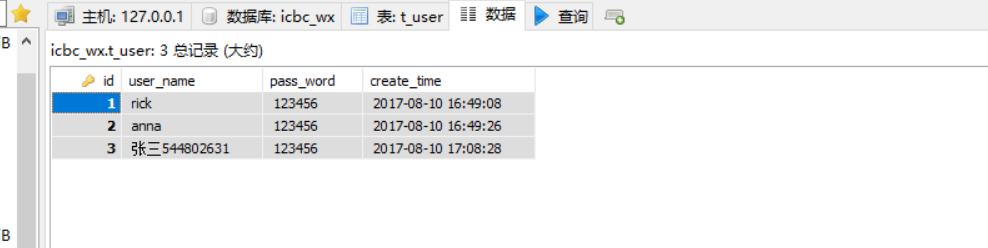
mysql数据库
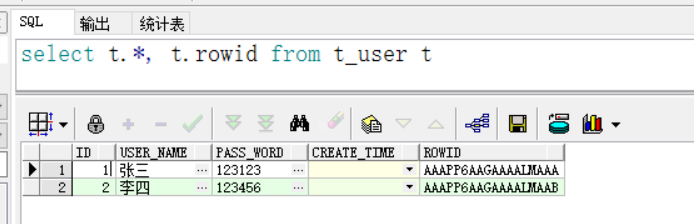
oralce数据库
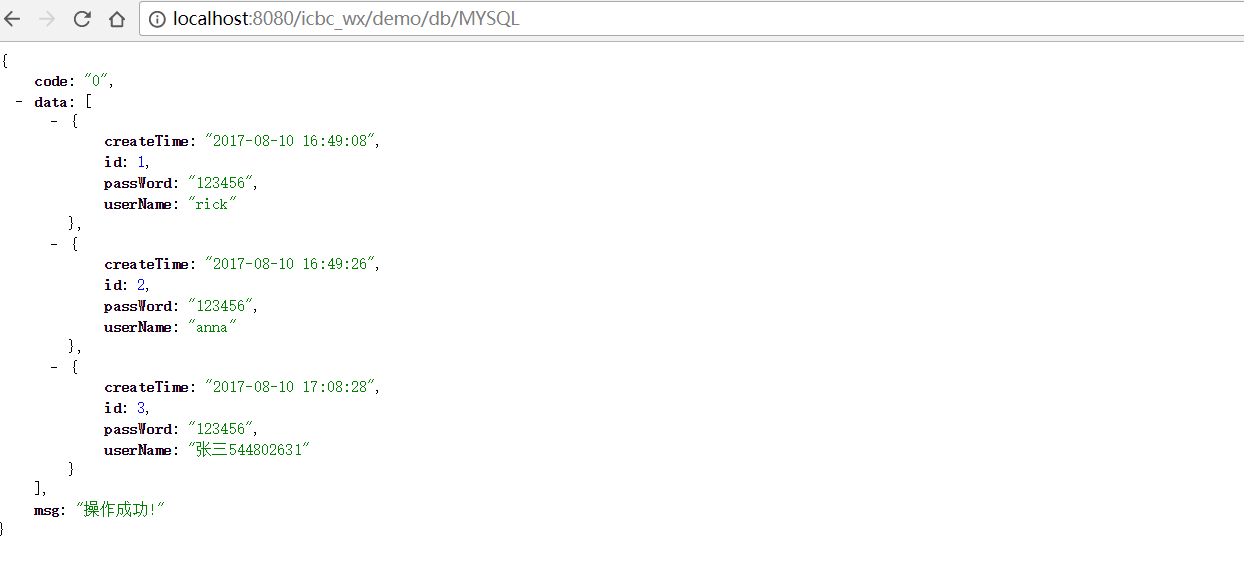
mysql数据源
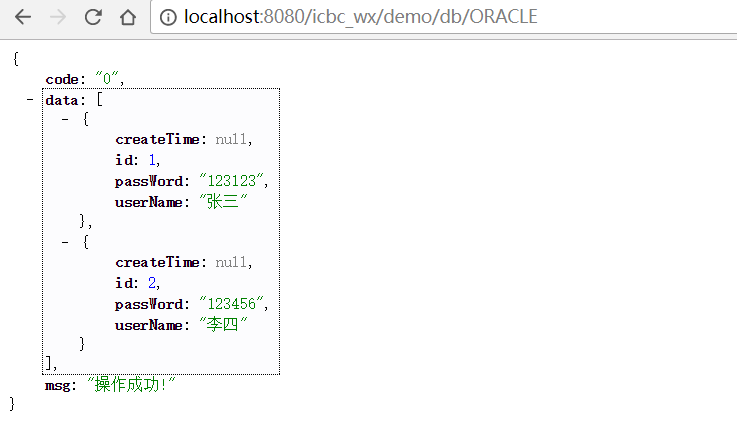
oracle数据源
170615、spring不同数据库数据源动态切换的更多相关文章
- spring+mybatis多数据源动态切换
spring mvc+mybatis+多数据源切换 选取oracle,mysql作为例子切换数据源.oracle为默认数据源,在测试的action中,进行mysql和oracle的动态切换. web. ...
- Spring多数据源动态切换
title: Spring多数据源动态切换 date: 2019-11-27 categories: Java Spring tags: 数据源 typora-root-url: ...... --- ...
- 实战:Spring AOP实现多数据源动态切换
需求背景 去年底,公司项目有一个需求中有个接口需要用到平台.算法.大数据等三个不同数据库的数据进行计算.组装以及最后的展示,当时这个需求是另一个老同事在做,我只是负责自己的部分. 直到今年回来了,这个 ...
- Spring3.3 整合 Hibernate3、MyBatis3.2 配置多数据源/动态切换数据源 方法
一.开篇 这里整合分别采用了Hibernate和MyBatis两大持久层框架,Hibernate主要完成增删改功能和一些单一的对象查询功能,MyBatis主要负责查询功能.所以在出来数据库方言的时候基 ...
- Springboot多数据源配置--数据源动态切换
在上一篇我们介绍了多数据源,但是我们会发现在实际中我们很少直接获取数据源对象进行操作,我们常用的是jdbcTemplate或者是jpa进行操作数据库.那么这一节我们将要介绍怎么进行多数据源动态切换.添 ...
- springboot多数据源动态切换和自定义mybatis分页插件
1.配置多数据源 增加druid依赖 完整pom文件 数据源配置文件 route.datasource.driver-class-name= com.mysql.jdbc.Driver route.d ...
- Spring3.3 整合 Hibernate3、MyBatis3.2 配置多数据源/动态切换数据源方法
一.开篇 这里整合分别采用了Hibernate和MyBatis两大持久层框架,Hibernate主要完成增删改功能和一些单一的对象查询功能,MyBatis主要负责查询功能.所以在出来数据库方言的时候基 ...
- mybatis 多数据源动态切换
笔者主要从事c#开发,近期因为项目需要,搭建了一套spring-cloud微服务框架,集成了eureka服务注册中心. gateway网关过滤.admin服务监控.auth授权体系验证,集成了redi ...
- Spring + Mybatis 项目实现动态切换数据源
项目背景:项目开发中数据库使用了读写分离,所有查询语句走从库,除此之外走主库. 最简单的办法其实就是建两个包,把之前数据源那一套配置copy一份,指向另外的包,但是这样扩展很有限,所有采用下面的办法. ...
随机推荐
- thinkphp 点击分类显示分类下的文章(完整)
控制器 <?php // 本类由系统自动生成,仅供测试用途 class IndexAction extends Action { public function index(){ $cate=M ...
- Batch Normalization原理及其TensorFlow实现——为了减少深度神经网络中的internal covariate shift,论文中提出了Batch Normalization算法,首先是对”每一层“的输入做一个Batch Normalization 变换
批标准化(Bactch Normalization,BN)是为了克服神经网络加深导致难以训练而诞生的,随着神经网络深度加深,训练起来就会越来越困难,收敛速度回很慢,常常会导致梯度弥散问题(Vanish ...
- linux -- Ubuntu开启root账户,并切换到root用户登陆
启用root账户 ubuntu 的root账户具有最高的系统权限,它类似于windows系统中的管理员账号,但是比windows系统中管理员账号的权限更高,一般都情况下不要使用root账户,但是有的时 ...
- erlang -- ios apns provider -- erlang 实现
os apns-apple notification server 与第三方provider的通信原理网上已有很多介绍,这里不再介绍,有想了解的大家可以去IOS官网https://developer. ...
- opencv实例三:播放AVI格式视频
一.不带滚动条的视频读取播放. 1.原理介绍:视频的本质是一些静态的图像的集合,opencv可以不断读取视屏中的图片,显示,就可以实时的视频流进行处理了. 2.代码如下: /************* ...
- js计算两个时间相差天数
//两个时间相差天数 兼容firefox chrome function datedifference(sDate1, sDate2) { //sDate1和sDate2是2006-12 ...
- u3d读取xml txt
u3d读取xml文件和u3d 读取txt外部文件 using UnityEngine;using System.Collections; using System.Xml;using System.X ...
- android 沉浸式状态栏(像ios那样的状态栏与应用统一颜色样式)
这个特性是andorid4.4支持的,最少要api19才干够使用.以下介绍一下使用的方法,很得简单: 添加一个demo源代码: https://github.com/ws123/StatusDemo ...
- AssetBundle中Unload()方法的作用
AssetBundle.Unload(false)的作用: 官网的解释是这样的: When unloadAllLoadedObjects is false, compressed file data ...
- [转]ASP.NET MVC 5 - 给电影表和模型添加新字段
在本节中,您将使用Entity Framework Code First来实现模型类上的操作.从而使得这些操作和变更,可以应用到数据库中. 默认情况下,就像您在之前的教程中所作的那样,使用 Entit ...