
C# 爬虫 抓取小说
心血来潮,想爬点小说。通过百度选择了个小说网站,随便找了一本小说http://www.23us.so/files/article/html/13/13655/index.html。
1、分析html规则
思路是获取小说章节目录,循环目录,抓取所有章节中的内容,拼到txt文本中。最后形成完本小说。
1、获取小说章节目录

通过分析,我在标注的地方获取小说名字及章节目录。
<meta name="keywords" content="无疆,无疆最新章节,无疆全文阅读"/>// 获取小说名字

<table cellspacing="" cellpadding="" bgcolor="#E4E4E4" id="at">// 所有的章节都在这个table中。
下面是利用正则,获取名字与目录。
//获取小说名字

Match ma_name = Regex.Match(html, @"<meta name=""keywords"".+content=""(.+)""/>");

string name = ma_name.Groups[].Value.ToString().Split(',')[];

//获取章节目录

Regex reg_mulu = new Regex(@"<table cellspacing=""1"" cellpadding=""0"" bgcolor=""#E4E4E4"" id=""at"">(.|\n)*?</table>");

var mat_mulu = reg_mulu.Match(html);

string mulu = mat_mulu.Groups[].ToString();
2、获取小说正文内容
通过章节a标签中的url地址,查看章节内容。
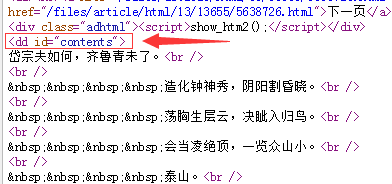
通过分析,正文内容在<dd id="contents">中。
//获取正文
Regex reg = new Regex(@"<dd id=""contents"">(.|\n)*?</dd>");
MatchCollection mc = reg.Matches(html_z);
var mat = reg.Match(html_z);
string content = mat.Groups[].ToString().Replace("<dd id=\"contents\">", "").Replace("</dd>", "").Replace(" ", "").Replace("<br />", "\r\n");
2、C#完整代码
using System;
using System.Collections;
using System.Collections.Generic;
using System.IO;
using System.Linq;
using System.Net;
using System.Text;
using System.Text.RegularExpressions;
using System.Web;
using System.Web.Mvc; namespace Test.Controllers
{
public class CrawlerController : BaseController
{
// GET: Crawler
public void Index()
{
//抓取整本小说
CrawlerController cra = new CrawlerController();//顶点抓取小说网站小说
string html = cra.HttpGet("http://www.23us.so/files/article/html/13/13655/index.html", ""); //获取小说名字
Match ma_name = Regex.Match(html, @"<meta name=""keywords"".+content=""(.+)""/>");
string name = ma_name.Groups[].Value.ToString().Split(',')[]; //获取章节目录
Regex reg_mulu = new Regex(@"<table cellspacing=""1"" cellpadding=""0"" bgcolor=""#E4E4E4"" id=""at"">(.|\n)*?</table>");
var mat_mulu = reg_mulu.Match(html);
string mulu = mat_mulu.Groups[].ToString(); //匹配a标签里面的url
Regex tmpreg = new Regex("<a[^>]+?href=\"([^\"]+)\"[^>]*>([^<]+)</a>", RegexOptions.Compiled);
MatchCollection sMC = tmpreg.Matches(mulu);
if (sMC.Count != )
{
//循环目录url,获取正文内容
for (int i = ; i < sMC.Count; i++)
{
//sMC[i].Groups[1].Value
//0是<a href="http://www.23us.so/files/article/html/13/13655/5638725.html">第一章 泰山之巅</a>
//1是http://www.23us.so/files/article/html/13/13655/5638725.html
//2是第一章 泰山之巅 //获取章节标题
string title = sMC[i].Groups[].Value; //获取文章内容
string html_z = cra.HttpGet(sMC[i].Groups[].Value, ""); //获取小说名字,章节中也可以查找名字
//Match ma_name = Regex.Match(html, @"<meta name=""keywords"".+content=""(.+)"" />");
//string name = ma_name.Groups[1].Value.ToString().Split(',')[0]; //获取标题,通过分析h1标签也可以得到章节标题
//string title = html_z.Replace("<h1>", "*").Replace("</h1>", "*").Split('*')[1]; //获取正文
Regex reg = new Regex(@"<dd id=""contents"">(.|\n)*?</dd>");
MatchCollection mc = reg.Matches(html_z);
var mat = reg.Match(html_z);
string content = mat.Groups[].ToString().Replace("<dd id=\"contents\">", "").Replace("</dd>", "").Replace(" ", "").Replace("<br />", "\r\n"); //txt文本输出
string path = AppDomain.CurrentDomain.BaseDirectory.Replace("\\", "/") + "Txt/";
Novel(title + "\r\n" + content, name, path);
}
}
} /// <summary>
/// 创建文本
/// </summary>
/// <param name="content">内容</param>
/// <param name="name">名字</param>
/// <param name="path">路径</param>
public void Novel(string content, string name, string path)
{
string Log = content + "\r\n";
//创建文件夹,如果不存在就创建file文件夹
if (Directory.Exists(path) == false)
{
Directory.CreateDirectory(path);
} //判断文件是否存在,不存在则创建
if (!System.IO.File.Exists(path + name + ".txt"))
{
FileStream fs1 = new FileStream(path + name + ".txt", FileMode.Create, FileAccess.Write);//创建写入文件
StreamWriter sw = new StreamWriter(fs1);
sw.WriteLine(Log);//开始写入值
sw.Close();
fs1.Close();
}
else
{
FileStream fs = new FileStream(path + name + ".txt" + "", FileMode.Append, FileAccess.Write);
StreamWriter sr = new StreamWriter(fs);
sr.WriteLine(Log);//开始写入值
sr.Close();
fs.Close();
}
} //Post
public string HttpPost(string Url, string postDataStr)
{
CookieContainer cookie = new CookieContainer();
HttpWebRequest request = (HttpWebRequest)WebRequest.Create(Url);
request.Method = "POST";
request.ContentType = "application/x-www-form-urlencoded";
request.ContentLength = Encoding.UTF8.GetByteCount(postDataStr);
request.CookieContainer = cookie;
Stream myRequestStream = request.GetRequestStream();
StreamWriter myStreamWriter = new StreamWriter(myRequestStream, Encoding.GetEncoding("gb2312"));
myStreamWriter.Write(postDataStr);
myStreamWriter.Close(); HttpWebResponse response = (HttpWebResponse)request.GetResponse(); response.Cookies = cookie.GetCookies(response.ResponseUri);
Stream myResponseStream = response.GetResponseStream();
StreamReader myStreamReader = new StreamReader(myResponseStream, Encoding.GetEncoding("utf-8"));
string retString = myStreamReader.ReadToEnd();
myStreamReader.Close();
myResponseStream.Close(); return retString;
} //Get
public string HttpGet(string Url, string postDataStr)
{
HttpWebRequest request = (HttpWebRequest)WebRequest.Create(Url + (postDataStr == "" ? "" : "?") + postDataStr);
request.Method = "GET";
HttpWebResponse response;
request.ContentType = "text/html;charset=UTF-8";
try
{
response = (HttpWebResponse)request.GetResponse();
}
catch (WebException ex)
{
response = (HttpWebResponse)request.GetResponse();
} Stream myResponseStream = response.GetResponseStream();
StreamReader myStreamReader = new StreamReader(myResponseStream, Encoding.GetEncoding("utf-8"));
string retString = myStreamReader.ReadToEnd();
myStreamReader.Close();
myResponseStream.Close(); return retString;
}
}
}
3、最后效果

4、补充
wlong 同学提了个建议,说用NSoup解析html更方便,我就去查了查,目前没有太大的感触,可能不太会用。DLL下载地址http://nsoup.codeplex.com/
NSoup版:
NSoup.Nodes.Document doc = NSoup.NSoupClient.Parse(html);

//获取小说名字

//<meta name="keywords" content="无疆,无疆最新章节,无疆全文阅读"/>
//获取meta

NSoup.Select.Elements ele = doc.GetElementsByTag("meta");

string name = "";

foreach (var i in ele)

{

    if (i.Attr("name") == "keywords")

    {

        name = i.Attr("content").ToString();

    }

}

//获取章节

NSoup.Select.Elements eleChapter = doc.GetElementsByTag("table");//查找table,获取table里的html

NSoup.Nodes.Document docChild = NSoup.NSoupClient.Parse(eleChapter.ToString());

NSoup.Select.Elements eleChild = docChild.GetElementsByTag("a");//查找a标签

//循环目录,获取正文内容

foreach (var j in eleChild)

{

    string title = j.Text();//获取章节标题

    string htmlChild = cra.HttpGet(j.Attr("href").ToString(), "");//获取文章内容

}
HtmlAgilityPack版(NaYoung提供):
DLL下载地址:HtmlAgilityPack.1.4.6.zip
HtmlWeb htmlWeb = new HtmlWeb();
HtmlDocument document = htmlWeb.Load("http://www.23us.so/files/article/html/13/13694/index.html");
HtmlNodeCollection nodeCollection = document.DocumentNode.SelectNodes(@"//table/tr/td/a[@href]"); //代表获取所有
string name = document.DocumentNode.SelectNodes(@"//meta[@name='keywords']")[].GetAttributeValue("content", "").Split(',')[];
foreach (var node in nodeCollection)
{
HtmlAttribute attribute = node.Attributes["href"];
String val = attribute.Value; //章节url
var title = htmlWeb.Load(val).DocumentNode.SelectNodes(@"//h1")[].InnerText; //文章标题
var doc = htmlWeb.Load(val).DocumentNode.SelectNodes(@"//dd[@id='contents']");
var content = doc[].InnerHtml.Replace(" ", "").Replace("<br>", "\r\n"); //文章内容
//txt文本输出
string path = AppDomain.CurrentDomain.BaseDirectory.Replace("\\", "/") + "Txt/";
Novel(title + "\r\n" + content, name, path);
}
Jumony版:
C# 爬虫 抓取小说的更多相关文章
- Python 爬虫-抓取小说《盗墓笔记-怒海潜沙》
最近想看盗墓笔记,看了一下网页代码,竟然不是js防爬虫,那就用简单的代码爬下了一节: """ 爬取盗墓笔记小说-七星鲁王宫 """ from ...
- Python 爬虫-抓取小说《鬼吹灯之精绝古城》
想看小说<鬼吹灯之精绝古城>,可是网页版的好多广告,还要一页一页的翻,还无法复制,于是写了个小爬虫,保存到word里慢慢看. 代码如下: """ 爬取< ...
- C# 爬虫 正则、NSoup、HtmlAgilityPack、Jumony四种方式抓取小说
心血来潮,想爬点小说.通过百度选择了个小说网站,随便找了一本小说http://www.23us.so/files/article/html/13/13655/index.html. 1.分析html规 ...
- 笔趣看小说Python3爬虫抓取
笔趣看小说Python3爬虫抓取 获取HTML信息 解析HTML信息 整合代码 获取HTML信息 # -*- coding:UTF-8 -*- import requests if __name__ ...
- 爬虫技术 -- 进阶学习(七)简单爬虫抓取示例(附c#代码)
这是我的第一个爬虫代码...算是一份测试版的代码.大牛大神别喷... 通过给定一个初始的地址startPiont然后对网页进行捕捉,然后通过正则表达式对网址进行匹配. List<string&g ...
- Node.js爬虫抓取数据 -- HTML 实体编码处理办法
cheerio DOM化并解析的时候 1.假如使用了 .text()方法,则一般不会有html实体编码的问题出现 2.如果使用了 .html()方法,则很多情况下(多数是非英文的时候)都会出现,这时, ...
- python 爬虫抓取心得
quanwei9958 转自 python 爬虫抓取心得分享 urllib.quote('要编码的字符串') 如果你要在url请求里面放入中文,对相应的中文进行编码的话,可以用: urllib.quo ...
- 爬虫技术(四)-- 简单爬虫抓取示例(附c#代码)
这是我的第一个爬虫代码...算是一份测试版的代码.大牛大神别喷... 通过给定一个初始的地址startPiont然后对网页进行捕捉,然后通过正则表达式对网址进行匹配. List<string&g ...
- 如何利用Python网络爬虫抓取微信朋友圈的动态(上)
今天小编给大家分享一下如何利用Python网络爬虫抓取微信朋友圈的动态信息,实际上如果单独的去爬取朋友圈的话,难度会非常大,因为微信没有提供向网易云音乐这样的API接口,所以很容易找不到门.不过不要慌 ...
随机推荐
- golang windows 安装方法
编译器下载链接:https://golang.org/dl/ 默认安装到C盘,不用修改. 添加环境变量: 配置环境变量: 注:C:\mygo\bin 配置这个后,则可以直接在 Dos ...
- 【JAVASCRIPT】React学习- 数据流(组件通信)
摘要 react 学习包括几个部分: 文本渲染 JSX 语法 组件化思想 数据流 一 组件通信如何实现 父子组件之间不存在继承关系 1.1 父=>子通信 父组件可以通过 this.refs.xx ...
- 【CSS3】块级元素与行内元素的区别
一.行内元素与块级函数的三个区别 行内元素的特点: 和其他元素都在一行上: 高,行高及外边距和内边距部分可改变: 宽度只与内容有关: 行内元素只能容纳文本或者其他行内元素. 行内元素设置width无效 ...
- LeetCode题解 343.Integer Break
题目:Given a positive integer n, break it into the sum of at least two positive integers and maximize ...
- [HNOI2006]超级英雄 网络流+二分版
刚学网络流的我这里有一道非常好的"网络流练手题"------[HNOI2006]超级英雄. 记得很久以前真的有这个节目来着,还是大兵主持的. 其实这是一道匈牙利板子大水题,但对于我 ...
- 使用maven搭建环境
今天第一次用maven创建springmvc工程,下载配置都很成功,但用命令行创建项目时遇到一些问题: 1.命令行显示命令不为内部或外部命令: 解决方法:使用管理员模式打开命令行 2. 显示到如下图所 ...
- 使用Spring Cloud和Docker构建微服务架构
原文:https://dzone.com/articles/microservice-architecture-with-spring-cloud-and-do 作者:Alexander Lukyan ...
- C#生成无重复的随机数
大一学期末的时候做课程设计时遇到过生成无重复随机数的问题,今天自己也写出来了: static int[] Create_Value() { Random ran = new Random(); //生 ...
- 58. Length of Last Word【leetcode】
Given a string s consists of upper/lower-case alphabets and empty space characters ' ', return the l ...
- 怎样做才是最优雅方式切换 web 项目数据源 ?
随着业务变迁/需求变更,JavaEE 应用中会被迫连接多个数据源进行业务处理. 怎样在不影响原有项目结构的情况下,已最优雅/最简洁的方式动态切换数据源呢? 本文已一次添加数据源后动态切换实践为例,描述 ...