
Python爬虫+可视化教学:爬取分析宠物猫咪交易数据
前言
各位,七夕快到了,想好要送什么礼物了吗?
昨天有朋友私信我,问我能用Python分析下网上小猫咪的数据,是想要送一只给女朋友,当做礼物。
Python从零基础入门到实战系统教程、源码、视频
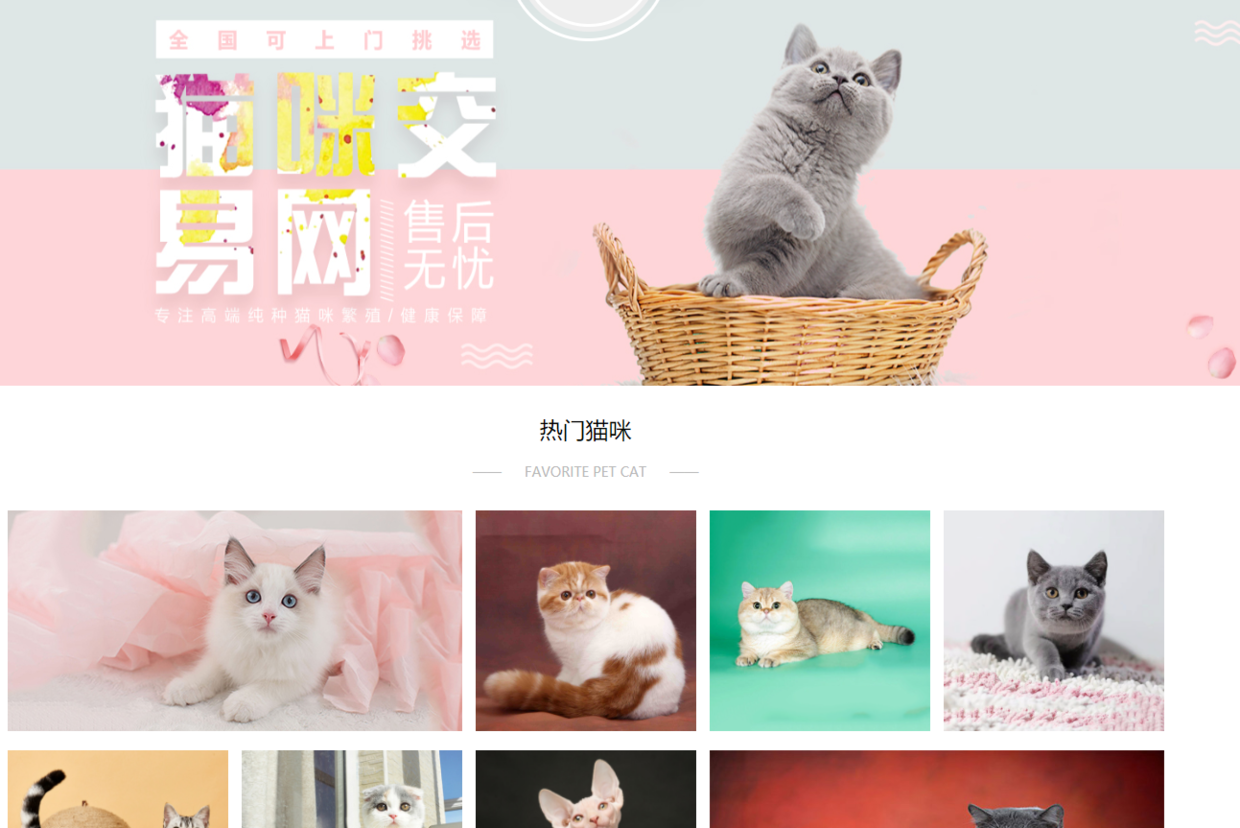
网上的数据太多、太杂,而且我也不知道哪个网站的数据比较好。所以,只能找到一个猫咪交易网站的数据来分析了
地址:
http://www.maomijiaoyi.com/
爬虫部分
请求数据
import requests

url = f'http://www.maomijiaoyi.com/index.php?/chanpinliebiao_c_2_1--24.html'

headers = {

        'User-Agent': 'Mozilla/5.0 (Windows NT 10.0; Win64; x64) AppleWebKit/537.36 (KHTML, like Gecko) Chrome/92.0.4515.131 Safari/537.36'

}

response = requests.get(url=url, headers=headers)

print(response.text)
解析数据
# 把获取到的 html 字符串数据转换成 selector 对象 这样调用

selector = parsel.Selector(response.text)

# css 选择器只要是根据标签属性内容提取数据 编程永远不看过程 只要结果

href = selector.css('.content:nth-child(1) a::attr(href)').getall()

areas = selector.css('.content:nth-child(1) .area .color_333::text').getall()

areas = [i.strip() for i in areas] # 列表推导式
提取标签数据
for index in zip(href, areas):

    # http://www.maomijiaoyi.com/index.php?/chanpinxiangqing_224383.html

    index_url = 'http://www.maomijiaoyi.com' + index[0]

    response_1 = requests.get(url=index_url, headers=headers)

    selector_1 = parsel.Selector(response_1.text)

    area = index[1]

    # getall 取所有 get 取一个

    title = selector_1.css('.detail_text .title::text').get().strip()

    shop = selector_1.css('.dinming::text').get().strip()  # 店名

    price = selector_1.css('.info1 div:nth-child(1) span.red.size_24::text').get()  # 价格

    views = selector_1.css('.info1 div:nth-child(1) span:nth-child(4)::text').get()  # 浏览次数

    # replace() 替换

    promise = selector_1.css('.info1 div:nth-child(2) span::text').get().replace('卖家承诺: ', '')  # 浏览次数

    num = selector_1.css('.info2 div:nth-child(1) div.red::text').get()  # 在售只数

    age = selector_1.css('.info2 div:nth-child(2) div.red::text').get()  # 年龄

    kind = selector_1.css('.info2 div:nth-child(3) div.red::text').get()  # 品种

    prevention = selector_1.css('.info2 div:nth-child(4) div.red::text').get()  # 预防

    person = selector_1.css('div.detail_text .user_info div:nth-child(1) .c333::text').get()  # 联系人

    phone = selector_1.css('div.detail_text .user_info div:nth-child(2) .c333::text').get()  # 联系方式

    postage = selector_1.css('div.detail_text .user_info div:nth-child(3) .c333::text').get().strip()  # 包邮

    purebred = selector_1.css(

        '.xinxi_neirong div:nth-child(1) .item_neirong div:nth-child(1) .c333::text').get().strip()  # 是否纯种

    sex = selector_1.css(

        '.xinxi_neirong div:nth-child(1) .item_neirong div:nth-child(4) .c333::text').get().strip()  # 猫咪性别

    video = selector_1.css(

        '.xinxi_neirong div:nth-child(2) .item_neirong div:nth-child(4) .c333::text').get().strip()  # 能否视频

    worming = selector_1.css(

        '.xinxi_neirong div:nth-child(2) .item_neirong div:nth-child(2) .c333::text').get().strip()  # 是否驱虫

    dit = {

        '地区': area,

        '店名': shop,

        '标题': title,

        '价格': price,

        '浏览次数': views,

        '卖家承诺': promise,

        '在售只数': num,

        '年龄': age,

        '品种': kind,

        '预防': prevention,

        '联系人': person,

        '联系方式': phone,

        '异地运费': postage,

        '是否纯种': purebred,

        '猫咪性别': sex,

        '驱虫情况': worming,

        '能否视频': video,

        '详情页': index_url,

    }
保存数据
import csv # 内置模块

f = open('猫咪1.csv', mode='a', encoding='utf-8', newline='')

csv_writer = csv.DictWriter(f, fieldnames=['地区', '店名', '标题', '价格', '浏览次数', '卖家承诺', '在售只数',

                                           '年龄', '品种', '预防', '联系人', '联系方式', '异地运费', '是否纯种',

                                           '猫咪性别', '驱虫情况', '能否视频', '详情页'])

csv_writer.writeheader() # 写入表头

csv_writer.writerow(dit)

print(title, area, shop, price, views, promise, num, age,

      kind, prevention, person, phone, postage, purebred, sex, video, worming, index_url, sep=' | ')
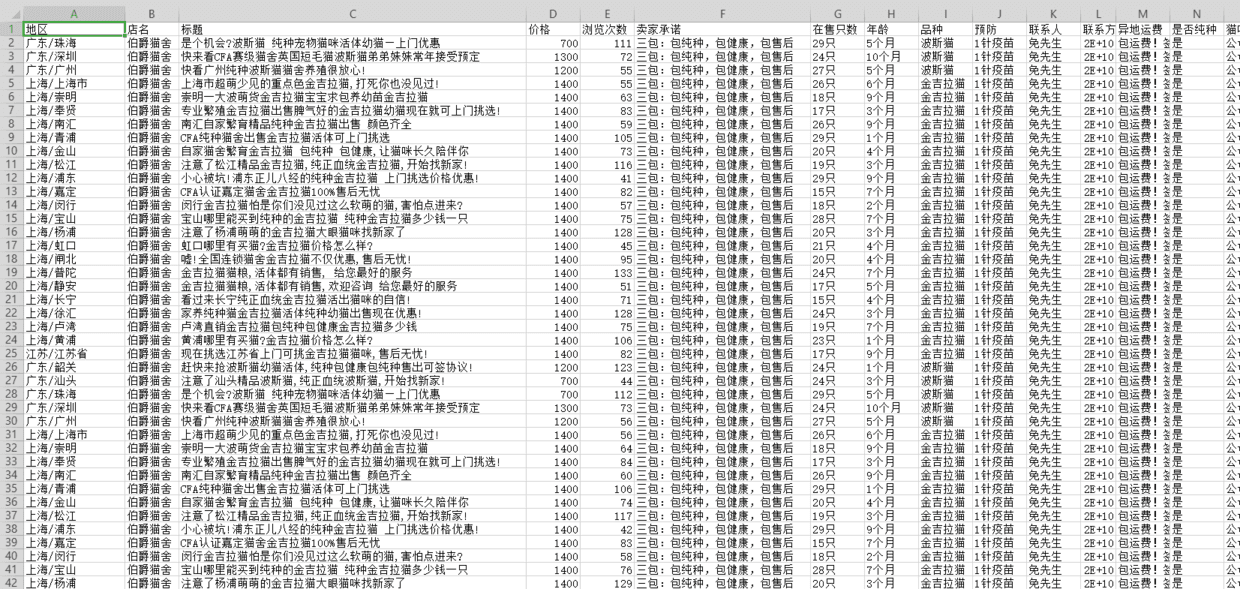
得到数据
数据可视化部分
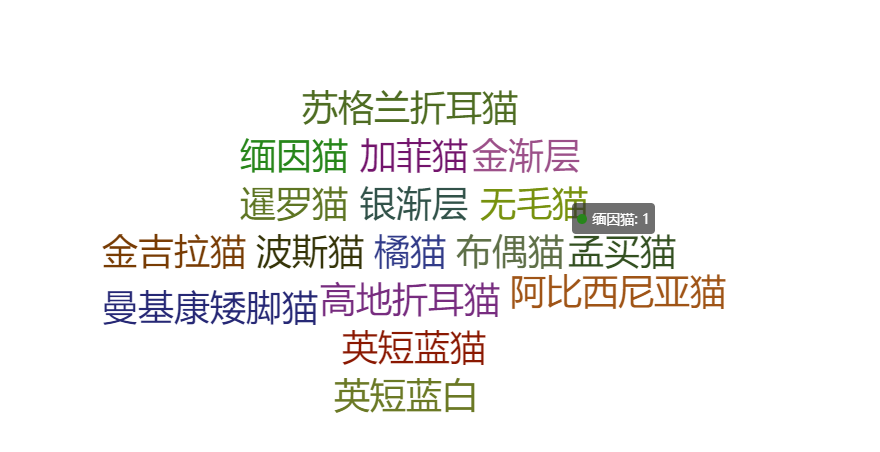
词云图
from pyecharts import options as opts

from pyecharts.charts import WordCloud

from pyecharts.globals import SymbolType

from pyecharts.globals import ThemeType

words = [(i,1) for i in cat_info['品种'].unique()]

c = (

    WordCloud(init_opts=opts.InitOpts(theme=ThemeType.LIGHT))

    .add("", words,shape=SymbolType.DIAMOND)

    .set_global_opts(title_opts=opts.TitleOpts(title=""))

)

c.render_notebook()
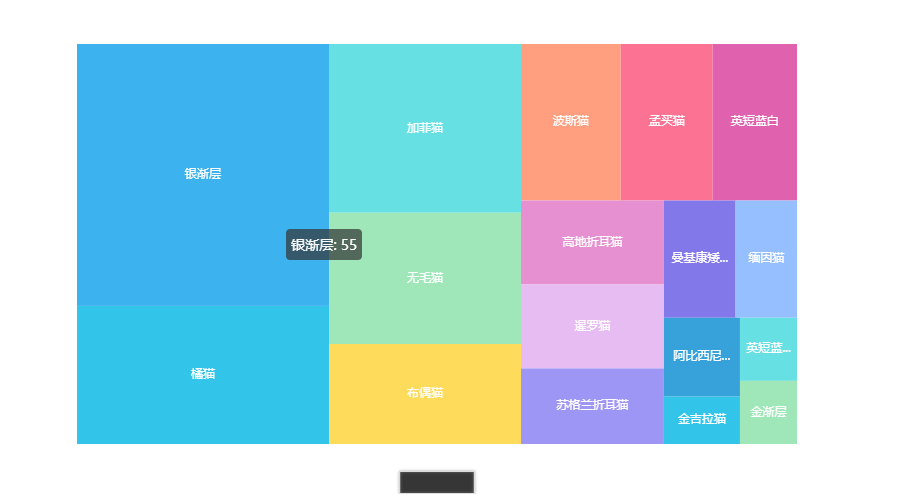
交易品种占比图
from pyecharts import options as opts

from pyecharts.charts import TreeMap

pingzhong = cat_info['品种'].value_counts().reset_index()

data = [{'value':i[1],'name':i[0]} for i in zip(list(pingzhong['index']),list(pingzhong['品种']))]

c = (

    TreeMap(init_opts=opts.InitOpts(theme=ThemeType.LIGHT))

    .add("", data)

    .set_global_opts(title_opts=opts.TitleOpts(title=""))

    .set_series_opts(label_opts=opts.LabelOpts(position="inside"))

)

c.render_notebook()
均价占比图
from pyecharts import options as opts

from pyecharts.charts import PictorialBar

from pyecharts.globals import SymbolType

location = list(price['品种'])

values = list(price['价格'])

c = (

    PictorialBar(init_opts=opts.InitOpts(theme=ThemeType.LIGHT))

    .add_xaxis(location)

    .add_yaxis(

        "",

        values,

        label_opts=opts.LabelOpts(is_show=False),

        symbol_size=18,

        symbol_repeat="fixed",

        symbol_offset=[0, 0],

        is_symbol_clip=True,

        symbol=SymbolType.ROUND_RECT,

    )

    .reversal_axis()

    .set_global_opts(

        title_opts=opts.TitleOpts(title="均价排名"),

        xaxis_opts=opts.AxisOpts(is_show=False),

        yaxis_opts=opts.AxisOpts(

            axistick_opts=opts.AxisTickOpts(is_show=False),

            axisline_opts=opts.AxisLineOpts(

                linestyle_opts=opts.LineStyleOpts(opacity=0),

            ),

        ),

    )

    .set_series_opts(

        label_opts=opts.LabelOpts(position='insideRight')

    )

)

c.render_notebook()
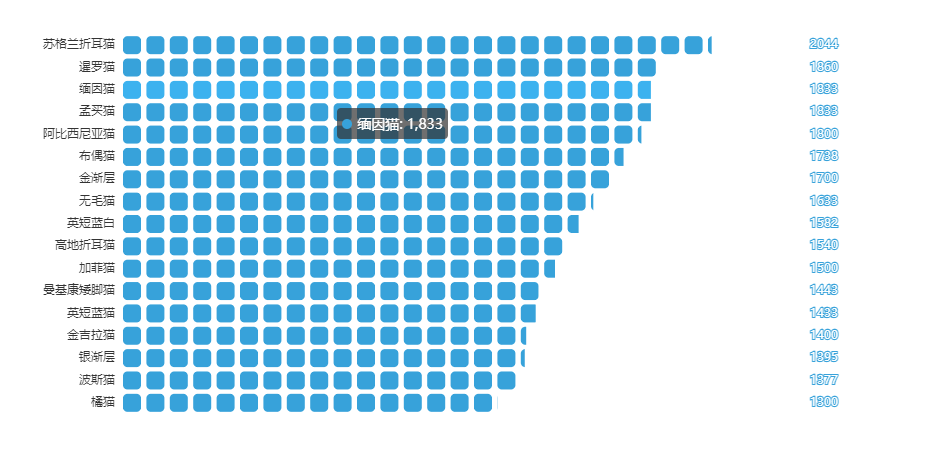
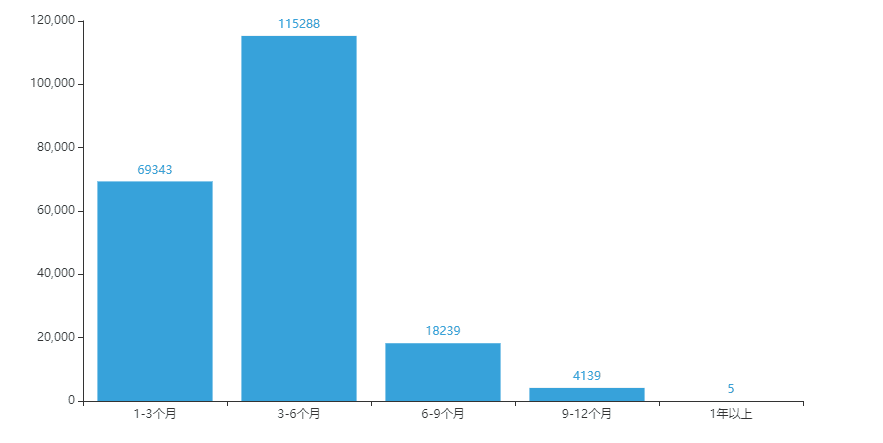
猫龄柱状图
from pyecharts import options as opts

from pyecharts.charts import Bar

from pyecharts.faker import Faker

x = ['1-3个月','3-6个月','6-9个月','9-12个月','1年以上']

y = [69343,115288,18239,4139,5]

c = (

    Bar(init_opts=opts.InitOpts(theme=ThemeType.LIGHT))

    .add_xaxis(x)

    .add_yaxis('', y)

    .set_global_opts(title_opts=opts.TitleOpts(title="猫龄分布"))

)

c.render_notebook()
Python爬虫+可视化教学:爬取分析宠物猫咪交易数据的更多相关文章
- 【转载】教你分分钟学会用python爬虫框架Scrapy爬取心目中的女神
原文:教你分分钟学会用python爬虫框架Scrapy爬取心目中的女神 本博文将带领你从入门到精通爬虫框架Scrapy,最终具备爬取任何网页的数据的能力.本文以校花网为例进行爬取,校花网:http:/ ...
- Python爬虫实例:爬取B站《工作细胞》短评——异步加载信息的爬取
很多网页的信息都是通过异步加载的,本文就举例讨论下此类网页的抓取. <工作细胞>最近比较火,bilibili 上目前的短评已经有17000多条. 先看分析下页面 右边 li 标签中的就是短 ...
- Python爬虫教程-17-ajax爬取实例(豆瓣电影)
Python爬虫教程-17-ajax爬取实例(豆瓣电影) ajax: 简单的说,就是一段js代码,通过这段代码,可以让页面发送异步的请求,或者向服务器发送一个东西,即和服务器进行交互 对于ajax: ...
- Python爬虫实战之爬取百度贴吧帖子
大家好,上次我们实验了爬取了糗事百科的段子,那么这次我们来尝试一下爬取百度贴吧的帖子.与上一篇不同的是,这次我们需要用到文件的相关操作. 本篇目标 对百度贴吧的任意帖子进行抓取 指定是否只抓取楼主发帖 ...
- Python爬虫实例:爬取猫眼电影——破解字体反爬
字体反爬 字体反爬也就是自定义字体反爬,通过调用自定义的字体文件来渲染网页中的文字,而网页中的文字不再是文字,而是相应的字体编码,通过复制或者简单的采集是无法采集到编码后的文字内容的. 现在貌似不少网 ...
- Python爬虫实例:爬取豆瓣Top250
入门第一个爬虫一般都是爬这个,实在是太简单.用了 requests 和 bs4 库. 1.检查网页元素,提取所需要的信息并保存.这个用 bs4 就可以,前面的文章中已经有详细的用法阐述. 2.找到下一 ...
- python爬虫-基础入门-爬取整个网站《3》
python爬虫-基础入门-爬取整个网站<3> 描述: 前两章粗略的讲述了python2.python3爬取整个网站,这章节简单的记录一下python2.python3的区别 python ...
- python爬虫-基础入门-爬取整个网站《2》
python爬虫-基础入门-爬取整个网站<2> 描述: 开场白已在<python爬虫-基础入门-爬取整个网站<1>>中描述过了,这里不在描述,只附上 python3 ...
- python爬虫-基础入门-爬取整个网站《1》
python爬虫-基础入门-爬取整个网站<1> 描述: 使用环境:python2.7.15 ,开发工具:pycharm,现爬取一个网站页面(http://www.baidu.com)所有数 ...
随机推荐
- 最好的Kubernetes客户端Java库fabric8io,快来自定义你的操作
我最新最全的文章都在南瓜慢说 www.pkslow.com,欢迎大家来喝茶! 1 Kubernetes Java客户端 对于Kubernetes集群的操作,官方提供了命令行工具kubectl,这也是我 ...
- webapi发布在iis之后报错Http 403.14 error
服务器是 Windows Server 2008 R2 Enterprise 网上找了很多说是修改webconfig.试过之后没有效果,另外报错了. 最后才找到是因为webapi发布时选择的应用程序的 ...
- 创建Akamai cdn api授权
注:通过Akamai Cli purge和通过Akamai API进行刷新之前,都要事先创建类似于如下的刷新的凭据,这两种刷新方式所创建的凭据是相同的. 目的:创建Akamai CDN API授权以便 ...
- Redis之集群
Redis Cluster是 Redis的分布式解决方案,在3.0版本正式推出,有效地解决了Redis分布式方面的需求.当遇到单机内存.并发.流量等瓶颈时,可以采用Cluster架构方案达到负载均衡的 ...
- 44、djanjo工程(介绍)
44.1.什么时web框架: 1.框架,即framework,特指为解决一个开放性问题而设计的具有一定约束性的支撑结构,使用看框架可以 帮助你快速开发特定的形同,简单的说,就是你用别人搭建好的舞台来做 ...
- ACdream 1007 a+b 快速幂 java秒啊,快速幂 避免 负数移位出错
a + b ( sigma (ai^x) ) % mod 1 import java.util.*; 2 import java.math.*; 3 import java.io.*; 4 p ...
- IDA PRO:庆祝成立创新 30 周年
今天,IDA 已经三十岁了.为了纪念周年纪念,我们将描述史诗旅程的开始和主要里程碑. 背景 在 1990 年代初期,DOS 是最流行的 PC 操作系统,主要是 8086,偶尔有 80286(80386 ...
- Java 设置PDF跨页表格重复显示表头行
在创建表格时,如果表格内容出现跨页显示的时候,默认情况下该表格的表头不会在下一页显示,在阅读体验上不是很好.下面分享一个方法如何在表格跨页是显示表格的表头内容,这里只需要简单使用方法 grid.set ...
- angular小记
declarations:包装组件或指令等 providers:依赖注入 imports:导入其他模块 bootstrap:设置根组件 exports:导出组件或指令等 app.component.t ...
- FreeRTOS基本概念
1.在FreeRTOS中,使用的数据类型虽然都是标准C里面的数据类型,但是针对不同的处理器,对标准C的数据类型又进行了重新定义. 2.链表由节点组成,节点与节点之间首尾相连,节点包含用于指向后一个节点 ...