
Python爬虫+可视化教学:爬取分析宠物猫咪交易数据
前言
各位,七夕快到了,想好要送什么礼物了吗?
昨天有朋友私信我,问我能用Python分析下网上小猫咪的数据,是想要送一只给女朋友,当做礼物。
Python从零基础入门到实战系统教程、源码、视频
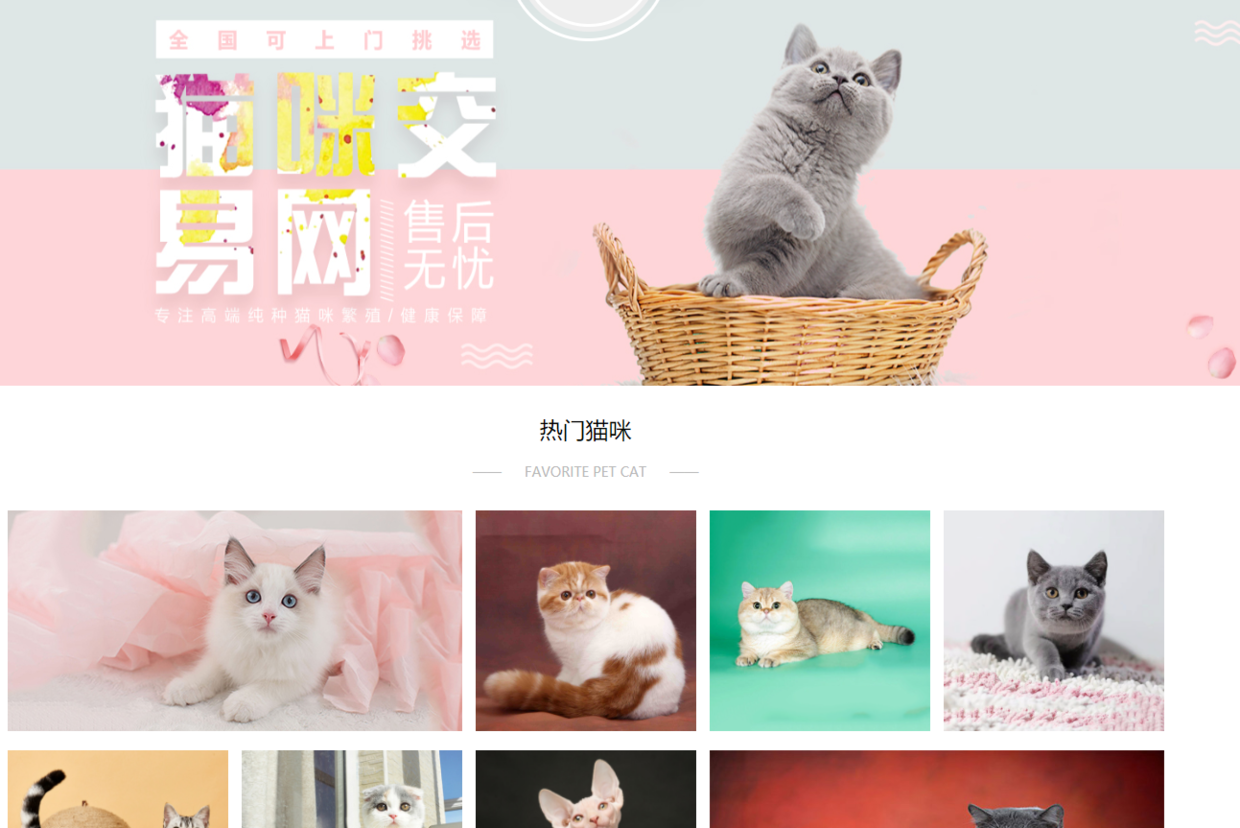
网上的数据太多、太杂,而且我也不知道哪个网站的数据比较好。所以,只能找到一个猫咪交易网站的数据来分析了
地址:
http://www.maomijiaoyi.com/
爬虫部分
请求数据
import requests

url = f'http://www.maomijiaoyi.com/index.php?/chanpinliebiao_c_2_1--24.html'

headers = {

        'User-Agent': 'Mozilla/5.0 (Windows NT 10.0; Win64; x64) AppleWebKit/537.36 (KHTML, like Gecko) Chrome/92.0.4515.131 Safari/537.36'

}

response = requests.get(url=url, headers=headers)

print(response.text)
解析数据
# 把获取到的 html 字符串数据转换成 selector 对象 这样调用

selector = parsel.Selector(response.text)

# css 选择器只要是根据标签属性内容提取数据 编程永远不看过程 只要结果

href = selector.css('.content:nth-child(1) a::attr(href)').getall()

areas = selector.css('.content:nth-child(1) .area .color_333::text').getall()

areas = [i.strip() for i in areas] # 列表推导式
提取标签数据
for index in zip(href, areas):

    # http://www.maomijiaoyi.com/index.php?/chanpinxiangqing_224383.html

    index_url = 'http://www.maomijiaoyi.com' + index[0]

    response_1 = requests.get(url=index_url, headers=headers)

    selector_1 = parsel.Selector(response_1.text)

    area = index[1]

    # getall 取所有 get 取一个

    title = selector_1.css('.detail_text .title::text').get().strip()

    shop = selector_1.css('.dinming::text').get().strip()  # 店名

    price = selector_1.css('.info1 div:nth-child(1) span.red.size_24::text').get()  # 价格

    views = selector_1.css('.info1 div:nth-child(1) span:nth-child(4)::text').get()  # 浏览次数

    # replace() 替换

    promise = selector_1.css('.info1 div:nth-child(2) span::text').get().replace('卖家承诺: ', '')  # 浏览次数

    num = selector_1.css('.info2 div:nth-child(1) div.red::text').get()  # 在售只数

    age = selector_1.css('.info2 div:nth-child(2) div.red::text').get()  # 年龄

    kind = selector_1.css('.info2 div:nth-child(3) div.red::text').get()  # 品种

    prevention = selector_1.css('.info2 div:nth-child(4) div.red::text').get()  # 预防

    person = selector_1.css('div.detail_text .user_info div:nth-child(1) .c333::text').get()  # 联系人

    phone = selector_1.css('div.detail_text .user_info div:nth-child(2) .c333::text').get()  # 联系方式

    postage = selector_1.css('div.detail_text .user_info div:nth-child(3) .c333::text').get().strip()  # 包邮

    purebred = selector_1.css(

        '.xinxi_neirong div:nth-child(1) .item_neirong div:nth-child(1) .c333::text').get().strip()  # 是否纯种

    sex = selector_1.css(

        '.xinxi_neirong div:nth-child(1) .item_neirong div:nth-child(4) .c333::text').get().strip()  # 猫咪性别

    video = selector_1.css(

        '.xinxi_neirong div:nth-child(2) .item_neirong div:nth-child(4) .c333::text').get().strip()  # 能否视频

    worming = selector_1.css(

        '.xinxi_neirong div:nth-child(2) .item_neirong div:nth-child(2) .c333::text').get().strip()  # 是否驱虫

    dit = {

        '地区': area,

        '店名': shop,

        '标题': title,

        '价格': price,

        '浏览次数': views,

        '卖家承诺': promise,

        '在售只数': num,

        '年龄': age,

        '品种': kind,

        '预防': prevention,

        '联系人': person,

        '联系方式': phone,

        '异地运费': postage,

        '是否纯种': purebred,

        '猫咪性别': sex,

        '驱虫情况': worming,

        '能否视频': video,

        '详情页': index_url,

    }
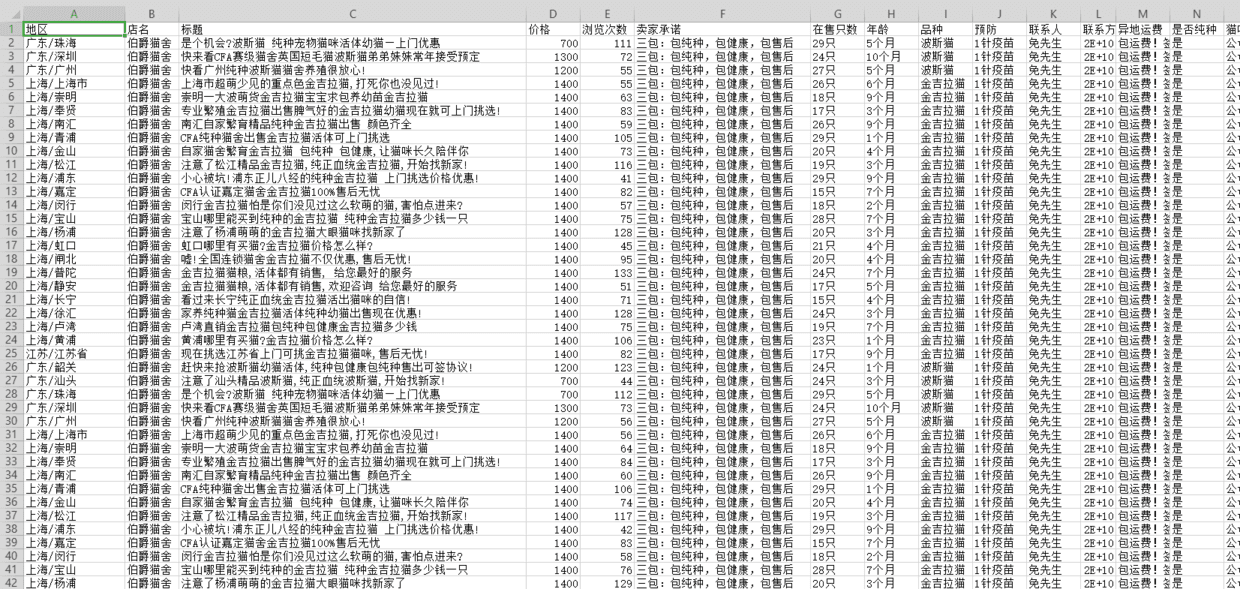
保存数据
import csv # 内置模块

f = open('猫咪1.csv', mode='a', encoding='utf-8', newline='')

csv_writer = csv.DictWriter(f, fieldnames=['地区', '店名', '标题', '价格', '浏览次数', '卖家承诺', '在售只数',

                                           '年龄', '品种', '预防', '联系人', '联系方式', '异地运费', '是否纯种',

                                           '猫咪性别', '驱虫情况', '能否视频', '详情页'])

csv_writer.writeheader() # 写入表头

csv_writer.writerow(dit)

print(title, area, shop, price, views, promise, num, age,

      kind, prevention, person, phone, postage, purebred, sex, video, worming, index_url, sep=' | ')
得到数据
数据可视化部分
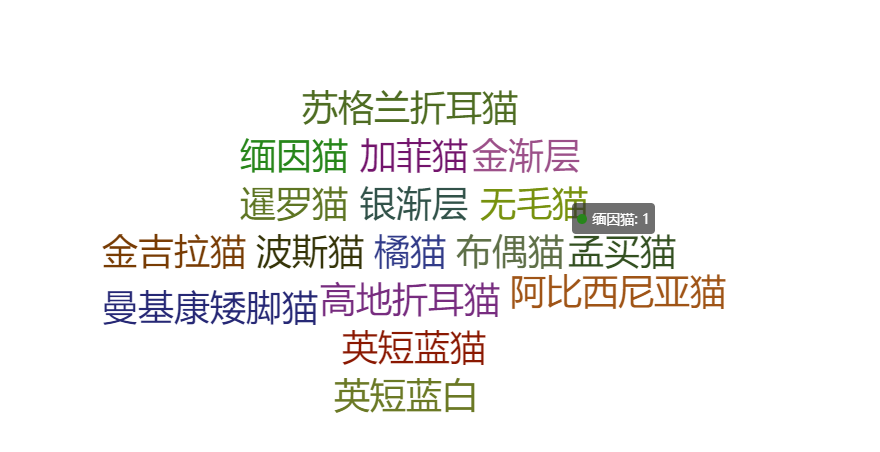
词云图
from pyecharts import options as opts

from pyecharts.charts import WordCloud

from pyecharts.globals import SymbolType

from pyecharts.globals import ThemeType

words = [(i,1) for i in cat_info['品种'].unique()]

c = (

    WordCloud(init_opts=opts.InitOpts(theme=ThemeType.LIGHT))

    .add("", words,shape=SymbolType.DIAMOND)

    .set_global_opts(title_opts=opts.TitleOpts(title=""))

)

c.render_notebook()
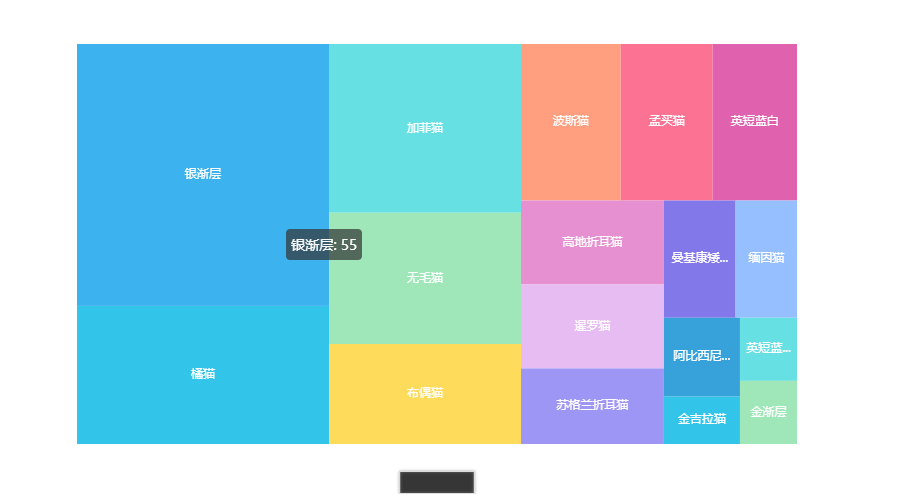
交易品种占比图
from pyecharts import options as opts

from pyecharts.charts import TreeMap

pingzhong = cat_info['品种'].value_counts().reset_index()

data = [{'value':i[1],'name':i[0]} for i in zip(list(pingzhong['index']),list(pingzhong['品种']))]

c = (

    TreeMap(init_opts=opts.InitOpts(theme=ThemeType.LIGHT))

    .add("", data)

    .set_global_opts(title_opts=opts.TitleOpts(title=""))

    .set_series_opts(label_opts=opts.LabelOpts(position="inside"))

)

c.render_notebook()
均价占比图
from pyecharts import options as opts

from pyecharts.charts import PictorialBar

from pyecharts.globals import SymbolType

location = list(price['品种'])

values = list(price['价格'])

c = (

    PictorialBar(init_opts=opts.InitOpts(theme=ThemeType.LIGHT))

    .add_xaxis(location)

    .add_yaxis(

        "",

        values,

        label_opts=opts.LabelOpts(is_show=False),

        symbol_size=18,

        symbol_repeat="fixed",

        symbol_offset=[0, 0],

        is_symbol_clip=True,

        symbol=SymbolType.ROUND_RECT,

    )

    .reversal_axis()

    .set_global_opts(

        title_opts=opts.TitleOpts(title="均价排名"),

        xaxis_opts=opts.AxisOpts(is_show=False),

        yaxis_opts=opts.AxisOpts(

            axistick_opts=opts.AxisTickOpts(is_show=False),

            axisline_opts=opts.AxisLineOpts(

                linestyle_opts=opts.LineStyleOpts(opacity=0),

            ),

        ),

    )

    .set_series_opts(

        label_opts=opts.LabelOpts(position='insideRight')

    )

)

c.render_notebook()
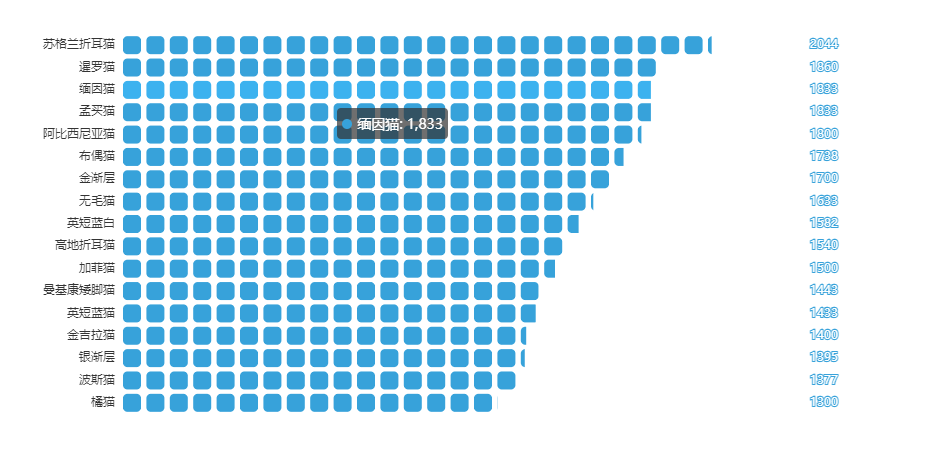
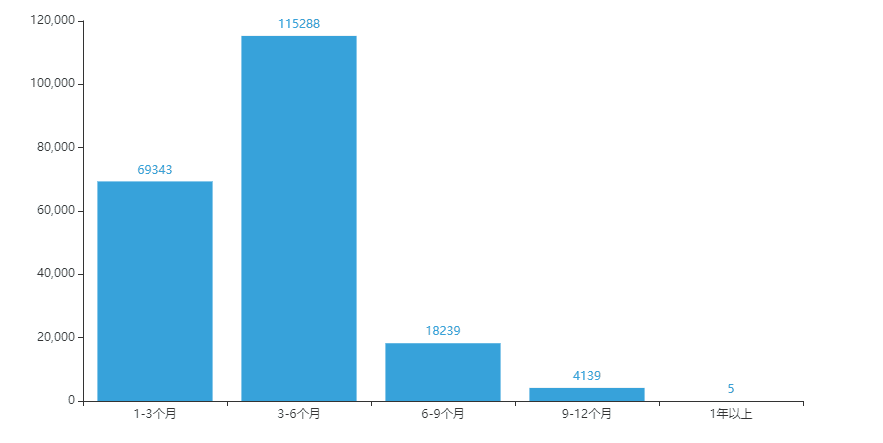
猫龄柱状图
from pyecharts import options as opts

from pyecharts.charts import Bar

from pyecharts.faker import Faker

x = ['1-3个月','3-6个月','6-9个月','9-12个月','1年以上']

y = [69343,115288,18239,4139,5]

c = (

    Bar(init_opts=opts.InitOpts(theme=ThemeType.LIGHT))

    .add_xaxis(x)

    .add_yaxis('', y)

    .set_global_opts(title_opts=opts.TitleOpts(title="猫龄分布"))

)

c.render_notebook()
Python爬虫+可视化教学:爬取分析宠物猫咪交易数据的更多相关文章
- 【转载】教你分分钟学会用python爬虫框架Scrapy爬取心目中的女神
原文:教你分分钟学会用python爬虫框架Scrapy爬取心目中的女神 本博文将带领你从入门到精通爬虫框架Scrapy,最终具备爬取任何网页的数据的能力.本文以校花网为例进行爬取,校花网:http:/ ...
- Python爬虫实例:爬取B站《工作细胞》短评——异步加载信息的爬取
很多网页的信息都是通过异步加载的,本文就举例讨论下此类网页的抓取. <工作细胞>最近比较火,bilibili 上目前的短评已经有17000多条. 先看分析下页面 右边 li 标签中的就是短 ...
- Python爬虫教程-17-ajax爬取实例(豆瓣电影)
Python爬虫教程-17-ajax爬取实例(豆瓣电影) ajax: 简单的说,就是一段js代码,通过这段代码,可以让页面发送异步的请求,或者向服务器发送一个东西,即和服务器进行交互 对于ajax: ...
- Python爬虫实战之爬取百度贴吧帖子
大家好,上次我们实验了爬取了糗事百科的段子,那么这次我们来尝试一下爬取百度贴吧的帖子.与上一篇不同的是,这次我们需要用到文件的相关操作. 本篇目标 对百度贴吧的任意帖子进行抓取 指定是否只抓取楼主发帖 ...
- Python爬虫实例:爬取猫眼电影——破解字体反爬
字体反爬 字体反爬也就是自定义字体反爬,通过调用自定义的字体文件来渲染网页中的文字,而网页中的文字不再是文字,而是相应的字体编码,通过复制或者简单的采集是无法采集到编码后的文字内容的. 现在貌似不少网 ...
- Python爬虫实例:爬取豆瓣Top250
入门第一个爬虫一般都是爬这个,实在是太简单.用了 requests 和 bs4 库. 1.检查网页元素,提取所需要的信息并保存.这个用 bs4 就可以,前面的文章中已经有详细的用法阐述. 2.找到下一 ...
- python爬虫-基础入门-爬取整个网站《3》
python爬虫-基础入门-爬取整个网站<3> 描述: 前两章粗略的讲述了python2.python3爬取整个网站,这章节简单的记录一下python2.python3的区别 python ...
- python爬虫-基础入门-爬取整个网站《2》
python爬虫-基础入门-爬取整个网站<2> 描述: 开场白已在<python爬虫-基础入门-爬取整个网站<1>>中描述过了,这里不在描述,只附上 python3 ...
- python爬虫-基础入门-爬取整个网站《1》
python爬虫-基础入门-爬取整个网站<1> 描述: 使用环境:python2.7.15 ,开发工具:pycharm,现爬取一个网站页面(http://www.baidu.com)所有数 ...
随机推荐
- ANDROID开发 Fatal signal 11(SIGSEGV) at 0x问题解决方案
最近做ANDROID开发,也遇到了很多程序员遇到的一个问题:FATAL SIGNAL 11(SIGSEGV) at 0xxxxx,自然是各种搜索是否有人已然解决,虽然搜索出来的已有案例不少,基本都是内 ...
- 树莓派4B-SPI读写flash-FM25CL16B(同时支持FM25CL64等其它系列Flash)
1.树莓派SPI介绍 4B的引脚如下图所示: 其中Pin19.21.23是SPI0,接口定义如下所示: 时钟(SPI CLK, SCLK) 主机输出.从机输入(MOSI) 主机输入.从机输出(MISO ...
- 『无为则无心』Python函数 — 25、Python中的函数
目录 1.函数的使用 (1)定义函数 (2)调用函数 (3)使用函数的注意事项 2.函数的参数 3.实参的类型 Python函数的说明: Python中函数的应用非常广泛,前面章节中我们已经接触过多个 ...
- 闲聊,Python中的turtle
写在前面 其实我也不知道为什么我会写这个,本文涉及信号与传递,Python 正题 近期看到一个3年前的视频,1000个圆一笔画出一个Miku 在观看完源码了以后,我发现这是这调用的是基本的goto,用 ...
- Linux使用shell脚本监控
(1)性能监控脚本 performance.sh #!/bin/bash #-------------------------------------------------------------- ...
- 5shell中的数组
0.理解数组 (1)shell不限制数组的大小,数组元素的下标从0开始计数 (2)获取数组中的元素要使用下标[ ],下标可以是一个整数,也可以是一个结果为整数的表达式,但是下标必须大于等于0 (3)b ...
- php+redis+lua实现分布式锁(转载)
以下是我在工作中用到的类,redis加锁两种方式,解锁为了保证原子性所以只用lua+redis的方式 缺陷:虽然死锁问题解决了,但业务执行时间超过锁有效期还是存在多客户端加锁问题.不过,这个类已经满足 ...
- sscanf功能详解(转)
#include <stdio.h> #include <stdlib.h> #include <string.h> static void sscanf_test ...
- python django与celery的集成
一.celery与django 关于celery介绍和使用可以查看上篇Python中任务队列-芹菜celery的使用 关于django的介绍和使用可查看python django框架+vue.js前后 ...
- ARTS第一周
开始进行的第一周. 1.Algorithm:每周至少做一个 leetcode 的算法题2.Review:阅读并点评至少一篇英文技术文章3.Tip:学习至少一个技术技巧4.Share:分享一篇有观点和思 ...